
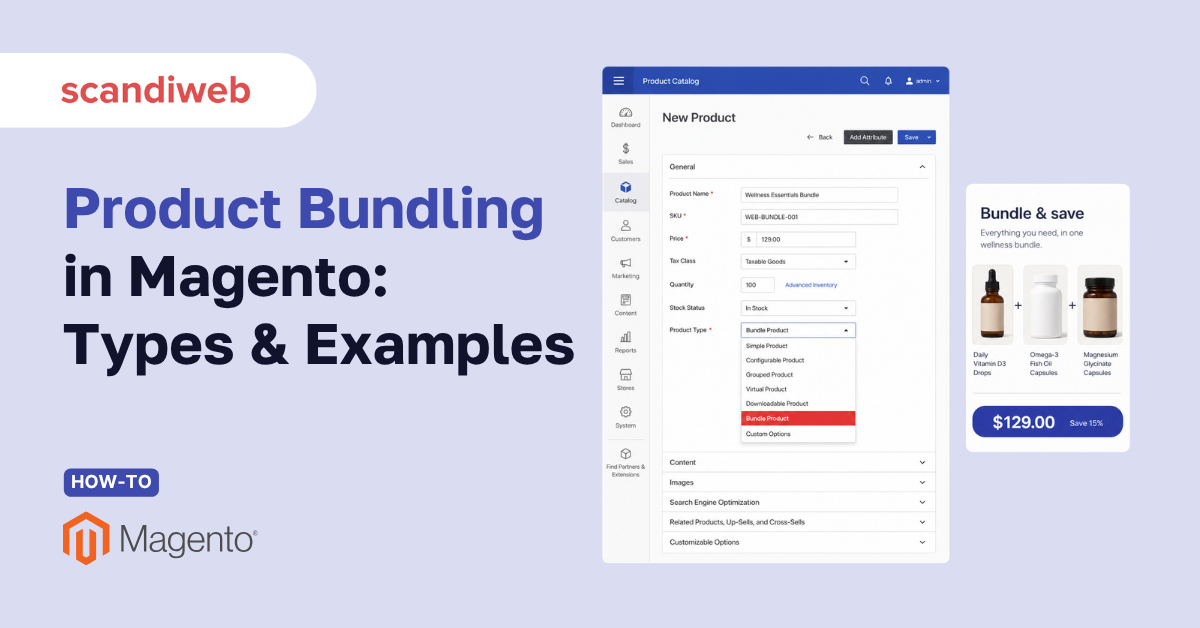
Effective bundling strategies lift revenue by roughly 5 to 15% and can improve customer retention by up to 30%, according to McKinsey-cited analysis compiled by Envive. Well-built bundles routinely deliver a 20 to 30% increase in average order value, and as much as 30% of eCommerce revenue now comes from bundled products, per Swell’s product-bundling research. For Magento merchants, that upside has a specific home in the catalog: the bundle product type.
Let’s explore what product bundling is, the main bundle types, examples from real stores, and how to create a bundle product in Magento 2 (Adobe Commerce).
🚀 Quick takeaway
Product bundling groups items into a single purchase, often at a discount. In Magento 2, a bundle product lets shoppers configure the set themselves, with pricing set to dynamic or fixed. Done well, bundling raises average order value and clears slow-moving stock at the same time.
What is product bundling?
Product bundling is a merchandising strategy where several different or identical products are sold together as one offer, usually at a price lower than buying each item on its own. It stays close to upselling techniques and cross-selling, but the mechanics differ: bundling packages the offer up front, while upselling and cross-selling nudge the shopper toward a larger or complementary purchase during the journey. Bundling is often the result of that cross-sell and upsell logic, fixed into a single add-to-cart action.
The business case is straightforward. A bundle raises the value of each order, gives shoppers a reason to buy more in one session, and can move inventory that would otherwise stall. It also reduces decision fatigue: instead of assembling a set themselves, the shopper accepts a curated combination at a clear saving.
Types of product bundling
There are three main types of product bundling, and the difference matters because each one serves a different merchandising goal.
- Same product bundling – shoppers buy more than one unit of the same product and save money, for example a three-pack of the same shirt. This is a volume play that suits consumables and basics.
- Mixed product bundling – shoppers buy different but related products together for less than buying them separately, for example a shirt and a matching tie. The items remain available on their own, so the bundle is an optional incentive.
- Pure product bundling – the products can only be bought as a set and not individually. This works for curated kits and gift sets where the combination is the product.
Shopify groups the same logic under pure, mixed, and build-your-own bundling, framing it as a primary lever for both average order value and inventory clearing. The naming varies across platforms, but the merchandising intent is the same: decide whether the items stay separately available, and whether the shopper or the store controls the combination.
🚀 Quick takeaway
The three types differ on one choice: can the items still be bought alone? Same and mixed bundles keep items available separately, so the bundle is an incentive. Pure bundles lock the set, so the combination is the product. Pick the type that matches your inventory goal.
Product bundling strategies with examples
The bundle type is the offer. The strategy is how you present it on the storefront so shoppers notice and act on it. Below are display approaches used by real stores, each suited to a different catalog and shopper context.
Pre-selected bundle with a combined CTA
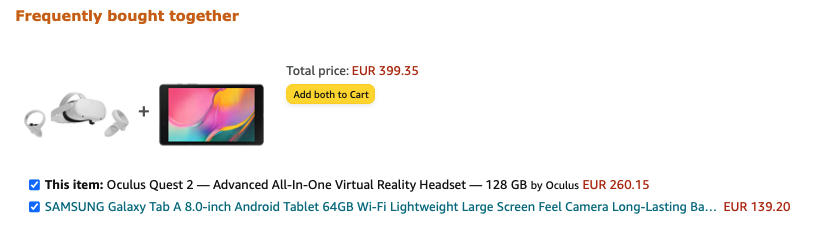
This approach pre-fills the bundle and gives the shopper a single button to add the whole set to the cart. It makes for a smooth experience, since the customer only clicks once to take the full offer. Amazon’s frequently-bought-together block is the familiar example.
Text notifications about the bundle
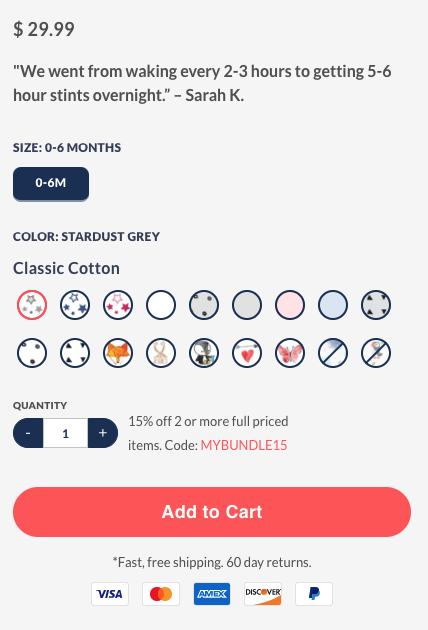
A simple but effective approach is to show the offer with a discount code right next to the quantity selector. The shopper sees the saving at the exact moment they are deciding how much to buy, as on Nestedbean.
Bundle and save tabs
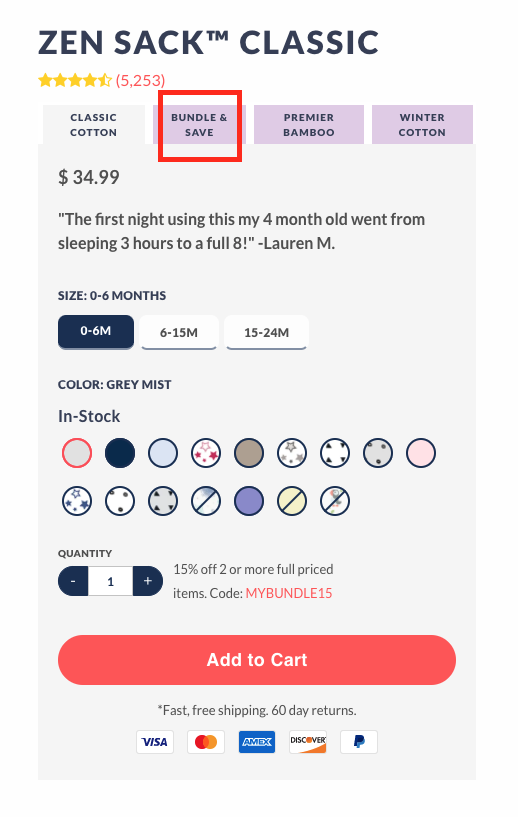
Another approach divides the product detail page into separate tabs and names one of them “Bundle and save.” Shoppers who want the offer can open it without cluttering the main product view for everyone else.
🚀 Quick takeaway
There is no single best bundle display. Pre-selected sets suit complementary basics, tabs and notifications suit detailed product pages, and “shop the look” formats suit apparel. Match the format to how shoppers already browse your catalog.
Bundles as product recommendations
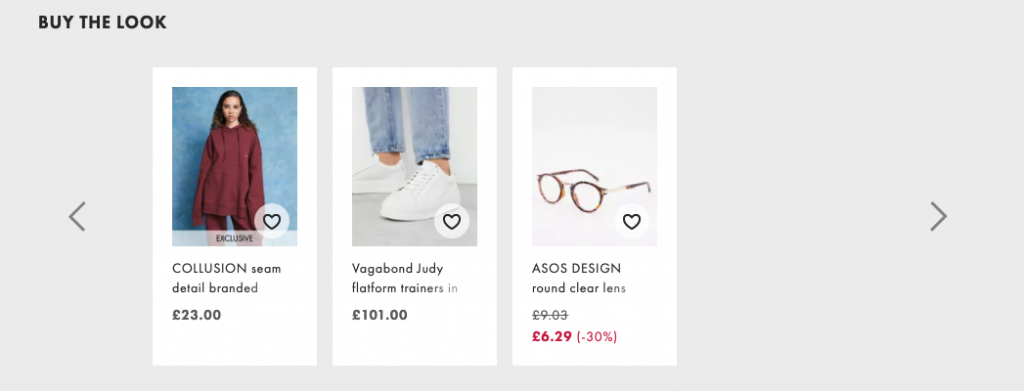
Showing the bundle inside a recommendations block is a widely used approach. The “Buy the look” format has become common in apparel, where Asos presents a coordinated set alongside the main item.
Bundles linked from product photos
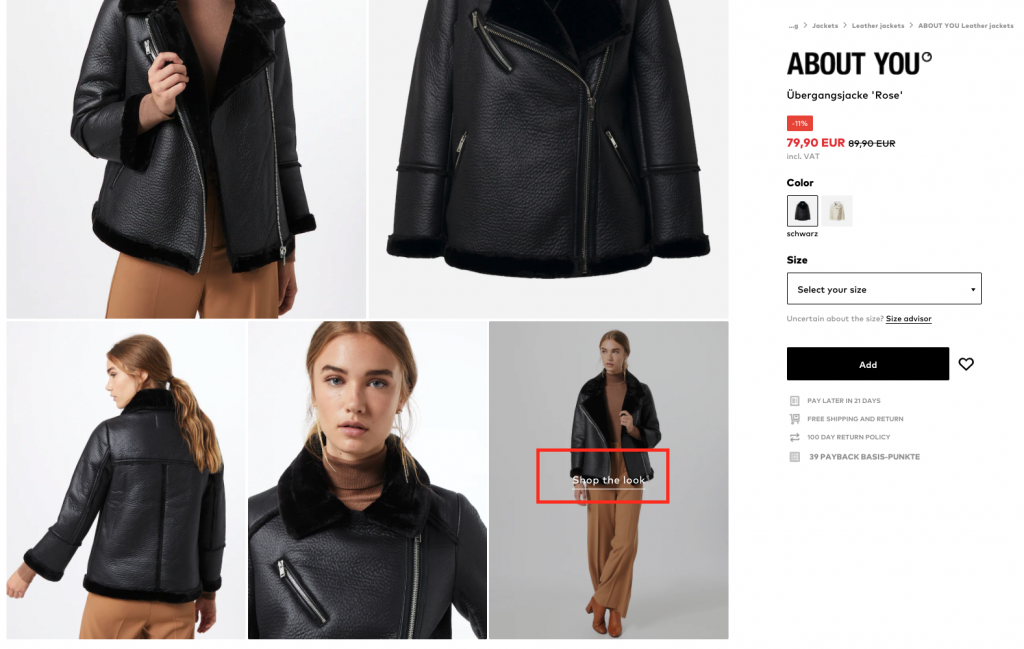
A less common approach displays the bundle inside the product imagery itself, with a “Shop the look” or similar call to action layered onto the photo. About You uses this to turn a styled image into a shoppable set.
Bundle boxes after the description
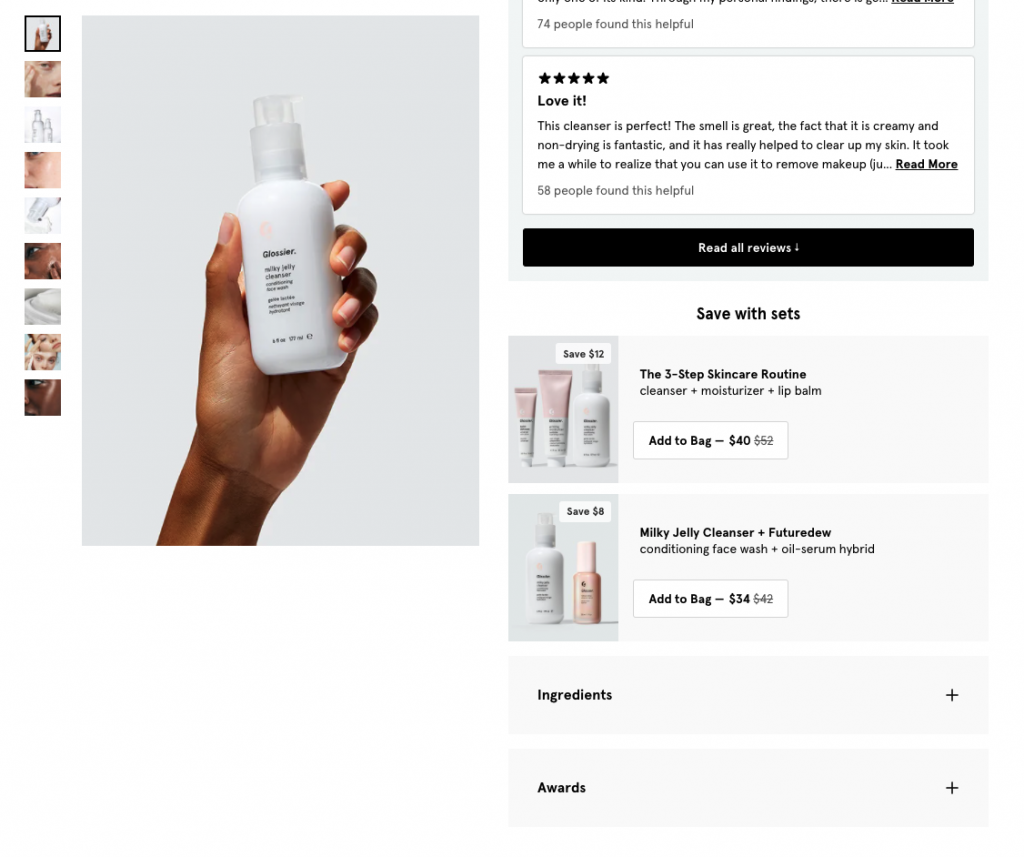
A frequently used approach places a bundle “box” after the product description. The box shows the included products, the amount saved, and a call to action that adds everything to the cart in one step, as Glossier does with its sets.
Shop by look bundles
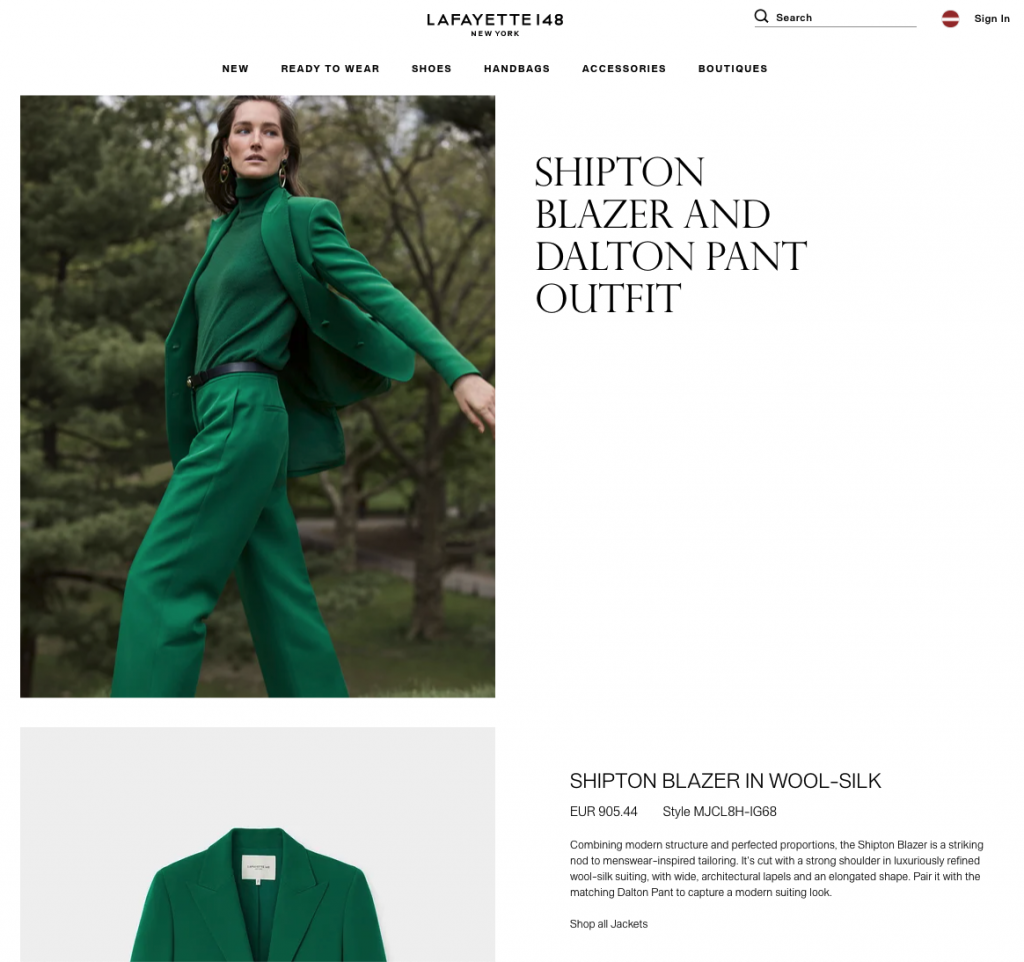
You can let shoppers buy directly by bundle. In apparel, rather than scattering the “look” items across separate pages, the store presents the full set on one detail page and lets the shopper add all of it to the cart at once. Lafayette 148 New York uses this full-outfit format.
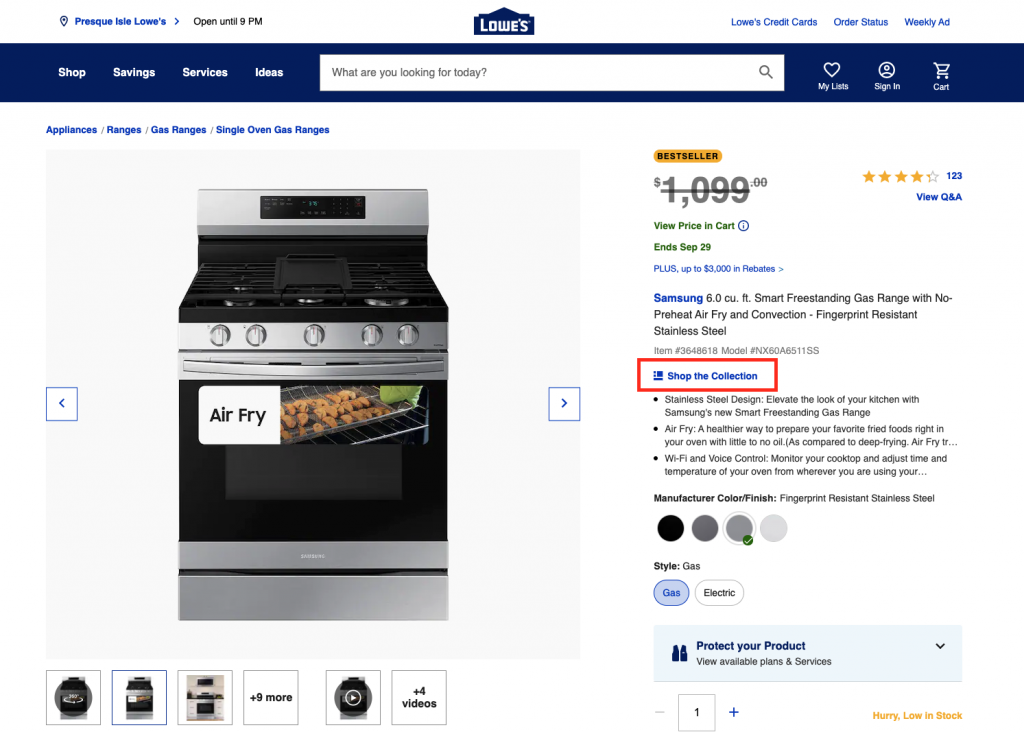
Bundle CTA in the product description
Placing a bundle-related call to action inside the product description is simple and effective. When clicked, it takes the shopper to the related bundle, as on Lowe’s product pages.
Across every format, the constant is value clarity. Shoppers need to know what they gain from the bundle, and that gain is not always money. It can be convenience and time, because they do not have to hunt for matching products, or it can be inspiration on how to combine items. The strongest results come from pairing a clever bundle with a display approach that fits how people already shop the page.
What is a bundle product in Magento 2?
A bundle product in Magento 2 (Adobe Commerce) is a configurable kit made of several simple or virtual products that the shopper assembles by choosing from defined options. Each option set can be a dropdown, radio button, checkbox, or multiple-select, and the final price reflects the selections. It is Magento’s native way to sell “build your own” and fixed sets.
The bundle type is one of the reasons merchants weighing native catalog flexibility lean toward Magento. A bundle is just one of the Magento product types you can choose from. Shoppers customize the contents within the rules you set, and the platform handles inventory and pricing per included item. If you are comparing platform-level bundling before committing, the Magento vs Shopify comparison covers how each handles complex product structures.
How to create a bundle product in Magento 2
You create a bundle product from the Magento admin in a few defined steps. The core decisions are the bundle items, the price logic (dynamic or fixed), and how the items reach the customer. The steps below follow the Adobe Experience League documentation for the bundle product type.
- Open the product type menu. Go to Catalog > Products, then use the Add Product menu (the arrow next to the button) and choose Bundle Product.
- Enter the core fields. Set the product name and SKU. In Magento 2, SKU, Price, and Weight can each be set to dynamic or fixed for a bundle.
- Set the price logic. To charge one fixed bundle price, set Dynamic Price to No and enter a Price. To let the price reflect the options the shopper chooses, set Dynamic Price to Yes and leave Price blank.
- Add bundle items. In the Bundle Items section, add each option (the choices the shopper picks from) and assign the simple products that belong to it. Set input types such as dropdown, radio button, checkbox, or multiple-select.
- Set the bundle delivery option. Decide whether the bundle leaves the warehouse as one package or as separate items, and set weight handling accordingly.
- Complete catalog settings and save. Assign categories, websites, images, and inventory, then save and confirm the bundle on the storefront.
Two tax and pricing details matter. With dynamic pricing, tax is determined per included item, and minimum advertised price (MAP) is not available. With fixed pricing, tax applies to the bundle as a whole. If your bundles need rules beyond the native options, for example conditional pricing or programmatic dynamic price logic, that is a job for custom Magento development, and ongoing changes are usually handled through Magento support.
🚀 Quick takeaway
Dynamic price (set to Yes, Price left blank) sums the chosen options and taxes them per item. Fixed price (set to No, Price entered) charges one amount and taxes the bundle as a whole. MAP is not available on dynamic-price bundles.
When should you use a bundle vs grouped or configurable product in Magento?
Use a bundle when shoppers build a set from several products and you want one add-to-cart action. Use a grouped product when you list related items together but each is bought separately. Use a configurable product when one product comes in variants, such as size or color, and the shopper picks one. The three solve different problems.
- Bundle product – multiple distinct items combined into one configurable kit, priced dynamically or as a fixed set. Best for “build your own” boxes and curated bundles.
- Grouped product – a collection of standalone simple products shown on one page, each added to the cart individually. Best for a product family bought in any combination.
- Configurable product – one product with selectable attributes (size, color), where each combination maps to a simple product SKU. Best for variant-driven catalogs like apparel.
Choosing the wrong type creates reporting and inventory headaches later, so the decision belongs in catalog planning, not at launch. Merchants sometimes worry the platform itself is a risk here, but the bundle, grouped, and configurable types remain actively maintained in current releases, as covered in is Magento dying.
🚀 Quick takeaway
Bundle, grouped, and configurable solve different problems. Bundle is for a configurable kit added in one action, grouped is for related items each bought on its own, and configurable is for one product in size or color variants. Decide during catalog planning, not at launch.
How bundling lifts average order value
Bundling raises average order value by increasing the number of items per order and by anchoring shoppers to a saving they can see. McKinsey-cited analysis puts the revenue lift from effective bundling at roughly 5 to 15%, with retention improvements of up to 30%. Swell’s research points to AOV improvements of 20 to 30% from well-built bundles.
The mechanics are practical. A bundle reframes the buying decision from “should I add this one item” to “should I take the better-value set,” and the discount makes the larger basket feel like a win rather than a splurge. It also moves complementary and slow stock alongside the hero product, which improves margin mix without a sitewide markdown.
The catch is that the offer has to be designed against real shopper behavior, not guessed. Which products belong together, what discount is enough to move the decision without eroding margin, and where the bundle appears on the page are all testable questions. scandiweb’s conversion rate optimization work treats bundle placement and pricing as experiments, with one CRO program reaching a +48% average conversion-rate improvement across tested experiences. That is the difference between a bundle that exists in the catalog and one that actually lifts AOV.
🚀 Quick takeaway
A bundle in the catalog is not the same as a bundle that earns. Test which products pair, what discount moves the decision, and where the offer appears on the page. Treat bundle placement and pricing as experiments, not set-and-forget settings.
Frequently asked questions
What is the difference between a product set and a bundle in Magento?
A bundle is a Magento product type where the shopper configures a kit from defined options and adds it in one action. A “product set” is a general retail term for any grouped offer. In Magento, that intent maps to either the bundle, grouped, or configurable product type depending on how the items are sold.
Should I use dynamic or fixed pricing for a Magento bundle?
Use dynamic pricing when the total should reflect the options the shopper chooses, with tax calculated per item. Use fixed pricing when you want to charge one set price for the whole bundle, with tax applied to the bundle as a whole. Minimum advertised price is only available on fixed-price bundles.
What are the disadvantages of product bundling?
Bundling can erode margin if the discount is too deep, mask weak individual products, and complicate returns and inventory reporting. Pure bundles also remove the option to buy a single item, which can lose shoppers who only want one product. The fix is testing the offer rather than discounting by default.
Can a bundle product ship as separate items?
Yes. When you create a bundle in Magento 2 you choose whether it ships together as one package or as separate items, and weight handling follows that choice. This matters for fulfillment cost and for products that cannot practically travel in one box.
What product types can go inside a Magento bundle?
A Magento bundle is built from simple and virtual products assigned to its options. The shopper selects from those options using dropdowns, radio buttons, checkboxes, or multiple-select inputs, and the bundle’s price and inventory reflect the chosen items.
Does bundling actually increase revenue?
Industry research says yes when bundles are well designed. McKinsey-cited analysis links effective bundling to a 5 to 15% revenue increase, and Swell reports AOV increase of 20 to 30%, with up to 30% of eCommerce revenue now coming from bundled products. Results depend on offer design and placement.
Want bundles that increase average order value? Talk to scandiweb about how to set up bundling that is tested against your shoppers’ buying behavior.




































