
Your acquiring bank just emailed asking for your AOC by the end of the month, and nobody on your team is sure who is supposed to produce it. The payment provider? The host? The agency that built the checkout? It’s you.
That surprises a lot of merchants, and it’s one of the two PCI DSS SAQ questions our support team hears most. The other one arrives a few weeks later: “The scan failed on ‘unsupported version’. What now?” This guide answers both. It covers which Self-Assessment Questionnaire fits your checkout, what an Attestation of Compliance is and who signs it, how PCI duties split between you, your payment provider, your host and your agency, and what to do when a scan flags software that’s out of support.
Overview
- A PCI DSS SAQ is the self-assessment a merchant completes to validate PCI compliance, and the SAQ type depends on how the checkout handles card data: SAQ A for iframe or redirect checkouts, SAQ A-EP when your page controls the payment form, SAQ D when card data touches your systems.
- The Attestation of Compliance (AOC) is the signed declaration at the end of that assessment. The merchant completes and signs its own AOC. Your payment provider and host have separate AOCs that support yours, but they can’t attest for you.
- An internet-facing component that’s out of vendor support is an automatic fail in an ASV scan, and since SAQ A includes quarterly ASV scans, an unsupported platform version blocks a clean attestation even when card data never touches your servers.
What is a PCI DSS SAQ?
A PCI DSS SAQ (Self-Assessment Questionnaire) is the form a merchant uses to check its own setup against the Payment Card Industry Data Security Standard and report the result. Each SAQ type covers a different checkout setup, and your acquiring bank or the card brands decide whether you can self-assess at all.
The PCI Security Standards Council describes SAQs as validation tools for merchants and service providers that are eligible to self-assess. The largest merchants, as defined by the card brands and their acquirers, skip the SAQ and get a Report on Compliance (ROC) from a Qualified Security Assessor (QSA) instead.
The standard behind every SAQ is PCI DSS v4.0.1. The Council ran a request for comments on v4.0.1 in June and July 2026 and calls it “the currently-published version of the standard”, so v4.0.1 is what your next assessment uses. The future-dated requirements in the 4.x line became mandatory on March 31, 2025.
For an online store, three SAQ types matter:
- SAQ A: card data is entered only on a page or form that comes directly from a PCI DSS compliant payment provider (an embedded iframe or a redirect).
- SAQ A-EP: your website doesn’t receive card data but controls how the payment form is built or delivered, so it can affect the security of the transaction.
- SAQ D: everything else, including any setup where card data is stored, processed or transmitted by your own systems.
🚀 Quick takeaway
The SAQ type is a property of your checkout architecture. Change the payment integration and you change the SAQ, so ask which SAQ a payment method puts you in before you build it.
SAQ A vs SAQ A-EP vs SAQ D: which one fits your checkout?
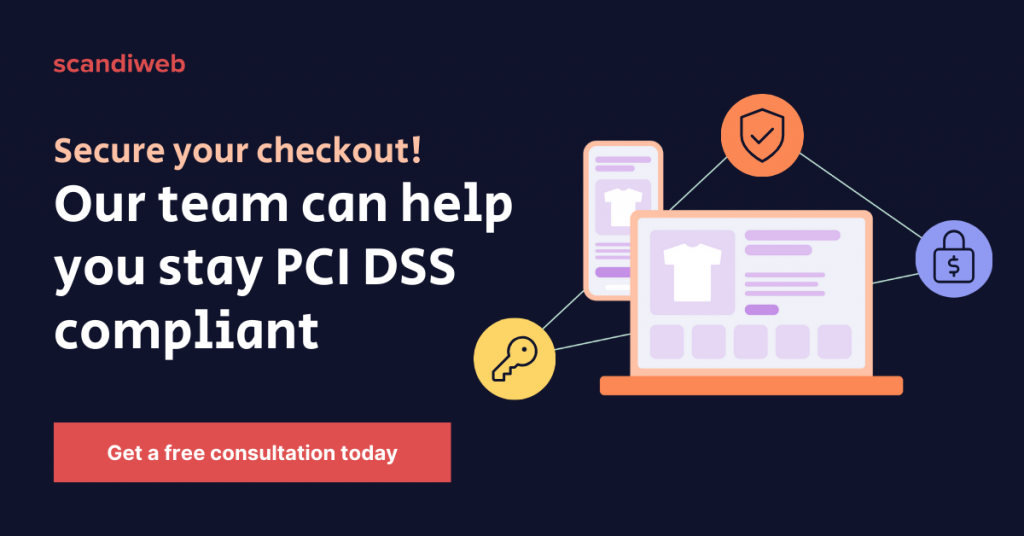
The SAQ follows the card data. If the customer types card details into a field served by your payment provider, you’re usually in SAQ A. If your own page builds or posts the payment form, you’re in SAQ A-EP. If card data passes through your servers, your code or your call center systems, you’re in SAQ D.
| Checkout setup | Who serves the card fields | Typical SAQ | What you still own |
|---|---|---|---|
| Full redirect to a hosted payment page | Payment provider | SAQ A | Quarterly ASV scans of your site, protecting the page that sends shoppers to the provider |
| Embedded iframe or hosted fields from a PCI DSS compliant provider | Payment provider | SAQ A | ASV scans, plus proof the page that embeds the iframe is protected against script attacks |
| Direct post or a JavaScript form your site generates | Your website | SAQ A-EP | A much larger set of controls, including payment-page script management (6.4.3) and change detection (11.6.1) |
| Card data handled by your servers, APIs or staff systems | You | SAQ D | The full PCI DSS, in practice a project for a QSA-led team |
Most Magento (Adobe Commerce), Shopify and BigCommerce stores that use a mainstream gateway can stay in SAQ A, as long as the integration loads the card fields from the provider. Our comparison of Magento payment gateways shows which integration types each gateway offers.
SAQ A: iframe or redirect checkouts
SAQ A is the shortest questionnaire, and it got shorter in the January 2025 revision. The PCI SSC removed requirements 6.4.3 and 11.6.1 (payment-page script management and tamper detection) from SAQ A, along with 12.3.1, the risk analysis that supported 11.6.1. In their place, it added an eligibility criterion: the merchant must confirm its site “is not susceptible to attacks from scripts” that could affect its eCommerce systems.
The Council later explained in FAQ 1588 that the criterion applies only to pages that embed the provider’s form, such as an iframe. Full redirects are out of its scope. There are two ways to meet it:
- Protect the page yourself, or through a third party, with techniques like the ones in requirements 6.4.3 and 11.6.1: a script inventory, script authorization, and alerts when the page or its headers change.
- Get written confirmation from your PCI DSS compliant payment provider that its embedded solution, implemented per its instructions, includes protection against script attacks.
What SAQ A doesn’t drop is scanning. FAQ 1604, published in June 2026, confirms that SAQ A for v4.x includes external vulnerability scans by an Approved Scanning Vendor (ASV) for redirect and iframe merchants alike, because a compromised merchant page can compromise the payment process.
SAQ A-EP: your page controls the payment form
SAQ A-EP fits stores where the card data still goes straight to the provider, but your site builds the payment form, for example with a direct post or a JavaScript form your own page generates. Because a compromised script on your page could change where card data goes, A-EP brings in far more controls than SAQ A, including 6.4.3 and 11.6.1, which stay in force here.
If you’re on A-EP without a strong reason, moving to the provider’s hosted fields or iframe is often the fastest way to shrink your PCI work.
SAQ D: card data touches your systems
SAQ D covers merchants that store, process or transmit card data on their own systems, and it’s the full standard. Adyen’s SAQ A guidance notes that 6.4.3 and 11.6.1 remain applicable to SAQ D merchants. If a custom checkout, a phone-order screen or an API integration puts card numbers on your servers, plan for SAQ D or redesign the flow so the card data stays with the provider.
🚀 Quick takeaway
The latest SAQ A revision moved script security into the eligibility check: either you protect the page that holds the iframe, or your payment provider confirms in writing that its solution does.
What is a PCI attestation of compliance (AOC), and who provides it?
A PCI Attestation of Compliance (AOC) is the signed declaration that sums up your assessment and states that you comply with PCI DSS. If you validate with an SAQ, you complete and sign your own AOC, usually through an executive officer. If a QSA produces a ROC, the QSA signs the AOC alongside you. Nobody else can sign it for you.
So when your bank asks for “your AOC”, it wants the merchant AOC that closes your SAQ. Your payment provider’s AOC and your host’s AOC are different documents. They prove those providers are compliant as service providers, and you rely on them to answer the questions in your SAQ that they cover. They don’t replace your attestation.
An AOC covers 12 months, according to Stripe’s attestation guide, so treat it as an annual task with quarterly scans in between. You submit it to your acquirer, or upload it through the acquirer’s compliance portal, along with the SAQ and any passing ASV scan reports it asks for.
What to collect before you sign
- Your SAQ type, confirmed against your current checkout (see the table above).
- Your payment provider’s current AOC, plus its written confirmation on script-attack protection if you embed its iframe.
- Your host’s AOC for the infrastructure layer. Adobe, for example, maintains PCI certification for the Adobe Commerce infrastructure, and under its shared responsibility model the merchant stays responsible for custom code, extensions and ASV scans.
- Your passing ASV scan reports, or the remediation plan for any scan that failed.
Provider AOCs come up again when you change providers. A card token migration between payment providers usually needs a formal request, the receiving provider’s PCI AOC and an encrypted file transfer, which we cover in Adyen vs Stripe.
🚀 Quick takeaway
The AOC your bank wants carries your signature. Collect your payment provider’s and host’s AOCs every year, check that your SAQ type still matches your checkout, then sign your own.
Who is responsible for PCI compliance: merchant, payment provider, host, or agency?
The merchant is accountable for PCI compliance, even when most of the work is outsourced. Your payment provider, host and agency each own specific controls, and PCI DSS asks you to write down that split. Requirement 12.8.5 asks you to record which requirements each service provider manages, which you manage, and which are shared.
Here’s how the split typically works for an online store on SAQ A or A-EP. Your contracts decide the final version.
| PCI task | Merchant | Payment provider | Host | Agency or support partner |
|---|---|---|---|---|
| Choose the SAQ, complete it, sign the AOC | Owns | Supplies its AOC | Supplies its AOC | Advises |
| Card fields, tokenization, the payment page itself | Chooses the integration | Owns | – | Builds the integration |
| Script protection on the page that embeds the iframe | Accountable | Confirms in writing, if offered | – | Implements CSP, script inventory, monitoring |
| Server, OS and network patching | Owns if self-hosted | – | Owns on managed hosting | – |
| Platform and extension patches (Magento core, modules) | Accountable | – | Sometimes, per contract | Applies and tests |
| Quarterly ASV scans | Owns (books the ASV) | – | Fixes infrastructure findings | Fixes application findings |
| Plan for end-of-life software | Owns | – | Flags OS and PHP end dates | Flags platform and extension end dates |
| Record of who does what (12.8.5) | Owns | Answers on request | Answers on request | Answers on request |
Three things the matrix makes clear:
- Service providers must tell you what they cover. Requirement 12.9.2 asks providers to support your requests for their compliance status and for the requirements they’re responsible for. Requirement 12.8.4 asks you to check their status at least once a year.
- Your host covers less than its AOC suggests. Adobe’s shared responsibility model puts infrastructure on Adobe and custom code, extensions and ASV scans on the merchant. Managed hosting such as ReadyMage or our managed Magento hosting takes the server layer off your plate, and the application layer stays with you and your developers.
- An agency with access to your checkout code belongs on your service provider list. It can change the page that loads the payment form, so it affects the security of the transaction even though it never sees a card number.
🚀 Quick takeaway
A vendor AOC proves the vendor is compliant. It doesn’t prove your store is. The gaps usually sit in the rows nobody signed for, such as script protection on the checkout page and patching the platform itself.
What to do when a PCI scan fails on “unsupported version”
A failed ASV scan with an “unsupported version” finding means the scanner found an internet-facing component, such as the platform, PHP, the web server or the operating system, that its vendor no longer supports. The PCI SSC treats that as an automatic failure, so you can’t attest to SAQ A compliance until the finding is fixed or formally resolved.
The Council’s FAQ 1130 states that an internet-facing unsupported operating system will be reported as an automatic failure in an ASV scan, and that compensating controls are only a temporary measure while you upgrade. ASVs apply the same logic to other end-of-life software they can fingerprint. Here’s the order we work in when a client’s scan fails this way:
- Read the finding precisely. Note the IP address or hostname, the component and the version the scanner detected. “Unsupported version” on PHP is a different job from “unsupported version” on Magento.
- Rule out a false positive. Some Linux distributions backport security fixes without changing the version number the server reports. If that’s the case, collect the vendor’s evidence and file a dispute with your ASV.
- Upgrade the component. This is the only fix that holds. For Magento, check the Magento end of life dates for your 2.4.x line and plan the move to a supported release with Magento upgrade services or your own team.
- If the upgrade takes weeks, document compensating controls. Isolate the component, restrict access, monitor logs, and agree the timeline with your acquirer. Compensating controls buy time with a fixed end date. They don’t make the component compliant.
- Rescan and keep the passing report. Requirement 11.3.2 needs a passing scan each quarter, so file the clean rescan with your next AOC.
What you shouldn’t do is sign an AOC that claims compliance while the scan is still failing. The attestation is a signed statement, and a breach on a store with an open failing scan is the scenario everyone wants to avoid. IBM’s Cost of a Data Breach Report 2025 puts the average breach at USD 4.44 million globally and USD 10.22 million in the US.
🚀 Quick takeaway
An “unsupported version” finding comes with a deadline. Dispute it if it’s a false positive, upgrade if it’s real, and use compensating controls only to cover the weeks in between.
Why unsupported Magento versions fail, and what patching looks like
Unsupported Magento versions fail for a simple reason: Adobe no longer releases security fixes for them. When an exploit appears, supported versions get a patch from Adobe, and unsupported ones wait for whatever a partner can backport.
We saw this in September 2026 with StyleSmuggler, an unauthenticated remote code execution flaw in Magento Open Source and Adobe Commerce. Adobe’s official fix covers 2.4.4 and later. For stores on 2.2.0 to 2.4.3-p3, our team built and published a backport for older Magento versions and applied the official hotfix across client stores, as described in our StyleSmuggler response. A backport closes one hole. It doesn’t put the version back into support, and the next scan still flags it.
If your store runs on a supported line, the steady-state work is applying Adobe’s security releases within the window PCI DSS expects, which requirement 6.3.3 sets at one month for critical patches. Our Magento 2 upgrade process breakdown shows what that cycle involves, and a Magento support retainer is how most of our clients keep it on schedule.
Magento 1 and PCI compliance
A Magento 1 store can’t pass a clean PCI assessment. Magento 1 reached end of life on June 30, 2020, Adobe has issued no security patches for it since, and an ASV scan flags it as unsupported software, which fails the quarterly scan that SAQ A requires.
The card networks warned merchants before the deadline. Visa sent acquirers an advisory titled “Urgent Action Required” in April 2020, and PayPal contacted Magento 1 merchants directly.
A hosted or redirect payment page reduces your PCI scope, and it’s a sensible step while you plan a move. It doesn’t fix the platform. The store still renders the page that sends shoppers to the provider, it still runs extensions with known, unpatched vulnerabilities, and the scan still fails.
If a migration can’t start this month, keep the interim period short and planned:
- Move card entry to a hosted page or redirect so card data never reaches the store.
- Restrict admin and server access, and watch for injected scripts and unusual checkout behavior. Our guide on how to stop a carding attack covers the response steps.
- Tell your acquirer about the failed scan and the dated migration plan before they find it in the scan report.
- Set the migration start date now. A Magento 1 to 2 migration is a rebuild, so the earlier it starts, the shorter the exposure.
🚀 Quick takeaway
Scope reduction lowers the stakes on an end-of-life platform. It doesn’t change the scan result. The only exit from a failing “unsupported version” finding is a supported version.
A PCI DSS SAQ checklist for your next assessment
Use this list before your next SAQ is due, or the day your bank’s email arrives:
- Map your checkout: redirect, embedded iframe, JavaScript form, or card data on your servers. That answer picks your SAQ.
- If you embed an iframe, decide how you meet the script-attack criterion: your own script controls, or written confirmation from your payment provider.
- Collect current AOCs from your payment provider and host, and file them with your SAQ.
- Write the responsibility matrix (requirement 12.8.5) and get each provider to confirm its rows.
- Check every internet-facing component against its vendor’s support dates: Magento line, PHP, database, web server, operating system.
- Book quarterly ASV scans, and fix or dispute every failure before the quarter closes.
- Complete the SAQ, sign the AOC and send both to your acquirer.
🚀 Quick takeaway
Steps 4 and 5 are where most stores lose time. A responsibility matrix and a support-date check done once a year make every later AOC request a one-day task.
Frequently asked questions
What is the difference between SAQ A and SAQ A-EP?
SAQ A is for stores where the payment provider serves the card fields through a redirect or an embedded iframe. SAQ A-EP is for stores whose own page builds or posts the payment form, for example with a JavaScript form. A-EP adds many more controls, including payment-page script management and change detection.
Who provides the PCI attestation of compliance?
The merchant does. If you validate with an SAQ, you complete it and an executive signs the AOC. If a QSA performs a ROC, the QSA signs the AOC with you. Your payment provider and host have their own AOCs, which support your assessment but can’t replace it.
How often do I need to complete a PCI DSS SAQ?
Once a year. An AOC covers a 12-month period, and most acquirers ask for a new SAQ and AOC annually. Quarterly ASV scans run in between, and a major change to your checkout or hosting is a reason to check whether your SAQ type still fits.
Do SAQ A merchants need ASV scans?
Yes. PCI SSC FAQ 1604 confirms that SAQ A for PCI DSS v4.x includes external vulnerability scans by an Approved Scanning Vendor for merchant webpages, whether the checkout redirects to the provider or embeds its iframe. A compromised merchant page can still compromise the payment process.
What happens if my PCI scan fails on an unsupported version?
You can’t attest to compliance until it’s resolved. Confirm the finding, dispute it with evidence if it’s a false positive, and upgrade the component if it’s real. Compensating controls are a temporary measure, so agree a dated remediation plan with your acquirer and rescan after the fix.
Is a Magento 1 store PCI compliant?
No. Magento 1 has had no security patches since its end of life on June 30, 2020, and ASV scans flag it as unsupported software. A hosted payment page reduces scope, but the platform still fails the quarterly scan. The lasting fix is moving to a supported platform.
Which PCI DSS version applies now?
PCI DSS v4.0.1. The PCI SSC calls it the currently published version of the standard, and its June–July 2026 request for comments asked whether v4.0.1 needs a revision. No newer version has been published. The future-dated v4.x requirements have been mandatory since March 31, 2025.
Does my payment provider’s PCI compliance make my store compliant?
No. A compliant provider covers the card fields and its own systems. You still own the SAQ, the AOC, the quarterly ASV scans, patching of your platform and extensions, and, for embedded iframes, protection of the page that holds the iframe, unless the provider confirms that in writing.
Every AOC request is easier when you already know who patches, who scans and who signs. If those answers are fuzzy for your store, map your PCI responsibilities with our support team, and the next request from your bank becomes a short email.




































