
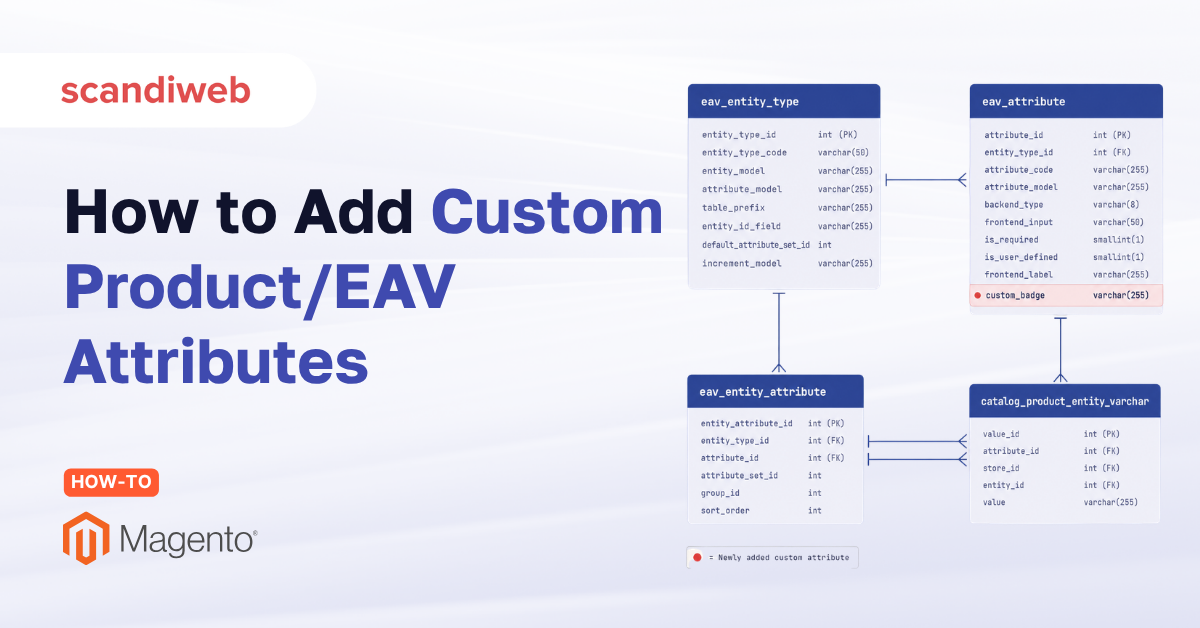
You add a new product attribute in the admin, save it, and something downstream breaks. A query slows to a crawl, an import fails, or a value lands in a table you did not expect. If you have ever opened the Magento (Adobe Commerce) database and wondered why one product spreads across half a dozen tables, you are looking at the Entity-Attribute-Value (EAV) model, and it explains almost everything about how attributes behave.
EAV is the abstraction that lets Magento (Adobe Commerce) manage any number of entities, each with any number of attributes, without hard-coding a column for every field. That flexibility is the reason the platform has lasted, even as people keep asking whether Magento is dying. Understand EAV and the Magento 2 attribute types that run on top of it, and the catalog stops feeling like a black box.
Overview
- The EAV model stores entities, attributes, and values in separate tables, so you can add fields without changing the schema.
- Magento 2 attribute types are the input types (text field, dropdown, multiple select, price, date, yes/no, visual swatch, and more) that set an attribute’s data type and admin field format.
- Custom attributes and extension attributes are different mechanisms: one extends entity data in EAV, the other extends API objects for integrations.
🚀 Quick takeaway
EAV trades wide, fixed tables for flexibility. Every product, category, or customer is a row in an entity table, and each of its fields lives as a separate value row keyed by attribute and data type. That is why one catalog change can affect many tables at once.
What are Magento 2 entities?
Entities are the core objects Magento (Adobe Commerce) manages: products, categories, customers, customer addresses, and orders. Each entity type is a distinct record in the EAV system, and each instance of that type can carry its own set of attributes. The schema below shows how these entity types relate.
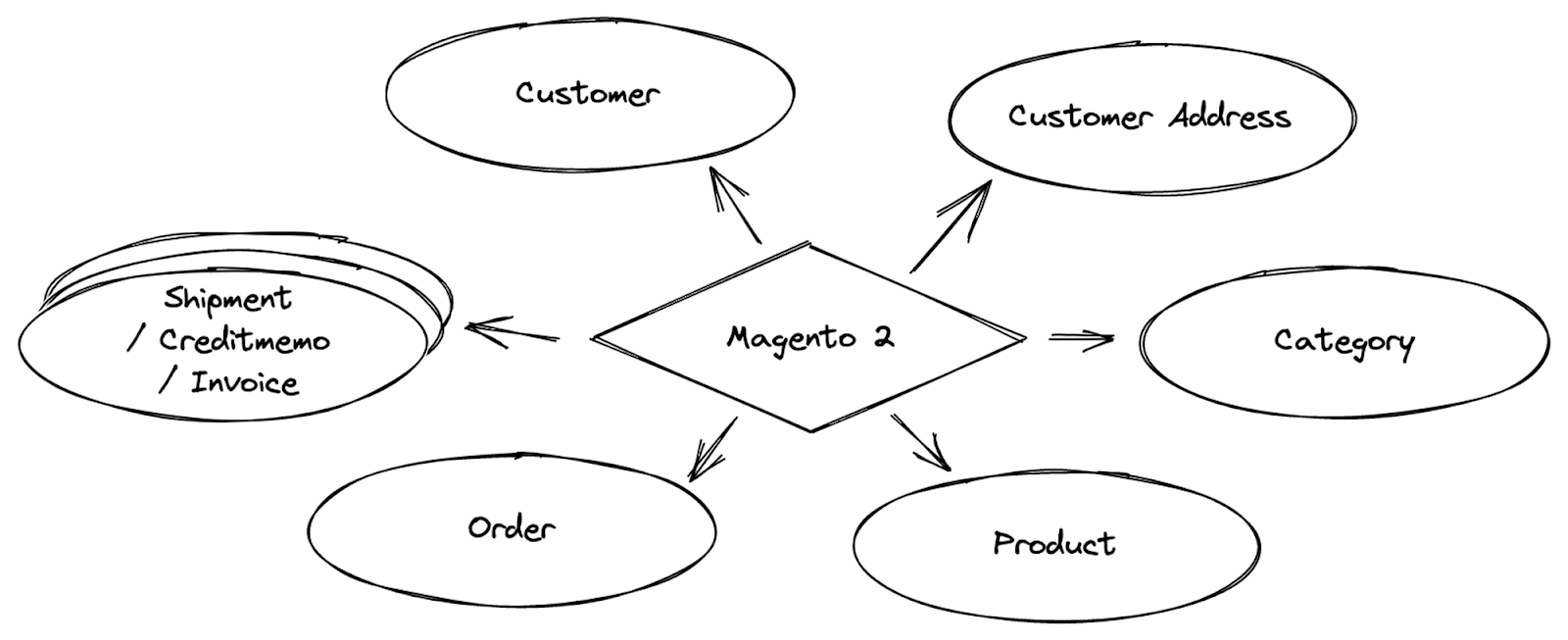
Each entity instance has attributes that describe it. A product may have a color, a price, and a description. A category may have a name and a layout. Per Adobe’s documentation, attributes are the building blocks of the catalog, and every product belongs to an attribute set that acts as a template for the fields it carries (Adobe Experience League, product attributes overview). Managing those attributes consistently across thousands of products is exactly the problem EAV is built to solve.
How are attributes of entities managed?
The EAV model splits attribute storage across four kinds of tables: one for entity types, one for attribute definitions, one for attribute groups, and a family of value tables keyed by data type. A single product’s data is therefore distributed across several tables rather than stored in one wide row.
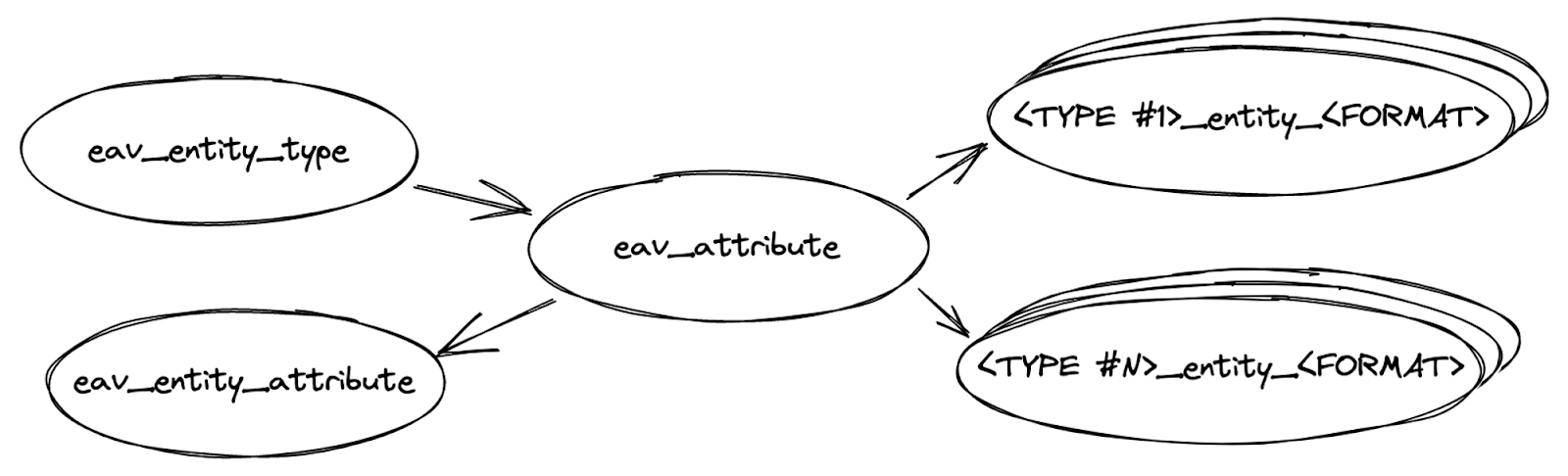
Here is what each table does:
- Entity types live in
eav_entity_type. This table declares the identifier of each entity type, such as product, category, and order. - Attribute definitions live in
eav_attribute. Each attribute has its own identifier here. One attribute maps to exactly one entity, so thenameof a product is a different attribute from thenameof a category. The attribute code can match, but the underlying identifiers will not. - Attribute groups live in
eav_entity_attribute. This table declares the identifier for attribute groups, which in Magento are used by product attributes. - Attribute values live in tables named
<TYPE>_entity_<FORMAT>. To find the value of a given attribute, you look in the table matching that entity’s type and the attribute’s data type.
The value tables follow a predictable naming pattern. The data-type suffix tells you the column format, and the type prefix tells you which entity it belongs to.
- Data-type suffixes:
_datetime,_decimal,_int,_text,_varchar. - Entity-type prefixes:
catalog_category_,catalog_product_,customer_,customer_address_. - Examples:
customer_entity_int,catalog_category_entity_datetime,catalog_product_entity_decimal.
That is the working set of EAV tables. The schema also ships seven legacy tables that confuse developers because they are never used in practice: eav_entity, eav_entity_datetime, eav_entity_decimal, eav_entity_int, eav_entity_store, eav_entity_text, and eav_entity_varchar. You can safely ignore them when tracing where a value lives.
🚀 Quick takeaway
To find a value, combine the entity prefix with the data-type suffix. A product price is in catalog_product_entity_decimal, a customer’s group ID in customer_entity_int.
What are the Magento 2 attribute types?
In Magento 2, an attribute’s type is its input type: the setting that decides what data the attribute holds and how it appears as a field in the admin. Per Adobe’s documentation, the input type determines both the stored data type and the admin form control (Adobe Experience League, attribute input types). Choosing the right one keeps your EAV value tables clean and your storefront filters working.
The common Magento 2 product attribute input types include:
- Text field – a single line of text, stored as varchar. Used for short labels like a model number.
- Text area – multi-line text, stored as text. Used for descriptions.
- Dropdown – a single-select list of predefined options. The selected option ID is stored as an integer.
- Multiple select – lets a product hold several option values at once.
- Price – a decimal value used for additional pricing fields.
- Date and Date and Time – stored in datetime value tables.
- Yes/No – a boolean toggle stored as an integer.
- Visual Swatch and Text Swatch – option-based attributes that render as color or text chips, commonly used for configurable products.
The input type maps directly to the EAV value table that stores it, which is why a dropdown value lands in an _int table while a description lands in a _text table. For a field-by-field walkthrough of creating and configuring these in the admin, see our companion guide on working with product attributes.
How to add a custom product or EAV attribute in Magento 2
There are two reliable ways to add a custom EAV attribute in Magento 2: through the admin for a one-off field, or through a data patch in code for anything you need versioned and repeatable across environments. Adobe and the wider developer community treat the data patch as the standard for production work (Webkul, custom attribute guide).
Through the admin
Go to Stores > Attributes > Product, select Add New Attribute, set the attribute code, pick the input type from the list above, and save. Then add the attribute to the relevant attribute set under Stores > Attributes > Attribute Set so products that use that set expose the new field. This path is fine for a single store and a field you will not need to reproduce elsewhere.
Through a data patch
For repeatable, version-controlled work, create a data patch in your module under Setup/Patch/Data/. The patch uses EavSetupFactory to call addAttribute(), passing the entity type, the attribute code, and an array of options including type (the backend data type), input (the input type), label, required, and which attribute sets to attach it to. Running bin/magento setup:upgrade applies the patch, and Magento records it so it never runs twice. This keeps the same attribute identical across local, staging, and production.
🚀 Quick takeaway
Use the admin for a quick, single-environment field. Use a data patch with EavSetupFactory::addAttribute() for anything that has to survive a deployment pipeline. The patch is the difference between a field someone added by hand and one your whole team can trust.
Custom-attribute work is rarely just one field. It touches indexing, validation, import mappings, and frontend rendering, which is where it pays to lean on people who have done it at scale. scandiweb has shipped Magento (Adobe Commerce) work since 2007 and is one of the largest certified Magento teams, so if a custom-attribute rollout is blocking a launch you can hire Magento developers to handle the data patches and indexing. For larger builds, our Magento development team can scope the full schema and migration plan.
Also read: how to create a custom widget in Magento, another build tutorial from the same series.
Custom attributes vs extension attributes
Custom attributes and extension attributes sound interchangeable but solve different problems. A custom attribute adds a field to a core entity like a product, stored through the EAV model and visible in the admin. An extension attribute extends an API data object with custom fields so external systems can read and write them, and it is defined in extension_attributes.xml rather than the EAV tables (MGT-Commerce, custom vs extension attributes).
In short, custom attributes are about storing more data on an entity. Extension attributes are about exposing data, often data that already exists or comes from another module, through the service contracts and APIs that integrations rely on. A product with a new “warranty length” field in the admin is a custom attribute. A field added to the product API response so an ERP can sync it is usually an extension attribute.
Why is entity information indexed?
Indexing exists because EAV is slow to query at scale. With 100,000 entities and 400 attributes, the value tables hold up to 100,000,000 rows, and asking an SQL engine to filter products by attribute value across that many rows is expensive. Indexing flattens and pre-computes that data so the storefront stays fast.
To take load off the SQL database, Magento (Adobe Commerce) uses a search engine that stores documents and searches them quickly, at the cost of not relating records to one another the way SQL does. Older Magento 2 releases used Elasticsearch, and current versions support OpenSearch as the default search engine. Earlier still, the platform relied on SQL flat tables, creating a row per entity and a column per attribute, which queried fast but demanded heavy database resources.
Magento keeps these indexes current in three modes:
- Update on save (
onSave) – reindexes on each entity or attribute change. - Update on schedule (
onSchedule) – reindexes on a cron-driven interval, the recommended mode for production. - Manual – triggered by a CLI command when you need to force a rebuild.
🚀 Quick takeaway
Run indexers on schedule in production. Save mode reindexes on every catalog change and can stall bulk imports. Scheduled mode batches the work via cron, keeping admin saves fast and the storefront index reliably fresh.
Frequently asked questions
What is the EAV model in Magento 2?
The EAV (Entity-Attribute-Value) model is how Magento 2 stores flexible data. Instead of a fixed column per field, it keeps entities, attribute definitions, and values in separate tables, so you can add attributes to products, categories, or customers without altering the database schema.
What are the Magento 2 attribute types?
Magento 2 attribute types are input types that set an attribute’s data type and admin field. Common ones include text field, text area, dropdown, multiple select, price, date, yes/no, and visual swatch. The input type also determines which EAV value table stores the data.
What is the difference between custom attributes and extension attributes?
Custom attributes add fields to core entities like products and are stored through the EAV model in the database. Extension attributes extend API data objects with custom fields for integrations and are declared in extension_attributes.xml. One stores more data, the other exposes data through service contracts.
What is a Magento 2 attribute set?
An attribute set is a template that groups the attributes a product carries. Every product must belong to one attribute set, so a clothing set might include size and color while an electronics set includes voltage and warranty. Attribute sets keep the catalog organized and consistent.
Why does Magento index entity data?
Because EAV spreads each entity’s values across many table rows, filtering by attribute at scale is slow in SQL. Indexing pre-computes and flattens that data into a search engine such as OpenSearch or Elasticsearch, so the storefront returns results quickly without overloading the database.
How do I add a custom attribute in Magento 2?
Add it through the admin under Stores > Attributes > Product for a one-off field, then attach it to an attribute set. For repeatable, version-controlled work, create a data patch that uses EavSetupFactory::addAttribute() and apply it with bin/magento setup:upgrade.
Related reading from the scandiweb blog:
Want to understand what runs under the Magento catalog before your next custom-attribute build? Talk to our developers and project managers about your store.




































