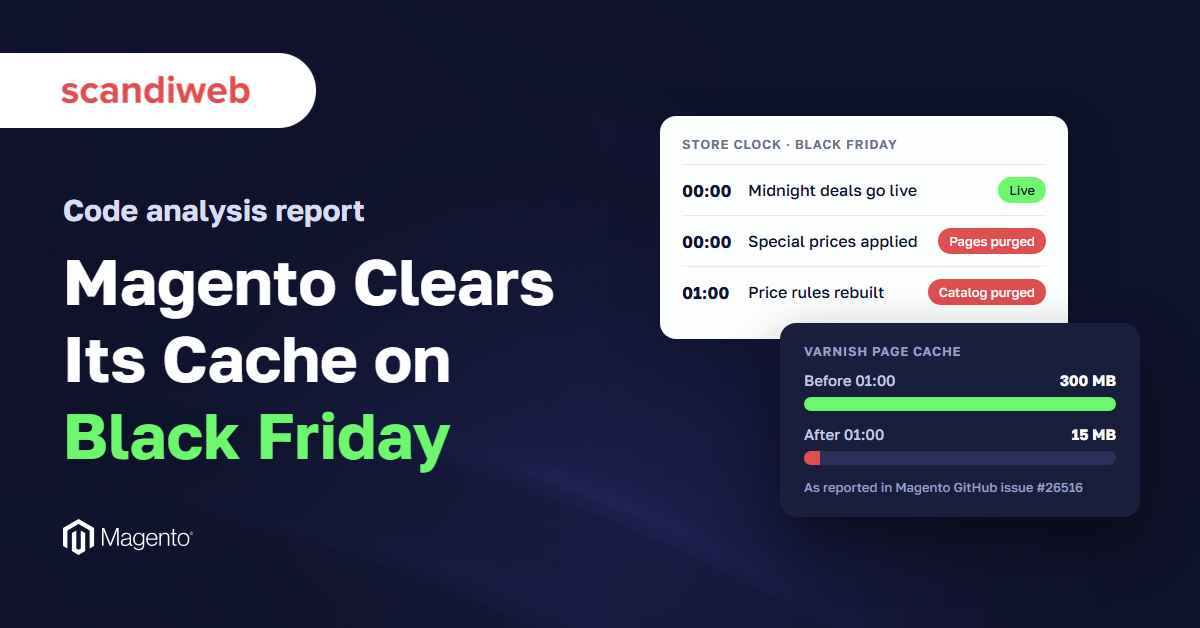

Built-in price jobs in the open-source platform behind more than 100,000 online stores empty cached product and category pages at midnight and 1 a.m. store time. Shoppers then see yesterday’s price, or servers rebuild the catalog under peak load.
- Stores on London time clear their Magento cache as Cyber Monday’s peak begins
- Magento clears its own page cache just as Black Friday deals go live
Downloads
Riga, Latvia – November 2026. Online stores running Magento, the open-source commerce platform Adobe sells as Adobe Commerce, clear large parts of their own page cache at the start of every day, including the first hour of Black Friday. That is the finding of a code analysis published today by scandiweb, a Latvian eCommerce agency founded in 2003 specializing in Magento and digital optimization for global brands.
scandiweb’s team analyzed Magento’s public source code to trace how version 2.4.9, the current release, applies scheduled price changes. Two jobs built into the platform run at the turn of the day on the store’s own clock:
- At midnight, a job that runs every hour activates special prices that start that day. It clears the cached pages of every product it changes, and of the category pages that list them.
- At 1 a.m., a nightly job rebuilds discount prices for any store with at least one active catalog price rule. It then clears every cached product and category page in the store.
In Magento Open Source, merchants can schedule catalog price rules and special prices by date only, not by time; Adobe Commerce adds scheduled updates with start times. So a Black Friday discount set up this way starts on 27 November with no way to choose the hour, and Magento’s own jobs put it into effect at the turn of the day: special prices at midnight, catalog price rules with the 1 a.m. rebuild, both on the store’s clock.
Those hours are no longer quiet on Black Friday. Major US retailers open their online deals at 12:01 a.m. Adobe recorded a record $11.8 billion in US online spending on Black Friday 2025, with shoppers spending $12.5 million a minute at the 10 a.m.–2 p.m. ET peak. For stores whose admin clock runs on London time, the nightly 1 a.m. rebuild lands at 8 p.m. Eastern on Cyber Monday, inside the day’s busiest two hours.
“A cache is what lets a store serve thousands of shoppers from a page it built once,” said Glebs Vrevsky, Executive Board at scandiweb. “For Black Friday, Magento clears that cache at the exact moment a midnight sale goes live, and again an hour later. In that window a store either shows yesterday’s price or builds every page from scratch while the shoppers are arriving.”
Who sees it at the worst time
The clock that matters is the one set in the store’s admin panel. Stores configured for UK time or UTC that sell to American shoppers run the 1 a.m. job at 8 p.m. Eastern. On Cyber Monday 2025, Adobe measured $16 million a minute in US online spending between 8 p.m. and 10 p.m. Eastern. That is well above the $12.5 million a minute it recorded at the Black Friday peak, and the highest per-minute rate Adobe reported last season.
Not new, still open
Magento users have described the effect for years. A public issue on Magento’s GitHub tracker, “Product and Category pages purged from Varnish daily at 1AM local time”, reports one store’s cache shrinking from about 300MB to 15MB overnight. Recent comments say it still happens on version 2.4.7-p3. Adobe’s own support articles describe delays in scheduled price changes and stale cached pages after them.
What merchants can do before 27 November
scandiweb recommends four checks, none of which require new software:
- Confirm which time zone the store’s admin uses, and which market it sells to.
- Check whether any catalog price rule is active, and when the 1 a.m. job will next run.
- Pre-load (“warm”) the cache for top category and product pages after each purge: straight after midnight, and again once the 1 a.m. rebuild has finished if any catalog price rule is active. Pages warmed before the 1 a.m. job will be cleared again.
- Measure how fast the store builds pages with an empty cache, the condition shoppers meet in that first hour.
Making an empty cache cost less
These checks shorten the window; they don’t close it. Stores that expect shoppers while the cache is empty have three broad options, each with a trade-off:
- Serve the old page while a new one is built. CDNs with “soft purge”, such as Fastly on Adobe Commerce Cloud, keep the previous page and refresh it in the background. The catch is that shoppers can briefly see the old price, the issue Adobe’s own support article describes. Magento’s standard Varnish setup removes purged pages outright, so it doesn’t offer this.
- Rebuild pages before shoppers ask for them. Open-source and commercial cache-warming extensions crawl a store’s top pages right after a purge. On a large catalog, warming takes time and adds load of its own.
- Make each page cheaper to build. Profiling tools such as Blackfire or New Relic show which blocks and extensions slow page builds, so developers can fix or remove them. A newer group of tools speeds up the build step itself without changing the storefront. One is Expedio, which runs under a store’s existing theme and has an open-source core. In scandiweb’s own benchmark of one merchant’s store with every cache empty, a category page was built in 57 milliseconds instead of 181, 3.2 times faster. Results on other stores will differ.
The full analysis, with references to the exact lines of Magento code, is available here.
Notes to editors
- The analysis reads the public source code of Magento Open Source 2.4.9 (magento/magento2 on GitHub). It is a code review, not a test of any live store. Adobe Commerce adds a separate scheduling feature with start times, which is not open source and was not analyzed.
- Effects vary by setup. Stores with custom cache rules, a CDN that serves stale pages, or no active price rules may see less impact.
- Spending figures are from Adobe Digital Insights. Store count is from Store Leads (111,495 active Magento stores, Q1 2026).
Disclosure
scandiweb develops Expedio, a server-side page-build tool for Magento mentioned in this release, and offers Magento development services. scandiweb has no commercial relationship with the other tools and vendors named here. scandiweb is an official Adobe Gold Partner. The code analysis covers only Magento’s public source code and can be checked by anyone using the links above.































Share on: