
Define a promotion, select multiple products, write the copy, and send it to your whole customer database – that’s building email campaigns the old way. Different customers receive the same message, even when their behavior, preferences, and intent are completely different, often within the same segment.
What if, instead of sending the same version of a campaign to everyone, each customer received a version tailored to what they’ve browsed, bought, and are likely to do next?
Let us show you what’s possible when you change the approach with the help of AI.
Step 1: the campaign
In our example, let’s look at a global activewear brand with a strong eCommerce presence and a CRM system already in place. They run regular promotional email campaigns and have a solid setup:
- Customer data from online and in-store purchases
- Lifecycle-based segmentation
- Automated flows and campaigns.
However, most campaigns are still built using rules like segments based on past purchases or activity, predefined product selections, and fixed messaging per audience group, which creates a big personalization gap.
Customers shopping for activewear (or any other product) can behave very differently and be looking for different things, yet they receive the same email. The data about their purchase history, preferences, engagement, and browsing and shopping behavior is there, but it isn’t being used to decide what each customer should see.
Step 2: specific use case
The impact of personalizing emails is highest at specific moments in the customer lifecycle.
Here’s a common scenario:
A customer has signed up, browsed products, maybe even made an initial purchase, but hasn’t come back in a while. Purchase intent is uncertain, and churn risk is increasing.
Also read:
Case Study: Conversational Commerce Brings 31% of Churned Customers Back
Most CRM setups already account for this with a predefined flow: Identify inactive users (e.g., no purchase in the last 30 days) → Place them into a re-engagement segment → Send a reminder or offer.
What you need to take into account is that within this “at-risk” group, customers are very different. They are grouped by inactivity, but instead of treating them as a single audience, it becomes a starting point for understanding what each individual customer is missing and what would motivate them to return.
Step 3: customer behavior becomes a clear profile
To personalize email at an individual level, you first need to move beyond segments and look at actual behavior. For each customer, the goal is to build a simple, usable profile based on what they’ve already done.
The best part is, this doesn’t require new data. It uses what most brands already have – purchase history, browsing activity, product categories viewed or bought, engagement with past emails or campaigns, etc.
From this, you can start to understand patterns, for example:
- A customer consistently browsing the studio and low-impact categories
- A customer buying matching sets and newer collections
- A customer focused on discounted or everyday items
- A customer who browses often but hasn’t purchased yet.
These patterns help answer a practical and significant question – what is this customer actually interested in right now? At this stage, you want to create a clear enough picture to guide the next decision, even if you don’t predict everything perfectly.
Instead of assigning someone to a broad segment, you’re defining what they prefer, how they shop, and where they are in their journey. This profile becomes the input for personalization and as the foundation for deciding what each customer should see next.
Step 4: making it actionable with AI
Once you have a clear view of customer behavior, the next step is to decide what makes the most sense for that specific customer to see. Here’s where AI becomes the most useful.
Instead of relying on predefined rules (e.g., “if customer bought X, show Y”), AI can evaluate multiple signals at once and determine which product is most relevant, what type of message fits best, and how to position the offer.
For example:
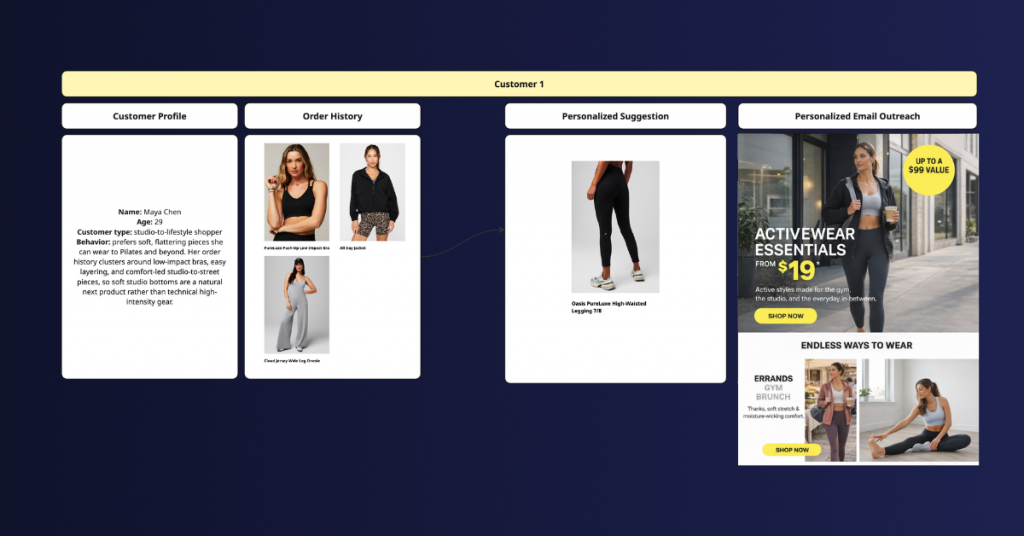
- A customer focused on studio workouts → show soft, flexible leggings → message around comfort and movement
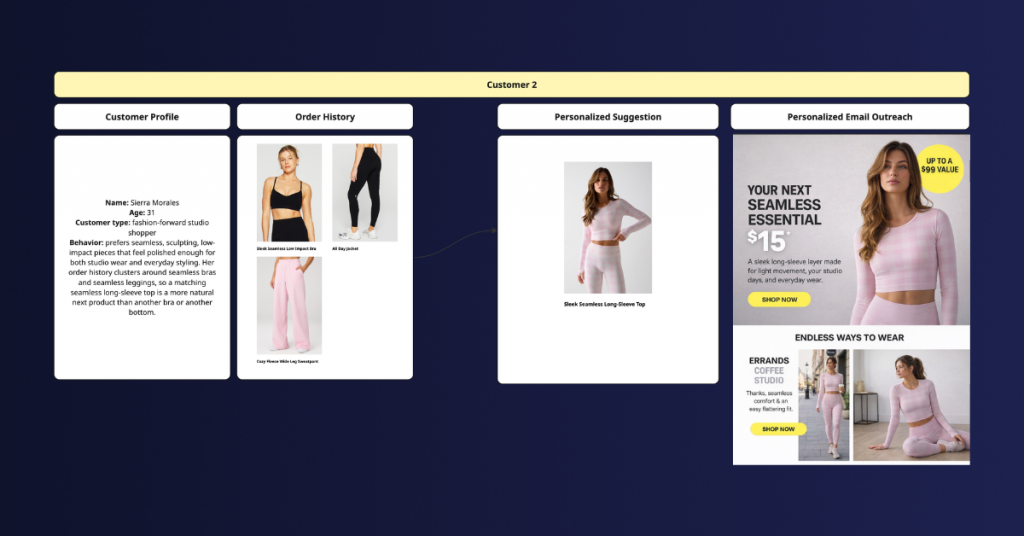
- A customer interested in styling and trends → show a matching set → message around versatility and looks
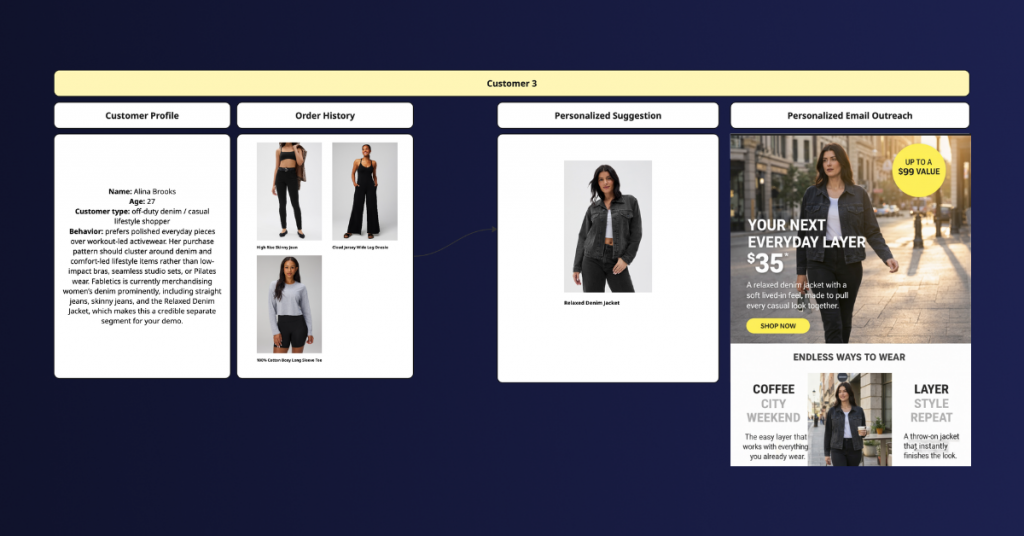
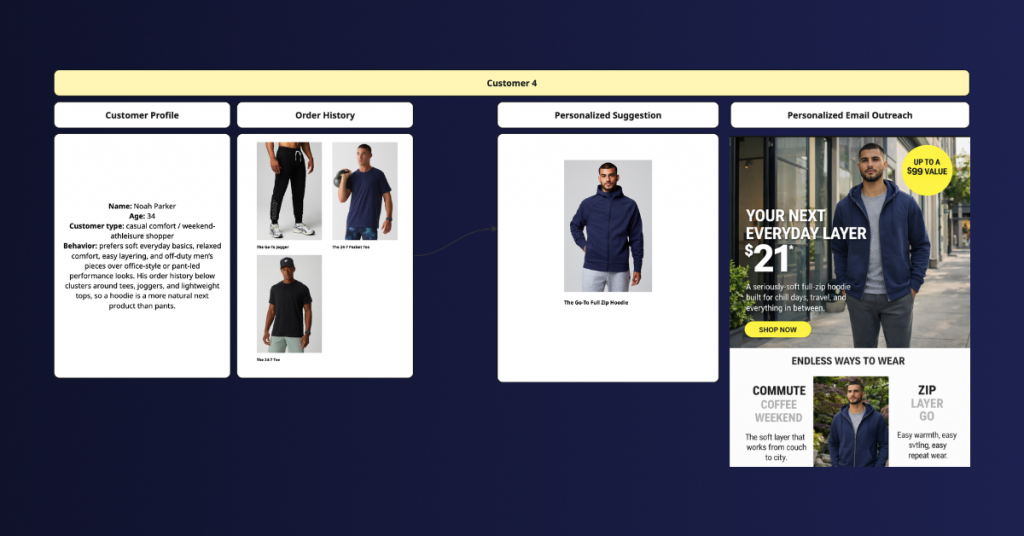
- A customer buying casual pieces → show a jacket or layer → message around everyday wear
- A customer who hasn’t purchased yet → show an entry product → message focused on ease and value.
You’re no longer selecting products and writing one message for a segment. You’re letting the system decide, per customer, what to highlight, why it matters, how to present it, and maximize engagement. Each customer gets a direction that reflects their own behavior, and raw data becomes something actionable.
Step 5: email generation for each customer
Once the decision is made (product + angle + message), the email itself becomes straightforward. The system generates a version of the email for each customer using the selected product, the chosen message angle, a subject line that matches the intent, and a customized CTA. The structure of the email remains consistent, but the product, tone, and reasons to buy are tailored to each individual.
- The studio-focused customer receives:
- soft leggings
- subject line around comfort or movement
- copy that reflects low-impact workouts
- The trend-driven customer receives:
- a matching set
- subject line focused on style
- copy that leans into versatility and looks
- The casual shopper receives:
- a jacket
- subject line around everyday wear
- copy positioned around ease and layering
At this point, the campaign functions as a system that automatically produces many variations:
Step 6: strategy implementation within CRM
To make this happen, you don’t need to replace your current tools. The CRM still triggers the campaign, defines the audience (e.g., at-risk users), builds emails, and handles delivery.
What changes is what happens before the email is sent. Instead of pulling fixed templates and predefined product blocks, the system generates personalized content with tailored recommendations.
So the setup becomes:
- CRM → defines when and to whom
- AI layer → decides what each person sees.
The data is already there, and the campaigns already exist. What changes are the decisions before the email is sent. When each customer sees products and messaging that match how they actually shop, you will notice the difference immediately in higher engagement, clicks, conversions, and revenue.
Curious how this would work for your business? Contact our AI & email marketing strategists today, and we’ll show you concrete examples based on your products and customer purchase patterns, and show what your campaigns could look like with AI-driven personalization.


Share on: