
How many people in your company spend their day retyping documents into a system too risky or expensive to replace?
Even though most digital commerce work stops at the storefront or platform, many problems begin deeper inside the business, where orders, invoices, and shipment documents are still entered manually.
To help automate repetitive work inside legacy business systems, scandiweb has taken a strategic stake in LegacyBridge, an AI agent that clears the manual data entry. It reads an incoming document and enters the data in the system, leaving only the uncertain cases for a person to check.
The hidden operational problem behind modern commerce
Digital commerce budgets have gone almost entirely to what customers see – the catalog, checkout, app, personalization layer, etc. Behind all of it, the systems that actually commit an order or pay a supplier have usually been left exactly as they were. They still work, and the risk involved in changing them is far higher than on the customer-facing side.
So the work moves to people:
- Purchase orders arrive as email attachments and are typed into an ERP
- Delivery notes go into a warehouse system
- Supplier invoices are entered into finance
- Returns and warranty paperwork get typed into a back-office application that only a few people know how to operate.
🚀 Quick takeaway
The customer experience can only be as good as the operational systems and data flows behind it. A modern storefront does not shorten the time it takes an order to reach the system that fulfills it.
When a purchase order takes two days to reach the ERP because the person who enters them was on vacation, that delay reaches the customer as a stock inaccuracy or a support ticket.
What LegacyBridge changes
LegacyBridge is an AI agent for business systems that have no practical integration path. It reads an incoming document and enters the information through the screens the business already uses, the way a trained employee would. Nothing is installed on the core system, and the old application code does not change; only the cases the agent is unsure about reach a person.
For companies working with us, this opens a new capability, a practical way to automate repetitive document-to-system work without replacing your core ERP or changing legacy code, scoped by the team that already knows your architecture.
Why scandiweb is expanding into the operational layer
For over two decades, scandiweb has taken on almost anything in our clients’ digital stack (storefronts, platforms, performance, data, integrations), most of it well below what customers see. That work still matters, and it is still most of what we do. But what’s changed is where the ceiling is.
On project after project, the limit on what a better storefront can deliver has turned out to be behind it. A checkout can be tuned to the millisecond and the customer still waits two days for confirmation, because the order has to be added to ERP by hand. Optimizing the one half of that sequence is only part of it, and many of our clients have reached it. It’s where a process stops being handled by software and starts being done by hand.
Our scope is commerce as a whole now, including the operational systems that never appear on a storefront. We’re now able to work on another layer deeper.
Together with LegacyBridge, we are bringing AI automation into the hidden operational layers, letting us help a client’s business, and across more of it, than we could before.
How LegacyBridge works
Four things happen, and none of them require a change to the system being automated.
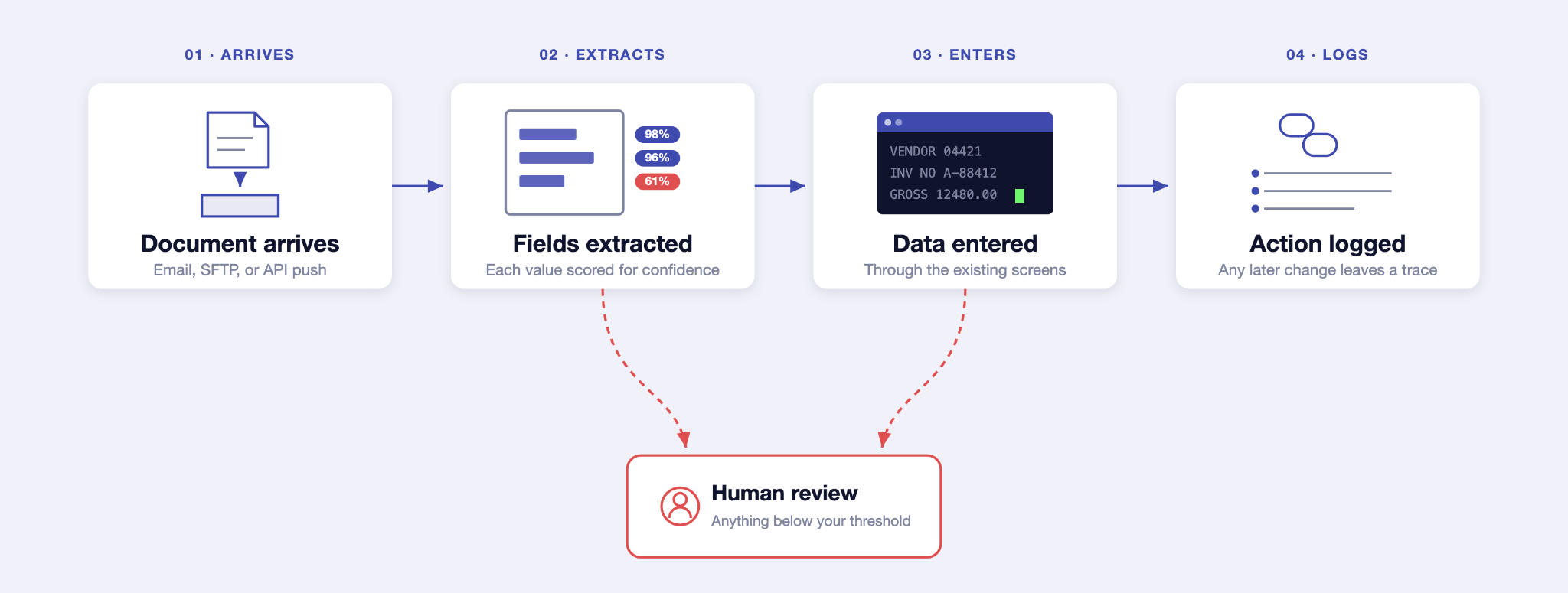
The document arrives
A purchase order, invoice, delivery note, or claim enters a queue by email, SFTP, or an API push. Each one becomes a single unit of work with its own record.
→ The agent reads it
Vision and language models pull out the fields that matter and return structured values, each with a confidence score attached (the confidence score is the part that makes the rest of this safe).
→ The agent enters the data
It signs in over your network, walks the menu path to the correct entry screen, and enters the data field by field. It reads what is actually on the screen, so a screen that has been changed or a menu that has been reordered does not break it the way older automation breaks.
→ Everything is logged
Each action is written to the audit trail as it happens, and the record cannot be changed later without leaving a trace.
Work the agent is confident about proceeds automatically. When a field cannot be read cleanly, a value falls below the threshold, or a screen does not match what was expected, the document is flagged for a person, and the agent continues with the next item in the queue. Human oversight of automated decisions, documented and demonstrable, is exactly what frameworks like the EU AI Act expect.
Three workflows worth looking at first
Purchase orders arriving by email or PDF
B2B customers send orders as attachments, and someone in customer service types them into the ERP. This is the highest-value candidate in most organizations because the delay directly affects a paying customer, and because order entry errors are expensive in both directions.
Automating it narrows the gap between a customer sending an order and that order being real in your system.
Shipment and delivery documents
Delivery notes, dispatch confirmations, and carrier paperwork get entered into a transport or warehouse system, often by a team working from a shared inbox.
The operational win is speed of information. Stock and shipment status become current, which is what makes accurate delivery promises possible on the storefront.
Supplier invoices
Accounts payable teams enter invoices into a finance system from PDFs that arrive in dozens of formats. There is high volume, and the cost of a late payment is usually high.
Confidence-based handling fits this well, because the exceptions that need a human are the ones finance already wants to look at.
Why you don’t need to replace the core system first
The instinct when confronted with an aging ERP is to plan its replacement. Sometimes that is right, and scandiweb has run enough enterprise platform decisions to say when it is. But often it is not the first move.
These systems have been running for decades, carry years of custom business logic that exists nowhere else in written form, and connect to operations in ways no current employee has fully mapped. Replacement programs are long and expensive even when they go well.
The alternative – you can leave the system exactly where it is and still remove most of the manual typing around it. If a replacement does eventually happen, the document processing you automated stays useful, because the queue, extraction, and business rules are independent of whichever system receives the data.
When a direct integration is still the better answer
If a clean API exists and the vendor supports it, build the integration. LegacyBridge is for the cases where the API does not exist, or it exists but is not licensed to you, or the vendor wants a six-figure sum and nine months to expose the one endpoint you need, or the system is so old that touching its integration layer is its own risk assessment.
How to tell whether a workflow qualifies
See if any of your recurring workflows meet these conditions:
- It is a recurring document stream (the same kind of document, arriving continuously)
- Teams type it in manually today, and it is not yet automated in any way
- The volume and time spent are meaningful
- No clean, practical API path exists (or one exists on paper and has been unavailable to you for years).
🚀 Quick takeaway
The question worth asking is whether a person is doing this workflow, repeatedly, from a document, into a system you cannot integrate with.
scandiweb has spent 20+ years on storefronts, platforms, data, and integrations. That work has a natural boundary, and the boundary has always been the point where a process stops being handled by software and starts being done by hand.
Our strategic acquisition of LegacyBridge means the same AI agent development discipline we apply to customer-facing work now reaches the operational processes feeding commerce, where the delays that reach your customers begin.
Identify one recurring, high-volume process your team still handles manually. Tell your account manager which one it is, or book a short feasibility review, and we will scope a focused two-week pilot on that workflow.
Frequently asked questions
Does anything get installed on our ERP?
No. The agent works through the same interface a person uses, signing in over your network. The application code of the core system does not change, and there is no module to deploy or maintain inside it.
How is this different from robotic process automation?
Traditional RPA records and replays click paths against fixed screen positions, which breaks whenever a screen changes. The agent reads the content of the screen and works out where it is, so ordinary changes to menus and layouts do not stop it. There is also nothing to install on desktops or agent virtual machines.
What happens when the agent is not sure?
The document is flagged for human review and the agent continues with the next one. Every uncertainty becomes an audit entry rather than a silent error, and you decide where the confidence threshold is set.
Do we need to replace our ERP first?
No, and that is the point. The approach exists precisely for systems that cannot be safely or affordably replaced right now.
What does this mean for clients already working with scandiweb?
It is a capability you can ask your existing team about. The people who know your order flow and integrations would scope the assessment, and the work runs under the same delivery and governance standards as everything else we do for you.




































