
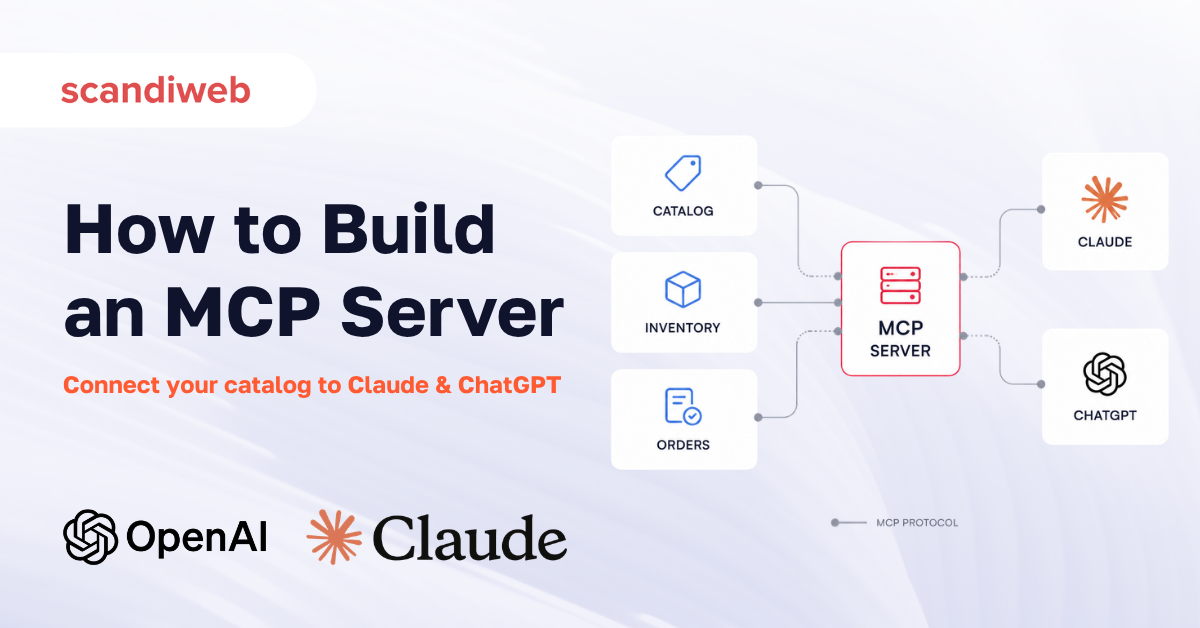
Building an MCP server means deciding what parts of your business to expose to AI assistants, wiring those to your live systems, and choosing how an assistant reaches them safely. The work is approachable to start and easy to underestimate in production, which is the part most guides skip.
This article is part of our series on the Model Context Protocol. The first explained what MCP is, the second covered ChatGPT apps for eCommerce, and this one is about the layer underneath both: the server you build so assistants can actually access your catalog, inventory, and orders.
You will not need to write code to follow this. There is one short example, so the shape of the work is concrete, and your engineering team can take it from there.
What an MCP server is, in one minute
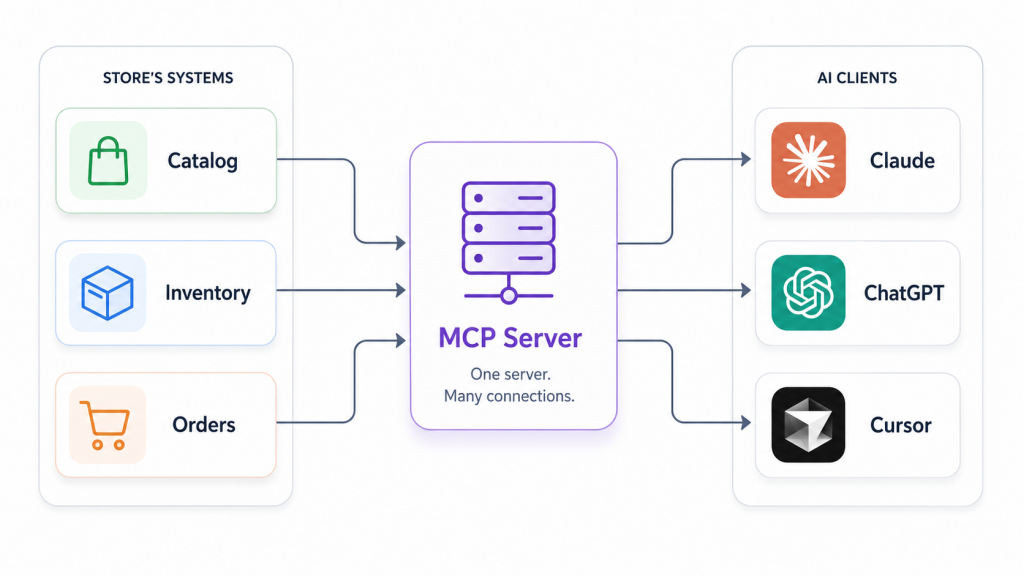
An MCP server is a program that exposes your data and actions to AI assistants through the Model Context Protocol, the open standard that lets clients like Claude and ChatGPT connect to external systems. The server publishes a set of capabilities, the assistant calls them during a conversation, and your systems stay behind a single consistent interface. Building one means deciding what to expose, wiring it to your data, and choosing how the assistant reaches it.
The reason this is one standard rather than a dozen integrations matters for budgeting. Before MCP, connecting your store to each assistant meant a separate, bespoke integration for every one. MCP replaced that with a single interface that many assistants already know how to use. You build the server once, and Claude, ChatGPT, and other clients can all reach it.
The standard is also no longer a single-vendor project. MCP was introduced by Anthropic in November 2024 and, in December 2025, was donated to the new Agentic AI Foundation under the Linux Foundation, with Anthropic, Block, and OpenAI as co-founders. By that point, it counted roughly 97 million monthly SDK downloads and around 10,000 active servers. That governance move is the de-risking signal that the interface you build against is an industry standard.
🚀 Quick takeaway
The point of building on MCP is to build once. One server, reached by many assistants, instead of a new integration every time a new AI client matters to your customers.
MCP server vs MCP client
An MCP server exposes capabilities, your tools, data, and prompts, while an MCP client is the application that consumes them, such as Claude Desktop, ChatGPT, Cursor, or an agent you write. The client connects to one or more servers and decides when to call them. When you build an MCP server, you are building the side that holds your systems, and the assistant is the client that talks to it.
This distinction keeps a project scoped correctly. You are not building the AI, and you are not building a chat interface. You are building the connector that lets an assistant someone else operates reach the things only your business can provide: your real products, your real stock levels, your real order status. That is a smaller and more controllable piece of work than teams often assume when they first hear “build an MCP server.”
The building blocks: tools, resources, and prompts
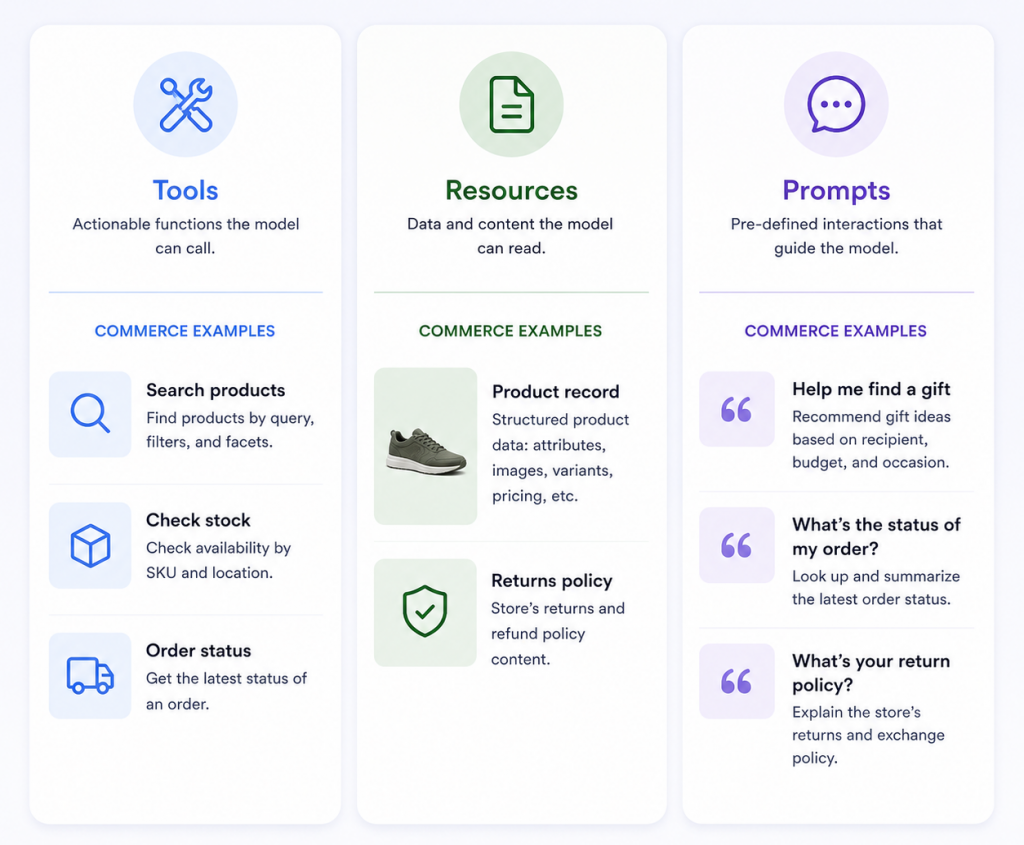
An MCP server exposes three kinds of capability. Tools are functions the assistant can call to take an action, such as searching a catalog or checking stock, usually with user approval. Resources are read-only data the assistant can pull in, like a product record or a document. Prompts are reusable templates that guide the assistant through a task. Most commerce servers lean on tools and resources.
For a store, the mapping is intuitive once you see it:
- Tools are the actions: search products, check availability, get order status, start a return.
- Resources are the reference data: a product detail record, a sizing guide, a returns policy.
- Prompts are the guided flows: a “help me find a gift” template that walks the assistant through the right questions.
It helps to picture one real exchange. A shopper tells an assistant they need running shoes for wide feet under a set budget. The assistant calls your product-search tool with those constraints, your server queries the live catalog and returns matching products with current prices and stock, and the assistant presents them in the conversation. If the shopper then asks where an existing order is, the assistant calls your order-status tool. Each of those is a capability you chose to expose, and nothing happens that you did not define.
Deciding which capabilities to expose, and which to hold back, is the first real design conversation. A good early scope is narrow: two or three high-value tools that map to questions customers actually ask, rather than an attempt to expose the whole platform on day one.
How to build an MCP server, step by step
Building an MCP server takes five stages: pick an SDK, define the server, register the tools and resources you want to expose, choose a transport, then connect a client and test. For a store, the useful version exposes real capabilities, product search, stock checks, order status, rather than a toy example. The official Python and TypeScript SDKs handle the protocol, so most of the work is wiring tools to your own systems.
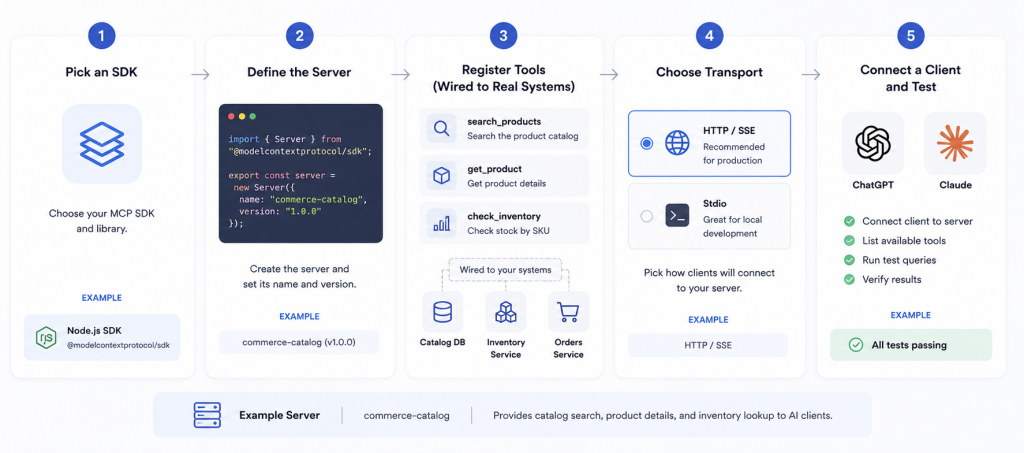
- Pick an SDK. Official SDKs exist for TypeScript, Python, C#, and Go, among others. Most teams choose the language their commerce systems already use, so the server can talk to existing code directly.
- Define the server and register tools. This is where you name the capabilities. A product-search tool, a stock-check tool, an order-status tool.
- Wire each tool to your real data. This is the bulk of the work and the part no tutorial can do for you: connecting each tool to your catalog, inventory, and order systems.
- Choose the transport. Streamable HTTP for anything customer-facing, as covered above.
- Connect a client and test. Point Claude or ChatGPT at the server and confirm each tool returns correct, current data.
A single product-search tool in Python with the FastMCP framework looks like this:
from fastmcp import FastMCP

mcp = FastMCP("store-catalog")

@mcp.tool()
def search_products(query: str) -> list[dict]:
    """Search the live catalog and return matching products."""
    return catalog.search(query)
That is the entire pattern. The framework turns the function and its description into a tool the assistant can call, and your team repeats the pattern for stock checks and order status. The hard, valuable work is behind catalog.search: making sure it returns accurate, current, well-structured data. When scandiweb built tools like the Claude Blog Factory, the protocol layer was quick, and the systems integration was where the real effort and care went. A store-specific server follows the same balance.
🚀 Quick takeaway
The SDK writes the protocol for you. Your investment goes into the data behind each tool, which is why stores with a clean catalog and reliable inventory feeds build faster.
Choosing a transport: stdio vs Streamable HTTP
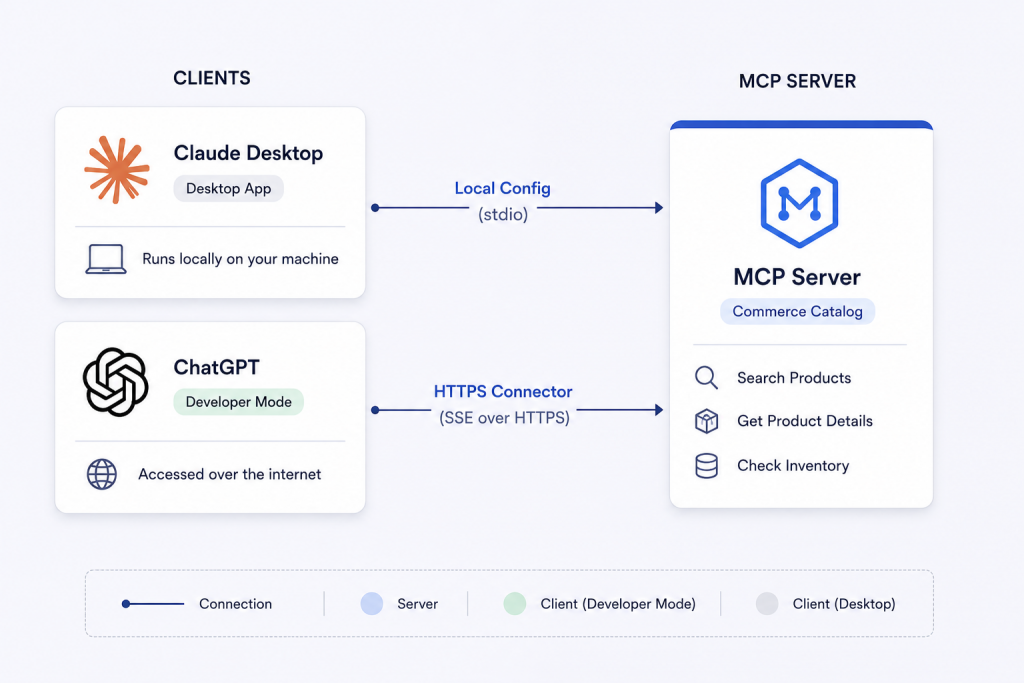
MCP servers talk to clients over JSON-RPC using one of two transports. Use stdio when the server runs on the same machine as the client, such as a local developer tool. Use Streamable HTTP when the server is remote and reached over the network, which is the case for anything customer-facing. The older HTTP and SSE transport is deprecated, so new servers should not start with it.
If the person using the AI client also controls the machine the server runs on, use stdio; for anything your customers or a hosted assistant reach, use Streamable HTTP.
Almost any commerce use case is the second kind, because the server lives on your infrastructure and assistants reach it over the internet. There is one technical gotcha worth knowing so it does not surprise your team mid-build: a stdio server must never write logs to standard output, because that channel carries the protocol messages and stray output corrupts them.
🚀 Quick takeaway
For a customer-facing store, the transport choice is Streamable HTTP. Stdio is for local developer tools, and the old SSE transport is retired.
Connecting your server to Claude and ChatGPT
The same MCP server works across assistants, so you build once and connect many. Claude Desktop reads a local config that points at your server command for stdio, or a URL for a remote server. ChatGPT consumes MCP through its Apps SDK and requires an HTTPS endpoint registered as a connector in developer mode. Building to the protocol, rather than to one assistant, is what makes the server reusable across Claude, ChatGPT, and others.
Taking your MCP server to production
A production MCP server needs more than a local script. Host it behind HTTPS on a platform such as Cloudflare Workers or Google Cloud Run, containerize it for repeatable deploys, and add rate limiting because AI clients can call tools in tight loops. Add logging and error handling per tool so a single failure does not break the conversation. The jump from a local demo to a hosted service is where most of the real work is.
This is the line item to plan for. A weekend prototype that answers questions in Claude Desktop is encouraging, and it is also perhaps a fifth of the way to something customers can touch. The remaining work is the standard discipline of any service that faces the public: reliable hosting, encryption in transit, sensible limits so an automated client cannot hammer your systems, and monitoring so you know when a tool starts failing. Budgeting for that gap up front is the difference between a demo that impresses leadership once and a service that earns its place in the customer experience.
On timeline, a narrow first server, a few read-only tools against a clean catalog, is a matter of weeks rather than months for a capable team. What stretches a timeline is usually messy product data that has to be cleaned before a tool can return it reliably, approval cycles for anything that touches orders or payments, and the security review a customer-facing endpoint deserves.
Securing your MCP server
Any MCP server that touches customer data needs authentication. The MCP spec treats remote servers as OAuth resource servers and calls for OAuth 2.1 with PKCE and Resource Indicators, while local development can use API keys or environment variables. Validate every input, because the assistant will send unexpected calls, and watch your dependencies: a 2025 vulnerability in the popular mcp-remote package showed how a weak link exposes the whole chain.
Security is the section the generic tutorials skip, and it is the one a decision-maker should ask about first. An MCP server is a door into your live systems, opened to an assistant acting on a customer’s words. That door needs the same rigor as any other public endpoint: proper authentication on anything that reaches customer or order data, validation on every request, and current dependencies. The mcp-remote vulnerability, disclosed in 2025 and rated critical, affected a package with hundreds of thousands of downloads and is a useful reminder that the protocol being standardized does not make every tool around it safe. This is also where the PPC audit agent and other production builds taught us to treat the connector as carefully as the systems behind it.
🚀 Quick takeaway
An MCP server is a public door into live systems. Authentication, input validation, and patched dependencies are not optional once it touches customer or order data.
Should you build your own MCP server or use a prebuilt one?
Build your own MCP server when your systems or logic are specific enough that no prebuilt server fits, which is common for custom stacks and bespoke workflows. Use a prebuilt server, such as Shopify’s official Storefront or Catalog MCP servers, when you are on a supported platform and need standard commerce capabilities. Use a managed MCP platform when you want hosting, auth, and monitoring handled and prefer to focus only on your tools.
It helps to know the prebuilt options are real and growing. Shopify, for example, ships official MCP servers: a Storefront server that exposes a single store’s catalog, cart, and policies, a Catalog server for cross-merchant product discovery, and a Customer Accounts server for order tracking and returns. If you are on a platform like that and need standard commerce capabilities, a prebuilt server can put you live quickly with far less to maintain. You build your own when your data or logic is specific enough that no prebuilt server fits.
Build your own if:
- Your data or actions are specific to your stack and no prebuilt server exposes them
- You need fine control over which tools and resources are exposed, and how
- You have engineering capacity to maintain it as the spec and your systems change
- You need custom authentication or compliance rules a generic server will not enforce.
Use a prebuilt server if:
- You are on a platform that ships official MCP servers, such as Shopify
- You need standard capabilities, catalog, cart, order status, rather than bespoke logic
- You want to be live quickly with less to maintain.
Use a managed MCP platform if:
- You want hosting, HTTPS, and authentication handled for you
- You prefer to write only the tools and leave the infrastructure to the platform
- You are testing demand before investing in your own deployment.
For many stores, the right answer is a mix of a prebuilt server for the standard parts and a custom one for what makes your business specific. If you are deciding what to build versus buy, our team can scope an MCP server against your stack using the same approach behind the MCP servers we run in production.
Frequently asked questions about building an MCP server
How do I build an MCP server?
To build an MCP server, pick an official SDK such as Python or TypeScript, define a server, register the tools and resources you want to expose, choose a transport (stdio for local, Streamable HTTP for remote), then connect a client like Claude or ChatGPT and test. Most of the work is wiring your own data and actions to the tools, since the SDK handles the protocol itself.
What is the difference between an MCP server and an MCP client?
An MCP server exposes capabilities, your tools, data, and prompts, while an MCP client is the application that uses them, such as Claude Desktop, ChatGPT, or Cursor. The client connects to the server and decides when to call its tools. When you build an MCP server, you build the side that holds your systems.
What are tools, resources, and prompts in MCP?
They are the three capabilities an MCP server can expose. Tools are functions the assistant calls to take an action, like searching products. Resources are read-only data the assistant can read, like a product record. Prompts are reusable templates that guide a task. A typical commerce server uses mostly tools and resources.
What language should I use to build an MCP server?
Use whichever official SDK fits your stack. The tier-one SDKs are TypeScript, Python, C#, and Go, with more languages supported at lower tiers. Python with FastMCP is the fastest path for many teams, and TypeScript is common when the server lives alongside a web codebase. The protocol is the same across all of them.
What is the difference between stdio and Streamable HTTP?
They are the two transports an MCP server uses. Stdio runs the server as a local process on the same machine as the client, which suits developer tools. Streamable HTTP exposes the server over the network for remote and customer-facing use. The older HTTP and SSE transport is deprecated, so new servers should use Streamable HTTP for remote access.
How do I connect an MCP server to ChatGPT?
ChatGPT consumes MCP servers through its Apps SDK. You host your server behind an HTTPS endpoint, then register that endpoint as a connector in ChatGPT developer mode. During development you can expose a local server over HTTPS with a tunneling tool. The same server also works with Claude and other MCP clients without changes.
How do I secure an MCP server?
Any MCP server that touches customer data needs authentication. The spec treats remote servers as OAuth resource servers and calls for OAuth 2.1 with PKCE, while local development can use API keys or environment variables. Validate every input the assistant sends, and keep dependencies patched, since a 2025 vulnerability in a popular MCP connector package showed how one weak link exposes the chain.
Do I need to build my own MCP server?
Not always. If you are on a platform that ships official MCP servers, such as Shopify, a prebuilt server may cover standard commerce needs. Build your own when your data or logic is specific enough that no prebuilt server fits, or when you need control over exactly which tools and resources are exposed and how they are secured.
If you are weighing whether to build your own MCP server or connect a prebuilt one, talk to our team and we will map it to your catalog, your assistants, and your security needs before your engineers write much code.




































