
Your Magento (Adobe Commerce) store has slowed down, someone checked the server, and the answer came back: the database is working too hard. That’s MySQL, or its close relative MariaDB, the software that holds every product, price, customer and order and serves them each time Magento builds a page. The verdict is often right. It just doesn’t say what to fix.
Magento 2 MySQL optimization means finding where the database time goes, then fixing that first. Magento stores a product’s details in separate tables by type of value (text, whole numbers, prices, dates), a design called EAV (entity-attribute-value). As a result, Adobe’s documentation says, its “SQL queries are sometimes long and complex.” A query is one request for data, written in SQL, the database’s language. On a slow store, the time usually goes to one of four places, and each one needs a different fix.
What is Magento 2 MySQL optimization?
Magento 2 MySQL optimization is the work of making the database behind a Magento store answer faster and less often. It covers four jobs: finding and fixing slow queries, cutting the number of queries each page sends, keeping fast-growing tables in check, and setting MySQL or MariaDB the way Adobe advises for Magento.
Magento talks to the database whenever it builds a page the cache doesn’t hold: logged-in views, filtered category pages, search results, cart and checkout. The admin, product imports and background jobs query it too. So database trouble shows up first on uncached pages and on busy admin days, when someone is editing the catalog or running an import.
Why a Magento page sends so many queries
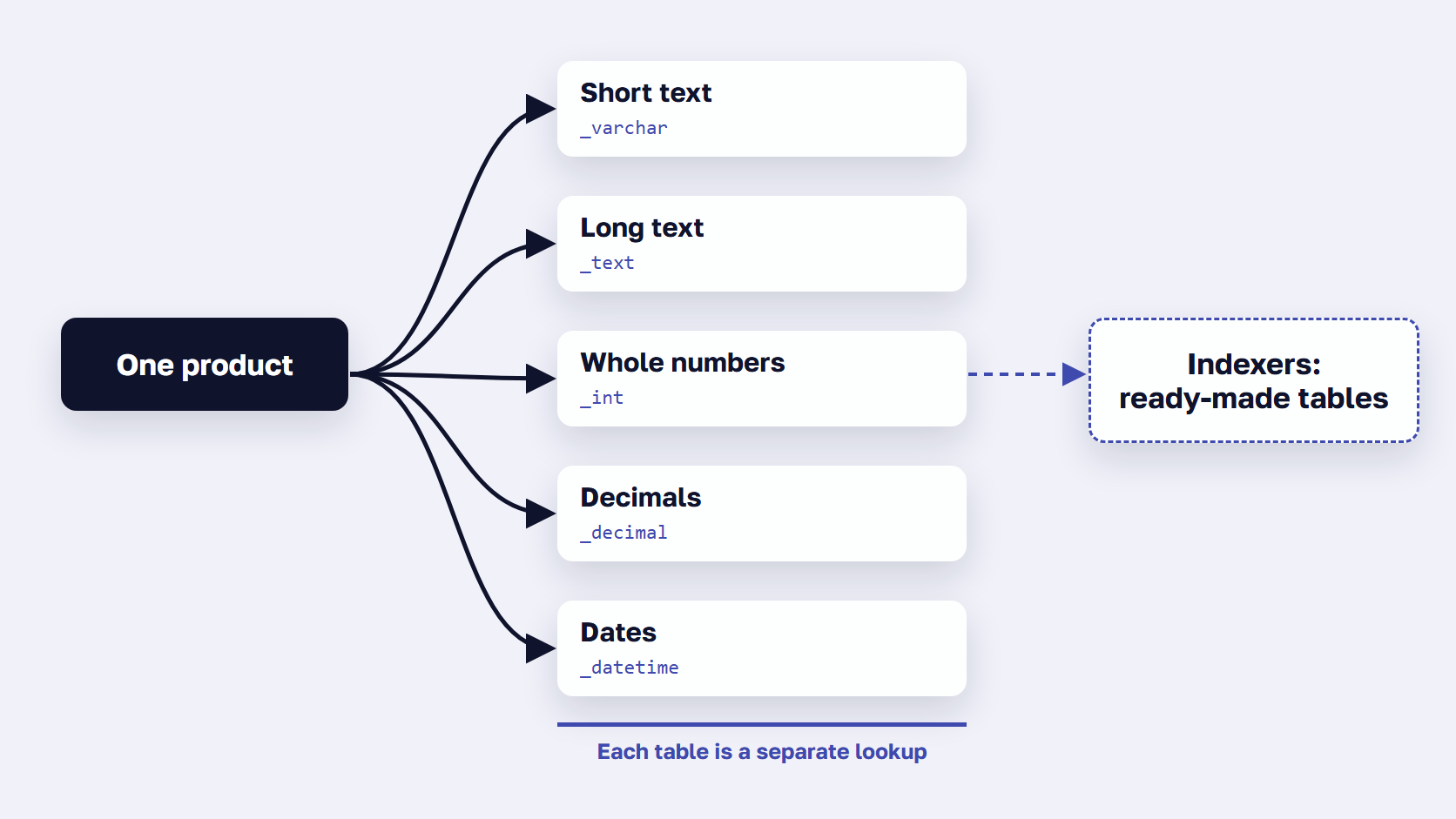
Under EAV, each product attribute is stored by its type of value rather than in one row per product. Adobe’s developer documentation says objects that use EAV attributes typically store values in several MySQL tables, and that the Catalog and Customer modules are the main ones. For products, the values are kept in one table per type: catalog_product_entity_varchar, _int, _decimal, _text and _datetime. Each table is a separate lookup, so a page that lists many products reads many tables.
Magento offsets this with indexers, background jobs that precompute data into ready-made tables. Without them, Adobe says, the application would have to calculate the price of every product on the fly, taking cart price rules, bundle pricing and discounts into account. Flat tables were the older answer, one wide row per product, and Adobe no longer recommends them. Our explainer on Magento’s EAV model walks through every attribute type and table.
🚀 Quick takeaway
Magento caches its built-in EAV attributes but not the custom ones a merchant adds. Adobe says caching those too decreases the insert and select requests sent to the database, at the cost of a bigger cache: run bin/magento config:set dev/caching/cache_user_defined_attributes 1.
Where Magento database time goes
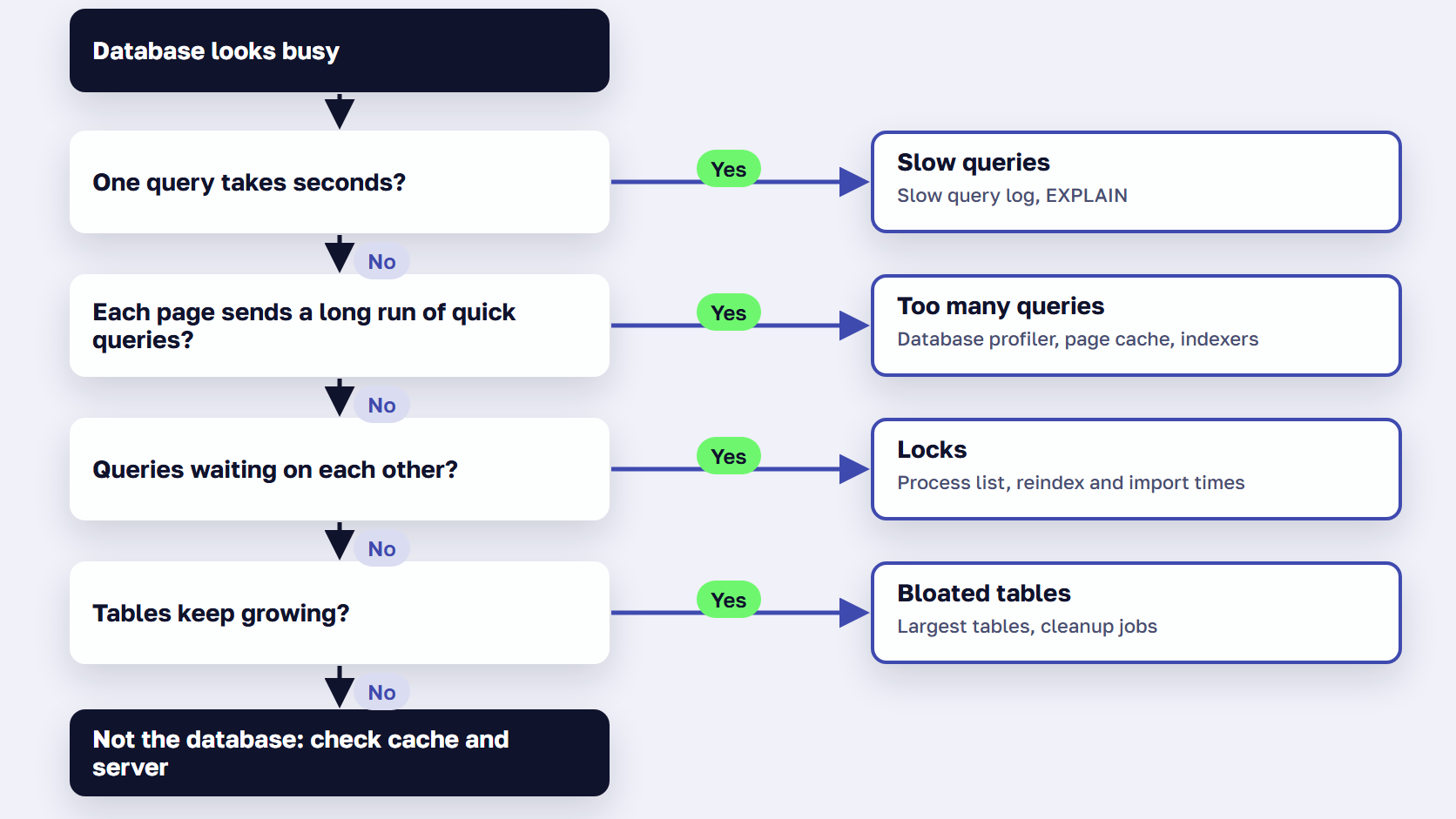
Time in a slow Magento database usually goes to one of four patterns:
- Slow queries: a few requests take seconds each.
- Too many queries: each request is quick, but every uncached page sends a long run of them.
- Locks: queries wait for others to finish, often during reindexing or imports.
- Bloated tables: logs and old records pile up in tables the store uses every day.
A busy database doesn’t say which pattern you have, so measure first: when you audit Magento performance, you time each page type from the cache and uncached, which shows whether the slow pages are the ones the database builds.
| Pattern | What you see | First check | What fixes it |
|---|---|---|---|
| Slow queries | A few requests take seconds each, and the same ones keep coming back | The slow query log, ranked with pt-query-digest | An index, a rewritten query, or a fix to the extension that sends it |
| Too many queries | Each query is quick, but uncached pages are slow and database load rises with traffic | Count the queries per page with Magento’s database profiler, on staging | More pages from the cache, indexers on Update by Schedule, a lighter page build |
| Locks | Queries pile up waiting, often while reindexing, importing or saving in the admin | SHOW FULL PROCESSLIST during a slow spell | Update by Schedule, imports outside peak hours, no schema changes at peak |
| Bloated tables | A few tables run to gigabytes and keep growing | List the 20 largest tables | Magento’s cleanup settings and cron, extension log settings, order archive |
If the database stays quiet while pages are slow, the cause is somewhere else, and our guide to why a Magento store gets slow matches symptoms to causes.
🚀 Quick takeaway
During a slow spell, run SHOW FULL PROCESSLIST on the database. One query running for many seconds points to a slow query. The same short query repeated across many connections points to too many queries. A pile of connections waiting on each other points to locks. A load test on a staging copy shows whether locks appear at your real peak.
How to find slow queries in Magento
To find slow queries in Magento, turn on the MySQL slow query log, which records every query that runs longer than a time you set. Rank the log with pt-query-digest to see which queries cost the most in total, then run EXPLAIN on the worst ones to see whether MySQL reads a whole table where an index would do.
Turn on the MySQL slow query log
The slow query log is a file where MySQL writes down every query that takes longer than a time you choose. It’s off by default, and the default threshold is 10 seconds, far too high to catch the queries shoppers feel.
# my.cnf, [mysqld] section. A starting point: agree the threshold with your host or DBA.
slow_query_log      = 1
slow_query_log_file = /var/log/mysql/mysql-slow.log
long_query_time     = 1    # example value, in seconds. MySQL's default is 10
On Adobe Commerce Cloud, the log is already written to /var/log/mysql/mysql-slow.log. Run it on production during your busiest days, since that’s where the real traffic is, and agree the threshold with your host or DBA before you change it.
Rank the worst queries with pt-query-digest
pt-query-digest is a free Percona tool that groups the log by query shape and ranks the groups by total time, slowest first.
pt-query-digest /var/log/mysql/mysql-slow.log > slow-query-report.txtRead the top of the report first. A query that is moderately slow but runs thousands of times can cost more than one very slow query that runs once an hour. Adobe names this tool in its database playbook for Commerce Cloud Pro.
Read the query plan with EXPLAIN
An index is a sorted lookup list, like the index at the back of a book, that lets MySQL find rows without reading the whole table. Adobe’s database performance guidance says to run EXPLAIN (or EXPLAIN ANALYZE on MySQL) on each top query to find out what makes it slow, and a full table read where an index would do is the usual answer.
In a Magento store, the typical causes are a custom or extension table with no index on the column it’s filtered by, an extension query that runs once per product, and a report or export run during trading hours. Add a missing index through the module’s db_schema.xml, the declarative schema, so the change survives the next deploy. Adobe advises against running schema changes by hand on production, and core tables are best left alone.
🚀 Quick takeaway
Keep the slow query log on for a few days that include your busiest hours, then put the threshold back. A low threshold fills the log fast, and the MySQL manual warns that logging queries that don’t use indexes makes the log grow quickly.
How to make Magento run fewer database queries
The fastest database query is the one Magento never sends. Serve as many pages as possible from the full page cache, which answers without reaching Magento or the database, keep indexers on Update by Schedule so heavy recalculation runs in the background, and lighten the page build, which decides how many queries every uncached page sends.
Count before you tune. Magento’s database profiler, switched on in a staging copy, shows how many queries one page sends, so you can tell a 50-query page from a 600-query one before changing anything.
Serve more pages from the full page cache
Varnish is a caching server placed in front of Magento that keeps finished pages and sends them without building them again. Adobe’s Varnish guidance notes that requests Varnish answers never reach the web server, so a cached page sends no database queries at all. Logged-in, filtered and search pages are cached too, per customer group and per search term, they just miss more often. Fewer cache variants means more hits.
Keep indexers on Update by Schedule
Indexers precompute catalog data such as final prices into ready-made tables, and cron is Magento’s scheduler, which runs background jobs every minute. On Update on Save, every admin save triggers a recalculation, and Adobe says that on large stores with frequent updates this degrades database performance. On Update by Schedule, database triggers note what changed in changelog tables ending in _cl, cron applies the changes every minute, and a separate job clears processed rows every 5 minutes.
Two warnings. Adobe’s database configuration playbook says switching modes creates triggers through DDL statements that can lock tables, so do it in maintenance mode with cron off. And don’t add custom triggers of your own, which Adobe doesn’t support. If an indexer is stuck or keeps falling behind, our list of known indexer problems and their fixes covers the usual causes.
Make each page build ask for less
The remaining queries come from building each uncached page: the layout, its blocks and the data every block loads. Profile one slow page with a tool such as New Relic or Blackfire, then remove or replace the blocks and modules that query the most. Extensions that load data they never show are a common find.
Expedio, scandiweb’s Magento module with an open-source core, works on this part. It speeds up how Magento builds each page on the server by applying Liquid, the open-source template language created at Shopify, and makes that build at least 2x faster. It runs on Magento Open Source, Adobe Commerce and Commerce Cloud, with Luma, Hyvä or a custom theme, on any hosting, and leaves the theme, data, admin and checkout as they are.

Our CTO’s benchmark found that in stock Magento, most of the time goes into building the page itself, “and much of that is spent fetching data piece by piece.” In a benchmark on one merchant’s Hyvä store, measured as server response time, a full category page ran 30 database queries with Expedio instead of 655, and the homepage ran 11 instead of 604. Both copies of the store ran on the same server with no full page cache, so Magento built every request. The same server also handled 3x the traffic before response times started to rise. The Expedio benchmark has the full method and its limits.
🚀 Quick takeaway
To count the queries one page sends, switch on Magento’s database profiler on a staging copy. It lists every query on the page with its time, plus the total count, so you can compare the same page before and after a change.
Magento database maintenance: keep big tables in check
Magento database maintenance means keeping the tables that grow every day at a steady size: cron history, abandoned carts, visitor records, report events and indexer changelogs. Magento has a setting or a cron job for each of them, so most of the work is making sure cron runs and the settings fit your store.
The tables that grow every day
Some tables get a new row for every visit, every cart and every scheduled job, so they grow whether or not the store sells anything.
| Table | What fills it | What keeps it in check |
|---|---|---|
cron_schedule | A row for every scheduled background job | Cron history settings (Stores > Settings > Configuration > Advanced > System > Cron). By default, successful runs are kept 60 minutes and failed ones 3 days |
quote | Shopping carts, including abandoned ones | Quote Lifetime (days), 30 by default. A daily cron job deletes carts not updated within it, with their items and addresses |
customer_visitor | A row for each visitor session | A daily cron job removes records older than the cookie lifetime plus one day |
report_event, report_viewed_product_index | Product views and other shopper events for reports | Stores > Settings > Configuration > General > Reports. Adobe recommends turning reports off if you don’t use them |
Tables ending in _cl | Changes waiting for indexers on Update by Schedule | A cron job clears processed rows every 5 minutes, as long as cron runs and indexers keep up |
sales_order, sales_order_grid and other sales tables | Orders, invoices, shipments and credit memos | Never delete them. On Adobe Commerce, archive old orders, and use asynchronous grid indexing |
| Extension tables (logs, imports, feeds) | Whatever the extension records | The extension’s own cleanup setting, or its vendor |
Everything in that table depends on cron running, which Adobe’s cron settings page describes, and none of it touches orders. Before you delete anything yourself, back up the database, test on a staging copy and run it outside peak hours.
To see which tables need attention, list the largest ones. This query is adapted from the size check in Adobe’s database playbook, reads only, and is safe on production.
-- The 20 largest tables in the store's database, in MB
SELECT table_name,
       ROUND((data_length + index_length) / 1024 / 1024) AS size_mb
FROM information_schema.TABLES
WHERE table_schema = DATABASE()
ORDER BY (data_length + index_length) DESC
LIMIT 20;
Large database tables are a standard line in our store health checks, and the same few kinds of table come up again and again.
Three structural checks
Adobe’s playbook also lists three checks on how tables are built, each a quick query away.
- Every table on InnoDB. Extensions sometimes add tables in the older MyISAM format, which Adobe says to convert.
- Every table with a primary key. Without one, InnoDB adds a hidden 6-byte key shared across all such tables, which can cause contention when several writes land at once.
- No duplicate indexes. Each extra index is one more thing MySQL updates on every write, and a duplicate adds nothing to reads.
🚀 Quick takeaway
Before you delete anything, list your 20 largest tables. In our store health checks, the biggest are often log tables written by extensions, product-view reports and indexer changelogs. Each has a setting, a cron job or a vendor option that keeps it in check.
Which MySQL settings matter for Magento?
The MySQL settings that matter most for Magento are the InnoDB buffer pool, sized to keep Magento’s index tables in memory, max_connections, matched to the number of PHP workers, and the temporary table limits that indexers need. Run a database version Adobe lists for your release: MySQL 8.4 or MariaDB 12.3 for Magento 2.4.9.
Supported MySQL and MariaDB versions
Adobe’s system requirements list the database versions for each release.
| Magento release | MySQL | MariaDB |
|---|---|---|
| 2.4.9 | 8.4 | 12.3 (Commerce Cloud: 12.3 recommended, or 11.8) |
| 2.4.8-p5 | 8.4 | 11.4, 11.8 |
| 2.4.8 to 2.4.8-p4 | 8.4 | 11.4 |
| 2.4.7-p10 | Not supported | 10.11, 11.8 |
| 2.4.7-p9 | 8.0 | 10.11 |
MySQL 8.0 reached end of support on April 30, 2026, and Adobe supports only the combinations it lists. For PHP, search and cache versions too, see our Magento 2 system requirements guide. Upgrade the database before Magento when moving to 2.4.9. Adobe’s own wording is to upgrade to MariaDB 12.3 before you upgrade to 2.4.9.
The settings Adobe calls out
The InnoDB buffer pool is the memory where MySQL keeps the tables and indexes it reads most. Adobe doesn’t publish a full tuning guide, because each store and environment is different, but its general MySQL guidelines and software recommendations name a few settings.
| Setting | What it controls | Adobe’s guidance | MySQL 8.4 default |
|---|---|---|---|
innodb_buffer_pool_size | Memory where InnoDB keeps table and index data | Large enough to keep all index tables in memory | 128 MB |
innodb_buffer_pool_instances | How that memory is split | At least 1 GB per instance | 1, for pools of 1 GB or less |
max_connections | Connections open at once | Match your PHP threads: about 300 small, 1,000 medium | 151 |
innodb_thread_concurrency | Threads InnoDB runs at once | 2 × (CPUs + disks) | 0 |
tmp_table_size, max_heap_table_size | Temporary tables kept in memory | Higher for indexers, for example 64M | 16 MB |
max_allowed_packet | Largest single request | Above 16 MB for large product imports | 64 MB |
explicit_defaults_for_timestamp | How date columns get default values | Must be ON | ON (OFF on Commerce Cloud’s MariaDB) |
MySQL 8.4 already starts max_allowed_packet at 64 MB, so check the current value with SHOW VARIABLES LIKE 'max_allowed_packet' before changing it. The values below are starting points, with verified sources only.
# my.cnf, [mysqld] section. Starting points from Adobe's MySQL guidance.
# Size innodb_buffer_pool_size to your own server, then test on staging.
explicit_defaults_for_timestamp = ON
tmp_table_size                  = 64M    # Adobe's example value for indexers
max_heap_table_size             = 64M
max_connections                 = 300    # Adobe: about 300 small, 1,000 medium. Match your PHP threads

# MariaDB 10.4 or 10.6 only, where reindexing runs slower
optimizer_switch                    = 'rowid_filter=off'
optimizer_use_condition_selectivity = 1
Commerce Cloud Pro customers can’t change some of these themselves, so open a ticket with Adobe support.
Read replicas and split databases
A replica is a read-only copy of the database. Adobe’s MySQL configuration best practices recommend a read-only connection (MYSQL_USE_SLAVE_CONNECTION) on Commerce Cloud Pro when you expect high database load. On your own servers, replication must be row-based. Don’t start a split database, which Adobe deprecated in 2.4.2. In our view, a replica takes reads off the main server and does nothing for slow queries or locks.
Frequently asked questions about Magento MySQL optimization
What MySQL version does Magento 2.4.9 support?
Magento 2.4.9 supports MySQL 8.4 and MariaDB 12.3 on-premises, and Adobe Commerce Cloud runs it on MariaDB 12.3 (recommended) or 11.8. Release 2.4.8 supports MySQL 8.4 and MariaDB 11.4, plus 11.8 from patch 2.4.8-p5. MySQL 8.0 reached end of support on April 30, 2026, and neither 2.4.8 nor 2.4.9 lists it.
How much memory should MySQL get on a Magento server?
Give the InnoDB buffer pool, the memory where MySQL keeps table and index data, enough room to hold Magento’s index tables, as Adobe advises. The MySQL manual notes that on a dedicated database server, up to 80% of physical memory often goes to the buffer pool. The default is 128 MB, so check that someone changed it, and split the pool so each instance gets at least 1 GB.
Should you use the flat catalog in Magento 2?
No. Adobe no longer recommends flat catalogs and says continued use is known to cause performance degradation and other indexing issues, on 2.3.x and later. Flat tables copied each product into one wide row to avoid EAV lookups, and current Magento relies on its indexers and search engine instead. Before you switch them off, check whether any extension still depends on flat tables, as Adobe warns.
How do you clean up a Magento database safely?
Back up the database, test on a staging copy, and let Magento’s own settings and cron jobs do most of the work: cron history lifetimes, the quote lifetime, report settings and changelog cleanup. Never delete orders, invoices or other sales records, and don’t empty indexer changelog tables by hand. For tables an extension writes, use the extension’s own cleanup option or ask its vendor.
Should a Magento store run MySQL or MariaDB?
Either works if the version is one Adobe lists for your Magento release, because Adobe supports only the combinations it lists. Adobe Commerce Cloud runs MariaDB. If you’re on MariaDB 10.4 or 10.6 with an older release, Adobe recommends optimizer_switch='rowid_filter=off' and optimizer_use_condition_selectivity = 1, because reindexing runs slower on those versions.
Can a read-only database replica speed up Magento?
It can take read traffic off the main database. On Adobe Commerce Cloud Pro, Adobe recommends turning on MYSQL_USE_SLAVE_CONNECTION when you expect high database load, so read-only traffic goes to a read-only node. On your own servers, replication must be row-based, because Adobe doesn’t support statement-based replication. Don’t plan a split database: Adobe deprecated that feature in version 2.4.2.
Where to start with Magento 2 MySQL optimization
Magento 2 MySQL optimization starts with finding where the database time goes, and only then changing settings or servers. Find the slow queries, cut the queries each page sends, keep the fast-growing tables in check, and set the configuration to Adobe’s guidance, in that order.
A bigger database server is the last step on that list, because a store that sends 600 queries to build one page will keep the new server busy too. The slow query log and the database profiler take an afternoon to set up and tell you which of the four patterns you have. Our Magento support team runs these checks in every store health check. The database is one layer of a Magento store, and to work through the others, from hosting to the browser, use our guide to speed up Magento.
If you're not sure which of the four patterns your store has, tell us what you're seeing and we'll help you find where the database time goes.