

The average Magento store runs around 30 extensions, according to the 2026 Magento statistics compiled by Onyx8 Agency, and the Adobe Commerce Marketplace alone lists roughly 3,900 of them, per Magefan. Every one of those modules is code that someone else wrote, code that has to be patched, retested, and made compatible again every time you upgrade Magento, install a security patch, or move to a new theme.
So this guide on the best Magento 2 extensions does two things at once. We’ll name the extensions worth installing, organized by the job each one does for your store, and tell you which ones you can probably skip, build natively, or consolidate. The goal is the shortest list that covers what your store needs, because on Magento (Adobe Commerce), fewer and better-chosen modules mean a faster site and a far smoother upgrade path.
🚀 Quick takeaway
Pick extensions by category. Most stores need strong search, SEO, performance and caching, security, reviews, marketing automation, and reporting, plus a page builder and a B2B layer where relevant. Choose one trusted vendor per category and confirm version and theme compatibility before you buy.
How to choose Magento 2 extensions
The best Magento 2 extensions are those that solve a real problem you can measure, from a vendor that keeps the module up to date. Everything else is the weight your team has to carry through every future upgrade.
Before naming specific modules, it helps to agree on the selection rules, because they decide which entries below actually belong in your store and which ones do not.
- One vendor per category where possible, because five extensions from five vendors means five different code styles, five support queues, and five things to break on the next Magento release. A single SEO or marketing suite from one vendor is usually cleaner than three single-purpose modules.
- Confirm compatibility before you buy and check the exact Magento version, your PHP version, and your theme, including whether the module supports your frontend if you run a modern one.
- Prefer native first, as Magento ships with capable search, catalog, and promotion tools; replace them only when the native version genuinely limits you.
- Look at release cadence, how quickly they support new Magento versions, and whether support is responsive.
- Budget for the year – marketplace prices commonly run from $49 to roughly $449 per extension, and many carry annual renewals for updates and support. Multiply that across 30 modules, and the real number gets your attention fast.
The must-have Magento 2 extensions by category
Below are the categories nearly every serious store needs, with the vendors that consistently do each job well. Treat the named modules as strong defaults and apply the selection rules above before committing.
1. Search and layered navigation
On-site search is where high-intent visitors tell you exactly what they want to buy, so weak search quietly costs revenue. Magento’s native search and layered navigation work, but they slow down and lose relevance as catalogs grow past a few thousand SKUs.
Strong options here are Amasty Improved Layered Navigation, Mirasvit Advanced Search and Sphinx Search, and Mageworx search tooling. For larger catalogs, many stores move to a dedicated engine such as Elasticsearch or OpenSearch (now the Magento default) or a hosted service like Algolia, which has a well-supported Magento module. Better navigation also lifts SEO by creating cleaner, indexable filtered pages, so coordinate this with whoever owns your Search Engine Optimization work.
2. SEO suite
Magento’s out-of-the-box SEO controls are thin. A good SEO extension adds template-driven meta tags, automated and customizable canonical rules, HTML and XML sitemap control, structured data, hreflang for multi-store setups, and bulk URL and redirect management.
The leaders are Mageworx SEO Suite Ultimate, Amasty SEO Toolkit, and Mirasvit SEO Suite. Pick one suite rather than stacking single-purpose SEO modules, because overlapping rules for canonicals and redirects are a common source of indexing bugs that are painful to debug later.
3. Performance and full-page caching
Speed is revenue and a ranking factor, and it is the area where extensions can help or hurt the most. The foundation is server-side: Varnish full-page caching, Redis for sessions and cache, and a CDN.
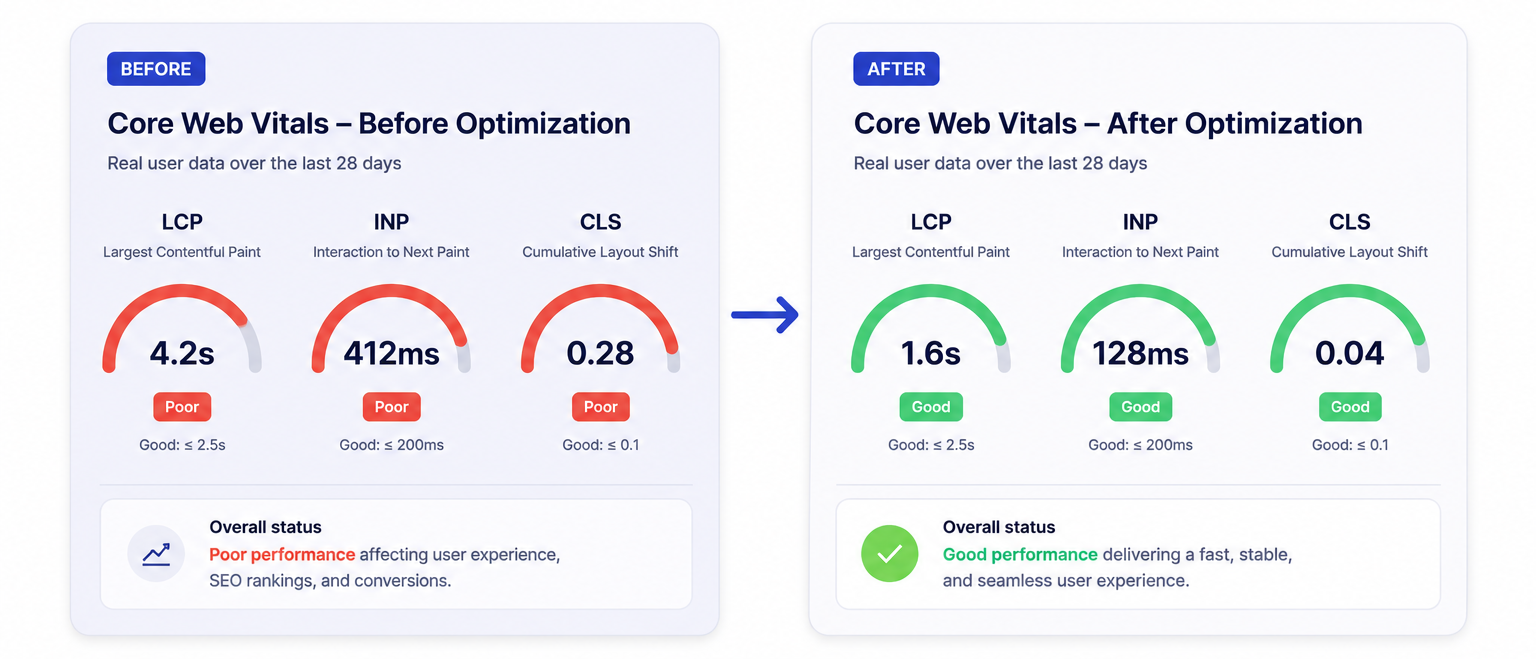
On top of that, image optimization and lazy-loading modules from Amasty, Mirasvit, or Mageplaza can help, and Google Page Speed style optimizers handle JavaScript and CSS bundling, a core part of Magento performance optimization. The bigger performance lever, though, is a modern frontend. A Hyvä theme strips out the heavy default Luma stack and routinely lifts Core Web Vitals more than any single caching plugin. If your store struggles on speed, start with the theme and infrastructure, then add targeted modules.
4. Security and compliance
A breach or a failed PCI scan costs far more than any module. Magento’s own security patches are the non-negotiable baseline, but extensions add useful layers: two-factor authentication hardening, admin action logging, login attempt limiting, and bot and spam protection.
Amasty, MageFence, and Mageplaza offer security modules, and reCAPTCHA is built into Magento for form protection. For privacy and cookie consent under GDPR and CCPA, Amasty GDPR and Mageplaza GDPR are common choices. One caution: security extensions touch sensitive areas of your store, so only install ones from vendors with a clear patching track record.
5. Product reviews and user-generated content
Reviews are among the highest-leverage trust signals on a product page, and they feed rich snippets that improve how your listings look in search. Magento’s native reviews are basic, with no photo reviews, review reminders, or import from third parties.
Amasty Advanced Product Reviews and Mirasvit Advanced Reviews add review reminder emails, photo and rating attributes, and structured data output. If you already use a dedicated reviews platform such as Yotpo, Trustpilot, or Bazaarvoice, use their official Magento connector instead of a second module, so you are not maintaining two review systems at once.
6. Marketing automation and promotions
This category covers abandoned cart recovery, email automation, loyalty and rewards, gift cards, and advanced promotion rules. The native cart price rules are surprisingly capable, so confirm what you genuinely need before buying.
Common picks include Amasty and Mageplaza for promotions, automatic related products, and gift cards, and Mirasvit for follow-up email and rewards. Many merchants instead route email and automation through Klaviyo, Dotdigital, or Adobe’s own tools via their official connectors, which keeps the heavy logic outside Magento and lighter on your store.
7. Page builder and content
Adobe Commerce includes Page Builder natively, and Magento Open Source supports it too, so many stores need nothing extra here. Where teams want more layout control or a faster editing experience, third-party builders from Mageplaza, Landofcoder, and others exist, and Hyvä has its own compatible content tooling.
Before adding a builder, check it renders cleanly on your theme. Heavy page builders are a frequent cause of bloated, slow category and landing pages, which undercuts the performance work in category three.
8. B2B functionality
If you sell wholesale, Adobe Commerce includes a full B2B module set: company accounts, shared catalogs, quotes, and requisition lists. On Magento Open Source, you add these with extensions instead.
Amasty, Webkul, and BSS Commerce all offer B2B suites covering company accounts, customer-group pricing, quick order, and request-for-quote. Because B2B logic touches checkout, pricing, and customer accounts, this is one category where a clean implementation matters more than the cheapest module. If wholesale is core to your revenue, treat it as a build, and lean on dedicated B2B eCommerce expertise.
9. Reporting and analytics
Magento’s built-in reports are limited, and exporting to spreadsheets every week does not scale. Advanced reporting extensions give you profit, inventory, and customer reports in the admin, with the metrics merchandisers and finance need.
Mirasvit Advanced Reports, Amasty Advanced Reports, and Mageplaza Reports are the usual choices. Many stores also push order and behavior data into GA4, BigQuery, or a BI tool, in which case a reporting extension matters less. Decide where your single source of truth is before adding one.
Comparison: the core extension categories
Use this summary to map each category to a default approach and to where it tends to break if you are not careful:
| Category | Trusted vendors | Native first? | Main watch-out |
|---|---|---|---|
| Search and navigation | Amasty, Mirasvit, Algolia | Yes, up to ~3k SKUs | Performance on very large catalogs |
| SEO suite | Mageworx, Amasty, Mirasvit | No, native is thin | Overlapping canonical and redirect rules |
| Performance and caching | Hyvä, Amasty, hosting, and DevOps | Yes, configure first | Plugins cannot fix a heavy theme |
| Security and compliance | Amasty, MageFence, Mageplaza | Patches are baseline | Only trust vendors with strong patching |
| Reviews and UGC | Amasty, Mirasvit, Yotpo | No, native is basic | Do not run two review systems |
| Marketing automation | Amasty, Mageplaza, Klaviyo | Partly, rules are capable | Keep heavy logic outside Magento |
| Page builder | Native, Hyvä, Mageplaza | Yes, native covers most | Builder bloat slows pages |
| B2B | Adobe Commerce native, Amasty, Webkul | Yes on Adobe Commerce | Touches checkout and pricing |
| Reporting | Mirasvit, Amasty, GA4 or BI | Limited natively | Define your source of truth first |
Where do you buy Magento 2 extensions?
Most reputable extensions come from three places: the official Adobe Commerce Marketplace, the vendor’s own store (Amasty, Mageplaza, Mirasvit, Mageworx, Webkul, and others), and the open-source community for free modules. The Marketplace vets submissions and is the safest default, with paid extensions commonly listed from $49 to $449.
Buying direct from a top vendor is also fine and often gives you faster support and earlier compatibility releases. Avoid nulled or pirated extensions entirely. They are a known vector for malware, and they void any support or update path, which is exactly the maintenance trap this guide is trying to help you avoid.
How to spot and remove redundant extensions
Most stores accumulate modules over years of quick fixes, agency handovers, and abandoned campaigns, and nobody ever circles back to remove what is no longer used.
A practical audit starts by listing every installed module with bin/magento module:status, then mapping each one to a business owner and a clear reason it exists. Modules with no owner, no recent traffic, or overlapping functions are your first candidates to retire. Common overlaps include two SEO suites both writing canonical tags, a standalone reviews module running alongside a Yotpo or Trustpilot connector, and several small “mini” extensions doing what one suite already covers.
Before you disable anything, confirm it is genuinely unused. Search the codebase and database for references, check whether it powers a live block or cron job, and snapshot your config so you can restore quickly. Disable first with bin/magento module:disable, regression test, and only fully uninstall once you are confident nothing depends on it. Removing dead code shrinks your attack surface, speeds up deploys, and shortens every future upgrade.
Why staging and rollback matter more than the extension itself
The fastest way to take down a Magento store is to install or update an extension straight on production. Even a well-built module can clash with another one’s plugins, override the same class, or expect a different schema version, and you will not see it until checkout breaks at the worst possible moment.
Treat every install and update as a deployment. Run it first on a staging environment that mirrors production data and configuration, then test the critical paths: add to cart, checkout, payment capture, admin order creation, and any flow the new module touches. Keep a tagged release or database backup so a rollback is one command. A real-world conflict example: an SEO suite and a layered-navigation module both rewriting category URLs can produce duplicate canonicals and 404s that only surface on indexed pages days later, which is exactly why you catch it on staging.
How many extensions is too many?
There is no magic number, but if you are well past the ~30-extension average and your upgrades keep slipping, that is the signal. The cost of an extension is the compounding maintenance over every future upgrade.
Each module you add increases the surface area for conflicts, lengthens regression testing, and can delay how fast you adopt the next Magento security release. Stores that stay lean upgrade faster and break less. If you have inherited a store with dozens of overlapping modules, an audit that consolidates or removes the redundant ones usually pays for itself in upgrade time saved.
Are extensions still worth it on Magento in 2026?
Yes. Magento still powers a meaningful share of serious eCommerce, with Magefan reporting it at roughly 8% of the eCommerce market and well over a hundred thousand live stores, and the extension ecosystem is one of its biggest advantages over more closed platforms.
Choosing the right extensions and the right partner
The hard part of extensions is rarely picking a module, it is integrating it cleanly, keeping it compatible across upgrades, and knowing when to build native instead. That is where an experienced team earns its keep, and where the wrong installs quietly accumulate into a slow, fragile store.
If you want help deciding what to keep, what to consolidate, and what to remove, working with a specialist is the fastest path, and scandiweb has been building and maintaining Magento stores for over a decade
Frequently asked questions about Magento 2 extensions
What are Magento 2 extensions?
Magento 2 extensions are modular pieces of code that add or change functionality on your store, similar to apps on a phone. They can add features Magento lacks natively, such as advanced SEO controls or a richer review system, and they come from the Adobe Commerce Marketplace, individual vendors, or the open-source community.
How many extensions does a typical Magento store use?
About 30 on average, according to the 2026 Magento statistics compiled by Onyx8 Agency. That is a useful benchmark rather than a target. Many high-performing stores run fewer, and consolidating overlapping modules is often a quick win for speed and upgrade time.
How much do Magento 2 extensions cost?
Paid extensions on the Adobe Commerce Marketplace commonly run from $49 to about $449, and many carry annual renewals for updates and support. Free modules exist for many use cases, but the real cost of any extension is the ongoing maintenance it adds across every future upgrade.
Are free Magento extensions safe to use?
Reputable free modules from the Marketplace or established vendors are fine. Avoid nulled or pirated copies of paid extensions entirely, because they are a common malware vector and leave you with no updates or support path.
How do I check if an extension is compatible with my store?
Confirm the supported Magento edition (Open Source or Adobe Commerce) and version, your PHP version, and your theme, including Hyvä compatibility if you run a Hyvä frontend. Test on a staging environment before deploying to production, never directly on the live store.
Do extensions slow down a Magento store?
They can, especially heavy page builders, poorly coded modules, or several extensions doing overlapping work. The number of extensions matters less than their quality and how well they are integrated. Server-side caching, a CDN, and a modern frontend such as Hyvä usually move performance more than any single plugin.
Should I build a feature natively or use an extension?
Use an extension when a trusted vendor already solves the problem well and keeps the module current. Build native when the feature is core to your business, needs deep customization, or when stacking modules would create conflicts. For checkout, pricing, and B2B logic in particular, a clean custom build is often more maintainable than several plugins.
Where is the safest place to buy Magento 2 extensions?
The official Adobe Commerce Marketplace is the safest default because submissions are vetted. Buying directly from a top vendor such as Amasty, Mageplaza, Mirasvit, or Mageworx is also reliable and often gives you faster support and earlier compatibility releases.
Carrying more modules than your store needs? Let us help you audit your extension stack so you run fewer, better-chosen extensions and far fewer upgrade headaches.




































