
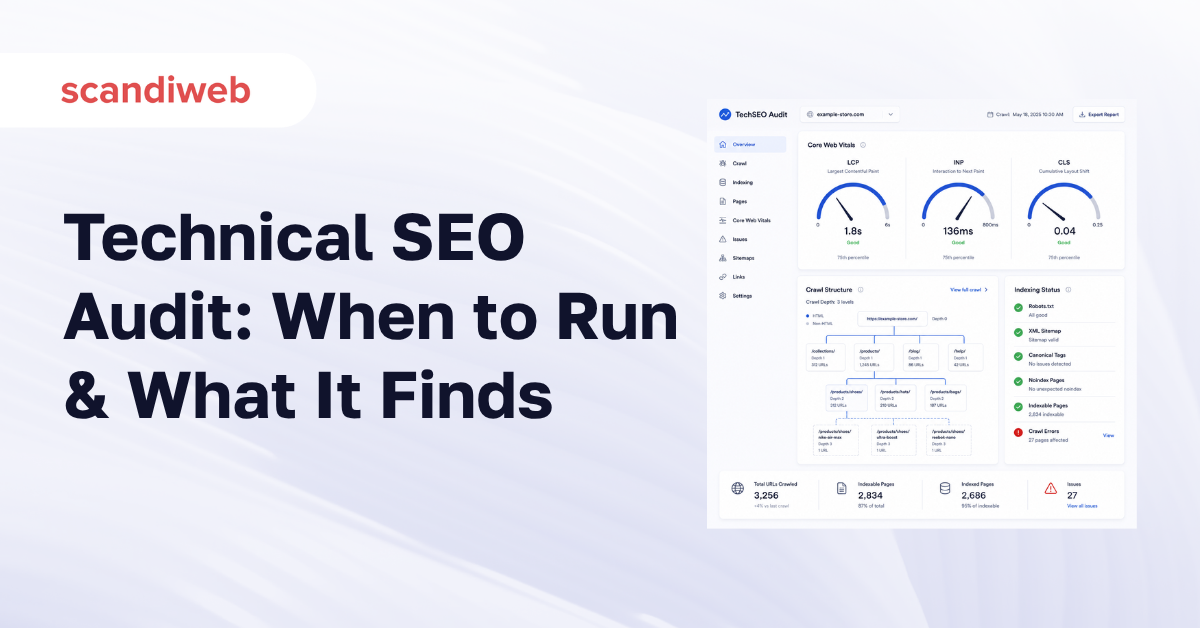
On large eCommerce catalogs, duplicate, low-quality, or blocked URLs can waste up to 30% of the crawl budget Google allocates to a site (OWT, 2026). That is revenue you already paid to earn, sitting in pages Google never gets to. If your rankings have slipped, your last migration cost you traffic, or you simply do not know whether the technical side of your store is helping or quietly bleeding you, a technical SEO audit is how you find out. This article covers what a technical SEO audit actually checks, why it maps directly to revenue, and when it is worth commissioning one.
🚀 Quick takeaway
Most SEO budget goes to content and links, but if crawl, indexing, or speed is broken underneath, none of that spend can compound. The audit is what tells you which one you are dealing with.
Overview
- A technical SEO audit evaluates the infrastructure that lets search engines crawl, render, index, and trust your site, then ranks the issues by revenue impact so you fix the costly ones first.
- It matters because crawl waste, slow Core Web Vitals, indexing errors, and broken redirects suppress rankings no amount of content or link building can recover.
- Run one before any migration or redesign, after a ranking or traffic drop, ahead of peak season, and on a regular cadence, quarterly for most stores and monthly for high-velocity catalogs.
What is a technical SEO audit?
A technical SEO audit is a structured review of the infrastructure that lets search engines crawl, render, index, and trust a site (Semrush, 2024). It answers one decisive question: can Google reach, understand, and rank your content. Where content audits look at what you say and link audits look at who vouches for you, a technical audit checks whether the machine underneath actually works.
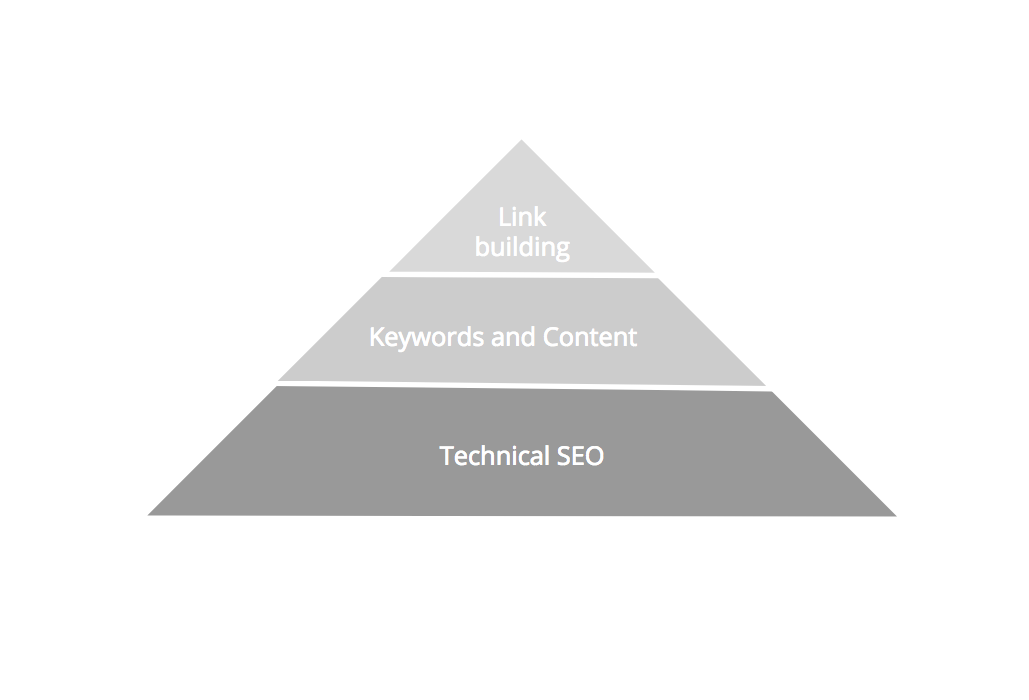
Think of SEO as three layers. Content and keywords decide what you rank for. Links decide how much authority you carry. The technical layer decides whether either of those even gets a chance, because a page Google cannot crawl or index never enters the race. A beginner’s guide to SEO frames the full picture, but the technical layer is the base of the pyramid: get it wrong and the spend above it cannot compound.
Most technical fixes are one-time setups that hold: a working robots.txt, a clean XML sitemap, correct canonical tags, proper redirects. The work is in catching the ones that broke without anyone noticing, and in keeping pace with the signals Google keeps adding, such as Core Web Vitals and mobile rendering.
🚀 Quick takeaway
A technical SEO audit does not chase keywords. It checks whether the plumbing that delivers your keywords to Google is intact, which is why it usually comes first.
Why a technical SEO audit protects revenue
Technical problems are expensive precisely because they are invisible in the channels most teams watch. A category page blocked by a stray noindex tag still loads fine for shoppers and still shows up in your analytics, so nothing looks wrong, except it earns zero organic traffic. Multiply that across a catalog and the lost revenue is real even though no dashboard flags it.
Three patterns cause most of the damage:
- Crawl waste. Google gives each site a finite crawl budget. Spend it on duplicate, faceted, or low-value URLs and your money pages get crawled less often, so new products and price changes take longer to surface.
- Slow performance. Page speed is a ranking signal and a conversion lever at the same time. A slow store loses rankings to faster competitors and loses shoppers at the same checkout.
- Indexing and redirect errors. Broken redirects, orphaned pages, and indexing conflicts quietly remove pages from search, often after a migration nobody audited.
This is the gap a technical SEO audit closes: it converts invisible infrastructure problems into a ranked, costed list you can act on. scandiweb has shipped SEO and platform work across 2,000+ eCommerce projects since 2003, and the pattern repeats, the stores losing organic ground are rarely the ones with bad content. They are the ones with a technical issue no one has looked for yet.
🚀 Quick takeaway
The most expensive technical issues never trigger an alert. They simply make pages earn less than they should, which is exactly what an audit is built to surface.
What we check in a technical SEO audit
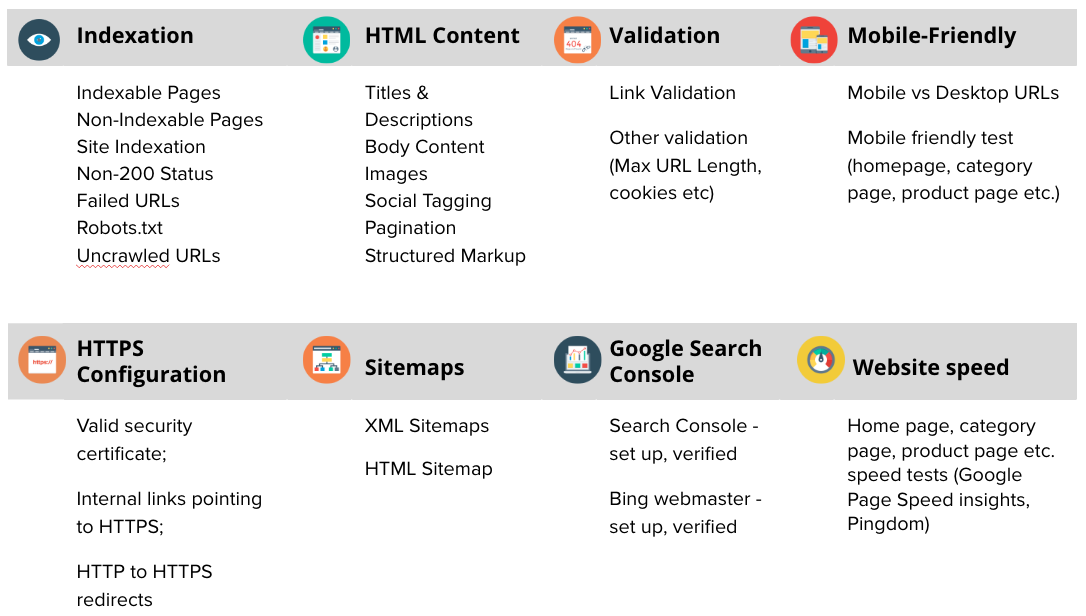
A modern technical audit covers crawlability, indexability, site architecture, internal linking, duplicate content, performance, mobile rendering, structured data, and HTTPS (Semrush, 2024). Below is what each area looks at and why it earns its place. The tooling is the 2026 stack: Google Search Console and Google Analytics 4 for first-party signals, Screaming Frog for full-site crawls, PageSpeed Insights and the Core Web Vitals report for performance, plus log-file analysis on larger sites.
Crawlability and indexation
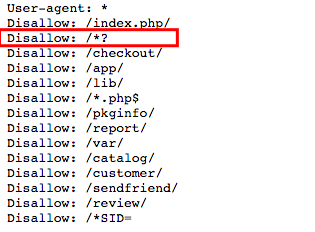
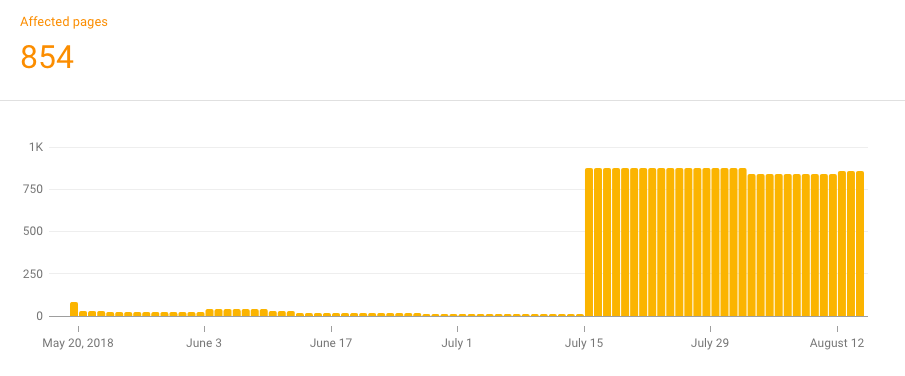
The first question is how much of your site Google can actually see. We check how many pages are indexed versus how many should be, whether important pages are accidentally set to noindex, and whether robots.txt is blocking directories it should not. On Magento (Adobe Commerce) stores especially, a copied robots.txt template often blocks every URL containing a question mark, which silently buries layered navigation and pagination and turns Search Console into a wall of warnings.
Crawl budget and duplicate content
On large eCommerce catalogs, duplicate, low-quality, or blocked URLs can waste up to 30% of the crawl budget Google allocates, and pages buried more than three or four clicks from the homepage get crawled far less often, which is why faceted navigation and orphan pages are core audit targets (OWT, 2026). Thin and near-identical pages are a classic crawl-budget drain, see our guide to duplicate content and SEO for the eCommerce patterns that trigger it.
Site performance and Core Web Vitals
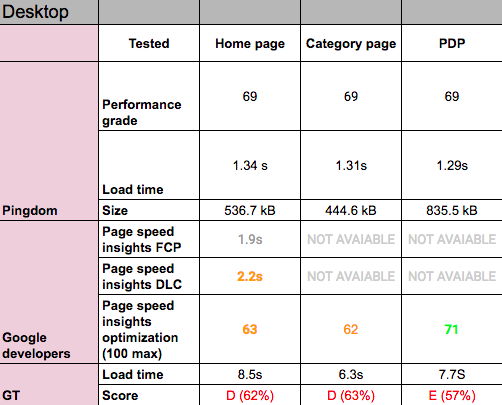
A technical SEO audit measures the three Core Web Vitals Google uses as ranking signals, Largest Contentful Paint under 2.5 seconds, Interaction to Next Paint at or under 200 milliseconds, and Cumulative Layout Shift at or under 0.1 (web.dev, 2024), with INP now the responsiveness metric that replaced First Input Delay. We test product, category, homepage, and CMS templates separately, because the optimization level usually differs by page type. If you want to read the speed scores correctly rather than chase a single number, our take on using Google PageSpeed Insights the right way explains what to trust.
HTML, redirects, and HTTPS
Search engines read your titles, meta descriptions, canonical tags, and heading structure to decide what each page is about, so the audit checks they are correct and unique. It also tests every internal and external link for broken targets and server errors, validates the HTTP-to-HTTPS redirects and security certificates, and confirms the redirect chain is clean. Screaming Frog surfaces most of this at scale, but a manual walkthrough still catches what crawlers miss.
XML sitemaps and Search Console
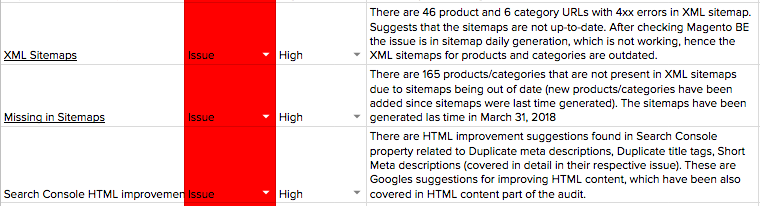
The audit confirms your XML sitemap lists the right pages, drops the wrong ones, and is free of broken or redirected links. Magento’s default sitemap is limited out of the box, often missing the homepage and custom CMS pages while including test or low-quality URLs, so we built a mini-module to add and remove custom URLs cleanly. We also verify Google Search Console and Bing Webmaster Tools are set up, properties are confirmed, and no errors are stacking up unread.
Structured data
Structured data is still a competitive edge. Industry estimates put schema adoption at only around 17% of the top 10 million sites, so getting product, breadcrumb, and FAQ markup right separates an audited store from most of its rivals. The audit checks what markup exists, whether it validates, and where adding it would win rich results competitors are leaving on the table.
International and platform-specific checks
Stores running across countries or languages need hreflang, separate sitemaps, and Search Console localization checked so the right version reaches the right audience. Platform matters too. Running on Shopify rather than Magento? Our Shopify SEO checklist covers the platform-specific technical checks.
For the step-by-step execution view, our technical SEO audit guide for eCommerce walks through each check in tool-level detail, it is the hands-on companion to this decision-maker overview.
🚀 Quick takeaway
The checks have not changed in spirit, but the stack has. Core Web Vitals, INP, and structured data now carry weight that page-load seconds and basic crawls used to carry alone.
When do you need a technical SEO audit?
Most sites benefit from a full technical audit each quarter, high-velocity eCommerce stores should audit monthly, and any redesign, replatform, or domain migration warrants an audit immediately (industry guidance, 2026). Beyond the cadence, four specific triggers make an audit worth commissioning now rather than later.
Before a migration or redesign
Migrations are where unaudited sites lose the most traffic. Redesigns, platform changes such as a Magento 1 to Magento 2 upgrade, domain or folder moves, and HTTP-to-HTTPS shifts all rewrite the technical foundation, and SEO is the thing that breaks quietly when no one is watching it. We recovered and grew organic clicks by 24% by getting the technical SEO right during a PWA migration. The safe sequence is to benchmark the live site first, decide what to migrate versus improve, audit the staging build before go-live, build a complete 301 redirect map, and re-check indexing and redirects immediately after launch.
As the first real SEO step
If no structured SEO work has happened yet, an audit scopes the problem before you spend on content or links. It tells you which issues are High, Medium, or Low priority and what each one costs to fix, so the budget goes to the changes that move rankings rather than the ones that feel productive. It is equally useful when SEO has been done piecemeal and you suspect something foundational was skipped.
After a ranking or traffic drop
When organic traffic falls and the content has not changed, the cause is usually technical: a botched redirect, a creeping Core Web Vitals regression, an indexing conflict, or crawl budget being eaten by new low-value URLs. An audit isolates the cause instead of leaving you to guess, and the revenue impact of fixing it can be substantial once the blocker is gone.
Ahead of peak season
Going into a high-traffic period, the cost of a technical problem multiplies. Slow pages and crawl issues that you can absorb in a quiet month become lost sales when traffic peaks, so auditing a month or two before the rush leaves time to fix what you find.
🚀 Quick takeaway
The best time to audit is before something breaks, the second best is the moment traffic drops. Waiting until peak season to discover a crawl issue is the most expensive option.
Who runs a technical SEO audit, and can AI do it?
A technical SEO audit is usually run by an in-house SEO specialist or an agency team using a crawler and analytics stack, then interpreted by someone who can prioritize the findings by business impact. Tools surface the data, but deciding which of 400 flagged issues actually matters for your revenue is judgment, not automation. That interpretation layer is the difference between a 200-row export and a plan.
AI assistants and audit tools can speed up the data-gathering, flagging broken links, scoring Core Web Vitals, summarizing crawl reports, but they cannot yet weigh a faceted-navigation crawl trap against a slow product template for your specific catalog and margins. Use them to accelerate the crawl, not to replace the prioritization.
🚀 Quick takeaway
The bottleneck in a technical audit was never collecting the data. It is deciding what to fix first, which is where experienced judgment still beats any tool.
How scandiweb runs a technical SEO audit
Every issue we find gets a plain-language description, a priority of Low, Medium, or High, and a fix estimate where developer work is needed, so you get a costed action plan rather than a raw export. We fix the High and Medium items first to set the ground for everything above the technical layer, then hand back something your team can actually execute against. For stores on Magento (Adobe Commerce), the audit ties directly into Magento SEO Services and, where the root cause is the build itself, Magento store development.
Frequently asked questions
What is a technical SEO audit?
A technical SEO audit is a structured review of the infrastructure that lets search engines crawl, render, index, and trust a website. It checks crawlability, indexing, site speed, Core Web Vitals, redirects, structured data, and HTTPS, then ranks the issues found so the most costly ones get fixed first.
What is the difference between an SEO audit and a technical SEO audit?
An SEO audit is the broad term covering content, keywords, backlinks, and technical health together. A technical SEO audit is the subset focused only on the infrastructure, crawling, indexing, speed, and rendering, that decides whether search engines can reach and understand your pages at all.
What are the four types of SEO?
The four commonly cited types are technical SEO, on-page SEO, off-page SEO, and local SEO. Technical SEO covers crawling and indexing, on-page covers content and HTML, off-page covers links and authority, and local covers map and proximity ranking. A technical audit focuses on the first.
What tools are used for a technical SEO audit?
The 2026 stack is Google Search Console and Google Analytics 4 for first-party data, Screaming Frog for full-site crawls, PageSpeed Insights and the Core Web Vitals report for performance, and log-file analysis on larger sites. Tools surface the issues, but a person prioritizes which ones matter.
Can ChatGPT do an SEO audit?
ChatGPT can help interpret crawl data, summarize reports, and draft fixes, but it cannot crawl your live site or weigh issues against your catalog and margins on its own. Pair it with a crawler for the data, and with human judgment for deciding what to fix first.
How often should you run a technical SEO audit?
Most sites benefit from a full technical audit each quarter, while high-velocity eCommerce stores should audit monthly. Run one immediately before and after any migration, redesign, or platform change, and any time organic traffic drops without a content reason.
About this guide
Written by Lina Ivanova, Head of Traffic Acquisition at scandiweb. Maintained by the scandiweb SEO team. Last updated May 2026.
If your store is losing organic ground and you cannot tell whether the cause is technical, that uncertainty has a price, and it grows every month you leave it unanswered. Put a number on it instead of guessing, book a technical SEO audit and we will scope one for your site.




































