
Did you know that only 43% of Shopify stores pass all three Core Web Vitals according to Google’s 2025 CrUX data? We’ve identified that the same handful of issues – duplicate product URLs, app bloat, thin collection pages, broken redirects after slug edits – cause most of the lost traffic in scandiweb’s audits.
To improve SEO on Shopify, start with technical foundations: Google Search Console, GA4, sitemap submission, clean indexation, and a fast theme. Then optimize product and collection pages, build internal links, publish useful content, add structured data, and run regular audits. The order below is the one that holds up in audit after audit.
This article outlines all you need to know about technical SEO and on-page SEO for Shopify and Shopify Plus stores.
Shopify SEO checklist: what to fix first
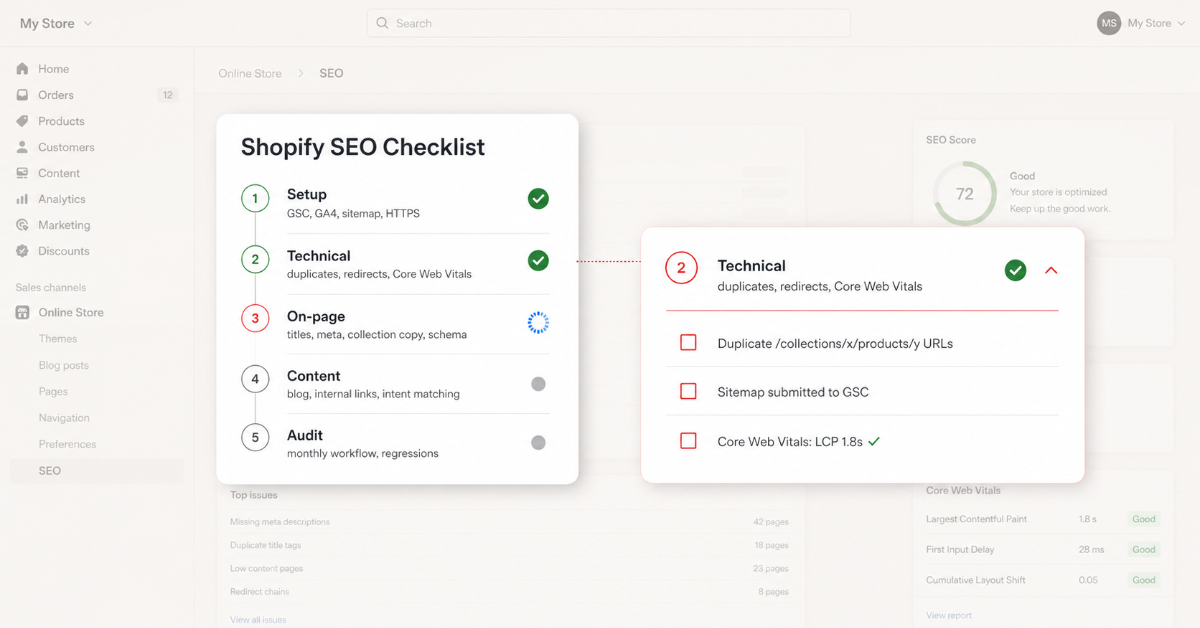
Duplicate URLs, page speed, and product and collection metadata are the first issues to fix on a Shopify store. These are the issues most likely to block rankings or waste crawl budget. Once technical health is stable, move to on-page content, internal links, structured data, and ongoing audits.
- Connect Google Search Console and GA4 before any optimization work, because without measurement you cannot identify ranking drops or improvements.
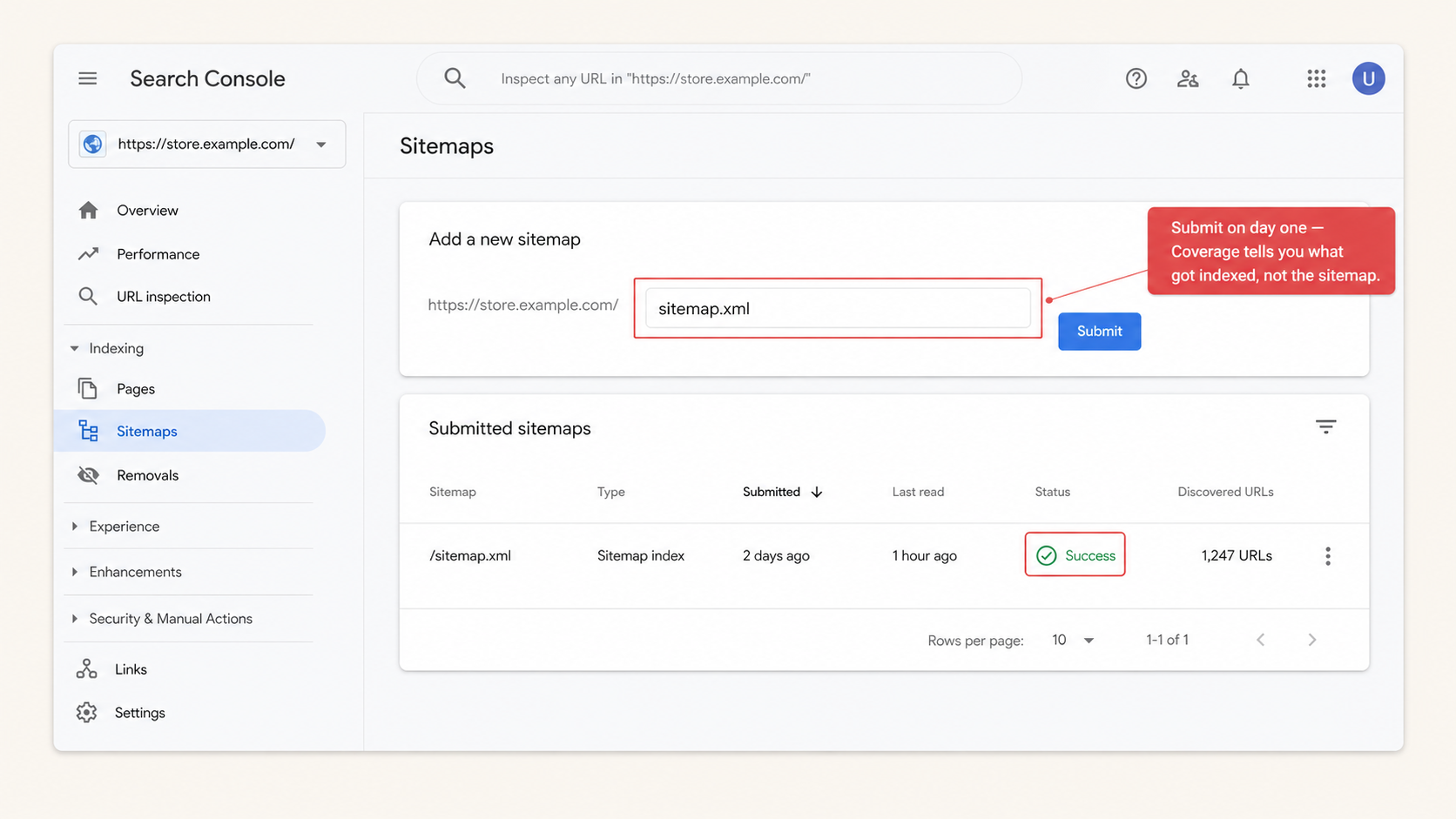
- Validate indexation through the Coverage report, not the sitemap itself, since pages in the sitemap are often not indexed.
- Fix duplicate product URLs caused by collection paths, because duplicate URLs split ranking signals and waste crawl budget.
- Audit app bloat and unused theme code, since excess scripts slow pages and directly impact rankings.
- Treat the SEO checklist as phased, not flat: setup, technical, on-page, content, and audit each depend on the previous layer.
🚀 Quick takeaway
If you only do one thing this week, fix the /collections/x/products/y duplicate URLs. It is the highest-impact, lowest-effort fix on most Shopify stores, and it usually takes under an hour of theme work.
Priority framework: high-impact tasks vs low-impact
This Shopify SEO checklist groups tasks by ranking impact, not by effort, so merchants know what to fix first. The priorities below reflect what moves traffic in scandiweb’s audit work, not a generic “do everything” list.
| Priority | Task | Why it matters | Where to check or tool |
|---|---|---|---|
| High | Connect GSC and GA4 | Without measurement, ranking changes cannot be diagnosed or improved | Shopify admin, Preferences |
| High | Submit sitemap.xml | Speeds discovery of new and updated pages | GSC, Sitemaps |
| High | Fix duplicate product URLs | Consolidates ranking signals to one URL and avoids duplicate indexing | Screaming Frog, Sitebulb |
| High | Audit page speed | A ranking factor when competing pages are otherwise similar | PageSpeed Insights |
| High | Rewrite title tags and meta descriptions | Directly affects rankings and click-through rate in search results | Shopify admin, Products and Collections |
| Medium | Add product schema | Enables rich results (price, stock, reviews) | Schema.org validator |
| Medium | Improve collection page copy | Collection pages drive higher-volume rankings | Site crawl, manual review |
| Medium | Optimize images (alt text and compression) | Improves accessibility and page speed (LCP) | Theme editor, image app |
| Medium | Strengthen internal linking | Passes authority to products and collections | Manual review, crawl |
| Low | Set up Shopify Markets (regions) | Relevant only for multi-region SEO | Shopify admin, Markets |
How to set up SEO for Shopify
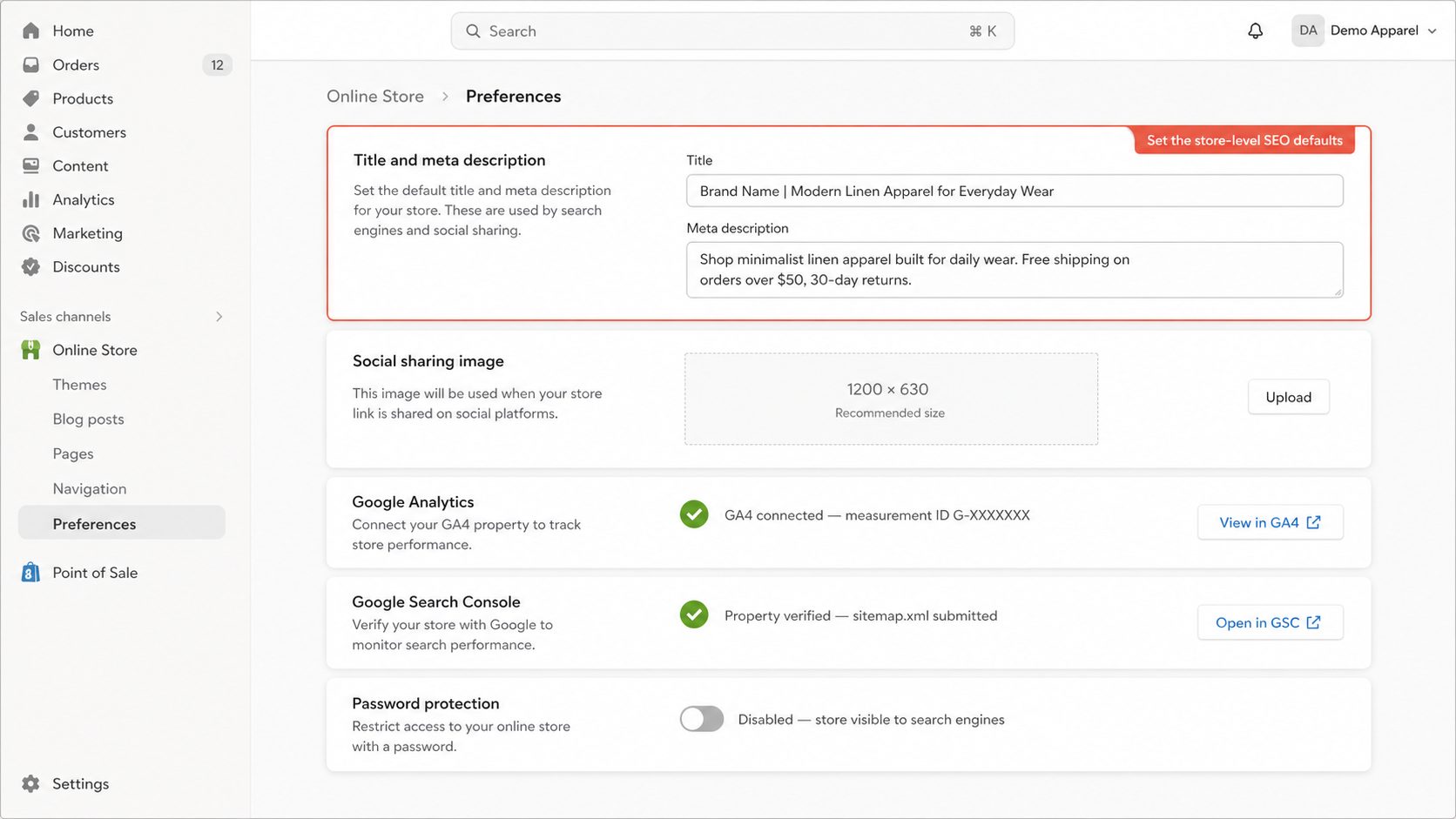
To set up SEO for Shopify, connect Google Search Console and GA4, submit your sitemap.xml, confirm HTTPS is active. Choose a lightweight theme like Satoshi which is the #1 Shopify theme with exceptional UX and optimized performance baked-in. Also a good tip is to review the default title and meta description templates.
Six steps cover the practical setup work, and any Shopify SEO checklist that runs longer than this in the setup phase usually buries the items that move rankings.
- Connect GSC: verify domain, submit
sitemap.xml, and set the preferred domain. - Connect GA4 through Shopify’s built-in integration in admin preferences.
- Confirm HTTPS is active and the primary domain redirects correctly (www vs non-www).
- Review default title and meta templates in theme settings, since most Online Store 2.0 themes ship with generic placeholders that need replacing.
- Set up Online Store 2.0 structured content if your theme supports it, so app blocks live where you place them rather than injecting into every template.
- Install one metadata management app or use Shopify’s native fields, and avoid stacking multiple SEO apps that modify the same elements.
In scandiweb’s Shopify audits, the most consistent setup error is not what gets installed, but what gets left behind from a previous theme or app stack. Old metadata templates, abandoned redirect tools, and three competing schema apps tend to outlast the team that installed them. Setup is the right moment to remove them, not to layer on more. For the wider operational picture, our guide on setting up a Shopify store correctly from the start covers the questions that come up before SEO work even begins.
🚀 Quick takeaway
Setup is not where rankings come from. It is the layer that lets every other optimization take effect, which is why skipping it quietly compounds for months.
What Shopify handles automatically
sitemap.xmlgeneration, auto-updated as products and collections change- Canonical tags on product and collection pages
- HTTPS across all pages
- Mobile-responsive themes by default
robots.txt, editable throughrobots.txt.liquidin theme code since 2021- Editable title and meta description fields on every page
Shopify covers the technical foundation, not the strategy. The platform will not decide what your H1 should say, which collections deserve internal links, or whether your product copy answers a buyer’s actual question.
What you still need to optimize manually
| Shopify handles automatically | You still need to optimize |
|---|---|
sitemap.xml generation | Submit sitemap to Google Search Console |
| Canonical tags | Fix duplicate URL paths from collection structure |
| HTTPS | Review redirect chains after URL edits |
| Mobile-responsive theme | Optimize Core Web Vitals (LCP, CLS, INP) on real devices |
| Meta field structure | Write unique title tags and meta descriptions per page |
| Default product page layout | Optimize H1 usage, alt text, internal links, and schema |
Technical SEO for Shopify
Technical SEO for Shopify focuses on making sure Google can crawl, index, and understand the right pages without wasting crawl budget on duplicates, broken URLs, or slow templates. The most common issues on Shopify stores are duplicate product URLs from collection paths, app-induced script bloat, unused theme code, missing product schema, and 404s left behind after URL edits. All of them are fixable in the admin or theme code, and all of them compound when ignored.
Check indexing, sitemap, and crawlability
Work through the indexation review in this order:
- Submit
sitemap.xmlin Google Search Console so new and updated pages are queued for crawling. - Use the Coverage or Pages report to find non-indexed URLs. The sitemap tells Google what exists, not what got indexed.
- Inspect critical URLs (homepage, top collections, top products) through URL Inspection to confirm Google’s last-crawled version.
- Review
robots.txt.liquidfor unintended blocks introduced by apps or theme edits. - Confirm product and collection pages return a 200 status with indexable meta robots tags.
Shopify stores often over-block through app-injected noindex tags, so check response headers, not just on-page meta. The most common pattern: a review or upsell app sets noindex on out-of-stock product pages by default, and the merchant only finds out when those products come back in stock and refuse to rank.
Fix duplicate URLs, redirects, and canonical issues
Four named issues cause most of the duplicate-content losses on Shopify:
- Collection-path duplicates.
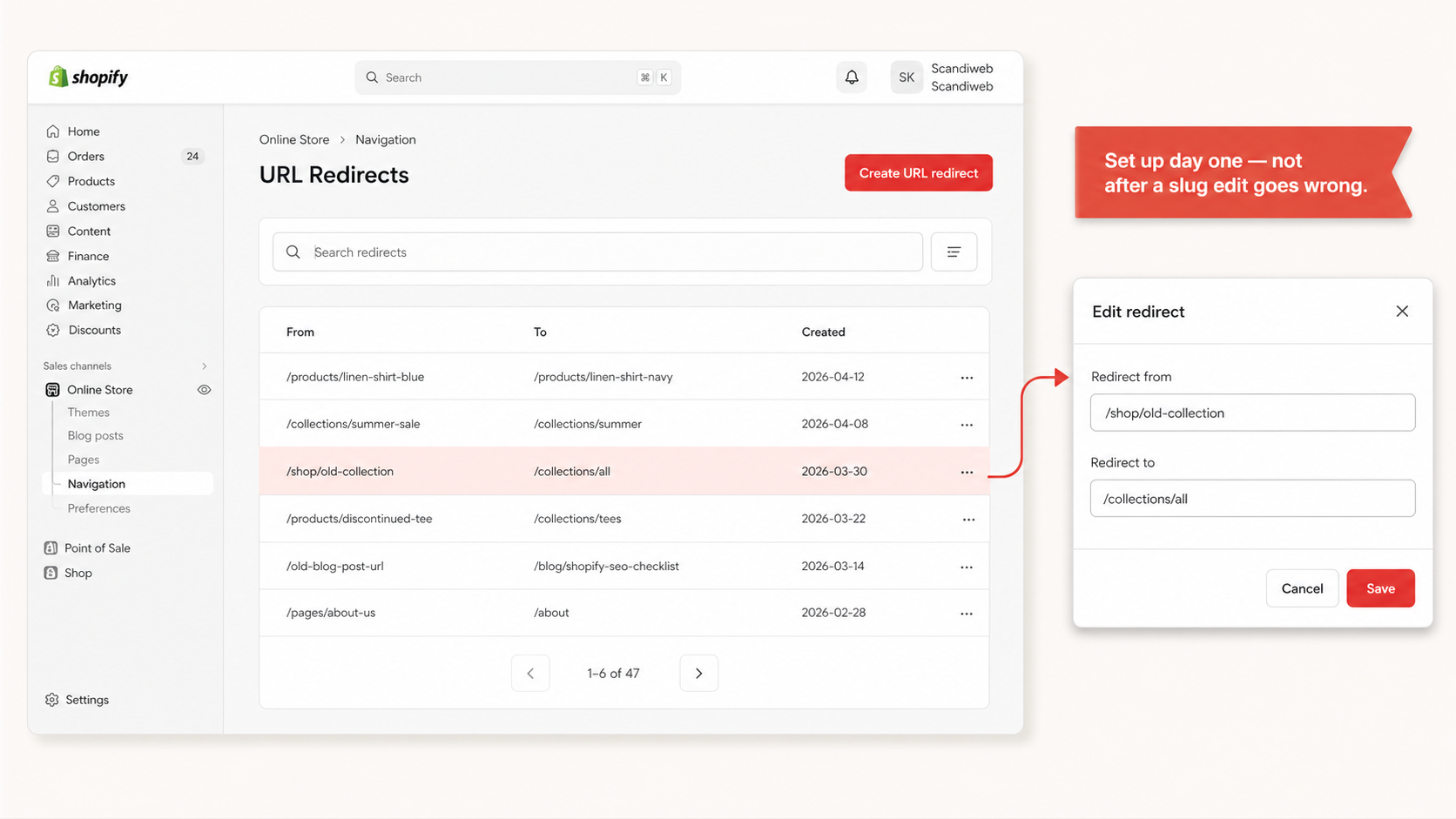
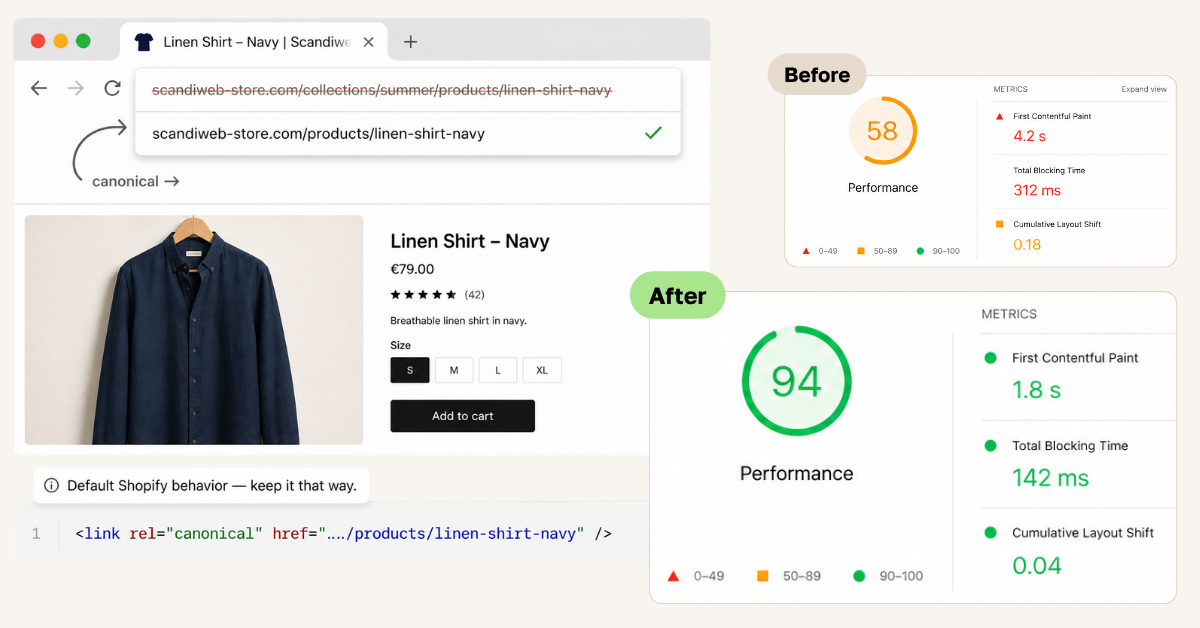
/collections/summer/products/xvs/products/x. The canonical points to the bare path by default, but merchants often break this with app modifications or theme edits. With 500 products, 1,000+ URLs end up crawlable, even if only half deserve to rank. - Outdated product URLs after slug edits. Shopify prompts you to create a 301 redirect when you change a URL, but the prompt is frequently missed during bulk edits, CSV imports, or migrations. Broken redirects are one of the most common causes of traffic loss in scandiweb audits, and the risk peaks during platform migrations where URL mapping has to be handled deliberately.
- 404s from deleted products that were never redirected to the parent collection or a relevant alternative.
- Seasonal or out-of-stock products. Decide redirect vs
noindex, but do not delete pages that already earned backlinks or rankings.
Our guide on migrating to Shopify without losing SEO covers URL mapping and redirect handling in detail. Inside the admin, manage redirects under Online Store, Navigation, URL Redirects.
Improve Shopify speed and Core Web Vitals
Speed is the single most common SEO failure scandiweb sees in Shopify audits. Google’s current Core Web Vitals thresholds are LCP under 2.5 seconds, INP under 200 milliseconds, and CLS at or below 0.1. The fixes worth prioritizing are Shopify-specific, not generic:
- App script bloat, especially review, popup, and tracking apps that inject scripts on every page rather than the templates that need them
- Unused theme sections that load even when hidden behind feature flags
- Unoptimized product images, where switching to
.webpand lazy-loading below-the-fold media usually clears the LCP threshold on its own - Third-party tracking scripts firing synchronously instead of through deferred or async loaders
- Heavy hero sliders and autoplay videos that push LCP past 4 seconds on mobile
The Dawn theme on Online Store 2.0 ships with strong Core Web Vitals out of the box, often scoring 95+ on Lighthouse before customization. In scandiweb’s audits, Dawn stores routinely drop to 55-65 on mobile once 5-10 apps and unoptimized media land on top, which is why theme choice usually matters more than post-launch optimization. For a deeper view of fixes that move the score, see scandiweb’s guide on improving Shopify site speed and performance.
🚀 Quick takeaway
Theme choice is a Core Web Vitals decision, not a design decision. A fast theme with five apps will usually outperform a heavy theme with one.
On-page SEO for Shopify
On-page SEO on Shopify optimizes each product, collection, and blog page so search engines understand what it should rank for. Focus on unique title tags, meta descriptions, one clear H1 per page, useful body copy, image alt text, and internal links to relevant products or collections. Shopify provides the fields. Merchants are responsible for filling them with intent-matched content.
Product page SEO checklist
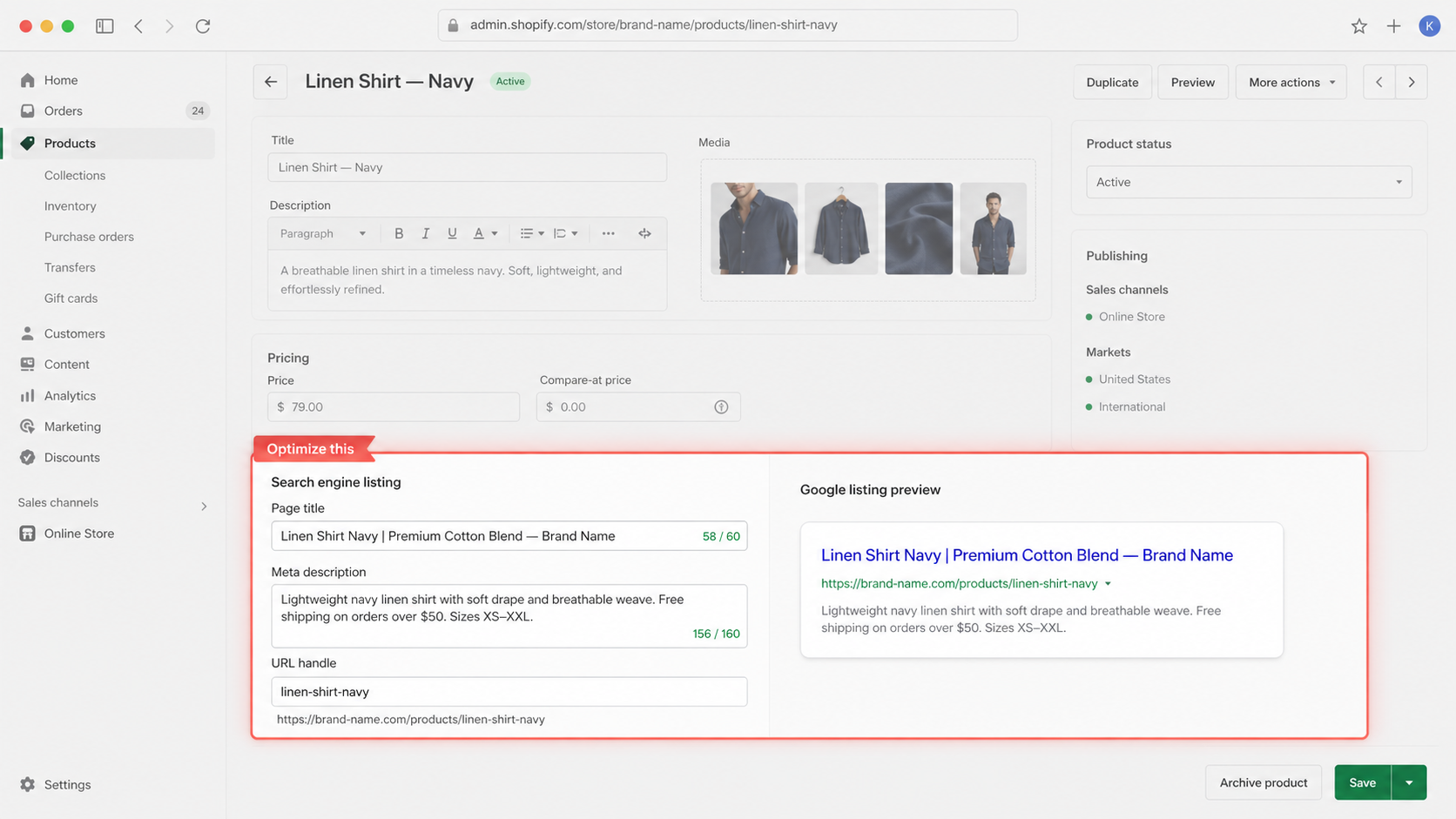
- Unique title tag with primary keyword and brand, 55 to 60 characters
- Meta description with value prop and CTA, 150 to 160 characters
- H1 matches the product name, with no duplicate H1s injected by theme sections
- Product description answers the top three buyer questions, not just specs
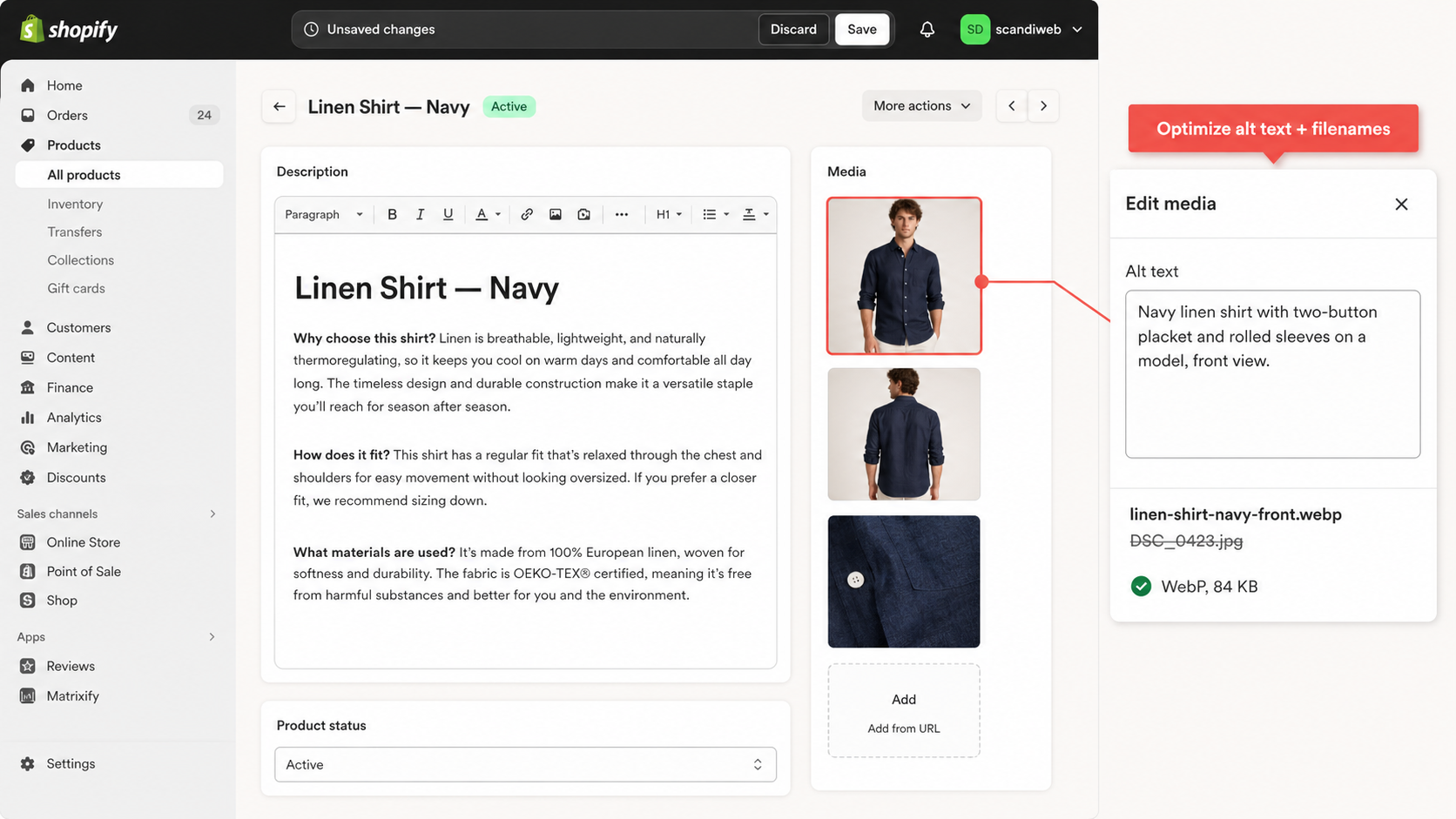
- Image filenames use a descriptive slug like
linen-shirt-navy.jpg, notDSC_0423.jpg - Alt text describes the image for accessibility, with keyword use only where natural
- Product schema is in place (Online Store 2.0 themes add this by default, but verify on the rich results test)
- Internal links to two or three related products or the parent collection
The “300 words per product” rule is outdated. Say enough to answer buyer questions, then stop. Thin product pages fail. Padded ones fail too. The pattern that holds up across audits: a 120-word description that resolves three real buyer questions outperforms a 400-word block of brand voice that resolves none.
Collection page SEO checklist
Collection pages typically rank for higher-volume keywords, while product pages capture long-tail intent. This is where most Shopify SEO traffic comes from, yet many stores leave collection pages thin or poorly structured. The fix is usually copy and structure, not new features.
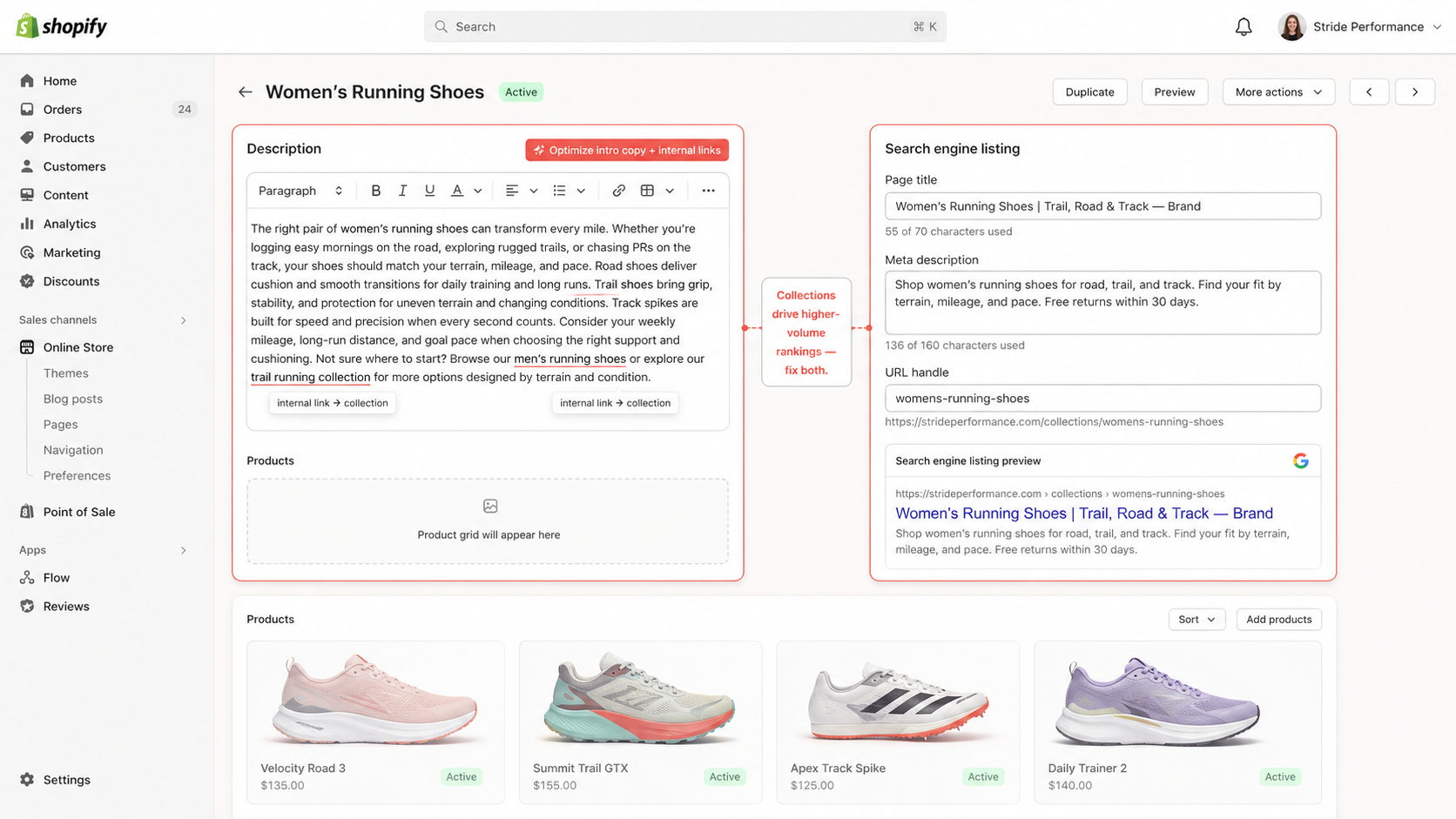
- One primary keyword target per collection, for example “women’s running shoes”
- 100 to 200 words of intro copy above the product grid, not below it where users scroll past
- Useful filters: size, color, price range, brand
- Internal links to subcategories and bestsellers inside the intro copy
- Avoid thin collections with fewer than four or five products, since they should be merged or redirected
- Internal links into the collection from blog content that targets related queries
Blog and content SEO checklist
Shopify blog content supports product and collection rankings by targeting informational queries and linking down to money pages. Avoid publishing content without clear search intent, since generic updates and low-value posts dilute topical focus. Most Shopify stores lack a clear internal linking hierarchy. Collections do not link to related collections, and product pages do not link back to their parent categories. This is one of the most common reasons stores fail to scale organic traffic.
- Target questions buyers ask before purchasing, using GSC Search Terms and AnswerThePublic
- Every blog post links to at least two products or collections using descriptive anchor text
- Internal links from product pages back to relevant blog content, such as care guides or comparisons
- Avoid brand updates and press releases in the main blog, since they dilute topical focus
🚀 Quick takeaway
Collection pages, not blog posts, do most of the heavy lifting in Shopify SEO. Treat blog content as an internal-link engine that points back at them.
Shopify SEO apps and tools: what do you actually need?
Shopify SEO apps handle specific technical tasks well: image compression, schema markup, redirect management, metadata bulk editing, and audit reports. They do not replace SEO strategy, keyword research, or content quality work. Most stores need one or two apps, not five. Stacking SEO apps often adds script weight that cancels the ranking benefit.
The categories worth considering, picked by problem rather than brand:
- Image compression for speed and LCP improvement
- Schema markup for rich results, only if your theme does not already cover it
- Redirect management, especially after a migration or large slug change
- Metadata bulk editing for stores with several thousand products
- Technical audits, used as one-time or monthly diagnostic, not as a permanent install
Most SEO apps overlap heavily. Installing multiple apps that modify metadata or schema often creates conflicts rather than improvements, and each one adds JavaScript weight and database calls to every request. Treat apps as tools for specific jobs, not as strategy: they earn their slot when a Shopify-native field cannot do the same work. If a function already lives in Online Store 2.0 or in your theme, an app for it is overhead, not optimization.
🚀 Quick takeaway
Apps that overlap with Shopify’s native fields are not optimization, they are extra script weight wearing an SEO label.
Shopify SEO audit: monthly workflow
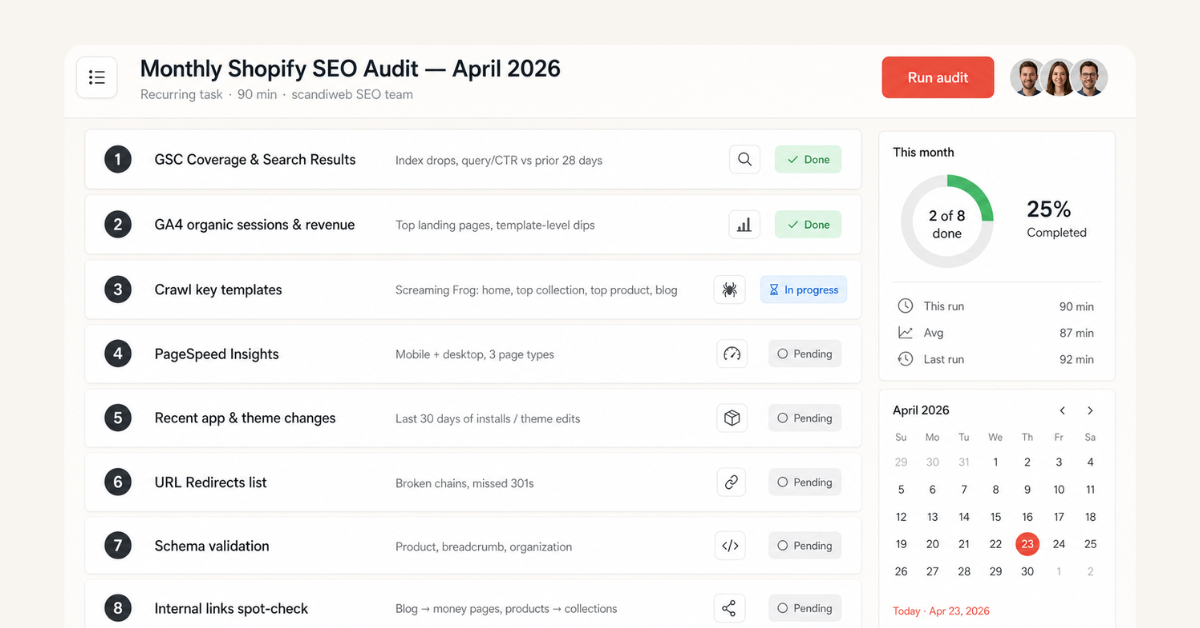
A Shopify SEO audit should check indexation, page speed, duplicate URLs, structured data, internal links, and content quality. The goal is not to surface every issue, it is to identify the fixes most likely to move rankings and revenue this month. A repeatable workflow beats occasional deep audits, and that is how scandiweb’s SEO team runs monthly checks across Shopify clients.
Where the previous Technical SEO section covered what to optimize, this section covers how to find what needs optimizing.
Step-by-step audit process
- GSC Coverage and Search Results. Check the Coverage report for indexation drops, then review Search Results for query and CTR declines compared with the previous 28 days.
- GA4. Review organic sessions, top landing pages, and revenue by landing page. Sudden drops on a single template usually indicate a technical change, not a content issue.
- Crawl key templates. Run Screaming Frog or Sitebulb on the homepage, top collection, top product, and blog templates to surface broken links, duplicate metadata, and orphan pages.
- PageSpeed Insights. Run on three page types (homepage, top collection, top product) on both mobile and desktop. Mobile is where Core Web Vitals usually fail first.
- Recent app and theme changes. Review installs and theme edits from the last 30 days. Most sudden ranking drops trace back to a deploy in this window.
- URL Redirects list. Check for broken chains, missed 301s, and orphaned redirects from old slugs.
- Schema validation. Run product, breadcrumb, and organization schema through Schema.org validator and Google’s Rich Results test.
- Internal links. Spot-check links from blog posts to money pages and from product pages back to parent collections.
Always compare performance against the previous 28 days to identify real changes, not normal fluctuation. The same eight steps run monthly catch most regressions before they show up in revenue, which is why this is the workflow scandiweb’s team uses on retainer accounts rather than reserving deep audits for once-a-quarter exercises.
🚀 Quick takeaway
Audits do not need to be heroic. A 90-minute monthly walkthrough of the same eight steps catches most regressions before they show up in revenue.
Is Shopify good or bad for SEO?
Shopify is good for SEO for most eCommerce stores because it handles hosting, HTTPS, sitemaps, canonical tags, and mobile-responsive themes by default. Shopify becomes limiting when merchants rely on too many apps, use slow themes, create thin collection pages, or need deeper control over URL structure (including the forced /products/ and /collections/ path prefixes). Shopify rankings usually come down to app discipline and how much intent-matched copy lives on collection pages, not the platform underneath.
Out of the box, Shopify gets the foundation right. Hosting and HTTPS ship by default, sitemaps and canonical tags generate automatically, and the admin lets merchants edit title tags, meta descriptions, alt text, and URL handles without touching code. Mobile-responsive themes are the baseline, and for 80% of stores that covers what is needed.
The named limitations are worth understanding before committing to the platform. The /products/ and /collections/ URL path prefixes are forced and cannot be restructured. Advanced checkout customization sits behind Shopify Plus, while standard plans allow only limited styling and settings. Shopify allows editing robots.txt through robots.txt.liquid, but access remains more limited than fully self-hosted platforms.
For most stores, these are acceptable trade-offs. For brands with complex taxonomies, multi-brand structures, or custom URL requirements, they are constraints to plan around. Our analysis of Shopify’s SEO limitations covers the edge cases in detail.
🚀 Quick takeaway
The platform is rarely the ceiling. Apps and theme choices usually are.
Shopify SEO tips for new stores
For a new Shopify store, SEO priorities are narrower: connect GSC and GA4, write unique titles and meta descriptions for products and collections, add 100 to 200 words of useful copy to top collections, build internal links from blog to money pages, and avoid installing apps that duplicate native Shopify features. Content marketing and link building come after the core pages are strong, not before.
A few stage-specific guidelines that consistently hold up for new stores:
- Start with product and collection page optimization, not blog content. Money pages compound. Blog posts route traffic into them.
- Pick an SEO-friendly theme on Online Store 2.0, with Dawn as the reference benchmark for Core Web Vitals. Our roundup of choosing an SEO-friendly Shopify theme compares the most credible options.
- Avoid installing more than two or three apps in the first month. The temptation to bolt on review, popup, and upsell apps before the catalog is even fully populated is the single biggest source of avoidable speed regressions.
- Set up URL Redirects from day one for any product slug changes, not after a slug edit goes wrong.
- Wait until you have 50 or more products before investing in content marketing. Linking to a thin catalog from a blog post does not generate traffic, it generates bounces.
How to improve SEO on Shopify: action plan by store stage
If your Shopify store is new, start with setup, indexation, metadata, and collection structure. If your store already gets traffic but growth has plateaued, prioritize technical audits, page speed, internal linking, and content refreshes. If rankings have dropped, check recent theme changes, app installs, URL edits, and broken redirects first. These account for most sudden Shopify SEO drops.
Fix first if you are growing:
- Core setup: GSC, GA4, sitemap, HTTPS
- Title and meta on top 10 products and top 5 collections
- Internal links from blog to money pages
- Basic product schema
Fix first if you are diagnosing a drop:
- Recent theme or app changes from the last 30 days
- URL edits without 301 redirects
- Indexation drops in GSC Coverage report
- Core Web Vitals regression
- Broken redirect chains
In a recent Magento 2 to Shopify migration, scandiweb’s SEO program for Kouboo used full metadata mapping, redirect handling, and ongoing optimization to grow organic revenue 107% post-launch, with the post-migration traffic dip held to 8-9% and recovered inside the first month. Migrations are the highest-stakes version of this action plan, but the underlying logic is the same on a stable store: control what changed and protect the URLs that already rank.
🚀 Quick takeaway
Sudden ranking drops almost always trace back to a change made in the last 30 days. Start with what changed, not with what you suspect.
Shopify SEO priorities by use case
| Fix first if you are growing | Fix first if rankings just dropped |
|---|---|
✓Connect Google Search Console and GA4, then submit your sitemap ✓Write unique titles and meta descriptions for your top 10 products and top 5 collections ✓Add internal links from blog posts to product and collection pages ✓Add product schema so listings can show price, stock, and reviews in Google | ✓Check what apps or themes you changed in the last 30 days ✓Add 301 redirects for any product URLs you edited ✓Open Google Search Console Coverage and look for indexation drops ✓Test Core Web Vitals on mobile and fix any speed regressions ✓Audit your URL Redirects list for broken chains |
Frequently asked questions
What is SEO in Shopify?
SEO in Shopify is the process of optimizing your store so search engines can crawl, understand, and rank your product, collection, and content pages. Shopify handles basics like sitemaps, HTTPS, and canonical tags, but rankings depend on how well you optimize content, internal links, site speed, and technical setup.
Do SEO apps work for Shopify?
Yes, SEO apps work for Shopify when they solve a specific technical task such as schema, redirects, image optimization, or bulk metadata edits. They do not replace SEO strategy, content quality, or site structure, and stacking too many of them often creates more problems than they fix.
How do I improve SEO on Shopify?
To improve SEO on Shopify, fix technical issues first (duplicate URLs, page speed), then optimize product and collection pages, strengthen internal linking, and publish content that supports buying decisions. Ongoing audits are needed to maintain rankings and prevent regressions as the store grows.
How do I fix common Shopify SEO issues?
Start by identifying the issue in tools like Google Search Console or a crawler, then fix the root cause before making structural changes. Most Shopify SEO issues come from duplicate URLs, slow pages, broken redirects, and thin collection content.
What is the best SEO app for Shopify?
There is no single best SEO app for Shopify. Different apps solve different problems, such as image compression, schema markup, redirects, or bulk metadata editing. Most stores only need one or two, and installing too many can slow the site and create conflicts.
Is Shopify good for SEO?
Yes, Shopify is good for SEO for most eCommerce stores. It handles hosting, HTTPS, sitemap generation, canonical tags, and mobile-responsive themes by default. It becomes limiting for merchants who need deep URL structure control, run into the forced /products/ path prefix, or require checkout customization outside of Shopify Plus.
Do I need Shopify SEO services?
You may need Shopify SEO services if your store has unresolved technical issues, traffic drops, slow performance, or limited internal resources. Agencies usually pay for themselves on audits, technical fixes, performance optimization, and migrations, where mistakes are expensive to fix later.
If your Shopify store is losing traffic or you are planning a migration where SEO cannot afford to slip, scandiweb takes responsibility across the full system: technical SEO, performance, content, and on-page execution under one team. Talk to scandiweb’s Shopify SEO team and we will walk through the audit findings against your catalog and current rankings, with a migration timeline if one is on the table.




































