
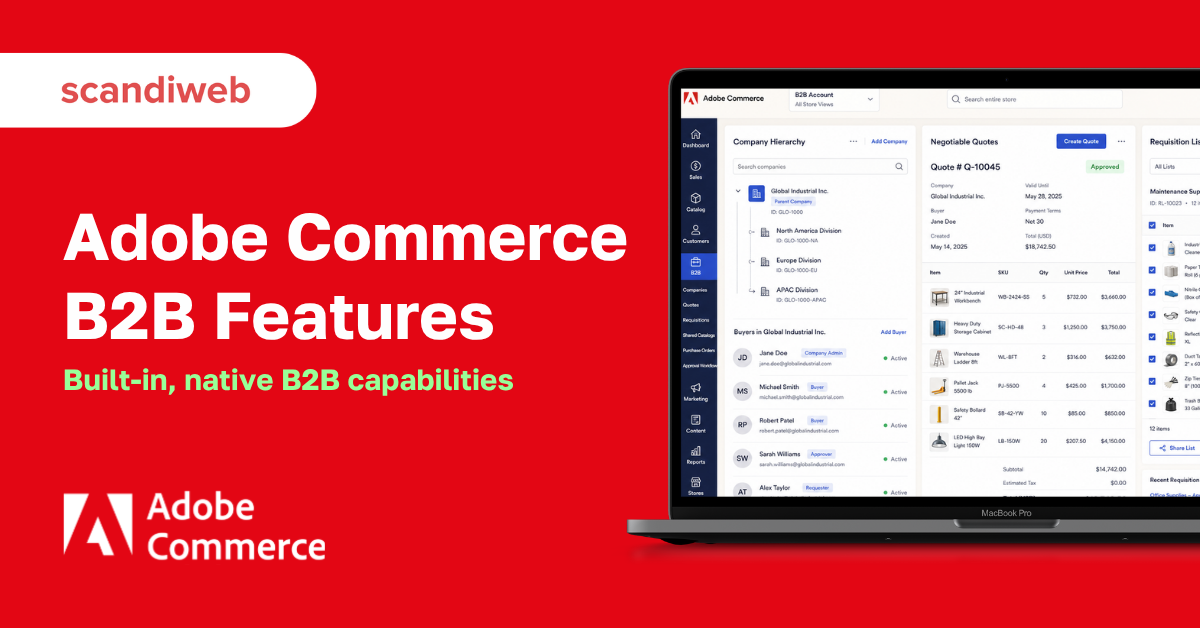
A lot of Magento B2B advice still tells merchants to bolt on a stack of third-party extensions for quoting, company accounts, and credit. That advice is out of date. Adobe Commerce now ships the core B2B toolkit natively, so most of what wholesale and distribution sellers used to buy as add-ons is already in the box, supported, and tied to the same admin your team already uses.
That changes the question you should be asking. It is no longer “which extensions do I need to make Magento work for B2B,” it is “which of the built-in Adobe Commerce B2B features map to how my buyers actually order.” Get that match right and you cut implementation cost, reduce the number of moving parts, and give your sales team less to babysit.
This guide walks through all nine native B2B features, what each one does, and the specific buying problem it solves for a merchant. If you are weighing Adobe Commerce against a composable platform, our commercetools vs Adobe Commerce breakdown walks through where each one fits.
🚀 Quick takeaway
The features below are native to Adobe Commerce, not paid extensions. Your job is to match them to your buyers’ ordering behavior, not to buy more software.
Overview
- Adobe Commerce includes nine native B2B capabilities: company accounts, company management, shared catalogs, quick order, negotiable quotes, purchase order approvals, requisition lists, company credit, and the platform’s built-in shipping and inventory tools.
- 67 percent of B2B buyers prefer a rep-free buying experience, per a Gartner sales survey, which is exactly what self-service company accounts, quoting, and credit are built to deliver.
- These features ship with the paid Adobe Commerce edition, not the free Magento Open Source, so the licensing line matters when you plan a build.
Before the feature-by-feature breakdown, the short video below is a quick visual tour of the B2B toolset. It is the fastest way to see the admin screens these features live in.
Why native B2B features matter for merchants
B2B buyers increasingly want to research, configure, and reorder without talking to a sales rep. The Gartner sales survey cited above puts that share at 67 percent, and the trend has been climbing year over year. A storefront that forces a phone call for every quote or reorder loses those buyers to competitors who let them self-serve.
The other half of the case is operational. Every feature you run as a third-party add-on is another vendor contract, another upgrade to test, and another support ticket your developers field. Native features are maintained by Adobe, version with the platform, and share one data model, so a company account, its catalog, its credit line, and its order history all reference the same records.
🚀 Quick takeaway
Self-service is not a nice-to-have. Two out of three B2B buyers now prefer to buy without a rep, so the features that let them do it directly affect your win rate.
1. Company accounts
Company accounts let multiple buyers from one business share a single account, with an internal structure of divisions, sub-divisions, and users that mirrors the real organization. A company administrator controls who can see what and who can buy what.
This solves the most common B2B mismatch on a B2C-shaped store: real buying is rarely one person with one cart. A procurement lead, a department manager, and a warehouse clerk all touch the same company, and they need different permissions. Company accounts give each of them the right access without you building a custom role system. These features ship with Adobe Commerce, not the free edition, and our Adobe Commerce vs Magento Open Source guide explains the licensing line.
2. Company management and hierarchies
Company management is the admin side of company accounts. It lets you build hierarchies that reflect a customer’s org chart, including parent companies that oversee subsidiary accounts, so a head office can manage the buying activity of several locations from one view.
For merchants selling to franchises, dealer networks, or multi-location enterprises, this is the difference between one clean relationship and a dozen disconnected logins. You set pricing, roles, and approval rules once at the parent level, and they cascade. When a buyer leaves or a new branch opens, the company administrator handles it, not your support team.
🚀 Quick takeaway
Hierarchies are what make Adobe Commerce viable for selling to large organizations, not just individual business buyers. One parent account can govern many child accounts.
3. Shared catalogs
Shared catalogs let you assign different product visibility and pricing tiers to different customer groups. One company sees its negotiated price list, another sees standard wholesale pricing, and a third sees only the products it is contracted to buy, all from the same product database across one or more websites.
This is the native answer to contract pricing, the single most requested B2B capability. Instead of maintaining separate stores or hacking customer-group price rules, you build a catalog per agreement and attach it to the right companies. Buyers only ever see prices and products that apply to them, which removes the awkward “call us for pricing” gap that pushes buyers to competitors.
4. Quick order
Quick order lets a logged-in buyer add products straight to the cart by typing a product name or SKU, or by pasting a list, without browsing category pages. For a buyer placing a repeat order of forty line items, that is the difference between two minutes and twenty.
B2B buyers usually know exactly what they want. They are not discovering products, they are restocking. Quick order respects that by stripping the merchandising layer out of the path to cart for the people who do not need it. It is one of the simplest features to switch on and one of the most appreciated by high-frequency accounts.
5. Negotiable quotes
Negotiable quotes move the back-and-forth of B2B pricing into the storefront. A buyer requests a quote from the cart, and the seller can adjust line items, quantities, and discounts, with both sides going back and forth until they agree, all tracked in the account.
This replaces the email-and-spreadsheet quote process that most wholesale sellers still run manually. Every revision is logged, the approved quote converts directly to an order, and nothing falls through the cracks of someone’s inbox. For sales teams, it turns quoting from a chore into a structured, auditable workflow.
🚀 Quick takeaway
Negotiable quotes are where B2B commerce stops looking like B2C. If your sales cycle involves any back-and-forth on price, this feature carries it inside the platform instead of your inbox.
6. Purchase order approvals
Purchase order approvals automatically convert qualifying orders into purchase orders for company accounts, then route them through approval rules you define based on user role, order value, or other criteria. A junior buyer can place an order, and it waits for a manager’s sign-off before it is submitted.
Large organizations almost never let an individual buy without controls. If your store cannot enforce a spending limit or an approval chain, you are asking enterprise procurement to work around your platform, which they will not do. Purchase order approvals match how corporate buying already works, which removes a hard blocker to landing bigger accounts.
7. Requisition lists
Requisition lists let buyers save and reuse lists of frequently ordered products, organized however they work, by vendor, by team, by project, or by season. A buyer reorders an entire list in a couple of clicks instead of rebuilding the cart each time.
For any customer who orders the same things on a cycle, requisition lists turn reordering into a habit rather than a task. That repeatability is what raises order frequency and lifetime value on B2B accounts, and it keeps your store as the path of least resistance against a competitor’s catalog.
8. Company credit
Company credit lets you extend a credit line to a company and let it pay on account, with you controlling the credit limit, tracking the balance, and managing reimbursements from the admin. Buyers check out against their available credit instead of paying upfront every time.
Trade credit is normal in B2B, and a store that demands a card on every order feels consumer-grade to a procurement team used to net terms. Company credit brings that expectation into the storefront natively. For deferred payment terms beyond the built-in credit ledger, scandiweb built the Ledyer B2B payment module for Adobe Commerce.
9. Built-in shipping and inventory
The ninth piece is the platform foundation the B2B features run on: Adobe Commerce’s native shipping configuration and multi-source inventory. You set shipping methods, rates, and rules per customer group, and you track stock across multiple warehouses or locations from one inventory system.
For B2B, this matters because freight, split shipments, and regional stock are routine. Native multi-source inventory means a company in one region can be served from the nearest warehouse, and shipping rules can reflect the negotiated freight terms in a contract. It ties the previous eight features to real fulfillment instead of leaving logistics as a separate problem.
🚀 Quick takeaway
The first eight features handle how buyers order. Shipping and inventory handle how those orders get fulfilled. A B2B build needs both halves, and Adobe Commerce ships them together.
What are the native B2B features in Adobe Commerce?
Adobe Commerce natively includes company accounts, company management and hierarchies, shared catalogs with tiered pricing, quick order by SKU, negotiable quotes, purchase order approvals, requisition lists, and company credit, all running on the platform’s built-in shipping and multi-source inventory. None of these require a third-party extension. They are part of the paid Adobe Commerce edition and are documented and maintained by Adobe.
Do you need Adobe Commerce B2B or a custom build?
Start with the native set. If company accounts, shared catalogs, quoting, approvals, and credit cover how your buyers order, you can launch on the built-in features and avoid custom development entirely. The native toolkit handles the large majority of standard wholesale and distribution workflows.
When the native features are not enough, a tailored build is the answer. scandiweb rebuilt Macron’s B2B platform on Adobe Commerce and saw revenue grow 29.8 percent year over year, transactions rise 14.1 percent, and order creation time drop 40 percent. The native features were the foundation, and the custom work sat on top of them, not in place of them. The decision is rarely all-or-nothing: most merchants run the standard features and customize the few workflows that are genuinely specific to their business.
🚀 Quick takeaway
Default to the native features. Customize only the workflows that are truly specific to your business, and let the built-in toolkit carry the rest.
How much does it cost to implement Adobe Commerce B2B?
The B2B features themselves are included in the Adobe Commerce license at no extra module cost, so the spend is the license plus implementation, not a stack of separate extension fees. Implementation cost depends on how many of the native features you configure as-is versus how much custom work your contract pricing, ERP integration, and checkout rules require. A build that leans on the native toolkit is meaningfully cheaper than one that recreates these features from scratch, which is the core argument for choosing the platform that already has them.
Frequently asked questions
What are the B2B features of Adobe Commerce?
Adobe Commerce includes nine native B2B capabilities: company accounts, company management and hierarchies, shared catalogs with tiered and contract pricing, quick order by SKU, negotiable quotes, purchase order approvals, requisition lists, company credit, and the platform’s built-in shipping and multi-source inventory. All of them ship with the platform, with no third-party extension required.
Is Adobe Commerce B2B or B2C?
Both. Adobe Commerce supports B2B and B2C models on the same platform, and you can run them together. The B2B features are switched on for the company accounts and websites that need them, while the standard storefront serves B2C buyers as usual.
Do the B2B features come with Magento Open Source?
No. The native B2B feature set is part of the paid Adobe Commerce edition, not the free Magento Open Source. If you need company accounts, shared catalogs, quoting, approvals, or credit out of the box, you need Adobe Commerce.
What does B2B eCommerce include?
B2B eCommerce is online commerce where one business sells to another through a digital platform that handles ordering, account management, pricing, and fulfillment. In practice that means features like company accounts, contract pricing, quoting, purchase orders, and credit terms, which is exactly what the Adobe Commerce native toolkit provides.
Can I customize the native Adobe Commerce B2B features?
Yes. The native features are the starting point, and they can be extended or tailored when your workflows need it. The common pattern is to configure the standard features for the bulk of your buyers and add custom development only for the parts that are specific to your business, such as ERP-driven pricing or a non-standard approval flow.
How do I know which B2B features my store needs?
Map them to how your buyers actually order. If they place repeat orders, you need quick order and requisition lists. If they negotiate pricing, you need shared catalogs and negotiable quotes. If they buy on terms with internal sign-off, you need company credit and purchase order approvals. The right setup is the subset that matches your buyers’ behavior, not all nine by default.
So the real decision is whether the native Adobe Commerce B2B set fits your workflow as-is, or whether a few of your buying flows need custom development on top of it. Tell us how your buyers order, and our Magento B2B development team will map the right setup, then talk to our B2B team to scope it.




































