

Adobe sells commerce in four editions. Adobe Commerce Optimizer replaces the storefront and connects to a backend you already run. Adobe Commerce as a Cloud Service (ACCS) is the multi-tenant SaaS platform where Adobe owns the application. On Adobe Commerce on Cloud, Adobe manages the infrastructure, and the codebase stays yours. On-premise leaves both with you.
So what separates them, and how do you choose? Mostly it comes down to how much of your current build each edition asks you to give up. Optimizer keeps your checkout and your customizations, while ACCS replaces the storefront, customization layer, integrations, and configuration. The other two replace nothing and ask you to keep upgrading instead.
This guide takes them one at a time: what switching costs for each, where Adobe’s published ceilings stop, whether an Optimizer build survives a later move to SaaS, and how each edition breaks down.
What the four Adobe Commerce editions are
Adobe’s four commerce editions differ mainly in where the ownership line falls. On Adobe Commerce on-premise you own everything. On Adobe Commerce on Cloud, Adobe manages the infrastructure and you keep the codebase. On Adobe Commerce as a Cloud Service, Adobe owns the application as well. Adobe Commerce Optimizer stands outside that ladder entirely, because it replaces the storefront and leaves the commerce backend where it is.
| Edition | What Adobe owns | What you keep | What you rebuild |
|---|---|---|---|
| Adobe Commerce Optimizer | Storefront delivery, catalog, search, and recommendations | Your commerce backend, checkout, orders, customizations | The storefront, on Edge Delivery Services |
| Adobe Commerce as a Cloud Service | Infrastructure and the commerce application | Your data, and integrations that already speak over APIs | Storefront, customization layer, integrations, configuration |
| Adobe Commerce on Cloud | Infrastructure only | Codebase, checkout, PHP extensions, upgrade schedule | Nothing. You upgrade instead |
| Adobe Commerce on-premise | Nothing | Everything, including the hosting decision | Nothing. You upgrade instead |
🚀 Quick takeaway
Adobe Commerce on Cloud and on-premise ask for no rebuild at all. They charge you in upgrade projects instead, based on Adobe’s published schedule.
About Adobe Commerce Optimizer
Adobe Commerce Optimizer runs in front of a commerce backend, delivering the storefront on Edge Delivery Services and Catalog Service, Live Search, and Product Recommendations.
The Adobe Commerce Optimizer Connector connects to Adobe Commerce on Cloud and on-premise, and it syncs five feeds:
- Products
- Product attributes
- Categories
- Price books
- Customer group pricing
Your store uses the Catalog Sources, Price Books, and price variants.
Adobe Commerce is the official system. An initial full catalog sync runs during setup, then delta syncs update product and price on a cron schedule, and nothing updates Optimizer data back to Commerce.
Cart, checkout, and order flows are never modified. Optimizer never reaches that part of the application.
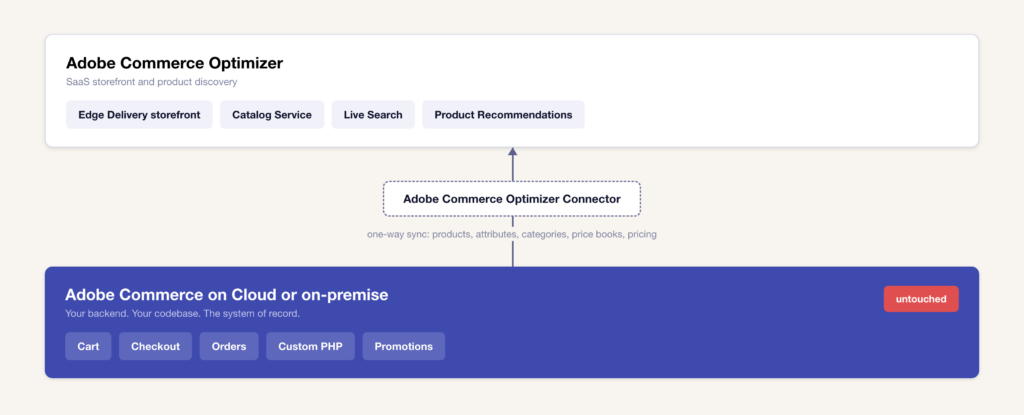
The connector supports Adobe Commerce on Cloud and on-premise. It does not integrate with non-Adobe backends directly, but a third-party headless storefront can call the Optimizer GraphQL APIs for discovery and recommendations while checkout stays on another platform.
🚀 Quick takeaway
The connector syncs products, categories, and price books from Adobe Commerce, but it does not change cart, checkout, or order flows.
What each edition limits you to
Adobe has a detailed limits and boundaries document for Adobe Commerce Optimizer, but there is no equivalent for Adobe Commerce as a Cloud Service yet.
| Entitlement | Adobe Commerce Optimizer | Adobe Commerce as a Cloud Service |
|---|---|---|
| SKUs | 250K per source, expandable in 100K packs | 250,000, overage licensing required |
| Catalog sources | 50, not expandable | Not published |
| Catalog ingestion | 1K/min, expandable to 5K or 10K/min | 1K/min |
| Daily ingestion | 100K/day, up to 1M/day | 100K/day |
| Catalog variations | 100, expandable in 100-unit packs | 100 |
| Product payload | 200 KB, not expandable | Not published |
| Variants per product | 10K, not expandable | Not published |
| Facets / filterable / searchable attributes | 100 / 200 / 200 | Not published |
| Recommendation units | 50, not expandable | Not published |
| Sandboxes | 2 per instance, expandable | 2 per instance, expandable |
| Product visuals | 2 power users, 2 collaborators, 1 TB | 2 power users, 2 collaborators, 1 TB |
For a stable catalog, neither ceiling is likely to matter. For a fashion retailer, the ingestion row determines whether the catalog is stable. For a grocery business, the ingestion row determines whether the stock is updated. The SaaS platform does not.
Also read:
What is Magento? The complete guide to Adobe Commerce
🚀 Quick takeaway
Adobe Commerce Optimizer can process 250,000 SKUs per catalog source across 50 sources, and it can ingest up to 1 million updates per day. Adobe Commerce as a Cloud Service publishes 250,000 SKUs and 100,000 updates a day.
What migration to each edition costs
Staying on Adobe Commerce on Cloud requires recurring upgrade projects, on-premise adds infrastructure and patching, and adding Adobe Commerce Optimizer requires a storefront build with no backend migration. Moving to Adobe Commerce as a Cloud Service costs a full rebuild across five workstreams, and the storefront alone costs 35 to 50 percent.
Staying on Adobe Commerce on Cloud costs you upgrade projects. Standard support runs three years from each version’s general availability, extended support adds a year for 2.4.6 and 2.4.7, and from 1 June 2027 Adobe stops maintaining Cloud environments running unsupported versions.
Staying on-premise costs you the same upgrades plus the infrastructure and patching. Merchants often choose it for data residency or for infrastructure requirements that exclude shared hosting.
Adding Adobe Commerce Optimizer, you build a storefront on Edge Delivery Services and connect it, and the backend keeps running underneath, with no data migration, no configuration recreation, no extension audit, and no checkout risk.
Moving to Adobe Commerce as a Cloud Service is a rebuild. It requires rebuilding the storefront on Edge Delivery Services, re-architecting customization into App Builder, re-plumbing integrations, and recreating configuration in the new admin. The cost varies by store profile and includes 35 to 50 percent of the effort. Read more in our article on what an Adobe Commerce SaaS (ACCS) migration actually costs.
Does Optimizer work carry over to ACCS?
Adobe Commerce Optimizer uses Edge Delivery Services, and the storefront rebuild uses the same merchandising services. Since the storefront rebuild accounts for 35 to 50 percent of ACCS migration effort, the storefront can complete it early. The connector and sync configuration would be discarded, and there is no official migration path between Optimizer and ACCS.
Optimizer may be obsolete if you commit to the SaaS platform, but Adobe’s documentation says it is not.
Adobe Commerce Optimizer delivers its storefront through Commerce Storefront powered by Edge Delivery Services. It uses the same merchandising services as the SaaS edition: Catalog Service, Live Search, and Product Recommendations.
If the storefront rebuild is 35 to 50 percent of an ACCS migration, and the Optimizer project produces that storefront, then a merchant who adopts Optimizer first has completed the most expensive part of a future migration without touching checkout. Discard the connector and its sync configuration because ACCS has no separate backend to sync from.
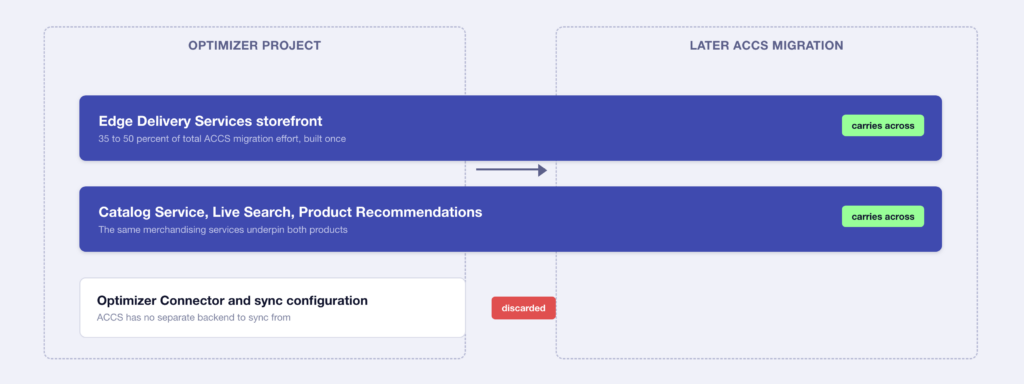
Note that Adobe has not published a migration from Optimizer to ACCS yet. A storefront built on Optimizer’s GraphQL APIs will need its data layer repointed because the queries would now run against the SaaS commerce engine instead of the connector.
Who each edition fits
Each edition has a merchant it was not built for. Knowing which one you are before signing off is what keeps a business case defensible a year later.
Adobe Commerce Optimizer can run only with Adobe backends, so it does not support non-Adobe commerce engines.
Adobe Commerce as a Cloud Service fits a merchant whose customization already runs outside the application. It has webhooks and events, and its storefronts can be rebuilt either way. PHP is not supported inside it, so the application’s pricing, promotion, and checkout logic must be moved first.
Adobe Commerce on Cloud keeps the upgrade cycle, and the version schedule is not negotiable. Merchants on 2.4.4 and 2.4.5 lose every tier of support on 31 May 2027, with Cloud enforcement following on 1 June.
Adobe Commerce on-premise fits a merchant who needs to own scaling, patching and uptime directly, usually for control or compliance. For most merchants, it is the highest total cost of the four.
How to choose between Adobe Commerce editions
Choose Adobe Commerce Optimizer if
- Your backend is stable and supported, and the storefront is slow
- You run B2C on an Adobe Commerce backend, on cloud or on-premise
- Your checkout and pricing logic already work and you want them left alone
- Your catalog approaches ACCS’s published ceilings but stays inside Optimizer’s
- You want an Edge Delivery Services storefront without a backend migration.
Choose Adobe Commerce as a Cloud Service if
- Your catalog stays inside 250,000 SKUs and updates at a predictable rate
- Your customization is integration work that already communicates over APIs
- You are ready to rebuild a stock or lightly themed storefront
- Ending the upgrade cycle matters more to you than keeping in-application PHP
- Your content team wants to publish page changes without a developer.
Choose Adobe Commerce on Cloud if
- Your checkout, pricing or promotion logic is in PHP modules you depend on
- You need a customization that App Builder’s exposed hooks do not reach yet
- You have invested in a custom frontend
- Your current version still has support runway, and upgrading costs less than rebuilding
- You would rather set your own upgrade schedule than hand it to Adobe.
Choose Adobe Commerce on-premise if
- Data residency or regulatory rules mean your data cannot sit on shared infrastructure
- Your integrations are tied to on-site systems a managed platform cannot reach
- You want infrastructure decisions, uptime, and disaster recovery under your own control
- Your customization goes deeper than any of the other three editions will support
- You would rather own the full stack than depend on Adobe’s roadmap for any part of it.
Frequently asked questions about Adobe Commerce editions
What is Adobe Commerce Optimizer?
Adobe Commerce Optimizer is a SaaS storefront and product discovery layer that runs in front of an Adobe Commerce backend you already own. It delivers the storefront on Edge Delivery Services and adds Catalog Service, Live Search and Product Recommendations. The commerce engine, checkout and order flows underneath are left unchanged, which makes it the only Adobe option that improves storefront performance without a replatform.
How many Adobe Commerce editions are there?
Four. Adobe Commerce Optimizer is a storefront and discovery layer over an existing backend. Adobe Commerce as a Cloud Service is the multi-tenant SaaS platform, generally available since June 2025. Adobe Commerce on Cloud is the platform-as-a-service edition where Adobe manages infrastructure and you own the codebase. Adobe Commerce on-premise leaves both infrastructure and application with you.
What is the difference between Adobe Commerce Optimizer and Adobe Commerce as a Cloud Service?
Optimizer replaces your storefront and keeps your commerce backend. ACCS replaces the backend as well. Optimizer connects to Adobe Commerce on cloud or on-premise through a first-party connector and never modifies cart, checkout or orders. ACCS is a full platform where Adobe owns the application. PHP is not supported inside it, and every storefront is rebuilt.
Does Adobe Commerce Optimizer work with a non-Adobe backend?
Not directly. The Adobe Commerce Optimizer Connector supports Adobe Commerce on Cloud and Adobe Commerce on-premise only. A third-party headless storefront can query the Optimizer GraphQL APIs for product discovery and recommendations while checkout stays on another platform, but the native connector path requires an Adobe Commerce backend.
What are the SKU limits on Adobe Commerce Optimizer?
Adobe’s limits document allows 250,000 SKUs per catalog source, expandable in 100,000-SKU packs, across a maximum of 50 catalog sources. Catalog ingestion runs at 1,000 updates per minute and 100,000 per day as standard, expandable to 5,000 or 10,000 per minute and up to 1 million updates per day.
Is Adobe Commerce Optimizer a step toward Adobe Commerce as a Cloud Service?
It can be. Both deliver storefronts through Edge Delivery Services and both use the same merchandising services, so an Optimizer storefront is built on the technology ACCS also requires. Since the storefront rebuild is 35 to 50 percent of ACCS migration effort, adopting Optimizer first completes that workstream early. Adobe has published no formal migration path between the two.
Can B2B merchants use Adobe Commerce Optimizer?
The Adobe Commerce Optimizer Connector is designed for B2C merchants. B2B merchants running Adobe Commerce on Cloud or on-premise keep the B2B functionality in their existing backend, and the Optimizer route is not currently open to them in the same way.
Which Adobe Commerce edition is cheapest?
The cheapest edition depends on what you already own. Staying on Adobe Commerce on Cloud costs recurring upgrade projects. Adding Optimizer costs a storefront build with no backend migration. Moving to ACCS costs a full rebuild across five workstreams. On-premise carries the infrastructure and patching cost as well. The lowest one-time cost is Optimizer, and the lowest ongoing platform cost is usually ACCS.
When does my Adobe Commerce version lose support?
Adobe publishes three tiers. For 2.4.6, standard support ended 11 August 2026, extended support ends 31 August 2027, and security-only support ends 31 May 2028. For 2.4.7, standard support ends 31 May 2027 and extended ends 31 May 2028. Versions 2.4.4 and 2.4.5 lose every tier on 31 May 2027, with Cloud enforcement from 1 June 2027.
Choosing the Adobe Commerce edition that fits your business
Choose the Adobe Commerce edition that best fits your problem. For example, a slow storefront on a healthy backend is an Optimizer problem, but an upgrade cycle is a SaaS problem. PHP customizations that your business depends on are a reason to stay where you are and plan carefully.
Before building a business case, check your commercial logic, what your catalog does at peak, and your current storefront cost.
Are you trying to work out which Adobe Commerce edition fits your catalog, your customization and your storefront? Book a free consultation with an Adobe-certified architect, and we will get back to you the best path forward.




































