
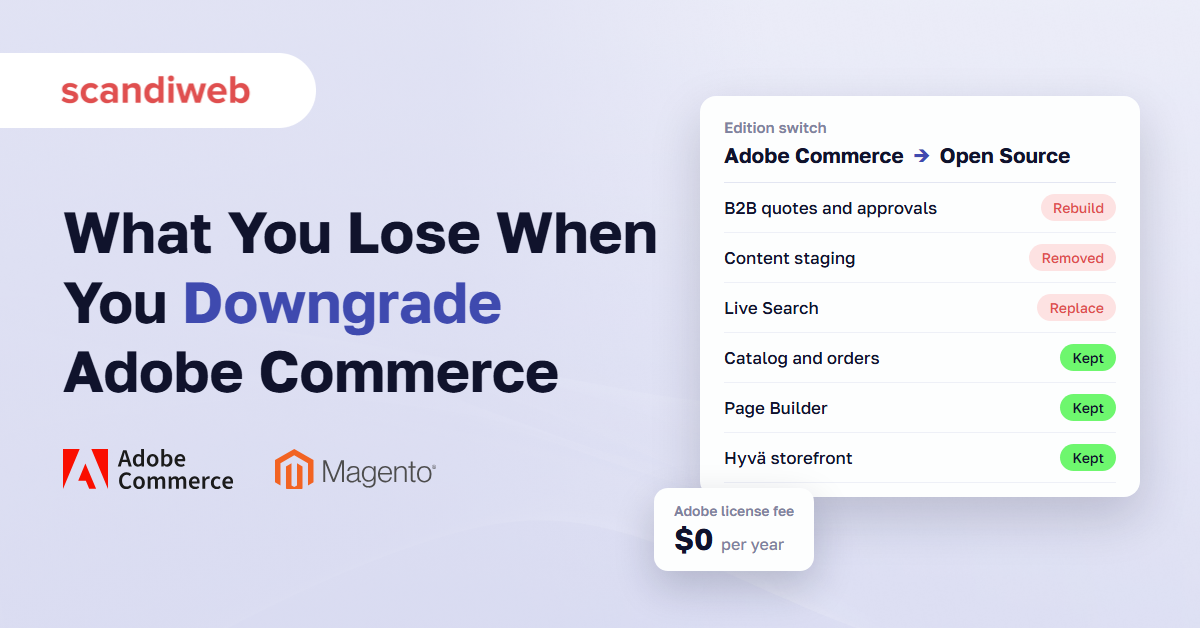
If your Adobe Commerce renewal is coming up and someone has asked why you pay for software that also comes in a free edition, the honest answer starts with an inventory. You can downgrade Adobe Commerce to Magento Open Source, because both editions share the same core. The license line disappears. What you get back depends on how many Commerce-only features your team uses every week, and on whether you also leave Adobe’s cloud hosting.
It’s one of the questions our clients ask most often this year, usually together with a second one: Cloud, on-premise, or ACCS, what are we paying for? Both have the same starting point. List the Commerce-only features your team uses, find a replacement for each, and set the total cost against three more years of license fees, well before the renewal date.
What you lose when you downgrade Adobe Commerce to Magento Open Source
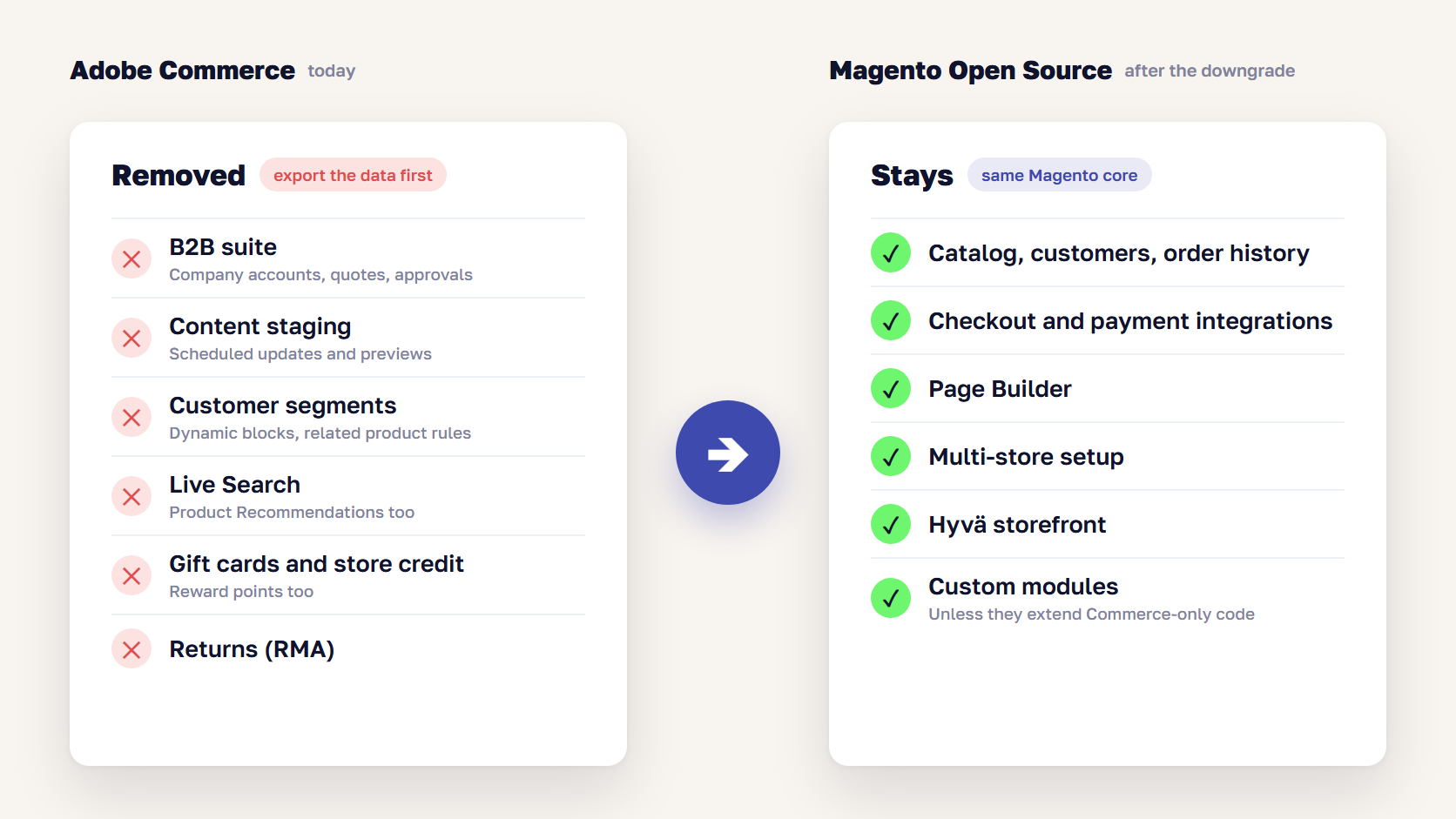
When you downgrade Adobe Commerce to Magento Open Source, you lose the B2B suite, content staging and scheduled updates, customer segments, Live Search, Product Recommendations, gift cards, store credit, reward points, and returns management. You keep the catalog, customers, orders, checkout, Page Builder, multi-store setup, and most of your custom code. Data stored by the removed features has to be exported or migrated first.
These are the features that change the decision. For the full edition-by-edition feature list, see our Magento Open Source vs Adobe Commerce comparison.
| Adobe Commerce feature | After the downgrade | Usual replacement |
|---|---|---|
| B2B: company accounts, shared catalogs, negotiable quotes, purchase order approvals | Removed with its data | B2B extension suite or custom build |
| Content staging and scheduled updates | Removed, scheduled campaigns are lost | Scheduling extension or manual publishing |
| Customer segments, dynamic blocks, related product rules | Removed | Segmentation extension or a CDP |
| Live Search and Product Recommendations | Not available on Open Source | OpenSearch (built in) or a search service |
| Gift cards, store credit, reward points | Removed with customer balances | Extensions, with balances migrated |
| Returns (RMA), email reminders, sales order archive | Removed | Extensions or your helpdesk |
| Adobe support and Cloud hosting | Ends with the license | Your agency, your host, your CDN |
B2B features: company accounts, quotes, and approvals
If you sell to companies through Adobe Commerce, the B2B suite is the first thing to check. Company accounts with buyer roles, shared catalogs with customer-specific prices, negotiable quotes, purchase order approvals, requisition lists, and company credit are all part of B2B for Adobe Commerce, which installs on top of the Commerce license. Our overview of Adobe Commerce B2B features covers what each one does.
On Open Source, these come from third-party extensions or custom work, and the data does not move by itself. Open quotes, approval rules, and company hierarchies have to be exported and rebuilt in the new module. A B2C store with a wholesale price list in a customer group usually loses nothing here. A distributor whose buyers request quotes every day loses a working sales process.
🚀 Quick takeaway
Run a report of quotes and purchase orders created in the last 90 days. If the count is close to zero, the B2B suite is not a reason to keep paying for Adobe Commerce.
Content staging and scheduled updates
Content staging lets merchandisers schedule price changes, banners, and category updates for a future date and preview them before they go live. Open Source has no staging, so scheduled campaigns stop running after the switch, and marketing goes back to publishing changes by hand or through an extension.
Staging also changes the database. To keep versions, Adobe Commerce stores products, categories, CMS pages, and blocks under a row_id key with several rows per entity, where Open Source uses one row per entity_id. That difference makes the move a database project as well as a code change, which the project section below covers.
Live Search and Product Recommendations
Adobe lists Live Search as supported on Adobe Commerce on Cloud and on-premises, version 2.4.4 and later, according to the Live Search installation guide. Magento Open Source isn’t on that list, and Product Recommendations has the same scope. After a downgrade, storefront search goes back to OpenSearch, which comes with Magento, and your synonyms, merchandising rules, and recommendation units need rebuilding in whatever you choose next.
For a store with a small catalog, OpenSearch with good attribute setup is often enough. For a large catalog where search drives most sales, budget for a third-party search service, which is a subscription priced by usage.
What you keep after a downgrade
The core stays the same, so most of the store survives:
- Catalog, customers, order history, and CMS content, once the database is converted
- Checkout, payment and shipping integrations, and multi-store setup
- Page Builder, which has been in Magento Open Source since version 2.4.3
- Adobe Payment Services, which Adobe lists as compatible with Open Source 2.4.4 and later
- A Hyvä storefront, since the Hyvä Theme became free and open source in November 2025
- Custom modules, unless they extend Commerce-only classes
🚀 Quick takeaway
Count balances as well as features. Gift card balances, store credit, and reward points are money or value your customers already hold, so they have to move to the replacement module before the old one is removed.
Adobe Commerce Cloud vs on-premise vs ACCS: what you pay Adobe for
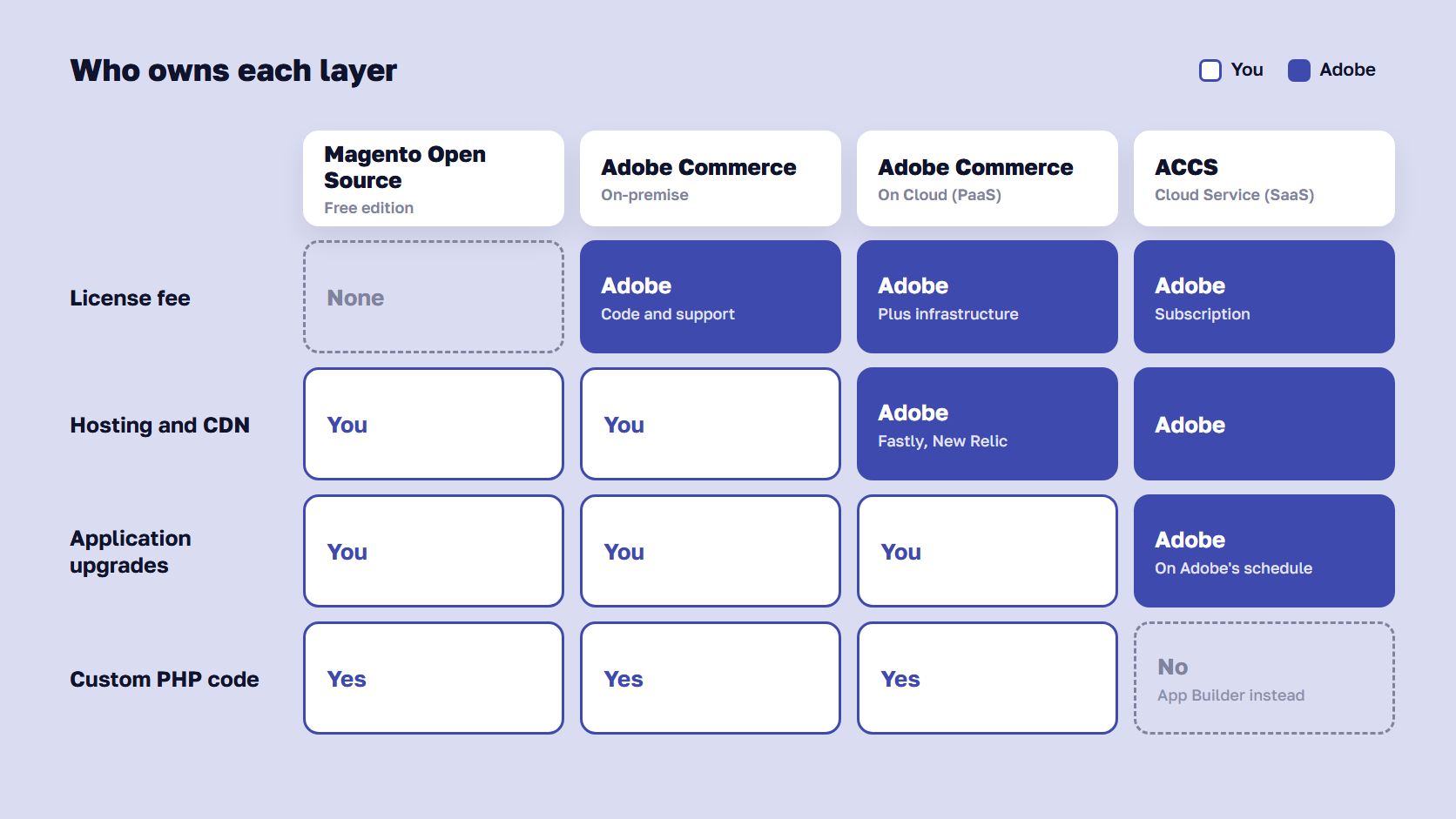
With Adobe Commerce on-premise, you pay Adobe for the Commerce code and support, and you run the hosting. With Adobe Commerce on Cloud, the license also covers managed infrastructure: hosting environments, Fastly CDN with WAF and DDoS protection, and New Relic monitoring, while your team still owns the codebase and upgrades. With Adobe Commerce as a Cloud Service (ACCS), Adobe runs the application as well and upgrades it for you.
| Option | What the fee covers | Who runs hosting | Who upgrades the application | Custom PHP in the app |
|---|---|---|---|---|
| Magento Open Source | No license fee | You or your host | You | Yes |
| Adobe Commerce on-premise | Commerce code and Adobe support | You or your host | You | Yes |
| Adobe Commerce on Cloud | Code, support, infrastructure, CDN, monitoring | Adobe | You | Yes |
| Adobe Commerce as a Cloud Service | A SaaS subscription | Adobe | Adobe | No |
Our guide to Adobe Commerce Optimizer, SaaS, PaaS, and on-premise compares the four Adobe editions in detail. For a downgrade decision, two of them matter most.
Moving from Cloud to on-premise keeps the features
If the license is the problem and the features are not, moving from Adobe Commerce on Cloud to Adobe Commerce on-premise may solve it with less work. Based on aggregated partner estimates, the on-premise license runs roughly $22,000 to $125,000 a year, against roughly $40,000 to $190,000 for Cloud. Adobe doesn’t publish prices, so treat these as planning anchors.
You keep B2B, staging, and Live Search, the database stays as it is, and the project is a hosting move. In exchange, you pay for the infrastructure yourself, and someone has to run it. Managed Magento hosting is one way to avoid building that team.
Is moving to ACCS a downgrade?
No. Adobe Commerce as a Cloud Service is a different product, and moving to it is closer to a rebuild. The storefront moves to Edge Delivery Services, customization moves out of the application into App Builder, and neither Luma nor Hyvä storefronts carry over. Adobe’s contract also caps a subscription at 250,000 SKUs. Our guide to Adobe Commerce as a Cloud Service covers who it fits, and our breakdown of ACCS migration cost prices the move.
🚀 Quick takeaway
Ask which part of the bill you want to stop paying. If it’s the hosting premium, Cloud to on-premise keeps every feature. If it’s the license itself, only Open Source removes it.
What a downgrade from Adobe Commerce to Magento Open Source involves
A downgrade from Adobe Commerce to Magento Open Source runs in seven steps: audit the Commerce features and data you use, export the data you’ll lose, choose replacements, swap the Composer packages, convert the database, move hosting if you leave Cloud, then test and cut over. The database conversion is the risky part, so it runs on a copy first.
- Audit what you use. List every Commerce-only feature with live data behind it: staging updates, customer segments, B2B companies and quotes, gift card accounts, reward point balances, and returns. Check extensions and custom modules for dependencies on Commerce classes.
- Export what you’ll lose. Customer balances, open quotes, company structures, and return history need a destination before anything is removed.
- Choose and install replacements. Pick an extension or custom build per feature, and test that it can import the exported data.
- Swap the code. Replace the Adobe Commerce metapackage with the Open Source one in Composer, and remove or rewrite modules that depend on Commerce code.
- Convert the database. Remove the Commerce-only tables and convert row_id back to entity_id for products, categories, CMS pages, and blocks.
- Move hosting, if you leave Cloud. Set up the new environment, CDN, WAF, monitoring, backups, and a deployment pipeline to replace the Cloud tooling.
- Test and cut over. Run a full regression on staging, freeze catalog changes, migrate, and switch DNS in a low-traffic window.
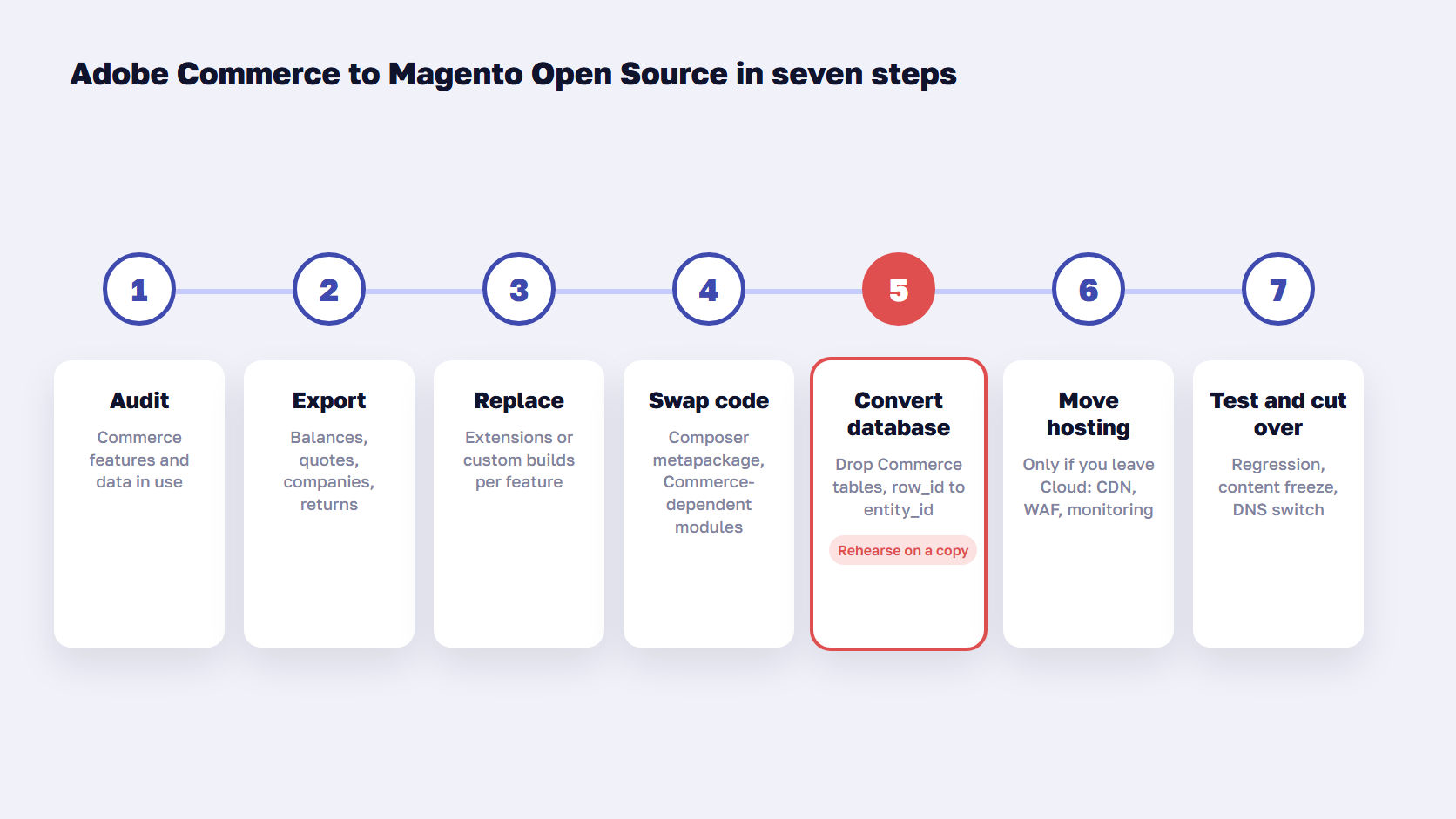
The database step is where downgrades go wrong. Adobe Commerce adds around 90 tables that Open Source doesn’t have, plus the staging key structure. Deploy eCommerce, a UK agency, published an open-source command-line tool for this conversion in March 2026 and warns that it makes irreversible changes to the database. Whatever tool you use, run it on a production copy, compare row counts before and after, and keep the backup until the store has run cleanly for a few weeks.
URLs, product data, and customer accounts stay where they are. Compared with a replatform, SEO risk is low, and customers don’t need to reset passwords.
How long a downgrade takes
The timeline depends on how many Commerce features you replace and how much data moves with them, plus a hosting move if you leave Cloud. The database conversion and its rehearsal on a copy set the critical path, and each replaced feature adds its own build and test time.
Start early enough to finish before the renewal date. If the project runs late, you either renew for another term or run a store you no longer have a license for. Check your contract’s renewal and notice terms first.
Which Magento version to downgrade on
Downgrade on a supported version. Adobe’s October 2026 security bulletin offered Magento Open Source patch files only for 2.4.7 and later, and 2.4.8 is supported until May 31, 2028. If you run 2.4.6 or older, combine the downgrade with an upgrade. Our guide to Magento end of life lists the support dates for every 2.4 version.
🚀 Quick takeaway
Plan the project backward from the renewal date. The database conversion needs at least one full rehearsal on a copy, and that rehearsal is what usually moves the timeline.
Adobe Commerce vs Magento Open Source: the 3-year cost check
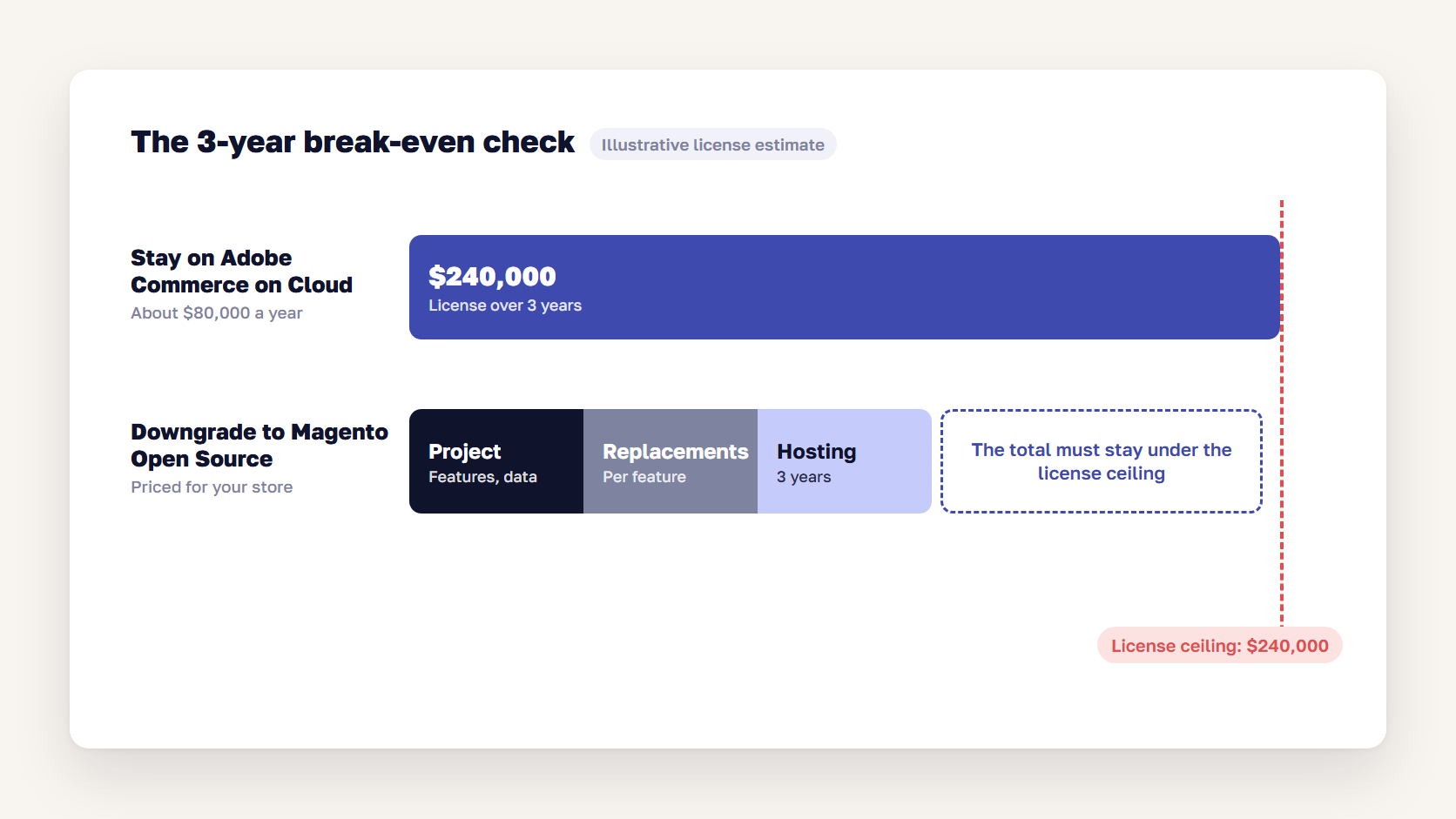
A downgrade pays off when the license fees you stop paying are larger than everything the move adds. Over three years, the license is the ceiling. The one-time project, the replacement features, and any hosting the Cloud license used to cover have to come in under it. A B2C store that uses few Commerce-only features usually clears that bar. A store that depends on B2B or staging may not.
| Cost line over 3 years | Stay on Adobe Commerce on Cloud | Downgrade to Magento Open Source |
|---|---|---|
| License | About $120,000–$570,000 | $0 |
| Hosting, CDN, and monitoring | Included in the Cloud license | Priced with your host |
| One-time project | None | Depends on the features you replace, data migration, and hosting |
| Replacement features | None | One extension, service, or custom build per Commerce feature you use |
| Search | Live Search included | OpenSearch included, or a paid search service |
| Upgrades and patches | Your team or agency | Your team or agency |
The license range comes from our Magento pricing guide, which breaks down all seven cost categories of running Magento. It is an estimate from aggregated partner data, because Adobe quotes privately and by GMV.
Take a B2C retailer with $5–10 million in annual GMV on Adobe Commerce on Cloud. Partner estimates put that license at about $80,000 a year, or $240,000 over three years. That $240,000 is the ceiling. The downgrade project, the replacements for staging and Live Search, and three years of hosting together have to cost less than that for the move to pay off. The project cost depends on which features you replace, how much data has to migrate, and whether you move hosting, so it has to be priced against your store.
scandiweb gives you a detailed quote for the downgrade after a short scoping call.
Where the saving disappears
Four things eat into the saving, and none of them shows up in a license comparison:
- B2B rebuilds: recreating quotes, approval flows, and company accounts as custom work can cost more than three years of license fees for a store that sells mostly to companies.
- Running infrastructure: leaving Cloud means someone handles scaling for peak traffic, incidents, and server security, either in-house or through a managed host.
- Card data and compliance: Adobe’s Cloud infrastructure comes with PCI-certified hosting. On your own hosting, keeping the environment in scope for PCI DSS is your job and your host’s.
- Adobe support: escalations to Adobe end with the license, so your agency or team becomes the only line of support.
🚀 Quick takeaway
Price the replacement for each Commerce feature you use before you count the saving. One feature with no good extension, usually negotiable quotes or staging, can decide the whole case.
Who should downgrade Adobe Commerce, and who shouldn’t
Downgrade Adobe Commerce to Magento Open Source if you sell mostly to consumers, use few Commerce-only features, and have a team or agency that can run hosting and patching. Stay on Adobe Commerce if your B2B sales depend on its native quotes and company accounts, your marketing team relies on staging, or the license is a small share of your total platform cost.
Downgrade to Magento Open Source if:
- You sell mostly to consumers and don’t use the B2B suite
- Your team rarely schedules content or price changes in staging
- Your catalog search works well enough on OpenSearch or a search service you’d pay for anyway
- You have an in-house team or agency that already handles upgrades and security patches
- The license is one of your three largest platform costs
Stay on Adobe Commerce if:
- Your buyers use negotiable quotes, purchase order approvals, or company accounts every day
- Your merchandisers schedule campaigns and price changes in staging every week
- Live Search and Product Recommendations drive a measurable share of revenue
- You have no team to run servers and a CDN outside Adobe’s Cloud
- The renewal is due before the project could finish
If you land in the middle, there are other options. Moving from Cloud to on-premise keeps the features and lowers the license band. The renewal is also the time to renegotiate your GMV tier. And if the platform itself is the problem, our guide to Magento to Shopify migration compares that path over three years.
🚀 Quick takeaway
One true “stay” condition can change the answer on its own. Price the replacement for that feature first, before you add up the rest.
Frequently asked questions about a downgrade from Adobe Commerce
Can you downgrade from Adobe Commerce to Magento Open Source?
Yes. Both editions share the same Magento core, so you can move from Adobe Commerce to Magento Open Source without changing platforms. The project removes the Commerce modules, replaces the Commerce metapackage in Composer, converts the database from the row_id structure back to entity_id, and replaces any Commerce-only features you still need with extensions. It needs a full rehearsal on a copy of production.
Do I lose my data if I downgrade Adobe Commerce?
You keep products, categories, customers, orders, and CMS content, as long as the database conversion runs correctly. You lose the data that belongs to Commerce-only features: scheduled staging updates, customer segments, B2B companies and quotes, gift card accounts, reward points, store credit, and returns. Export each of these before the conversion and import them into the replacement modules.
What happens to gift card balances, store credit, and reward points?
They are removed with the Adobe Commerce modules, so you have to migrate them. Export each customer’s balance, install replacement extensions, and import the balances before go-live. Gift cards and store credit are value customers already paid for or were promised, so check the totals before and after the move and keep the export as a record.
Is Magento Open Source still supported by Adobe?
Yes. Adobe still releases Magento Open Source, with 2.4.9 out since May 2026, and publishes security patches for it. Support is narrower than for Adobe Commerce: the October 2026 security bulletin offered Open Source patch files only for 2.4.7 and later. Open Source also comes without Adobe’s ticket support, so your team or agency handles issues directly.
How much does Adobe Commerce cost compared to Magento Open Source?
Magento Open Source has no license fee. Adobe doesn’t publish Adobe Commerce prices, but aggregated partner estimates put the on-premise license at about $22,000 to $125,000 a year and Adobe Commerce on Cloud at about $40,000 to $190,000 a year, scaled by GMV. Hosting, development, extensions, and maintenance apply to both editions.
Can I downgrade Magento Enterprise to Community?
Yes. Magento Enterprise Edition is today’s Adobe Commerce, and Community Edition is today’s Magento Open Source, so it is the same project under the old names. On Magento 2, you swap the Composer metapackage, convert the database, and replace Enterprise-only features. Magento 1 Enterprise stores have no supported version to move to, because Magento 1 support ended in June 2020.
Does Hyvä work on Magento Open Source?
Yes. The Hyvä Theme runs on both Magento Open Source and Adobe Commerce, and it has been free and open source since November 10, 2025. If your Adobe Commerce store already uses Hyvä, the storefront carries over in a downgrade. Check any Hyvä compatibility modules for Commerce-only features you’re removing, such as gift cards or B2B.
Is ACCS cheaper than Adobe Commerce on Cloud?
Not always, and moving to it costs more than a downgrade. ACCS replaces hosting, upgrades, and the license with one subscription, which removes upgrade projects. Getting there means rebuilding the storefront on Edge Delivery Services and moving customizations to App Builder, and Adobe caps a subscription at 250,000 SKUs. Compare that one-time cost with several years of upgrade spending first.
Decide on an Adobe Commerce downgrade before the renewal date
A downgrade from Adobe Commerce to Magento Open Source pays off when the license buys features your team doesn’t use. Start with the inventory: every Commerce-only feature with live data behind it, and what replacing it would cost. Then set the one-time project and the new running costs against three years of fees, and leave enough time for a database rehearsal before the renewal is due.
Weighing a downgrade before your next Adobe Commerce renewal? Send us your feature list and renewal date, and after a short scoping call we'll send a detailed quote, with what you'd lose and what you'd keep.




































