
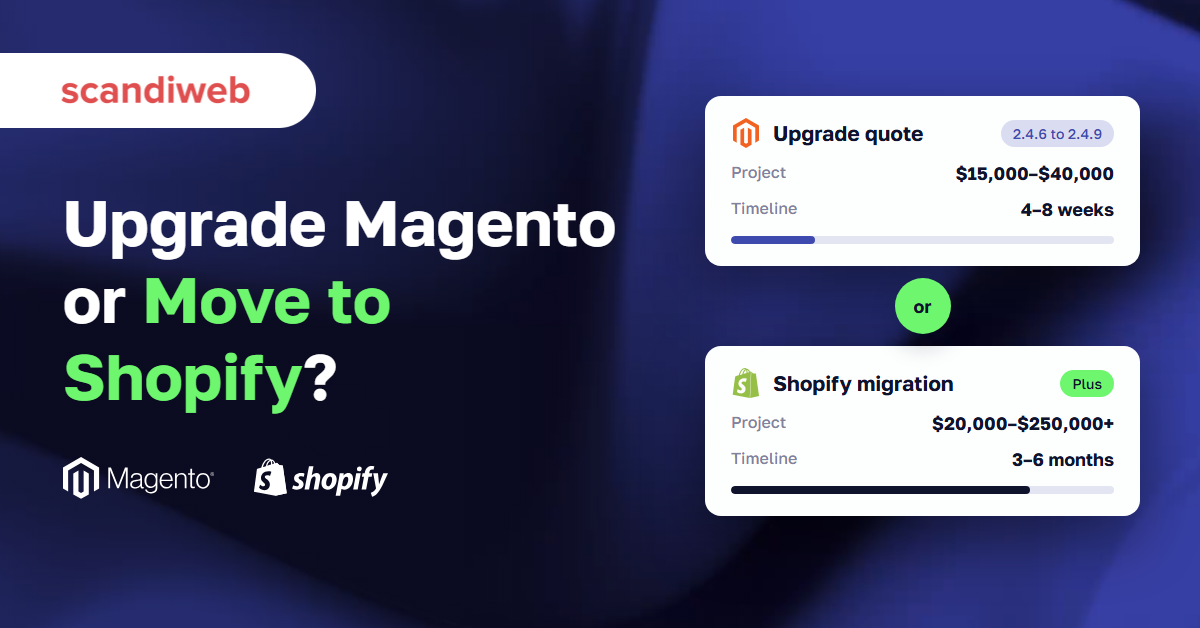
You have a Magento upgrade quote in your inbox, and someone in the last leadership meeting asked why you don’t just move to Shopify. Both answers cost real money, and neither is easy to undo once the work starts. This guide walks through the Magento to Shopify migration decision the way we walk clients through it. It covers when moving pays off and when the upgrade is the better spend, what each path costs over three years, and which data survives the trip.
We build and support stores on both Magento and Shopify, so this guide doesn’t lean toward either one. The aim is to help you pick the platform you’ll still be happy on in 2029.
Magento upgrade or Magento to Shopify migration: the short answer
Upgrade Magento when your store runs on custom B2B pricing or deep ERP workflows, and your real complaints are speed and the cost of small changes, because both can now be fixed without replatforming. Choose a Magento to Shopify migration when your catalog and checkout are close to standard retail and you want to stop owning hosting and upgrades. In exchange, you accept Shopify’s data model and a monthly app bill.
Before comparing platforms, name what you are trying to get away from. That list decides most of this. If you want a feature-by-feature view, our Magento vs Shopify comparison covers it. This article stays on the decision in front of you.
Why the upgrade quote is the moment to decide
Most merchants don’t wake up wanting to replatform. In the client conversations we track, “should we just move to Shopify?” comes up most often in the weeks after an upgrade estimate lands.
Adobe gives each Magento 2.4 release three years of standard support, and several releases are running out close together, according to Adobe’s lifecycle policy.
| Version | End of standard support | What happens next |
|---|---|---|
| 2.4.6 | August 11, 2026 | Extended support to August 31, 2027, then security-only to May 31, 2028 |
| 2.4.7 | May 31, 2027 | Extended support to May 31, 2028 |
| 2.4.8 | May 31, 2028 | Not yet announced |
| 2.4.9 | May 31, 2029 | Released May 12, 2026 |
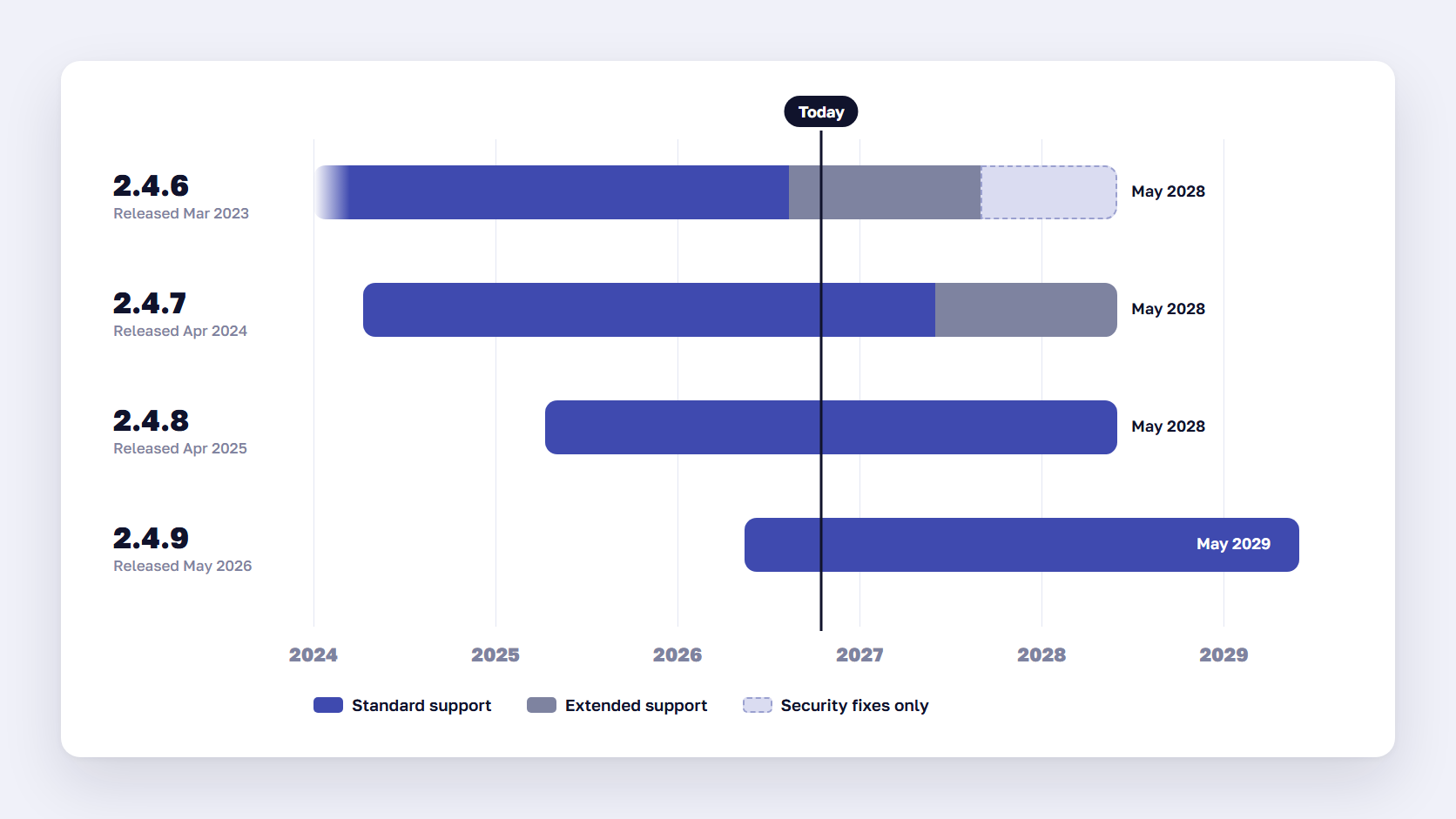
If you’re on 2.4.6, the clock is already running. Our Magento upgrade guide puts a minor version jump at $3,000–$8,000 over 2–4 weeks, and a major jump with an extension audit at $15,000–$40,000 over 4–8 weeks. On a store with years of customization, that second number is the one that makes people open a Shopify tab.
What merchants are really trying to fix
When we ask what the move to Shopify should solve, the answers almost always come from four complaints.
- A slow storefront, especially on category and search pages under load
- Small changes that take days and come with an invoice
- Upgrades and security patches that eat the budget meant for growth
- Owning hosting, uptime, PCI scope, and the on-call schedule that comes with them
Each of these is a real problem. The first three can be fixed on Magento, and managed hosting takes care of much of the fourth.
🚀 Quick takeaway
Write down the problem you want the new platform to fix before anyone quotes a migration. If the list is speed and the cost of every change, you have options that don’t involve moving 70,000 customer records.
The option most migration guides skip: keep Magento and fix what’s driving you away
You can now fix Magento’s two most common complaints, speed and the cost of change, on the store you already run. Expedio makes the Magento backend at least twice as fast without touching your theme or data. Ari, scandiweb’s AI agent for Magento, handles upgrades, patches, and store changes from a chat. Expedio’s core is free and open source, and Ari starts at €99 a month, so both sit far below a replatform budget.
Migration guides written by Shopify apps and agencies rarely mention this path, for the obvious reason that they sell the other one.
A faster Magento storefront with Expedio
Speed is the reason merchants give most often for looking at Shopify, and the data backs them up. In HTTP Archive data from August 2026, only 22% of Magento sites met Google’s “good” threshold for time to first byte, against 82–92% of Shopify sites, as our Ari team reported.
Expedio goes after that gap on the Magento side. It changes how Magento builds each page on the server, using Liquid, the same template language behind Shopify themes. Hyvä, Luma, and custom themes keep their design. The Expedio packages range from the free core to a full implementation with 2x speed guaranteed by contract.
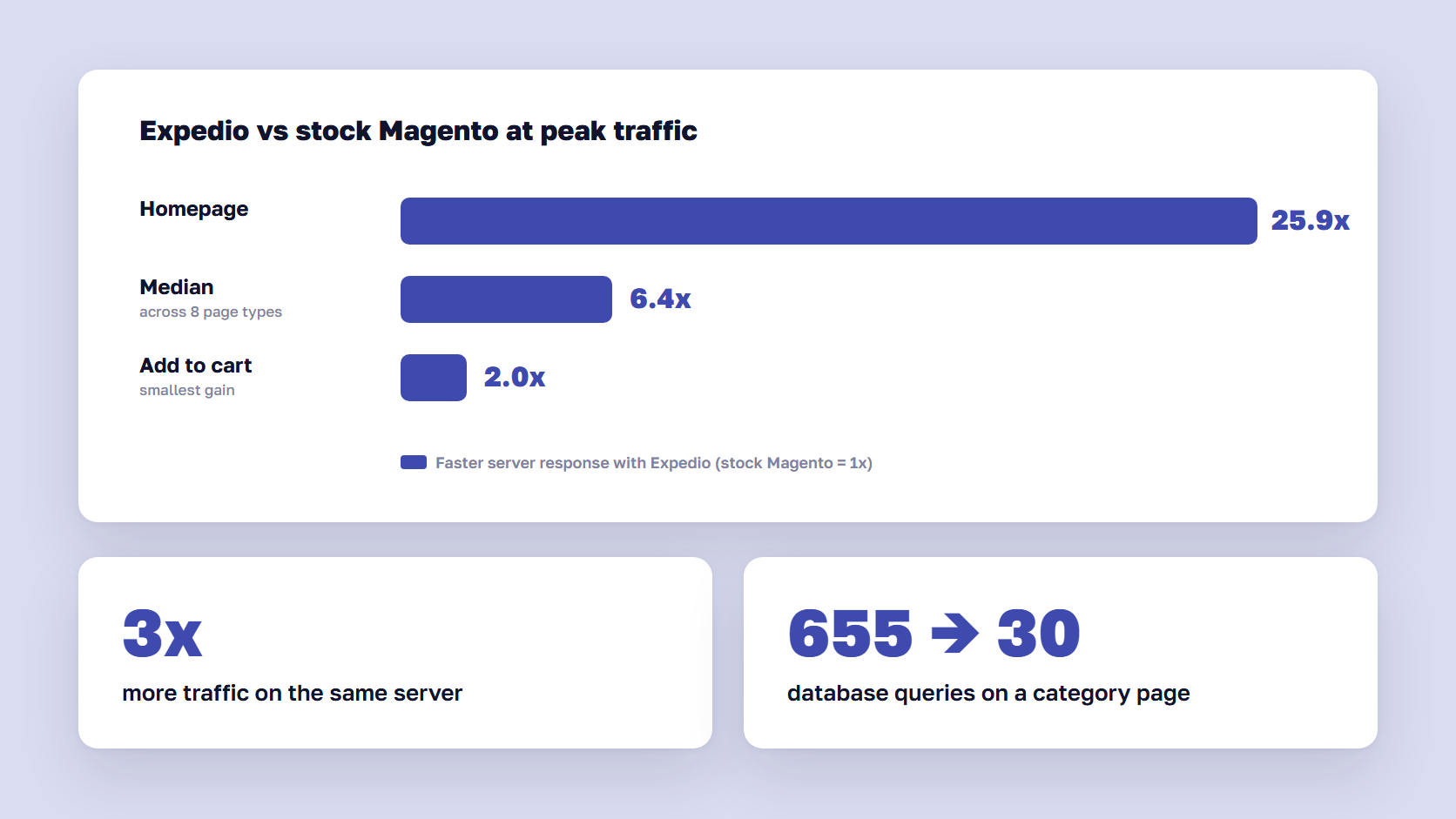
We tested it on one merchant’s Hyvä store with about 1,000 categories and 20,000 products. In that Expedio benchmark, the store on Expedio delivered these results.
- At least 2x faster on every page type at peak traffic, and up to 25.9x faster on the homepage
- 6.4x faster at the median across eight page types
- 3x more traffic handled on the same server
- 30 database queries on a full category page, down from 655
The test measured server response time, not full page load, and left cart and checkout out. Meet Expedio explains how we built it.
Faster upgrades and changes with Ari
The second reason people leave is what every change costs. Ari takes a request in plain language, builds it on a preview copy of your store, and waits for a person on your team to approve it before anything goes live. On scandiweb’s public demo store in August 2026, Ari applied and checked a security patch in 9 minutes. It upgraded 2.4.6 to 2.4.7 in 38 minutes, and moved a heavily customized 2.4.4 store to 2.4.9 in 2 hours 10 minutes.
Those timings come from a demo store, and a real store with abandoned extensions will take longer. Even so, an upgrade that takes hours changes the upgrade math above. Why we built an agent for Magento explains the review and approval model.
What staying looks like in practice
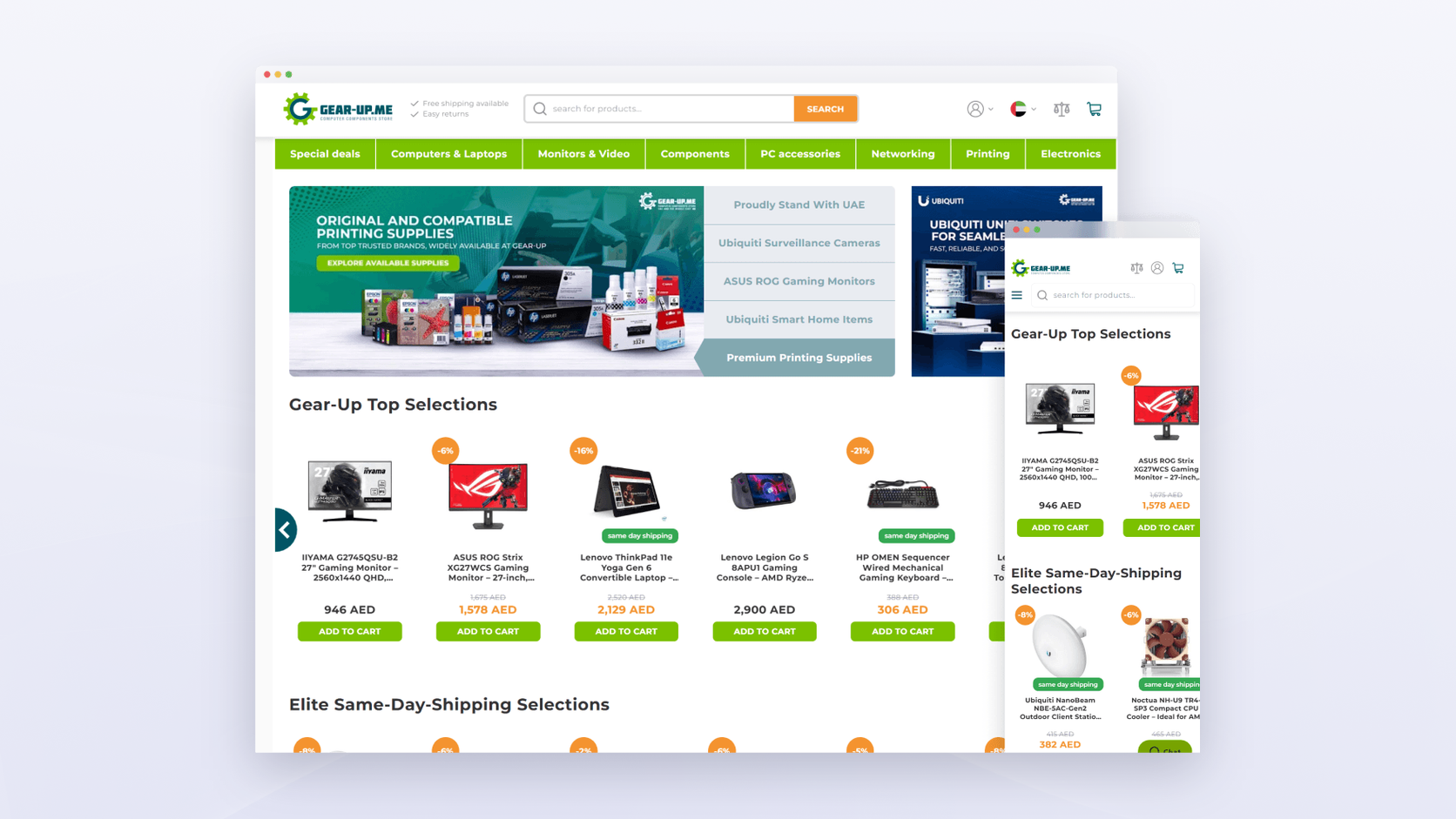
Gear-Up, an electronics retailer in Dubai, stayed on Magento. A previous partner had failed at its Magento 2 migration, and the store carried more than ten years of Magento 1 order history and seven currencies with their own rounding rules. We moved it to Magento 2 with a Hyvä frontend and launched in an 8-hour window. Revenue grew 110.9% YoY and orders 47.7% YoY.
Read more: Case Study: Magento 2 Migration and Hyvä Frontend Improve YoY Sales by 111%
🚀 Quick takeaway
A migration fixes speed and change cost by rebuilding everything else along with them. If those two problems are your whole list, fix them where they are and keep the budget.
What a Magento to Shopify migration costs over three years
A Magento to Shopify migration usually costs $20,000 for a simple store and $250,000 or more for a B2B store with ERP integrations, based on published agency estimates. Shopify Plus adds $2,300 per month on a three-year term. Over three years, the comparison turns on four lines: the Adobe license against the Plus fee, your app stack, payment fees, and how much custom work you rebuild.
Ranges below come from our Magento pricing breakdown, our upgrade guide, and Shopify’s published Plus pricing.
| Cost line | Upgrade and stay on Magento | Move to Shopify Plus |
|---|---|---|
| Platform license | $0 on Open Source, about $22,000–$125,000+ per year on Adobe Commerce, by GMV | $2,300 per month on a 3-year term, $2,500 on a 1-year term |
| One-time project | $3,000–$8,000 minor upgrade, $15,000–$40,000 major upgrade | $20,000–$250,000+ migration |
| Hosting | About $1,200–$7,000+ per year on Open Source, included on Adobe Commerce Cloud | Included |
| Extensions and apps | Extension licenses and renewals | Monthly app subscriptions that replace extensions |
| Payments | Your payment provider’s rate | Shopify Payments, or a 0.2% surcharge on third-party gateways |
| Maintenance | About $4,000–$25,000+ per year | Less platform upkeep, ongoing app and theme work |
The costs that decide it
The license line moves the total most. An Adobe Commerce store paying $50,000 a year for its license compares very differently from an Open Source store paying nothing. Over three years, Plus on a 3-year term comes to $82,800 before any revenue-based fee, which Shopify applies at high GMV but doesn’t publish.
Apps come next. Extensions you bought once on Magento often turn into monthly subscriptions on Shopify, and a store replacing 15 extensions can add a noticeable line to its run rate. Price the app list before anyone signs.
Payment fees matter at volume. If you keep a third-party payment provider on Plus, the 0.2% surcharge on $10 million in online revenue comes to $20,000 a year.
The last line is what you rebuild. Custom checkout steps, B2B pricing rules, and integrations are where migration quotes grow, and the next two sections show where that work comes from.
🚀 Quick takeaway
Plus is cheaper than Adobe Commerce for many mid-market stores, and often more expensive than a well-run Open Source store. Know which one you are before the business case is written.
What moves in a Magento to Shopify data migration
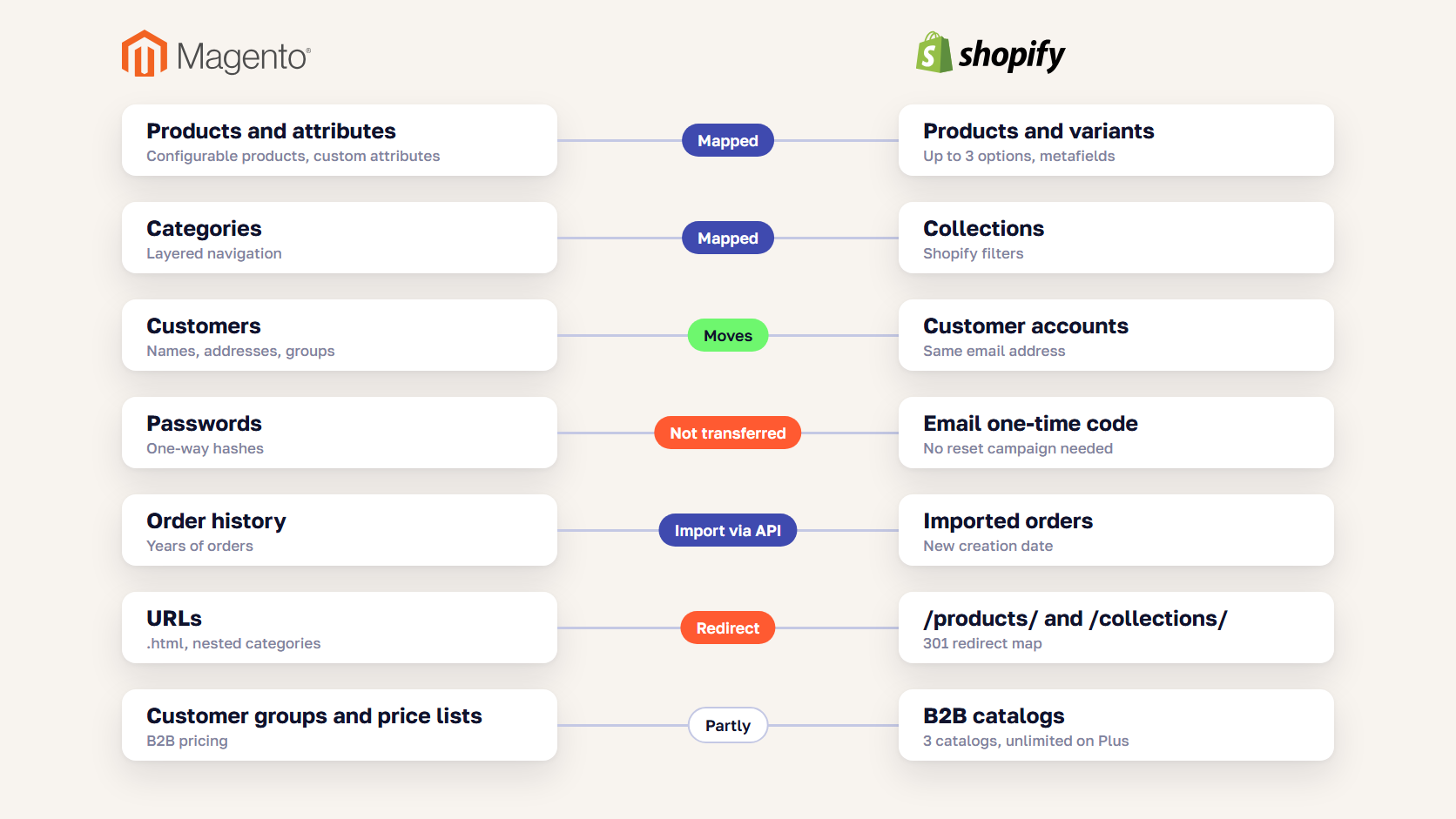
Products, customers, orders, and content all move in a Magento to Shopify data migration, and each needs some work on the way. Product attributes need mapping, URLs change and need redirects, and orders arrive with a new import date. Customer passwords stay behind, although Shopify’s current customer accounts sign in with a one-time email code, which makes that far less of a problem than it used to be.
| Magento data | Moves to Shopify? | What to know |
|---|---|---|
| Products and variants | Yes | Up to 3 options and 2,048 variants per product. Custom attributes become metafields |
| Categories | Yes, as collections | URLs move to /collections/, and layered navigation becomes Shopify filters |
| Customers | Yes | Password hashes don’t transfer. New customer accounts log in with an email code |
| Order history | Yes, through the API or an import app | The import date becomes the creation date, and the original date is kept separately |
| Reviews | Yes, through a reviews app | Choose the app before launch, or reviews disappear from product pages |
| CMS pages and blog | Yes, mostly by hand | A good moment to drop pages nobody visits |
| URLs | No | Shopify fixes paths like /products/ and /pages/, so every changed URL needs a 301 redirect |
| B2B customer groups and price lists | Partly | Native B2B allows 3 catalogs on Basic, Grow, and Advanced, unlimited on Plus |
Can you migrate customer passwords from Magento to Shopify?
No. Magento stores passwords as one-way hashes, and Shopify can’t import them. Shopify deprecated legacy customer accounts on February 26, 2026, and new stores use accounts where shoppers sign in with their email and a one-time code. Returning customers enter the same email they used on Magento, so there is no mass password reset to manage.
Order history: import it, then check your reports
Orders come across through Shopify’s Admin API or an import app such as Matrixify, once products and customers exist. Imported orders get the import date as their creation date, and the original purchase date is stored in a separate field. Reports and integrations that filter by creation date will show years of orders landing on one day until someone fixes the filter.
What a large catalog migration looks like
J.R. Dunn, a family-owned luxury jeweler in Florida and an authorized Rolex retailer, moved from Magento 1 to Shopify with us. We migrated more than 25,000 products, 68,000 customers, 72,000 historical orders, and 1,000 categories in 6.5 months. Its 150,000+ diamonds from five vendors needed a custom app, because Shopify’s native filtering caps out far below a catalog that size. The store launched with an SEO score of 100.
Read more: Case Study: Magento 1 to Shopify Migration for a Luxury Jewelry Brand

🚀 Quick takeaway
Decide your order-history cutoff early. Every year of orders you import is another year of data to clean and reconcile in reporting.
What you rebuild when you migrate Magento to Shopify
When you migrate Magento to Shopify, you keep your data and rebuild almost everything that acts on it. Extensions become apps, custom checkout logic becomes Shopify Functions and checkout extensions, store views become Markets, and every ERP or warehouse integration gets reconnected to Shopify’s APIs.
Before anyone writes an estimate, list every Magento extension and custom module, and mark each one keep, replace, or drop. The rebuild list usually includes these items.
- Extensions with no Shopify equivalent, rebuilt as custom apps
- Custom checkout steps, rewritten as checkout extensions and Functions
- ERP, PIM, and warehouse integrations, reconnected to Shopify’s APIs (our ERP integration guide covers how to scope them)
- Multiple store views, rebuilt as Shopify Markets or separate expansion stores
- B2B price lists beyond 3 catalogs, which need Plus
The longer this list, the more of the migration budget goes into rebuilding what already works today. For B2B stores, the rebuild is also the moment to open the catalog to search engines and AI assistants, which our B2B SEO guide explains.
How to protect SEO in a Magento to Shopify migration
Protect rankings by redirecting every indexed URL that changes and carrying over titles, meta descriptions, and structured data. Load the redirects before the domain switches, then watch Search Console daily. Shopify’s own migration guide tells merchants to expect a 5–10% traffic dip in the first week and to investigate any sustained drop above 20%.
Five steps carry most of the risk.
- Crawl the Magento store and export every indexed URL, plus your existing redirects
- Map 301 redirects to the new Shopify paths, starting with the pages that bring the most traffic, revenue, and backlinks
- Carry over page titles, meta descriptions, and structured data
- Load and test the redirects on the new store before you change DNS
- Watch Search Console coverage and your top keywords daily for the first two weeks
Our SEO migration checklist covers every check from the redirect map to the first 30 days after launch, and our guide on how to migrate to Shopify walks through the launch sequence step by step.
🚀 Quick takeaway
Magento URLs often end in .html and nest categories, and Shopify’s don’t. Almost every product and category URL changes, so give the redirect map its own owner and timeline from the first week of the project.
How to choose between a Magento upgrade and a Shopify migration
Stay on Magento and fix it when your edge comes from custom logic Shopify would make you rebuild, and your main complaints are speed and change cost. Move to Shopify when your store can run on standard features and apps, and the three-year numbers favor Plus once the rebuild list is priced. Most stores fall clearly on one side once that list is written down.
Upgrade and fix Magento if
- You sell B2B with customer-specific pricing, quotes, or more than a handful of price lists
- Your checkout or ordering flow depends on custom logic your competitors don’t have
- Your ERP integration is deep, stable, and expensive to rebuild
- Your main complaints are speed and the cost of small changes
- You run on Magento Open Source and pay no Adobe license
Migrate to Shopify if
- Your catalog, checkout, and pricing are close to standard DTC retail
- You want to stop managing hosting, patches, and version upgrades for good
- You pay an Adobe Commerce license that Plus would undercut
- Your extensions have clear Shopify app equivalents
- Your team wants to run merchandising and content without developers
If you land in the middle, an architecture review maps the rebuild list and prices both paths before you commit.
Frequently asked questions about Magento to Shopify migration
How much does it cost to migrate from Magento to Shopify?
A Magento to Shopify migration typically costs $20,000 for a simple store and $250,000 or more for a B2B store with ERP integrations, according to published agency estimates. On top of that come Shopify Plus at $2,300 per month on a three-year term, monthly app subscriptions, and the cost of rebuilding custom features. Your rebuild list moves the price more than catalog size does.
How long does a Magento to Shopify migration take?
Most mid-market migrations from Magento to Shopify take three to six months. Integrations and custom functionality stretch the timeline more than product count does. J.R. Dunn’s migration, with 150,000+ diamonds from five vendors and 72,000 historical orders, took 6.5 months. Simple stores with standard checkouts can move faster.
Will I lose SEO rankings if I move from Magento to Shopify?
You will usually see a short dip, and you shouldn’t lose rankings long term if every changed URL gets a 301 redirect and page metadata carries over. Shopify’s migration guidance treats a 5–10% traffic drop in the first week as normal. A sustained drop above 20% usually points to missing redirects or pages that dropped out of the index.
Is it cheaper to upgrade Magento or move to Shopify?
An upgrade is usually cheaper in year one: $3,000–$40,000 depending on the version jump, against $20,000–$250,000+ for a migration. Over three years, Shopify Plus can come out ahead for stores paying a high Adobe Commerce license, while Magento Open Source stores often stay cheaper. Price both paths over three years, including apps and payment fees.
Can Shopify handle B2B stores coming from Magento?
Shopify handles standard B2B well. Since April 2026, Basic, Grow, and Advanced plans include company profiles, payment terms, volume pricing, and up to three B2B catalogs, while Plus adds unlimited catalogs and catalogs assigned to specific companies. Stores with complex quoting, configurators, or ERP-driven pricing often need custom apps on Shopify, or stay on Magento.
Do I have to move to Shopify if my Magento version is end of life?
No. An unsupported Magento version means you need to upgrade, and replatforming is optional. You can move to a supported release such as 2.4.8 or 2.4.9 and keep your store and integrations. Treat end of support as the deadline to decide, then compare the upgrade quote with a full Magento to Shopify migration on cost and on what each path fixes.
Making the call
A Magento to Shopify migration makes sense when you want to stop owning the platform and your store fits Shopify’s model without heavy rebuilding. An upgrade makes sense when your custom logic is the business, and the reasons you wanted to leave can be fixed where you are. Either way, write the problem list and the rebuild list first, then price both paths over three years. If the answer is Shopify, our Magento to Shopify migration team starts with a fixed-price risk audit.
Holding an upgrade quote and a Shopify pitch at the same time? Send us both, and we'll tell you which one your store needs.




































