
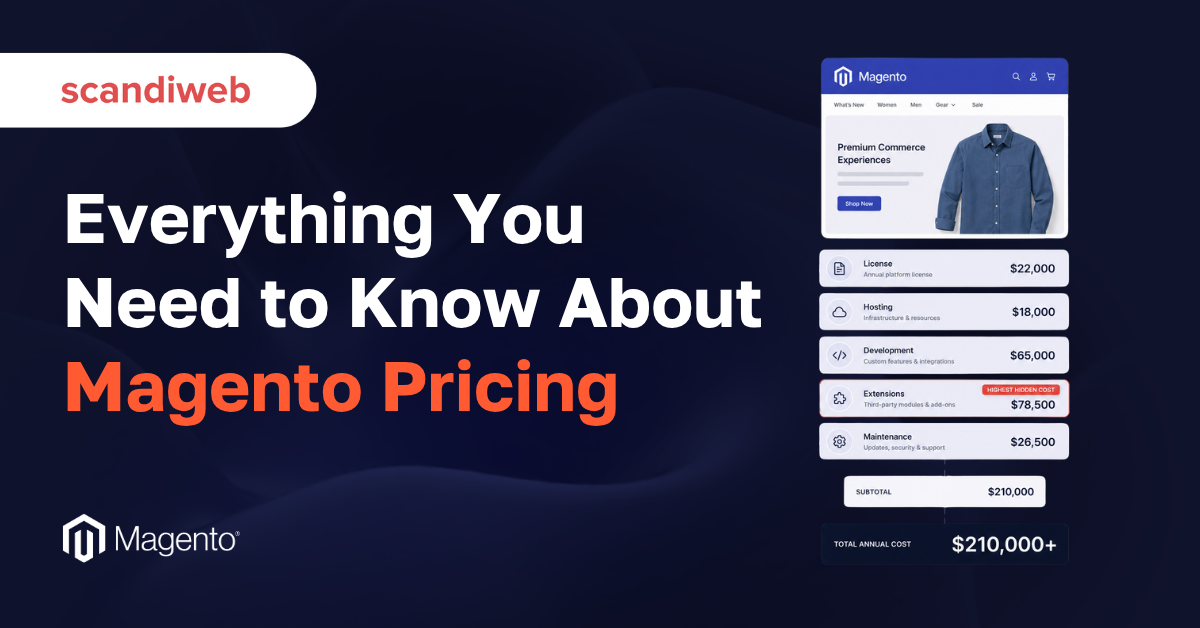
If the Adobe renewal quote on your desk is higher than the one before it, the natural guess is that Adobe raised its prices. Sometimes that’s part of it. More often the number moved because something on your side moved: your trailing GMV crossed into the next license tier, a multi-year rate ran out, or the cloud package in the quote now carries more vCPU days, more storage or an extra staging environment.
That’s why Magento pricing is hard to read from one invoice. The license is often the most predictable line on a five-year budget, and sometimes the smallest. The rest is in hosting, in the development hours behind every custom feature, in the extensions and integrations that make the store work, and in the maintenance that keeps it secure and fast after launch.
This guide covers all of it: Adobe Commerce license tiers by GMV, what drives the Adobe Commerce Cloud hosting bill, why renewals surprise finance teams and how to forecast the next one, and the full total cost of ownership of a Magento store. It’s written for heads of eCommerce, CFOs and founders who need a number they can defend.
🚀 Quick takeaway
Magento Open Source has no license fee, and Adobe doesn’t publish Adobe Commerce prices. The license scales with your GMV, the cloud bill scales with the resources in your contract, and both reset at renewal. Plan for a six-figure first year on a serious mid-market store and a recurring run rate in the tens of thousands after that.
Magento pricing starts with the edition: Open Source vs Adobe Commerce
Magento comes in two editions, and they start from very different places. Magento Open Source is free to download and use, with no license fee, ever. Adobe Commerce (formerly Magento Enterprise) is a commercial, licensed product with added B2B tooling, advanced merchandising, AI-driven product recommendations, and Adobe support included.
The mistake is reading “free” as “cheap.” Open Source removes a license invoice, but every other cost category below still applies in full. You still pay for hosting, for the build, and for security patching. We cover the feature-by-feature differences in our guide on Adobe Commerce vs Open Source, so this article stays on the money.
It also helps to separate two things that often get blurred. One is the edition decision, which is a question of features and license model. The other is the deployment decision, which is a question of who runs the infrastructure. Adobe Commerce can run on your own servers (on-premises), on Adobe Commerce Cloud, or as Adobe Commerce as a Cloud Service (ACCS), Adobe’s SaaS version. Each choice changes your hosting line and your license band, and our comparison of SaaS, PaaS and on-prem explains what each one includes.
Does Adobe publish Adobe Commerce pricing?
No. Adobe doesn’t publish Adobe Commerce license prices and never has. Every figure you see online is an estimate compiled by partners and agencies from real quotes, and the actual number requires a direct conversation with Adobe sales.
Adobe Commerce uses a custom, success-based license tied to your annual Gross Merchandise Value (GMV). The Adobe Commerce on Cloud product description defines GMV as the value of transactions through your sites over a contract year, excluding shipping, handling and customs charges and the taxes you collect. It defines Average Order Value (AOV) as that GMV divided by the number of transactions in the same year. The more you sell, the higher the tier, which is why we present every figure below as a range from aggregated partner estimates.
🚀 Quick takeaway
Adobe’s GMV excludes shipping, handling, customs and collected taxes. If your finance team forecasts the tier from analytics revenue that includes them, it will overestimate the band you fall into.
Adobe Commerce pricing by GMV tier
Adobe Commerce pricing follows your annual GMV in five commonly cited bands, from roughly $22,000 a year on-premises below $1M GMV to about $125,000 above $25M. Adobe Commerce Cloud pricing runs from about $40,000 to $190,000 or more across the same bands, because the Cloud license also covers managed hosting.
| Annual GMV | Adobe Commerce on-premises (est. per year) | Adobe Commerce on Cloud (est. per year) |
|---|---|---|
| Under $1M | ~$22,000 | ~$40,000 |
| $1M to $5M | ~$32,000 | ~$55,000 |
| $5M to $10M | ~$49,000 | ~$80,000 |
| $10M to $25M | ~$72,000 to $75,000 | ~$120,000 |
| $25M+ | ~$125,000+ | ~$190,000+ |
Two notes on reading the table. The figures come from partner and agency reports (Webkul, MGT Commerce), and the sources disagree slightly in the $10M to $25M band, so we show both numbers. Your contract may also differ from the band because of term length, discounts, or extra cloud capacity bundled into the quote.
The gap between the two columns is the price of managed infrastructure. On these estimates, Cloud costs roughly $18,000 to $65,000 a year more than the on-premises license at the same GMV. Whether that premium is good value depends on what you would otherwise spend on hosting and DevOps, which the next sections break down.
🚀 Quick takeaway
The tier boundaries matter more than the averages. A store at $9.5M GMV growing 10% a year will renew in the next band, so model both tiers whenever you are within a year’s growth of a boundary.
The seven cost categories that make up Magento total cost of ownership
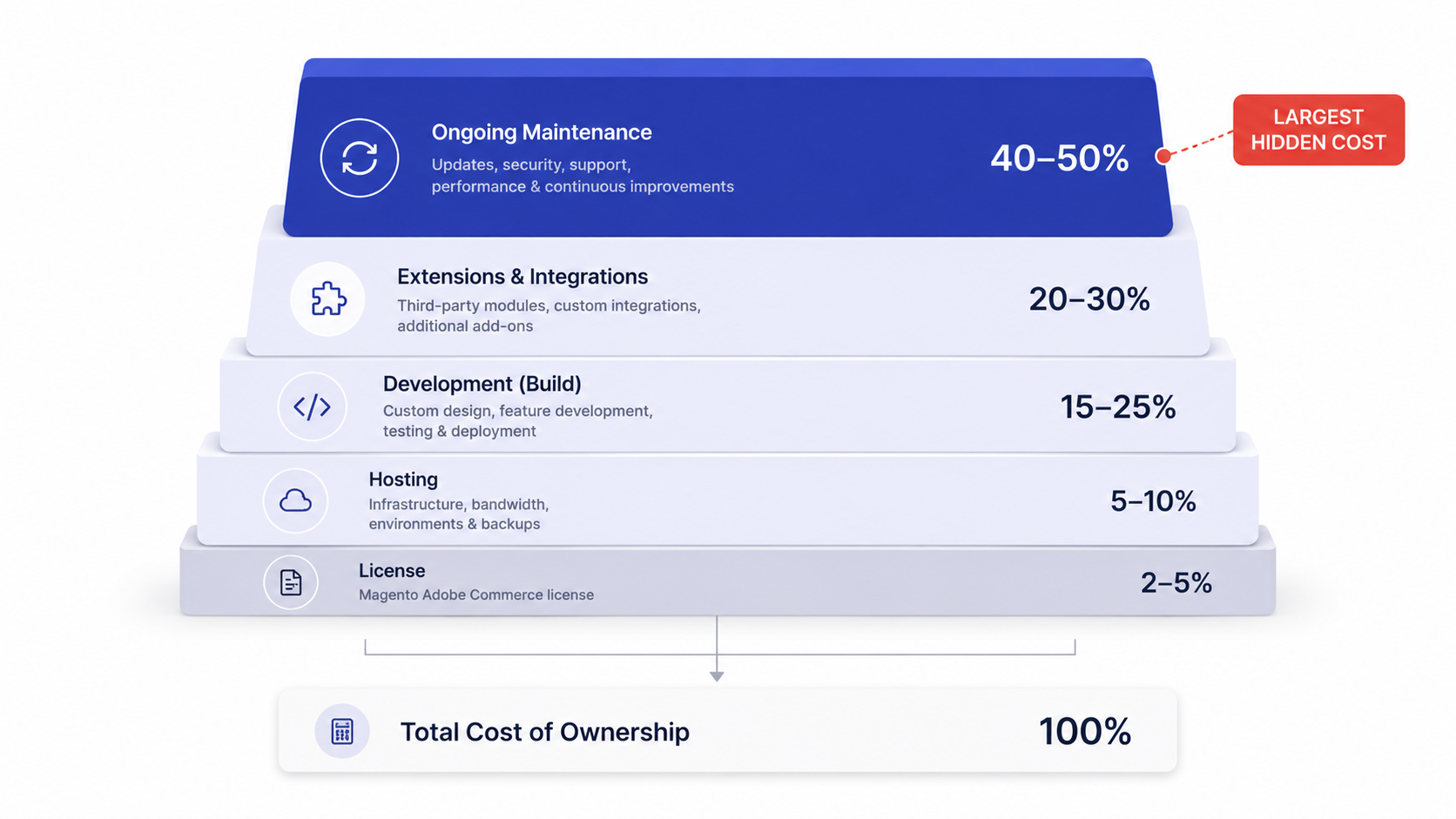
A realistic Magento budget is the sum of seven moving parts. Treating any one of them as the whole picture is how stores end up underfunded six months after launch. Here is each category with a current range and the reasoning behind it.
1. License (the part everyone overweights)
Magento Open Source: zero. Adobe Commerce: estimated, based on aggregated partner data, at roughly $22,000 to $125,000 per year for the on-premises license and roughly $40,000 to $190,000 per year for Adobe Commerce on Cloud, which bundles managed infrastructure. The GMV tier table above shows where your store falls.
One detail trips up budgets: the license is billed annually and rises as you grow, so you can’t model it once and forget it. Partner guides note that pricing resets each year based on trailing 12-month GMV, so a strong sales year shows up in the next renewal. When you compare Adobe Commerce to the apparent zero of Open Source, you are really comparing a growing subscription against a set of capabilities you would otherwise build and maintain yourself.
2. Hosting and infrastructure
Magento needs real compute, so shared hosting is not an option for a live store. For Magento Open Source on a managed VPS or cloud setup, plan for roughly $1,200 to $7,000+ per year depending on traffic and catalog size. Adobe Commerce on Cloud folds hosting into the license, which is part of why the cloud tier costs more.
Magento hosting cost comes down to a short list of drivers:
- Application compute: the CPU cores and memory behind PHP and the web servers, sized for your peak hour, not your average one.
- Search and cache services: OpenSearch for catalog search and Redis or Valkey for cache and sessions, which grow with catalog size and traffic.
- Database: the size and speed of MySQL or MariaDB, plus a read replica once admin work and storefront traffic compete.
- Environments: every staging or development copy of the store is more servers to pay for.
- CDN and bandwidth: image-heavy catalogs and international traffic move this line the most.
- Bot traffic: crawlers and scrapers use the same compute as shoppers, so unfiltered bots inflate the bill.
Where many budgets go wrong is treating hosting as a commodity line. Magento performance under real traffic depends on infrastructure tuning, caching and CDN setup, which is its own discipline. If you want the speed without owning the operations, managed hosting and DevOps built for Magento removes most of that risk, and our list of Magento hosting providers compares the main options.
It also helps to think in tiers rather than a single number. A low-traffic catalog store can run on a tuned single-server setup at the bottom of that range. A store with seasonal spikes, a large catalog and dozens of concurrent admin users needs autoscaling, a read replica, dedicated cache nodes and a proper CDN, which pushes the annual figure toward and past the top of the range. Peak events like Black Friday are where under-provisioned stores either pay for emergency capacity or lose revenue to downtime, so the cheapest hosting line on paper is often the most expensive one in practice.
Code speed changes the hosting bill too. A store that renders pages faster needs fewer cores for the same traffic, which is why work like our Expedio performance module for Magento shows up on the infrastructure line as well as in conversion.
🚀 Quick takeaway
Two stores with the same traffic can have very different hosting bills. Caching, bot filtering and staging sizing usually explain the gap before server prices do.
3. Development and the initial build
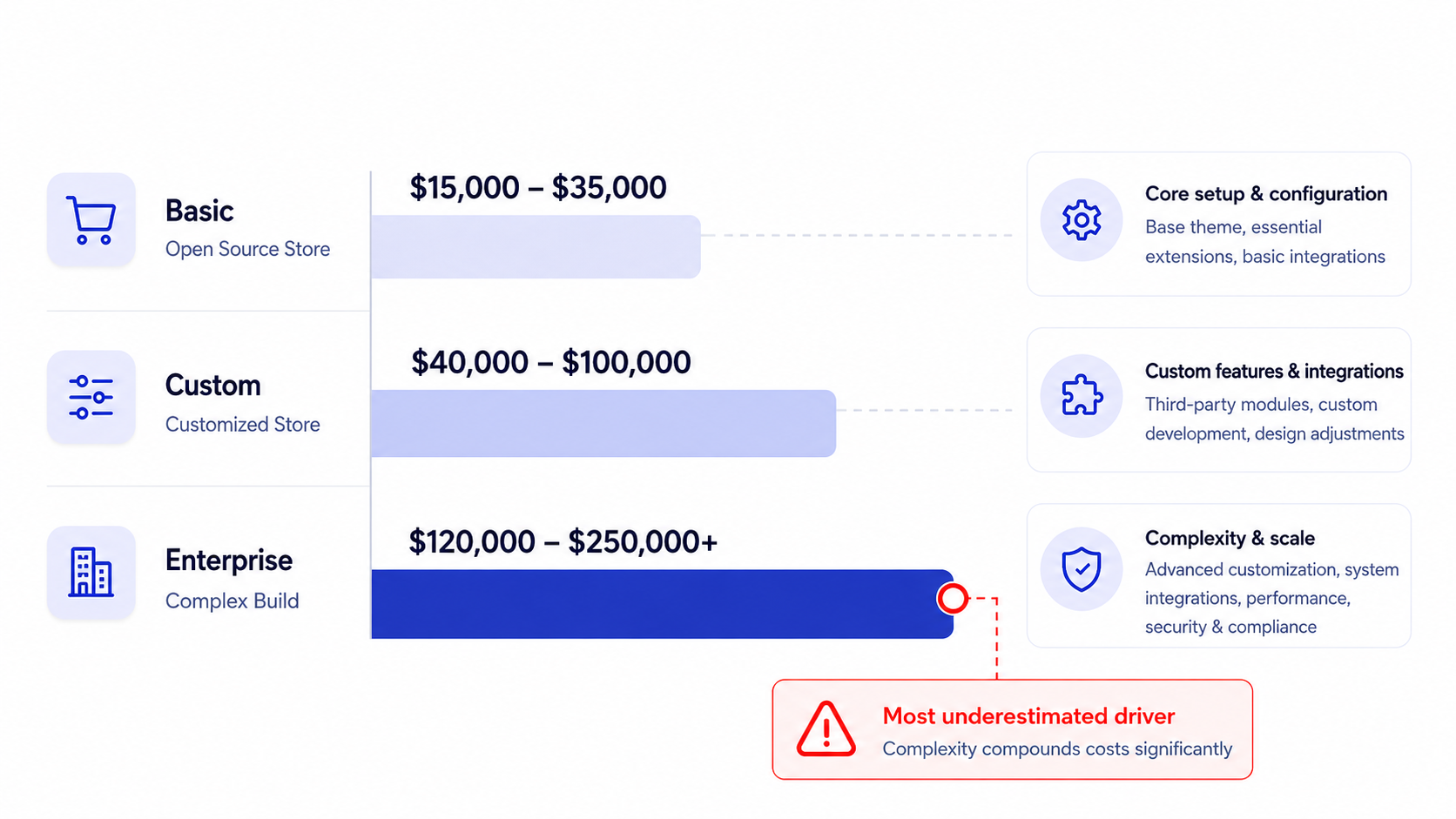
This is usually the single largest line in year one. For an Open Source build, the market consensus across current pricing guides (Elementor, Hostinger, magestore) lands around $20,000 to $60,000 for a straightforward store, $60,000 to $150,000+ for a heavily customized site, and $100,000 to $500,000+ for complex enterprise builds with deep ERP or CRM integration.
Your requirements drive that number more than the platform does. A clean catalog with standard checkout is one thing. Bespoke pricing logic, multi-store setups, headless frontends and custom B2B workflows are another. Hourly rates vary widely by region, from roughly $40 per hour in parts of APAC to $125+ per hour in North America, which is why the same scope can carry very different invoices.
A practical way to read the build estimate is to break it into work streams rather than one lump sum. A typical mid-market build splits into discovery and architecture, theme and frontend implementation, custom module development, third-party integrations, data migration, and quality assurance. The integration and QA streams are the ones most often underestimated, because they scale with the number of external systems and the state of the source data. A store with a clean product feed and two integrations will land near the bottom of its band, while the same visual scope with a legacy ERP, inconsistent SKUs and five integrations can double the hours without changing a single pixel of the design.
4. Theme and frontend
You can launch on a pre-built theme for $0 to a few hundred dollars, but most serious brands invest in custom design. A custom Magento theme typically runs $0 to $5,000+ for a template-based approach and well into five figures for a fully bespoke, conversion-focused frontend, often 40 to 160+ design and build hours.
The frontend decision also touches performance. Modern stacks like Hyvä themes are popular because they cut page weight and improve Core Web Vitals, which feeds directly into conversion and search rankings. That makes design spend a revenue decision as well as a visual one.
There is also a long-term cost angle that rarely makes it into a first quote. A heavily customized default Luma theme accumulates technical debt and gets more expensive to maintain through Magento upgrades, while a leaner modern frontend tends to upgrade more cleanly. Choosing the frontend architecture is as much a maintenance decision as a design one, so price both the build and the five-year upkeep before you commit.
5. Extensions
Individual Magento extensions commonly cost $60 to $600 each, and a real store runs many of them: search, reviews, advanced pricing, marketing automation, tax, and more. Premium or subscription-based extensions add recurring fees on top of the one-time purchase.
Compatibility is where extensions really cost money. Every extension has to be tested against your version of Magento and against every other extension, and conflicts surface during upgrades. Budget for the integration and QA time as well as the sticker price of each module.
A useful habit is to treat every extension as a recurring liability. Each module you add has to be re-tested on every platform upgrade, may need its own paid support contract, and can block a security patch if its vendor is slow to update. Stores that keep a tight, well-justified set of extensions spend far less over five years than stores that install a new module for every minor requirement, even when the upfront prices look similar.
6. Integrations
Most mid-market stores connect Magento to an ERP, a CRM, a PIM, a tax engine, payment gateways and a marketing stack. Each connection is custom work, and complex ERP integrations alone can run from several thousand to well into five figures depending on the system and the data flows. If your architecture is integration-heavy, planning the integrations layer early prevents expensive rework later.
Payment processing also belongs here as an ongoing cost, and it’s the figure that surprises finance teams. Gateways typically charge around 2.9% plus $0.30 per transaction. A store doing $5M a year in card sales pays around $145,000 annually in processing at a blended 2.9%, before gateway monthly fees, fraud tools and chargeback handling. That single line can exceed the entire Adobe Commerce license, so better gateway terms often return more than a squeezed development quote. Our Adyen vs Stripe comparison shows how much the pricing model alone can move that number.
🚀 Quick takeaway
At $5M in card sales, payment processing costs two to four times the estimated Adobe Commerce license for that GMV band. If you only have time to negotiate one contract, check this one first.
7. Ongoing maintenance and support
This is the category most often missing from a first budget, and it never ends. Magento needs regular security patching, version upgrades, performance monitoring, bug fixes and feature work. Across current pricing guides, ongoing maintenance and support commonly runs from around $4,000 per year for a small Open Source store to $50,000+ per year for an active, business-critical Adobe Commerce store.
Skipping maintenance only defers the cost and adds risk. Unpatched Magento stores are a known target, and a single security incident or a broken checkout during peak season costs far more than a year of support. A predictable support and maintenance plan turns that risk into a fixed monthly line you can plan around.
Maintenance also splits into two budgets that are easy to conflate. The first is keep-the-lights-on work: security patches, version upgrades, monitoring and bug fixes that protect the store you already have. The second is evolution: new features, optimization and experiments that grow revenue. Healthy stores fund both. Stores that fund only the second eventually pay for the first all at once, in an emergency upgrade after they fall several versions behind. Our guide to Magento end of life lists the support dates that set that clock.
What drives the Adobe Commerce Cloud hosting bill?
On Adobe Commerce Cloud, the hosting bill is set by the resource bucket in your contract: vCPU days for production and staging, storage, and CDN bandwidth, sized to your GMV tier. You pay more when you need more of that bucket, through added vCPU days, extra environments or temporary upsizes for peak traffic.
The drivers, in the order they usually move the bill:
- vCPU days per environment. Adobe’s product descriptions set a maximum annual vCPU day allowance for production and a separate one for staging. One vCPU day is one virtual CPU running for one calendar day. If you need more, Adobe lets you buy additional vCPU days.
- Environments. The Pro plan includes an integration environment, a staging environment on dedicated hardware, and a production environment of three virtual machines behind a load balancer, according to Adobe’s Pro architecture documentation. An additional staging environment and larger integration environments are add-ons.
- Peak traffic. Adobe reallocates resources automatically to keep you inside your annual allowance, but for planned spikes you still open a Support ticket to request a temporary upsize, per Adobe’s technology stack documentation. Each upsized day draws on the same yearly allowance.
- Storage and CDN bandwidth. Both are allowances in the sales order. Large media libraries, logs and backups count toward storage, and heavy image traffic counts toward bandwidth.
- Included services. The license covers Fastly CDN with DDoS protection, a web application firewall, image optimization and New Relic monitoring, so these don’t appear as separate bills the way they would on self-managed hosting.
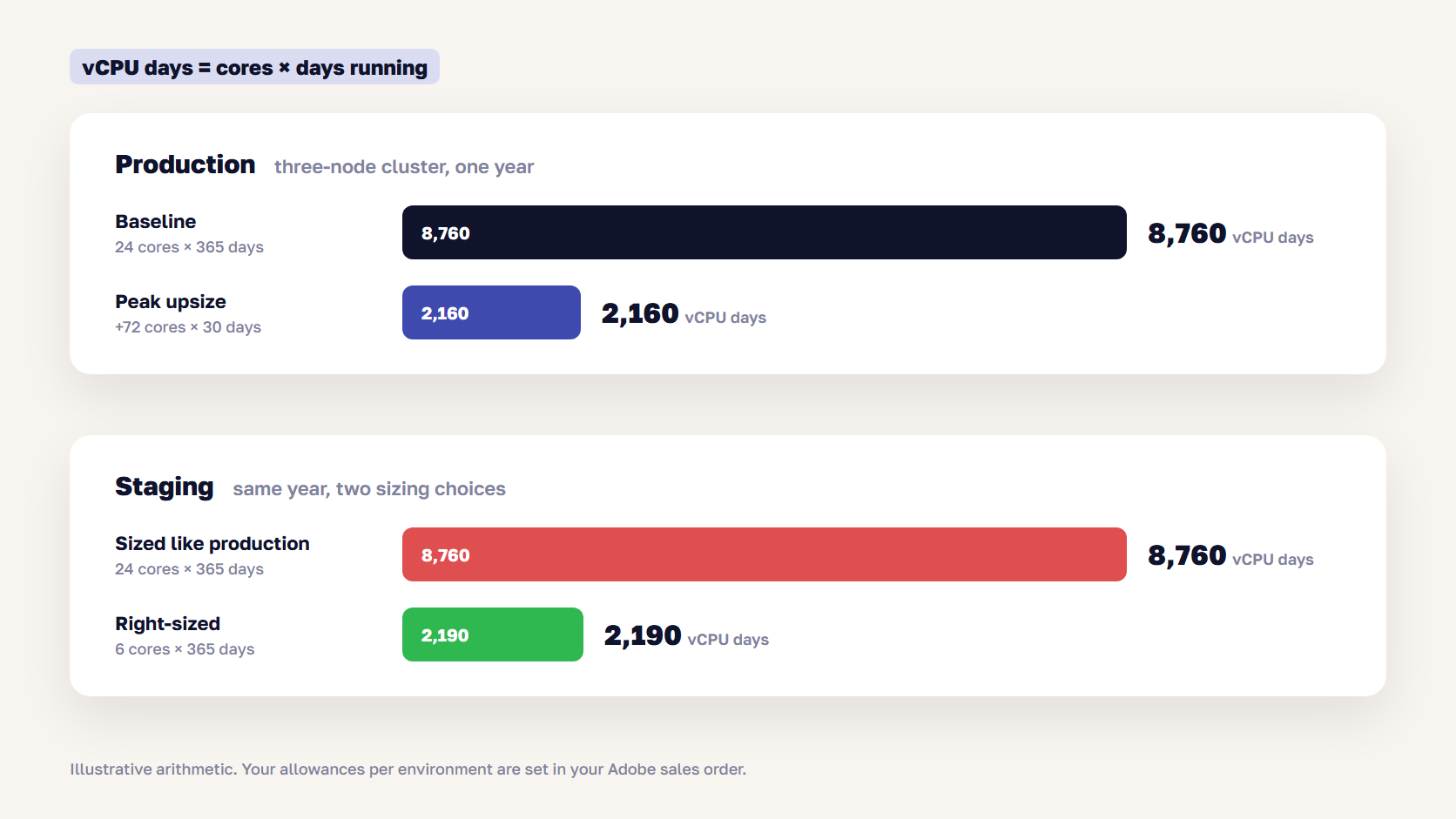
The arithmetic is simple and worth doing yourself. vCPU days equal cores multiplied by the days they run. A 24-core production cluster running all year uses 8,760 vCPU days. Upsizing by 72 cores for a 30-day peak adds 2,160 more. A staging environment sized like production uses another 8,760, while a 6-core staging environment uses 2,190.
Staging is where we see the most waste. In one renewal we reviewed for a retailer changing GMV tier, Adobe’s quote added packs of staging vCPU days because the main staging environment was sized close to production. Usage data showed staging averaging around 20% CPU. Our SRE team recommended downsizing staging to fit the included allowance instead of buying the packs, and flagged two more points to raise with Adobe before signing: the remaining production headroom for peak, and the rate for exceeding the production allowance.
🚀 Quick takeaway
On Adobe Commerce Cloud, the questions to ask are how many cores each environment runs, for how many days, and what you pay above the allowance. A staging copy sized like production can double your staging line for no customer benefit.
Adobe Commerce Cloud vs on-premises hosting: which costs less?
Adobe Commerce Cloud bundles hosting, CDN and managed infrastructure into a higher license fee, while on-premises Adobe Commerce keeps the license lower but leaves hosting and operations to you or your agency. Cloud is rarely cheaper on paper, but it can be cheaper in total once you count the operations work you no longer have to staff.
The trade-off is real and worth modeling rather than assuming. On-premises gives you control: you choose the provider, you tune the stack, and you can often run leaner infrastructure for a given workload. The cost is that someone has to own that infrastructure, including incident response, scaling for peak, and the DevOps skills to keep it fast. For a team that already has, or can buy, strong managed hosting, on-premises frequently wins on total cost.
Adobe Commerce Cloud earns its premium for teams that don’t want to run infrastructure at all. The higher license folds in hosting, Fastly CDN and a managed platform, which removes a hiring problem and a category of risk. The watch-out is that you are buying convenience at a fixed margin, with less freedom to optimize the underlying stack and a resource allowance you have to stay inside. Neither option is cheaper for every store. The right choice depends on whether running infrastructure is a strength you want to own or a cost you would rather outsource.
When does on-premises make financial sense?
On-premises tends to win when you have predictable traffic, in-house or agency DevOps capacity, and a wish to control infrastructure cost directly. It rewards teams that can keep the stack tuned and right-sized rather than paying for managed convenience.
Cloud tends to win when peak traffic is spiky and hard to predict, when you have no appetite to staff infrastructure operations, and when a single Adobe relationship is worth a premium. For many growing mid-market brands, the deciding question is whether they want to be in the hosting business at all, and the spreadsheet only confirms the answer.
🚀 Quick takeaway
Compare Cloud and on-premises over three years with the hosting, DevOps hours and peak capacity included on both sides. A license-only comparison always makes on-premises look cheaper than it is.
Why did the Adobe renewal go up?
Adobe Commerce renewals usually go up for one of five reasons: your trailing GMV moved you into a higher tier, Adobe changed the base price at renewal, a multi-year rate ended, the cloud package added capacity or environments, or your order profile no longer matches the licensed figures in the sales order.
- Your GMV crossed a tier. Partner guides such as MGT Commerce report that pricing resets each year on trailing 12-month GMV, so a strong sales year moves you up a band even if nothing else changed.
- The base price changed. Adobe can adjust base pricing at renewal, separately from your tier.
- A multi-year rate ended. Multi-year terms can lower and lock the per-year cost. When the term ends, the next quote starts from current pricing.
- The cloud package changed. Extra vCPU days, staging packs, an additional staging environment or larger integration environments all add to the quote. Ask Adobe to show the allowance per environment and your actual usage next to it.
- Your order profile changed. Adobe defines AOV as GMV divided by transactions, and the product descriptions refer to a licensed GMV and AOV, or an order limit, in your sales order. A shift to many smaller orders is worth checking against those figures.
If the renewal is the moment you start questioning the license itself, there are three alternatives worth pricing: moving from Cloud to on-premises, moving to ACCS (our breakdown of the ACCS migration cost shows what that takes), or downgrading to Magento Open Source. Each one has to be costed before the notice deadline in your contract, or you renew by default.
How to forecast your next renewal and hosting bill
You can forecast an Adobe Commerce renewal with your own data, months before the quote arrives. These six steps cover both the license and the cloud bill:
- Calculate GMV the way Adobe does. Use order data for your contract year and exclude shipping, handling, customs and collected taxes. Analytics revenue often includes them, which overstates the tier.
- Project it to the renewal date. Apply your growth forecast and find the band. If you are within one year’s growth of a boundary, model both tiers.
- Read your sales order. List the licensed GMV and AOV, the vCPU day allowance for production and staging, storage, CDN bandwidth, and every environment and add-on.
- Measure actual usage. Pull average and peak CPU per environment from New Relic, which is included with Adobe Commerce Cloud. A staging environment running far below its size is the first thing to right-size.
- Plan your peaks. For each peak window, multiply the extra cores by the days you need them. That number has to fit inside the production allowance alongside your baseline.
- Price the alternatives before talks start. A longer term, a Cloud to on-premises move, ACCS or Open Source each give you a reference point. Negotiating with a priced alternative changes the conversation.
🚀 Quick takeaway
A renewal you can forecast is a renewal you can negotiate. Arrive with your GMV calculated Adobe’s way, your usage per environment, and one priced alternative.
A worked Magento TCO example over five years
Ranges are useful, but a single worked example makes the total cost of ownership concrete. Consider a mid-market brand doing roughly $8M in annual GMV, moving from a dated platform to a customized Magento Open Source store with two integrations (an ERP and a marketing stack), managed hosting, and a fixed maintenance plan. The numbers below are illustrative planning figures, not a quote, but they show how the categories stack up across five years.
Year one carries the heavy one-time spend: a customized build at around $90,000, a custom frontend at around $25,000, initial extensions and integration work at around $35,000, plus hosting and first-year maintenance. That puts year one near $170,000. Years two through five are dominated by recurring lines: hosting at around $5,000, maintenance and support at around $30,000, and incremental feature work at around $20,000 a year, which lands each of those years near $55,000.
Across five years the Open Source path totals roughly $390,000, with the build representing under half of it and recurring operations representing the rest. Notice what is absent: there is no license line at all. Now model the same store on Adobe Commerce on-premises. Add a GMV-tiered license at roughly $50,000 a year, which is $250,000 over five years, and the total moves to around $640,000. The build and operations barely change. The license is the swing factor, and it buys native B2B, advanced merchandising and Adobe support that the Open Source store would otherwise approximate with extensions and custom work.
So the build, which dominates the first conversation, is under half of the five-year number, while hosting, maintenance, payment processing and (on Adobe Commerce) the license make up the majority. A Magento pricing decision made on the year-one build alone rests on a minority of the real cost.
| Cost category (annual unless noted) | Open Source store | Adobe Commerce store |
|---|---|---|
| License | $0 | ~$22,000 to $190,000+ (GMV-tiered, est.) |
| Hosting and infrastructure | ~$1,200 to $7,000+ | Bundled in cloud license |
| Initial build (one-time) | ~$20,000 to $150,000+ | ~$60,000 to $500,000+ |
| Theme and frontend (one-time) | ~$0 to $25,000+ | ~$5,000 to $40,000+ |
| Extensions and integrations | Varies widely, often $5,000 to $50,000+ | Varies widely, often $10,000 to $80,000+ |
| Maintenance and support | ~$4,000 to $25,000+ | ~$15,000 to $50,000+ |
🚀 Quick takeaway
Over five years, the build is less than half of what a Magento store costs. Budget the recurring lines with the same care as the launch.
What does a realistic Magento budget look like over time?
A serious mid-market Magento store typically costs a six-figure sum in year one (build plus license plus setup) and a recurring annual run rate in the tens of thousands after that for hosting, maintenance and license. The exact figure depends on edition and scope.
The table above pulls the category ranges into two store profiles. These are planning estimates synthesized from current pricing guides, not quotes, and your numbers will move with scope, region and negotiation. The most reliable way to use them is to place your own store in a band for each row, then sum the realistic case rather than the best or worst case for every line at once.
Is Magento still worth the cost in 2026?
Yes, for the right store. Magento is built for large catalogs, multi-store and multi-region operations, deep B2B workflows and full control of the customer experience, which is what high-volume brands need and what cheaper SaaS platforms struggle to deliver.
The “is anyone still using Magento” worry is understandable. BuiltWith and Store Leads data through 2025 show the live store count declining from prior peaks, with various trackers placing it somewhere in the 100,000 to 130,000 range and trending down year over year. A shrinking count still leaves a large, active platform. We unpack the numbers in our analysis of whether Magento is dying, and the short version is that it remains a strong fit for complex, high-GMV commerce.
The more useful question is fit. If your requirements are simple, a SaaS platform may be cheaper to run, which is why the Magento vs Shopify comparison matters before you commit, and why some teams price a Magento to Shopify migration at renewal time. If your requirements are genuinely complex, Magento’s cost buys flexibility you can’t easily get elsewhere.
The hidden costs most Magento budgets miss
The published cost categories are the easy part. The numbers that surprise merchants are the ones nobody quotes upfront. Watch for these.
- Developer scarcity. Skilled Magento developers are getting harder to find, which pushes up both agency rates and the time to hire in-house, a point raised repeatedly by merchants in the r/Magento community.
- Upgrade and patch cycles. Major version upgrades are projects in themselves, and they recur on Adobe’s release cadence. Our Magento upgrade guide shows what each one involves.
- Extension conflict resolution. The QA time to keep a stack of modules working together rises with every extension you add.
- Cloud capacity add-ons. On Adobe Commerce Cloud, extra vCPU days, staging packs and temporary upsizes are quoted separately from the base tier.
- Replatforming or migration debt. If you are coming from a legacy platform or moving between Magento versions, the one-time migration is its own line. Plan it as a real project.
- Performance and SEO remediation. A slow store quietly costs conversions and rankings, and fixing it after launch is more expensive than building it right.
- Internal team time. Discovery workshops, content and catalog preparation, user acceptance testing and training all consume your own staff’s hours, which is a real cost even when it never appears on an agency invoice.
How to control the true cost of running Magento
You can’t make Magento cheap, but you can make it predictable. A few decisions move the total cost of ownership the most.
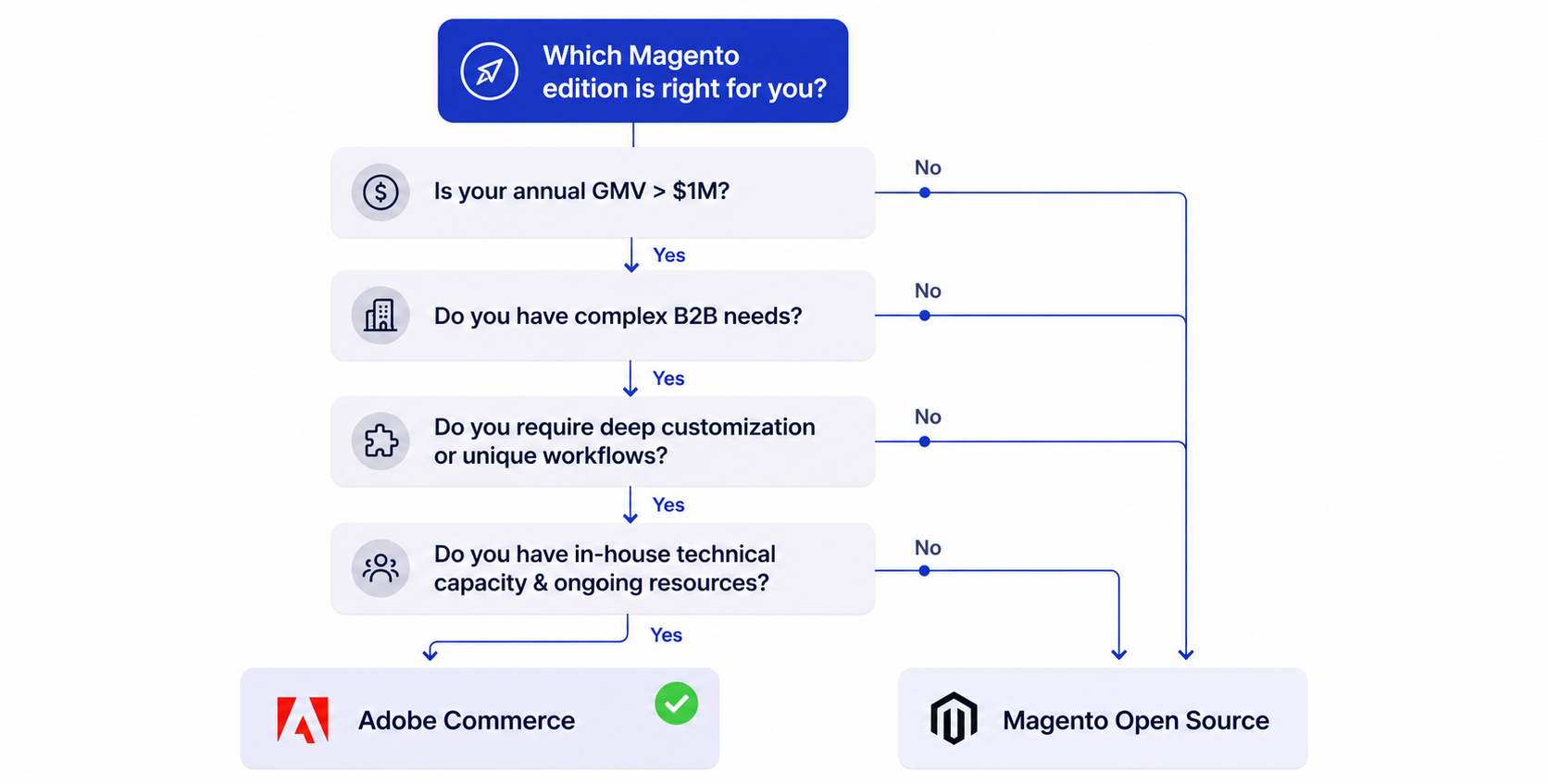
First, choose the edition on fit. Open Source plus a strong agency covers a large share of mid-market needs without a license bill, while Adobe Commerce earns its fee when you need its B2B and merchandising depth. Second, scope ruthlessly: every custom feature is a build cost and a permanent maintenance cost. Third, budget maintenance from day one as a fixed line.
A fourth lever is phasing. Trying to launch every feature at once inflates the year-one build and delays revenue. Launching a strong core store, then funding enhancements from the revenue it generates, spreads cost over time and lets real customer behavior guide where the next dollar goes. This is often the biggest difference between a budget that holds and one that doubles.
A fifth lever is the renewal itself. Forecast it with the six steps above, start talks well before the notice date, and size every cloud environment to its real usage.
Finally, the partner you choose moves the number more than any single line item. A strong agency reduces rework, writes clean code that is cheap to maintain, and prevents the mistakes that bloat year-two budgets. scandiweb has been building eCommerce for 23+ years across 2,100+ projects, and our roundup of Magento development companies is a useful place to compare options.
🚀 Quick takeaway
The cheapest Magento stores are the predictable ones: a tight extension list, a fixed maintenance line, right-sized environments and a renewal forecast that starts early.
Frequently asked questions about Magento pricing
Is Magento free?
Magento Open Source is free to download and use, with no license fee. Adobe Commerce is a paid, licensed product. In both cases you still pay for hosting, development, extensions and maintenance, so no Magento store is free to run.
How much does Adobe Commerce cost per year?
Adobe doesn’t publish prices. Based on aggregated partner estimates, the on-premises license runs roughly $22,000 to $125,000 per year and the cloud license roughly $40,000 to $190,000 per year, scaling with your GMV. The only accurate figure comes from an Adobe quote.
What is Adobe Commerce Cloud pricing based on?
Adobe Commerce Cloud pricing is based on your annual GMV tier, which sets the license and a bundle of resources: vCPU days for production and staging, storage and CDN bandwidth. Extra vCPU days, added environments and temporary upsizes increase the bill.
Why did my Adobe Commerce renewal go up?
The usual causes are trailing GMV crossing into a higher tier, a base price change at renewal, the end of a multi-year rate, or extra cloud capacity in the quote, such as staging vCPU packs. Compare the quote line by line with your previous sales order.
How much does Magento hosting cost?
For Magento Open Source, managed hosting commonly runs about $1,200 to $7,000+ per year, depending on traffic, catalog size, environments and CDN use. Adobe Commerce on Cloud includes hosting in its license, with resources set by your contract.
How much does it cost to build a Magento website?
A straightforward Open Source build commonly runs $20,000 to $60,000, a customized store $60,000 to $150,000+, and a complex enterprise build $100,000 to $500,000+. The depth of customization and integration drives the number more than the platform does.
Is Magento more expensive than Shopify?
Usually, yes, at the entry and mid levels, because Magento carries more development and maintenance overhead. The trade-off is control and flexibility. For large catalogs, B2B and multi-store needs, Magento can cost less than forcing those requirements onto a SaaS platform.
What is the cheapest way to run a Magento store?
Magento Open Source with efficient managed hosting, a lean theme, a tight set of well-tested extensions and a fixed maintenance plan is the most cost-controlled route. The savings come from disciplined scope, while maintenance stays fully funded.
What is Magento’s total cost of ownership?
Total cost of ownership is the full multi-year sum of license, hosting, build, theme, extensions, integrations, maintenance and any migration. For a serious mid-market store, expect a six-figure first year and a recurring annual run rate in the tens of thousands.
Does anyone still use Magento in 2026?
Yes. Live store counts have declined from earlier peaks to somewhere in the 100,000 to 130,000 range per BuiltWith and Store Leads, but Magento remains widely used by high-volume and B2B brands that need its flexibility. Its base is consolidating around the merchants it fits best.
Your next Adobe renewal and your next hosting bill can both be forecast months before they land. If you want those numbers with your GMV tier, cloud allowances and run rate side by side, get a cost breakdown from our team.