
Adobe Commerce as a Cloud Service moves the platform onto Adobe’s side of the line. Adobe runs the infrastructure, and the annual upgrade cycle comes off your roadmap. The open question is the Adobe Commerce as a Cloud Service migration cost itself.
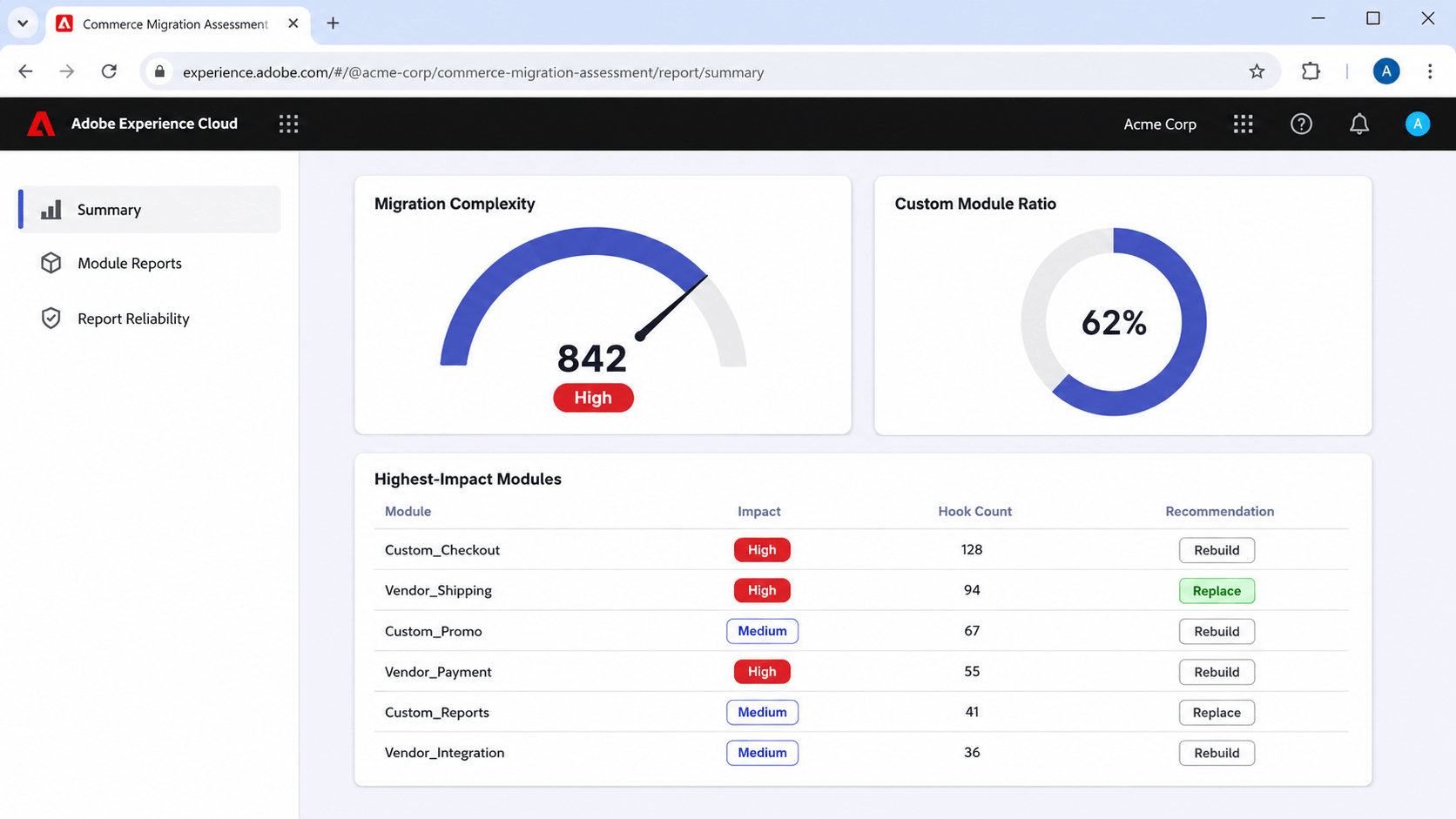
Adobe gives you a head start on that. Its Migration Assessment scans your codebase and returns a Migration Complexity rating of Low, Medium, or High, with 12 to 24 months indicated at the top band. That sizes the work, and the price then depends on who delivers it and at what rate.
This article puts money against Adobe’s bands: what each of the five workstreams consumes, the costs estimates commonly leave out, and indicative brackets by store profile you can take into a budget conversation.
Why nobody publishes an Adobe Commerce SaaS migration cost
Three separate things are being answered under one question across every page currently ranking for this.
The first is the license. Adobe Commerce subscription pricing has been reported for years, tiered on revenue, and the figures get recycled from article to article. Most of them predate ACCS entirely.
The second is the generic replatform. Agencies publish Adobe Commerce migration ranges of $15,000 to $150,000, or $40,000 to $400,000. Read the URLs and you will find Magento 1 to Magento 2 guides that were retitled. Those two projects fail in completely different places.
The third is the ACCS migration itself, and almost nobody has priced it. The platform reached general availability in June 2025. McFadyen publishes two fixed-scope packages aimed at manufacturers and distributors, eight weeks for standard implementations and 12 to 16 weeks for more complex environments, which remains the most specific public commitment anyone has made about ACCS delivery. It is measured in weeks. No agency anywhere has published a named ACCS migration case study with numbers attached.
🚀 Quick takeaway
If a cost source never mentions Edge Delivery Services, App Builder, or configuration recreation, it is pricing a different project from the one in front of you.
What Adobe’s own migration assessment already tells you
Here is the part almost nobody has picked up. Adobe publishes a scoring system built for exactly this question. It sizes the work rather than pricing it, because the price depends on who delivers the project and at what rate.
The Adobe Migration Assessment is an automated scan of your existing Adobe Commerce codebase. Adobe runs it, no access to your production environment is required beyond sharing the code, and the output inventories every custom module, plugin, observer, class preference, database modification, and integration in your store. Each input is weighted by how hard it is to migrate, and the total lands in one of three bands.
| Migration Complexity rating | Score range | Adobe’s stated migration approach |
|---|---|---|
| Low | 150 or below | Standard migration, direct, with payment provider coordination and data migration running in parallel |
| Medium | 151 to 375 | Modular migration, moved in segments, triaging high-impact custom modules |
| High | Above 375 | A phased migration, likely lasting 12 to 24 months |
That last row is the most useful figure Adobe has published about migration effort, and it appears on no agency page.
The storefront is scored separately, and it usually carries the bigger number
Adobe scores the front end on its own axis, because it is a separate project run by separate people. The measure is the count of block and template files in your store.
| Block and template count | Adobe’s stated effort |
|---|---|
| Under 100 | Baseline standard effort |
| 100 to 300 | Medium plan a structured front-end wave |
| Over 300 | High prioritize as a dedicated workstream |
Two other front-end signals move the total more than most teams expect. A custom theme namespace means a full theme rebuild is required, with no exceptions. And core layout handle overrides, where your Layout XML modifies a core page structure such as checkout_cart_index, are the highest-risk layout pattern in the assessment: one to three of them each need an explicit rebuild, and four or more warrant a dedicated layout sprint of their own.
A store can score Low on the backend and High on the storefront. Scoping one without the other is how estimates go wrong.
The five drivers Adobe weights most heavily
The assessment names five factors behind the rating: customization footprint, plugins and observers, class preferences, data model, and integrations. Two of them deserve your attention when you are reading an estimate.
Class preferences replace a core Adobe Commerce class outright. Adobe calls the pattern fragile, because it breaks silently when the platform updates that class. On ACCS the pattern has no equivalent at all, so every instance becomes a rebuild.
Core table modifications carry the highest weight in the entire scoring formula, because a structural change to a built-in database table creates a dependency on one specific platform schema version. Adobe’s own guidance is that more than fifteen of them justify a dedicated data workstream before anyone scopes the module work.
One more figure worth holding onto: Adobe reports that the average customer’s Custom Module Ratio is around 62%. If your team has been telling leadership that your store is unusually customized, the assessment will probably come back saying it is normal, and that the real question is which modules you are carrying.
🚀 Quick takeaway
The assessment is the cheapest move available to you on this decision, and you get it by asking your Adobe account manager. Adobe describes it as a low-cost way to establish scope before implementation begins.
The five workstreams you are actually paying for
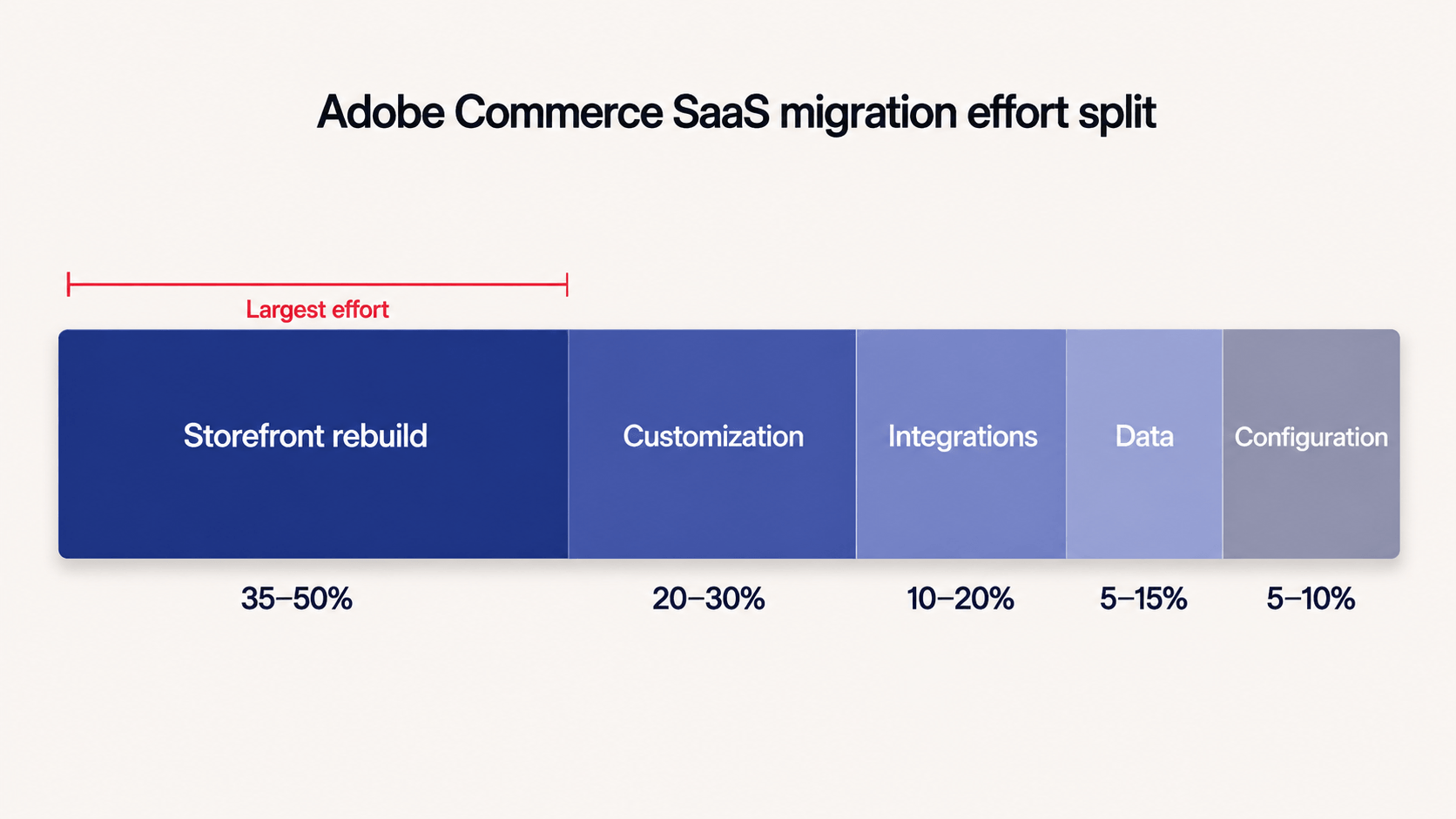
Adobe describes an ACCS migration as four parallel workstreams. We add a fifth, configuration recreation, because it is easy to miss at scoping and it surfaces during user acceptance testing.
| Workstream | What it covers | What moves the number | Share of total effort |
|---|---|---|---|
| Storefront rebuild on Edge Delivery Services | The entire front end, rebuilt document-first with drop-in components | Block count, custom theme, checkout customization | 35–50% |
| Customization re-platforming | Every custom PHP module triaged and rebuilt outside the application | Module count, hook density, GraphQL entanglement | 20–30% |
| Integration re-platforming | ERP, OMS, PIM, payments, and shipping moved to event-driven patterns | Number of systems, current coupling method | 10–20% |
| Data migration and validation | Catalog, customers, orders, and CMS content, plus everything the tool leaves behind | Custom tables, EAV attributes, multi-store catalogs | 5–15% |
| Configuration recreation and cutover | Store settings, payment methods, shipping rules, tax config, email templates | Store views, payment and tax jurisdictions | 5–10% |
The storefront rebuild on Edge Delivery Services is the biggest cost
Luma is not supported on ACCS. Every Luma storefront gets rebuilt on Edge Delivery Services, and Adobe is direct that this is no port: Luma’s PHP templates, LESS stylesheets, and Layout XML have no equivalent on the other side. The workable approach is to treat it as a new storefront project that takes your existing UX as input.
Adobe’s own words are that the storefront rebuild is typically the longest-lead item, and that starting it late creates the critical path that delays cutover. Any estimate arriving without a separate front-end line has not been scoped.
There is an upside on this line worth pricing in. Edge Delivery Services typically delivers Core Web Vitals improvements of 40% to 60% against a well-maintained Luma build, and Lighthouse 100 is achievable from Adobe’s boilerplate. If you are already running a headless or Edge Delivery storefront, the largest workstream partly carries over and your total drops materially.
Read more: Replacing a Luma Bottleneck with a Fast Hyvä Storefront
Every custom module gets one of four verdicts
Adobe’s assessment returns a recommendation per module: rebuild, refactor, replace with a native feature, or remove. Business logic that has to run server-side becomes an App Builder action triggered by a webhook or an I/O Event. Data shaping and API composition go to API Mesh. Anything ACCS now covers natively, including B2B, Live Search, and Product Recommendations, gets deleted.
The trap is volume against difficulty. Adobe puts it plainly: fifteen custom modules sounds manageable until three of them turn out to be deeply entangled with the GraphQL layer. scandiweb engineers found the same shape when we reviewed App Builder in production before ACCS made it the only option, where asynchronous event processing, absent bulk operations, and a thin connector library each turned into custom work.
Store configuration does not migrate and must be recreated by hand
The Bulk Data Migration Tool handles first-party commerce data: products, categories, customers, orders, and CMS content. It is available from Adobe by support ticket and remains in controlled availability. Custom tables, third-party extension data, and non-standard schemas need their own extraction scripts.
Configuration is the part teams miss. Adobe’s guidance is unambiguous. Store configuration, catalog settings, payment methods, shipping methods, and tax rules must all be manually recreated in the ACCS Admin. For a single-country store that is a week of work. For a group running fourteen store views with local payment methods and tax jurisdictions in each, it becomes a workstream with its own testing cycle. On a build like the Macron B2B platform, where the configuration surface is most of what the platform does, sizing it as an afterthought would sink the timeline.
🚀 Quick takeaway
Ask any partner quoting you to show configuration recreation as its own line with its own hours. Folded into data migration, it has not been counted.
So how much does an ACCS migration cost?
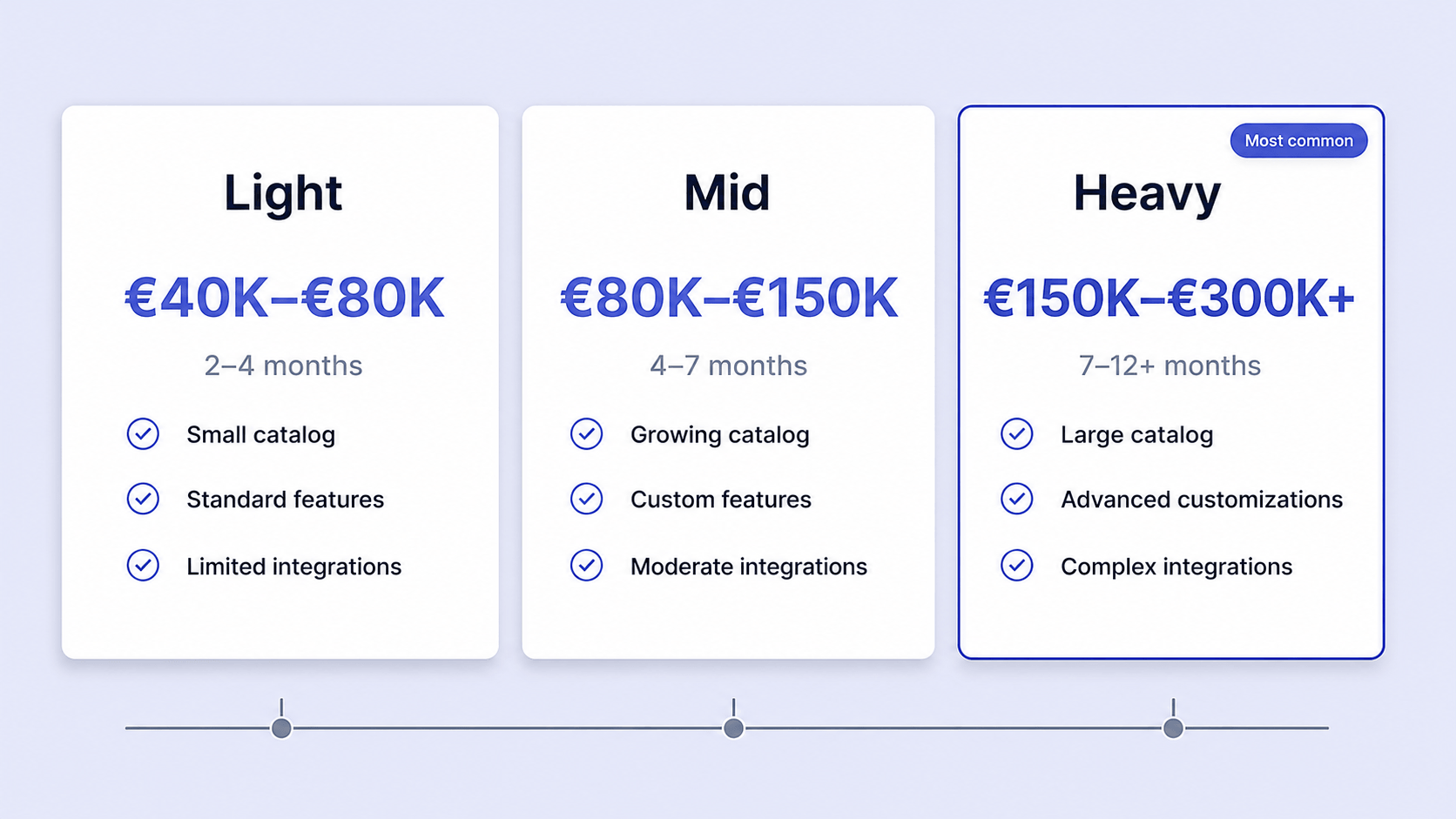
Most Adobe Commerce SaaS migrations land between $80,000 and $800,000. The spread comes from your storefront size and your custom module inventory, and revenue barely enters into it.
Here is how that breaks down against the profiles Adobe’s assessment produces.
| Store profile | What it looks like | Elapsed time | Indicative project cost |
|---|---|---|---|
| Light | Low rating, under 100 blocks, stock or lightly themed storefront, under 20 custom modules, two or three API integrations | 2–4 months | $80,000–$150,000 |
| Mid | Medium rating, 100 to 300 blocks, a custom theme namespace, 20 to 60 custom modules, ERP and OMS integrations, standard checkout | 4–9 months | $150,000–$350,000 |
| Heavy | High rating, over 300 blocks, checkout drop-in required, four or more core handle overrides, more than 15 core table modifications, B2B | 12–24 months | $350,000–$800,000+ |
These are scoping brackets rather than quotes. They assume external delivery at blended agency rates, and they exclude the ACCS subscription, your own team’s hours, and any roadmap work running alongside.
Two things move your figure off these bands faster than anything else. Running Edge Delivery Services or a headless storefront today reduces the biggest workstream to a rewiring job. And retiring dead modules before anyone scopes the build removes them from the estimate entirely, which is why Adobe tells you to filter the assessment to high-impact modules first and ask which of them anybody still uses.
🚀 Quick takeaway
Two stores on identical revenue with identical catalogs can sit two bands apart. Your front end decides the band.
The costs that never make it into the estimate
Platform comparisons almost always stop after the first column. Here is the full picture, in three groups.
Always counted. Platform license, hosting, and the support retainer or managed service.
Usually forgotten. The one-off migration, the storefront rebuild, replacing extensions with no ACCS equivalent, integration rework, re-entering settings by hand, and the upgrade after this one.
Never counted. Your own team’s hours during the move, retraining or rehiring for a Node and React stack in place of PHP, the roadmap frozen while the project runs, revenue risk at go-live, metering overages as you grow, and what it would take to leave later.
Read more: Magento Pricing: The True Cost of an Adobe Store
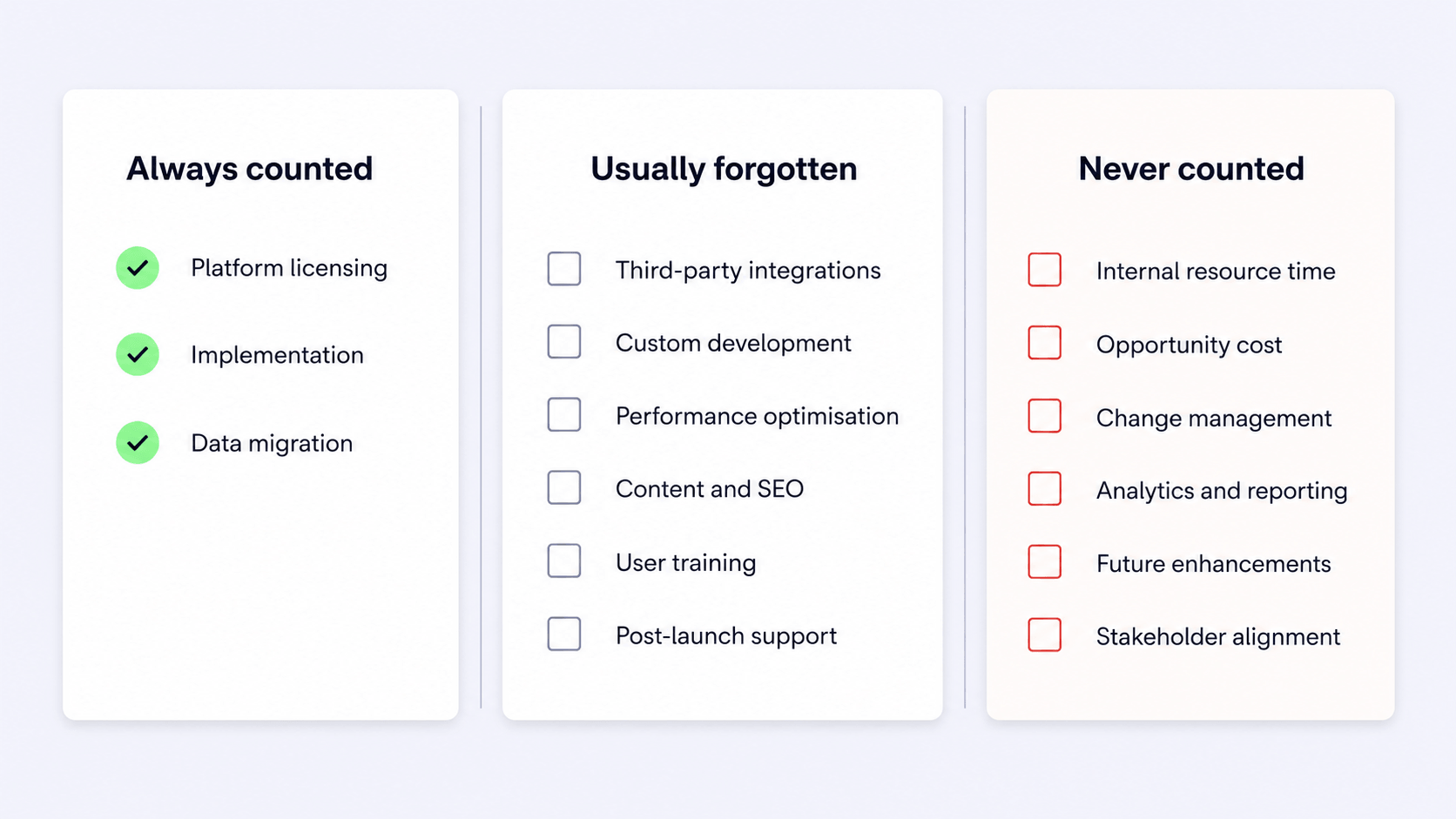
That last group is where the three-year picture takes shape. ACCS removes the recurring cost of upgrades permanently, which is real money for anyone who has run a version project. It also couples you to Adobe’s platform more closely than the other Adobe options, since your logic runs against Adobe’s APIs, events, and webhooks rather than in a codebase you host. Both belong in the same comparison.
Organic traffic belongs on this list too. ACCS has no URL rewrite tooling, and an Edge Delivery rebuild changes URL structures, hreflang, and structured data at the same moment. Redirect mapping at scale is a budgeted workstream on any migration we run, and it is why our website migration services team owns the redirect plan before the build starts.
Read more: Website Migration Case Study: A Story of 100k Redirects for Nuclear Blast
What does ACCS cost to run after go-live?
Adobe does not publish ACCS list pricing. What Adobe does publish, in the contractual product description, is the shape of the bill, which is arguably more useful when you are modeling three years. Anyone who has tried to pin down Adobe Analytics pricing will find the pattern familiar.
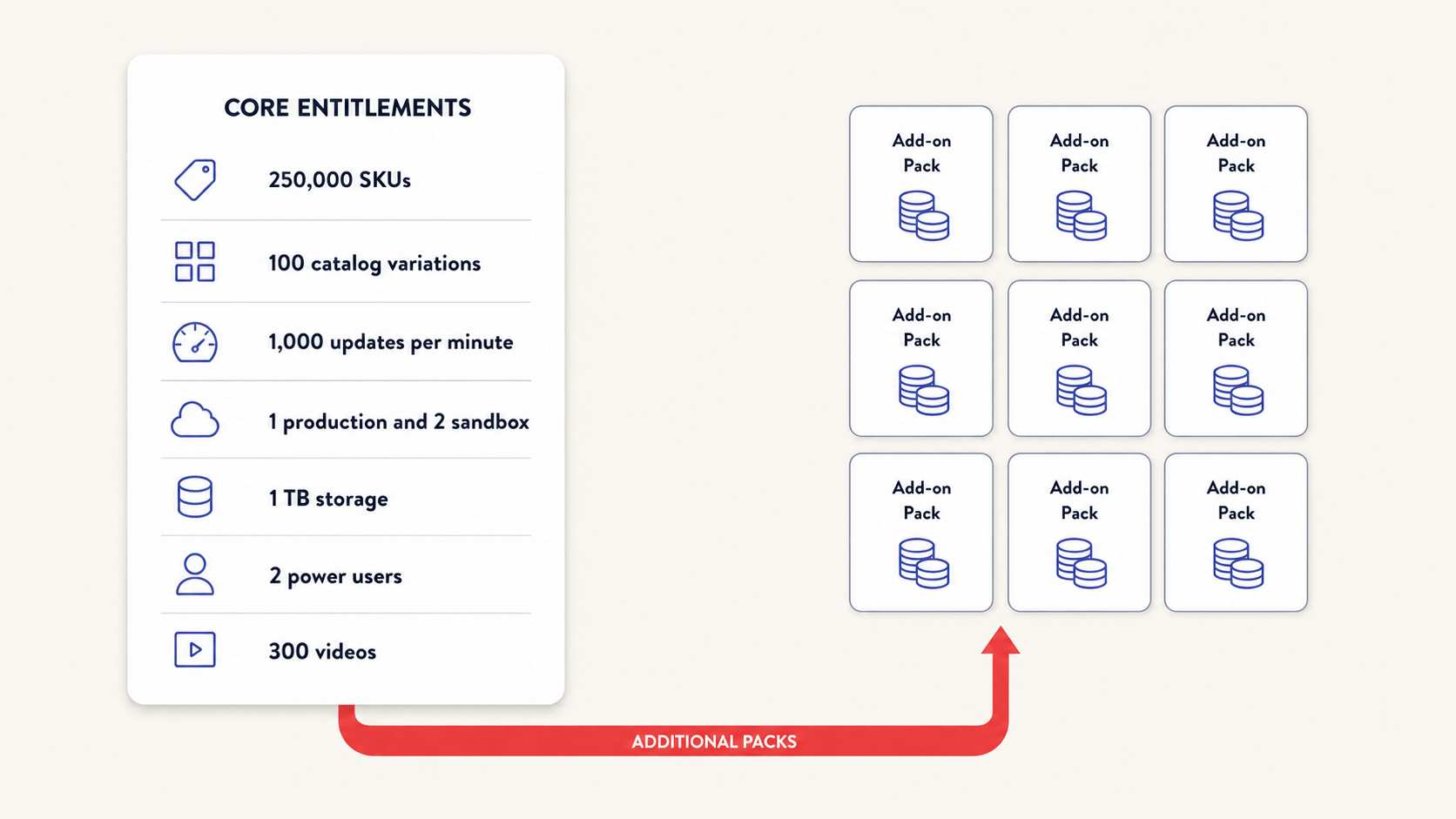
Your base package is tiered on licensed gross merchandise value and average order value, or on an order limit, set in your sales order. That package includes a fixed set of entitlements:
- 250,000 SKUs
- 100 catalog variations, counted as catalog views multiplied by price books
- 1,000 catalog updates per minute, and 100,000 per day
- 1 production environment and 2 sandbox environments
- 1 TB of storefront storage and 1 TB for Product Visuals
- 2 power users and 2 collaborator users on Product Visuals
- Video delivery for up to 300 videos of one minute each
Everything past those lines is a separate add-on, priced per pack: extra SKUs in packs of 10,000, catalog variations in packs of 100, ingestion rate in 5,000 or 10,000 packs, catalog retrieval per million API calls per month, storefront content requests per million per month, dynamic media operations per million per month, extra production or sandbox environments per instance, and App Builder per pack per year.
The counting rules matter more than the headline entitlements. A storefront content request counts as either one page view or five API calls. Smart imaging consumes twenty dynamic media operations, and so does a single video delivery. A headless front end making five API calls per page view burns through content requests at five times the rate of a page-rendered store.
Two SKU figures circulate, and they measure different things. The contractual product description entitles a base package to 250,000 SKUs, while Adobe’s launch blog cites what the platform can hold in a single instance, up to 250 million. Your entitlement is the one on your order form, and additional SKUs are sold in packs of 10,000.
🚀 Quick takeaway
App Builder is licensed separately, in packs, per year. Every module you rebuild as an App Builder action becomes a running cost as well as a build cost.
When migrating costs more than staying
Cost reduction is the weakest reason to move to ACCS. A near-full rebuild costs more than several years of upgrades on your current platform, so the business case is made in operations rather than in savings.
Move now if:
- Your assessment comes back Low or Medium and your storefront is under 300 blocks
- Your customization is integration work that already talks over APIs
- The upgrade cycle is genuinely your largest recurring engineering cost
- You are on 2.4.4 or 2.4.5, where every tier of support ends on 31 May 2027
- You are already on Edge Delivery Services or headless, so the biggest workstream partly carries
Stay put if:
- Your checkout or pricing logic is written as in-application PHP with no hook on Adobe’s predefined list
- You have recently rebuilt your storefront on Hyvä or invested in a custom front end
- Your catalog runs above 250,000 SKUs or updates at high frequency
- Cost reduction is the primary business case
- You have a peak trading season inside the next two quarters
Read more: Adobe Commerce Optimizer, SaaS, PaaS, or On-Prem: Which One to Choose?
On timing, keep two facts apart that get merged constantly. Your version has a deadline. Adobe Commerce 2.4.6 left standard support on 11 August 2026 and holds security-only support until 31 May 2028, while 2.4.7 runs to 31 May 2028 on extended support. From 1 June 2027, Adobe’s lifecycle policy states it will stop maintaining Cloud environments running unsupported versions. The platform has no deadline at all: Adobe has published no end-of-life for Adobe Commerce on Cloud, and has said so on its own blog. If staying is the right answer for you, upgrading in place is a legitimate one, and we cover the wider question in is Magento dying.
🚀 Quick takeaway
The deadline attached to your version is real and published. The platform itself has no published end-of-life, so check any platform deadline you are given against Adobe’s lifecycle policy.
How to get a real number for your store
Five steps, in this order, and the first three cost you almost nothing.
- Request the Adobe migration assessment through your solution account manager. Sharing a codebase is enough to get a scored inventory back, and your production environment stays untouched.
- Run a module retirement pass against the Module Reports tab before anyone scopes a build. Every module you retire leaves the estimate before a line of code gets written.
- Baseline your performance and your metering profile. Capture Lighthouse scores, page views, and API call volumes now, so you can size content requests and dynamic media operations from data.
- Scope the storefront separately from the backend. It should read as its own project inside the proposal, with its own timeline and its own team.
- Interrogate the estimate. Ask for effort by workstream, a named line for configuration recreation, a redirect and hreflang plan with an owner, and an incremental data sync strategy covering the gap between the initial load and go-live.
For the platform context behind all of this, our Adobe Commerce platform guide covers where ACCS sits among the Adobe options, and our Adobe Commerce as a Cloud Service page covers what delivery involves.
Frequently asked questions
How much does an Adobe Commerce as a Cloud Service migration cost?
Expect $80,000 to $150,000 for a lightly customized store, $150,000 to $350,000 for a mid-sized estate with a custom theme, and $350,000 to $800,000 or more for a heavily customized store with checkout work and B2B. Your storefront size and custom module inventory drive the figure, and revenue has almost no bearing on it.
How long does an ACCS migration take?
2 to 4 months at the light end, 4 to 9 months for a mid-sized store, and 12 to 24 months at the top end, which is Adobe’s own stated range for stores scoring above 375 on its assessment. The storefront rebuild sets the timeline, well ahead of the platform work.
Is Adobe Commerce SaaS cheaper than PaaS?
Not on the license, and not in year one. It removes the recurring cost of upgrades, patching, and hosting work permanently, which is where the case gets made over three years. If cost reduction is the only reason you are looking, the numbers rarely work.
Do my Magento extensions carry over to ACCS?
No. ACCS supports no PHP inside the application, so an extension cannot be installed the way it is on PaaS. Some vendors publish App Builder equivalents, some functions are now native, and the rest have to be rebuilt or dropped.
Does my store configuration migrate automatically?
No. Adobe states that store configuration, catalog settings, payment methods, shipping methods, and tax rules must all be manually recreated in the ACCS Admin. Document every setting before migration work begins.
Will migrating to ACCS cost me organic traffic?
Only if the redirects are an afterthought. ACCS has no URL rewrite tooling and an Edge Delivery rebuild changes your URL structures, so the redirect map, hreflang, and structured data need signing off before the build starts.
Is Adobe ending support for Adobe Commerce on Cloud?
No. Adobe has published no end-of-life for Adobe Commerce on Cloud. Individual versions carry support dates, and from 1 June 2027 Adobe will stop maintaining Cloud environments running unsupported versions, while the platform itself keeps its roadmap.
What does Adobe’s migration assessment cost?
Adobe describes it as a low-cost way to establish scope before implementation begins, and you request it through your solution account manager. It runs on your codebase and needs no production access.
If you want a second read on an estimate you have already been given, or a scoped range before you go looking for one, talk to our Adobe team and bring your version number and your block count.




































