
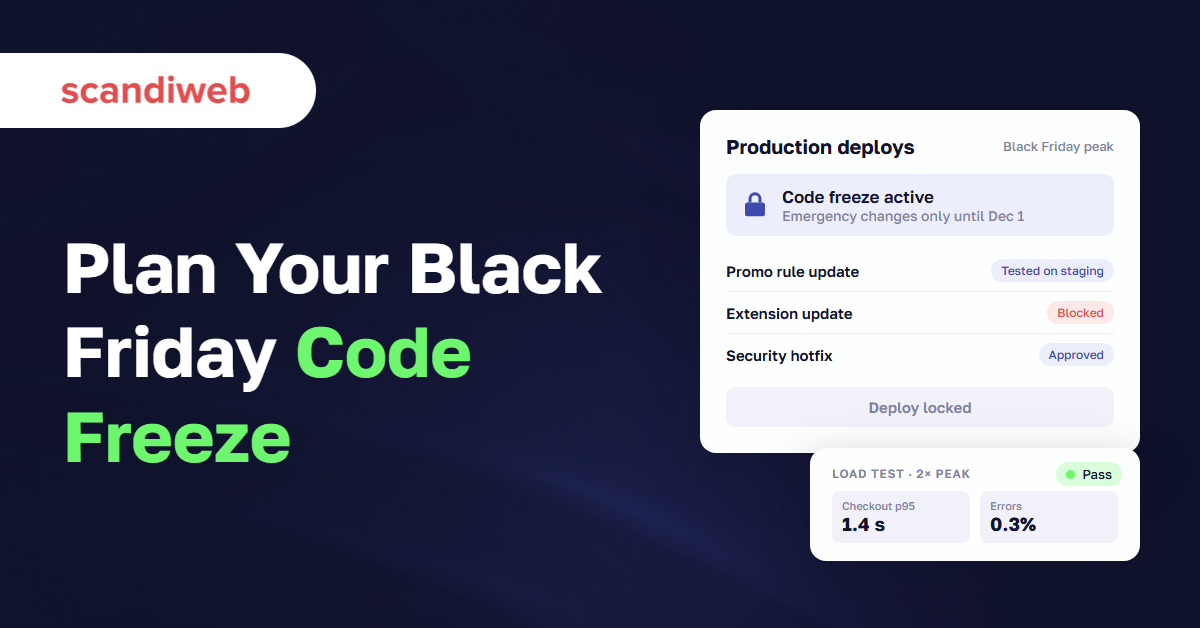
If your team is still merging features in late October and someone has just asked when the code freeze starts, the answer for Black Friday 2026 is: in about two weeks. Black Friday falls on November 27 and Cyber Monday on November 30. Count back the time you need to load test, fix what breaks, and test again, and the window for risky changes closes in early November.
The outage you’re trying to prevent rarely comes from a big release. One of our support clients launched a large campaign on a Friday, traffic climbed, and the whole site went down. Restarts didn’t help. The cause was a product label rule meant to cover the whole catalog except five products, set up by selecting every brand, and it made the platform fetch items in a loop. Nobody had deployed code that day.
That’s why this guide treats Black Friday readiness as three engineering jobs: a code freeze that also covers configuration, a load test with a target you can defend, and an incident plan with named people on call. Marketing, merchandising, and promo planning are covered in our Black Friday and Cyber Monday checklist.
What is a code freeze, and what should it cover?
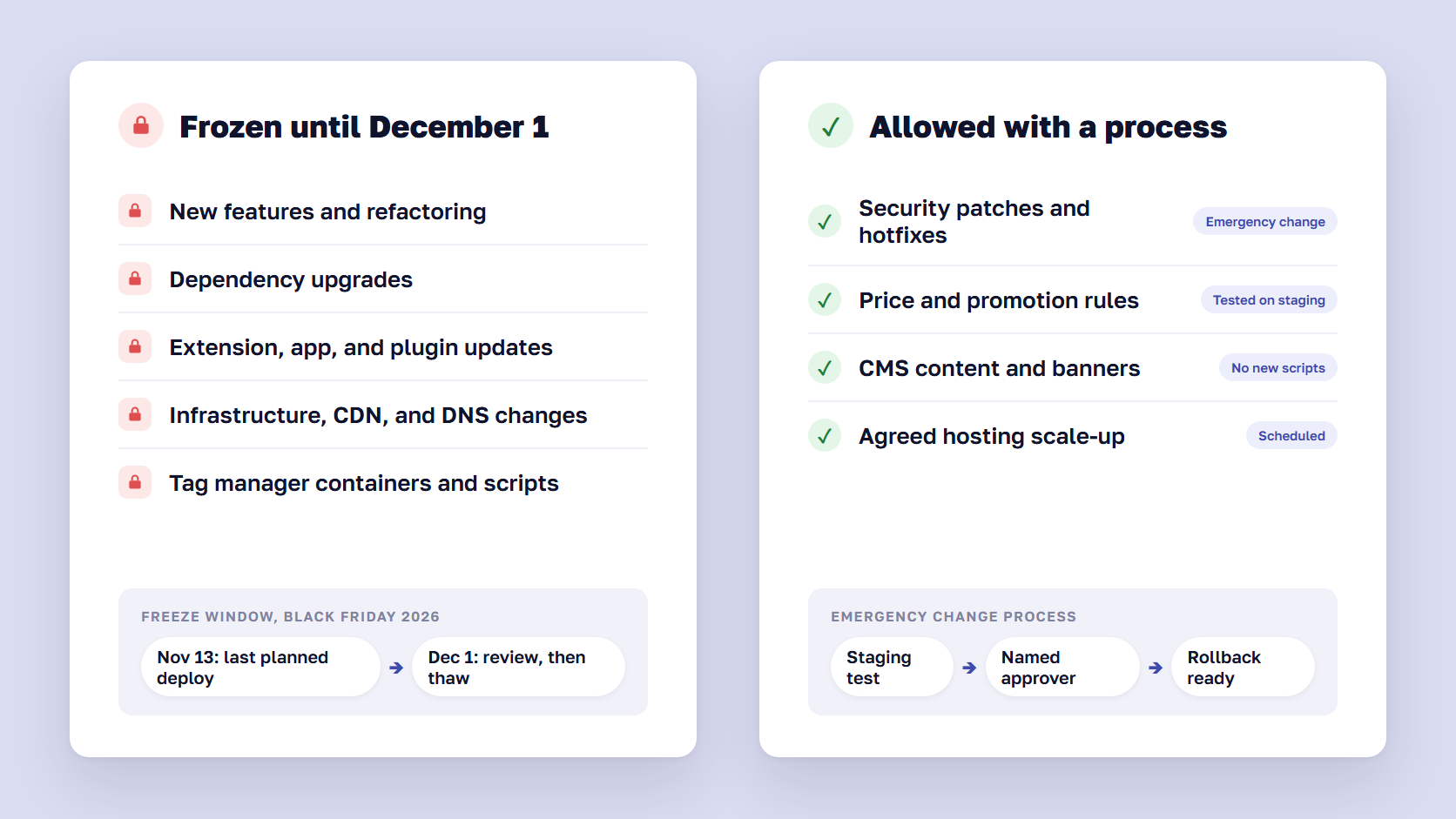
A code freeze is a period when a team stops deploying changes to production, so the live system stays in a known, tested state. For an online store before Black Friday, a code freeze should cover more than application code: configuration, extension and app updates, infrastructure changes, tracking scripts, and price or promotion rules can all take a store down, and none of them needs a developer to deploy.
Software teams use the term in two ways. Before a release, a code freeze means no new features, only bug fixes. Before a peak, it means no changes to production at all unless an agreed process approves them. Some teams call the second one a change freeze, which is the more accurate name for eCommerce, because outages like the one above start with changes that never go through a code review.
The freeze also protects your test results. A load test only describes the store you tested. Every change after it, even a small one, makes the result less true.
What the freeze allows, and what it blocks
A freeze that blocks everything gets ignored by the third day. Agree in writing which changes are allowed, who approves them, and how they’re tested.
| Change | During the freeze | How it goes live |
|---|---|---|
| New features, refactoring, dependency upgrades | Blocked | After Cyber Monday |
| Extension, app, and plugin updates | Blocked | After Cyber Monday, unless it’s a security fix |
| Infrastructure, CDN, DNS, and hosting changes | Blocked | Only the agreed scale-up, on a scheduled date |
| Tag manager containers and third-party scripts | Blocked | Publish final versions before the freeze |
| Security patches and hotfixes for live bugs | Allowed | Emergency change process: staging test, approval, rollback ready |
| Catalog, price, and promotion rules | Allowed, with limits | Built and tested on staging, applied at an agreed time |
| CMS content, banners, and landing pages | Allowed | Through the CMS, with no new templates or scripts |
Tag manager containers belong on the blocked list. A new marketing pixel is code running in every shopper’s browser, and a slow third-party script can hold up the checkout as effectively as a bad deploy.
🚀 Quick takeaway
The changes that break stores in November often come from the admin panel and the tag manager, with no deploy at all. If your freeze only stops the deployment pipeline, it covers the smaller risk.
When should the code freeze start for Black Friday 2026?
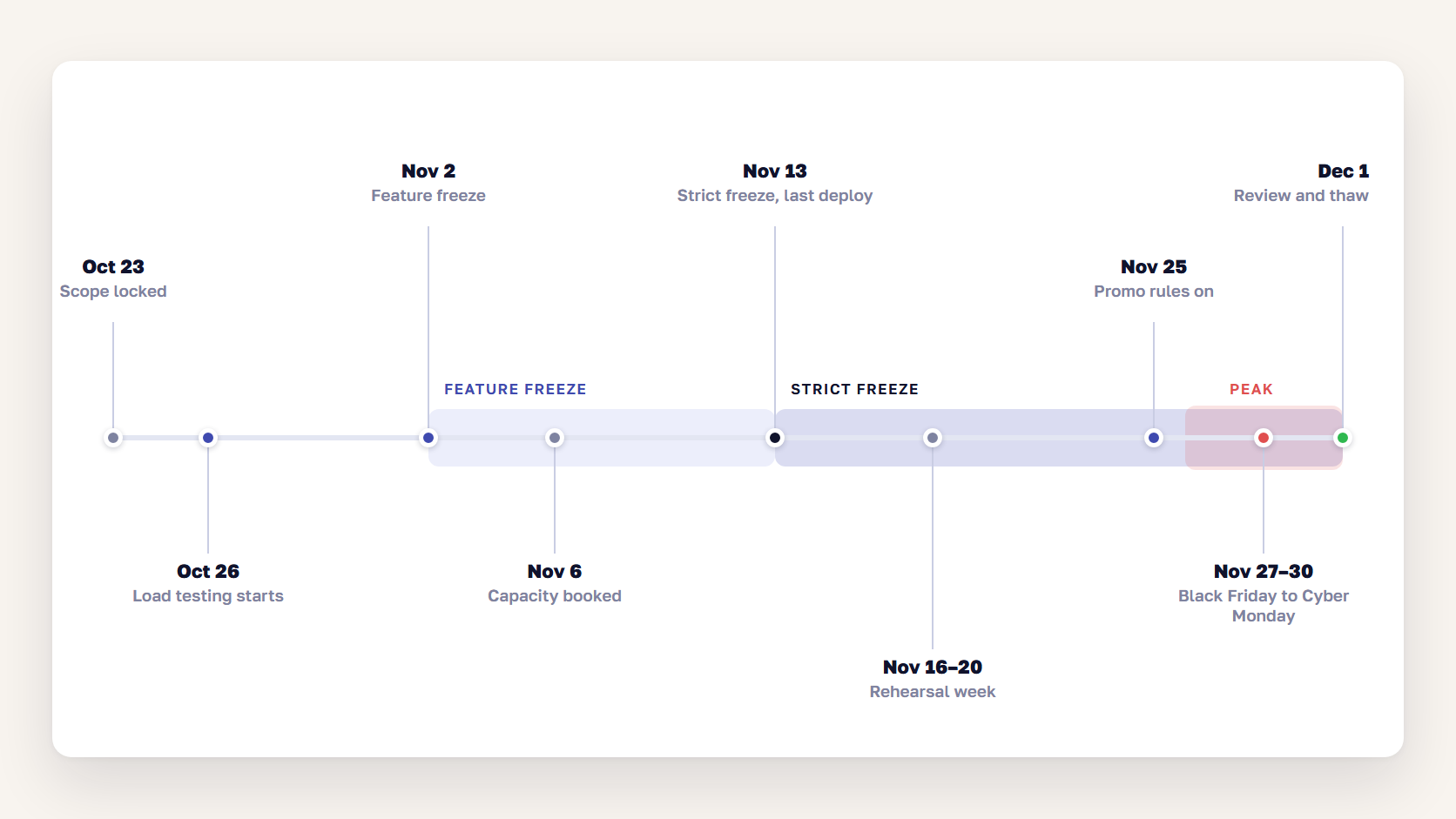
For Black Friday 2026, start the feature freeze on Monday, November 2, and allow no major deployments after Friday, November 13, two weeks before Black Friday. That leaves two weeks for load testing and fixes before the strict freeze, and two weeks of stable production before the peak. Keep the freeze in place through Cyber Monday, November 30, and lift it no earlier than Tuesday, December 1.
These dates match what our team has seen work for years. In a scandiweb Black Friday panel, Glebs Vrevskis described the usual pattern: “A common thing we see is code freeze starting from the first days of November, with no new features being released.” Reinis Groskops added that “the latest time to do any major deployments is probably 2 weeks before Black Friday.” The full Black Friday Q&A with our team covers the rest of their advice.
| Date (2026) | Milestone | What happens |
|---|---|---|
| Fri, Oct 23 | Scope locked | Last features picked, everything else moves to December |
| Mon, Oct 26 | Load testing starts | First test round on a production-sized environment |
| Mon, Nov 2 | Feature freeze | No new features. Bug fixes and test findings only |
| Fri, Nov 6 | Capacity booked | Hosting scale-up requested (Adobe Commerce on cloud: 10 business days ahead is Nov 12 at the latest) |
| Fri, Nov 13 | Strict freeze | Last planned deployment. After this, emergency changes only |
| Mon–Fri, Nov 16–20 | Rehearsal week | Final verification test, runbook walk-through, on-call rota confirmed |
| Wed, Nov 25 | Rules applied | Pre-tested price and promotion rules switched on in the evening |
| Thu, Nov 26 – Mon, Nov 30 | Peak | War room, 24/7 on-call, hourly checks |
| Tue, Dec 1 | Review and thaw | Post-peak review, then the release backlog opens again |
Two dates in the table are easy to miss. If you’re on Adobe Commerce on cloud infrastructure, Adobe recommends requesting a temporary compute upsize at least 10 business days before a major promotion, and finishing all patching before the code freeze. Promotions don’t count as emergencies, and Adobe notes that capacity during Black Friday and Cyber Monday is limited, so book early. If you’re still on a release line close to end of support, check our Magento end-of-life guide before the freeze, because a patch you can’t apply in November waits until December.
The other date is November 25. Our support team recommends building price and promotion rules on staging, testing them there, and switching them on the evening before the sale, without a customer email going out at the same moment. On high-load stores, that gives the platform a night to reindex before the traffic arrives, and any problem shows up while there’s still time to fix it. It’s the lesson from the outage in the introduction: once the rule was rebuilt to exclude five SKUs, it applied in two to three minutes instead of taking the site down for about an hour, and the fix was worth $500,000 in extra sales for that client.
Read more: How scandiweb Support Saved a Client’s Sales Event
If your sales start earlier, as many now do, move the whole calendar back by the same number of days. Date the freeze from the first day of heavy traffic, whatever the banner says.
🚀 Quick takeaway
Set the freeze date from the load-testing plan. Two test rounds with fixes in between take about two weeks, so a store that starts testing in mid-November has already run out of time.
Black Friday load testing: targets, scenarios, and pass criteria
eCommerce load testing for Black Friday means simulating your expected peak traffic, measured at the busiest minute, on an environment sized like production, and checking that shoppers can still search, add to cart, and pay within agreed response times. Set the target from your own data, script the full buying journey including checkout, and run at least two rounds with fixes in between.
Can the site take 5× traffic?
It depends on what the 5 multiplies. Five times an average day is often below a real Black Friday peak. On one Black Friday we supported, visits were up 10,955% on an average day, and concurrent visitors went from a couple of hundred to more than 17,000 as the first campaigns went out.
Build the target from numbers you already have:
- Find last year’s peak minute. Take the busiest hour from GA4 or your server logs, then look for the minute-level spikes inside it. Email sends and campaign launches create bursts that an hourly average hides.
- Apply this year’s forecast. Multiply by the growth the business expects and add any new traffic sources, such as a bigger email list or paid budget.
- Translate it into load. Express the target as concurrent sessions, page requests per second, and orders per minute. Orders per minute is the number that matters most, because checkout is the most expensive journey to serve.
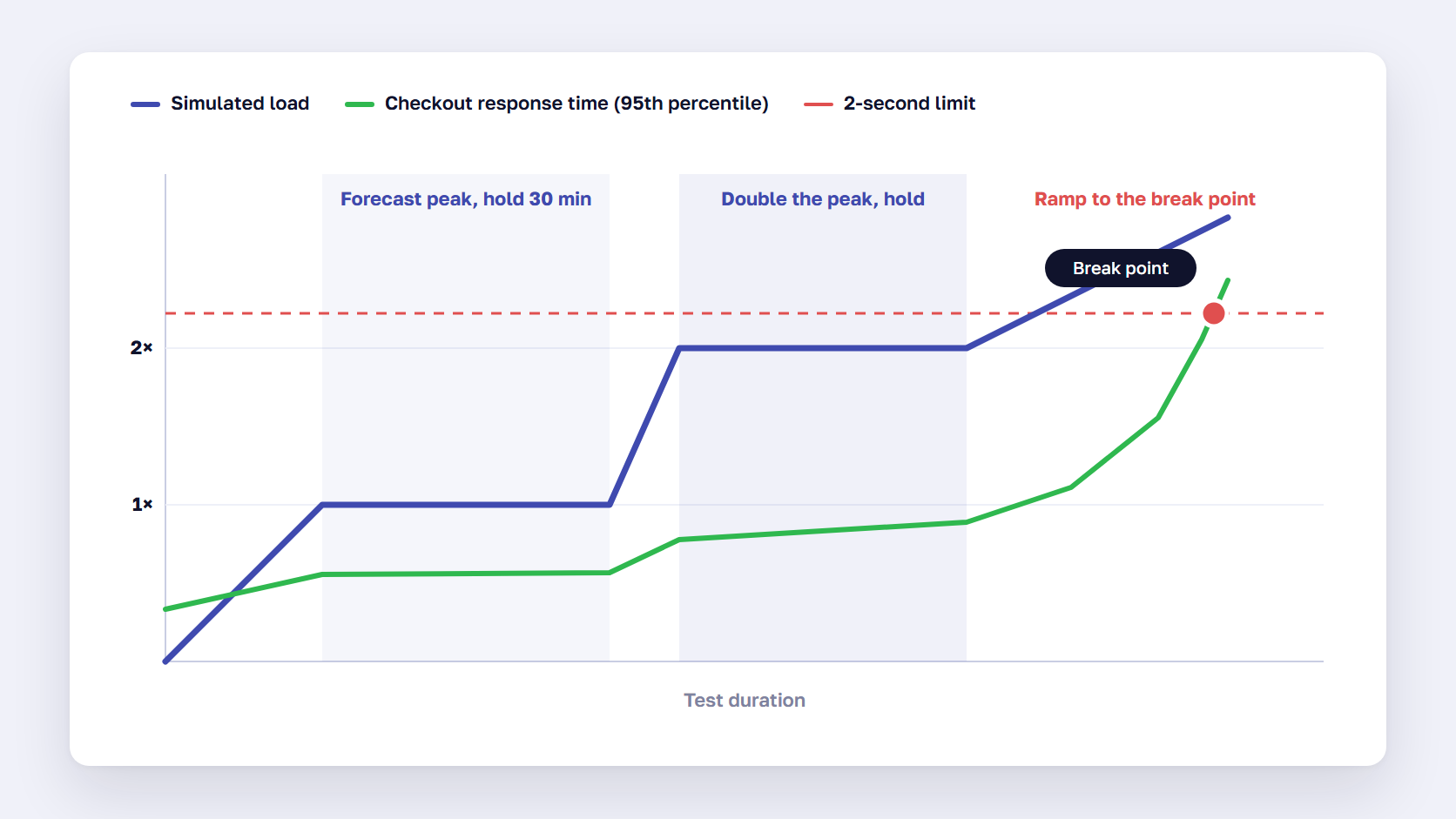
- Add headroom. Test at the forecast peak, then at double it, then keep raising the load until something breaks, so you know where the ceiling is and what fails first.
Black Friday traffic is also different from normal traffic. Most days, shoppers browse cached category pages. On Black Friday, they add to cart and check out, and those pages aren’t cached, so the same number of visitors puts far more load on the application and the database.
Which scenarios to test
A test that hammers the homepage measures your CDN, and not much else. Script the journeys that make money and the background jobs that run at the same time:
| Scenario | Share of simulated users | Why it matters |
|---|---|---|
| Browse category and product pages | 50–60% | Checks caching, images, and search under load |
| Search and filtered navigation | 15–20% | Search and faceted filters often skip the page cache |
| Add to cart and view cart | 15–20% | Uncached, writes to the database |
| Checkout with payment | 5–10% | The slowest journey, plus calls to payment, tax, and shipping services |
| Log in and view account or orders | 5% | Session and customer data under load |
| Background: order export, stock sync, imports, cron | Running throughout | Shows whether back-office jobs slow the storefront |
| Back office: staff processing orders in the admin | A realistic number of users | Admin queries compete with shoppers for the same database |
Point payments at a sandbox or a stub. A load test that sends thousands of real authorizations to your payment provider may trip its fraud checks, and nobody wants to explain that on November 20.
Pass criteria that make the result useful
Agree the pass criteria before the first run, so the result is a clear pass or fail. The thresholds below are a starting point to adapt, not a standard:
| Measure | Example pass criterion at forecast peak |
|---|---|
| Orders per minute | Sustained at the forecast peak for at least 30 minutes |
| Checkout and cart response time | 95th percentile under 2 seconds per step |
| Error rate | Under 1% of requests, and zero failed orders that the store accepted |
| Apdex (Adobe Commerce on cloud, New Relic) | 0.85 or higher, Adobe’s own target |
| Database and application CPU | Headroom left at the forecast peak, not pinned at 100% |
| Queues (orders, emails, stock updates) | Drain as fast as they fill, with no growing backlog |
The last row is the one teams forget. On the Black Friday above, the servers held, but orders arrived faster than the order queue could process them, and confirmation emails would have been delayed by days. The fix was a script that moved orders into separate batches on a dedicated instance. A queue-depth check in the load test would have found it earlier.
Read more: Scaling Up to Accommodate a 40000% Increase in Sales
Where to run the load test
Run the main rounds on an environment with the same size, configuration, and CDN setup as production. A staging server with half the CPU tells you little about Black Friday.
How you test depends on the platform:
- Adobe Commerce on cloud: test on a production-sized environment, watch the results in New Relic, and request the temporary upsize you need for the peak. Adobe’s checklist also covers read replicas, indexers set to Update on Schedule, and asynchronous order processing.
- Self-hosted Magento or headless: you own every layer, so the test has to cover the web servers, database, cache, search engine, message queue, and CDN. Agree any test against production with your host first, and run it at night.
- Shopify and Shopify Plus: Shopify runs and scales the platform, so your test surface is everything you added, such as a headless storefront, custom apps, checkout extensions, and the middleware that connects Shopify to your ERP. Ask Shopify before you point a load generator at the live storefront.
If the test exposes a slow storefront, our Magento performance optimization guide and Shopify performance playbook cover the usual fixes. For drops and limited releases where demand can exceed any capacity you’d buy, a virtual waiting room keeps checkout working for the shoppers already inside.
🚀 Quick takeaway
A load test that passes on the first run usually tested too little. Plan for the first round to find the bottleneck, the second to confirm the fix, and the third to find the ceiling.
The incident plan: runbook, roles, and on-call rotation
An eCommerce incident plan for Black Friday is a short document that says who is on call, how an incident is declared, who decides, and what the first action is for each likely failure. It should name people, list phone numbers for every outside provider, define severity levels, and include a tested rollback, so that at 9 p.m. on Black Friday nobody has to work out the process while the checkout is down.
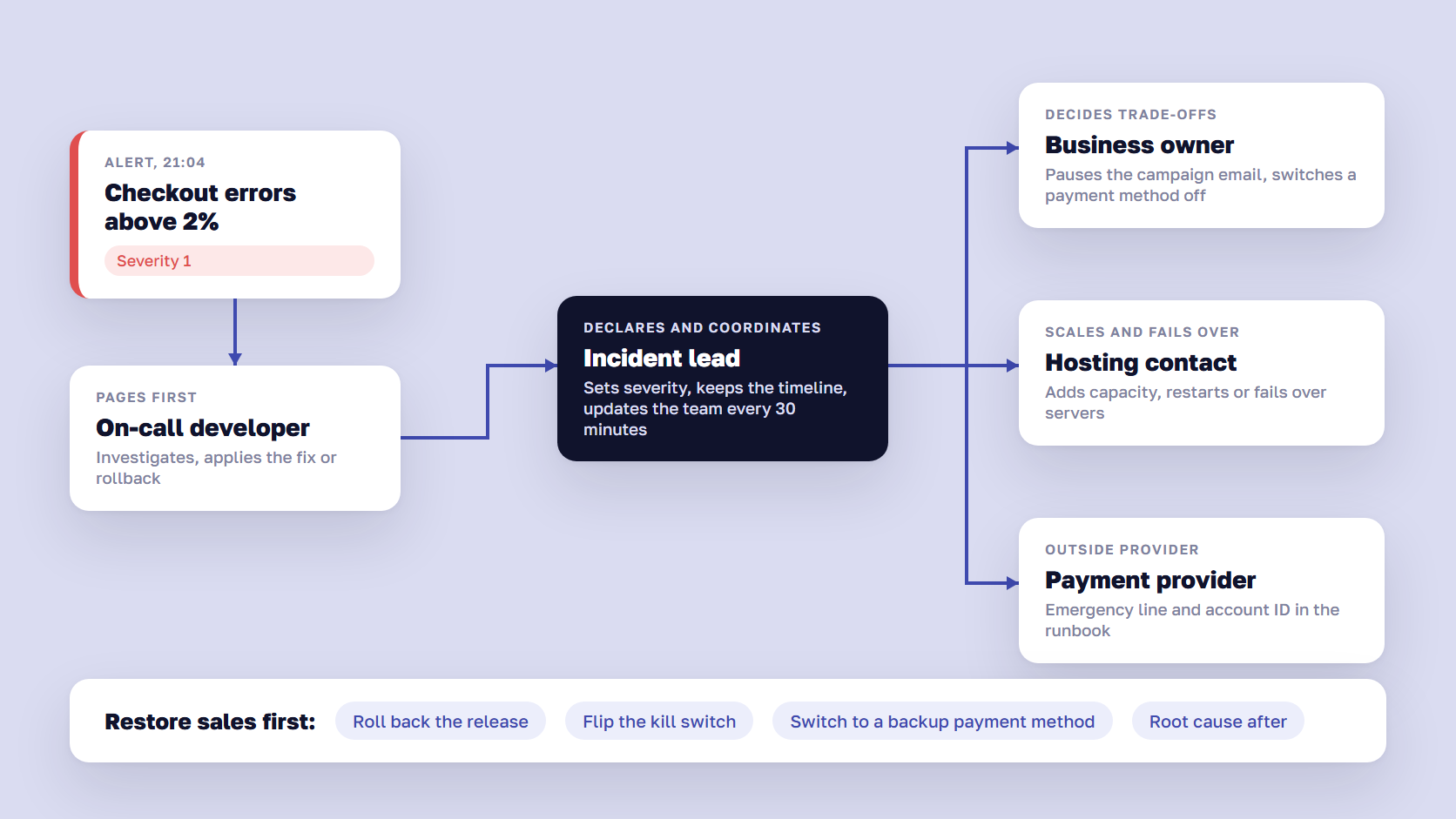
The order of steps matters more than the detail. During an incident, restore sales first, through a rollback, a disabled extension, or a switched payment method. Find the root cause afterward.
Roles to name before the peak
Each role needs a named person and a backup for every shift:
- Incident lead: declares the incident, sets the severity, and keeps the timeline. This person coordinates and doesn’t debug.
- On-call developer: investigates and applies the fix or rollback.
- Infrastructure or hosting contact: scales, restarts, or fails over servers, and talks to the host.
- Business owner: decides on trade-offs, such as pausing a campaign email or switching off a payment method.
- Communications: posts updates to the team every 30 minutes and decides what customers see, such as a site banner.
On-call rotation from Thanksgiving to Cyber Monday
Write the on-call rotation down, with names, shifts, and phone numbers, and keep a copy outside Slack, because the person you need may be offline. For the peak weekend, plan for 24/7 cover with handovers at fixed times, a second person on call for severity 1 incidents, and no one on call for more than 12 hours in a row.
List the outside contacts in the runbook too: hosting, CDN, payment provider, ERP and warehouse integrations, search, and your agency, each with an emergency number and the account ID they’ll ask for. If you’re agreeing response times with an agency for the first time, our guide to support SLA tiers and 24/7 cover explains what to ask for.
Playbooks for the failures you can predict
Most Black Friday website crashes follow a few patterns. Write a first action for each one before the peak:
| Failure | First signal | First action |
|---|---|---|
| Checkout or payments failing | Payment success rate drops, checkout errors rise | Switch to a backup payment method, check the provider’s status page |
| Site slow or down under load | Response time and error rate climb | Scale up, switch non-essential extensions and recommendations off, enable the waiting room |
| A promo rule misfires | Wrong prices, or load spikes right after a rule change | Disable the rule, restore the tested version |
| Stock sync or ERP integration stops | Orders oversell, export queue grows | Pause the affected products, switch the sync to batch mode |
| Order or email queue backs up | Queue depth grows, confirmation emails delayed | Add workers or move processing to a separate instance |
| Bot traffic or card testing | Traffic spike with no orders, many failed payments | Turn on CDN bot rules and rate limits, add a checkout challenge |
Each playbook needs a kill switch: a configuration flag or admin setting that turns the risky feature off without a deploy. Test every one of them during rehearsal week.
What to watch on the dashboard
Put the measures that show lost revenue on one screen, compared with the forecast for that hour:
- Orders per minute against the forecast
- Payment success rate by method
- Checkout and cart error rate
- Server response time and error rate
- Queue depth for orders, emails, and stock updates
- Purchase events arriving in GA4 and your ad platforms
The last line catches a quiet failure. If purchase events stop arriving, the ad platforms keep spending on the busiest days of the year with no conversion data. If your tracking runs through a server-side tracking setup, add the server container’s error rate to the same screen.
Practice the plan once before it’s needed. In rehearsal week, simulate one incident, such as a failed payment provider on staging, and time how long it takes from the alert to the workaround.
🚀 Quick takeaway
The incident lead and the person fixing the problem should be two different people. When one person does both, nobody updates the business, and nobody decides whether to pause the email that is still sending traffic to a broken checkout.
Test orders on production during peak
Yes, you can place test orders on production during the peak, and you should, as long as they follow agreed rules. A small number of real test orders each morning of the peak and after every approved change is the most direct proof that checkout, payment, stock, and order export still work end to end. Agree who places them, how they’re marked, and how they’re cancelled and refunded.
| Method | Best for | Watch for |
|---|---|---|
| Real card, small order, then cancel and refund | Confirming the live payment path end to end | Processor fees, and the order reaching the warehouse unless it’s flagged |
| Hidden test product or test customer group | Order export, emails, and ERP sync | It must stay hidden from search, feeds, and sitemaps |
| Payment provider test mode | Staging, not live stores | Shopify says not to switch Shopify Payments test mode on in a store that’s in production |
| Shopify Bogus Gateway | Shopify test stores | Other card providers have to be deactivated first, which isn’t practical on a live store |
Mark every test order clearly, for example with a test customer email and an order note, and tell the warehouse and finance teams which orders to ignore. Exclude them from reporting, or your peak-day numbers will be slightly wrong in every dashboard.
FAQ about the Black Friday code freeze
What is a code freeze?
A code freeze is a set period when no changes are deployed to a production system, so it stays in a tested, known state. Before Black Friday, eCommerce teams use a code freeze to protect the store during the peak. A good one also covers configuration, extension updates, tag manager changes, and infrastructure, with an emergency process for security fixes.
When should the code freeze start for Black Friday?
For Black Friday 2026, on November 27, start a feature freeze on November 2 and make the last planned deployment on November 13, two weeks before the peak. Use the time in between for load testing and fixes. If your sales start earlier in November, move each date back by the same number of days.
How long should a Black Friday code freeze last?
Most stores keep the strict freeze for about two to three weeks: from two weeks before Black Friday until the day after Cyber Monday. For 2026, that means November 13 to December 1. Stores with heavy December trade often keep a lighter freeze until their last Christmas delivery date.
Can we deploy a fix during the code freeze?
Yes, through an emergency change process. Security patches and fixes for bugs that hurt sales can go live during the freeze if they’re tested on staging, approved by a named person, deployed at a quiet hour, and have a rollback ready. Everything else waits until the freeze lifts.
Can the site take 5× traffic?
Only a load test can answer that, and only once you define what 5× means. Base the target on last year’s busiest minute, multiplied by this year’s forecast, then test at that level, at double it, and up to the break point. Five times an average day is often less than a real Black Friday peak.
Should we load test on production?
Run the main load tests on an environment that matches production in size and configuration. Test production itself only with your hosting provider’s agreement, at a low-traffic hour, with payments pointed at a sandbox. On Shopify, check with Shopify before running load against the live storefront.
Can we place test orders on production?
Yes, with rules. Place a few real test orders each morning of the peak and after any approved change, using a small real payment you cancel and refund, or a hidden test product. Mark the orders clearly, tell the warehouse and finance teams, and exclude them from reporting. Don’t switch payment test modes on in a live store.
Who should be on call during Black Friday?
At minimum, an incident lead, an on-call developer, a hosting or infrastructure contact, and a business owner who can pause campaigns or switch payment methods. Cover the full Thanksgiving to Cyber Monday window around the clock, name a backup for each shift, and keep phone numbers for every outside provider in the runbook.
Plan the code freeze this week
A Black Friday code freeze works when it starts from the load-testing plan, covers configuration as well as code, and ends with a team that knows who answers the phone. For 2026, that means locking scope this week, testing from late October, freezing features on November 2, and keeping production stable from November 13 through Cyber Monday. Write the runbook now, while there’s time to rehearse it.
Not sure your store will hold at the peak? Talk to our team about load testing and on-call cover before the freeze starts.




































