
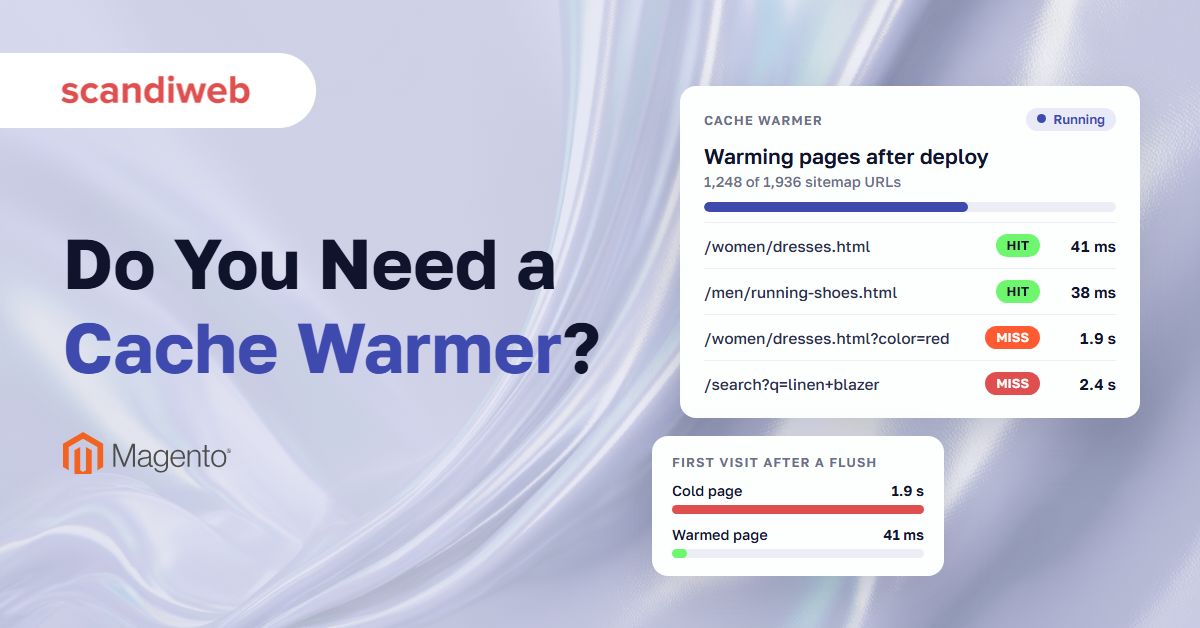
A Magento (Adobe Commerce) store keeps finished copies of its pages in a cache, so most shoppers get a page that is ready to send instead of waiting for Magento to build it. Those copies don’t last. Releasing a store update or flushing the cache deletes all of them, and catalog updates delete the pages they touch. A Magento 2 cache warmer refills the cache before shoppers notice the gap.
Without one, the first shopper to open each page after a flush waits while Magento builds it from scratch, which takes far longer than sending a saved copy. Every popular page gets rebuilt this way, one slow first visit at a time.
A warmer does that work in advance. It visits your pages automatically, usually working through the sitemap, so the first real visitor gets a saved copy. It only reaches pages it can predict, and each visit costs your server the same build a shopper would have triggered. Whether that trade pays off depends on your traffic and how often your cache empties.
What does a Magento 2 cache warmer do?
A Magento 2 cache warmer requests your store’s pages before shoppers do, so the full page cache already holds a finished copy when the first visitor arrives. It runs after a deploy, a cache flush or a catalog change, when the cache is empty and every page would otherwise be built by PHP while a shopper waits.
A cold cache is one that doesn’t hold the page a shopper asked for. Magento then builds that page from nothing: it resolves the layout, renders every block on it and runs the database queries behind them, and only then does any HTML exist. A warm cache already holds the finished page and hands it back without that work. Cache warming means filling the cache on purpose, before traffic arrives, so shoppers get the warm case rather than the cold one.
The cache a warmer fills is the full page cache. In production that should be Varnish. Adobe strongly recommends Varnish and says the built-in full page cache, which writes to the file system or the database, is much slower. In the admin, this is the Page Cache type, tagged FPC, and Flush Cache Storage removes everything in it regardless of tag.
We see the cold case after every release on the stores we support. The deploy finishes, the cache flushes, and the first request to each page carries the full build until the cache fills again. The cold cache vs warm cache question comes down to that first request against every one after it. A warmer is a program that sends those first requests itself.
🚀 Quick takeaway
Magento purges Varnish whenever its own cache is cleaned, flushed or refreshed. If your deploy runs a cache flush, every page your shoppers open next is a cold build.
How a full page cache warmer works in Magento 2
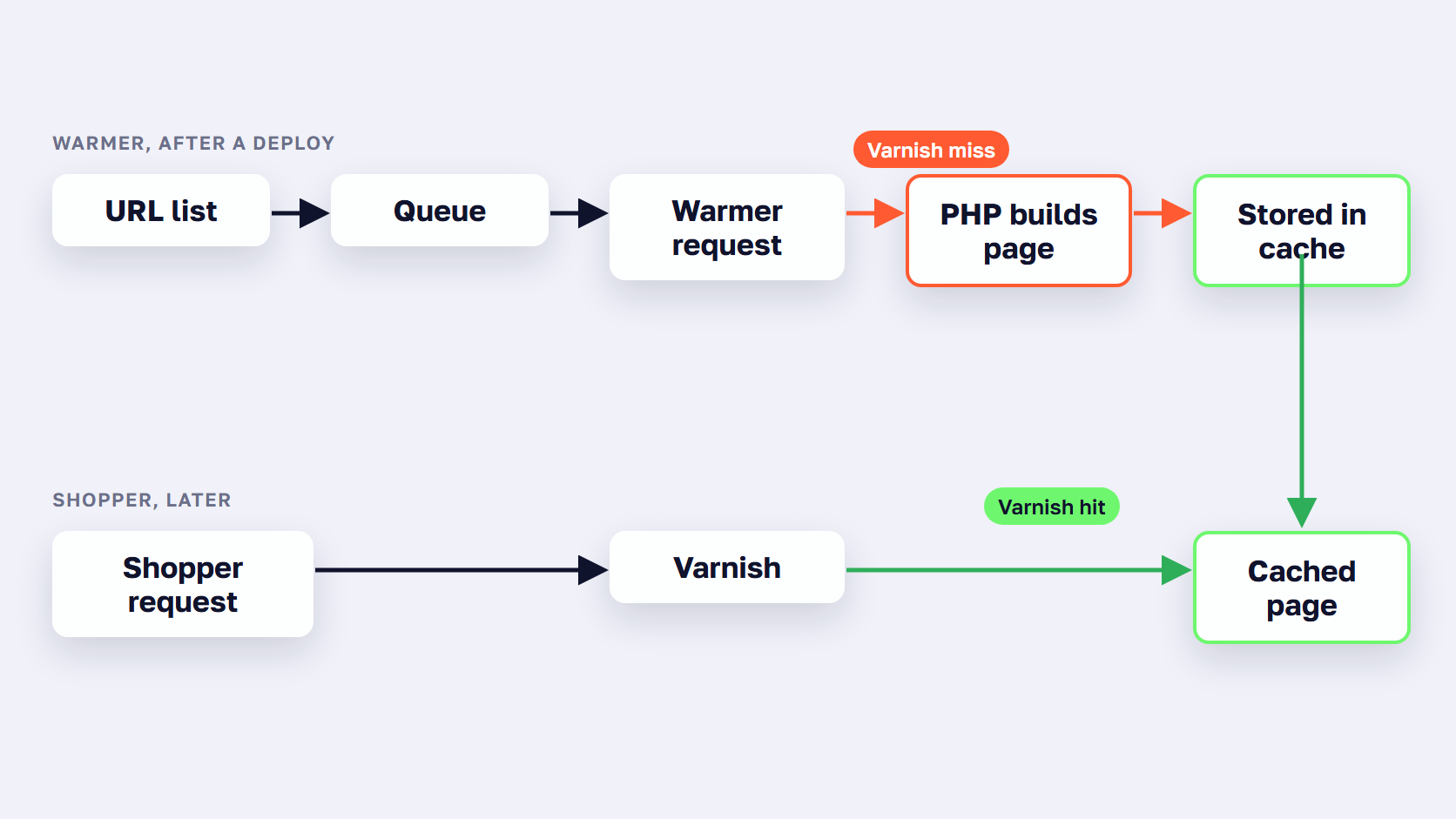
A full page cache warmer works in three steps. It builds a list of URLs from the sitemap, a URL file or page popularity, queues them, and requests each one from cron or a CLI command. Most let you cap concurrent requests, add a delay between them, and choose the store views, currencies and customer groups to warm.
Where the URL list comes from
Most warmers read your sitemap.xml, because it already lists the category, product and CMS URLs you want indexed. Some also accept a file of URLs, so you can add landing pages or leave out whole sections, and some rank pages by visits so the busiest URLs get warmed first.
Warmers come as paid and free Magento extensions, including open-source ones. Our comparison of speed optimization extensions includes the main warmers. A free Magento full page cache extension on GitHub, for example, reads sitemaps or URL files and is meant to be called from deployment scripts. Whichever you pick, the list is the whole job. A page that isn’t on it stays cold until a shopper opens it.
When the warmer runs
A Magento cache warmer runs from cron, like the rest of Magento’s background work, or from a CLI command you call by hand. The useful moment is right after a deploy or a full cache flush, when every page is cold, so most setups call the warmer from the deploy script and let cron keep the queue moving afterwards.
Adobe Commerce on Cloud has a built-in version of this. The post-deploy variables include WARM_UP_PAGES, which lists the pages to preload once the deploy finishes. Its default is index.php alone. You can add categories, CMS pages, products and store pages by pattern, provided the post-deploy hook is configured.
How it limits server load
Every request a warmer sends is a full page build, so the controls on a full page cache warmer for Magento 2 are all about pacing. Most warmers let you set how many requests run at once, add a delay between them, and cap how long a job may run. Some stop the crawl when system load passes a threshold you set. One manual puts the trade-off plainly: more threads finish the crawl sooner and increase the server load. Adobe’s WARM_UP_CONCURRENCY variable does the same job on Commerce Cloud, limiting simultaneous requests to reduce server load.
Store views, currencies and customer groups
Magento doesn’t cache one copy of a URL. It caches one copy per context, and the context travels in the X-Magento-Vary cookie: the store, the selected language and currency, the customer group, and whether the shopper is logged in. Adobe’s public content documentation lists these as the variables that make each cached URL unique.
A warmer only fills the contexts it requests, which is why most let you choose store views, currencies and customer groups. Each one you tick is another pass over the same URLs. The next section adds that up.
What a cache warmer costs your server
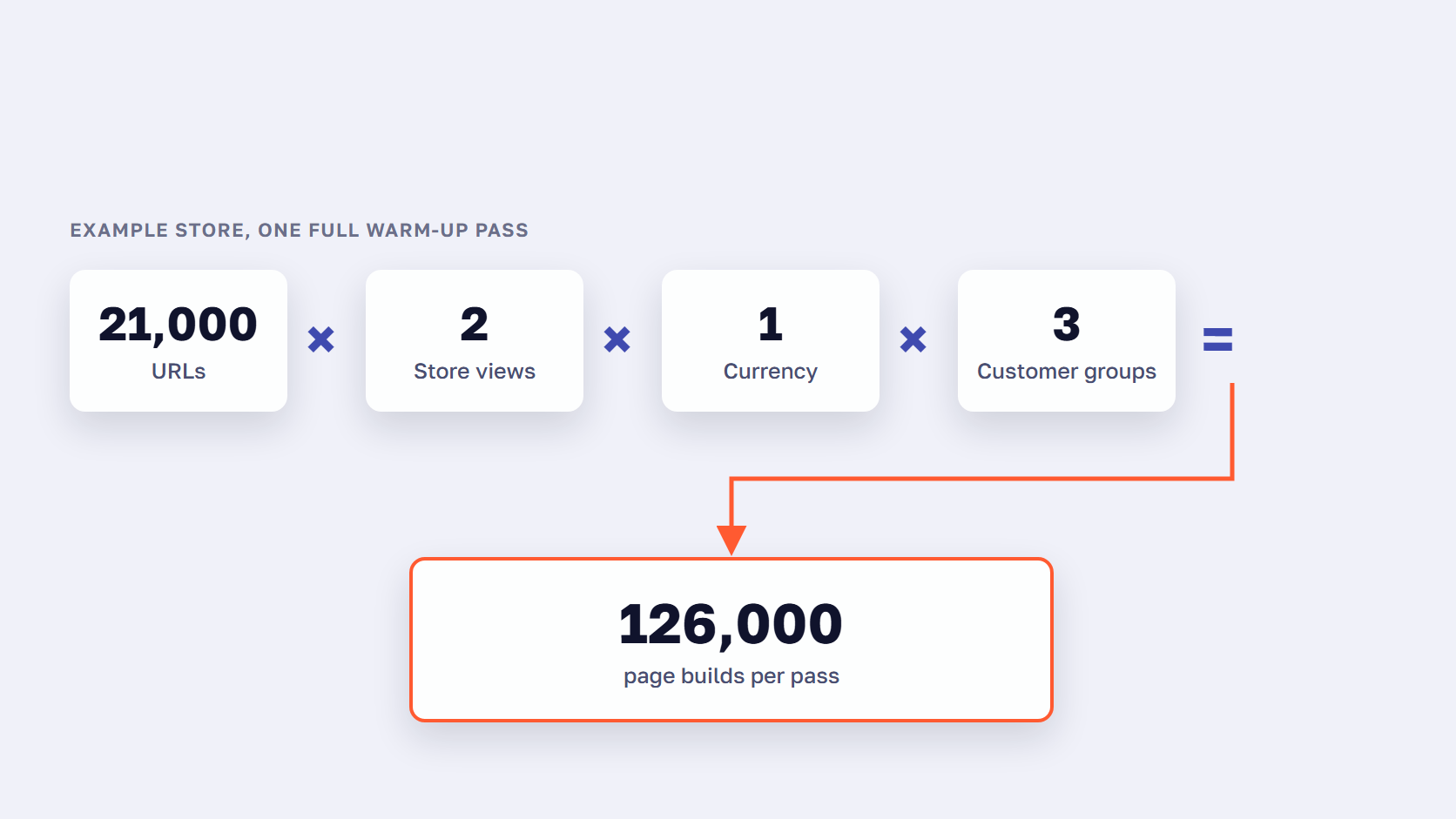
A cache warmer costs server time, because every URL it warms is a full uncached page build in PHP. One full pass equals your URLs multiplied by the store views, currencies and customer groups you warm. Magento also purges Varnish when products, categories, prices or promotion rules change, so the warmer keeps crawling the same pages.
Take a store the size of the one in our Expedio benchmark, with around 1,000 categories and 20,000 products. That is about 21,000 URLs before any filters or search terms. Warm them for 2 store views, 1 currency and 3 customer groups, and one full pass is 21,000 × 2 × 1 × 3 = 126,000 page builds.
This is an example, not a measurement, and your own numbers will differ. The shape holds, though: every one of those builds runs in PHP on your own server, competing with real shoppers for the same CPU. A Magento cache warmer doesn’t make a single build cheaper. It decides when the server does the work.
Why a warm cache keeps going cold
Adobe’s cache clearing with Varnish documentation lists the admin tasks that purge Varnish automatically: adding or editing categories, prices, products and promotional pricing rules. It also says that when you clean, flush or refresh the Commerce cache, Varnish purges as well.
So a store that imports prices every morning, or edits promotion rules through the day, empties the pages it just warmed, and the warmer crawls them again. The crawl in the example above isn’t a one-off after each deploy. It repeats as often as your catalog changes.
Some flushes are unavoidable. Sometimes flushing the whole cache storage is the only option, and then every page goes cold at once.
🚀 Quick takeaway
Before you buy a warmer, multiply your URLs by the store views, currencies and customer groups you would warm. That is the size of one full crawl on your own server.
What a cache warmer can’t fix
A cache warmer can’t fix the misses it doesn’t predict. Logged-in customers get one cached copy per customer group, and each group misses until it is warmed. Filter combinations and search terms are each cached on their own, more than a crawl can list. Checkout and account pages are never cached, and purged pages wait for the next visit.
Logged-in customers and B2B customer groups
Magento caches catalog pages for logged-in customers too. The customer group and the logged-in state are part of the X-Magento-Vary context, so the cache key includes them, and each group gets its own copy of every URL. Those copies miss more often than the guest copy for a plain reason: there are more of them, and all of them are empty after a deploy or flush.
If you are working out how to go about prewarming the cache for logged-in users, the answer is per customer group. Some warmers let you pick the groups to warm, so check for that before buying, and remember that pre-warming the cache for all customer groups means one full pass over your URLs for each group. A B2B store with many groups multiplies the crawl again.
Per-customer data such as the cart or wishlist isn’t in the page cache at all. Adobe’s private content documentation explains that the browser fetches it with an AJAX request and keeps it in local storage. And /customer and /checkout URLs bypass the cache in Magento 2.4’s default Varnish configuration, so no warmer touches them.
Filtered category pages and search results
Every filter a shopper can click in layered navigation makes a URL, and filters combine, so a category with a handful of filters has far more filtered pages than plain ones. Magento 2.4 caches each combination as its own entry, and search results too: the default Varnish configuration has no bypass for the search URL, and the search results layout has no block marked uncacheable, so each search term gets its own entry.
These pages are cacheable. They miss far more often than a plain category page, because most entries are still empty when a shopper asks for them. A crawl can’t list every filter combination, and search terms depend on what shoppers type, so a warmer covers only the few it has on its list. For a store where shoppers filter and search their way to products, that is a large share of catalog traffic.
The build itself
A warmer moves the wait to a moment when no shopper is in the queue. The build takes as long as it did before, and every page outside the crawl, or purged since the crawl, still runs the full build in front of a shopper. That is the part of the problem a warmer can’t reach.
For scale, HTTP Archive’s technology report for September 2026 puts the share of Magento origins with a good time to first byte at 23.0% on mobile and 22.7% on desktop, where good means 800 ms or less at the 75th percentile. A warmer raises the share of cached responses in figures like these. It does nothing for the uncached ones.
🚀 Quick takeaway
Check cache misses for logged-in sessions, filtered URLs and search results separately. Magento caches all three, but a warmer covers only a small share of their variants.
Cache warmer vs a faster cold build
A cache warmer hides slow page builds by running them before shoppers arrive. A faster cold build shortens the build itself, so every cache miss costs less, including the ones a crawl doesn’t cover. Warmers suit guest-heavy stores with a predictable set of URLs. Faster builds suit stores with logged-in customers, heavy filtering, search and frequent catalog updates.
The two fixes work on different parts of the same problem.
| Cache warmer | Faster cold build (Expedio) | |
|---|---|---|
| What it changes | When the slow build happens | How long the build takes |
| Pages it helps | URLs on its list, in the contexts it warms | Storefront pages Magento builds on the server, cached or not |
| Logged-in and B2B customers | One copy per warmed customer group, nothing per customer | A faster build in every session |
| Filtered pages and search | Only the combinations and terms on its list | A faster build on every miss |
| Server load | Adds a crawl on top of real traffic | Less server time per page, and the same server handles 3x the traffic before response times start to rise |
| After a deploy or flush | Covers the pages it reaches, in crawl order | First visits are faster on every page |
| Setup | Extension, cron, tuning and monitoring | A module install with no theme or data changes, built into ReadyMage |
| What it doesn’t do | Shorten the build | Speed up the browser side, the admin or Magento 1 |
Expedio is our module for making the cold build itself faster. It changes how Magento builds each page on the server by applying Liquid, the open-source template language created at Shopify, and its core is open source. It works with Magento 2 Open Source, Adobe Commerce and Commerce Cloud, with Luma, Hyvä and custom themes, on any hosting, and it leaves the theme, design, data, admin, catalog, prices, checkout and orders as they are.
In a benchmark on one merchant’s Hyvä store, measured as server response time, 100 category pages opened once from cold took a median of 57 ms with Expedio against 181 ms on stock Magento, 3.2x faster. A full category page went from 655 database queries to 30. The full numbers and method are in the benchmark write-up. Expedio is built into ReadyMage, our Magento hosting, and installs as a module on any other host.

The two can work together. A warmer on a faster build has fewer slow pages to hide, and each request it sends costs the server less.
🚀 Quick takeaway
A warmer changes when the slow build happens. Only a faster build changes how long it takes, which is the one fix that reaches the pages a crawl never visits.
How to run a cache warmer without slowing the store
To run a cache warmer without slowing the store, warm your busiest pages first, cap concurrent requests and pause the crawl when server load climbs. Start it from the deploy script or post-deploy hook, skip filter and sort parameters, and warm only the customer groups and currencies that bring real traffic.
These cache warming strategies keep the crawl useful and the server free for shoppers.
- Warm the pages that earn traffic first. Rank URLs by visits and let the long tail fill on its own.
- Start the warmer from the deploy. Call it from the deploy script, or list your top pages in
WARM_UP_PAGESon Adobe Commerce Cloud. - Cap concurrent requests and add a delay. More threads finish sooner and load the server harder.
- Pause the crawl when load climbs. Set a system-load threshold so shoppers always come first.
- Skip filter, sort and search URLs. Exclude them with pattern rules, because their combinations outnumber any crawl.
- Warm only the contexts with traffic. Pick the store views, currencies and customer groups that bring real visits.
- Keep deploys and full flushes away from peak days. A code freeze before big sales keeps the cache warm when it matters.
- Check the cache hit rate after every change. If misses don’t fall, the warmer is crawling the wrong pages.
Expired pages are a separate case. For those, Varnish’s grace mode already serves the stale copy while it fetches a new one, for 300 seconds by default in Adobe’s setup. A purged page is gone from the cache, so the warmer’s job is the pages emptied by flushes and purges.
🚀 Quick takeaway
Varnish grace mode serves an expired page while it fetches a new one, for 300 seconds by default in Adobe’s setup. A purged page is gone from the cache, so after a flush only a warmer or a faster build shortens the wait.
Do you need a Magento 2 cache warmer? A decision framework
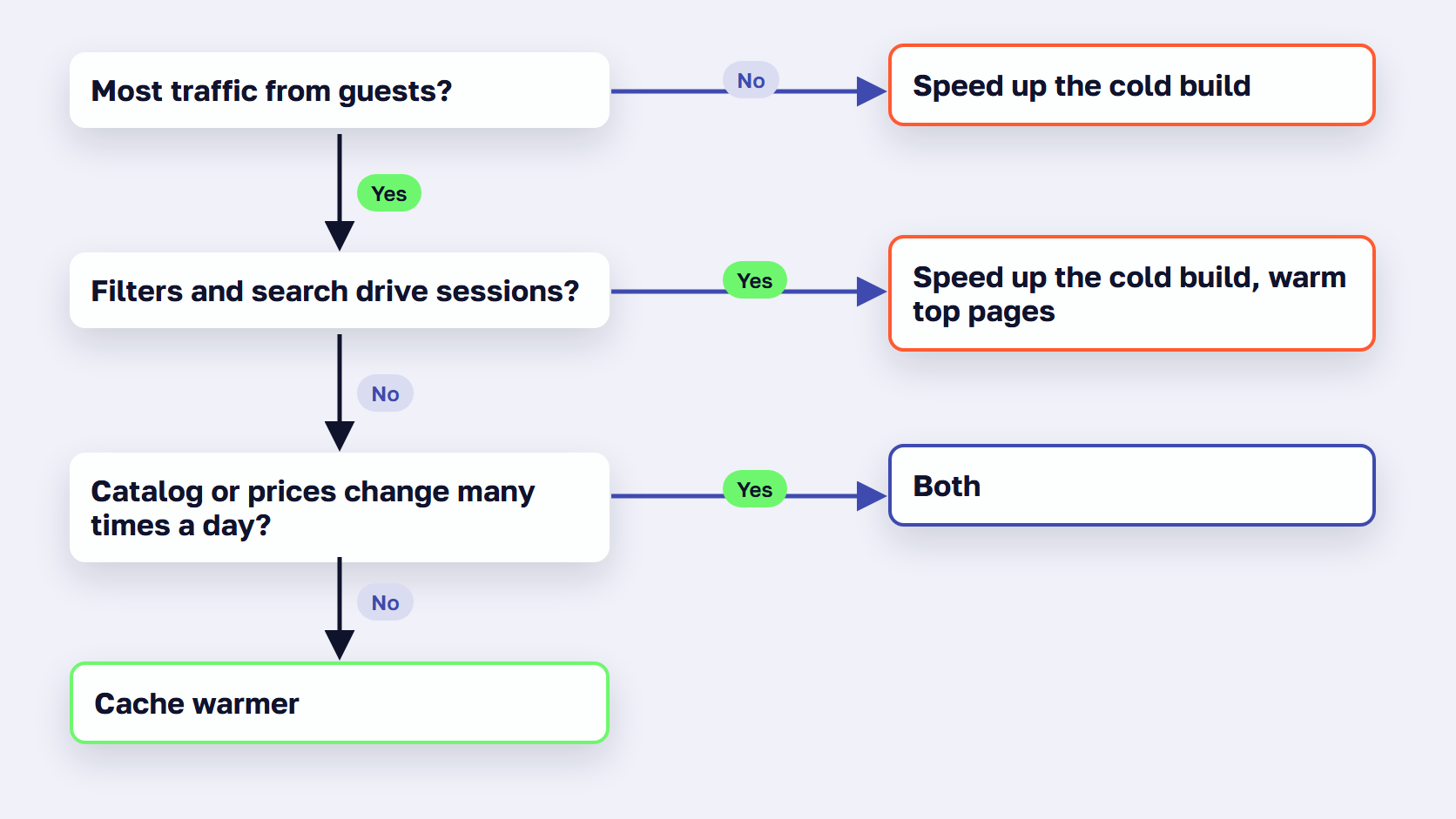
You need a Magento 2 cache warmer if most traffic is guests on a known set of category and product pages and you flush the cache on deploys. If revenue comes from logged-in customers, filtered pages or search, or the catalog changes all day, make the cold build faster first, then warm only your busiest pages.
Use a cache warmer if:
- You flush the full cache on deploys, and most traffic lands on a known set of category, product and CMS pages.
- Most of your shoppers browse as guests, so one cached copy per URL serves nearly all of them.
- You run few store views, currencies and customer groups, so one full crawl stays short.
- Your server has spare capacity outside peak hours to absorb a crawl after each deploy.
- Your catalog, prices and promotions change a few times a day at most, so warm pages stay warm.
Make the cold build fast instead if:
- A large share of your revenue comes from logged-in or B2B customers, whose pages are cached separately for each group.
- Your shoppers rely on layered navigation filters and site search, which produce more URLs than any crawl can cover.
- You would need to warm many store views, currencies or customer groups, and a full pass takes hours of server time.
- Catalog, price or promotion updates purge Varnish many times a day.
- Your server already runs near capacity at peak, so a crawl would compete with paying shoppers.
Do both if: you deploy often, most traffic is guests, and you also sell to logged-in or B2B customers. Speed up the cold build, then warm your top pages after each deploy.
Frequently asked questions about Magento 2 cache warmers
Does a cache warmer increase server load?
Yes, while it runs. Every URL a warmer requests is a full page build in PHP, the same work a shopper’s first visit would trigger. That is why warmers come with a concurrency limit and a delay between requests, and some pause when system load passes a threshold. Adobe describes its own post-deploy warm-up concurrency setting as a way to reduce server load.
Can you warm the Magento cache for logged-in customers?
Yes, per customer group, if the warmer supports it. Magento caches catalog pages for logged-in shoppers with one copy per context, which includes the customer group, and some warmers let you choose the groups to warm. Per-customer data such as the cart isn’t in the page cache, because Magento loads it in the browser through an AJAX request. Each group you add means another full pass over your URLs.
What is the difference between a cold cache and a warm cache?
A cold cache doesn’t hold the page a shopper asked for, so Magento builds it in PHP, runs the database queries behind it and stores the result. A warm cache already holds the finished page and returns it without running PHP. That is why the first visit to a page after a flush is slower than every visit after it, until the page expires or is purged.
How does Adobe Commerce Cloud warm the cache after a deploy?
Adobe Commerce on Cloud warms the cache in the post-deploy stage. The WARM_UP_PAGES variable in .magento.env.yaml lists the pages to preload, and its default is index.php alone. You can add categories, CMS pages, products and store pages by pattern, and WARM_UP_CONCURRENCY limits simultaneous requests to reduce server load. The post-deploy hook has to be configured for this to run.
How often should a Magento cache warmer run?
Run a cache warmer after every deploy or full cache flush, and on a schedule after that, because Magento purges Varnish whenever products, categories, prices or promotion rules change. Warmers run from cron, and one vendor’s setup guide recommends running cron every one to five minutes so the queue keeps moving. Schedule full crawls outside peak trading hours.
Do you still need a cache warmer if the cold build is fast?
Less, but a light one still helps. A faster cold build cuts what every cache miss costs, including the misses a warmer rarely covers, such as filter combinations, unusual search terms and customer groups it doesn’t warm. A small warmer for your top pages after each deploy then covers the busiest URLs, and each request it sends takes less server time because the build behind it is faster.
Before you install a Magento 2 cache warmer
Before you install a Magento 2 cache warmer, check how many page views the full page cache actually serves and where the misses come from. If most pages already come from the cache and the store still feels slow, look at why a Magento store is slow. If most misses are guests after deploys, a warmer is a quick fix. If they are logged-in customers, filters and search, speed up the cold build, because a crawl covers few of those pages.
Measure that on your own store, by context: guest sessions after a deploy, logged-in sessions, filtered URLs and search results, each on its own. The split tells you which fix you are buying. A warmer is one fix among many, and our guide to speed up Magento puts it in order with the server, database and frontend fixes.
Send us your slowest pages and how often your cache empties, and we'll tell you whether a warmer, a faster cold build or both fits your store.




































