
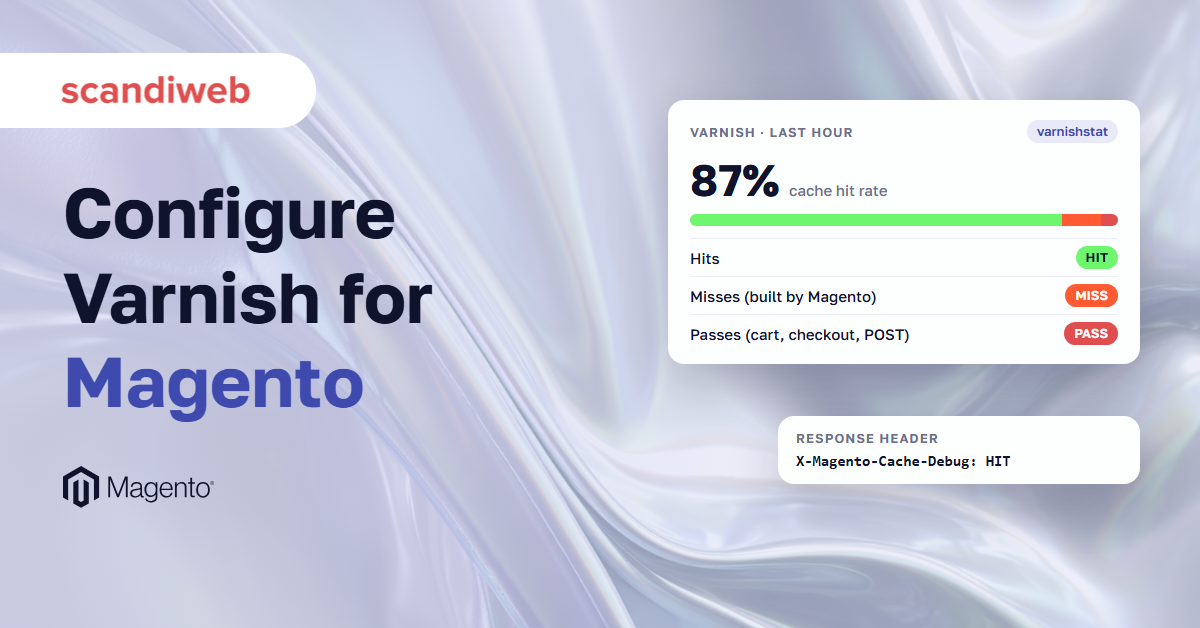
Setting up Varnish, the caching server Adobe recommends in front of every live Magento 2 (Adobe Commerce) store, usually takes an afternoon. It keeps finished copies of your pages and hands them to shoppers, so Magento doesn’t have to build each page again. You install it, switch the store over in the admin, load the file Magento generates, and restart. A test page comes back from the cache at once, and at the time, the Magento 2 Varnish configuration looks finished.
Then the odd problems start: a price change that doesn’t show, a homepage that loses its styling after a release, error pages that come and go.
The admin setting only tells Magento that Varnish exists. What Varnish keeps, for how long, and what it drops when a product changes is set in the VCL, the file of rules Varnish runs. Even then, some requests go on to Magento, where the shopper waits for the page build.
What a Magento 2 Varnish configuration includes
A Magento 2 Varnish configuration has four parts: Varnish itself, at a version Adobe supports and with enough memory, the Full Page Cache setting in the Magento admin, the VCL file that Magento generates and Varnish runs, and the purge hosts in Magento’s env.php file, which let Magento clear pages from Varnish when content changes.
In production, Varnish is the full page cache. How a page is cached, keyed and purged is covered in that guide, so this one stays on the Varnish side.
| Part | Where it lives | How you set it |
|---|---|---|
| Varnish and its startup options | The Varnish server | Package install, then varnishd options for port, memory and limits |
| Caching Application and Varnish fields | Magento admin, Full Page Cache section | Admin or bin/magento config:set |
| The VCL | /etc/varnish/default.vcl on the Varnish server | Admin export button or bin/magento varnish:vcl:generate |
| Purge hosts | app/etc/env.php, key http_cache_hosts | bin/magento setup:config:set --http-cache-hosts |
VCL stands for Varnish Configuration Language. The file Magento generates is a starting point, and once you edit it, it is yours: keep your changes in version control and reapply them after each re-export, because a new export doesn’t carry them.
Which Varnish version does Magento 2 support?
Magento 2.4.9 supports Varnish 8, according to Adobe’s system requirements, and so does the latest 2.4.8 patch, 2.4.8-p5. Our Magento 2 system requirements guide lists the other versions each release needs. Earlier 2.4.8 releases list Varnish 7.x, and Adobe’s table gives a version for each older patch line as well. Magento’s VCL generator includes templates for Varnish 6 and 7 only, so on Varnish 8, generate the Varnish 7 file and test it on staging first.
| Magento release | Varnish (Adobe, Oct 13, 2026) | VCL templates it can generate |
|---|---|---|
| 2.4.9 | 8 | Varnish 6, Varnish 7 |
| 2.4.8-p5 | 8 | Varnish 6, Varnish 7 |
| 2.4.8-p4 | 7.7 | Varnish 6, Varnish 7 |
| 2.4.8 | 7.6 | Varnish 6, Varnish 7 |
Supported Varnish versions and the VCL templates each Magento release includes. The 2.4.7 line and older have no Varnish 7 template, even where Adobe lists Varnish 8 for their latest patch.
The template number is the lowest Varnish version it supports. On 2.4.9 the Varnish 6 and Varnish 7 files are identical apart from two comment lines, so either one gives the same rules, and nothing in them uses the functions that the Varnish 8.0 upgrade notes list as removed. Adobe hasn’t published a Varnish 8 template, so compile the file with varnishd -C -f default.vcl on your Varnish 8 build and run a purge on staging before it goes live.
Varnish 8 and the Vinyl Cache name
Varnish is still in use, and Adobe still strongly recommends it in production. The open-source project behind it is now called Vinyl Cache. Varnish Cache 8.0, released in September 2025, was its last release line under the old name, and Vinyl Cache 9.0 followed in March 2026. Varnish Software continues a separate distribution that keeps the Varnish Cache name. Adobe’s table says Varnish 8, so install the newest 8.0.x package, 8.0.2 at the time of writing, and check it with varnishd -V before you generate the VCL. The September 2026 advisory VSV00020 covers 8.0.2, but only for VCL that calls the .upper() or .lower() string methods, and the file Magento generates calls neither.
🚀 Quick takeaway
On Magento 2.4.9, bin/magento varnish:vcl:generate still defaults to the Varnish 6 template. Pass --export-version=7 when you run Varnish 7 or 8.
How to configure Varnish for Magento 2, step by step
To configure Varnish for Magento 2:
- Put Varnish on port 80 and move the web server to port 8080.
- Set Caching Application to Varnish Cache in the admin.
- Generate the VCL with
bin/magento varnish:vcl:generate --export-version=7. - Check the health check URL.
- Allow Magento to purge.
- Set memory and header limits, then restart.
These steps assume Magento on-premises. On Adobe Commerce Cloud, skip to the last section.
1. Put Varnish in front of the web server
Varnish listens on port 80 and the web server, nginx or Apache, moves to port 8080, as in Adobe’s guide to configuring nginx for Varnish. Use an IP address or hostname for the backend rather than localhost, even on one machine. For HTTPS, a TLS terminator in front of Varnish passes X-Forwarded-Proto: https, the header Magento’s VCL expects by default, so HTTP and HTTPS copies of a page stay apart.
2. Switch Magento to Varnish and generate the VCL
In the admin’s Full Page Cache section, set Caching Application to Varnish Cache (Recommended), fill in the access list, backend host and port, and grace period, then use the export button for your Varnish version. On 2.4.9 there are buttons for Varnish 6 and Varnish 7. The command line does the same with bin/magento varnish:vcl:generate and the options in Adobe’s CLI reference. Two traps: the default --export-version is still 6, and --access-list takes one IP per flag. Back up /etc/varnish/default.vcl before you replace it, then restart Varnish.
A starting point. Replace the IPs with your own servers.
bin/magento varnish:vcl:generate \
  --export-version=7 \
  --backend-host=192.0.2.20 \
  --backend-port=8080 \
  --access-list=192.0.2.20 \
  --access-list=192.0.2.21 \
  --grace-period=300 \
  --output-file=/tmp/default.vcl
3. Point the health check at the right file
The probe calls health_check.php every 5 seconds with a 2-second timeout and marks the backend sick when fewer than 5 of the last 10 checks pass. The script returns 500 when MySQL or the cache storage can’t be reached. The path depends on your web root. The VCL from 2.4.7 on probes /health_check.php, which fits a web root of pub/. With the Magento folder as the web root, use the older /pub/health_check.php form, which Adobe’s advanced page still shows, because Magento keeps the script only in pub/. Open the URL from the Varnish server to confirm it answers, because a wrong path fails every check and Varnish then treats Magento as down.
From the 2.4.9 VCL. Use /pub/health_check.php if your web root is the Magento folder rather than pub/.
backend default {
    .host = "192.0.2.20";
    .port = "8080";
    .first_byte_timeout = 600s;
    .probe = {
        .url = "/health_check.php";
        .timeout = 2s;
        .interval = 5s;
        .window = 10;
        .threshold = 5;
    }
}
4. Let Magento purge Varnish
When a product, category or price changes, Magento sends a PURGE request with the cache tags to each host in http_cache_hosts. Set them with setup:config:set --http-cache-hosts. Without them, Magento purges the store’s own host name on port 80, which misses a Varnish on another port or server. Varnish accepts a purge only from an IP in acl purge and answers 405 otherwise. In most setups that means the address of every server that runs Magento, which is what the generator’s access list is for. Adobe’s page words it as the Varnish host’s IP, the same machine when the two share a server, so with a load balancer in between, check which address Varnish sees. On several web servers, as in an autoscaling setup, every node sends purges. When Magento can’t reach any purge host, it logs “No cache server(s) could be purged” in var/log/system.log. A 405 from Varnish leaves no log entry, so test each Magento server with the purge request below.
Comma-separated, no spaces. The port can be left out for port 80. The test purge bans a tag that no page carries, so it clears nothing: 200 Purged means the server is allowed, 405 means it isn’t.
bin/magento setup:config:set --http-cache-hosts=192.0.2.30:80,192.0.2.31:80

# Run on each Magento server: 200 Purged = allowed, 405 = not in acl purge
curl -i -X PURGE -H 'X-Magento-Tags-Pattern: ((^|,)no_such_tag(,|$))' http://192.0.2.30/
5. Set memory and header limits before you go live
With no storage option, Varnish starts with 100 MB, and Adobe gives no size. Give it what the server can spare and watch the eviction counter covered in the measurement section. Category pages carry one cache tag per product in the X-Magento-Tags header, and past Varnish’s 8 KB default the browser gets 503 Backend Fetch Failed. Adobe’s 503 guidance sizes http_resp_hdr_len from the largest category, product count times 21, and raises http_resp_size with it. Varnish takes the response headers from workspace_backend, 96 KB by default, which Adobe’s snippet also sets, so give it room above http_resp_size. These options live in your Varnish service file, and the path depends on the OS. Change them well before peak season and your code freeze, then retest with a load test at peak traffic.
A starting point from Adobe’s 503 guidance. Size the header limit from your largest category (products × 21), keep the workspace above the response size, and set the memory to what the server can spare.
varnishd -a :80 -f /etc/varnish/default.vcl \
  -s malloc,<size> \
  -p http_resp_hdr_len=65536 \
  -p http_resp_size=98304 \
  -p workspace_backend=131072
On Adobe Commerce Cloud, configure Fastly instead
On Adobe Commerce Cloud, full page caching uses Fastly, a Varnish-based CDN, through the Fastly CDN module that Adobe installs on Pro Staging and Production and on Starter Production. There is no default.vcl to edit, and custom rules go into Fastly custom VCL snippets. The VCL rules in the rest of this article describe what Magento expects from its cache. Fastly runs its own configuration.
🚀 Quick takeaway
If single-page purges come back with a 405, Varnish doesn’t recognize the sender. Add the IP of every server that runs Magento to acl purge, then purge one URL again.
What the Magento VCL does with query strings, cookies and TTLs
Magento’s VCL builds the cache key from the URL plus the X-Magento-Vary cookie, so other cookies don’t split the cache. On 2.4.9 it sorts query parameters and strips a fixed list of marketing parameters. It stores only 200 and 404 responses that aren’t marked private, and everything else goes to Magento.
The generated VCL sets what counts as the same page. The rules below are read from the VCL Magento 2.4.9 generates, and several of them changed between releases.
Query strings: sorted, and marketing parameters stripped
The 2.4.9 VCL sorts query parameters first, so ?color=red&size=m and ?size=m&color=red share one entry. Sorting is new in 2.4.9. It then removes known tracking parameters: utm_ parameters, Google and Microsoft click IDs such as gclid and msclkid, fbclid, mc_ parameters and a few more. Lists differ by release: 2.4.8 added the Google and Microsoft click IDs, and Magento’s development branch already carries a much longer list. A parameter missing from your release’s list gives every click its own cache entry. Add it to both regex lines in vcl_recv and note the change for the next re-export. Filter parameters must stay, because they change the page. The removal pattern only checks that the URL holds a tracking parameter, then cuts every match, even inside a longer name: on 2.4.9 a link to ?country_of_origin=12&utm_source=newsletter reaches Magento as ?country_of_, so the shopper lands on the unfiltered page. If a filter or other parameter name ends in a listed name, such as origin or ie, anchor the pattern to ? or &.
Cookies: only X-Magento-Vary splits the cache
X-Magento-Vary is the cookie in which Magento records the shopper’s context, such as customer group, store and currency. The VCL hashes only that value out of the Cookie header, so analytics and consent cookies don’t create extra copies of a page. It removes Set-Cookie from cacheable responses, and since 2.4.7 it won’t store a page whose response sets X-Magento-Vary when the request didn’t send it. Custom code that adds values to the context multiplies the copies of every page. Passing requests on session cookies, as some tutorials advise, adds nothing, because the hash already ignores them.
TTLs, status codes and pages Varnish won’t store
The TTL comes from Magento’s s-maxage header, set by the admin field “TTL for public content”, 86400 seconds by default. Only 200 and 404 responses that aren’t marked private are stored. A response marked no-cache or no-store gets a two-minute marker, and requests in that window go straight to Magento. The VCL comment calls the marker hit-for-pass, while Varnish 8’s reference says beresp.uncacheable produces a hit-for-miss object, so expect these requests in cache_hitmiss rather than cache_hitpass. Browsers get no-store for HTML, so the browser never holds a stale page. Static and media files pass by default, so serve them from the web server or a CDN.
🚀 Quick takeaway
A tracking parameter that isn’t on Magento’s list, such as one your email or affiliate tool adds, gives every click its own cache entry. Add it to the regex in vcl_recv.
Grace mode, purges and ESI in the Magento VCL
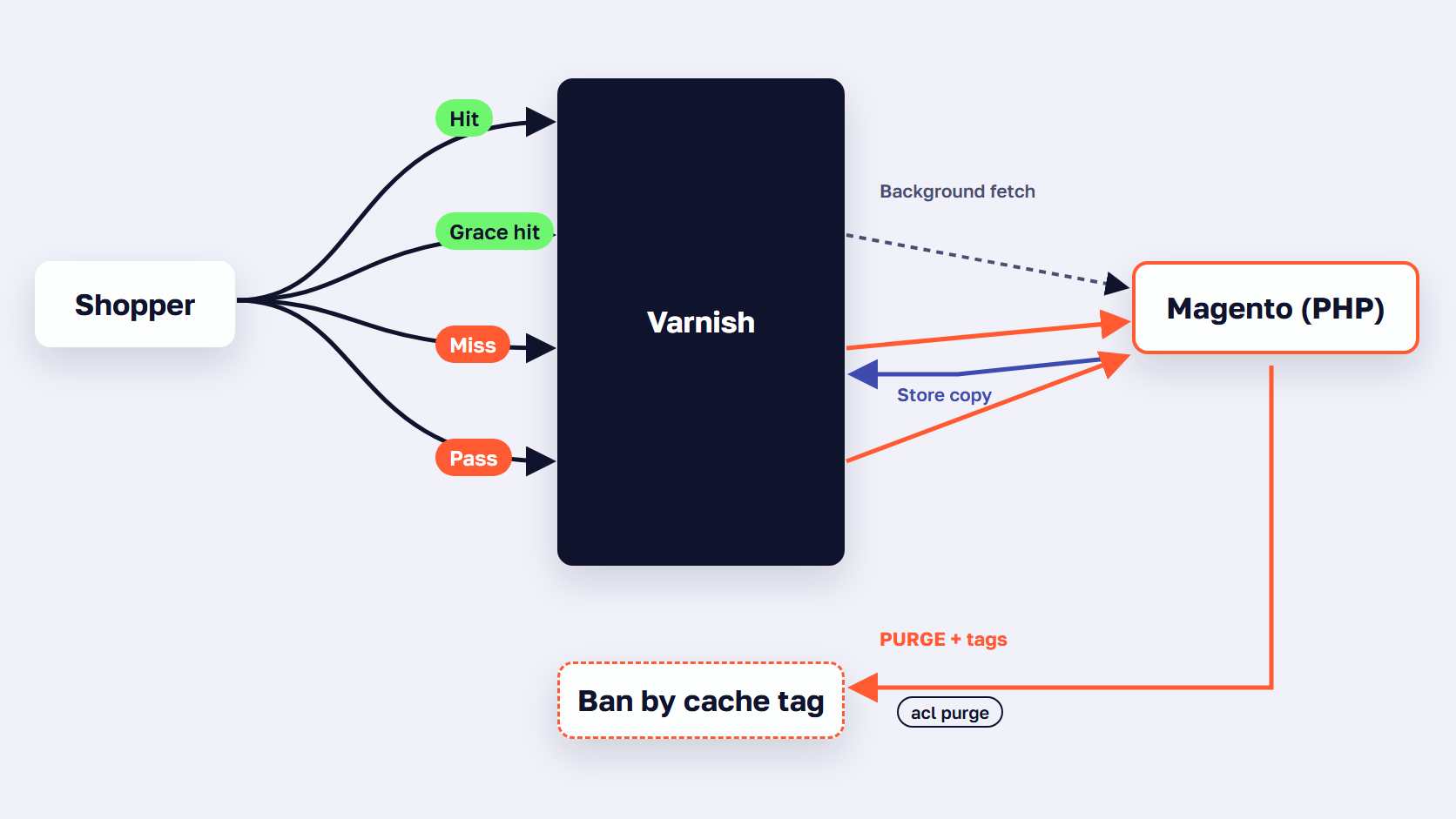
Magento’s VCL keeps every page for three days past its TTL. While the backend passes its health check, Varnish serves an expired page for the admin’s grace period, 300 seconds by default, and fetches a fresh one. If the check fails, it keeps serving stale pages. A purge from Magento, sent as a ban by cache tag, removes pages outright.
Grace mode keeps expired pages for three days
The VCL keeps every object three days past its TTL. While the backend passes its health check, Varnish serves an expired copy for up to the admin’s grace period, 300 seconds by default, and refreshes it in the background. After that, the request waits for a fresh build. When the health check fails, Varnish keeps serving what it has, which keeps a store up through a short outage, as Adobe’s advanced Varnish page describes. A Grace header on hits shows which case applied: “none” for a copy within its TTL, “normal (healthy server)” or “unlimited (unhealthy server)”. A page removed by a purge is not served in grace.
Purges are bans by cache tag
Magento sends tags rather than URLs, so one product save can clear the product page, its categories and any block that shows it. Varnish turns each purge into a ban on X-Magento-Tags, which applies to every stored object with a matching tag. These are obj.* bans, so Varnish’s background ban lurker can clean them up. The next shopper gets a miss, unless a cache warmer requests the page first. Count bans in MAIN.bans: a number that climbs all day points to imports, cron jobs or mass saves.
ESI blocks are cached on their own
ESI stands for Edge Side Includes, a way for Varnish to assemble a page from separately cached pieces. With Varnish selected, a layout block with its own ttl, such as the default theme’s top menu, becomes an ESI include that points at page_cache/block/esi and is cached with its own TTL and tags. The admin field “Handles params size” caps how many layout handles the include passes, 100 by default, and Magento’s own comment advises 50–100. Watch MAIN.esi_errors.
How to measure and raise your Varnish hit rate
To measure your Varnish hit rate in Magento 2:
- Read the X-Magento-Cache-Debug header: HIT, MISS or UNCACHEABLE.
- Compare MAIN.cache_hit with MAIN.cache_miss in varnishstat.
- Group requests by URL and result with varnishncsa.
- Trace one slow URL with varnishlog.
- Watch MAIN.n_lru_nuked for evictions and MAIN.bans for purges.
Varnish answers hits. Every miss and pass goes to Magento, so the hit rate sets how much of your traffic waits for PHP.
Read the cache headers
The VCL sets X-Magento-Cache-Debug on every response: HIT, MISS, or UNCACHEABLE on 2.4.7 and later. UNCACHEABLE means Magento told Varnish to skip the page. It’s there in production mode too, although Adobe’s verification page says to switch to developer mode to see the headers. Developer mode only adds X-Magento-Cache-Control and keeps Age. If the debug header is missing, the response didn’t pass through Magento’s VCL, so check that Varnish loaded the new file and that no proxy or CDN in front removes the header. If the header says HIT and the page is still slow, the wait is elsewhere: see why a Magento site gets slow.
Count hits and misses with varnishstat
varnishstat is Varnish’s live counter tool. The Varnish 8 counters that matter: cache_hit (which includes grace hits, counted separately in cache_hit_grace), cache_miss, cache_hitpass and cache_hitmiss for the “don’t cache” markers, s_pass for passes, n_lru_nuked for objects evicted to make room, and bans. A practical hit rate is hits divided by hits plus misses plus passes, measured over a busy day and per page type where you can. No published target fits every store, so measure your own.
Find the URLs that miss with varnishncsa and varnishlog
varnishncsa writes one line per request. Log ten minutes or a busy day with the handling value and URL path, then group the lines to see which page types miss or pass. varnishlog follows one URL through Varnish and its backend request. Then time the pages that miss, as you would when you audit your store page type by page type, because misses show up in field data as slow server response time.
Run on the Varnish server. Counters are totals since Varnish started.
# Hits, misses, passes, evictions and bans since Varnish started
varnishstat -1 | grep -E 'MAIN\.(cache_hit|cache_hit_grace|cache_miss|cache_hitpass|cache_hitmiss|s_pass|n_lru_nuked|bans) '

# Ten minutes of requests: how Varnish handled each URL path
timeout 600 varnishncsa -F '%{Varnish:handling}x %U' > /tmp/handling.txt
sort /tmp/handling.txt | uniq -c | sort -rn | head -30

# Follow one URL through Varnish and Magento
varnishlog -g request -q 'ReqURL ~ "^/women/tops"'
Fix what keeps the hit rate low
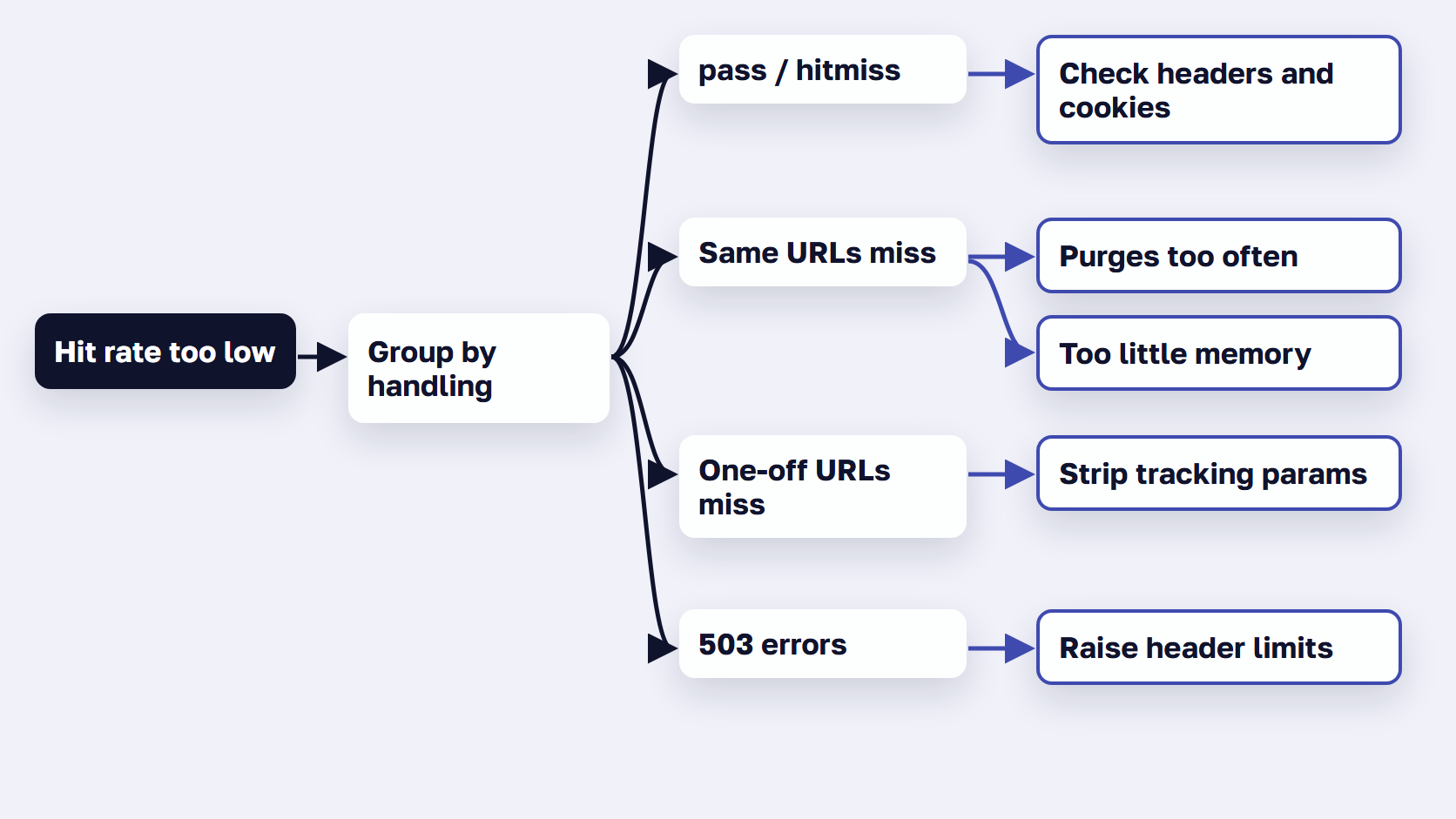
Match what the log shows to the change that fixes it.
- Many pass or hitmiss lines on catalog pages: find what sends
Cache-Control: private, no-cache or a block markedcacheable="false". - Misses on the same URLs again and again, with
MAIN.bansclimbing: move imports and mass saves off-peak, and stop flushing the cache on every deploy. - Misses with
n_lru_nukedclimbing: Varnish is evicting pages to make room, so give it more memory. - Many one-off URLs: strip the extra tracking parameters, and accept that layered navigation filters and rare searches miss more often.
- 503 errors: raise the header limits and check the health check URL, as in the setup steps.
🚀 Quick takeaway
Group one busy day of requests by URL and result with varnishncsa before you edit the VCL. Tune the page types with the most misses first.
What still reaches PHP when Varnish is tuned
Even with a tuned VCL, Varnish passes every POST, cart, checkout and account request to Magento. It also misses the first request after each purge, rare filter and search URLs, and each customer group’s first view of a page. Those shoppers wait while Magento builds the page in PHP, so the build speed sets their response time. A miss also runs the database queries behind each block, covered in our Magento MySQL optimization guide. Server response on uncached pages is also where Magento trails most other platforms, as our fastest eCommerce platforms research shows.
A pass or a miss costs a full page build in PHP, and that build is the time those shoppers wait. Cache settings move requests between the two groups, and for the second group only the build speed counts.
Expedio, scandiweb’s software for the server-side page build, works on exactly those requests. It speeds up how Magento builds each page by applying Liquid, the open-source template language created at Shopify, and its core is open source. It runs on Magento 2 Open Source, Adobe Commerce and Commerce Cloud, with Luma, Hyvä or a custom theme and on any hosting, and it leaves the theme, design, data, admin, catalog, prices, checkout and orders as they are. Pages that reach Magento are built at least 2x faster, and the same server handles 3x the traffic before response times start to rise.

In a benchmark on one merchant’s Hyvä store, measured as server response time with no full page cache, category pages opened with all caches empty took a median of 57 ms instead of 181 ms. The method and caveats are in the Expedio benchmark.
🚀 Quick takeaway
Time a filtered category page right after a purge. That is the wait every shopper gets on a miss, and no cache setting shortens it.
Frequently asked questions about Magento 2 Varnish configuration
Which Varnish version should I use with Magento 2.4.9?
Use Varnish 8. Adobe’s system requirements list Varnish 8 for Magento 2.4.9 and 2.4.8-p5, and give a version for each older patch line. Magento’s VCL generator has no Varnish 8 template, so generate the Varnish 7 file with --export-version=7, then test it on staging before it goes to production.
How do I generate the Varnish VCL for Magento 2 from the command line?
Run bin/magento varnish:vcl:generate. It prints the VCL, or writes it to a file with --output-file. Set --export-version to 7 for Varnish 7 or 8, because the default is still 6, and pass the backend host and port, the grace period, and each IP allowed to purge with --access-list. Then replace /etc/varnish/default.vcl and restart Varnish.
Why does Varnish return 503 Backend Fetch Failed on Magento?
One common cause is response headers that are bigger than Varnish allows. Category pages carry a cache tag for each product in the X-Magento-Tags header, and Varnish’s default limit is 8 KB. Adobe suggests setting http_resp_hdr_len to your largest category’s product count times 21, for example 65536, and raising http_resp_size above it.
Why are Magento pages not being purged from Varnish?
Magento sends a PURGE request to every host in http_cache_hosts, and Varnish answers 405 unless the sender’s IP is in the VCL’s acl purge list. Set the hosts with bin/magento setup:config:set --http-cache-hosts, add each Magento server’s IP to acl purge, then send a test PURGE from each one: 200 means Varnish accepts it, 405 means the IP is missing. Magento logs “No cache server(s) could be purged” only when it can’t reach any host.
What is the difference between Varnish and Redis caches?
Varnish caches whole pages in front of the web server, so a cache hit never reaches Magento. Redis, or Valkey on Magento 2.4.9, holds Magento’s own cache data and sessions in memory, which speeds up the work Magento does when Varnish misses. Most production stores run both: Varnish for pages, Valkey or Redis for the rest.
Is Varnish used on Adobe Commerce Cloud?
No. On Adobe Commerce Cloud, full page caching uses Fastly, a Varnish-based CDN, instead of a Varnish server you run yourself. Adobe installs the Fastly CDN module for Magento 2 on Pro Staging and Production and on Starter Production. Custom caching rules go into Fastly custom VCL snippets rather than a default.vcl file.
Magento 2 Varnish configuration: what to check after every upgrade
A Magento 2 Varnish configuration is done when you can show three things: the VCL matches your Magento and Varnish versions, Magento’s purges reach every Varnish host, and you know your hit rate by page type. Check all three after every upgrade. Then make the requests Varnish sends on to Magento faster.
The version table, the health check path and the marketing parameter list are the three things that change most often between releases, so re-export the VCL after each upgrade and diff it against the one in production. Where the two differ, carry your own changes into the new file, and keep a Magento 2 Varnish check on the release checklist. For the layers around Varnish, from PHP to the browser, see how to speed up Magento layer by layer.
If you're moving to Varnish 8 for Magento 2.4.9, or your hit rate is lower than you expected, talk to our Magento team about a review of your VCL and purge setup.