
This guide is for one retailer in particular: the one with a store network, an online shop, and a hunch that many of its online orders could be collected across town tomorrow morning instead of waiting three days for a courier. BOPIS, short for buy online, pick up in store, is how that happens.
A customer browses your online store during their lunch break, picks a store at checkout, and grabs the order on the way home. There’s no shipping fee and no waiting for a courier. Whether it’s groceries for same-day pickup or high-demand apparel, shoppers now expect that option. Below is what BOPIS is, what it asks of your stock data and store teams, how to run it on Magento (Adobe Commerce) and Shopify, and where it tends to break.
Overview
- BOPIS (buy online, pick up in store), also called click and collect, lets shoppers pay online and collect the order at a store, usually the same or next day.
- It works only when per-store stock is accurate and the shopper hears from you at each step: order confirmed, ready for pickup, collected.
- Magento supports store pickup natively through Inventory Management (MSI): stores become pickup-location sources, In-Store Delivery appears at checkout, and staff send a ready-for-pickup email from the order.
What is BOPIS?
BOPIS stands for buy online, pick up in store. The shopper pays on your website or app, chooses a store, and collects the order there instead of waiting for home delivery. Retailers also call it click and collect, in-store pickup or store pickup. (Search “bopis” on its own and you’ll also find a Filipino dish, which is why retail pages spell the term out.)
For retailers, in-store pickup cuts last-mile shipping costs, brings online shoppers into stores, and gives staff a chance to sell something extra at the counter. For customers, it removes delivery wait times and shipping fees and gives them control over when they collect.
The catch is operational. You need store-level inventory you can trust, a pickup process that doesn’t clog the regular checkout lines, and messages that tell the shopper exactly when to come. Retailers that skip those three end up with canceled orders and annoyed customers at the counter.
BOPIS vs curbside pickup, ship to store and BORIS
The acronyms overlap, and the difference matters for how you set up stock and staffing.
| Model | How it works | What it needs from you |
|---|---|---|
| BOPIS (click and collect) | Order online, collect inside the store from a counter, shelf or locker | Store-level stock, a pickup area, a ready-for-pickup message |
| Curbside pickup (BOPAC) | Order online, staff bring the order to the car | Arrival check-in, parking spots, staff on call |
| Ship to store (BOSS) | Order online, the item travels from a warehouse to the store for collection | Warehouse-to-store transfers and a longer promised time |
| BORIS | Buy online, return in store | Store-side returns process and refunds tied to the online order |
🚀 Quick takeaway
BOPIS is a fulfillment promise first. The pickup button takes a day to add, while the stock data and store process behind it take most of the project.
Why consumers prefer BOPIS
Shoppers choose in-store pickup for speed, cost and certainty. Many prefer it over standard shipping because they can avoid delivery delays and collect within hours of placing an order.
Consumers also like skipping shipping fees. Some retailers add pickup-only discounts or promotions to tip the choice further.
Security and flexibility matter too. With BOPIS, customers avoid the risk of lost or stolen parcels and choose a pickup time that fits their day.
How popular is BOPIS now?
BOPIS is now a standard part of how large retailers sell online, and it peaks right before holidays. Salesforce data reported by Digital Commerce 360 shows that about a fifth of online orders in the 2025 US holiday season included buy online, pick up in store, rising to about a third in the five days before Christmas, with the peak on Dec. 22.
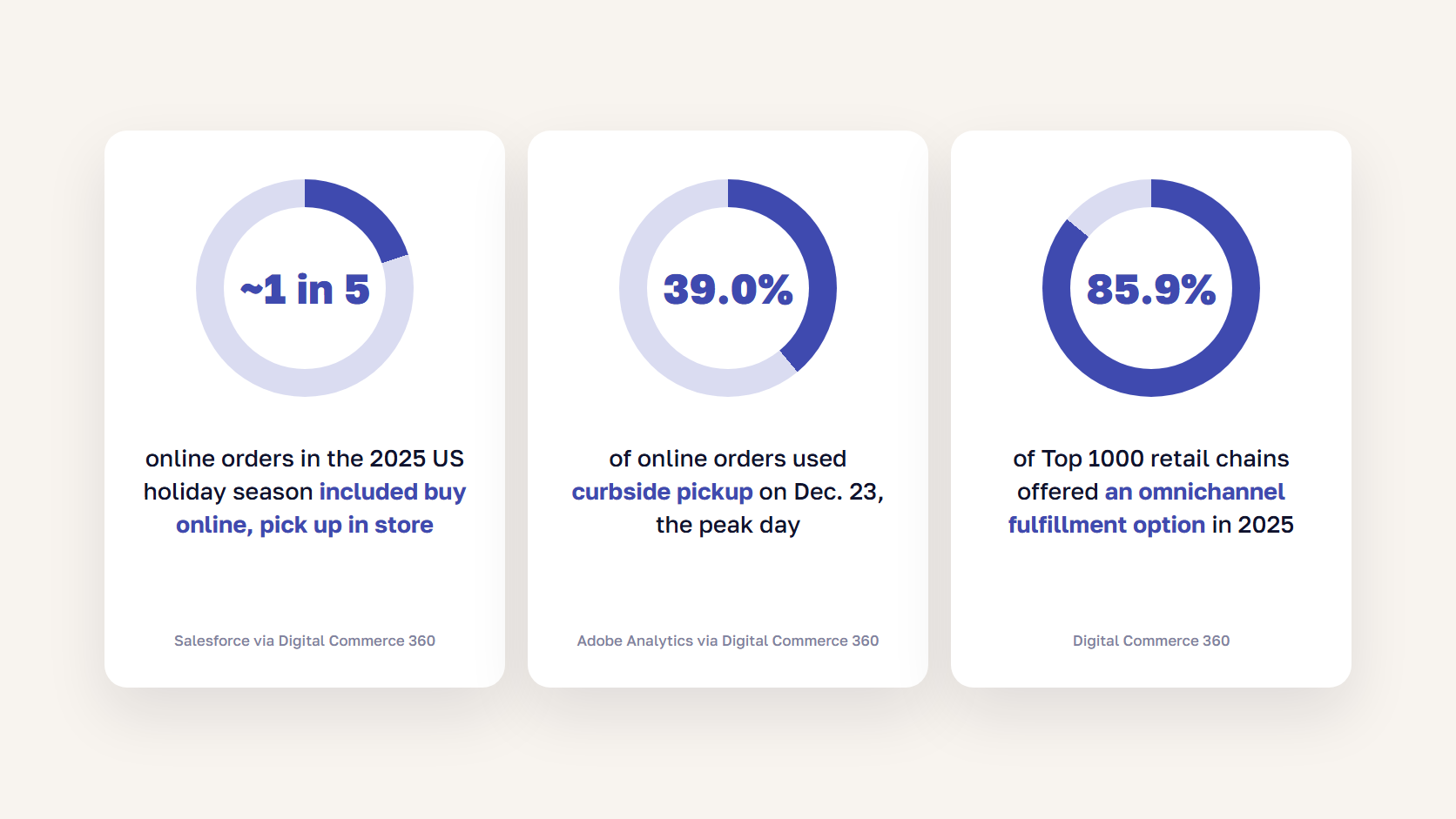
Curbside follows the same pattern. Adobe Analytics found that 39.0% of online orders used curbside pickup on Dec. 23, up from 37.8% on the same day a year earlier. Among the Top 1000 retail chains, 85.9% offered some form of omnichannel fulfillment in 2025, such as BOPIS, curbside pickup or in-store stock status, according to Digital Commerce 360.
There is a conversion signal too. Digital Commerce 360 found that Top 1000 chains offering BOPIS converted at an average of 3.4% in 2024, against 3.1% for all Top 1000 retailers. That doesn’t prove pickup causes the lift, but it shows shoppers use it when it’s there.
🚀 Quick takeaway
Pickup demand is highest in the last days before a holiday, which is exactly when your stock is thinnest and your stores are busiest. Test the whole flow well before your Black Friday code freeze.
How do you set up a BOPIS program?
You set up BOPIS in four parts: per-store inventory that updates often enough to trust, pickup options that are visible before checkout, an in-store process for picking and handing over orders, and customer notifications at every step. Each part has its own failure mode, so plan them together.
Keep per-store inventory accurate
Shoppers should only be able to choose pickup at a store that actually has the item. That requires stock levels per store instead of one national number, and a sync between your store systems and your online store that runs often enough for your sales pace. Most retailers connect it through their ERP or POS, which is where an eCommerce ERP integration or a Magento-integrated POS pays off.
When stock updates lag, customers order items that aren’t on the shelf, and the store has to cancel or substitute. Retailers with many locations and fast-moving stock feel this most. Three habits help: a safety buffer per store for fast sellers, a store-level check when the order lands, and a fallback such as a nearby store or a substitute when an item is missing.
Show pickup options before checkout
A good pickup journey starts on the product page. Let shoppers pick a store, see whether the item is in stock there, and see the expected pickup time before they add it to the cart. Digital Commerce 360 counted in-store stock status on 65.5% of Top 1000 chains in 2024, so shoppers increasingly expect it.
Then keep the customer informed. A typical sequence is:
- Order confirmation with the chosen store, its address and opening hours.
- Ready-for-pickup message with what to bring (order number, ID, the card used) and how long you’ll hold the order.
- Reminder if the order hasn’t been collected after a day or two.
- Collected confirmation, which also closes the loop for returns.
Shoppers abandon pickup orders when the messages are vague or arrive late. Keep the wording consistent across the checkout page, email and SMS.
Run the in-store pickup process
Fulfilling BOPIS orders needs a defined process in the store. Set up a pickup point, such as a service counter, shelves or self-service lockers, so pickup customers don’t wait in line at the regular registers. Train staff to pick, pack and label orders quickly, and give them a scanner or tablet to see new orders and mark them ready.
The risk is that pickup volume slows down service for shoppers already in the store. Prioritize orders by promised pickup time, staff up for known peaks, and credit stores for the online orders they fulfill, so store teams don’t treat pickup as someone else’s job. Our guide on online and offline sales cannibalization covers how to set those incentives.
Add curbside, lockers and pickup slots carefully
Curbside pickup and lockers attract shoppers who want even less time in the store. Letting customers change the pickup method after ordering, or book a pickup slot, also spreads traffic across the day.
Each extra method adds work. Curbside needs real-time coordination between staff and arriving customers, and lockers need upfront investment and floor space. Add them one at a time, once the basic pickup flow runs smoothly. If you handle orders from many locations, a Magento order management system is where the routing rules for each method belong.
🚀 Quick takeaway
Most failed pickups trace back to two gaps: stock that was wrong when the order was placed, and a ready-for-pickup message that never arrived. Fix those before adding curbside or lockers.

How to set up click and collect on Magento (Adobe Commerce)
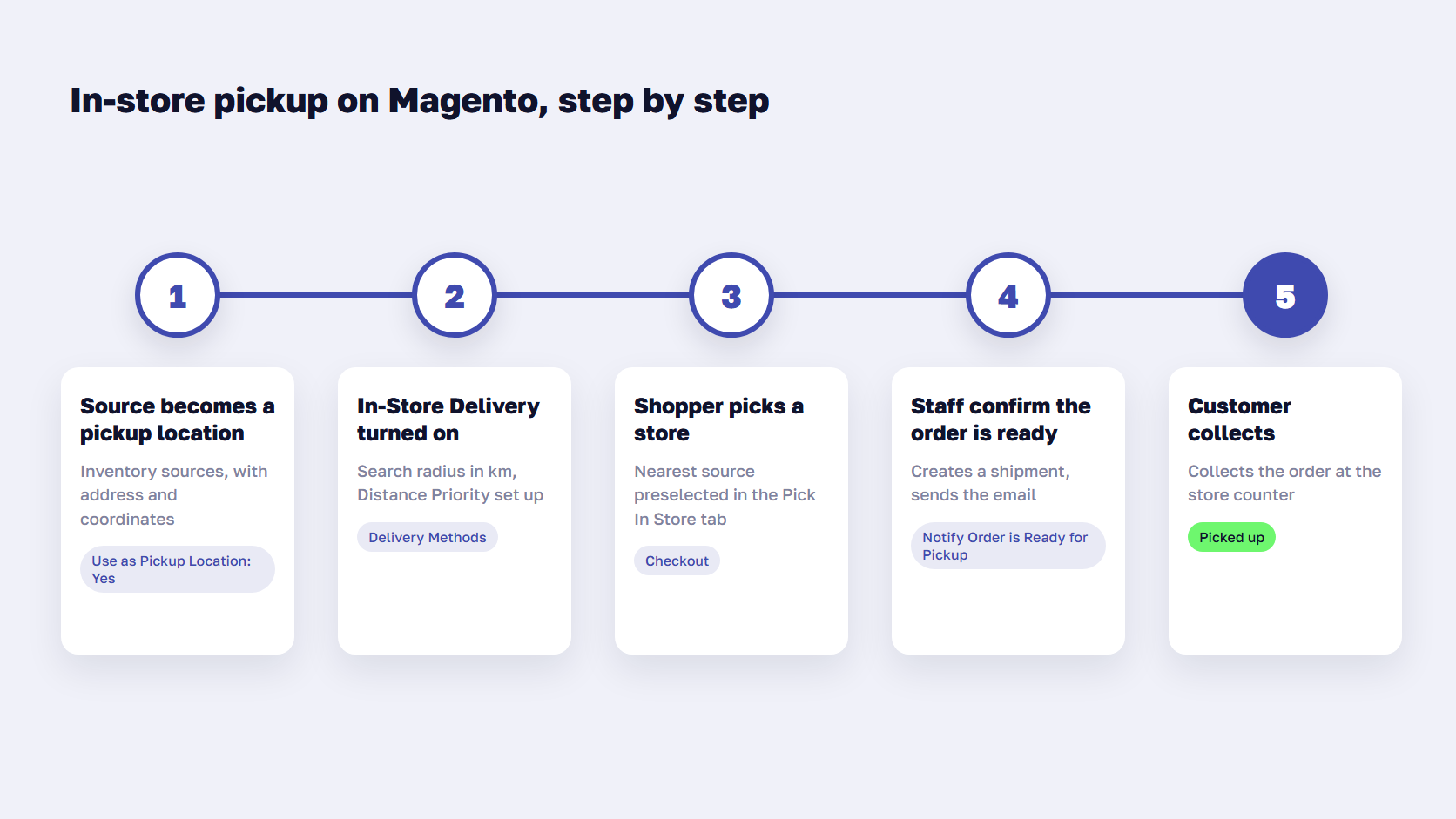
Magento supports store pickup natively through Inventory Management, also called MSI (Multi-Source Inventory). You turn each store into an inventory source marked as a pickup location, assign those sources to a non-default stock, enable the In-Store Delivery method, and configure distance search so checkout can find the nearest store. Staff then notify the shopper from the order when it’s ready.
Inventory Management is installed with both Magento Open Source and Adobe Commerce, according to Adobe’s inventory guide, so the native flow is available on either edition. The steps below follow Adobe’s own documentation.
How does MSI handle pickup locations?
In MSI, a pickup location is an inventory source with Use as Pickup Location set to Yes. You configure it under Stores > Inventory > Sources, and Adobe’s source settings then add a Pickup Location section to the source:
- Frontend Name: the store name shoppers see at checkout.
- Frontend Description: free text for opening hours, landmarks or parking notes. It can include images.
- Address and coordinates: country and postcode are required. Street, city, latitude and longitude make the distance search far more precise.
One rule catches many stores: the Default Source can’t be used as a pickup location. If your store runs on the single default source, you first create real sources for your stores and a new stock that includes them. Our guide to Magento inventory management explains how sources, stocks and sales channels fit together.
Turn on In-Store Delivery at checkout
In-Store Delivery is the shipping method shoppers choose at checkout. Adobe lists four prerequisites: a non-default stock and source configured as a pickup location, a configured Distance Priority Algorithm, geocodes downloaded and imported for offline distance calculation, and the Default Tax Destination Calculation settings.
You enable it under Stores > Settings > Configuration > Sales > Delivery Methods > In-Store Delivery. The settings are:
- Title: shown at checkout, “In-Store Pickup Delivery” by default.
- Method Name and Price: the label next to the rate, and an optional pickup fee.
- Search Radius: in kilometers, used when shoppers search for a store.
- Displayed Error Message: shown when pickup isn’t available for the cart.
At checkout, the shopper opens the Pick In Store tab. If Magento knows their address, it preselects the closest pickup location within the radius. If not, the shopper sees “We could not preselect pickup location based on available information” and chooses a store from the list, or searches by postcode or city.
Distance search runs on the Distance Priority Algorithm. You can use Google Maps, which needs an API key with the Geocoding and Distance Matrix APIs and may add Google charges, or offline calculation from geocodes your developers import from the command line.
Can customers pick up in store with per-store stock?
Yes. In MSI, each store source holds its own quantity per product, so pickup is tied to what that store has. Adobe’s REST tutorial for in-store pickup orders sets two conditions: all physical products in the order must be assigned to the pickup source, and all items must be in stock.
Keeping those quantities accurate is your job. The pickup-location search filters stores by which products are assigned to them. In Adobe’s tutorial, a store whose stock was moved to a warehouse still appears as a pickup location: “Although the store is out of stock locally, it can still be used as a pick-up location.” So the source quantities need a frequent sync from your ERP or POS, and orders need a store-level check before staff confirm them. If you’re connecting several systems, Magento integration services cover the sync design as well as the build.
🚀 Quick takeaway
Magento will let you mark any store as a pickup point. Whether a shopper finds their item there depends on how fresh that store’s stock number is, and your integration decides that.
Notify customers when orders are ready
When staff have picked the order, they click Notify Order is Ready for Pickup on the order in the Admin. The same action exists in the In-Store Pickup API as POST /V1/order/notify-orders-are-ready-for-pickup, which creates a shipment and sends the customer an email. API users need the Magento_InventoryInStorePickupApi::notify_orders_are_ready_for_pickup permission.
That endpoint is how most stores connect pickup to their store tools: when a store app or warehouse system marks an order as picked, it calls the endpoint and Magento sends the email. The native flow covers the ready-for-pickup email. Pickup reminders, SMS and “collected” messages usually come from your email or SMS platform, triggered by the order status.
Common pitfalls with Magento store pickup
Most problems we see come from setup gaps and a few version-specific bugs.
| Pitfall | What happens | Fix |
|---|---|---|
| Store runs on the Default Source | The store can’t be a pickup location | Create store sources and a new stock, then assign products |
| Store listed with no local stock | Shopper picks a store that can’t fill the order | Sync source quantities from ERP or POS, check stock before notifying |
| Distance search not configured | No store is preselected at checkout | Import geocodes or add a Google API key with both APIs |
| Products with Manage Stock set to No | “Your order is not ready for pickup” error on notify (ACSD-52606, 2.4.0 to 2.4.6-p2) | Apply the patch through the Quality Patches Tool (Adobe scheduled the fix for 2.4.7) |
| API notify on an order that isn’t ready | Ready-for-pickup email still sent (ACSD-49389, 2.4.0 to 2.4.6) | Apply the patch (Adobe scheduled the fix for 2.4.7) |
| Adobe Commerce as a Cloud Service | The REST pickup-locations search isn’t supported | Use the pickupLocations GraphQL query instead |
Two more points for planning. Adobe discontinued its Store Fulfillment extension in February 2024, so anything beyond the native flow (store selectors on product pages, curbside check-in, staff apps) comes from Marketplace extensions or a custom build on Adobe Commerce. And because pickup needs every item in the cart at one store, decide early what happens to mixed carts: block pickup, split the order, or transfer stock between stores.
🚀 Quick takeaway
On Magento, the native pickup flow covers sources, checkout and the ready email. Store selection on the product page, staff tools and transfers are where custom work starts, so budget for them up front.
How does local pickup work on Shopify?
Shopify calls it local pickup, or pickup in store. You enable it per location under Settings > Shipping and delivery > Pickup in store by turning on “Let customers pick up orders directly at this location,” then set an expected pickup time and the instructions that go into the Ready for pickup email, according to Shopify’s help center.
Staff click Mark as ready for pickup on the order to send that email, then Mark as picked up after collection. By default, pickup is offered only when the whole order is in stock at that location, though store transfers can move stock from other locations. Customers only see pickup locations in their own country, which matters if you’re selling in several countries, and custom pickup apps require Shopify Plus. For setups beyond the defaults, Shopify development usually means a pickup app plus a POS or ERP stock sync.
🚀 Quick takeaway
Shopify and Magento handle the basics the same way: pickup per location, whole-order stock at that location, and a ready-for-pickup email. The differences show up in store transfers and in how much you can customize.
How BOPIS works in practice
Retailers across categories run BOPIS, and the best implementations share one thing: the shopper sees per-store availability before committing. Three of the examples below (Sportland, Byggmax and JYSK) are scandiweb clients, and the other two are well-known US retailers.
Sportland’s approach to in-store pickup
Sportland lets customers select their pickup store directly on the product page. As customers browse a product, they see an extra call-to-action next to the standard Add to Cart button.


Clicking it opens a store selector that shows stock availability at each Sportland store, along with opening hours and addresses. Behind it, a custom ERP integration syncs inventory, customer and order data between Sportland’s 120+ stores and its Adobe Commerce platform, and orders are ready for collection within 30 minutes at no additional delivery cost. Sportland saw +30% online sales and +20% repeat customers.
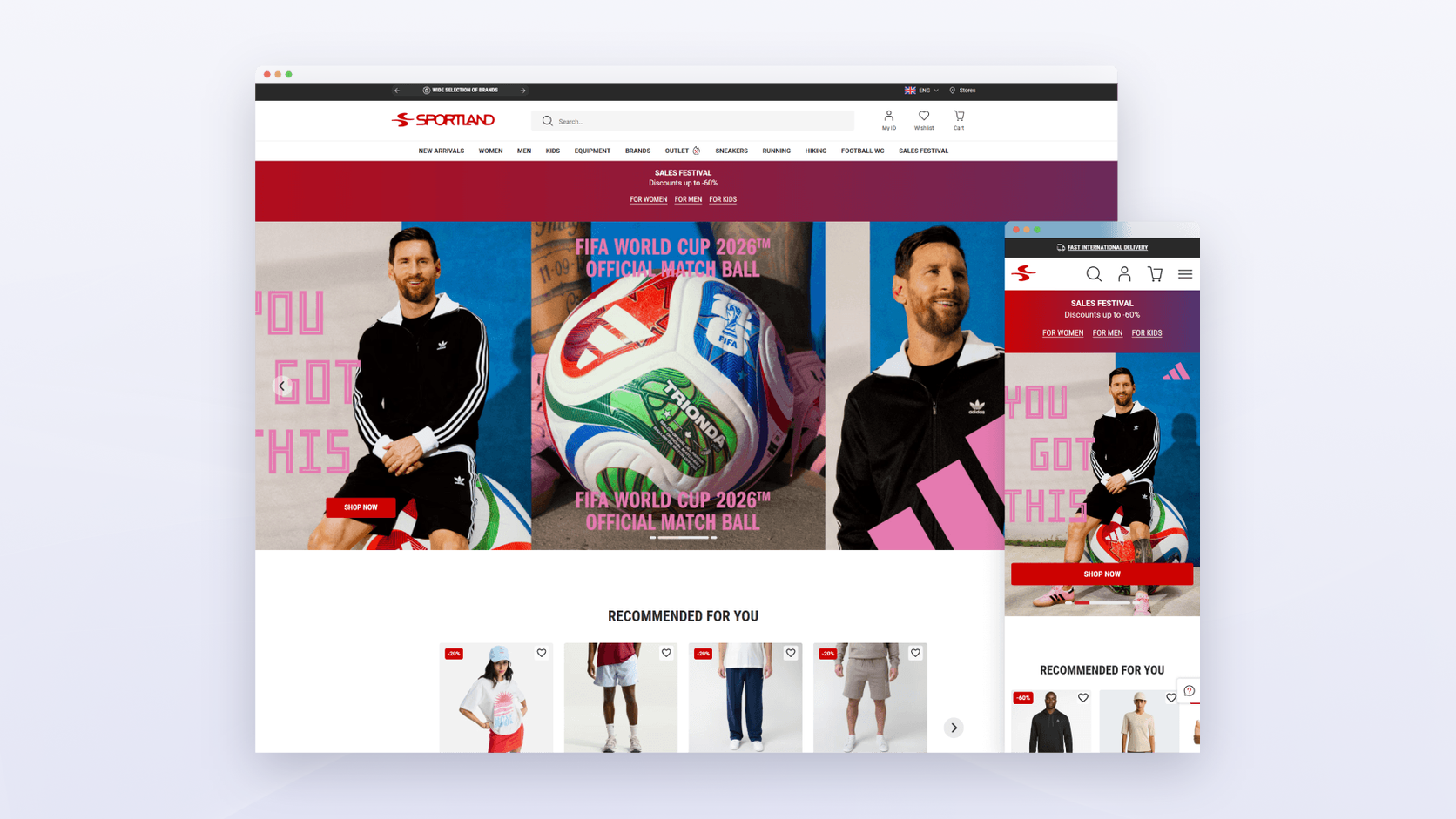
Read more: Delivering End-to-End Omnichannel Experience: Case Studies of Leading Retailers
Byggmax optimizes BOPIS with automatic store selection
Byggmax, a Nordic DIY retailer with 200+ stores, lets online customers check product availability at their local store and choose in-store pickup during checkout. Real-time inventory checks keep the stock information in front of the shopper accurate.


On mobile, Byggmax added a store selector icon to the main navigation. When tapped, a pop-up opens with the nearest store pre-filled based on the user’s location, while still allowing manual changes. The pop-up also shows opening hours and contact details.
Real-time availability and flexible pickup options at REI Co-op
Outdoor retailer REI gives customers a choice between in-store and curbside pickup throughout the shopping journey. Product pages show real-time stock levels at the selected store, and the checkout highlights expected pickup times.


REI also lets customers choose between pickup and delivery on the product page, with estimated times for both. Customers can switch stores if an item isn’t available at the one they chose first.
Target educates customers with a dedicated landing page
Target noticed that some customers didn’t know how in-store pickup worked, so it created a dedicated landing page that explains it step by step: choosing pickup at checkout, getting the pickup notification, and collecting in store or through Drive Up.
To encourage extra purchases, Target also added personalized product recommendations to that page, showing items often bought with the customer’s order.

JYSK connects online shopping with in-store convenience
JYSK Canada’s BOPIS flow starts online and leads the customer to their nearest store. An automated store locator assigns the nearest of its 50+ stores based on the customer’s location, and Adobe Commerce is connected to Microsoft Dynamics Navision, so the stock a shopper sees online matches what the store associate sees when the order arrives.

In the store, customers can use the JYSK app to find their way around, locate products on the shelf, and check stock in real time. If they decide to buy more during the visit, the app connects in-store shopping back to online orders, for example by adding items to a cart for home delivery.
🚀 Quick takeaway
Every one of these retailers shows per-store stock before the shopper commits. That single design choice prevents most failed pickups, and it depends entirely on the integration behind the store selector.
scandiweb’s approach to implementing BOPIS
Every BOPIS project depends on the business: the number of stores, how stock moves between them, and what systems already hold the numbers. Across 2,100+ eCommerce projects, our process for pickup has settled into four steps.
Step 1: Requirements and UX wireframes
We start with a working session with stakeholders to agree on the pickup rules: which stores take part, how stock is synced, what happens to mixed carts, and which messages the customer gets. Where information is missing, such as store-level stock accuracy, we check the data before design starts.
Then we create high-fidelity UX wireframes for the store selector, product page, checkout and notifications. Each one carries notes on expected behavior, planned extensions and technical constraints, so usability issues show up before development.
Step 2: UX/UI designs
We turn the confirmed wireframes into final UI designs that follow your brand guidelines, consistent across desktop and mobile. The design phase includes a pattern library of interface elements and documentation of each element’s behavior.
Step 3: User testing
We test the pickup journey on desktop and mobile with real users to see where they hesitate or fail. The results go into an executive summary with task completion rates, behavior patterns and design feedback, and we adjust the designs before the build. Our CRO and UX team runs this testing.
Step 4: Implementation
With the designs approved, the team estimates the build, including the platform setup (on Magento, the MSI sources, In-Store Delivery and notifications above) and the stock integration with your ERP or POS. After stakeholder approval, development starts, and we test the full flow with real store stock before launch. For the wider picture of connecting stores and online, see our guide to unified commerce on Magento.
FAQ
What does BOPIS stand for?
BOPIS stands for buy online, pick up in store. The customer orders and pays on a retailer’s website or app, chooses a store, and collects the order there instead of waiting for delivery. It’s also called click and collect, in-store pickup or store pickup.
What is the difference between BOPIS and click and collect?
There is no real difference. BOPIS is the term US retailers use most, while click and collect is common in the UK, Europe and Australia. Both describe ordering online and collecting in a physical store, from a counter, shelf or locker.
Is BOPIS the same as curbside pickup?
No. With BOPIS, the customer walks into the store to collect the order. With curbside pickup, sometimes called BOPAC, staff bring the order out to the customer’s car. Curbside needs an arrival check-in and staff on call, so it’s usually added after basic in-store pickup works.
Does Magento support in-store pickup?
Yes. Magento Open Source and Adobe Commerce include In-Store Pickup in Inventory Management (MSI). You mark store sources as pickup locations, enable the In-Store Delivery method, and configure distance search. Staff use Notify Order is Ready for Pickup to create the shipment and email the customer.
Can customers pick up in store with per-store stock on Magento?
Yes. Each store is an MSI source with its own quantities, and pickup orders need every item assigned to and in stock at that source. Magento doesn’t verify that the numbers are current, though, so per-store stock needs a frequent sync from your ERP or POS.
How does MSI handle pickup locations?
MSI treats each pickup location as an inventory source with Use as Pickup Location set to Yes. The source carries a storefront name, a description for hours or directions, and an address with coordinates for distance search. The Default Source can’t be a pickup location.
How do customers know a BOPIS order is ready?
The retailer sends a ready-for-pickup message once staff have picked and packed the order. In Magento, the Notify Order is Ready for Pickup action sends that email and creates a shipment. In Shopify, Mark as ready for pickup sends it. Reminders and SMS usually come from your messaging platform.
Does Shopify support local pickup?
Yes. Shopify lets you turn on pickup per location, set an expected pickup time, and send a Ready for pickup email from the order. By default, pickup is offered only when the whole order is in stock at that location, and customers see pickup locations only in their own country.
Got a store list, a stock feed you only half trust, and a checkout that only offers delivery? Bring all three and book a working session with our team. We’ll work out which of your stores should become pickup locations first, how often their stock needs to sync, and what your customers hear at each step.