
If your finance team has just told you Dynamics NAV is going out of support, and nobody is quite sure what your Magento store does on the day that happens, you are asking the right question at roughly the right time.
A Magento Business Central integration connects Adobe Commerce to Microsoft Dynamics 365 Business Central so orders, inventory, pricing, and customer records move between the storefront and the ERP without manual exports. It replaces the Magento Dynamics NAV integration most stores are running today. Most of the advice you will find online is written by connector vendors, and it answers a different question than the one you have. This guide covers what Business Central means for eCommerce specifically: what changes on the storefront side, what breaks, and how to sequence it.
What is a Magento Business Central integration?
A Magento Business Central integration is a two-way data flow between an Adobe Commerce storefront and Microsoft Dynamics 365 Business Central. Orders and customer records pass from the store to the ERP. Stock levels, pricing, product data, and fulfillment status pass back. The integration is built either on a purchased connector, an iPaaS middleware layer, or a custom API build, and the right choice depends on how much your catalog and order logic deviate from the standard. It is one of many systems a store connects to, and our guide to Magento integrations maps the wider set.
🚀 Quick takeaway
The word “integration” hides the real variable. Two stores running identical software can need completely different builds, because the difference lives in the catalog rules and the warehouse setup, not in the platforms.
What the Dynamics NAV retirement actually means
Microsoft Dynamics NAV follows a Fixed Lifecycle Policy: five years of mainstream support, then five years of extended support. During extended support only security updates are released. After that, Microsoft issues no further patches at all. Mainstream support has now ended for every version of Dynamics NAV, and Dynamics 365 Business Central is the successor product, built from the same codebase rather than a separate line. We covered the older connection in an earlier piece on Navision integration with Magento, and the mechanics described there are exactly what changes below.
For Dynamics NAV 2018, the final release, Microsoft’s own lifecycle listing records mainstream support ending on 11 January 2023 and extended support ending on 12 January 2028.
Treat that date as a planning horizon. Running an unpatched ERP behind a public eCommerce storefront carries a different risk profile from running one behind a firewall, because the storefront takes untrusted input from the open internet all day.
Three practical consequences for an eCommerce team:
- Security patching stops, which most PCI and internal audit processes will eventually flag
- Your integration partner’s willingness to support a legacy connector declines well before the official date
- The people who built your original NAV integration are often no longer at the company, and the customizations are frequently undocumented
🚀 Quick takeaway
The storefront risk arrives earlier than the support deadline. It arrives when the last person who understood your NAV customizations leaves, and that date is usually already behind you.
What changes between NAV and Business Central for your storefront
For the storefront, the biggest change is the integration surface. Dynamics NAV integrations were commonly built against on-premise SQL, direct database access, or older SOAP web services. Business Central is a cloud product with a governed API layer, so the integration moves to REST and OData endpoints with different authentication, rate limits, and extension rules. Data structures carry over recognizably. The way your store reaches them does not.
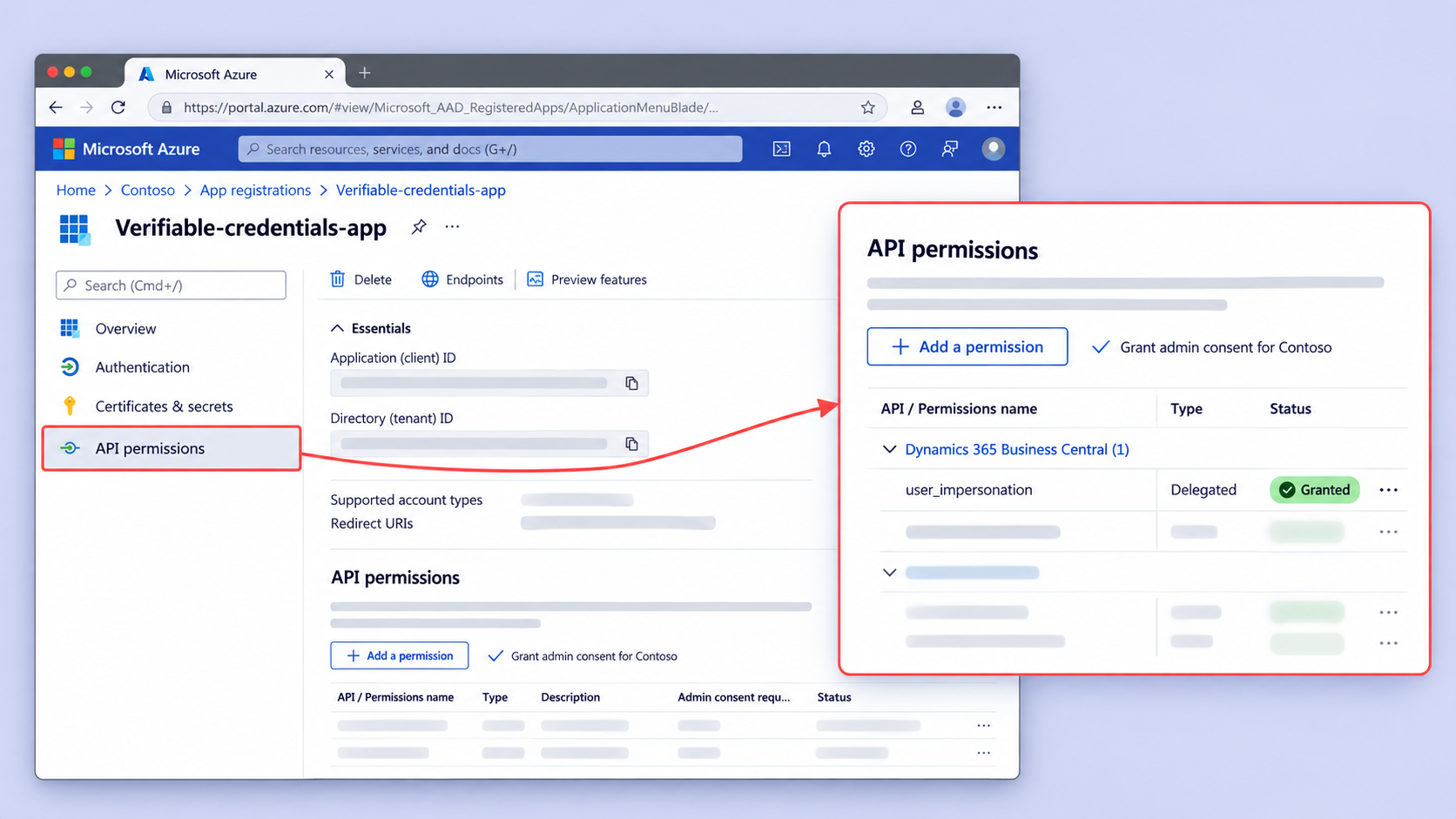
That distinction is what turns the storefront work into a real project. A few specifics worth knowing before scoping.
Authentication changes. Older integrations often used service accounts with broad database rights. Business Central uses OAuth against Microsoft Entra ID, which means credential handling, token refresh, and permission scoping all become part of the build.
Direct database access disappears. If any part of your current integration reads or writes SQL tables directly, that path closes. Every one of those calls needs an API equivalent, and some of them will not have one.
Customizations need rebuilding, not porting. NAV customizations written in C/AL do not transfer to Business Central’s AL extension model. If your order import depends on a modified NAV object, that dependency becomes a scoping item.
The Magento Dynamics 365 integration page covers the target state. Where customer records rather than orders are the main flow, the Magento Dynamics CRM integration covers that side separately.
The same retirement affects stores on other platforms, and the storefront work is comparable in shape. Teams running Salesforce Commerce Cloud can start from the Salesforce Dynamics NAV integration page, and BigCommerce merchants from the BigCommerce Dynamics NAV integration page. The API changes and the four failure modes below apply regardless of which storefront sits in front of the ERP. The same questions come up on non-Microsoft systems, whether that is a Magento Infor integration, a Magento Visma integration, or a Shopify Priority ERP integration.
What actually breaks during the cutover
Four failure modes account for most of the pain in a NAV to Business Central move, and none of them are on a connector’s feature list. Multi-warehouse stock accuracy, tax code mapping, order status synchronization, and historical data continuity. Each one is invisible in a demo environment and obvious in production, usually within the first week, because they only surface at real order volume across real edge cases.
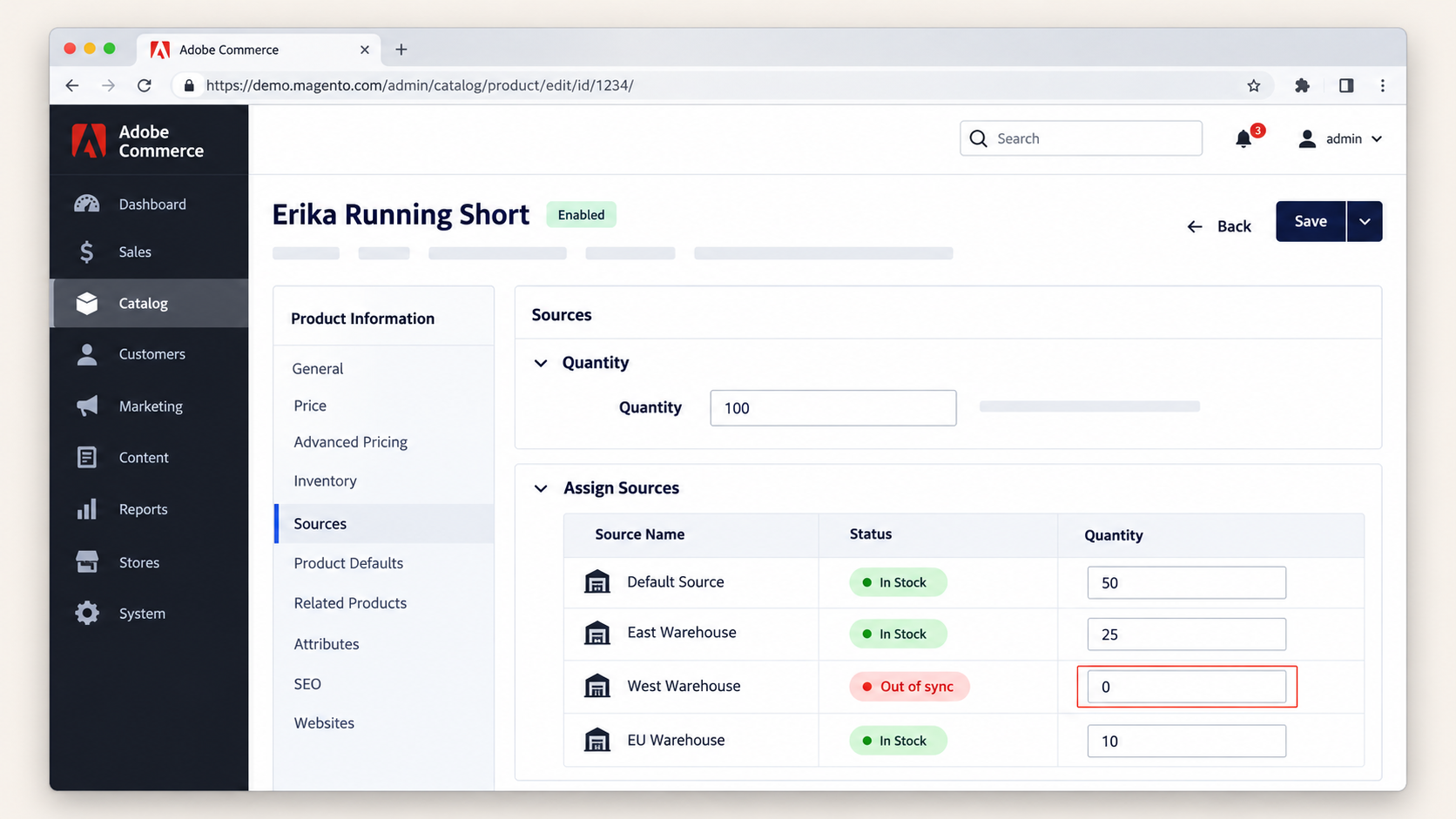
Multi-warehouse stock accuracy
If you fulfill from more than one location, the number your store displays is the output of an allocation rule. Those rules are often encoded in the old integration rather than in either system, which means they exist nowhere in the documentation and nowhere in the new connector. Rebuild them deliberately or you will oversell within days.
Tax code mapping
Tax logic is where the two systems disagree most quietly. Magento calculates tax at the cart, Business Central calculates it at the invoice, and if the mappings drift the difference appears as a reconciliation problem in finance rather than an error in the store. Nobody notices for a month.
Order status synchronization
Every store has custom statuses. Partially shipped, awaiting stock, on hold for credit check. These rarely map one to one, and the failure surfaces as a customer receiving the wrong email at the wrong moment, which your support team absorbs before anyone reports it as a bug.
Historical data continuity
Order history, customer records, and returns data need a decision before cutover, not after. Migrate them, archive them, or run a read-only bridge. All three are valid. Making no decision means someone answers a customer service query with a spreadsheet for the next two years.
🚀 Quick takeaway
Every one of these four failures is silent. They do not throw errors, they produce wrong numbers that look plausible, which is why they reach finance and support before they reach engineering.
Connector or custom build: how to choose
Buy the connector when your setup is close to standard, and build custom when your catalog or fulfillment logic carries real complexity. An off-the-shelf connector handles single-warehouse, single-currency, standard-catalog stores well, and it is the faster and cheaper answer for a large share of merchants. A custom build earns its cost when allocation rules, B2B pricing, or multi-market tax logic are the reason your store works the way it does.
Choose a connector if:
- You fulfill from a single warehouse or use straightforward allocation
- Your catalog uses standard product types without heavy attribute customization
- You operate in one country and one tax regime
- Your order statuses match the platform defaults
- You need the move completed on a fixed deadline with minimal engineering time
Choose a custom build if:
- You allocate stock across multiple warehouses or store locations
- You run B2B pricing, customer-specific catalogs, or negotiated rates
- You sell across several tax jurisdictions with different rules per market
- Your current NAV setup contains customizations nobody has fully documented
- Your order workflow includes statuses or approvals that exist only in your business
Most teams land somewhere in between, using a connector for the standard flows and custom work for the two or three places where the business genuinely differs. That hybrid is usually the correct answer, and it is rarely the one a vendor recommends.
🚀 Quick takeaway
The honest test is how many of your integration rules exist only inside the old connector. If the answer is more than a couple, the cheap path turns into the expensive one.
How a Magento Business Central integration is sequenced
A storefront-side integration runs in five stages, and the order matters more than the duration of any single stage. Audit the existing integration, map the data model, build and test against a sandbox, run parallel, then cut over. Teams that compress the audit stage to save time are the teams that discover undocumented allocation logic during parallel running, which is the most expensive place to find it.
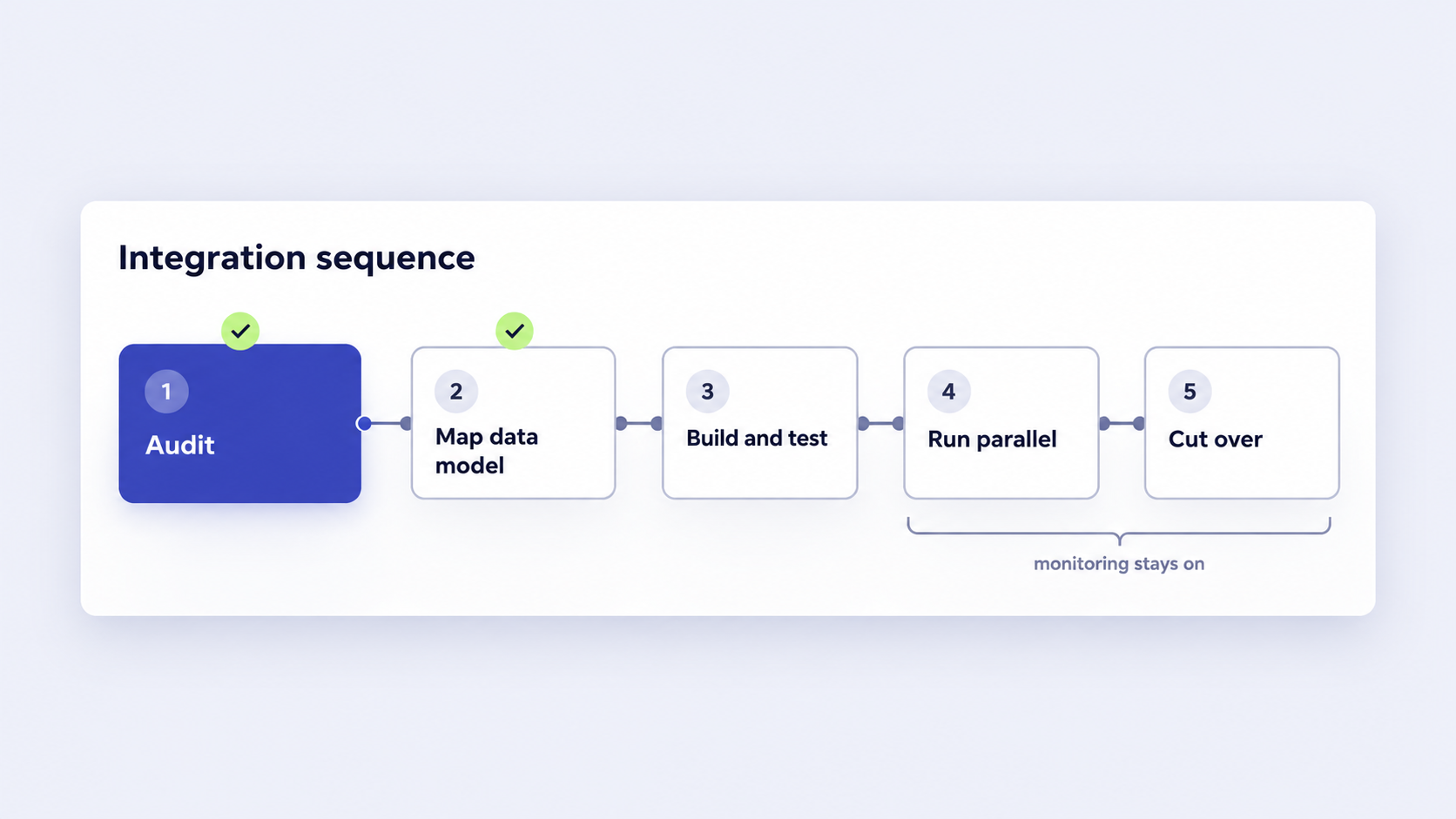
- Audit the current integration. Document every field that moves today, in both directions, including the ones nobody remembers configuring. This stage produces the actual scope.
- Map the data model. Decide field by field what maps directly, what needs transformation, and what has no equivalent. The no-equivalent list is the real work.
- Build and test against a Business Central sandbox. Test with production-shaped data, not sample data. Edge cases are the point.
- Run both systems in parallel. Compare stock, tax, and order status between the old and new flows under real volume. This is where silent failures surface.
- Cut over and monitor. Keep field-level monitoring and a retry queue in place for the first weeks, because the first genuine anomaly usually arrives during a promotion.
What this looks like in production
scandiweb built exactly this connection for JYSK Canada, part of an international household retail chain with more than 3,000 stores across over 50 countries. The Adobe Commerce storefront integrates with Navision for stock, pricing, and product data, running English and French store versions for the Canadian market.
The demanding part was real-time multi-warehouse stock status for every product, feeding an omnichannel setup across 50 stores that includes in-store pickup, a call center, printed catalogs, and a store locator covering more than 50 Canadian locations. Stock accuracy across that many fulfillment points is precisely the failure mode described earlier, at the scale where it stops being theoretical.
“Working with scandiweb has been a positive experience, they have consistently kept their timelines and have competent people with the technical expertise to finish the job.”
– Jon H. Bartels, Director of IT at JYSK Canada
🚀 Quick takeaway
Multi-warehouse stock is the integration requirement that separates a configuration exercise from an engineering project, and it is the one most often discovered after the contract is signed.
Frequently asked questions about Business Central and eCommerce
What is the difference between Dynamics NAV and Business Central?
Business Central is the direct successor to Dynamics NAV, built from the same codebase and delivered as a cloud product. The business logic and data structures are recognizably related. The differences that matter for eCommerce are technical: Business Central uses REST and OData APIs with OAuth authentication, while many NAV integrations relied on direct SQL access or older SOAP services that no longer apply.
When does Dynamics NAV support end?
Dynamics NAV follows Microsoft’s Fixed Lifecycle Policy of five years mainstream support followed by five years extended support. Mainstream support has ended for every NAV version. For NAV 2018, the final release, Microsoft’s lifecycle listing records extended support ending on 12 January 2028, after which no further security patches are issued.
Can Magento integrate with Business Central without a connector?
Yes. Business Central exposes REST and OData APIs, so a custom integration can be built directly against them without purchasing a connector. Whether that is the right choice depends on complexity. Standard single-warehouse stores are usually better served by an existing connector, while multi-warehouse allocation, B2B pricing, or multi-market tax logic generally justify a custom build.
What data moves between Magento and Business Central?
Typically orders and customer records move from the storefront to the ERP, while stock levels, pricing, product data, and fulfillment status move back. The exact field list varies by business. The fields that cause problems are rarely the obvious ones, and are more often tax codes, warehouse allocation rules, and custom order statuses that exist only in your setup.
Do we need to migrate order history to Business Central?
Not necessarily. Three approaches work: migrate historical records into Business Central, archive them separately with a documented access route, or maintain a read-only bridge to the legacy system. The decision needs making before cutover, because the default outcome of not deciding is a customer service team working from exported spreadsheets.
Will our existing NAV customizations transfer?
Customizations written in NAV’s C/AL do not carry across to Business Central, which uses the AL extension model. Anything your current integration depends on that lives in a modified NAV object needs rebuilding rather than porting. This is the single most common source of underestimated scope in a NAV to Business Central move.
Planning the move to Business Central
A Magento Business Central integration is a storefront project as much as an ERP project, and the parts that overrun are almost always on the storefront side. The deadline gives you a reason to start. The audit gives you a scope. The four silent failure modes give you a test plan.
If your current setup is standard, a connector will get you there. If your stock allocation, pricing rules, or tax logic are the reason your store works, plan for custom work in those specific places and use the connector everywhere else.
The teams who come through this well are the ones who treated the audit as the deliverable, because everything downstream is priced from what that audit finds.
Working out what your NAV setup is actually doing before you commit to a date is the cheapest hour of this whole project. If you want a second pair of eyes on it, talk to our integration team.




































