
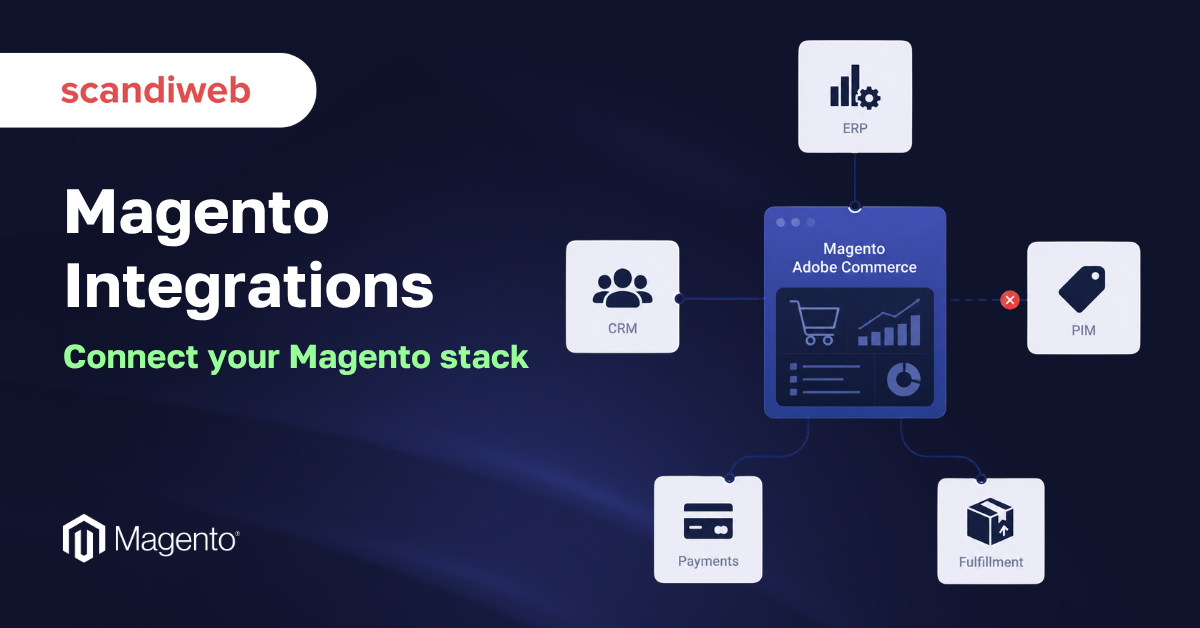
The average enterprise now runs 897 applications, yet only 29% of them are actually connected to each other. For a mid-market Magento (Adobe Commerce) store, that gap is the difference between an order that reaches the warehouse in seconds and one that a staffer re-keys into the ERP by hand at the end of the day.
That is the part most “best Magento integrations” lists miss. The storefront is the easy part. The real backbone of a healthy store is the set of integrations that keep inventory, orders, customers, prices, and taxes in sync across every system the business already runs. Get that layer right, and the catalog scales, fulfillment stays accurate, and finance trusts the numbers. Get it wrong, and the silos quietly cost you. Gartner estimates that disconnected data costs the average organization 12.9 million dollars a year.
We’ll walk through the integration categories every Magento store needs, name the tools merchants actually use in each one, and give you a way to decide what to connect first. This guide is for heads of eCommerce, CTOs, and operations leads deciding where to spend their integration budget, not a generic explainer of what an API is.
🚀 Quick takeaway
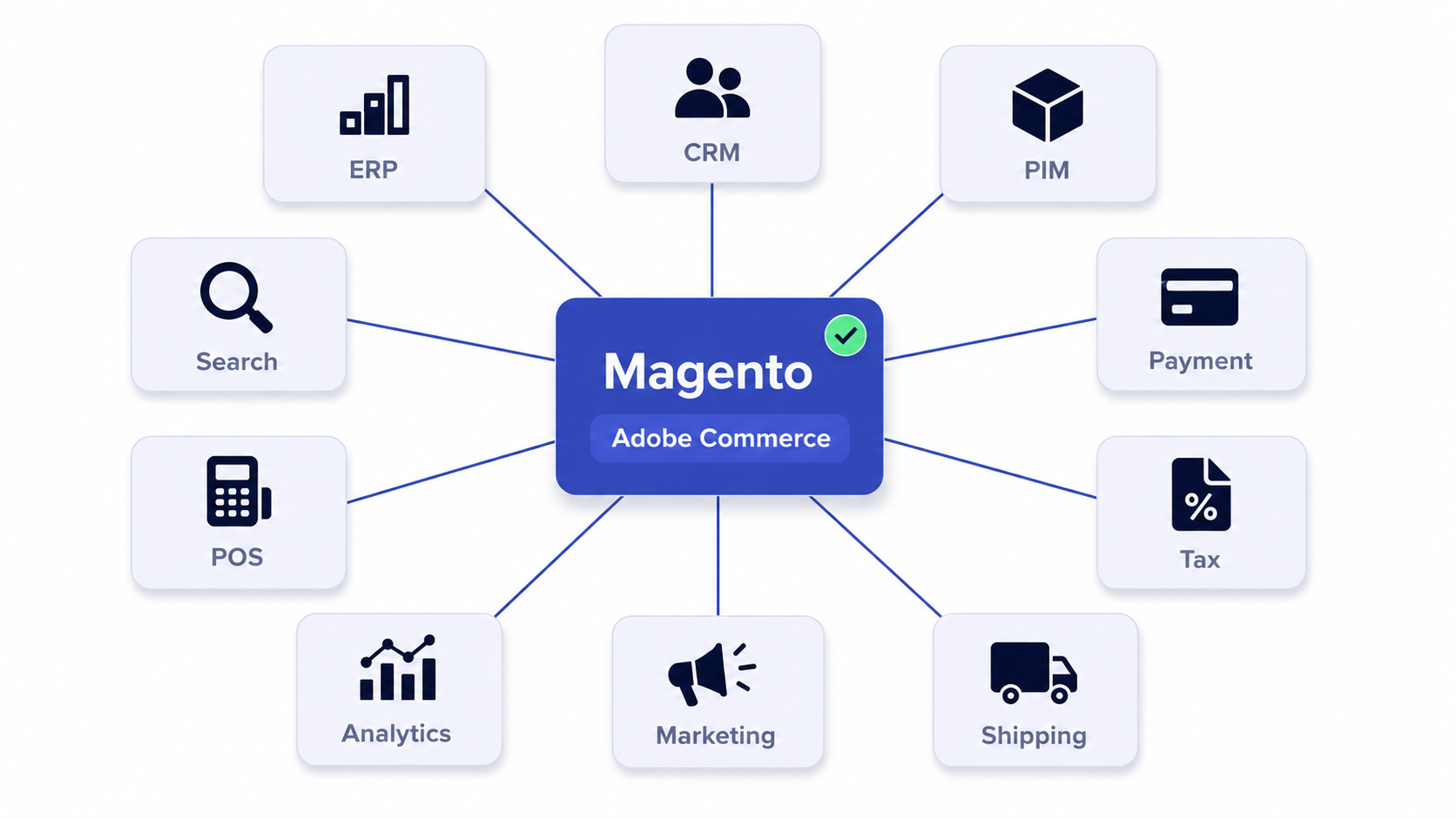
Treat integrations as one connected layer. Prioritize the four systems that move money and inventory first (ERP, payments, tax, and fulfillment), then layer on CRM, PIM, marketing, analytics, POS, and search. The goal is a single source of truth for every order, customer, and SKU.
What are Magento integrations?
Magento integrations are the connections that let Adobe Commerce exchange data with the other systems a business runs, such as its ERP, CRM, payment gateway, tax engine, carriers, and marketing tools. They keep records consistent so that one event, like a completed order, updates every system that needs to know about it.
Magento ships with a flexible REST and GraphQL API plus a large marketplace of extensions, so connectivity is rarely a yes-or-no question. The real decisions are which systems to connect, how tightly, and whether to use a native extension, a prebuilt connector, an integration platform, or a custom build. We cover that trade-off later in this guide.
How to choose the right Magento integrations
Before naming tools, it helps to have a way to judge each one. Most over-built stacks happen because someone connected a system without asking whether it earned a permanent data pipeline. Run every candidate through these five questions.
| Question | Why it matters |
|---|---|
| Does it move money or inventory? | Order, payment, tax, and stock integrations are non-negotiable. Connect these first and harden them most. |
| How often does data need to sync? | Real-time, near-real-time, or nightly batch each imply different architecture and cost. Match the method to the need. |
| Is there a maintained native connector? | A vendor-supported extension usually beats a custom build for total cost of ownership, until your logic gets unusual. |
| Who owns the data conflict? | Decide the system of record per field (price, stock, customer) before you connect, not after a mismatch. |
| What breaks if it goes down? | Map the failure mode. A queue and retry logic matter far more for orders than for a newsletter sync. |
Best Magento ERP integrations
An ERP integration is the single highest-leverage connection most stores make. It syncs orders, inventory, pricing, and customer records between Magento and the system finance and operations live in, which removes manual re-keying and keeps stock accurate across channels. High-volume merchants often add a dedicated order management system (OMS) to orchestrate fulfillment from one hub. Many merchants connect these through an integration platform such as Celigo, Jitterbit, or Workato rather than a single point-to-point build, because an iPaaS handles retries, mapping, and monitoring out of the box. scandiweb has built these in production, including the Magento Dynamics NAV integration, the Magento Dynamics 365 integration, and the Magento Infor integration. Our guide to eCommerce ERP integration covers how to pick the right ERP and scope the connection before you commit.
1. NetSuite
NetSuite is a cloud ERP that fast-scaling mid-market brands use to run finance, inventory, and order management in one place. Connected to Magento, it becomes the system of record for stock and pricing while orders flow into NetSuite for fulfillment and accounting. It fits brands that have outgrown spreadsheets but do not want to host on-premise software. The watch-out is that NetSuite customizations and saved searches can make a connector brittle, so agree on field mappings before the first sync. It connects to Adobe Commerce through maintained connectors such as Celigo or a Magento extension, or through the REST API for custom flows.
2. SAP S/4HANA
SAP S/4HANA is the enterprise ERP larger operations and manufacturers run for finance, supply chain, and production. Linked to Magento, it keeps complex pricing, credit, and inventory logic consistent between the storefront and the back office. It fits enterprises with established SAP processes and high order volume. The watch-out is implementation weight, since SAP projects are large and the integration usually runs through middleware rather than a simple extension. It connects to Adobe Commerce through an iPaaS or SAP integration suite that maps orders, customers, and stock both ways.
3. Microsoft Dynamics 365 Business Central
Dynamics 365 Business Central is a mid-market ERP that Microsoft-centric finance teams use for accounting, inventory, and operations. Connected to Magento, it unifies order and customer data with the rest of a Microsoft stack such as Outlook and Power BI. It fits brands already invested in Microsoft tooling. The watch-out is that older on-premise Dynamics editions need different connectors than the cloud version, so confirm which edition you run. It connects to Adobe Commerce through a maintained connector or an integration platform that handles order, stock, and pricing sync, and the Magento Business Central integration page covers what that involves. For larger SAP operations, SAP Business One is also a common target in this category.
Best Magento CRM integrations
A CRM integration pushes customer and order history from Magento into the system your sales and service teams use, so they see the full relationship rather than a fragment. It also feeds segmentation back into marketing. For B2B merchants, the CRM link often carries quote, account, and credit data, which makes it tighter and more bidirectional than a typical B2C setup. If account-based selling is part of your model, our B2B eCommerce work covers how that data should flow.
4. Salesforce
Salesforce is the enterprise CRM that sales and service teams use to manage pipelines, accounts, and support cases. Connected to Magento, it gives reps a full view of each customer’s orders and lifetime value alongside their open opportunities. It fits brands with a real sales function or a large service operation. The watch-out is cost and complexity, since Salesforce can become a project of its own, so deduplicate contacts before the first sync or you import the mess instead of fixing it. It connects to Adobe Commerce through a marketplace connector or an integration platform that maps customers and orders both ways.
5. HubSpot
HubSpot is an all-in-one CRM and marketing platform popular with mid-market brands that want sales, service, and email in one tool. Connected to Magento, it syncs contacts, deals, and purchase history to power lifecycle campaigns and sales follow-up. It fits teams that prefer a single platform over stitching several together. The watch-out is that deeper eCommerce reporting can need its higher tiers, so map your must-have properties before committing. It connects to Adobe Commerce through HubSpot’s native or marketplace connector that syncs contacts and order events. Microsoft Dynamics 365 Sales and Zoho CRM are also worth considering in this category.
Best Magento PIM integrations
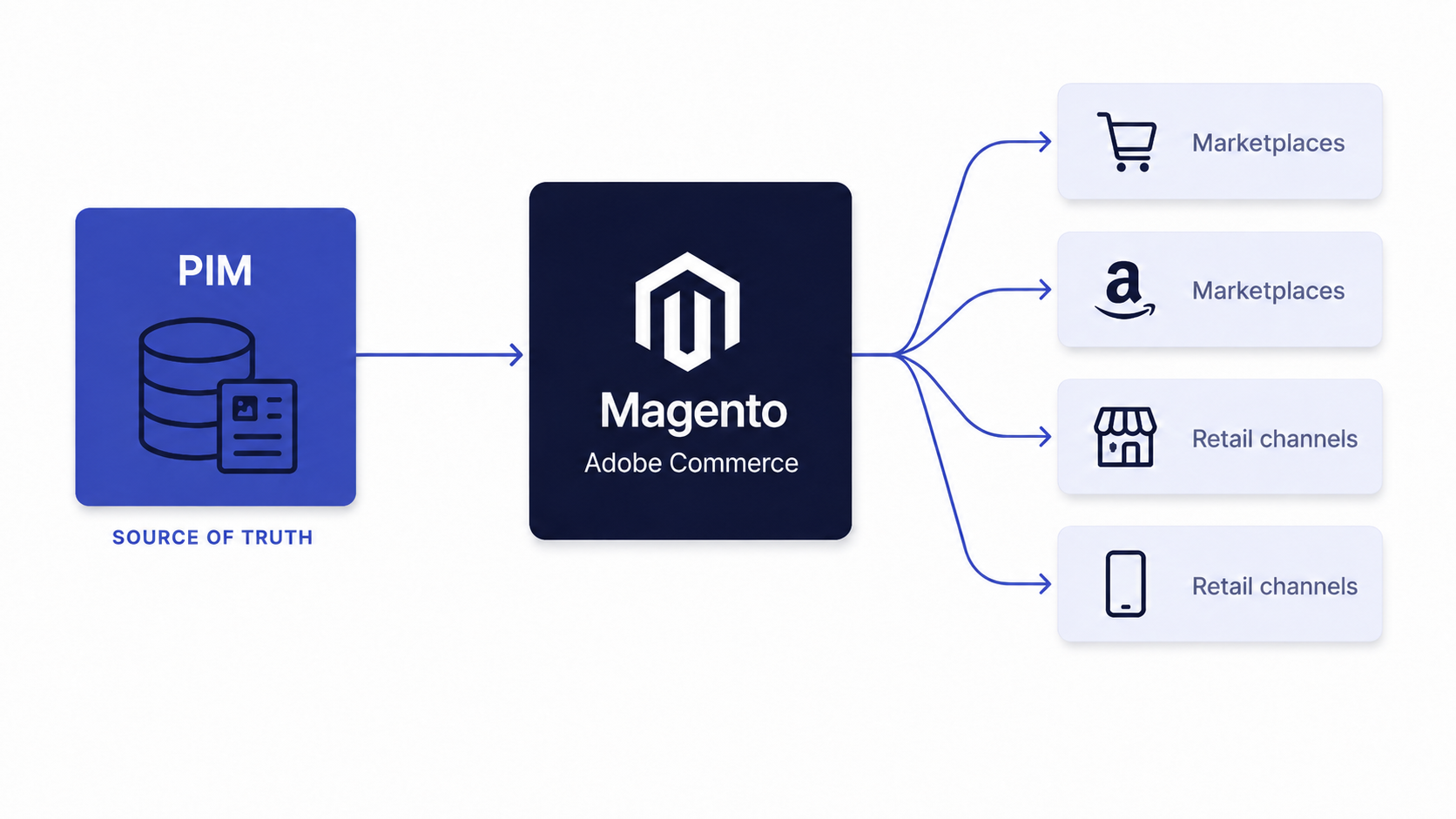
A PIM integration centralizes product data, attributes, descriptions, and media so the catalog stays consistent across Magento and every other channel. It matters most when you sell thousands of SKUs or publish to marketplaces and retailers alongside your own store. A PIM becomes the source of truth for product content while Magento renders it, which keeps merchandising teams out of admin spreadsheets. scandiweb builds and connects PIM systems, including catalog mapping and enrichment workflows, so the data stays clean before it ever reaches the storefront. Scope and data flow for each sit on the Pimcore Magento integration and Magento Akeneo integration pages.
6. Akeneo
Akeneo is a product experience management platform that brands use to enrich, validate, and govern catalog data before it reaches any channel. Connected to Magento, it pushes finished product content and media into the storefront while staying the master for attributes. It fits large or fast-changing catalogs and omnichannel sellers. The watch-out is that a PIM is only as good as the attribute model behind it, so invest in the taxonomy before the connector. It connects to Adobe Commerce through a maintained connector that maps Akeneo attributes to Magento product fields.
7. Pimcore
Pimcore is an open-source PIM and digital asset management platform for brands that want product data, media, and content under one flexible system. Connected to Magento, it serves as the source of truth for enriched product records and assets. It fits complex catalogs and teams that need heavy customization or want to avoid per-record licensing. The watch-out is that its flexibility means more setup and developer involvement up front. It connects to Adobe Commerce through API-based sync or a custom connector that mirrors product data into the catalog. Salsify is another option worth considering, especially for retail syndication.
Best Magento payment and BNPL integrations
Payment integrations connect Magento to the processors that authorize and capture money at checkout, and increasingly to buy-now-pay-later providers that lift conversion on higher-value carts. This is one of the four systems that move money, so reliability and conversion both matter here. The right mix depends on your markets, since cross-border stores usually need strong local method coverage. Keep every integration PCI-compliant by tokenizing rather than touching raw card data, and test 3-D Secure and refund flows, not just the happy path.
8. Stripe
Stripe is a developer-friendly payment processor that handles cards, wallets, and many local methods through one API. Connected to Magento, it authorizes and captures payments at checkout and supports saved cards and subscriptions. It fits brands that want broad method coverage and clean APIs, including those selling cross-border. The watch-out is that per-transaction fees add up at scale, so model your effective rate. It connects to Adobe Commerce through a maintained Stripe extension that tokenizes card data and supports 3-D Secure.
9. Adyen
Adyen is an enterprise payment platform built for global and omnichannel merchants that want one provider across online and in-store. Connected to Magento, it processes payments with strong local acquiring and unified reporting. It fits larger brands selling in many countries. The watch-out is that it is aimed at higher volumes, so smaller stores may find onboarding heavy. It connects to Adobe Commerce through Adyen’s official extension that covers tokenization, 3-D Secure, and refunds.
10. PayPal (Braintree)
PayPal, with its Braintree gateway, is one of the most recognized checkout options and a trust signal many shoppers expect. Connected to Magento, it offers express checkout, cards, and wallets through a single account. It fits almost any store that wants to reduce friction for buyers who prefer PayPal. The watch-out is that dispute handling and reserves can affect cash flow, so understand the terms. It connects to Adobe Commerce natively, since PayPal and Braintree are among the built-in payment methods. Authorize.net, plus wallets such as Apple Pay and Google Pay, are common additions in this category.
11. Klarna
Klarna is a buy-now-pay-later provider that lets shoppers split a purchase into installments or pay later, which can lift conversion and average order value on higher-priced carts. Connected to Magento, it appears as a checkout option and settles the full amount to the merchant while carrying the credit risk itself. It fits brands with considered or higher-ticket purchases where payment flexibility drives sales. The watch-out is that BNPL can encourage returns, so watch your return rate alongside conversion. It connects to Adobe Commerce through Klarna’s official payment extension.
Best Magento search and personalization integrations
Search and personalization integrations improve how shoppers find and discover products, which directly moves conversion and average order value. Native Magento search works, but dedicated engines do far more. These tools index your catalog, so upstream PIM and attribute quality determine how good the results feel. We compare similar tools in our roundup of website personalization tools, and the same evaluation logic applies to Adobe Commerce.
12. Algolia
Algolia is a hosted search and discovery engine known for fast, typo-tolerant results and merchandising controls. Connected to Magento, it powers instant search, autocomplete, and category pages that respond as the shopper types. It fits stores with large catalogs or heavy reliance on search. The watch-out is that pricing scales with search volume and records, so estimate usage early. It connects to Adobe Commerce through a maintained Algolia extension that indexes the catalog and syncs updates.
13. Klevu
Klevu is an AI-driven search and discovery platform built specifically for eCommerce, with self-learning relevance tuned to shopper behavior. Connected to Magento, it delivers smart search, category merchandising, and recommendations. It fits brands that want strong out-of-the-box relevance without heavy manual tuning. The watch-out is that AI relevance still needs clean product data to work well. It connects to Adobe Commerce through a Klevu extension that indexes products and tracks on-site behavior. Bloomreach Discovery is another strong option in this category for larger catalogs.
Best Magento email and marketing integrations
Marketing integrations feed Magento purchase and behavior data into the tools that run email, SMS, and automation, so campaigns target real buyers rather than a static list. Map abandoned-cart and order events carefully, since a broken event silently kills your highest-revenue automations. Many of these mirror the choices we cover for Shopify in our guide to the best Shopify integrations, and the selection logic carries over to Adobe Commerce almost one-to-one.
14. Klaviyo
Klaviyo is an email and SMS marketing platform built for eCommerce, with segmentation driven by purchase and browsing data. Connected to Magento, it powers abandoned-cart, post-purchase, and win-back flows tied to real order events. It fits brands that run retention and lifecycle marketing as a revenue channel. The watch-out is that pricing scales with profile count, so prune inactive contacts. It connects to Adobe Commerce through a maintained Klaviyo extension that syncs customers, orders, and events.
15. Dotdigital
Dotdigital is a cross-channel marketing platform strong in email, SMS, and automation, with deep Adobe Commerce roots. Connected to Magento, it syncs customers, orders, and product data to drive segmentation and triggered campaigns. It fits mid-market and enterprise brands that want a platform aligned closely with Adobe Commerce. The watch-out is that getting full value takes setup across channels rather than email alone. It connects to Adobe Commerce through its official Engagement Cloud connector. Mailchimp and Bloomreach are also common picks in this category.
Best Magento reviews and UGC integrations
Reviews and user-generated content integrations collect ratings, photos, and questions from buyers and display them on product pages, which builds trust and lifts conversion. They also syndicate review content to search and shopping channels. The watch-out across this category is moderation and authenticity, so use verified-buyer review requests tied to real Magento orders.
16. Yotpo
Yotpo is a reviews and loyalty platform that collects ratings, photos, and user content and displays them across the storefront. Connected to Magento, it triggers post-purchase review requests from real orders and shows star ratings on product and category pages. It fits brands that want reviews, loyalty, and SMS under one vendor. The watch-out is that the broader suite is modular and priced per product, so scope what you actually need. It connects to Adobe Commerce through a maintained Yotpo extension that ties review requests to order data.
17. Trustpilot
Trustpilot is a widely recognized review platform focused on company and product trust signals. Connected to Magento, it sends automated review invitations after orders and surfaces TrustBox widgets and seller ratings on the site. It fits brands that want a well-known third-party trust mark and Google Seller Ratings eligibility. The watch-out is that public company reviews invite all feedback, so commit to responding. It connects to Adobe Commerce through a Trustpilot extension that automates invitations from completed orders.
Best Magento helpdesk and support integrations
Helpdesk and support integrations bring order and customer data into the tools your service team uses, so agents resolve tickets without switching screens. They turn scattered email, chat, and social messages into one queue tied to real purchase history. The watch-out across this category is keeping order context in sync, so agents always see the current order and fulfillment status.
18. Gorgias
Gorgias is a helpdesk built for eCommerce that centralizes email, chat, and social into one inbox with order context attached. Connected to Magento, it shows each ticket alongside the customer’s orders and lets agents act on them in place. It fits direct-to-consumer brands that want fast, commerce-aware support. The watch-out is that pricing is tied to ticket volume, so automate repetitive questions to keep costs sane. It connects to Adobe Commerce through a Gorgias integration that pulls order and customer data into the agent view.
19. Zendesk
Zendesk is an established support platform that scales across email, chat, phone, and self-service knowledge bases. Connected to Magento, it gives agents customer and order details inside the ticket so they can answer without leaving the helpdesk. It fits larger or multi-brand support operations that need robust workflows and reporting. The watch-out is that the full suite can get expensive and complex, so start with the channels you actually use. It connects to Adobe Commerce through a Zendesk integration or app that surfaces order history in the agent workspace.
Best Magento shipping and fulfillment integrations
These integrations connect Magento to carriers, rate engines, and warehouse or 3PL systems so customers see accurate delivery options and orders flow to fulfillment automatically. The order delivery experience starts the moment the rate appears at checkout, so accuracy here protects both margin and trust. Sync tracking numbers back to Magento and the customer, not just outbound orders, so support is not left guessing. Carrier-level detail is on the Magento Royal Mail integration page, and our guide to eCommerce shipping integration covers how the rating, labeling, orchestration, and tracking layers fit together.
20. ShipStation
ShipStation is a multi-carrier shipping platform that brands use to compare rates, print labels, and automate fulfillment across carriers. Connected to Magento, it imports orders, applies rules to pick carriers and services, and writes tracking back to the store. It fits stores shipping across multiple carriers or warehouses. The watch-out is that automation rules need maintenance as your carrier mix changes. It connects to Adobe Commerce through a ShipStation integration that pulls orders and pushes tracking updates. Shippo and EasyPost are strong alternatives for multi-carrier rating, alongside direct UPS, FedEx, and DHL accounts.
21. ShipBob
ShipBob is a third-party logistics provider with a fulfillment network and software for brands that outsource warehousing and delivery. Connected to Magento, it receives orders automatically and returns inventory levels and tracking so the store reflects real stock. It fits direct-to-consumer brands that want outsourced fulfillment with distributed warehouses. The watch-out is that you depend on a partner’s stock accuracy, so reconcile inventory regularly. It connects to Adobe Commerce through a ShipBob integration that syncs orders, inventory, and tracking both ways.
Best Magento POS and omnichannel integrations
POS and omnichannel integrations connect Magento to the point-of-sale systems that ring up in-store sales, so online and physical channels share one inventory pool, one customer record, and one view of every order. They matter most when you sell across a website and one or more stores and need stock, pricing, and loyalty to stay consistent everywhere. The watch-out across this category is the shared stock pool, so decide which system owns inventory before you connect, or the two channels will oversell the same units. The Magento Magestore POS integration page covers what shared stock looks like across store and online.
22. Lightspeed Retail
Lightspeed Retail is a cloud POS with strong omnichannel inventory features that retailers use to run physical stores alongside an online channel. Connected to Magento, it keeps stock, products, and customer records in sync so a sale in either channel updates the same inventory. It fits multi-store retailers that want one stock pool across the website and the shop floor. The watch-out is that you have to settle which system is the master for inventory and pricing up front, or the channels drift apart. It connects to Adobe Commerce through a maintained connector or an integration platform that maps products, stock, and orders both ways.
23. Square
Square is a popular POS for small and mid-market merchants that unifies in-person and online sales under one account. Connected to Magento, it syncs catalog, inventory, and order data so the storefront and the register reflect the same numbers. It fits brands that already run Square in-store and want their Magento catalog and stock aligned with it. The watch-out is that deeper, real-time inventory sync can need a third-party connector rather than a basic feed, so confirm the level of sync you need. It connects to Adobe Commerce through a marketplace connector or an integration platform that maps products, stock, and orders.
24. Magestore POS
Magestore POS is a Magento-native point-of-sale extension that runs in-store checkout directly on top of Adobe Commerce rather than syncing to an outside system. Because it shares the Magento catalog and order data, the store and the website work from one source of truth without a separate inventory bridge. It fits merchants that want their POS and eCommerce on the same platform and prefer to avoid a third-party POS. The watch-out is that an on-platform POS adds load and customization to your Magento build, so plan hosting and performance accordingly. It connects to Adobe Commerce natively as an extension that reads and writes the same catalog, stock, and orders. Brands that want to compare dedicated POS tools should also weigh options such as Lightspeed and Square against an on-platform approach.
Best Magento tax integrations
A tax integration calculates the correct rate at checkout and keeps you compliant across jurisdictions, which is one of the four money-moving systems you should connect early. For any store selling into multiple states or countries, an automated tax engine quickly pays for itself in avoided errors and audit risk. Validate the setup against your actual nexus footprint, since the engine only calculates what you configure it to. The Magento Avalara integration page covers the setup in detail.
25. Avalara
Avalara AvaTax is a tax automation engine that calculates US sales tax, VAT, and cross-border duties in real time and supports filing. Connected to Magento, it returns the correct rate at checkout based on address and product taxability, so finance is not reconciling rates by hand. It fits multi-state, multi-country, or marketplace sellers. The watch-out is that accurate results depend on correct tax codes and nexus configuration. It connects to Adobe Commerce through Avalara’s official extension that calls AvaTax at checkout. Vertex and TaxJar are the other standard choices in this category.
Best Magento analytics and CDP integrations
Analytics integrations send Magento behavior and transaction data into the tools that measure performance, so decisions rest on accurate numbers rather than gut feel. A customer data platform goes further by unifying every customer touchpoint into one profile that downstream tools can use. Measurement is fragile, so plan for server-side events early rather than retrofitting them after the data looks wrong.
26. Google Analytics 4
Google Analytics 4 (GA4) is the standard web and app analytics platform, with event-based measurement and free reporting. Connected to Magento, it tracks product views, add-to-carts, and purchases for funnel and attribution analysis. It fits every store that wants reliable reporting at no license cost. The watch-out is that browser and ad-blocker loss degrades client-side data, so pair it with server-side tracking and Google Tag Manager. It connects to Adobe Commerce through GA4 tagging, often via the enhanced eCommerce data layer and GTM. Adobe Analytics and warehouses such as BigQuery or Snowflake extend this for blended reporting.
27. Segment
Segment is a customer data platform that collects events once and routes them to many downstream tools, so analytics, marketing, and warehouses share one clean stream. Connected to Magento, it captures storefront and order events and forwards them to destinations like GA4, Klaviyo, or a data warehouse. It fits brands with a growing stack that want consistent data instead of duplicate tracking in every tool. The watch-out is that a clear tracking plan matters, since a messy event schema spreads everywhere at once. It connects to Adobe Commerce through a Segment source that emits events server-side or client-side.
Native vs third-party Magento integrations: how to decide
Native or marketplace-vendor connectors win on total cost of ownership when they cover your use case, because someone else maintains them through Magento upgrades. A custom build earns its keep only when your logic is genuinely unusual or performance-critical.
Most stores end up with a blend: native extensions for common tools, an integration platform for the heavy ERP and order flows, and a small amount of custom code where the business is differentiated. The mistake is defaulting to custom everywhere, which turns every Magento upgrade into a regression-testing marathon. Extensions that add features on the platform itself are a separate category from these connectors, and our roundup of the best Magento 2 extensions covers those store add-ons.
| Approach | Best for | Trade-off |
|---|---|---|
| Native or marketplace extension | Common tools with a maintained connector | Less flexible if your logic is unusual |
| Integration platform (iPaaS) | ERP, order, and multi-system flows | Subscription cost and a learning curve |
| Custom build | Differentiated or performance-critical logic | Highest maintenance and upgrade burden |
Common Magento integration pitfalls
The failure rate here is real. Industry research cited by Integrate.io reports that 84 percent of system-integration projects fail or only partially succeed, usually for predictable reasons.
- No system of record. Two systems both think they own the price or stock, and they drift apart.
- No retry or queue. One outage drops orders instead of replaying them when the ERP returns.
- Connector sprawl. Every team adds its own tool until nobody can map the data flow.
- Ignoring upgrades. Custom integrations break on the next Magento release because no one budgeted for maintenance.
- Skipping observability. Without monitoring, you learn about a broken sync from an angry customer, not a dashboard.
If you are weighing whether Adobe Commerce is still the right home for this stack, our analysis of whether Magento is dying looks at the platform’s trajectory with current data, and our Magento vs Shopify comparison covers how the two handle complex integration needs differently.
What to do before adding the next Magento integration
Before connecting one more system, confirm the basics so the new pipe strengthens the stack instead of adding fragility.
- Name the system of record for every field the integration touches.
- Decide the sync frequency and method (real-time, near-real-time, or batch).
- Check for a maintained native connector before scoping custom work.
- Define the failure mode and add retry or queue logic for anything that moves money or orders.
- Set up monitoring and alerting so a broken sync surfaces immediately.
- Document the data map so the next person can support it.
Done in this order, integrations compound into an operations advantage. Done ad hoc, they compound into technical debt. If the stack is already sprawling, our integration team can audit what you run and consolidate it into one layer.
Frequently asked questions
What is a Magento integration?
A Magento integration is a connection that lets Adobe Commerce exchange data with another system, such as an ERP, CRM, payment gateway, or carrier, so a single event updates every system that needs it.
Can Magento integrate with ERP systems?
Yes. Magento connects with ERP systems, including SAP Business One, NetSuite, and Microsoft Dynamics 365 Business Central, usually through a maintained connector or an integration platform such as Jitterbit, Celigo, or Workato.
Is Magento a CMS or a CRM?
Neither. Magento (Adobe Commerce) is an eCommerce platform. It includes content management features for product and page content, but it is not a CRM, which is why most stores integrate a dedicated CRM such as Salesforce or HubSpot.
What are the most important Magento integrations to set up first?
Start with the four systems that move money and inventory: ERP, payment gateway, tax engine, and fulfillment. These keep orders, stock, and finance accurate before you layer on marketing, analytics, and search.
How many integrations does a typical Magento store need?
There is no fixed number. Mid-market companies use around 101 SaaS apps on average per 2025 data, but only a handful need a permanent connection to Magento. Connect what moves money, inventory, or customer data, and resist adding extras that do not earn one.
Should I use a native extension or a custom integration?
Use a maintained native or marketplace connector when one covers your use case, since it survives upgrades for you. Reserve custom development for logic that is genuinely unusual or performance-critical, and use an integration platform for heavy ERP and order flows.
How do I keep inventory accurate across Magento and other systems?
Designate one system of record for stock, sync in near-real-time or real-time for fast-moving SKUs, and add retry logic so an outage replays orders rather than dropping them. POS and omnichannel setups need a single shared stock pool.
Want an integration layer that holds under real volume? Talk to scandiweb to plan your integration stack and connect your Magento store the right way.




































