
You’re planning a Magento (Adobe Commerce) upgrade or a move to a new host, and the first page of the plan is Adobe’s list of required software: PHP (the programming language Magento runs on), the database, the search engine, the cache, the web server. It looks like half the plan is done. Then the next question on the same page asks how much processing power, memory and storage the new server should have, and nothing on the list answers it.
The Magento 2 system requirements tell you which software versions a release runs on. How big the server must be is a separate question, and it’s the one with a price tag: the hosting bill every month, and the orders you lose if pages slow down in the busiest hour of a sale.
What are the Magento 2 system requirements?
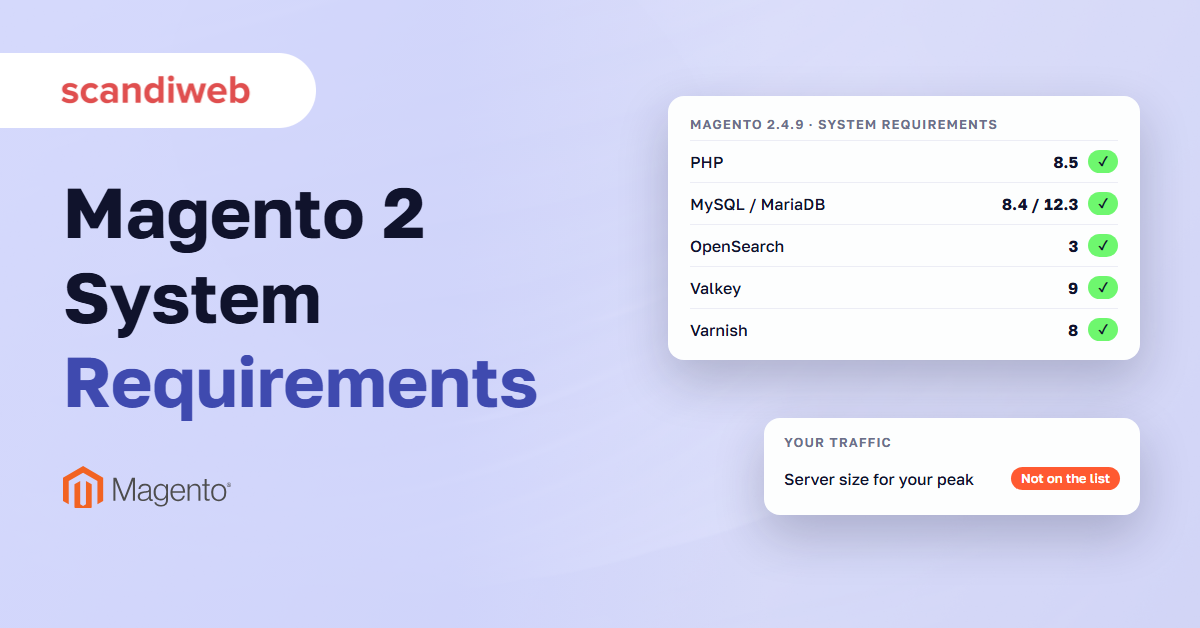
Magento 2.4.9, the latest release, needs PHP 8.5, MySQL 8.4 or MariaDB 12.3, OpenSearch 3, Valkey 9, Varnish 8, nginx 1.30, RabbitMQ 4.3 or ActiveMQ Artemis 2, and Composer 2.10, on 64-bit Linux. Adobe supports only the combinations in its table, and each patch release can change them.
Adobe publishes one table per release line and updates it with every patch release, most recently on October 13, 2026. It supports only the combinations in Adobe’s table, so a stack that is close enough can mean Adobe Support asks you to change a version before it investigates a problem.
| Requirement | 2.4.9 | 2.4.8-p5 | 2.4.7-p10 | 2.4.6-p15 |
|---|---|---|---|---|
| PHP | 8.5 | 8.3, 8.4 | 8.2, 8.3 | 8.1, 8.2 |
| MySQL | 8.4 | 8.4 | Not supported | Not supported |
| MariaDB | 12.3 | 11.4, 11.8 | 10.11, 11.8 | 10.11 |
| OpenSearch | 3 | 3 | 2.19, 3 | 2.19, 3 |
| Valkey (cache and sessions) | 9 | 8.1 | 8.1 | 8.1 |
| Redis (cache) | Not supported | Not supported | Not supported | Not supported |
| Varnish | 8 | 8 | 8 | 8 |
| nginx | 1.30 | 1.30 | 1.30 | 1.30 |
| RabbitMQ or ActiveMQ Artemis | 4.3 or 2 | 4.3 or 2 | 4.3 or 2 | 4.3 or 2 |
| Composer | 2.10 | 2.10 | 2.10 | 2.2.26+ |
| Standard support ends | May 31, 2029 | May 31, 2028 | May 31, 2027 (extended to May 31, 2028) | Ended Aug 11, 2026 (extended to Aug 31, 2027) |
On-premises Magento 2 system requirements for the latest patch of each supported release line, from Adobe’s table updated October 13, 2026. Support dates from Adobe’s lifecycle policy. Extended support applies to Adobe Commerce.
These are the Magento 2 requirements for the latest patch of each line, and the Magento version requirements change with every patch, so read the column for the patch you run. Each line also has an end date, and our list of Magento end of life dates covers the support periods and patches in detail. End of life applies to each release line, and the platform itself has no end date.
Magento PHP version by release
Magento 2.4.9 needs PHP 8.5. Adobe allows PHP 8.4 only while you upgrade and dropped PHP 8.2 and 8.3 for this release, per the 2.4.9 release notes. Magento 2.4.8 runs on PHP 8.3 or 8.4, 2.4.7 on 8.2 or 8.3, and 2.4.6 on 8.1 or 8.2.
The Magento PHP requirements also follow PHP’s own calendar. PHP 8.2 stops receiving security fixes on December 31, 2026, per the PHP supported versions list, so a 2.4.6 or 2.4.7 store on 8.2 has to move before then.
Install the PHP extensions on Adobe’s list, among them bcmath, intl, mbstring, pdo_mysql and sodium. Keep OPcache on, PHP’s built-in cache of compiled code, and apply the same PHP settings to the command line and the web server, since cron and deploys run from the command line.
Database, search and cache versions
MySQL and MariaDB are two compatible database servers, and Magento runs on either. Magento 2.4.9 lists MySQL 8.4 or MariaDB 12.3. MySQL 8.0 reached end of support on April 30, 2026, and Adobe’s tables for 2.4.6 and 2.4.7 now list MariaDB only.
OpenSearch is the search engine behind catalog search and layered navigation filters. Adobe lists OpenSearch 3 for 2.4.8 and 2.4.9, and 2.19 or 3 for 2.4.6 and 2.4.7. Elasticsearch 7.17 reached end of support on January 15, 2026, and Elasticsearch 8 stays listed for 2.4.7 and 2.4.8 only.
Valkey is an open-source data store that works like Redis and holds Magento’s cache and sessions. Varnish is a page cache that runs in front of the web server. Adobe lists Valkey 9 for 2.4.9, and Redis is no longer supported as the cache on current patches, per Adobe’s Valkey and Redis guidance. Varnish 8 appears in every latest-patch column. For the message queue, Adobe lists RabbitMQ 4.3 or ActiveMQ Artemis 2, and names Artemis as the long-term broker.
Web server, operating system and other requirements
Every current table lists nginx 1.30 with PHP-FPM, the process manager that runs PHP for the web server. Apache 2.4 last appears in Adobe’s tables for 2.4.8-p2, 2.4.7-p6 and 2.4.6-p11. Magento runs on 64-bit Linux only, such as Red Hat Enterprise Linux, Ubuntu or Debian.
You also need a valid SSL certificate (self-signed ones are not supported), TLS 1.2 or later for PayPal and repo.magento.com, a mail server, and Composer 2.10 (2.2.26 or later on 2.4.6). Keep Xdebug on development machines only: Adobe says the module alone can add up to 30% to response time even with no debug session running.
🚀 Quick takeaway
Check the row for your exact patch. On 2.4.8, patch p4 lists Varnish 7.7, Valkey 8 and nginx 1.28, while p5 moves to Varnish 8, Valkey 8.1 and nginx 1.30.
Adobe Commerce system requirements on Cloud
Adobe Commerce on Cloud has its own table. For 2.4.9 it lists PHP 8.5, MariaDB 12.3 (recommended) or 11.8, OpenSearch 3, Valkey 9, RabbitMQ 4.3, ActiveMQ Artemis 2 and nginx 1.30, with Fastly as the page cache in place of Varnish. Magento Open Source has no separate table, so self-hosted stores check the on-premises one.
On Cloud, Adobe sets the services and their versions in the project’s services.yaml file. The Pro production environment runs three virtual machines behind a load balancer, and each one carries the whole stack: Fastly, nginx with PHP-FPM, Valkey or Redis, OpenSearch and one node of a Galera MariaDB cluster, as Adobe’s Pro architecture page describes. When capacity goes up, the three machines are resized one at a time, so the site stays up.
From the Pro 48 cluster up, a project can move to the scaled architecture: at least six nodes, three for the database and services and three for the web server. The service tier grows only by making its servers bigger, while the web tier grows by adding servers.
Magento Open Source has no table of its own. Adobe lists its PHP extensions on the same requirements page, so a self-hosted Open Source store uses the on-premises table above. Stores on Adobe Commerce as a Cloud Service, Adobe’s fully managed version, don’t run this stack themselves: Adobe manages the infrastructure, patching and upgrades.
🚀 Quick takeaway
On Commerce Cloud Pro, every production node runs the whole stack. Only the scaled architecture, from the Pro 48 cluster up, splits web and service nodes. Find out which one you have before you plan a capacity increase.
Magento server requirements vs the capacity your traffic needs
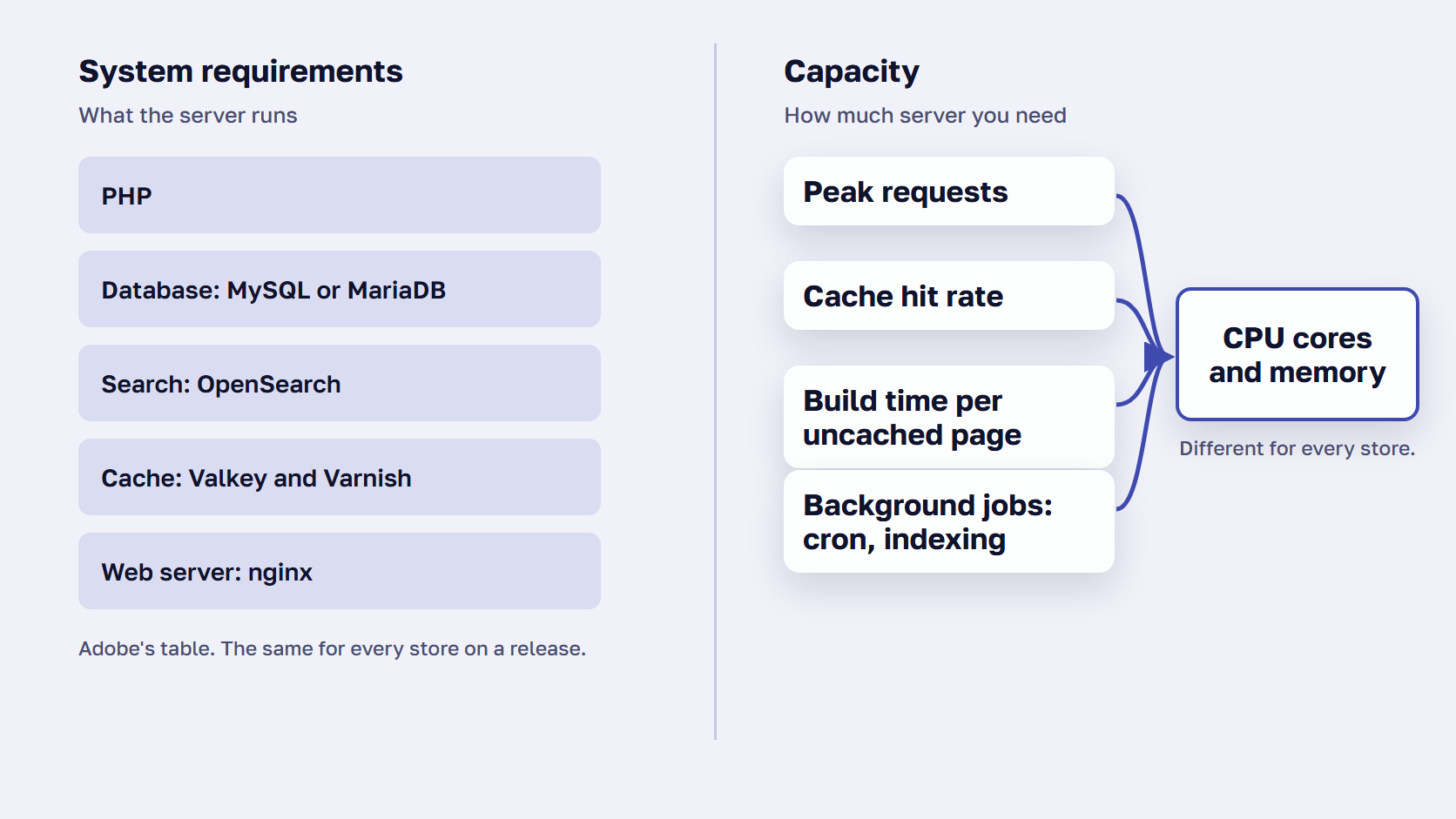
Magento server requirements list the software versions a release runs on. Capacity is how many requests a server can answer before pages slow down, and it depends on four things: traffic at your busiest hour, how many pages come from the cache, how long Magento takes to build the rest, and background jobs such as indexing.
A server can meet every line of Adobe’s table and still slow down at the first sale, because the Magento 2 server requirements say nothing about how many shoppers arrive at once.
What decides how much server a Magento store needs
Four numbers decide it, and only the first one shows up in a marketing calendar.
- Peak traffic: requests in the busiest hour, the number that sizes the server. A monthly visitor count hides it.
- Cache hit rate: the share of pages served ready-made by Varnish, or by Fastly on Cloud. Those requests never reach the web server.
- Build time: how long Magento takes to build a page the cache doesn’t have. It grows with catalog size, extensions, filters and search.
- Background work: cron jobs, indexing, imports and the admin, which use the same CPU and memory as shoppers do.
Adobe’s hardware recommendations put the first two together in one sentence: “Commerce web nodes serve all requests that are not cached or cannot be cached through the application.”
Why cache misses set the size of the web tier
The full page cache keeps a separate copy of a page per customer group, store, currency and language, and a separate copy of search results per search term. So logged-in shoppers, filtered category pages and searches miss far more often than a plain category page does. Cart, checkout and account pages, plus anything sent as a form submission, always go to Magento. After a deploy or a cache flush, every page misses until shoppers or a cache warmer refill it.
Each miss keeps a CPU core busy for as long as Magento takes to build the page, while hits barely touch the web servers. That is why the web tier is sized for misses, and why the hit rate matters as much as the traffic figure. Our guide to the Magento full page cache explains which pages miss and how to cut the misses.
🚀 Quick takeaway
Size the server for the busiest hour. A store with a modest monthly audience can still need a large web tier when a sale sends most of a day’s shoppers in at once.
How to size a Magento server for your traffic
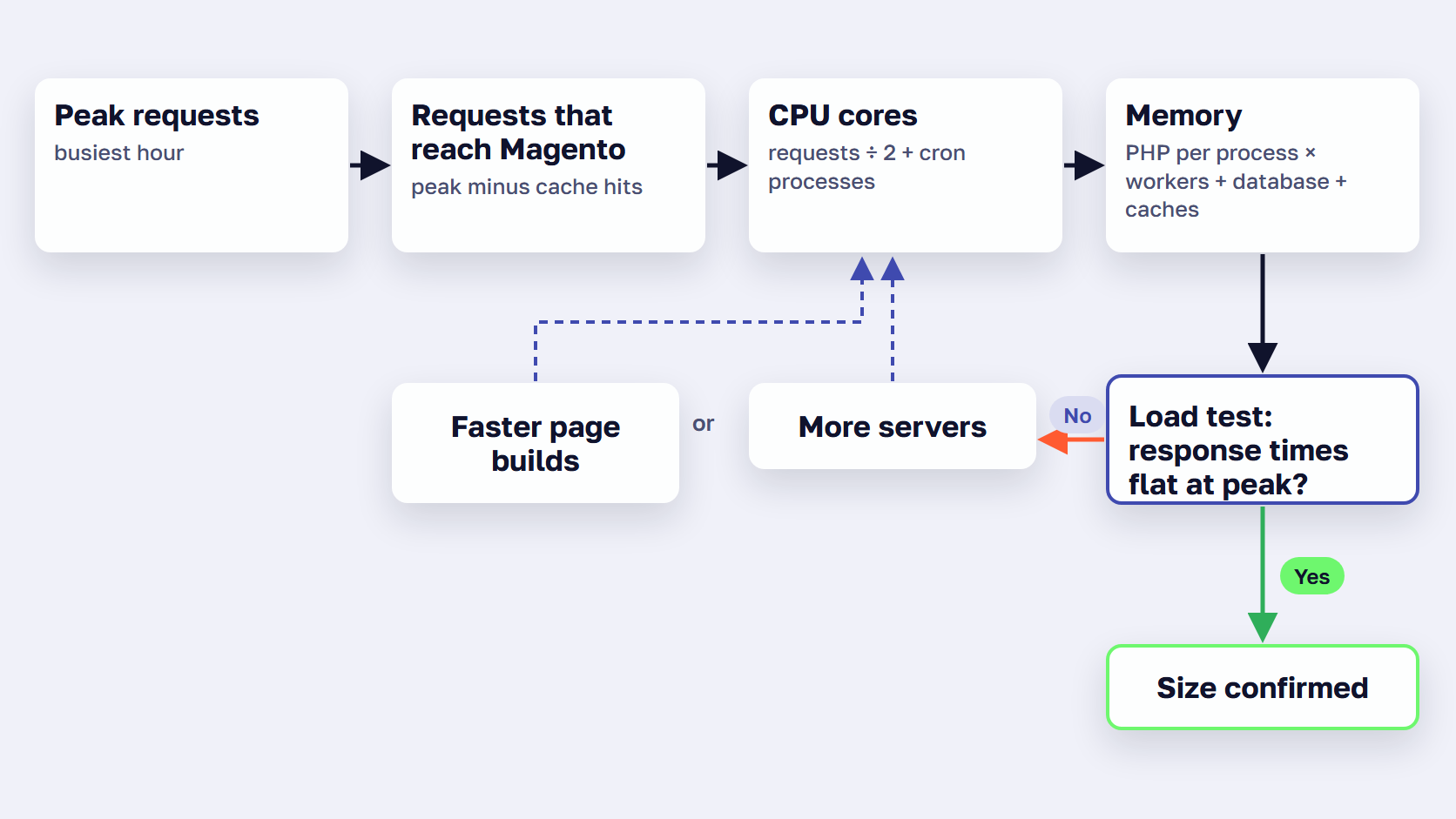
To size a Magento server:
- Measure requests at your busiest hour and your cache hit rate.
- Count CPU cores with Adobe’s formula, expected requests divided by two plus cron processes.
- Size memory for PHP, the database and the caches.
- Give each tier its own servers and plan for peaks.
- Load test at that size.
The five steps turn your own numbers into the right server for Magento 2, in terms a host or a developer can quote against.
1. Measure peak requests and the cache hit rate
From your hosting dashboard, your CDN or New Relic, a monitoring service that records every request, take two numbers: requests per second in the busiest hour of your busiest day, and the share of them served from the cache. Monthly visitor counts don’t show the peak, and the peak is what the server has to survive.
Before we size a server for a store we host, we ask for visit counts, requests, cache usage, media size and database size. Then time how long uncached pages take to build, one page type at a time. Our guide on how to audit Magento performance walks through it. As a sanity check first, Adobe expects any page with cacheable blocks to load in under 150 ms when Varnish is working.
2. Count CPU cores with Adobe’s formula
Adobe’s rule of thumb is that “One CPU core can serve around two (sometimes up to four) Commerce requests effectively.” Its formula for the web tier:
cores = (expected requests / 2) + cron processes
“Expected requests” means requests reaching Magento at the same moment, so only cache misses count. The hit rate from step 1 turns peak traffic into that number.
As an example, say your monitoring shows about 20 requests reaching Magento at the same moment at peak, and the server runs 4 cron processes. The formula gives 20 divided by 2, plus 4: 14 cores across the web servers, before any headroom.
Add headroom above the peak you measured, and keep cron’s share in the sum. Indexing and imports compete with shoppers for the same cores, and a reindex that lands in the busiest hour shows up as slow pages.
3. Size memory for PHP, the database and the caches
Adobe publishes no single RAM figure for a production store. It gives memory per PHP process instead, and the figure depends on what the process does.
| What the PHP process does | Memory per process (Adobe) |
|---|---|
| Serves storefront pages only | 256 MB |
| Serves admin pages on a large catalog | 1 GB |
| Runs cron indexing on a large catalog | More than 256 MB |
| Compiles code and deploys static files | 756 MB (Adobe sets the limit at 1 GB) |
| Runs a whole store on one server | 2 GB |
| Pipeline deployment | 2 GB on the build server, 1 GB on web servers |
PHP memory per process, from Adobe’s hardware recommendations. Multiply by the PHP workers you run at peak.
Total PHP memory is arithmetic: memory per process times the PHP workers you run at peak. Adobe’s PHP settings page sets the limit at 1G for compiling and deploying and 2G for debugging.
The database should get memory close to half the size of its data, by Adobe’s guidance, so its indexes stay in memory. Our guide to Magento MySQL optimization covers the database settings in detail. Varnish needs enough to hold your most popular pages. Valkey (or Redis on older releases) holds all other caches, and the block cache grows with SKUs times store views, so a large catalog with many store views needs more. Keep sessions in their own instance. Upgrades can need up to 2 GB of RAM, and Adobe says to add a swap file on a server with less.
4. Give each tier its own servers and plan for peaks
A tier is a group of servers that does one job: web, database, search or cache. Adobe’s guidance is to install Varnish on a separate server in front of the web tier. Keep staging on its own resources too, so test runs and imports don’t take CPU from shoppers.
For short peaks, server autoscaling in Magento 2 adds web servers while traffic is high and removes them afterward. On Commerce Cloud, Adobe’s auto scaling adds web nodes when CPUs across the web tier run at 75% for a minute while traffic climbs 20% for five minutes, within your contracted limits, and a planned upsize needs 48 business hours’ notice.
If you’d rather not run the tiers yourself, these are the Magento hosting requirements our team provisions for every store we host.
5. Load test at the size you plan to run
Run one round with the full page cache on and one with it off, to see what the server can build on a bad day. Raise the load in steps and note where response times bend: that point is your capacity. Adobe enables Cloud auto scaling on production only after load testing on staging, and that order holds anywhere. Our Black Friday load-testing plan sets the target, the traffic mix and the pass criteria. Our guide to Magento load testing covers the tools and the run, step by step.
🚀 Quick takeaway
A web server that only serves the storefront needs a quarter of the PHP memory per process that admin work on a large catalog does, by Adobe’s figures. Keeping the admin, cron and deploys off the storefront servers makes each one cheaper to size.
How faster page builds change the server you need
Every page the cache doesn’t serve keeps a CPU core busy while Magento builds it, so a faster build lets the same server answer more requests before response times rise. Our fastest eCommerce platform research shows how Magento’s server response compares with other platforms. Adding servers also raises capacity, yet each uncached page still takes just as long to build, and every extra server adds to the monthly bill.
This is the part Expedio works on. Expedio is scandiweb’s Magento module with an open-source core. It speeds up how Magento builds each page on the server by applying Liquid, the open-source template language created at Shopify, and makes that build at least 2x faster. It runs on Magento Open Source, Adobe Commerce and Commerce Cloud, with Luma, Hyvä or a custom theme, on any hosting, and leaves the theme, data, admin and checkout as they are.
Faster builds show up as capacity. In a benchmark on one merchant’s Hyvä store, measured as server response time, two copies of the store ran side by side on one server with the same data and no full page cache, so Magento built every request. With Expedio, the same server handled 3x the traffic before response times started to rise, and the homepage ran 11 database queries instead of 604. The Expedio benchmark covers the method and what it didn’t test, including cart and checkout.
Server size is one layer of a fast store. To work through the others, from caching to the browser, use our guide to speed up Magento.
🚀 Quick takeaway
Before you add servers, check how long uncached pages take to build. If a faster build lets each core serve twice as many requests, the next hardware purchase can wait.
Frequently asked questions about Magento 2 system requirements
What PHP version does Magento 2.4.9 need?
Magento 2.4.9 needs PHP 8.5 in production. Adobe allows PHP 8.4 only while you upgrade and dropped PHP 8.2 and 8.3 for this release. Magento 2.4.8 runs on PHP 8.3 or 8.4, and 2.4.7 on 8.2 or 8.3. PHP 8.2 stops receiving security fixes on December 31, 2026, so plan any move off it before then.
How much RAM does a Magento 2 server need?
Adobe publishes no single RAM figure for a production Magento server. It gives memory per PHP process instead: 256 MB for a web server that only serves the storefront, 1 GB for admin work on a large catalog, and 2 GB for a single-server store. Multiply that by the PHP workers you run at peak, then add the database, search and caches.
How many CPU cores does a Magento store need?
Adobe’s rule of thumb is that one CPU core can serve around two Magento requests effectively, sometimes up to four. Its formula is the number of expected requests divided by two, plus the number of cron processes. Count only the requests that reach Magento, because pages served from Varnish, or Fastly on Commerce Cloud, never reach the web server.
Does Magento 2.4.9 still support Redis?
No. Adobe doesn’t support Redis as the cache for Adobe Commerce 2.4.9, or for patch releases after 2.4.5-p16, 2.4.6-p14, 2.4.7-p9 and 2.4.8-p4. Use Valkey instead, an open-source data store that works like Redis. Version 9 is listed for 2.4.9, and Adobe recommends separate instances for sessions, the cache and the full page cache.
Does Magento 2 run on nginx or Apache?
Adobe’s current requirement tables list nginx 1.30 as the web server for every supported release line, with PHP running through PHP-FPM. Apache 2.4 last appears for 2.4.8-p2, 2.4.7-p6 and 2.4.6-p11 in Adobe’s older tables. Adobe supports only the combinations it lists, so nginx is the safe choice for a new or upgraded store.
Can you run Magento 2 on Windows or macOS?
Not in production. Adobe supports Magento 2 only on 64-bit Linux, such as Red Hat Enterprise Linux, Ubuntu or Debian, and says Microsoft Windows and macOS are not supported. For local development on Windows or a Mac, run Magento inside a Linux container or virtual machine, so your setup matches the server it will run on.
Check the Magento 2 system requirements, then size for your peak
The Magento 2 system requirements are the fixed part of the job: one table per release, checked against your exact patch. The server size is the part only your store can answer, from its peak traffic, its cache hit rate and how long its pages take to build. Measure those first, then buy the server.
Adobe’s table changed on October 13, 2026, and patch releases keep changing it, so read it again before every upgrade. Re-run the sizing before each sale season too, because catalog size, extensions and the cache hit rate drift from one year to the next. If the numbers point to a new host, compare Magento hosting providers against them before you sign.
Planning an upgrade or a move and want a second opinion on the numbers? Send us your peak traffic and current setup, and we'll help you size the server.