
The first failed authorization lands a little before 3 a.m., a one-dollar charge on the cheapest item in your catalog. Then another, from a different card, and another from a different IP. By the time your team logs in, the payment log shows hundreds of tiny declined attempts, a few that went through, and authorization fees that can land on next month’s gateway invoice.
That is a card testing attack, the noisiest problem in Magento fraud prevention, and merchants tend to describe it to us in nearly the same words: “Hundreds of tiny failed orders overnight. What’s happening?” On a Magento (Adobe Commerce) store it comes on top of quieter losses: friendly-fraud chargebacks, hijacked customer accounts, and coupon abuse that never trips a fraud score. This guide covers the whole stack. It shows how to spot and stop card testing in the first hour, how to configure Magento reCAPTCHA, WAF rate limits and payment provider rules, and how to build the layers that keep the slower fraud off your books.
Overview
- Card testing shows up as a spike in small, failed authorizations, usually through guest checkout, with rotating cards, emails and IP addresses.
- The first-hour response is reCAPTCHA on checkout and coupon forms, rate limits at the WAF, and tighter velocity rules at the payment provider, followed by voiding or refunding whatever got through.
- Lasting Magento fraud prevention is layered: bot defense, AVS and CVV, 3D Secure 2, velocity rules, fraud scoring, manual review, and PCI hygiene.
🚀 Quick takeaway
No single setting stops eCommerce fraud on Magento. Protection comes from layers: bot defense at the edge, AVS and CVV and 3D Secure at payment, velocity rules and fraud scoring at order placement, and a tight manual-review queue for the gray zone.
What is Magento fraud prevention?
Magento fraud prevention is the combined set of platform settings, payment controls, third-party tools, and review processes that detect and block fraudulent orders before they cost you money. On Magento Open Source, you assemble most of it yourself. On Adobe Commerce, you get more built in, including native integration with Signifyd for automated order screening, but the strategy is the same on both editions. If you are weighing the two, our breakdown of Adobe Commerce vs Magento Open Source covers where the built-in protections differ.
The word that matters is layers. Fraudsters probe for the one gap you left open, so a single control, however good, is a single point of failure. Effective prevention stacks independent checks so that an order has to pass several of them to go through, and so that a suspicious order gets caught by at least one even when it slips past the rest.
Why fraud on Magento is worth taking seriously
eCommerce fraud is growing faster than most stores. Juniper Research forecasts the value of eCommerce fraud rising from $44.3 billion in 2024 to $107 billion by 2029, driven largely by automated and AI-assisted attacks. The damage compounds, too. The LexisNexis True Cost of Fraud study puts the cost at $4.61 for every dollar of fraud lost by US retail and eCommerce merchants, once you add chargeback fees, labor, and the never-recovered product.
Chargebacks are their own tax. When fraudulent orders convert into disputes, your dispute ratio rises, and card networks penalize merchants who cross their thresholds with higher fees and, in severe cases, monitoring programs that put your ability to accept cards at risk. Card testing now has its own measure as well. Visa’s Acquirer Monitoring Program (VAMP), which replaced its older fraud and dispute programs in April 2025, tracks an enumeration ratio, the share of transactions suspected to be card testing, and the Merchant Risk Council notes that a business with 20% or more flagged is treated as high risk. Fraud prevention is about protecting the payment relationship that the whole store depends on.
There is also a quieter cost most teams underestimate: false declines. Aggressive rules that reject legitimate customers to feel safe can cost more revenue than the fraud they prevent.
🚀 Quick takeaway
Card testing costs you even when every attempt fails. A flood of declines raises your decline rate with issuers, which can make your genuine customers’ payments look riskier long after the attack ends.
The fraud types that hit Magento stores
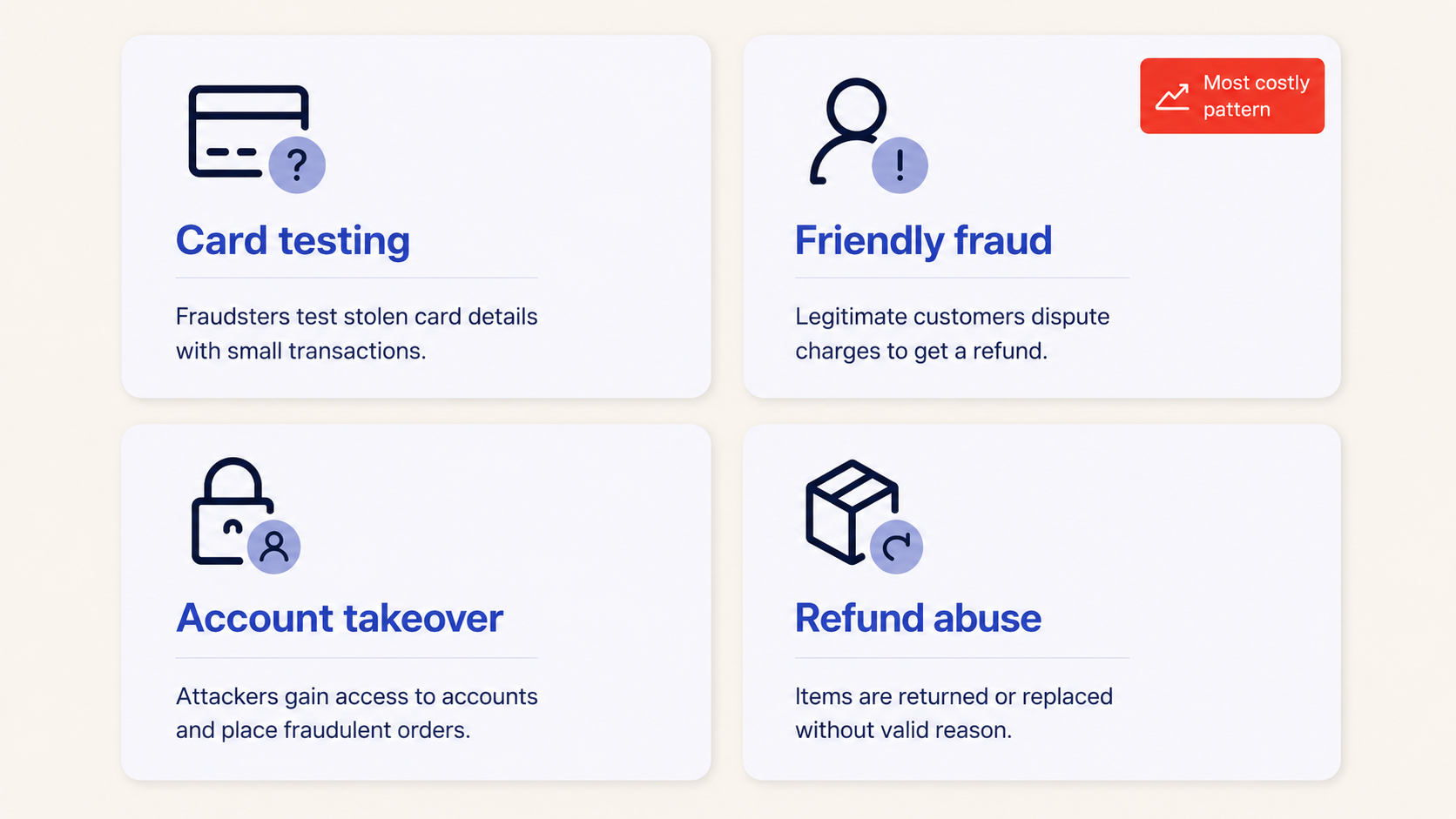
Before you configure a single control, you need to know what you are defending against. Four patterns account for most of the losses we see on Adobe Commerce stores.
Card testing (carding)
Attackers use your checkout as a free validator for stolen card numbers, firing hundreds or thousands of small authorization attempts to learn which cards are still live. This is the most common automated attack on Magento, and it shows up as a spike in failed payments, gateway fees for declined authorizations, and a flood of tiny orders. Card testing is frequently the prelude to larger fraud once the validated cards are sold on. Because it needs a fast response, it has its own section below on how to spot and stop it.
Friendly fraud (first-party fraud)
A real customer places a real order, receives the goods, then disputes the charge with their bank claiming they never authorized it or never received it. This has become the dominant fraud category. The latest Chargebacks911 Chargeback Field Report, based on more than 250 merchants, attributes 43.8% of chargebacks to friendly fraud, and Chargebacks911’s own case data puts it at 86% of the chargebacks it handles. It is hard to block at checkout because the order looks legitimate, so the defense is evidence and clear policies.
Account takeover (ATO)
Attackers use stolen or stuffed credentials to log into existing customer accounts, then exploit saved cards, loyalty balances, and stored addresses. The trend line is steep. TransUnion reports that global digital account takeover volume rose 21% between the first half of 2024 and the first half of 2025. ATO is dangerous because the resulting order comes from a trusted, aged account that most rules would wave through.
Refund and promo abuse
This covers customers who weaponize your policies: claiming non-delivery on items they received, stacking single-use coupons, creating throwaway accounts to repeat first-order discounts, or returning different goods than they bought. It rarely triggers fraud scoring because no stolen instrument is involved, so it has to be caught with velocity rules, account-level history, and policy design.
🚀 Quick takeaway
Only two of the four fraud types can be stopped at checkout. Friendly fraud and promo abuse come from real customers, so they are fought with evidence, policy and account history, and no fraud score will catch them alone.
The prevention layers, and how to set them up on Magento
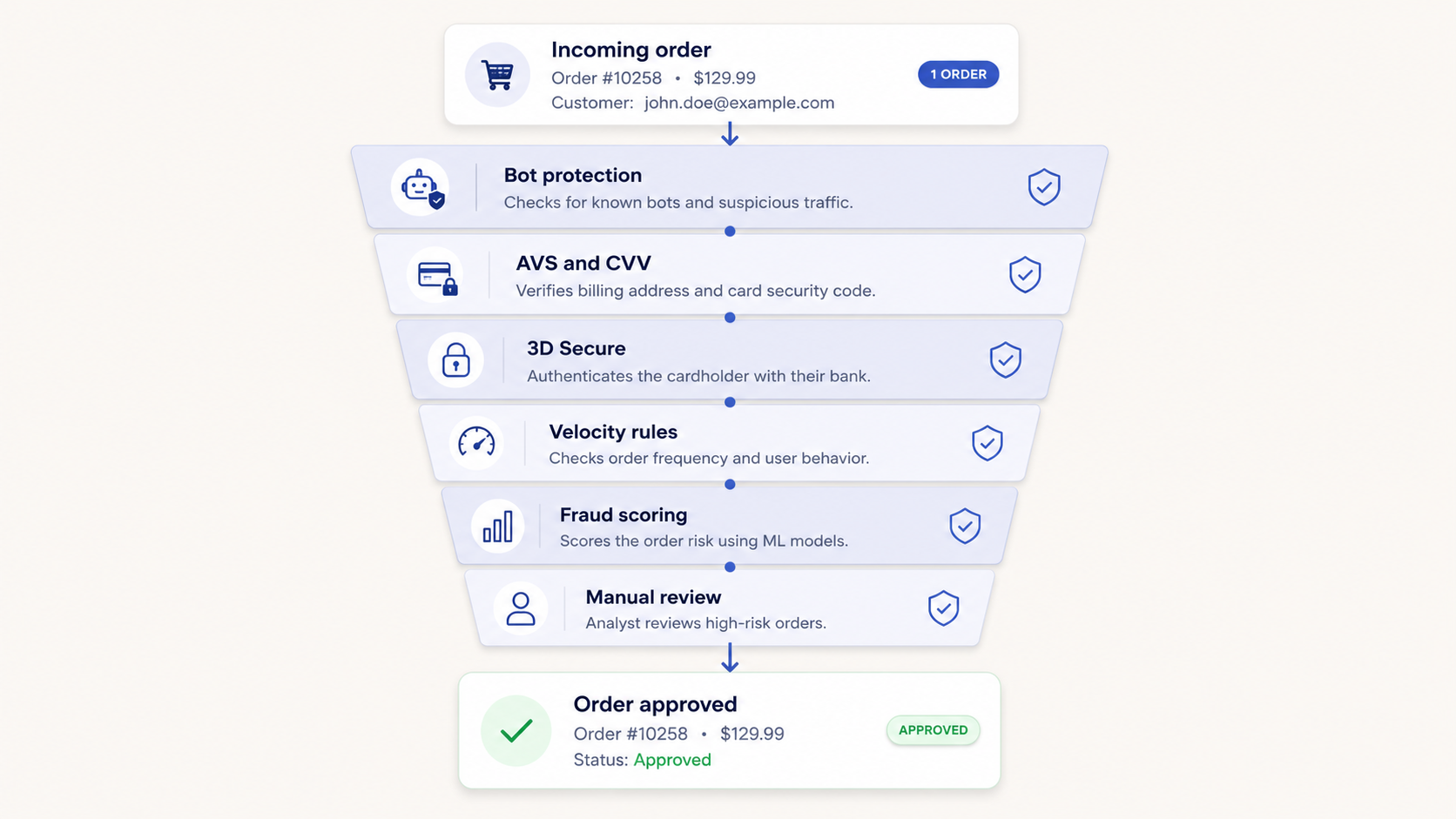
Here is the stack, ordered roughly by where an order encounters each control. Aim to have something working at every layer rather than one very strong layer and several gaps.
1. Bot and edge protection
Most card testing and credential stuffing is automated, so the cheapest win is stopping bots before they reach checkout logic. Put a WAF and rate limiting in front of the store at the CDN or Magento hosting edge, add a modern invisible CAPTCHA on login, registration, and checkout, and enable Magento’s native Google reCAPTCHA on those forms (the exact settings are in the card testing section below). Block or challenge traffic from data-center IP ranges and known anonymizing proxies. Well-tuned edge protection removes the bulk of low-effort attacks before any payment or fraud-scoring cost is incurred.
2. AVS and CVV at the gateway
Address Verification Service and the CVV check are the baseline payment controls every Magento store should enforce through its gateway. Configure the gateway as well as Magento to decline or hold orders where AVS or CVV does not match, and decide deliberately how strict to be. Most Magento payment gateways expose both checks as rules. These checks are weak on their own against stolen cards used with correct billing details, but they are nearly free and they filter out a lot of sloppy fraud.
3. 3D Secure 2
3D Secure 2 (sold as Visa Secure, Mastercard Identity Check, and similar) shifts liability for many fraudulent chargebacks from you to the card issuer when the customer authenticates. Modern 3DS2 uses risk-based, often frictionless, authentication, so most genuine customers never see a challenge. Enable it through your payment provider and, where the rules allow, apply it selectively to higher-risk orders so you keep checkout smooth for the safe majority. For card-not-present fraud this is one of the highest-impact controls available.
4. Velocity rules
Velocity rules cap how often an action can repeat in a window: orders per card, attempts per IP, accounts per device, redemptions per coupon. Real shoppers do not place twelve orders in ten minutes, which is why velocity limits catch automated abuse before it turns into loss. Stripe’s card testing guidance gives concrete examples: limit the number of cards that can be added to an account, the customers created from one IP address, and the purchases of the same product. Implement velocity limits at the gateway, in a fraud tool, or with custom Magento logic, and set thresholds against your real order patterns so you do not throttle legitimate repeat buyers.
5. Fraud scoring tools
This is the layer that does the heavy lifting against sophisticated fraud. Tools such as Signifyd (natively integrated with Adobe Commerce Payment Services), Riskified, Sift, NoFraud, and MaxMind minFraud score each order in real time using device fingerprinting, IP intelligence, email and phone reputation, and machine-learning models trained across a huge merchant network. Many of these vendors offer chargeback guarantees on orders they approve, effectively moving fraud risk off your books. For mid-market and enterprise Magento stores this is usually the single most impactful investment.
6. Manual review
No automated system should auto-approve or auto-cancel every order. The gray zone, medium-risk orders that are neither clearly safe nor clearly fraudulent, belongs in a manual-review queue where a trained person checks signals such as billing-shipping mismatch, freight-forwarder addresses, mismatched account age and order value, and reused details across accounts. Keep this queue small and fast by letting the layers above auto-clear the obvious cases, so reviewers spend their time only where human judgment adds value.
7. PCI hygiene and account security
Prevention also means not becoming the breach, and it starts with PCI compliance. Use a PCI-compliant, tokenized, hosted-fields or redirect payment integration so raw card data never touches your servers, keep Magento and every extension patched on Adobe’s security release cadence, restrict and audit admin access with two-factor authentication, and enforce strong password and login protection for customer accounts to blunt account takeover. A store on an unsupported Magento version no longer receives those patches at all. Solid hosting and DevOps practice underpins all of this, because an unpatched server or exposed admin is a fraud vector before it is anything else.
🚀 Quick takeaway
The first three layers cost almost nothing in conversion. Turn them on before you shop for a fraud-scoring tool, because a scoring tool is far cheaper to run when bots and sloppy stolen-card fraud never reach it.
A summary of the prevention layers
| Layer | What it stops | Effort to set up |
|---|---|---|
| Bot and edge protection (WAF, rate limiting, CAPTCHA) | Card testing, credential stuffing, scraping | Low to medium |
| AVS and CVV | Low-effort stolen-card fraud | Low |
| 3D Secure 2 | Card-not-present fraud, shifts chargeback liability | Low |
| Velocity rules | Automated abuse, coupon and refund abuse | Medium |
| Fraud scoring tools | Sophisticated and organized fraud | Medium |
| Manual review | Gray-zone orders that rules cannot judge | Ongoing |
| PCI hygiene and account security | Breaches, admin compromise, account takeover | Ongoing |
How do you spot and stop a card testing attack on Magento?
You spot card testing fraud by a sudden spike in small, failed authorizations, often on one low-priced product, with names, emails and IP addresses that keep changing. You stop it by putting reCAPTCHA on checkout and coupon forms, rate-limiting payment requests at the WAF, and tightening velocity rules at your payment provider, then cleaning up what got through.
We have handled these attacks on client stores for years. In one carding attack our team dealt with, hundreds of orders shared one shipping address and obviously fake customer details, and a share of them used valid cards that the automated fraud screening never flagged. The first moves were blunt: disable the targeted products, block the attacking IP addresses, then put permanent controls in place. Here is the fuller version of that response.
Signs of a card testing attack
Hundreds of tiny failed orders overnight is the classic pattern, but the signal is rarely that tidy. Look for these, and treat two or more together as an attack until proven otherwise:
- A spike in failed or declined authorizations, far above your normal decline rate, often concentrated in a few hours at night.
- Small amounts on cheap items, usually the lowest-priced product, a sample, a gift card or a donation line.
- Rotating details on the same order shape: different card numbers, nonsensical names and emails, and IP addresses that change every few attempts, with the same shipping address or the same cart repeated.
- Guest checkout and API traffic: attempts that skip the storefront pages and call checkout or payment endpoints directly.
- Gateway symptoms: a jump in generic decline codes, authorization fees on your invoice, or a warning from your payment provider.
- Sudden coupon or account creation bursts, because the same scripts often test coupon codes and create throwaway accounts.
Stripe’s documentation lists the same core symptoms: a spike in failed or blocked payments, a spike in decline errors, and low-value payments with nonsensical customer names and emails.
🚀 Quick takeaway
The successful charges are the expensive part. The declines cost you fees and reputation, but the cards that pass turn into disputes weeks later, so find and refund them on the day of the attack.
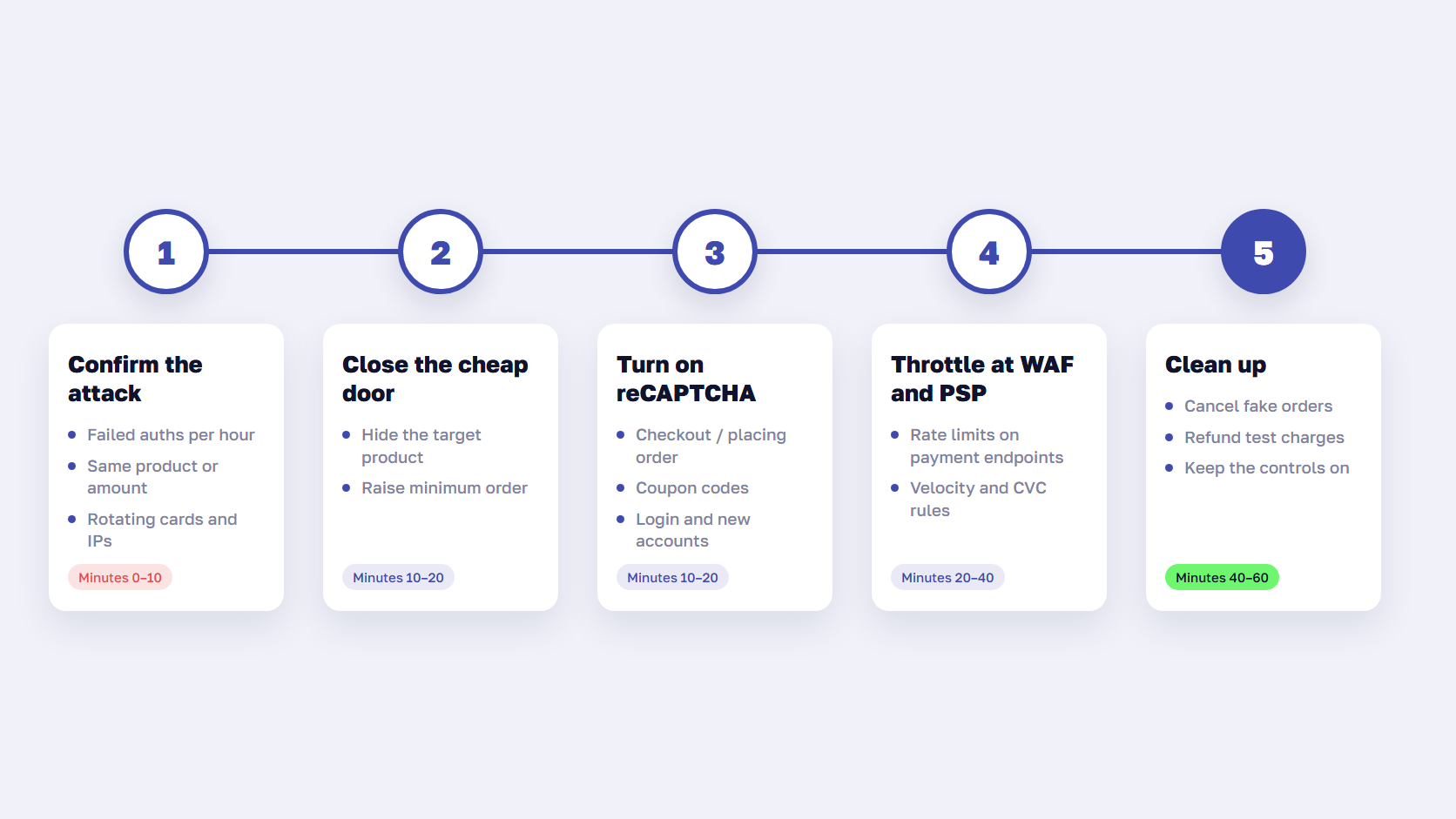
Immediate response checklist (the first hour)
- Confirm it is card testing. Compare failed authorizations per hour with a normal night, and check whether the attempts share a product, an amount, a shipping address or a user agent.
- Close the cheapest door. Temporarily disable or hide the product being used, or raise the minimum order value, so the script has nothing to buy.
- Turn on Magento reCAPTCHA for Checkout/Placing Order and Coupon Codes, and for login and account creation if those are under attack too (settings below).
- Rate-limit at the edge. Add WAF rules that limit requests to checkout and payment endpoints per IP and per session, and challenge or block data-center and proxy traffic.
- Tighten payment provider rules. Switch on or harden velocity rules, block repeated failed CVC checks, and ask your provider to apply its card testing protections to your account.
- Clean up. Cancel the fake orders in Magento, void or refund any successful test charges to head off disputes, and do not retry those cards.
- Rotate keys if they leaked. If attempts bypass your storefront entirely, check whether payment API keys were exposed and rotate them.
- Watch, then loosen carefully. Keep the controls on until the decline rate is back to normal for several days, and expect the attacker to return to test the new defenses.
If this is happening on your store right now and your team is stretched, our 24/7 Magento support team can take the first-hour work off your hands.
Magento reCAPTCHA settings that matter for checkout
Magento reCAPTCHA is built into Magento Open Source and Adobe Commerce, so there is no extension to buy. Per Adobe Experience League, you configure it under Stores > Settings > Configuration > Security > Google reCAPTCHA Storefront, and you can choose reCAPTCHA v3 Invisible, v2 Invisible, or the v2 “I am not a robot” checkbox. The settings that matter most for card testing:
- Enable for Checkout/Placing Order and Enable for Coupon Codes. These are the forms card testers hit most.
- Enable for Customer Login, Create New Customer Account and Forgot Password, which blunt credential stuffing and throwaway accounts.
- Enable for PayPal PayflowPro payment form if you use it, and the Braintree payment form option where it applies.
- Minimum score threshold for v3. The default is 0.5, where 1.0 is a typical human and 0.0 is likely a bot. Raise it during an attack, then bring it back down once traffic normalizes.
Two details trip teams up. Each reCAPTCHA type needs its own key pair, so v2 checkbox keys do not work with v2 Invisible. And on a headless or PWA storefront, the protection covers GraphQL too: per Adobe’s developer docs, the checkout setting protects the setPaymentMethodOnCart and setPaymentMethodAndPlaceOrder mutations, and the frontend has to send an X-ReCaptcha header with a valid token. Stripe makes the same point about any CAPTCHA: it only works if every request that validates a card or creates a payment requires it, checked on the server.
🚀 Quick takeaway
On a headless store, test reCAPTCHA by calling the checkout mutation without a token. If the order goes through, a script can do the same.
WAF and rate limits
A WAF is where you stop the volume. Rate-limit the checkout, cart, coupon and payment endpoints per IP and per session, add a challenge for traffic from hosting providers and anonymizing proxies, and block user agents that no real browser sends. Stripe warns that simple firewall rules or filters based on a single heuristic, such as IP addresses, are usually not sufficient on their own, so combine signals. A practical pattern from Stripe’s guidance: let the first payment attempt from an IP through, then require a CAPTCHA for further attempts from that IP for the next few hours. We used the same edge-first approach when a client was hit with a DDoS attack: moving the store behind Cloudflare and adding reCAPTCHA to the targeted form stopped it.
Payment provider rules: Stripe and Adyen
Your payment service provider sees card testing across many merchants, so use its rules.
- Stripe. Stripe’s recommended integrations (Payment Element and Checkout) include card testing controls such as rate limiters, machine-learning models and CAPTCHA triggers. Radar custom rules let you set velocity limits on supported plans, and built-in rules can block payments that fail the CVC check. If you run Stripe on Magento, check that your extension passes customer email, name, billing address and IP, because the models depend on that data.
- Adyen. Adyen’s machine learning rules include a bot attack rule that blocks transactions arriving at an unusually fast rate with suspicious payment properties, aimed at scripted attacks like card testing. Its risk profile also offers block lists and post-authorization rules on CVC and AVS results, and premium custom rules for behavior such as more than three purchases an hour. See the Adyen risk documentation and our Adyen for Magento integration.
After the attack: hardening checkout
Once the wave stops, make the next one expensive. Keep reCAPTCHA on checkout and coupons permanently, keep the WAF rate limits, and add velocity rules for cards per account and orders per IP. Review guest checkout: requiring an email verification or a session step before payment raises the cost of scripting. Set an alert on failed authorizations per hour so the next attack wakes someone up at 3 a.m. instead of at breakfast. And test these controls before peak season, ahead of the Black Friday code freeze, because a change made during peak trading carries more risk than the attack it fixes.
🚀 Quick takeaway
Card testers come back to see whether the door is still closed. The controls you add during the attack are the ones to keep, and an alert on failed authorizations is the cheapest early warning you can buy.
How do you balance fraud prevention against false declines?
Set your rules to your actual fraud rate and margin, then watch the false-decline and manual-review rates as closely as you watch fraud. The goal is the lowest total cost, fraud loss plus declined-legitimate revenue plus review labor.
In practice, that means starting with the high-liability, low-friction controls (3DS2, AVS, CVV, bot protection) that rarely hurt good customers, adding a scoring tool to triage the rest, and reserving manual review for the narrow middle. Review the numbers monthly. A rule that blocks $500 of fraud while declining $5,000 of good orders is a losing rule, even though it feels safe.
A decision framework for getting started
You do not need every tool on day one. Sequence the work by impact and effort:
- Audit what you already have. Check which gateway controls, reCAPTCHA forms, and patches are enabled. Many stores own controls they never switched on.
- Turn on the cheap, high-liability layers first. Enforce AVS and CVV, enable 3D Secure 2, and put bot protection at the edge. These cut a large share of fraud at near-zero conversion cost.
- Add velocity rules tuned to your real order patterns to stop automated abuse and coupon stacking.
- Adopt a fraud-scoring tool sized to your volume, ideally one with a chargeback guarantee, to triage orders automatically.
- Stand up a lean manual-review queue for the gray zone, with a clear checklist so decisions are consistent.
- Lock down PCI hygiene and account security as ongoing operational discipline.
If fraud is making you question the platform itself, it should not. The same open architecture that lets attackers probe Magento is also what lets you bolt on best-in-class controls, and it is one reason the platform stays a strong choice when you compare Magento and Shopify. For a broader view of the platform’s trajectory, our analysis of whether Magento is still worth it puts the security question in context.
🚀 Quick takeaway
Give every layer a named owner. A control nobody owns gets switched off during the next checkout release and stays off until the next attack.
Frequently asked questions
What is card testing fraud?
Card testing fraud is when attackers use your checkout to check which stolen card numbers still work. Scripts submit many small payments or card validations and the cards that pass are used for bigger fraud or resold. The merchant pays the authorization fees, the disputes and the hit to its decline rate.
How do I enable reCAPTCHA in Magento 2?
Go to Stores > Settings > Configuration > Security > Google reCAPTCHA Storefront, add the keys for the reCAPTCHA type you chose (v3 Invisible, v2 Invisible or v2 checkbox), and set Enable for Checkout/Placing Order, Coupon Codes, Customer Login and Create New Customer Account. Each type needs its own key pair.
What is the best fraud prevention solution for a Magento store?
There is no single best tool. The strongest setup is layered: 3D Secure 2 and gateway-level AVS and CVV for payment, bot protection at the edge, and a fraud-scoring service such as Signifyd, Riskified, NoFraud, or MaxMind minFraud sized to your order volume. For Adobe Commerce, Signifyd’s native integration is the most direct starting point.
How does Magento 2 fraud prevention differ from older versions?
Magento 2 (the only supported line, as Magento 1 reached end of life) supports modern protections that older versions could not, including native reCAPTCHA, two-factor admin authentication, current 3D Secure 2 flows through supported gateways, and clean integrations with fraud-scoring vendors. Staying on patched Magento 2 is itself a fraud-prevention measure.
Will 3D Secure hurt my conversion rate?
Modern 3D Secure 2 uses risk-based authentication, so most legitimate customers complete checkout without seeing a challenge. Applied selectively to higher-risk orders, it typically protects far more revenue through liability shift and blocked fraud than it costs in added friction.
Can fraud prevention stop chargebacks completely?
No. It can sharply reduce criminal fraud and the chargebacks that follow, but friendly (first-party) fraud comes from real customers disputing real orders, so it is fought with clear policies, delivery and authentication evidence, and a disciplined dispute-response process rather than a checkout gate.
Does Adobe Commerce include fraud protection out of the box?
Adobe Commerce offers more built in than Magento Open Source, including native integration with Signifyd through Payment Services for automated order screening and chargeback protection. You still configure gateway controls, bot protection, velocity rules, and review processes around it, but the starting baseline is higher.
How much does eCommerce fraud actually cost merchants?
More than the stolen goods. The LexisNexis True Cost of Fraud study puts the total cost at $4.61 for every dollar of fraud lost by US retail and eCommerce merchants once chargeback fees, labor, and lost product are counted, and Juniper Research forecasts eCommerce fraud reaching $107 billion by 2029.
If card testers are hitting your checkout tonight, or the attack has stopped and you want checkout locked down before they come back, get in touch. Our Magento support team will help you shut it down first and harden it after.




































