
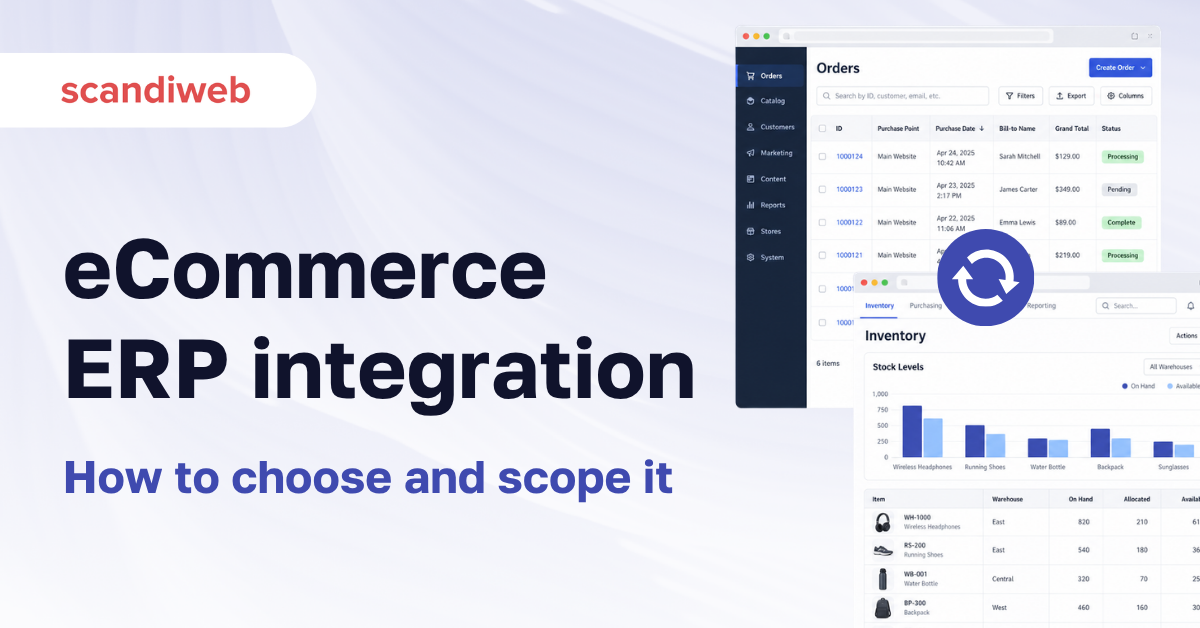
If your ERP and your store are still reconciled by somebody exporting a spreadsheet every morning, or if you are scoping that connection for the first time and every vendor you ask answers with their own product, this guide is about the part they skip.
eCommerce ERP integration connects your online store to the system that holds inventory, pricing, orders, and financial records, so those four things stay accurate in both places without anyone retyping them. The work splits into a purchased connector, an iPaaS middleware layer, or a custom API build. Which one you need depends far less on your ERP brand than on how your catalog, warehouses, and pricing rules actually work.
What is eCommerce ERP integration?
eCommerce ERP integration is a two-way data flow between a storefront and an ERP system. Orders and customer records move from the store to the ERP. Stock levels, pricing, product data, and fulfillment status move back. The integration runs either on a vendor connector, an iPaaS platform, or custom code against the ERP’s API, and the right choice is set by the complexity of your data rather than the size of your business.
Most stores already have some version of this. A nightly CSV export is an integration. So is a member of the finance team checking two screens. The question is rarely whether to integrate, and more often how much of the manual layer you can remove before the cost of removing it exceeds the cost of living with it.
Our wider guide to Magento integrations covers the other systems a store connects to. This one stays on the ERP side. Every ERP named in this guide has a page of its own in our integration directory, documented separately for each platform.
🚀 Quick takeaway
Every store already has an ERP integration. Most of them are a person. The project is about deciding which parts of that person’s job are worth automating.
The four data flows that decide the scope
Four flows account for almost all the work in an eCommerce ERP integration, and the scope of a project is set by which of them you need and how complex each one is in your business. Products and pricing, inventory and availability, orders and fulfillment, customers and accounts. A store that needs one-directional product data is a different project from a store that needs real-time multi-warehouse availability, even when both run the same ERP.
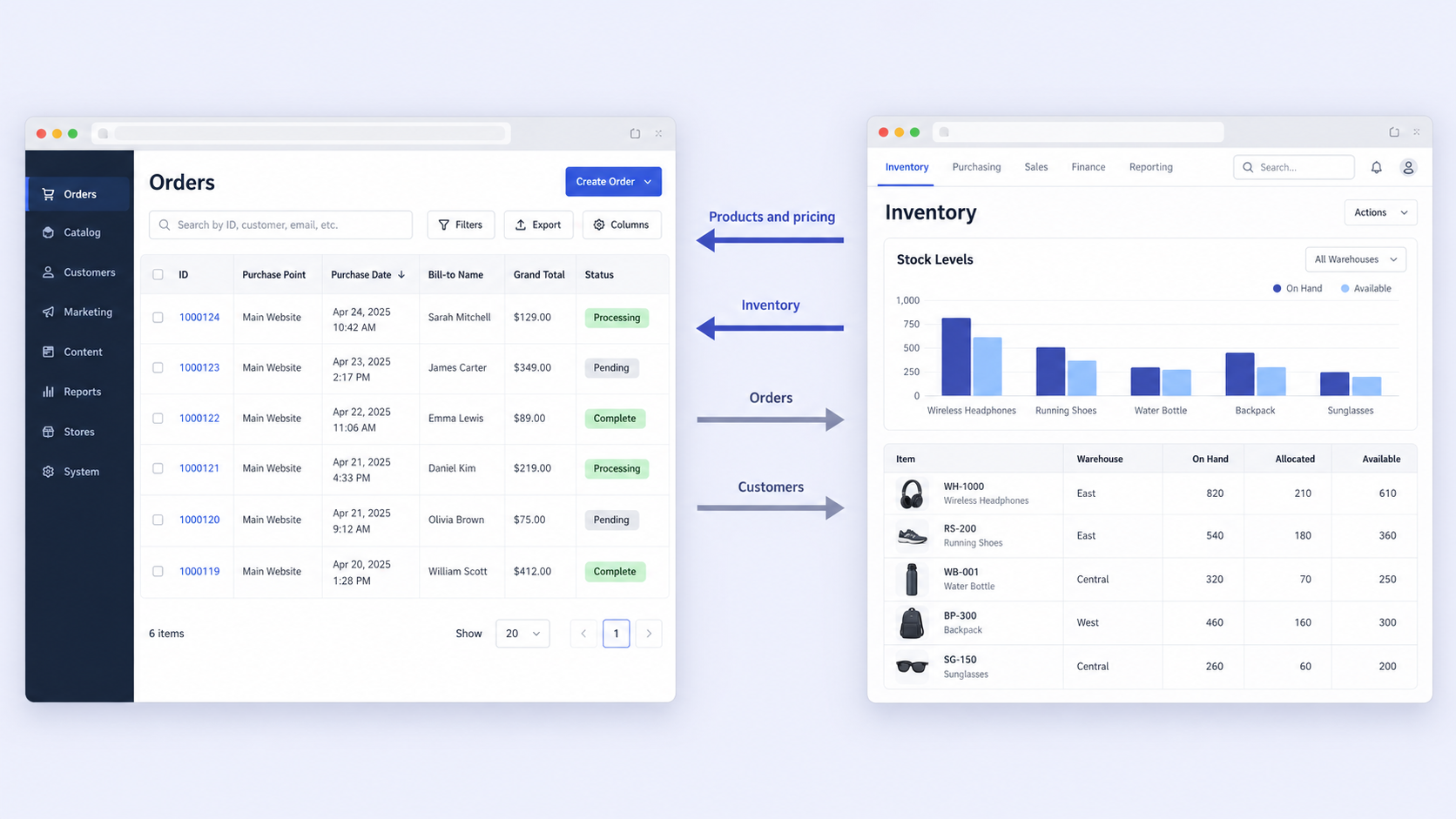
Products and pricing. Product data flows from the ERP or a PIM into the store. The difficulty is rarely the transfer. It is the mapping, because ERPs store products the way finance and operations need them, and storefronts need them the way customers browse them.
Inventory and availability. Simple on a single warehouse and genuinely difficult across several. What the store shows is the output of an allocation rule, and those rules are often encoded in the old integration rather than in either system.
Orders and fulfillment. Orders go out, status comes back. Custom order statuses are where this breaks, because almost every store has statuses the ERP has never heard of.
Customers and accounts. Straightforward for B2C. For B2B this carries account hierarchies, credit limits, negotiated pricing, and approval workflows, which is why B2B ERP integration is consistently the larger project.
🚀 Quick takeaway
Ask which of the four flows you need before you ask which connector to buy. Two stores on identical software can need completely different builds, and the difference is almost always in inventory and B2B pricing.
Which ERP fits which platform
There is no single best ERP for eCommerce. The practical question is which ERP your business already runs or is committed to, and how mature its integration path to your platform is. Microsoft and Oracle carry the deepest ecosystems. The Nordic and Israeli systems dominate their home markets and are frequently better fits for European mid-market operations, even though they appear in fewer international comparisons.
| ERP | Typical fit | Storefront integration notes |
|---|---|---|
| Microsoft Dynamics 365 Business Central | Mid-market, broad international base | REST and OData APIs with OAuth. The successor to Dynamics NAV, so many stores arrive here via a NAV to Business Central migration. The storefront side is covered on the Magento Business Central integration page, with the Magento Dynamics NAV integration and Magento Dynamics 365 integration pages covering the editions it replaces |
| Priority | Mid-market, strong in Israel and growing in Europe | Mature REST API. See the Shopify Priority ERP integration for what the connection covers |
| Infor | Manufacturing and distribution, complex catalogs | Several product lines with different integration paths. The Magento Infor integration page covers the Magento side |
| Visma | Nordic mid-market, finance-led | Regional strength and a common fit for Scandinavian retail. Covered on the Magento Visma integration page |
| Uniconta | Nordic small and mid-market | Cloud-native with a documented API. See the Salesforce Uniconta integration |
| Oracle ERP | Enterprise, multi-entity, multi-currency | Deepest capability and the longest integration timelines. The Salesforce Oracle ERP integration covers the Commerce Cloud path |
The pattern worth noticing is that the storefront work does not vary as much as the ERP brands suggest. The four data flows are the same. What changes is the API maturity, the authentication model, and how much of your business logic already lives inside the ERP rather than in a layer somebody built years ago. The same ERP on a different platform is a different project, which is why Dynamics NAV alone has its own page for Shopify, BigCommerce, Salesforce, and commercetools stores.
🚀 Quick takeaway
Pick the ERP on what your finance and operations teams need it to do. The storefront integration is a consequence of that decision, and it is rarely the deciding factor.
What actually breaks
Four failure modes account for most of the pain in an eCommerce ERP integration, and none of them appear on a connector’s feature list. Multi-warehouse stock accuracy, tax code mapping, custom order status handling, and undocumented business logic in the old integration. Each is invisible in a demo environment and obvious in production, usually within the first fortnight, because they surface only at real order volume against real edge cases.
Multi-warehouse stock accuracy
If you fulfill from more than one location, the number your store displays is the output of an allocation rule. Rebuild that rule deliberately or you will oversell within days. This is the single most common reason an integration that passed testing fails in its first week.
Tax code mapping
Storefronts calculate tax at the cart. ERPs calculate it at the invoice. When the mappings drift, the difference shows up as a reconciliation problem in finance instead of an error in the store, which means nobody notices for a month.
Custom order statuses
Partially shipped, awaiting stock, on hold for credit check. These rarely map one to one, and the failure presents as a customer receiving the wrong email at the wrong moment, absorbed by your support team before anyone logs it as a bug.
Undocumented logic in the old integration
The most expensive item on this list. Rules that exist in neither system, encoded years ago in a connector or a middleware script by somebody who has since left. They are discovered during parallel running, which is the worst possible moment.
🚀 Quick takeaway
All four of these are silent. They do not throw errors, they produce plausible-looking wrong numbers, which is why they reach finance and customer support long before they reach engineering.
Connector, iPaaS, or custom build
Buy the connector when your setup is close to standard. Use iPaaS when you are connecting several systems and want one place to manage them. Build custom when your allocation rules, B2B pricing, or multi-market tax logic are the reason your business works the way it does. Most stores end up with a hybrid, using a connector for the standard flows and custom work in the two or three places the business genuinely differs.
Choose a connector if:
- You fulfill from a single warehouse or use straightforward allocation
- Your catalog uses standard product types without heavy attribute customization
- You operate in one country and one tax regime
- Your order statuses match the platform defaults
- Your ERP and platform are a common pairing with a maintained connector
Choose iPaaS if:
- You are connecting three or more systems, not only the ERP
- You want non-developers to maintain the mappings
- Your data volumes are moderate and latency of a few minutes is acceptable
- You expect the set of connected systems to keep changing
Choose a custom build if:
- You allocate stock across multiple warehouses or retail locations
- You run B2B pricing, customer-specific catalogs, or negotiated rates
- You sell across several tax jurisdictions with different rules per market
- Your current setup contains logic nobody has documented
- You need real-time rather than batched synchronization
That hybrid answer is rarely the one a vendor recommends, because vendors sell whole solutions. It is usually the correct one.
🚀 Quick takeaway
The honest test is how many of your rules exist only inside the current integration. If the answer is more than a couple, the cheapest-looking option turns into the expensive one.
B2B changes the calculation
B2B eCommerce ERP integration is a materially larger project than B2C, because the ERP holds commercial logic the storefront has to reproduce faithfully. Customer-specific price lists, contract pricing, credit limits, account hierarchies, quote-to-order workflows, and approval chains all live on the ERP side and have to surface correctly for a logged-in buyer. Getting any of them wrong is visible to the customer immediately.
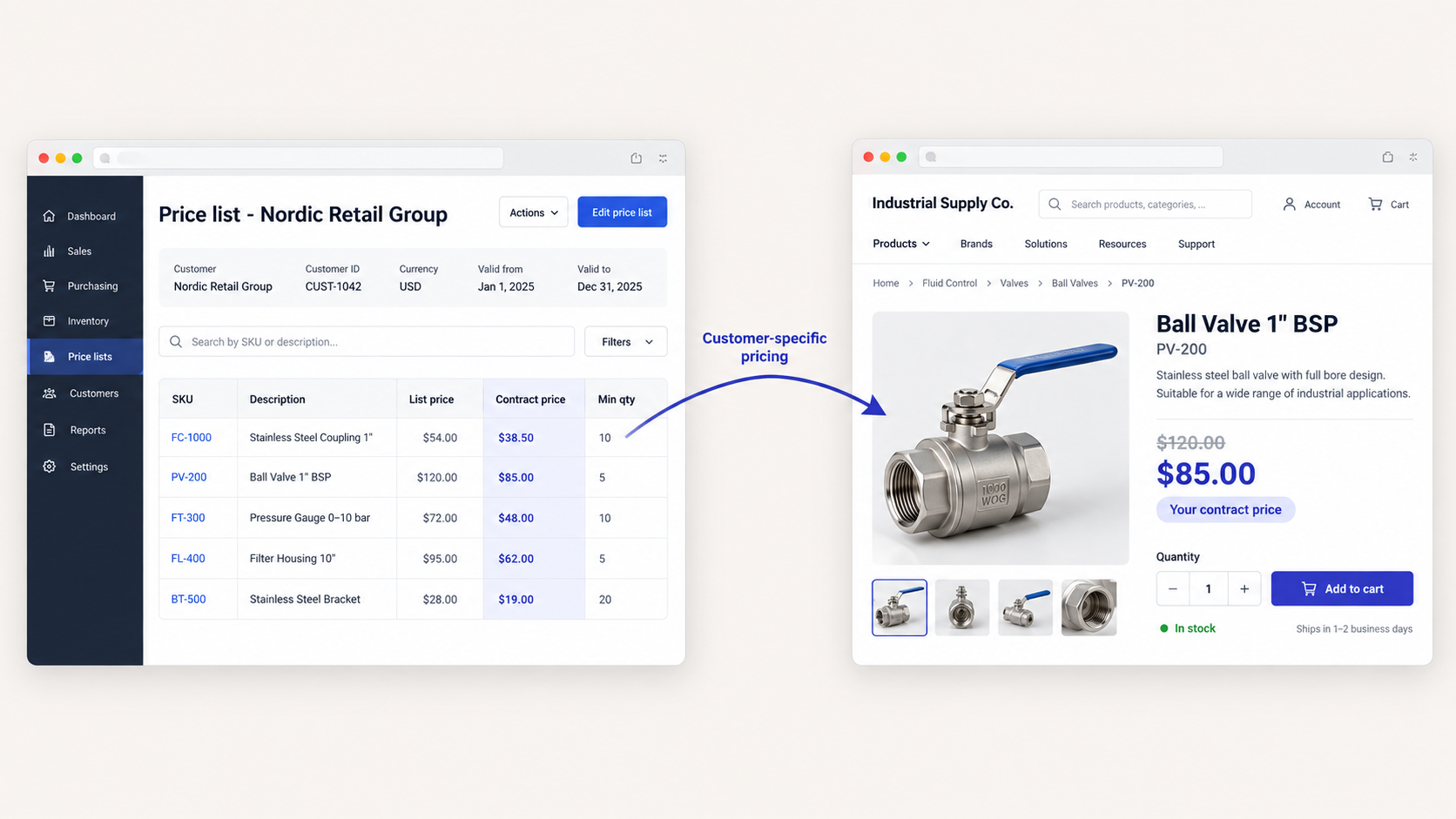
scandiweb built this at scale for Bechtle, unifying more than ten isolated internal platforms into a single CRM and eCommerce platform across 16 countries, with automated quote and contract generation running against ERP integrations. The platform now handles over 3 million quotes per month across 500+ admin users on 25+ microservices.
For multi-market retail the shape differs. Sportland runs a headless Adobe Commerce storefront across five markets integrated with both ERP and PIM, with 60+ store pick-up options and real-time multi-market analytics. That project saw 1,000+ orders in the first two days and an 80% higher conversion rate from AI merchandising.
🚀 Quick takeaway
If your pricing is negotiated per customer, assume B2B scope from the start. Retrofitting account-specific pricing onto an integration designed for B2C is close to rebuilding it.
How to scope it before you commit
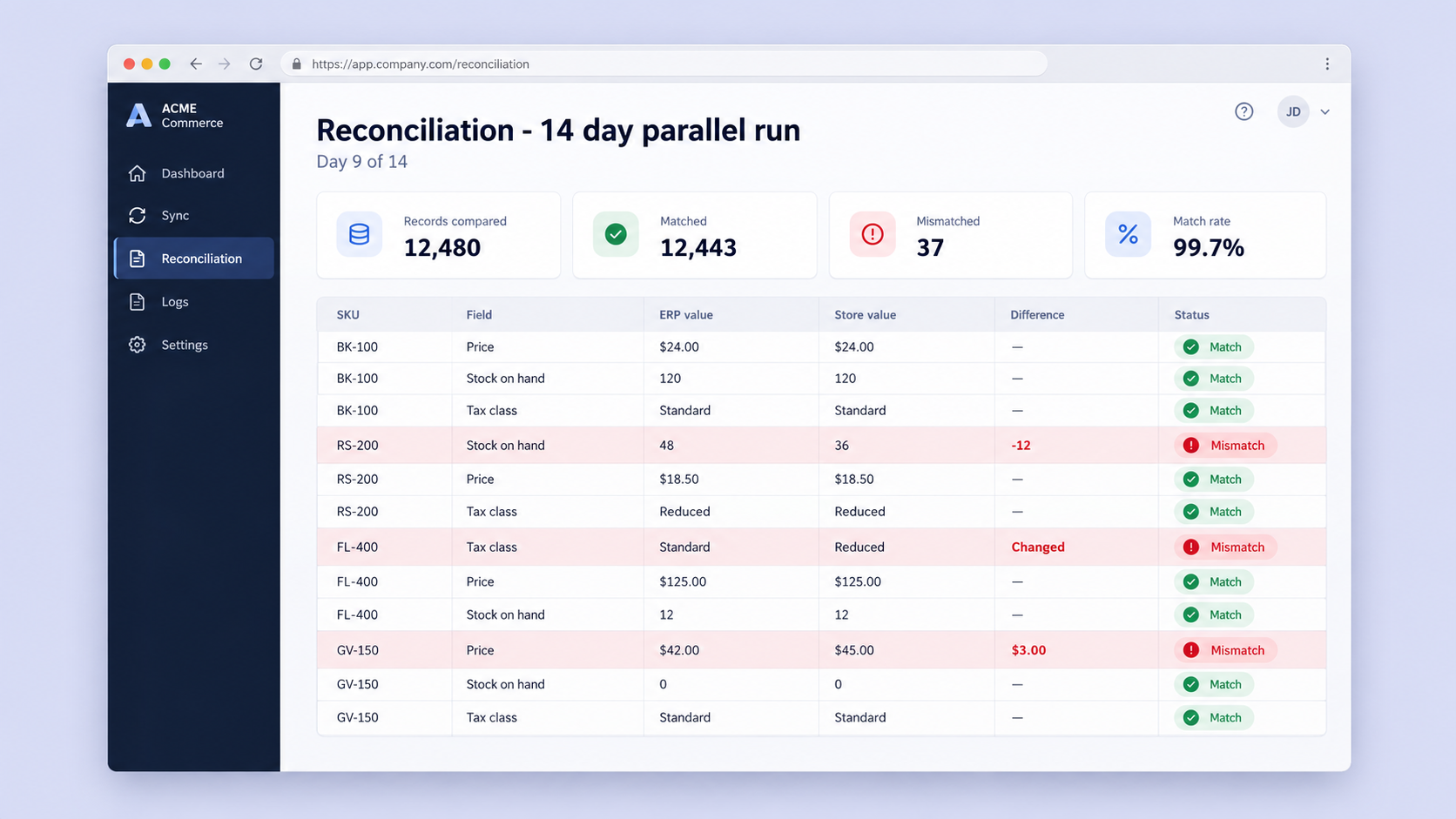
Scoping runs in five stages, and the order matters more than the duration of any one of them. Audit what moves today, map the data model field by field, build against a sandbox with production-shaped data, run both systems in parallel, then cut over with monitoring in place. Teams that compress the audit to save time are the teams that discover undocumented allocation logic during parallel running.
- Audit what moves today. Every field, in both directions, including the ones nobody remembers configuring. This stage produces the real scope, and it is the deliverable everything downstream is priced from.
- Map the data model. Decide field by field what maps directly, what needs transformation, and what has no equivalent. The no-equivalent list is the actual work.
- Build and test against a sandbox. Use production-shaped data, not sample records. Edge cases are the entire point of this stage.
- Run both systems in parallel. Compare stock, tax, and order status under real volume. Silent failures surface here or they surface in front of customers.
- Cut over and monitor. Keep field-level monitoring and a retry queue running for the first weeks, because the first genuine anomaly usually arrives during a promotion.
What to gather before the audit starts
You can shorten the first stage considerably by pulling four things together before anyone external looks at it. None of them require a developer.
- A list of every system that currently touches product, stock, order, or customer data, including the spreadsheets. The spreadsheets are usually where the undocumented rules live.
- Your warehouse and fulfillment setup, written out as rules. Which location serves which market, what happens when one runs out, and who decided that.
- Your full order status list as it appears to customers, alongside what each status means operationally.
- Your tax setup per market, including who currently owns the mapping and where it is maintained.
Teams that arrive with these four documented consistently get a tighter scope and fewer surprises during parallel running, because most of what an audit discovers is one of these four written down for the first time.
🚀 Quick takeaway
Treat the audit as the deliverable rather than the paperwork. Every number anyone quotes you afterward is derived from what it finds.
Frequently asked questions about eCommerce ERP integration
What is an ERP system for eCommerce?
An ERP system for eCommerce is the software that holds your inventory, pricing, orders, purchasing, and financial records in one place. The storefront sells, and the ERP is the system of record behind it. Common examples include Microsoft Dynamics 365 Business Central, Oracle ERP, Infor, Priority, Visma, and Uniconta. The ERP itself is not customer-facing, which is why the integration between the two matters.
Can you give me an example of ERP integration?
A customer places an order on your store. The order passes to the ERP, which reserves stock, generates the invoice, and queues the shipment. When the warehouse dispatches, the ERP sends the fulfillment status and tracking number back to the store, which emails the customer. Meanwhile stock levels update in both directions continuously, so the storefront never sells something that is no longer available.
Which ERP system is best for eCommerce?
There is no single best one. The right ERP is the one that matches how your finance and operations teams work, and which your business is already committed to. Microsoft Dynamics 365 Business Central and Oracle ERP carry the broadest ecosystems. Priority, Visma, and Uniconta are frequently better fits for European mid-market operations. The storefront integration is a consequence of that choice rather than a reason for it.
How long does an eCommerce ERP integration take?
Timelines are set by complexity rather than by ERP brand. A single-warehouse, single-market store on a maintained connector is a short project. A multi-warehouse B2B store with negotiated pricing and several tax jurisdictions is a substantially longer one. The audit stage is what tells you which of those you are, which is why it comes first.
Do we need a connector or a custom integration?
Buy the connector when your fulfillment, catalog, and tax setup are close to standard. Build custom when your allocation rules, B2B pricing, or multi-market logic are the reason your business works as it does. Most stores land on a hybrid, using a connector for standard flows and custom work only where the business genuinely differs.
Will ERP be replaced by AI?
No. AI is changing how people interact with ERP data through natural-language querying, forecasting, and anomaly detection, and most major vendors now bundle some version of this. The underlying job of an ERP, holding an auditable system of record for inventory, orders, and finances, is a system-of-record problem rather than a prediction problem. For integration planning, treat AI features as an additional data consumer to account for, not as a reason to delay.
What breaks most often in an ERP integration?
Multi-warehouse stock accuracy, tax code mapping, custom order statuses, and undocumented logic inherited from a previous integration. None of these produce error messages. They produce plausible-looking wrong numbers, which is why they typically reach finance or customer support before anyone in engineering sees them.
Getting an eCommerce ERP integration right
An eCommerce ERP integration is a storefront project as much as a finance one, and the parts that overrun sit on the storefront side. The four data flows tell you the shape. The four failure modes give you a test plan. The audit gives you a number you can defend.
If your setup is standard, a connector will get you there and you should use one. If your stock allocation, pricing rules, or tax logic are the reason your business works, plan custom work in those specific places and buy the rest.
Working out what your current setup actually does is the cheapest stage of this whole project and the one most often skipped. If you want a second pair of eyes before you commit to a scope, talk to our integration team.




































