
If two people on your team start every morning matching supplier invoices to purchase orders, you already know what three way matching costs when it’s done by hand. Every invoice gets checked against the order and the delivery note, line by line, before anyone pays it. The check itself is simple, but with dozens of suppliers whose documents never look the same twice, it fills the morning.
The numbers show how common this is. In Ardent Partners’ State of ePayables 2025, a survey of 204 accounts payable teams, 18.4% of invoices hit an exception, and only 35.4% were processed straight through without anyone touching them.
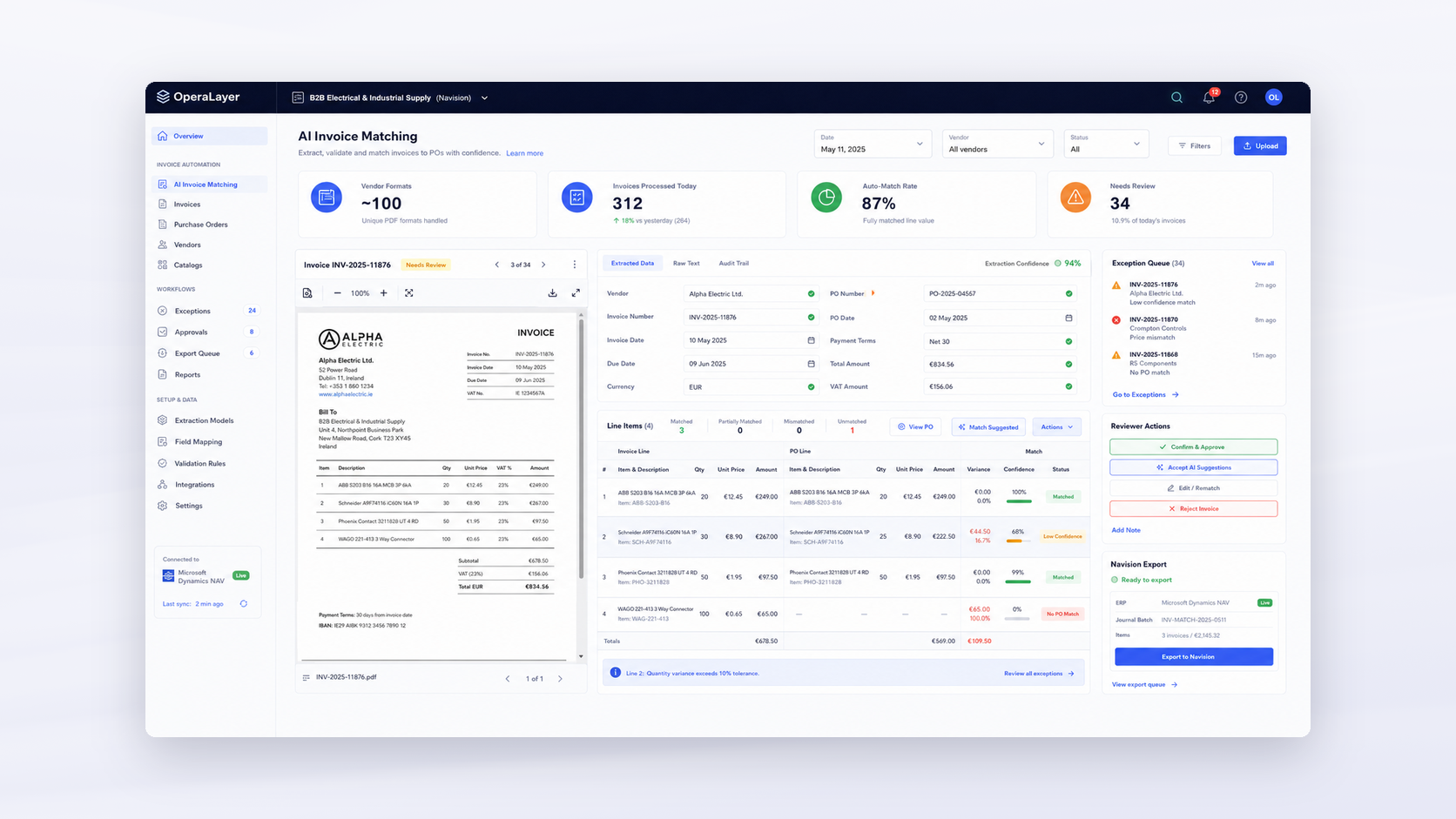
This guide explains what three way matching is, how it differs from two way and four way matching, and why it breaks down for wholesalers. Then it walks through how AI does the matching, using one of our own rollouts: a Baltic electrical wholesaler with 100+ suppliers that now matches 87% of its invoices with nobody touching them.
What is three way matching?
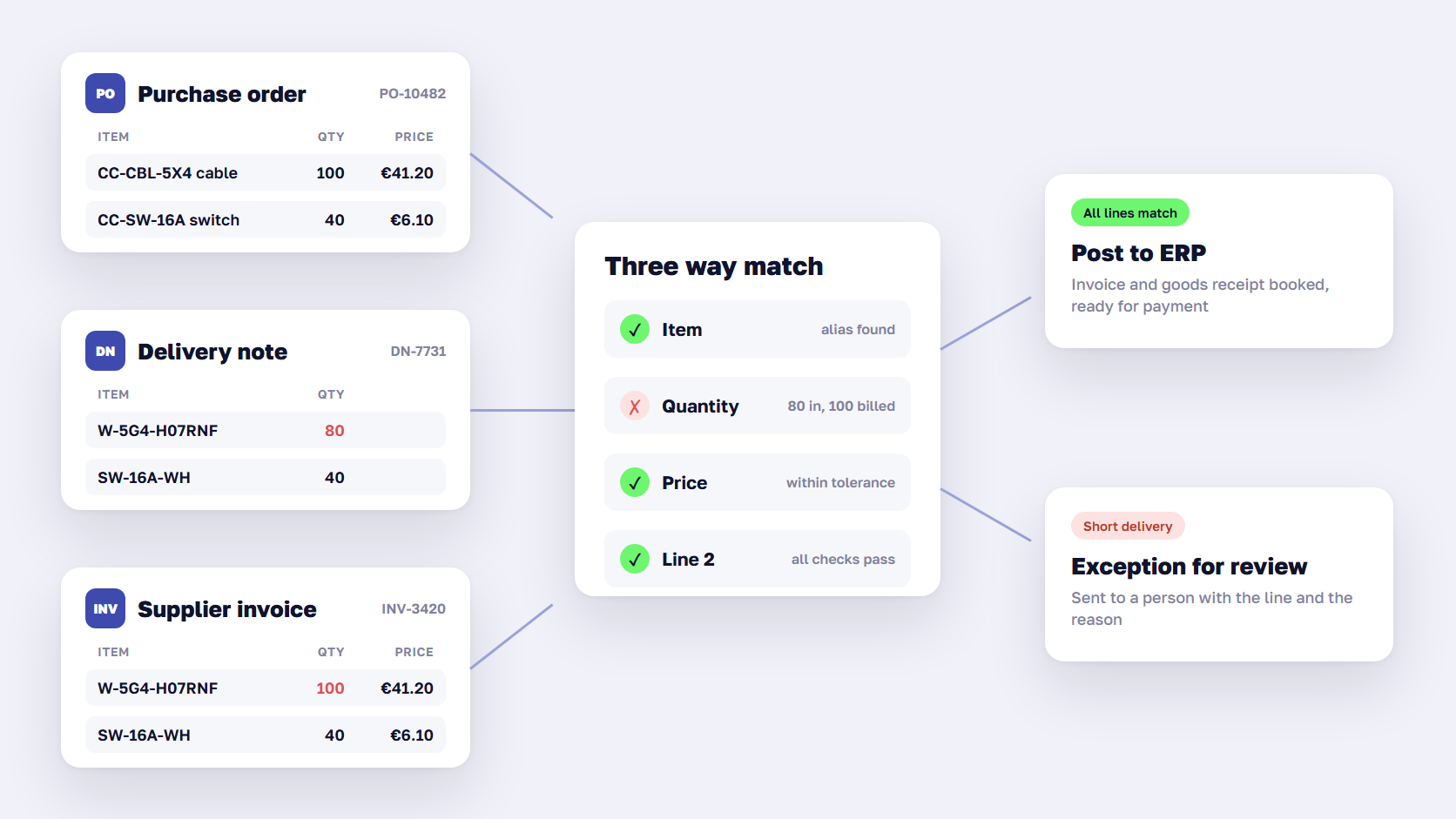
Three way matching is an accounts payable control that checks a supplier invoice against two other documents before it is paid: the purchase order and the goods receipt, usually based on the supplier’s delivery note. If the items, quantities, and prices agree within set tolerances, the invoice is approved for payment. If they don’t, it goes to a person as an exception.
Each document answers a different question:
- The purchase order shows what you agreed to buy, at what price.
- The goods receipt or delivery note shows what actually arrived. For cross-border road freight, the CMR consignment note is often part of that proof.
- The invoice shows what the supplier wants to be paid for.
A three way match catches the mistakes that cost money quietly: paying for 100 cable reels when 80 arrived, paying last quarter’s price after a discount was agreed, or paying the same invoice twice. Ardent’s benchmark shows how much of the work starts from orders: 65.4% of invoices are linked to a purchase order, and those are the invoices this check can cover.
🚀 Quick takeaway
The rule is easy to write down. The work is in finding the right order and the right delivery for every invoice line, and that is the part people spend their mornings on.
Two way vs three way vs four way matching
Two way matching compares only the invoice and the purchase order. Three way matching adds proof of delivery. Four way matching adds an inspection or quality check on top. The more documents you compare, the more errors you catch, and the more exceptions you create when one document is missing or late.
| Two way matching | Three way matching | Four way matching | |
|---|---|---|---|
| Documents compared | Invoice + purchase order | Invoice + purchase order + goods receipt | Invoice + purchase order + goods receipt + inspection |
| Catches | Wrong prices, items not ordered | Wrong prices, short or missing deliveries | All of these, plus goods that failed inspection |
| Typical use | Services, subscriptions, low-value orders | Physical goods, most wholesale and distribution | Regulated or high-value goods, quality-critical parts |
| Main risk | Paying for goods that never arrived | Exceptions when the receipt is missing or late | Slow approvals waiting for inspection results |
For a distributor or wholesaler buying physical stock, three way matching is the sensible default. Two way matching misses short deliveries, and those are the most common problem when goods arrive by pallet from many suppliers.
Why three way matching breaks down for wholesalers
The documents rarely line up on their own. A supplier invoice describes the goods in the supplier’s words, and your ERP describes them in yours. Most of the time in manual matching goes into translating between the two.
These are the exceptions we see most often:
- Item codes don’t match. The supplier invoices “W-5G4-H07RNF” and your order says “CC-CBL-5X4.” A person has to know they are the same cable.
- Units differ. You ordered 10 boxes, and the supplier invoices 500 pieces.
- Deliveries arrive in parts. One order is delivered on three delivery notes and billed on two invoices.
- Prices changed. A discount agreed by phone never reached the purchase order.
- Every supplier has its own layout. With 100 suppliers, you get roughly 100 invoice formats, in different languages, as PDFs, scans, and phone photos.
- The receipt is missing. The goods arrived, but the warehouse hasn’t booked the delivery note yet, so the match can’t finish.
Microsoft Dynamics NAV, like most ERPs, stores purchase orders and posts invoices. It doesn’t read 100 different PDF layouts or match supplier lines to your items, so people do both. According to Ardent, only 51.4% of invoices reach accounts payable teams electronically, which means about half still have to be read before anyone can match them.
🚀 Quick takeaway
Exceptions are mostly translation problems. The supplier and your ERP describe the same goods differently, and someone on your team holds the dictionary in their head.
How AI three way matching works
AI invoice processing for three way matching follows six steps: read every document, find the matching order and delivery, match each line, score how confident the match is, post the result to the ERP, and learn only from corrections that repeat. People review only the invoices the software is unsure about.
This is the sequence we built for the wholesaler with OperaLayer, our product for the work that falls between business systems.
1. Read every document, in any layout
The software extracts the supplier, invoice number, dates, lines, quantities, units, and prices from each PDF, scan, or photo, and gives every field a confidence score. Invoices, delivery notes, and CMR documents all go through the same reader, so the delivery evidence is available when the invoice arrives.
2. Find the order and the delivery
Each invoice is linked to its purchase order in the ERP and to the delivery notes booked against it. When one order spans several deliveries or invoices, the software keeps track of what has already been received and billed, so a partial delivery doesn’t look like an error.
3. Match line by line: barcode, SKU, alias, then fuzzy
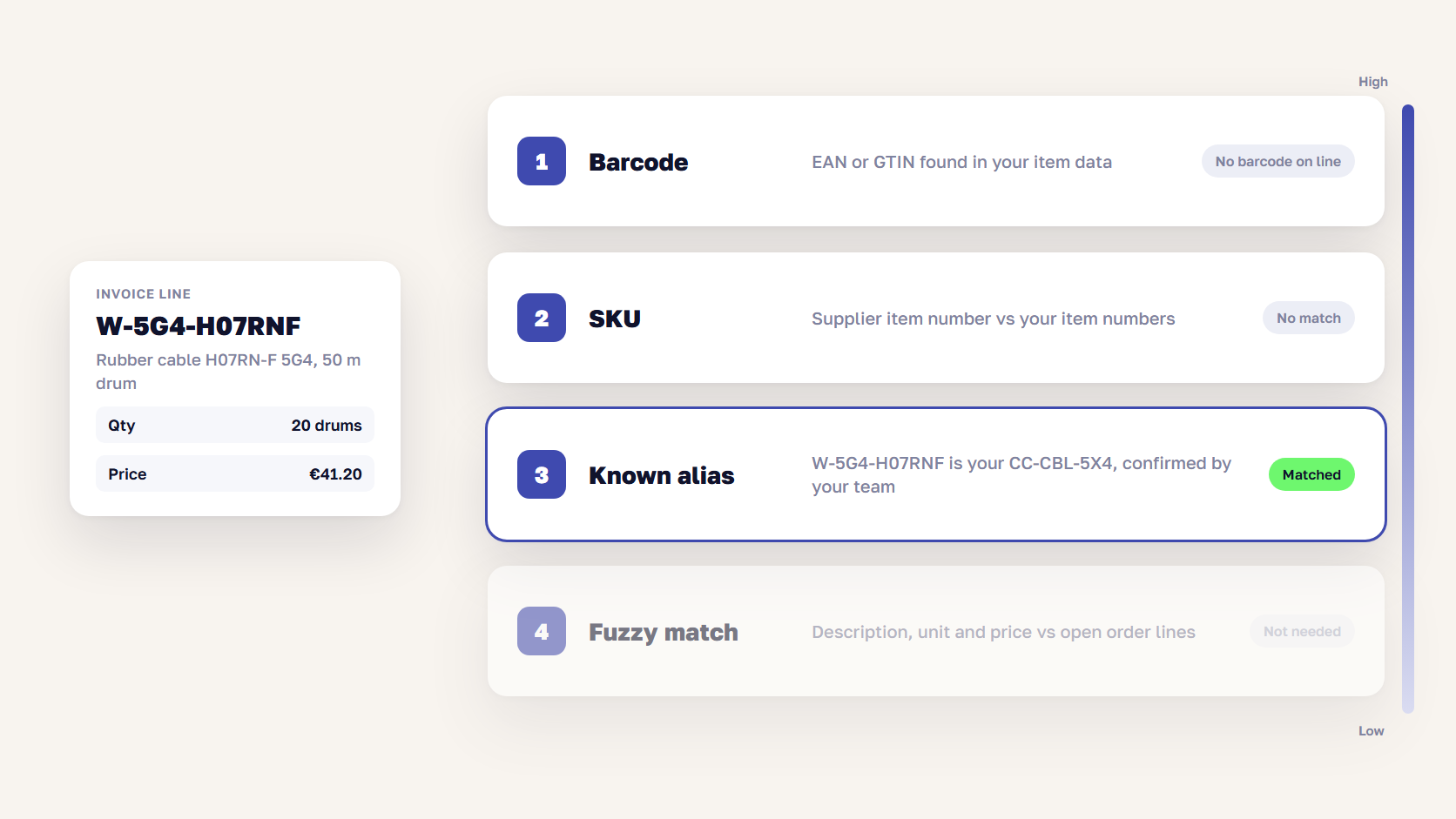
Line matching is where most of the manual time goes, so it runs in a fixed order, from the most reliable signal to the least:
- Barcode. If the supplier line carries an EAN or GTIN that exists in your item data, that is the match.
- SKU. The supplier’s item number is compared with your item numbers and the supplier item numbers already stored in the ERP.
- Known alias. A table of supplier codes your team has already confirmed, such as “W-5G4-H07RNF is our CC-CBL-5X4.”
- Fuzzy match. If nothing else works, the description, unit, and price are compared with open order lines to suggest the closest candidate.
A match from step 1 is almost always right. A match from step 4 is a suggestion and counts for less in the confidence score.
4. Score confidence and send only exceptions to people
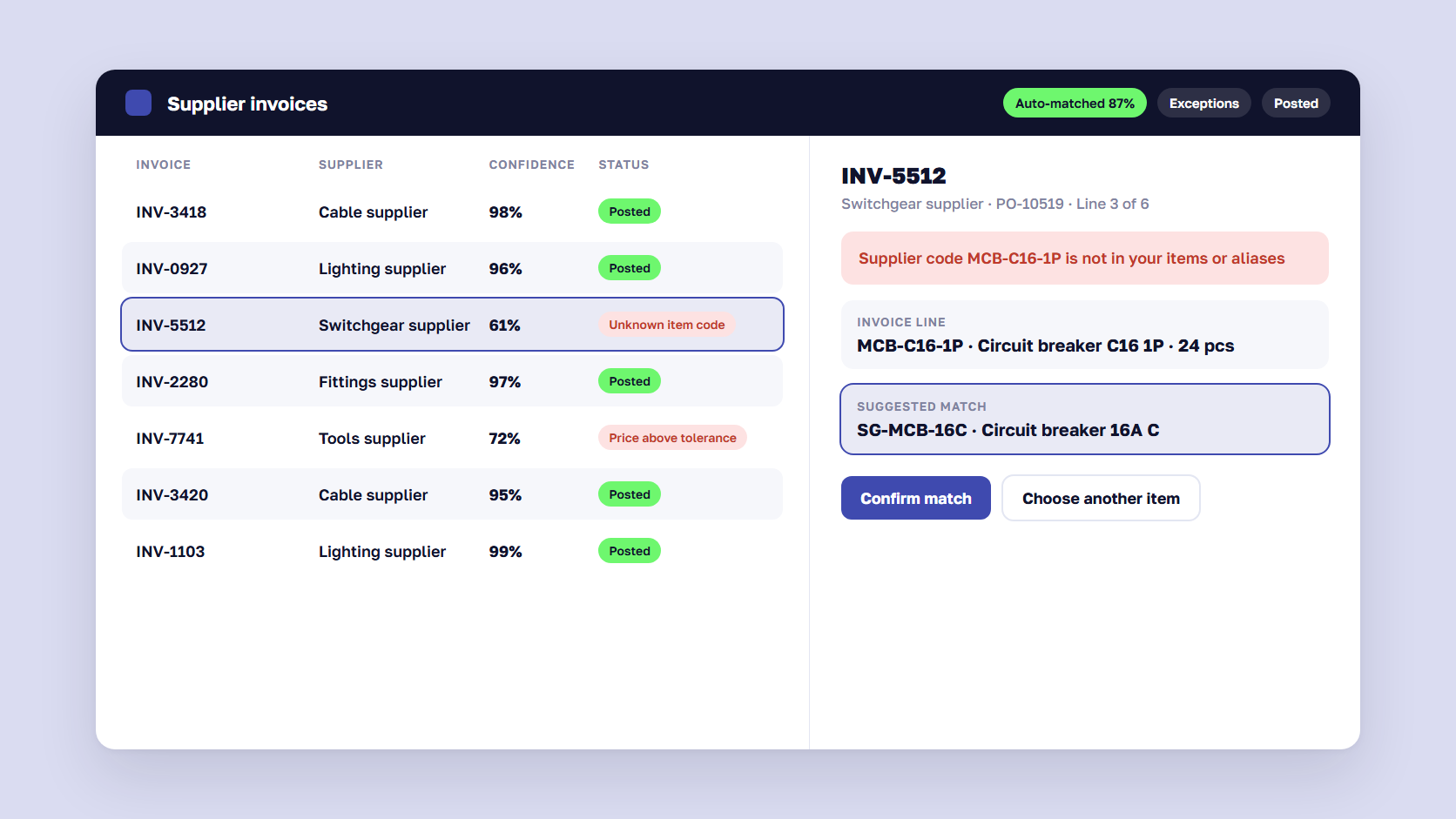
Every invoice gets an overall confidence score built from the extraction, the line matches, and the quantity and price checks. Above the threshold, it goes through. Below it, it lands in a review queue with the reason shown: an unknown item code, a price above tolerance, or a delivery not yet booked. The reviewer fixes one line instead of rechecking the whole invoice.
5. Send matched invoices to the ERP
Purchase orders are read from the ERP, and matched invoices go back to it as a batch ready to post. For the wholesaler, that means Dynamics NAV: purchase orders come in, and approved invoices go out as a Navision-ready journal batch. The ERP stays the system of record, and nothing is migrated.
6. Learn from corrections, but only when they repeat
A reviewer’s correction becomes a standing rule only after the same correction recurs, so one mistaken click can’t change how every future invoice from that supplier is matched.
🚀 Quick takeaway
Put exact signals first and fuzzy guesses last. That order keeps the auto-matched share high without letting weak matches through to the ERP.
Case: a Baltic electrical wholesaler with 100+ suppliers
The wholesaler buys from about 100 suppliers and runs on Microsoft Dynamics NAV. Before the project, two people checked every supplier invoice against orders by hand, every morning, together with the delivery notes and CMR documents. NAV could store the orders, but it couldn’t read 100 different PDF formats or match lines to purchase orders.
We built the matching app on OperaLayer, on top of NAV. A first working version ran on the wholesaler’s own documents in about two weeks. As we wrote in why custom software is becoming cheaper than SaaS, AI has changed how fast software can be built around a single workflow: work that once took years can now take weeks.
Earning the team’s trust took another month. The people who had matched invoices for years needed to see the software get the hard cases right before they let it send anything to NAV. During that month, they checked its suggestions against their own work and corrected the mistakes. Corrections that came up again turned into rules. Those were the same people who knew which supplier codes meant what, and their knowledge went into the alias table.
The results:
- 87% of invoices are matched with nobody touching them. People see the rest.
- Around 100 supplier formats are read without templates.
- About 2,000 documents a month go through the system: invoices, delivery notes, and CMR documents.
The next phase is scoped: supplier documents will come in straight from email instead of being uploaded, and approved invoices will go into NAV through its API instead of an export batch.
The same approach works on other old systems. When LegacyBridge joined OperaLayer, its first IBM i (AS/400) workflow went live in two weeks and now processes more than 10,000 documents a month, each in under 10 seconds instead of 10 to 15 minutes by hand. The details are in our post on LegacyBridge joining OperaLayer.
🚀 Quick takeaway
Building the first version was the short part. The month spent earning the team’s trust is what turned it into something they rely on, so plan for that month from the start.
Why seller-side automation comes before buyer-side AI agents
Most talk about AI agents in B2B is about the buyer’s side: an agent that searches suppliers, compares prices, and places the order. Those agents still struggle with B2B basics such as contract prices and purchase orders, as we cover in our B2B eCommerce trends for 2027 and our guide to the Universal Commerce Protocol.
The seller’s own side is ready now. Invoice matching repeats every day and follows rules your team can already write down, using data the ERP holds. The outcome is easy to measure: the share of invoices nobody touched. That makes it a good first job for AI inside a distributor or wholesaler.
The same pattern covers the other paperwork that arrives in many formats:
- Purchase order automation on the buying side: reading order confirmations and checking them against your POs before the goods arrive.
- Sales order automation on the selling side: customer orders that arrive by email or PDF, read and checked against price lists and stock.
- Order entry automation for the ERP: entering what was read into the right screens, with a person approving anything unusual.
AI order entry and invoice matching use the same parts: a reader, a matcher, a confidence score, and a review queue. Once the first one is live, the next one starts with most of the work done.
🚀 Quick takeaway
The first AI agents worth building work for your own team. Invoice matching runs on your data, and one number tells you whether it works.
How to prepare for automated invoice matching
You don’t need clean data to start, but a few decisions speed up the first weeks. Collect these before the project begins:
- Tolerances. How far can price and quantity differ before an invoice becomes an exception? Write the rule down, per supplier if needed.
- A sample of real documents. A month of invoices, delivery notes, and CMR documents from your largest and messiest suppliers.
- Your alias knowledge. The supplier codes your team already translates in their heads. Even a rough spreadsheet saves weeks.
- ERP access. Read access to purchase orders and receipts, and a way to post invoices back. For Dynamics NAV, plan around the move to Business Central, and see our guide to ERP integration for the options.
- One owner. Someone from accounts payable or purchasing who reviews exceptions in the first month and decides which corrections become rules.
E-invoicing mandates will make part of this easier. Belgium has required structured B2B e-invoices since January 2026, France started in September 2026, and Germany requires larger companies to issue them from January 2027, as our guide to the digital product passport lists. Structured invoices remove the reading step, but the line matching and the exceptions stay, and so do suppliers from outside those countries.
FAQ about three way matching
What is the difference between two way and three way matching?
Two way matching compares an invoice with the purchase order: the items and prices must agree. Three way matching adds the goods receipt or delivery note, so you only pay for what actually arrived. It catches short and missing deliveries that two way matching misses, which is why most wholesalers and distributors use it for physical goods.
What are common three way matching errors?
The most common three way matching errors are supplier item codes that differ from yours, different units of measure, partial deliveries spread across several delivery notes, prices that changed after the order, missing goods receipts, and duplicate invoices. Most of them are translation problems between the supplier’s documents and your ERP, which is why a confirmed alias table removes so many exceptions.
Can AI do three way matching?
Yes. AI reads invoices, delivery notes, and orders in any layout, matches each line to your items, and scores how confident each match is. Invoices above the confidence threshold go to the ERP without a manual check, and the rest go to a person with the reason shown. At one Baltic electrical wholesaler, this matches 87% of invoices with nobody touching them.
What auto-match rate is realistic for invoice matching automation?
It depends on your suppliers and data, but well above the market average is realistic. Ardent Partners’ 2025 benchmark puts straight-through processing at 35.4% of invoices on average. A wholesaler we work with reached 87% across about 100 supplier formats. Expect a lower rate in the first weeks, rising as repeated corrections become rules.
Does AI invoice processing replace the accounts payable team?
No. It removes the routine matching and leaves the decisions to people. The team reviews exceptions, approves anything unusual, and confirms which corrections become rules. In our wholesaler rollout, the people who used to match every invoice by hand now review only the exceptions, and their knowledge of supplier codes is what made the high match rate possible.
How long does it take to automate three way matching?
With an operational layer on top of your existing ERP, a first working version can run on your own documents in about two weeks. Plan for roughly another month of side-by-side review before your team trusts it to post invoices on its own. The ERP stays in place, so there is no migration to schedule.
Three way matching works when your team trusts it
Three way matching is a simple control that takes hours when the documents come in 100 layouts and the item codes don’t line up. AI can now read the documents and match the lines, then send people only the invoices that need a decision. At our wholesaler, the first version took about two weeks. The month of side-by-side review that followed is what made the team trust it to run on its own.
Still matching supplier invoices by hand every morning? Tell us which documents your team checks, and we'll show you what automated matching would look like on your own data.




































