
If your trade customers still email orders that someone retypes into Shopify, or if you’re trying to work out whether Shopify B2B can carry your price lists and payment terms without a pile of apps, this guide gives you the honest version. We build B2B stores on both Shopify and Magento, so we see where each platform does the job and where the custom work starts.
Since April 2026, Shopify B2B is no longer a Plus-only feature. Below, we cover what it includes on each plan, how company accounts, catalogs, and payment terms work, where the limits are, and when a Magento B2B build is the better fit.
What is Shopify B2B?
Shopify B2B is the set of wholesale features built into the Shopify admin. It lets you sell to business customers from the same store and checkout as your retail shoppers. Buyers belong to company accounts with their own locations, catalogs with negotiated prices, quantity rules, and payment terms such as Net 30. It runs on the Basic, Grow, Advanced, and Plus plans, with Plus unlocking customer-specific catalogs, deposits, and partial payments.
The model has four layers, and almost every limit in this guide comes from how they connect.
- Company: the business you sell to, such as a retailer or a contractor
- Company location: a branch, store, or warehouse of that company, each with its own addresses, catalogs, payment terms, tax settings, and checkout rules
- Customer: a person who buys on behalf of a location, with a role that controls what they can do
- Catalog: the products and prices a location can see, built from a price list and a product publication
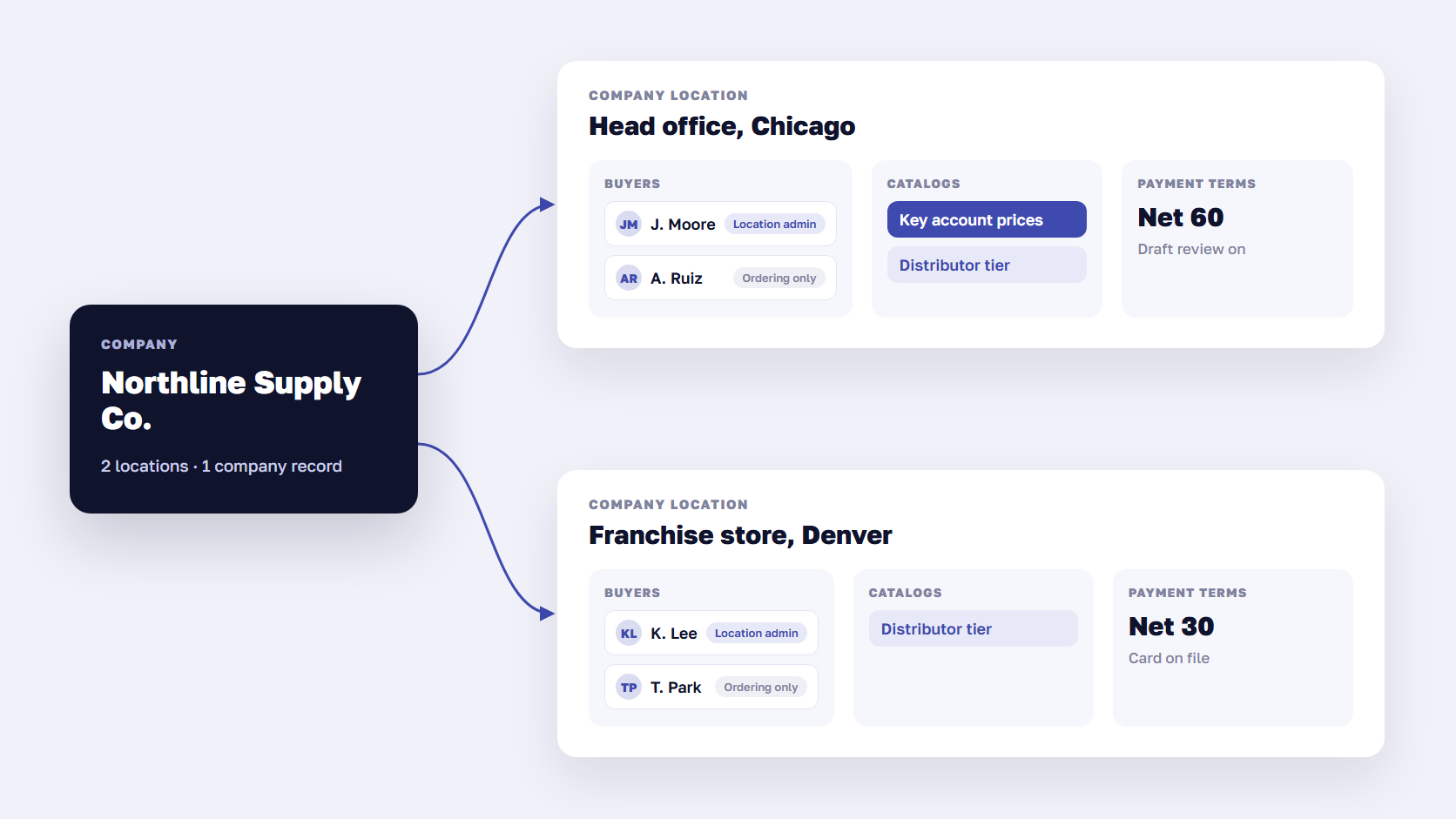
Most settings belong to the location, which suits buyers with many branches. A hardware chain with 40 stores can give its head office Net 60 and its franchise stores card payment at checkout, all under one company record. You can run B2B inside your retail store (a “blended” store) or as a separate store for wholesale only, using Shopify’s Trade theme, which can hide prices from visitors who aren’t logged in.
Shopify B2B vs Shopify Plus B2B: what each plan includes
On 2 April 2026, Shopify extended native B2B to the Basic, Grow, and Advanced plans at no extra cost. Before that, Shopify Plus B2B was the only native option, and most guides you’ll find still say so. Starter and Retail plans don’t include B2B.
| Feature | Basic, Grow | Advanced | Plus |
|---|---|---|---|
| Companies, locations, buyer roles | Yes | Yes | Yes |
| B2B catalogs | Up to 3 | Up to 3 | Unlimited |
| Catalogs assigned directly to a company location | Not included | Not included | Yes |
| Quantity rules and volume pricing | Yes | Yes | Yes |
| Net terms, vaulted cards, PO numbers | Yes | Yes | Yes |
| Draft orders, checkout to draft, reorders | Yes | Yes | Yes |
| Deposits and partial payments | Not included | Not included | Yes |
| Different storefront and checkout content for B2B buyers | Not included | Yes | Yes |
The three-catalog cap applies across all your B2B markets, so on a non-Plus plan you get three price tiers in total, such as “trade”, “distributor”, and “key accounts”. On these plans, catalogs attach to B2B markets, and a single company can’t get a catalog of its own. If every customer has their own negotiated prices, Shopify B2B without Plus won’t hold them. The non-Plus catalog features also require the new Shopify Markets setup.
Plus removes the cap and lets you assign a catalog straight to one company location, which is how customer-specific pricing works on Shopify. For the wider differences in fees, checkout, and expansion stores, see our comparison of Shopify vs Shopify Plus, and check Shopify’s pricing page for the current Plus fee.
🚀 Quick takeaway
Your plan depends on whether prices are set per tier or per customer. Up to three tiers fit Grow or Advanced, and per-customer pricing needs Plus.
Company accounts and buyer roles
Company accounts are where Shopify B2B wholesale starts. You create a company in the admin, invite buyers by email, or let them apply through a request form on your store. Existing retail customers and their order history can be moved into a company, which helps when trade buyers have been ordering through your normal checkout with discount codes.
How companies, locations, and buyers fit together
Each company can have up to 10,000 locations and 10,000 customers. Each location can have up to 50 customers with permissions on it. The 50-buyer cap rarely matters for a small wholesaler, but it does for a national account where every site manager orders for the same distribution center.
Buyers sign in through Shopify’s customer accounts, and that login is what shows them wholesale prices, their catalogs, and their payment terms. If you use a corporate login provider, Shopify supports third-party identity providers through OpenID Connect.
Buyer roles and order approvals
As of October 2026, Shopify has two B2B buyer roles per location.
- Ordering only: places orders for the location and sees their own orders, which is the default for a new contact
- Location admin: places orders, sees every order for the location, edits its shipping and billing addresses, reorders, and submits returns
There are no custom buyer roles. You can’t create a “requester” who builds a cart for a manager to approve, or a finance user who sees invoices without ordering. Shopify’s developer community has an open feature request for custom roles, and Shopify staff have acknowledged the gap.
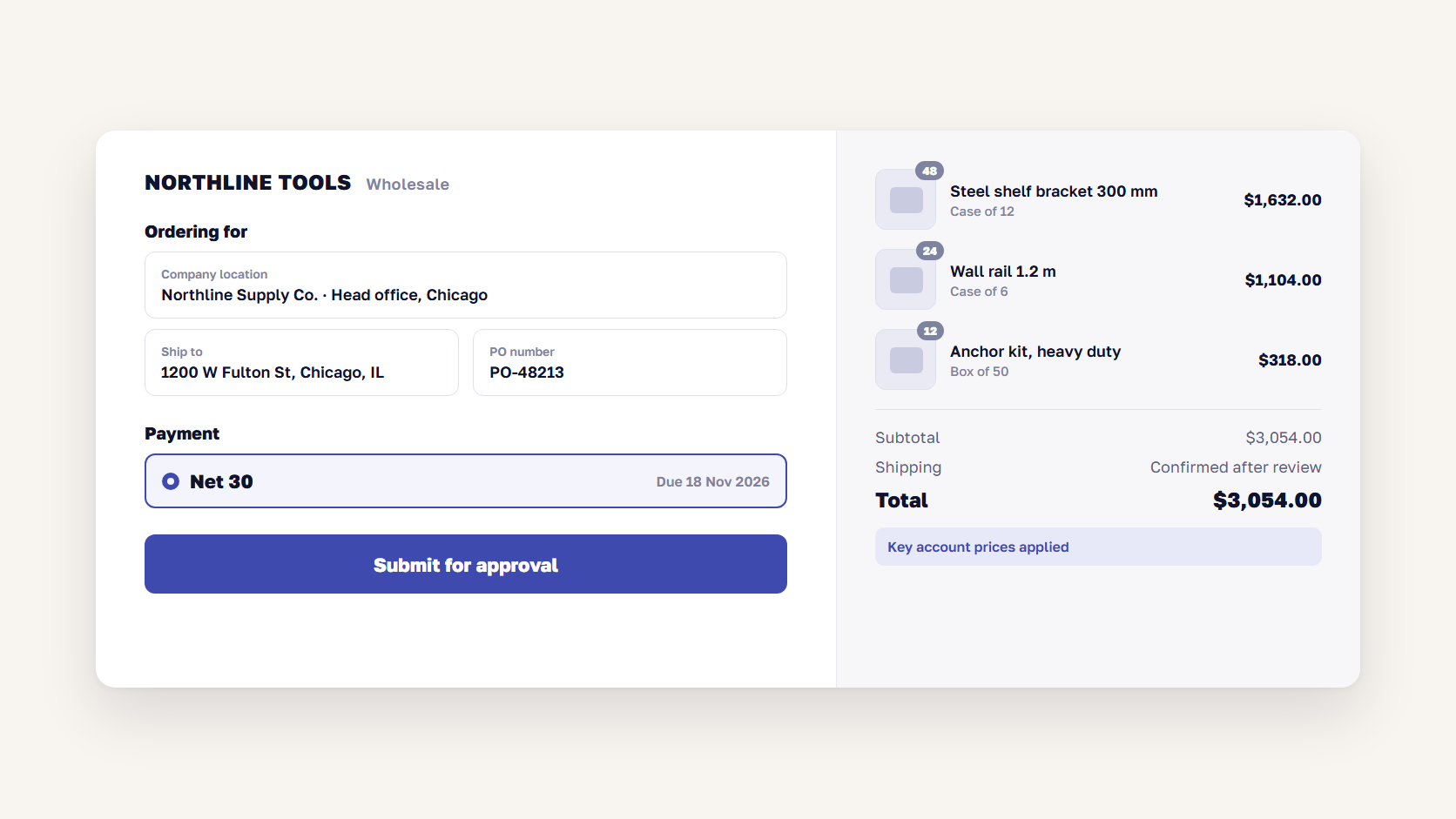
Approvals work at the merchant level instead. You can set a location to “Submit all orders as drafts for review”, and its buyers then see a “Submit for approval” button at checkout instead of paying. In this flow your team approves the order. If the buyer’s own manager has to sign off first, you need an app or custom work.
How Shopify B2B pricing works: catalogs and price lists
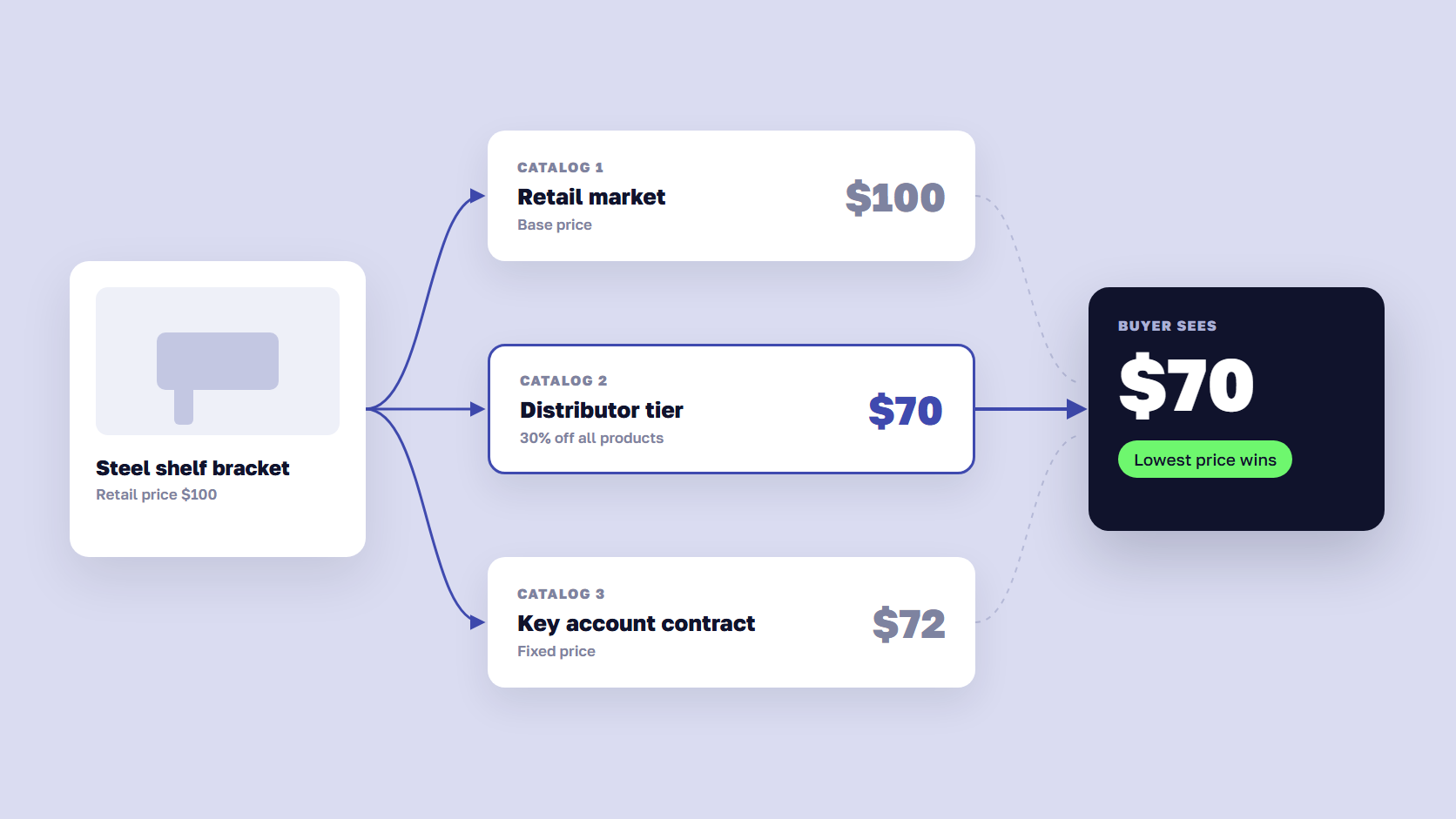
Shopify B2B pricing runs through catalogs. A catalog sets which products a company location can see and what it pays, using either an overall percentage adjustment, such as 30% off retail, or fixed prices per product or variant. Fixed prices override the percentage. When a location has several catalogs that price the same product, the buyer sees the lowest price.
In the API, every catalog has one price list and one product publication, and a location can carry up to 25 catalogs. A buyer who qualifies for a “distributor” catalog and a “spring promotion” catalog gets whichever price is lower. If your contract says a key account pays a fixed net price that never stacks with promotions, Shopify won’t enforce that by itself. You have to design the catalogs so the overlap never happens.
The other pricing tools stack on top of catalogs.
- Quantity rules: a minimum, maximum, or increment per variant, such as cases of 12
- Volume pricing: up to 10 price breaks per product within a catalog, such as $8 each from 100 units
- B2B discounts: automatic discounts or codes limited to B2B markets, and custom discount logic through Shopify Functions
- Price lists by CSV: fixed prices import and export per catalog, which is how most teams load prices from an ERP before an integration exists
Most wholesalers keep their prices in an ERP. Once you pass a few thousand fixed prices that change every month, the CSV routine becomes a weekly chore, and that’s the point where teams connect the ERP to Shopify’s B2B APIs. Our Shopify integrations work usually starts with exactly that price sync.
🚀 Quick takeaway
Every B2B price on Shopify comes from a catalog, and when catalogs overlap the lowest price wins. Contract pricing works when you design the catalogs so they never overlap on the same product.
Payment terms, net terms, and draft orders
Shopify B2B payment terms are set per company location: due immediately, Net 7, 15, 30, 45, 60, or 90, or due on fulfillment. Terms start on the day the order is placed. Draft orders can also use a fixed due date. Buyers can pay early from their customer account, and unpaid orders turn overdue when the terms run out.
What the payment settings do and don’t do
Three details catch finance teams out.
- Nothing is charged automatically when terms expire. If a buyer has a card saved on file, your team still charges it manually in the admin
- There’s no native credit limit. Shopify doesn’t stop a buyer on Net 30 from placing a new order while an old one is overdue, so credit control stays in your ERP, an app, or a manual check
- Deposits are Plus only. A percentage deposit at checkout, or on a draft order, needs Shopify Plus, and it’s calculated on the subtotal only
Payment reminders on the due date run through Shopify Flow. ACH payments are available in the US. If terms should change by order value or cart contents, you can build that with the Payment Customization Function or a third-party app.
Shopify draft orders as quotes
Shopify has no quote-request button. Draft orders do that job. A sales rep creates a draft for a company location, sets a custom price on any line, locks the prices, and sends it as an invoice. The buyer pays by card or accepts the terms, and the draft becomes an order. Price locks keep the quoted prices fixed even if the catalog changes, though they don’t work on product bundles.
The “checkout to draft” setting from the roles section turns any cart into a draft for review, which covers “send us your order and we’ll confirm prices and freight”. It doesn’t cover back-and-forth negotiation in the storefront, where a buyer asks for a better price on 500 units and your team counters. That workflow needs a quote app or custom development on top of draft orders.
🚀 Quick takeaway
Net terms on Shopify set a due date and nothing more. If your finance team needs credit limits and order holds, decide which system enforces them before launch.
Where Shopify B2B runs out
The native feature set covers standard wholesale well: tiered prices, case quantities, net terms, reorders, and a clean checkout. It runs out at the edges that make B2B different from retail, mainly per-customer pricing at scale, negotiation, buyer-side approvals, credit control, and ERP-owned catalogs.
| Limit | What happens | Fix |
|---|---|---|
| 3 catalogs on Basic, Grow, and Advanced | No room for per-customer price lists | Upgrade to Plus, or group customers into 3 tiers |
| Lowest price wins across catalogs | Promotions undercut contract prices | Design non-overlapping catalogs, or move logic to Shopify Functions |
| No quote negotiation | Buyers email for prices on large orders | Draft orders plus a quote app or admin extension |
| Two buyer roles only | No requester, approver, or finance-only user | B2B portal app or custom customer account extension |
| No credit limits | Overdue buyers keep ordering | ERP check through an app or Shopify Flow |
| ERP owns prices, stock, and customers | Manual CSV updates and mismatched prices | Middleware or custom integration to the B2B APIs |
| Shopify Scripts retired on 30 June 2026 | Old wholesale pricing scripts stopped running | Rebuild them as Shopify Functions |
Two of these come up in nearly every B2B project on Shopify that we scope. The first is per-customer pricing on a non-Plus plan, which usually decides the plan. The second is the ERP. If customer accounts, price agreements, and stock live in an ERP, Shopify becomes the ordering layer on top of it, and the integration is the real project.
The old Shopify Plus Wholesale channel closed on 30 April 2024, so any setup guide that still mentions “the wholesale channel” describes a retired product.
How teams fill the gaps: apps, Functions, and ERP integration
Most B2B stores on Shopify close the gaps with a mix of four kinds of tools. The right mix depends on how much of your B2B logic you want inside Shopify.
- Shopify B2B apps add quotes, credit limits, buyer portals, and registration flows. They’re the fastest route, but each one adds a monthly fee and its own data model, so check how they handle catalogs and company locations before you install two that overlap
- Shopify Functions replace the retired Scripts for discounts, payment methods, delivery options, and cart validation. Use them for rules like “hide Net 60 for orders under $2,000” or “block checkout below the case quantity”
- Checkout and customer account extensions change what buyers see, such as a custom approval screen or an account page that shows open invoices from your ERP
- ERP integration syncs companies, locations, catalogs, prices, stock, and orders through Shopify’s B2B APIs, either with a connector or a custom service. Our guide to eCommerce ERP integration covers how to scope it
Our advice is to keep the source of truth where it already is, usually the ERP, and let Shopify display prices and collect orders based on what the ERP decides. Teams that rebuild ERP pricing logic in Shopify apps end up maintaining it twice. When the fill list grows past a few apps and a pricing sync, it’s worth scoping it as a Shopify development project before launch rather than adding pieces after it.
🚀 Quick takeaway
Two apps and a price sync is a normal B2B setup on Shopify. Six apps plus custom approval logic usually means the platform choice deserves a second look.
Shopify B2B vs Magento B2B: who should choose which
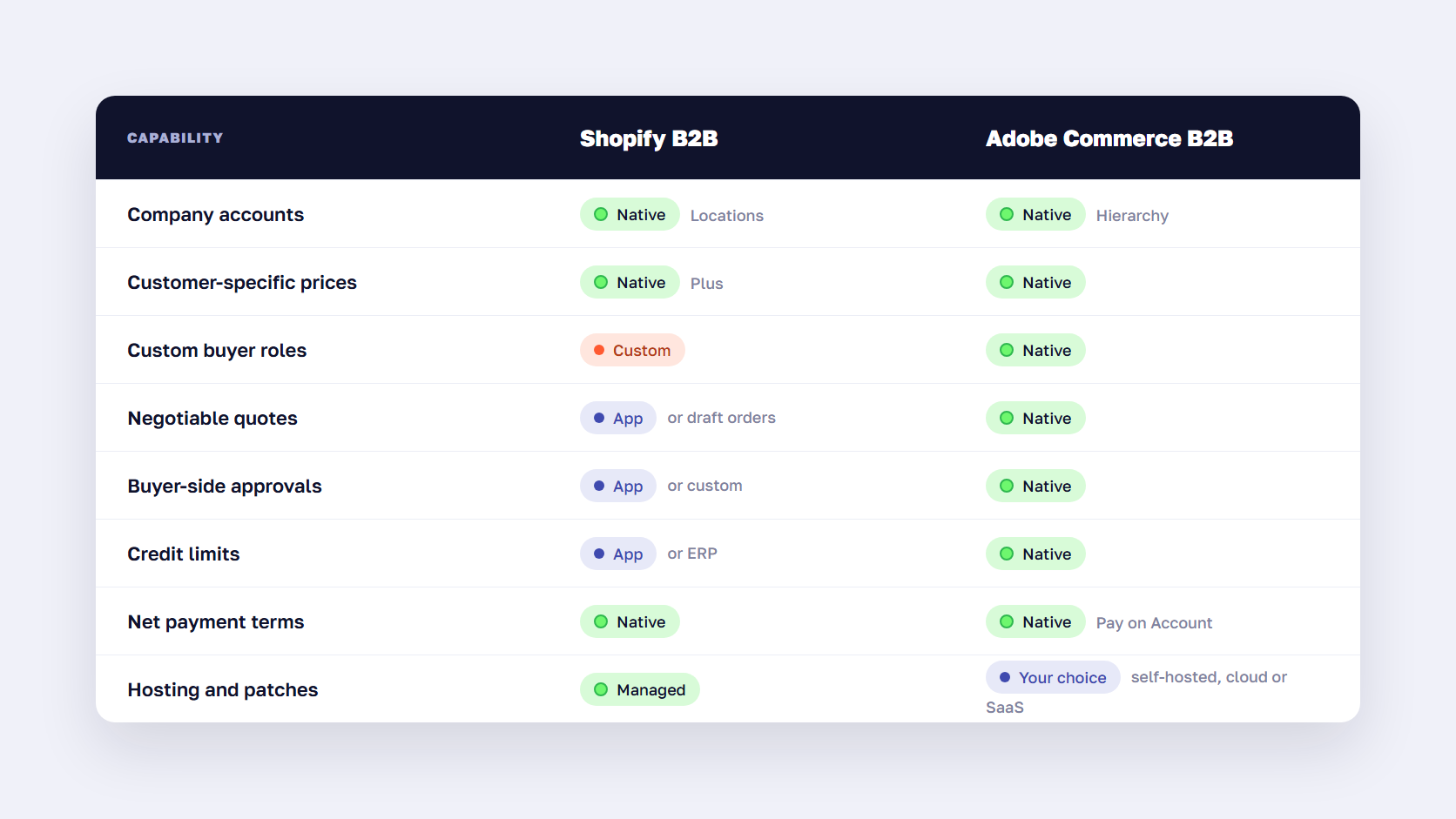
Choose Shopify B2B when your wholesale model is close to standard: tiered or customer-specific prices, case quantities, net terms, and buyers who mostly reorder. Choose Magento, in practice Adobe Commerce with its B2B module, when buyers negotiate quotes in the storefront, companies need custom roles and approval chains, or you need company credit lines inside the platform.
| Capability | Shopify B2B | Adobe Commerce B2B |
|---|---|---|
| Company accounts | Companies with locations | Companies with divisions and parent-child hierarchy |
| Buyer roles | 2 fixed roles | Custom roles and permissions set by the company admin |
| Customer-specific prices | Plus, catalog per location | Shared catalogs per company |
| Quotes | Draft orders, quote apps | Native negotiable quotes |
| Purchase approvals | Merchant draft review | Purchase orders with approval rules |
| Credit limits | Not native | Company credit with Pay on Account |
| Reorder tools | Reorders, quick order list | Requisition lists, quick order by SKU |
| Hosting and upgrades | Managed by Shopify | Your team or partner, or Adobe’s cloud options |
Adobe Commerce covers more of the B2B workflow natively, which our overview of Adobe Commerce B2B features walks through feature by feature. You pay for that in license, hosting, and development cost. Shopify gives you less B2B logic but takes hosting, security patches, and checkout upkeep off your team.
Choose Shopify B2B if
- You sell to a few price tiers, or to named accounts you can fit into Plus catalogs
- Your buyers mostly reorder known products at agreed prices
- You run retail and wholesale from the same catalog and want one admin
- Credit control and invoicing already happen in your ERP or accounting system
- You’d rather not run hosting, upgrades, and security patches yourself
Choose Magento B2B if
- Your buyers negotiate prices on large orders in the storefront
- Customer companies need their own roles, budgets, and approval chains
- You extend credit lines and want them enforced at checkout
- Your catalog, pricing, or ordering flow depends on custom logic your competitors don’t have
- You already run Magento with deep ERP integration that works
If you’re on Magento today and weighing the move, our guide to Magento to Shopify migration covers costs, data, and how to decide. If the answer is to stay, our Magento B2B development team builds and extends Adobe Commerce B2B stores.
Frequently asked questions about Shopify B2B
Is Shopify B2B only available on Shopify Plus?
No. Since 2 April 2026, it’s available on the Basic, Grow, Advanced, and Plus plans. Non-Plus plans get company accounts, up to three B2B catalogs, quantity rules, volume pricing, and payment terms. Plus adds unlimited catalogs, catalogs assigned to individual company locations, deposits, and partial payments. Starter and Retail plans don’t include B2B.
How much does Shopify B2B cost?
There’s no separate fee for B2B. The features are included in your Shopify plan, from Basic up to Plus, and Shopify’s pricing page lists the current plan fees. The real costs are usually elsewhere: B2B apps for quotes or credit limits, an ERP integration, and Plus itself if you need customer-specific pricing.
Can Shopify B2B handle quotes?
Partly. Shopify has no native quote-request button, but draft orders work as quotes. Your team sets custom line prices, locks them, and sends the draft as an invoice the buyer can pay or accept on terms. For buyers to request and negotiate quotes in the storefront, you need a quote app or custom development.
Can you sell B2B and B2C on one Shopify store?
Yes. A blended store serves retail shoppers and logged-in business buyers from the same storefront, catalog, and checkout. B2B buyers see their own catalogs, prices, and payment terms after they log in. On Advanced and Plus, you can also show different content and checkout options to B2B buyers.
Does Shopify B2B support credit limits?
No, not natively. Shopify supports net payment terms, but it doesn’t track a credit limit or block new orders when a buyer has overdue invoices. Merchants usually handle credit control in their ERP or accounting system and connect it to Shopify, or add a B2B app that checks credit before checkout.
Can Shopify B2B connect to an ERP?
Yes. Shopify’s B2B APIs let an ERP create and update companies, locations, catalogs, fixed prices, payment terms, and orders. Most wholesalers sync prices and stock from the ERP into Shopify and send orders back. You can use a ready-made connector for common ERPs or build a custom integration for ERPs with unusual pricing logic.
Is Shopify B2B enough for your wholesale business?
Shopify B2B is now a real option on every plan from Basic to Plus, and for tiered pricing, case quantities, and net terms, it does the job without much custom work. Check three things before you commit: whether your prices are set per tier or per customer, where credit control lives, and how much of your ERP logic has to reach the storefront. The answers tell you which plan you need, which apps you’ll add, or whether Magento B2B or another Shopify alternative is the better fit. For what’s changing in wholesale buying more widely, see our B2B eCommerce trends, and once the store is live, our B2B SEO guide covers how buyers find it.
Not sure whether your price lists and terms fit Shopify B2B or need Magento? Send us how your wholesale pricing works today, and we'll tell you what each platform would need to run it.




































