
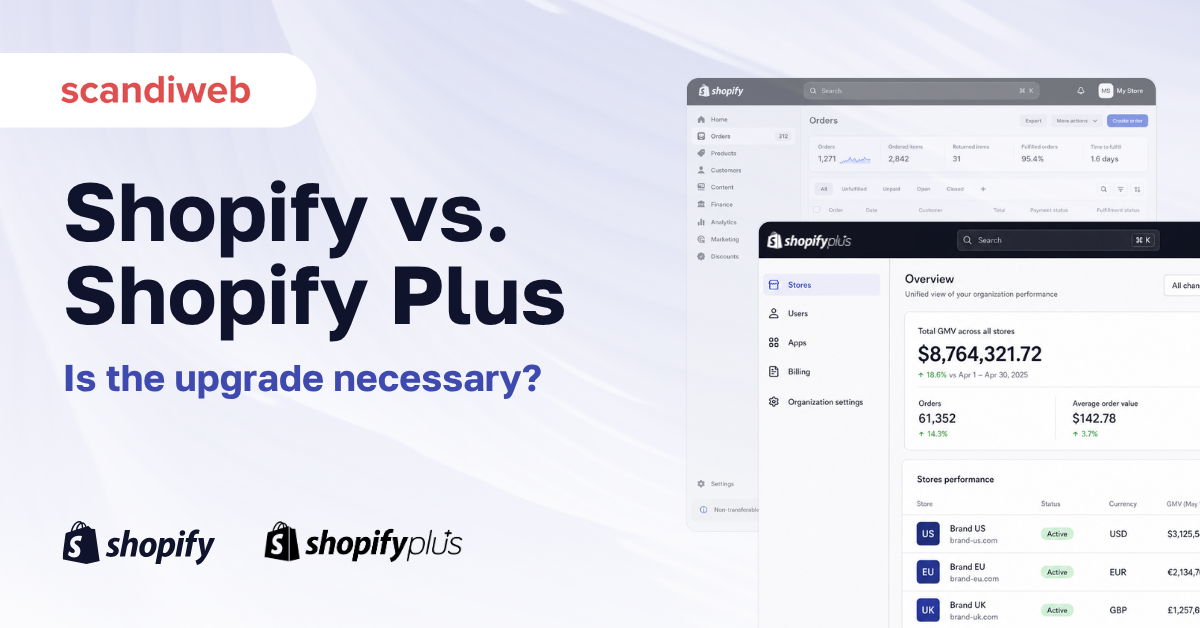
If you’re weighing Shopify against Shopify Plus, you’re probably in one of three rooms: a Basic or Advanced store outgrowing rate limits, B2B requests, or expansion-store sprawl; a finance review where third-party gateway fees suddenly dwarf the subscription; or a planning meeting where someone said “headless” and the dev team quoted Plus.
All three end on the same spreadsheet, with the same question: when does the upgrade actually pay back?
Short answer — Plus pays back the day your third-party gateway fees plus your subscription cross roughly $2,300 a month, which usually happens between $500K and $700K monthly revenue, well before the often-quoted $1M GMV threshold.
The rest of this guide covers the features, pricing, and migration realities that shift that number for B2B, multi-region, and headless builds — drawn from 20+ Shopify migrations scandiweb has shipped since 2014 (The New York Times, Durex, Hope-sthlm, Kouboo, and Edasi).
Why trust this guide
- Shopify Plus Partner since 2014; Adobe Commerce Gold and Hyvä Platinum Partner
- 2,100+ eCommerce projects, $4B+ in annual client GMV, 700+ brands across 40+ industries
- ISO 9001, ISO 27001, ISO 27017, and PCI DSS certified
- Shopify clients include The New York Times, Durex, Hope-sthlm, Kouboo, and Edasi
What is Shopify Plus, and how is it different from standard Shopify?
Shopify Plus is the enterprise tier of Shopify. It runs on the same platform as Basic, Shopify, and Advanced – but removes the limits and adds an enterprise support and B2B layer. The standard plans fit stores up to roughly $1M–$2M annual revenue; Plus is designed for everything above that, plus any store that needs customer-specific B2B pricing, multi-region operations, a customized checkout, or a headless storefront.
Standard plan pricing: Basic $39/mo, Shopify $105/mo, Advanced $399/mo. Plus is $2,300/mo or 0.4% of monthly revenue (whichever is higher), capped around $40,000/mo at very high volume.
The full-feature delta is in the table below; the key one is that Plus removes Shopify’s 0.5% transaction fee on third-party payment gateways – the line that drives most of the upgrade math (see Shopify’s published rate limits for the API ceiling).
🚀 Quick takeaway
Same platform, same admin, same theme architecture. The difference between Shopify and Shopify Plus is where Shopify holds back features, raises rate limits, and adds the enterprise support layer – not a separate product.
Shopify vs. Shopify Plus: side-by-side comparison
| Capability | Shopify (Basic, Shopify, Advanced) | Shopify Plus |
|---|---|---|
| Starting price | $39, $105, $399 a month | $2,300 a month, or 0.4% of monthly revenue, capped |
| Transaction fees (3rd-party gateway) | 2.0%, 1.0%, 0.5% | 0% |
| Staff accounts | 2, 5, 15 | Unlimited |
| Expansion stores | 1 | Up to 9, plus dev stores via Organization Admin |
| Checkout customization | Checkout Extensibility, limited | Full Checkout Extensibility plus Branding API |
| B2B and Wholesale | Native B2B on all three plans, up to 3 catalogs | Unlimited catalogs, catalogs per company location, deposits, and partial payments |
| Shopify Functions | Yes, lower limits | Yes, higher limits |
| Shopify Flow | Yes | Yes, advanced workflows |
| API rate limits | Standard | ~20× higher on REST and GraphQL |
| POS Pro locations | Add-on | 200 included |
| Uptime SLA | None published | 99.99% SLA |
| Support | 24/7 chat | Dedicated Launch Manager and Merchant Success Manager |
| Best fit | Under $1M GMV, single market, B2B with up to 3 price tiers | Above $1M GMV, customer-specific B2B pricing, multi-region, headless, enterprise |
Pricing reflects Shopify’s published rates as of May 2026; verify against shopify.com before signing.
Where the gap actually matters: a deeper look at Shopify Plus features
Checkout and Checkout Extensibility
The largest functional gap between Shopify and Shopify Plus is checkout. Standard plans get Checkout Extensibility with restrictions on extension count, custom JS, and branding. Plus opens the full surface: apps and UI extensions on every checkout step, Shopify Functions for custom discount and shipping logic, and a Branding API for pixel-level visual control.
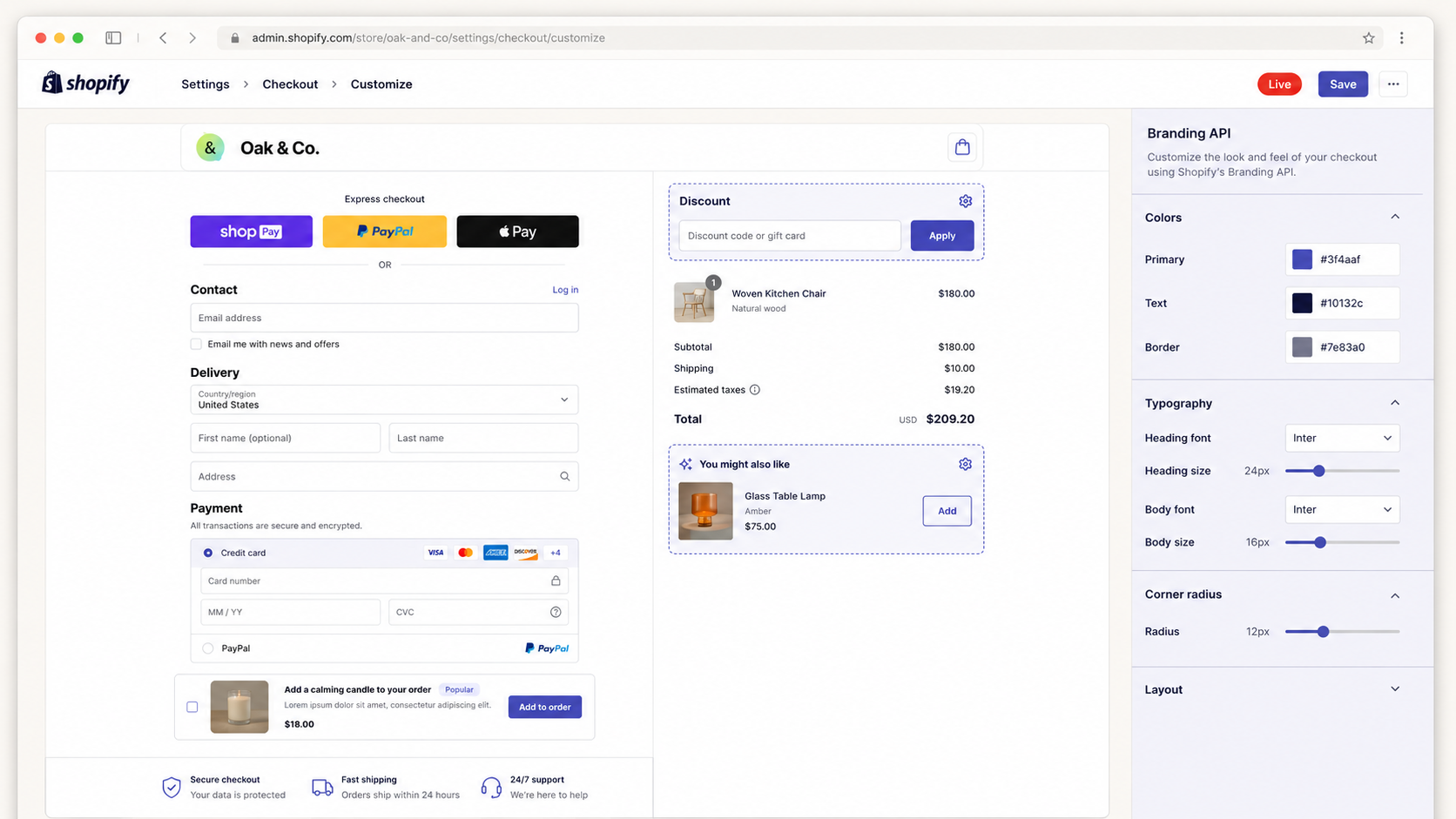
For high-AOV brands, checkout A/B testers, and B2B sellers with negotiated pricing, this single capability often justifies the upgrade. (Note: Shopify’s older Scripts layer is deprecated in favor of Functions, so any Scripts-dependent merchant should plan a Functions migration alongside the Plus move.)
B2B on Shopify and Shopify Plus
Since 2 April 2026, Shopify B2B is native on Basic, Grow, and Advanced: company accounts, up to three catalogs, quantity rules, volume pricing, net payment terms, and draft orders. Plus ships the full stack: unlimited catalogs, catalogs assigned directly to a company location for customer-specific pricing, deposits, and partial payments. The separate Wholesale channel closed on 30 April 2024, and B2B now runs inside the Shopify admin.
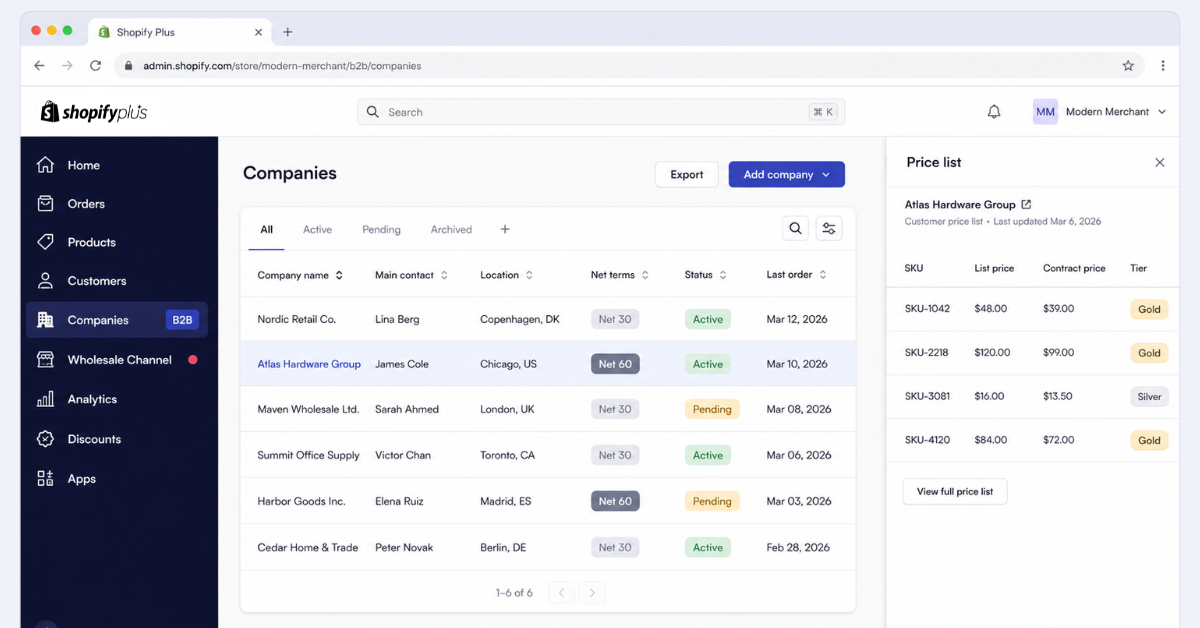
For merchants moving off Magento B2B, BigCommerce B2B Edition, or legacy ERPs, this is the feature that forces the decision. If B2B is more than 10–15% of revenue and your buyers have their own negotiated prices, you’ll need Plus. We cover the broader picture in our B2B eCommerce overview.
Shopify Functions, Flow, and the Scripts replacement
Shopify Functions (server-side WebAssembly modules for discounts, shipping, payments, and cart validation) are on every plan, but Plus gets higher execution limits and priority handling. Shopify Flow, the no-code automation engine, is also on every plan; Plus adds advanced templates and unlimited workflow runs that matter at scale – fraud auto-cancellation, B2B approval routing, post-purchase tagging for retention.
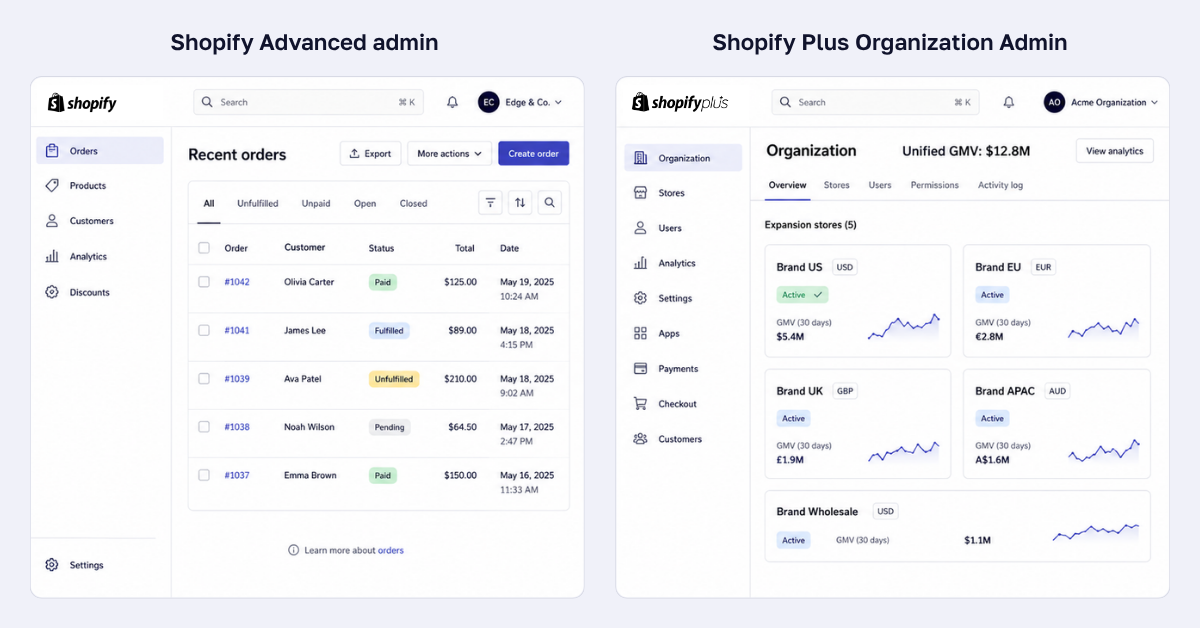
Multi-store and Organization Admin
If you sell into multiple regions or run multiple brands, the Organization Admin is the biggest operational reason to upgrade. From one dashboard you manage up to nine expansion stores plus dev stores, with unified permissions and consolidated analytics. Standard Shopify gives you exactly one store per plan. A typical international DTC config looks like five stores under one contract: US, EU, UK, APAC, plus a B2B Wholesale store.
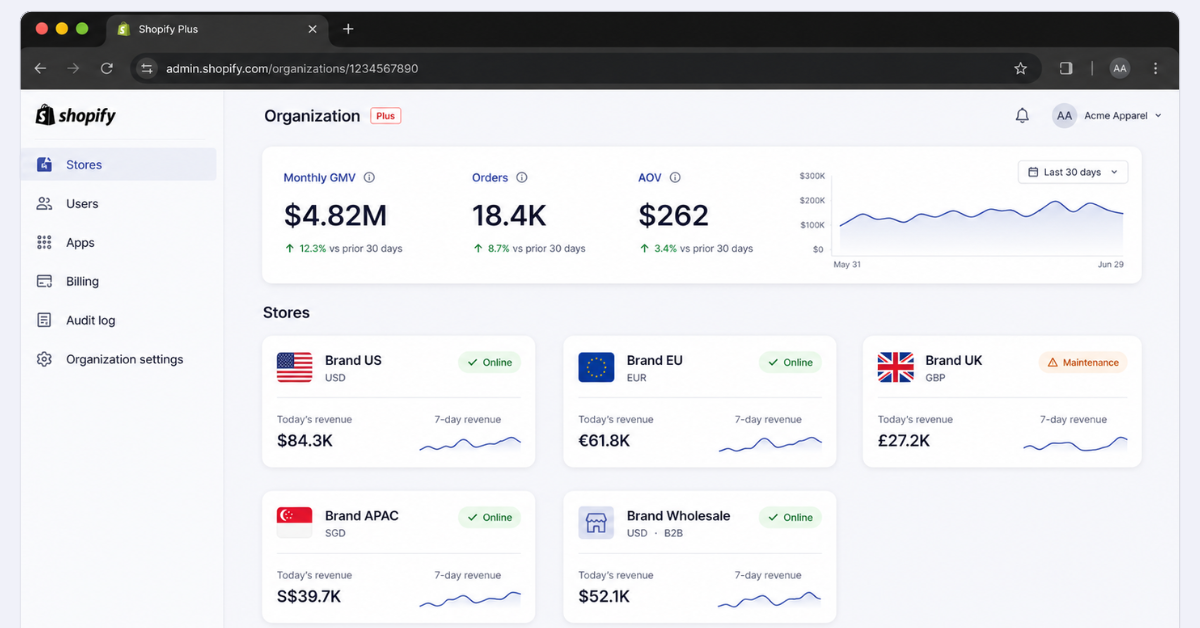
🚀 Quick takeaway
You can fake multi-region on standard Shopify with currency switchers and shipping zones. You cannot fake the operational layer – separate tax registration, separate admin, separate apps – which is exactly what Organization Admin is built for.
APIs, rate limits, and headless commerce
The API ceiling is where standard Shopify breaks for technical teams. Plus has roughly 20× the call rate on REST and GraphQL, which is what makes a serious build on Hydrogen, React, or Next.js viable. If your roadmap includes a PWA, a native mobile app pulling live catalog data, or any real-time personalization layer, you’ll hit the standard rate limits within weeks of go-live. It is the single constraint we run into first on non-Plus stores; we cover it in our headless commerce practice.
POS Pro, staff accounts, and permissions
Plus includes Shopify POS Pro at up to 200 locations – the right answer for retail chains, pop-up networks, and omnichannel brands. Standard plans charge POS Pro per location as an add-on. Staff accounts go from 15 on Advanced to unlimited on Plus, with granular role-based permissions. See our omnichannel retail case studies for the patterns that work.
Apps, themes, and customization limits
The App Store and Theme Store are the same across all plans, but Plus merchants get earlier feature access, fewer Liquid restrictions, and higher limits on custom apps and metafields. See our best Shopify integrations and Shopify themes guide for the picks we install most.
Security, compliance, and uptime SLA
Plus is the only Shopify tier with a published 99.99% uptime SLA, and the only tier suitable for enterprise compliance reviews. PCI DSS Level 1 is baked into Shopify itself, but if procurement wants SOC 2 reports, ISO 27001 attestation chains, or audit logs, Plus is the practical floor.
How much is Shopify Plus in 2026?
Shopify Plus costs $2,300/mo or 0.4% of monthly revenue (whichever is higher), capped around $40,000/mo at very high volume. The variable component kicks in past ~$800K monthly revenue. In practice, almost every Plus merchant signs a one- or three-year contract and negotiates discounts at higher GMV commitments.
For comparison, standard Shopify plan pricing:
| Plan | Monthly (US) | Billed yearly |
|---|---|---|
| Basic | $39 | $29 a month |
| Shopify | $105 | $79 a month |
| Advanced | $399 | $299 a month |
| Plus | $2,300 | Custom annual contract |
“Shopify enterprise pricing” is the same thing as Shopify Plus pricing – Plus is the enterprise tier. There is no separate enterprise SKU above Plus.
Hidden costs of Shopify Plus
The sticker price is only part of TCO. A realistic Plus budget includes:
- Apps and subscriptions: $500–$5,000+/mo (subs, reviews, search, loyalty, ERP connectors)
- Shopify Payments: 2.4–2.9% + 30¢/txn – Plus removes the 0.5% third-party gateway cut but processing fees still apply
- Theme dev or headless build: one-time $30K–$200K+
- Migration from Magento, BigCommerce, or legacy: $40K–$250K+ depending on data volume, integrations, and B2B complexity
- Ongoing dev and maintenance: 0.5–2 FTEs internal, or a Plus Partner retainer
For a breakdown against your stack, talk to scandiweb.
Shopify Plus vs. Shopify Advanced: when does the math flip?
The fastest payback test is transaction fees alone. On Advanced you pay $399/mo plus 0.5% on third-party gateway transactions; process $500K/mo through a third-party gateway and you’re at ~$2,900 all in. On Plus the 0.5% disappears – Plus is $2,300/mo flat at that volume. In practice the flip happens earlier because Plus also reduces some app costs and cuts operational workarounds.
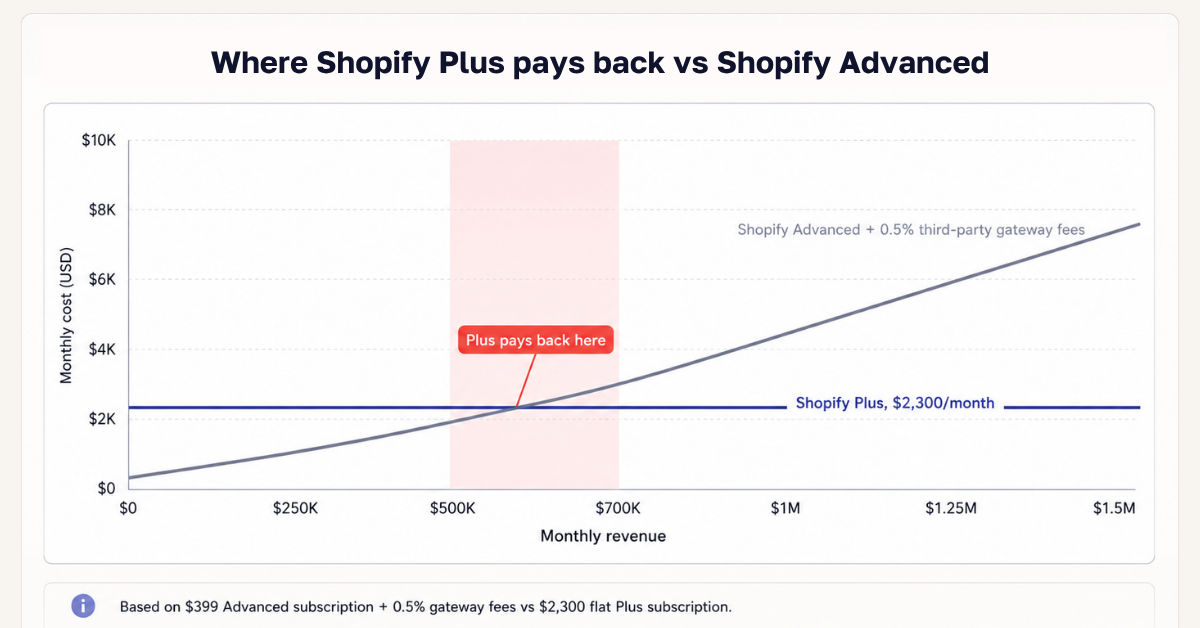
🚀 Quick takeaway
The “$1M GMV” rule of thumb is wrong in two common cases: B2B-heavy merchants hit payback at $500K–$700K, while single-region DTC on Shopify Payments often doesn’t break even until $3M–$5M – at which point Plus becomes a feature decision, not a cost decision.
When to upgrade from Shopify to Shopify Plus
Upgrade when the math pays back, or when a feature you need is only available on Plus.
Revenue thresholds
The industry rule of thumb is to consider Plus past $1M annual GMV and commit by $2M – which holds for single-region DTC on Shopify Payments. The threshold moves earlier for B2B-heavy merchants and multi-region rollouts (Plus removes third-party gateway fees and adds Plus-only B2B features and Organization Admin at the same time) and later for single-region Shopify Payments merchants, who often don’t hit payback until $3M–$5M annual GMV. Revenue is a lagging signal: if a B2B, headless, or multi-region launch is six months out, upgrade now – migration sits on its critical path.
Operational signals that override the revenue threshold
Upgrade when any of these are true, regardless of revenue:
- You need B2B with customer-specific price lists, more than three catalogs, deposits, or partial payments
- You’re launching in a second country and need a separate store with its own currency, language, and tax setup
- You need to customize checkout beyond what apps allow
- You’re going headless on Hydrogen or a custom front-end and need API headroom
- You operate more than 10 retail locations and need POS Pro at scale
- Procurement, legal, or compliance demands a published uptime SLA and enterprise contracts
- You’re hitting API rate limits or staff seat caps weekly
If two or more apply, it’s no longer whether to upgrade – only when.
How to upgrade to Shopify Plus, step by step
- Contact Shopify or a Shopify Plus Partner. Sales conversation, needs assessment, contract negotiation – allow two to four weeks. A Plus Partner can usually shorten the cycle and negotiate better terms.
- Plan the technical move. Existing Shopify stores upgrade in-place. From Magento, BigCommerce, WooCommerce, or custom: data migration, theme rebuild, and integrations are the real project – allow one to four months.
- Configure Plus capabilities. Expansion stores, Organization Admin permissions, Flow workflows, custom checkout extensions, B2B catalogs. Get Organization Admin right the first time – it’s hard to refactor later.
Pair the move with a Shopify SEO checklist review and a performance optimization pass; those two account for most avoidable revenue loss during platform changes.
Is Shopify Plus worth it?
Below $1M GMV, single market, no customer-specific B2B pricing, no headless plans: not yet – standard Shopify gets you 90% of the way for a tenth of the cost. Above $1M GMV, or any merchant who needs customer-specific B2B pricing, multi-store, headless, or customized checkout: yes, and the payback usually lands inside 6–12 months. The case studies below show what the lift looks like in practice; see also our conversion rate optimization practice for the architecture work that compounds the Plus upgrade.
🚀 Quick takeaway
Plus does not improve conversion on its own. It removes the limits that were holding back the architectural fixes that improve conversion. Treat the Plus upgrade and the architecture work as one decision, not two.
Shopify Plus case studies from our portfolio
A few of the migrations behind the numbers in this article.
The New York Times Store – Adobe Commerce to Shopify Plus in 60 days
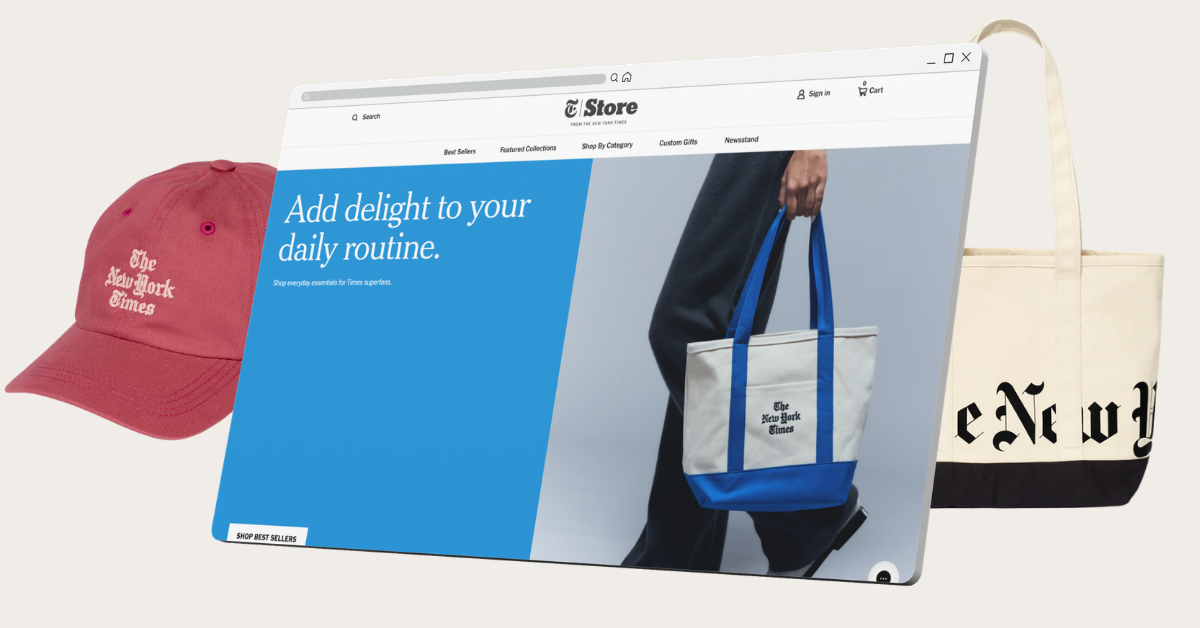
A 170-year-old brand with 50,000+ catalog items replatformed off Adobe Commerce onto Shopify Plus in 60 days, ahead of Black Friday. Outcomes: ~20% YOY revenue lift, 40% organic traffic growth, and Black Friday peaks 10–15× baseline absorbed without incident. See our interview with Robyn Metzger at The New York Times.
J.R. Dunn Jewelers – Magento 1 to Shopify with 150,000+ diamond SKUs

A family-owned luxury jeweler moved off Magento 1 onto Shopify in 6.5 months, with a perfect 100 SEO score at launch and a structure ready for the planned ERP integration. Build scope: 150K+ diamond SKUs, 72K+ historical orders, bespoke multi-vendor catalog logic. Full write-up: Magento 1 to Shopify migration for a luxury jewelry brand.
Kouboo – SEO-led Magento 2 to Shopify migration, +107% organic revenue
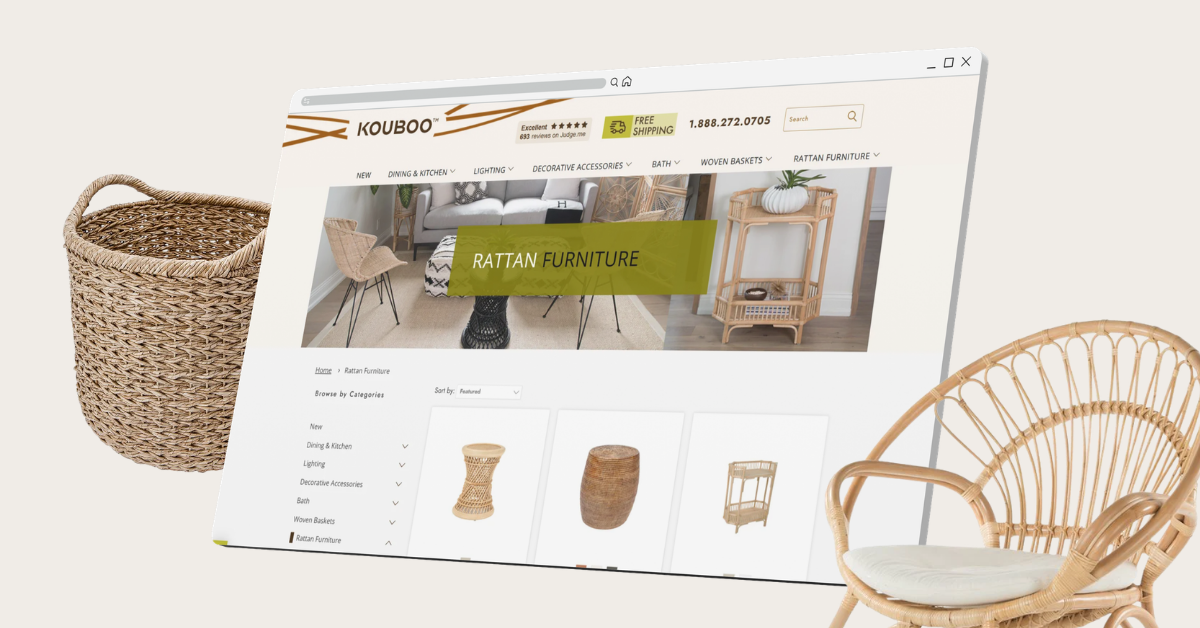
A rattan furniture brand replatformed from Magento 2 onto Shopify with SEO continuity mapped before cutover, then continued on a multi-year on-page content program. Outcomes: +72% organic traffic, +107% organic revenue, +138% top-3 keywords, +100% visibility, +32% clicks. Read the Kouboo SEO and migration case study.
Mrs Wordsmith – multi-region Shopify, URL restructure, +150% conversion rate
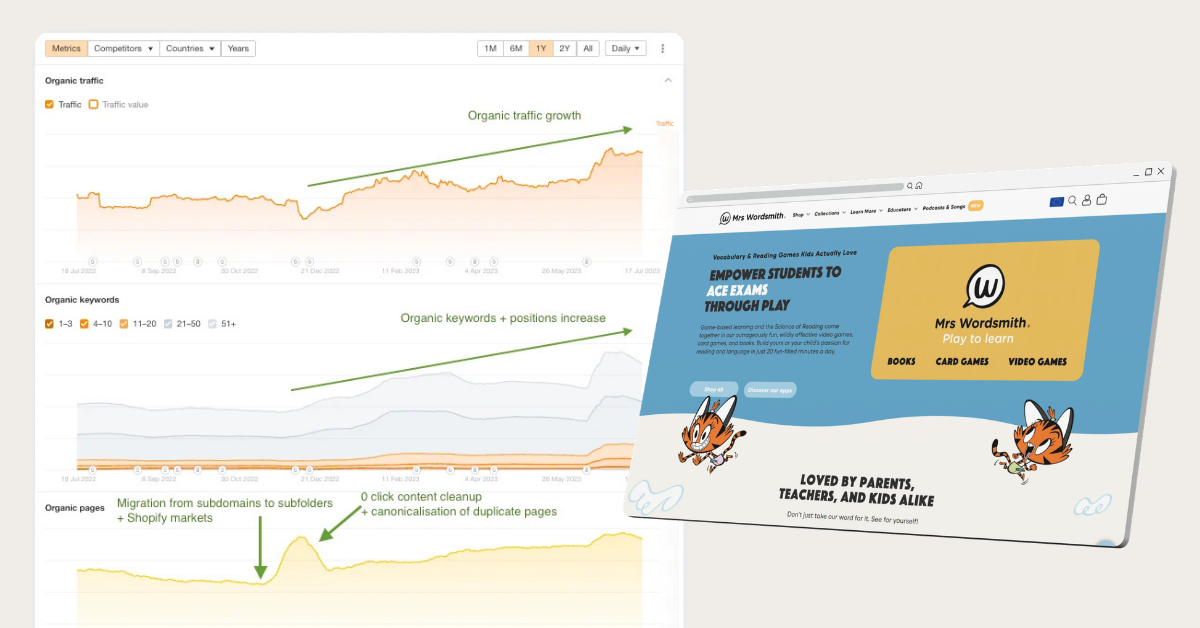
An education brand running Shopify across US, UK, and AU was splitting authority across three duplicate-content subdomains. We consolidated to one global domain on subfolders, fixed hreflang, restructured URLs, and added structured data. Outcomes: +150% conversion rate, +200% organic revenue, +65% organic traffic, +100% visibility, +80% top-3 keywords, +45% clicks. Full write-up: SEO case study: URL restructure leads to +150% in conversion rate.
Shopify Plus vs. alternatives
If you’re shopping enterprise platforms, Plus is one of several serious contenders. The short verdict on each:
- Adobe Commerce (Magento). Plus has lower TCO and faster time-to-launch. Magento still wins for ERP-driven catalogs and deep B2B.
- BigCommerce Enterprise. Closer comparison on price predictability. Plus wins on app ecosystem, checkout, and POS.
- Salesforce Commerce Cloud. Plus wins on speed and cost. SFCC is the right call only if Salesforce already owns the rest of the stack.
- commercetools and composable. Plus wins on time-to-value. Composable wins for very large enterprises that have the dev team to support it. We compared both in our commercetools vs. Shopify breakdown.
- WooCommerce. Different category, but a frequent upgrade path. See our Shopify vs. WooCommerce comparison.
For more side-by-sides, our platform comparisons library covers most enterprise stacks.
Planning a Shopify Plus migration
Most Plus migrations we run land in one of three shapes:
- Fast-track, 2–4 weeks. Single store, clean data, no B2B or custom checkout, off a similar-shape platform.
- Standard build, 1–2 months. New theme, ERP/WMS/PIM integrations, data layer + analytics, SEO redirect map, launch QA.
- Complex migration, 3–6 months. Magento or commercetools origin, B2B + DTC side by side, multi-region, headless, multiple ERP/PIM/OMS integrations.
The biggest predictor of post-launch performance is whether SEO and data-layer continuity are planned before cutover, not patched after. We build both into every migration through our SEO services team, and increasingly through Answer Engine Optimization (AEO) for clients who want to show up in AI-generated answers, not just blue links.
FAQ
How much is Shopify Plus? $2,300/mo or 0.4% of monthly revenue (whichever is higher), capped around $40,000/mo at very high volume.
What is the difference between Shopify and Shopify Plus? Same platform; Plus removes the limits. Full checkout customization, unlimited B2B catalogs, up to nine expansion stores, ~20× API rate limits, 200 POS Pro locations, 99.99% uptime SLA, and a dedicated Merchant Success Manager. Complete list in the table above.
Is Shopify Plus worth it? Yes above $1M GMV or for any merchant needing customer-specific B2B pricing, multi-store, headless, or customized checkout. No below $1M with a single market and a standard checkout – Advanced is enough.
When should I upgrade to Shopify Plus? When two or more apply: above $1M GMV, launching B2B with customer-specific pricing, expanding to a new region, going headless, customizing checkout beyond apps, or scaling past 10 retail locations.
What is the Shopify Plus minimum revenue requirement? None published. The math typically works above $1M annual GMV for single-region DTC, and earlier for B2B-heavy or multi-region merchants.
Shopify Plus vs. Shopify Advanced: which should I pick? Advanced for a single-store, single-market DTC brand under $1M GMV. Plus if you need customer-specific B2B pricing, multi-store, headless, custom checkout, or you’re paying more in third-party gateway fees than the subscription delta.
Does Shopify Plus include B2B? Yes – native B2B with company accounts, unlimited catalogs, catalogs assigned to individual company locations, payment terms, draft orders, deposits, and partial payments. Since 2 April 2026, Basic, Grow, and Advanced also include B2B with up to three catalogs.
Can I run multiple stores on Shopify Plus? Yes – up to nine expansion stores plus dev stores, all managed from one Organization Admin.
How long does a Shopify Plus migration take? Two weeks for a fast-track move off a similar platform; three to six months for a complex enterprise migration with B2B, headless, and multiple integrations. Typical full build is one to two months.
Further reading on Shopify and Shopify Plus
- How to Migrate to Shopify: a Step-by-Step Guide for eCommerce Brands – the operational checklist behind every migration we run
- 8 Best Shopify Alternatives for Complex Commerce in 2026 – the four platforms that genuinely replace Plus when it is not the right answer
- Shopify Redesign and Growth Foundation for Salt Life – DTC fashion redesign and growth foundation on Shopify
- Mil-Coffee – new website design and build on Shopify – DTC subscription build on Shopify, focused on coffee, delivery, and accessories
- Conversational commerce brings back 31% of churned customers – Shopify plus an AI sales agent on WhatsApp at Zorro
- Building a €150K/month lifecycle revenue engine in 5 markets – Felco’s centralized email + SMS program live in 30 days across 5 markets and 3 languages
- Best Shopify Agencies in the US & EU: 2026 Picks – for buyers evaluating partner agencies
- scandiweb portfolio – complete portfolio across Shopify and enterprise eCommerce
If you’re weighing the Shopify Plus upgrade and want a model built against your actual numbers, current GMV, gateway fees, app stack, B2B and multi-region roadmap, talk to scandiweb. We’ll model the payback, scope the migration, and tell you when Plus actually starts working for your business.




































