
Does the European Accessibility Act apply to a store that sells only to businesses? To a store that just launched a new theme, or to a brand with nine employees? These are the questions eCommerce teams have been asking since the law took effect on 28 June 2025, usually after a lawyer, a large customer or a vendor email raised it first.
The short answer: if your store sells to consumers in the EU, the law almost certainly covers it, wherever your company is registered. The longer answer depends on how your checkout works, how big your company is and what the first court cases have shown, and that is what the rest of this guide works through, ending with a plan to get from an audit to a published accessibility statement.
What is the European Accessibility Act?
The European Accessibility Act (EAA) is an EU directive that requires certain products and services sold to consumers to be accessible to people with disabilities. For online stores, it covers the website, the mobile app, and the full path to purchase, from product pages to payment. EU countries had to turn it into national law, and those laws have applied since 28 June 2025.
The law itself is Directive (EU) 2019/882. Because it’s a directive, each country passed its own version, such as Germany’s Barrierefreiheitsstärkungsgesetz (BFSG) and Ireland’s S.I. No. 636 of 2023. The requirements are the same in substance. Fines, regulators and some details differ, so the market you sell into decides which version you answer to.
Besides online stores, the act covers computers and smartphones, ATMs and ticket machines, e-books, consumer banking, telecom services and parts of passenger transport. For eCommerce, the category that matters is “e-commerce services”, defined as services provided at a distance through websites and mobile apps, at a consumer’s request, with a view to concluding a consumer contract. It joins a growing list of EU rules for online checkouts, such as the new EU withdrawal button.
Does the European Accessibility Act apply to your online store?
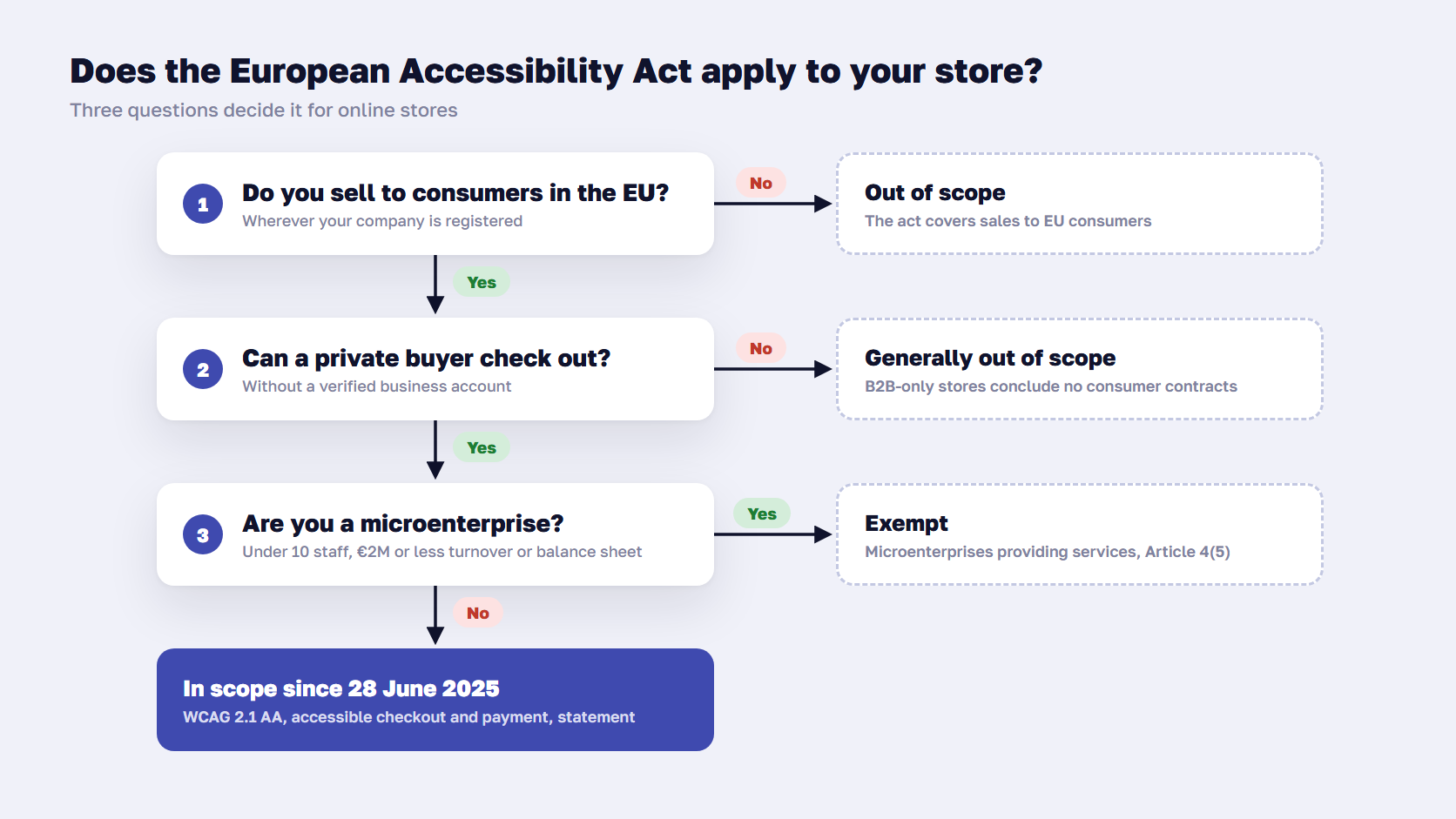
The EAA applies to your online store if you sell to consumers in the EU, wherever your company is based. It covers websites and apps used to conclude a consumer contract. Two groups are outside it: stores that sell only to businesses, and microenterprises with fewer than 10 employees and no more than €2 million in annual turnover or balance sheet total.
| Your store | In scope? | Why |
|---|---|---|
| Sells to EU consumers, company in the EU | Yes | The core case the law was written for |
| Sells to EU consumers, company in the UK, US or elsewhere | Yes | The law applies wherever the customer is |
| Sells only to businesses, with verified business accounts | Generally no | The definition requires a consumer contract |
| B2B store where anyone can register and pay | Likely yes | Private buyers can conclude a consumer contract |
| Fewer than 10 employees and €2 million or less in turnover or balance sheet | No | Microenterprises providing services are exempt |
| Sells only to customers outside the EU | No | The directive covers the EU market only |
Stores that sell only to businesses
The directive defines a consumer as a person who buys for purposes outside their trade, business, craft or profession. A store that sells only to companies concludes no consumer contracts, so the e-commerce rules don’t cover it. Germany’s BFSG says it directly: a service provider under the law is one that offers a service for consumers.
The catch is how the store works in practice. If a private person can register, add to cart and pay without a business check, the store concludes consumer contracts, whatever the homepage says. Before you rely on the B2B exclusion, check that:
- Registration requires a company name and a VAT or company number that you verify
- Prices, terms and checkout are written for business buyers
- Your terms and conditions exclude sales to consumers
- Orders from private individuals are rejected or cancelled
- Any separate D2C storefront is assessed on its own
The microenterprise exemption
Article 4(5) exempts microenterprises that provide services from the accessibility requirements. A microenterprise has fewer than 10 employees and an annual turnover or balance sheet total of €2 million or less. The staff limit is strict, while the financial limit is met if either figure stays at or below €2 million.
The directive has no grace period for growing out of the exemption. If you plan to hire your tenth employee, start the accessibility work before you do.
Stores based outside the EU
A UK or US store that sells to consumers in Germany or France is in scope for those customers. The UK didn’t adopt the directive, so a UK store selling only at home isn’t covered by it, although the Equality Act 2010 still requires reasonable adjustments for disabled customers. US stores have their own pressure under the ADA, where web accessibility lawsuits have been common for years.
🚀 Quick takeaway
The B2B exclusion depends on your checkout. If a private buyer can complete an order without a business check, plan as if the EAA applies.
European Accessibility Act requirements for eCommerce websites
The EAA requires an online store to be perceivable, operable, understandable and robust for people using assistive technology. In practice, that means accessible product information, navigation, forms, sign-in, checkout and payment, plus a public explanation of how the store meets the requirements. The directive also asks you to keep the store compliant every time it changes.
The requirements for an online store come in four parts:
- The website and app. Annex I asks for websites and mobile apps to be accessible “in a consistent and adequate way” by making them perceivable, operable, understandable and robust, the four principles behind WCAG.
- eCommerce specifics. The store must pass on accessibility information about the products it sells when the manufacturer provides it, and must make identification, security and payment functions accessible. Sign-in, one-time codes, CAPTCHAs and payment forms are all in scope.
- Information. You must explain how the service meets the requirements, in your terms and conditions or an equivalent document, in an accessible format. Most stores publish this as an accessibility statement.
- Ongoing conformity. You need procedures that keep the store compliant as it changes. If you find a non-conformity, you must fix it and inform the national authority.
The second point is the one store teams miss most often. A checkout can pass every page-level test and still fail at payment, because the card form is an iframe from the payment provider, the 3-D Secure challenge comes from the bank, and the CAPTCHA comes from a third vendor. The directive names identification, security and payment explicitly, so ask each provider for its accessibility conformance report and test a full purchase with a screen reader.
Product information is narrower than it sounds. You pass on what the manufacturer supplies, such as screen reader or hearing aid compatibility on electronics, in a format assistive technology can read. Well-structured product detail pages make this much easier, because the information has an obvious place to go.
There is one formal way out. If a requirement would fundamentally change your service or impose a disproportionate burden, Article 14 lets you rely on that, but only with a documented assessment that you keep for five years, renew at least every five years and share with the authority. The exception isn’t available if you received funding to improve accessibility.
WCAG 2.1 AA and EN 301 549: the standard behind the law
The EAA doesn’t name WCAG directly. The technical benchmark is the European standard EN 301 549, whose current version, V3.2.1, includes WCAG 2.1 level AA for websites. A newer version based on WCAG 2.2 was published in September 2026 but is not yet officially cited. Testing against WCAG 2.1 AA, with an eye on WCAG 2.2, is the practical target.
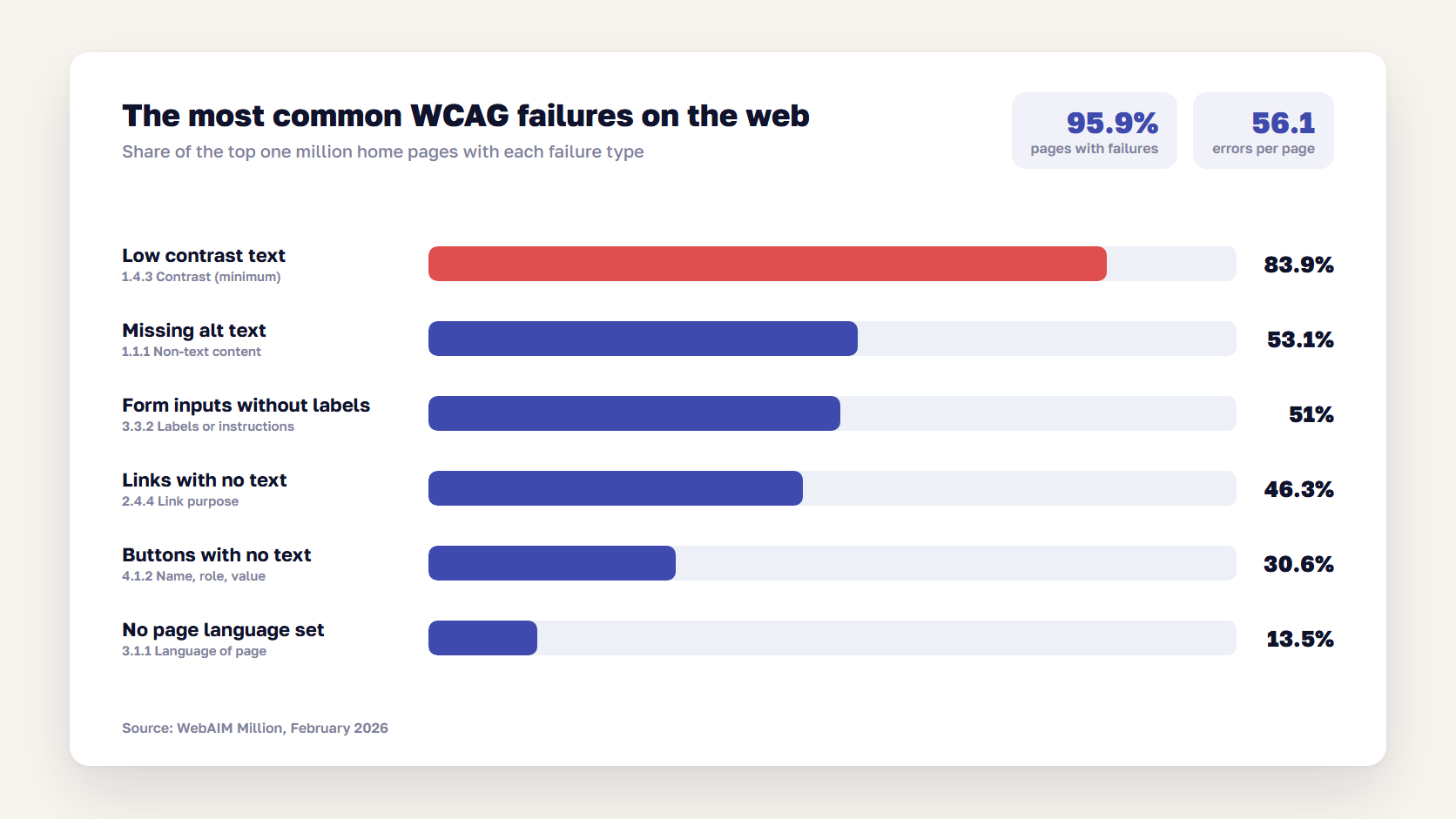
Automated scans show how far most websites are from that target. The WebAIM Million study of the top one million home pages, run in February 2026, found detectable WCAG 2 failures on 95.9% of them, with an average of 56.1 errors per page. Six failure types account for most of them.
On an online store, those failures cluster in predictable places:
| Store area | Common failure | WCAG 2.1 criterion |
|---|---|---|
| Header, menus and filters | Mega menu or filter panel can’t be opened or closed with a keyboard | 2.1.1 Keyboard |
| Product listing | Product images without alt text, “Add to cart” buttons with no accessible name | 1.1.1 Non-text content, 4.1.2 Name, role, value |
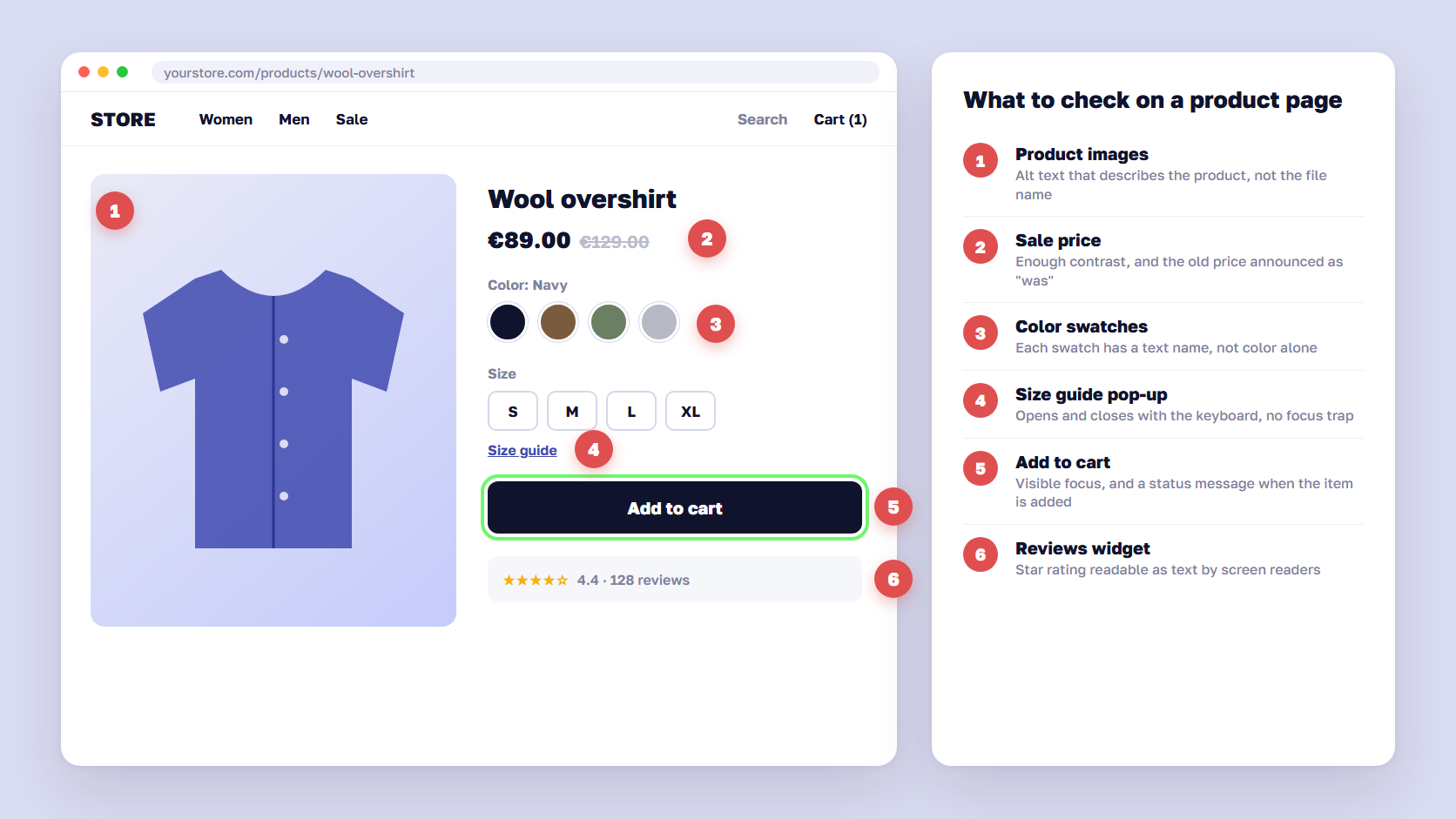
| Product page | Sizes or colors shown only as color swatches, low-contrast sale prices | 1.4.1 Use of color, 1.4.3 Contrast (minimum) |
| Cart | Quantity changes update the total without telling screen reader users | 4.1.3 Status messages |
| Checkout forms | Placeholder text instead of labels, errors shown only in red | 3.3.1 Error identification, 3.3.2 Labels or instructions |
| Sign-in and payment | Session timeout with no warning, CAPTCHA with no alternative | 2.2.1 Timing adjustable, 1.1.1 Non-text content |
| Pop-ups | Newsletter or cookie modal that traps keyboard focus | 2.1.2 No keyboard trap |
Plan for WCAG 2.2 now. Its new AA criteria include a minimum target size for buttons and links (2.5.8) and accessible authentication (3.3.8), and both affect mobile product pages and sign-in directly. When the new EN 301 549 version is cited, they become part of the benchmark.
🚀 Quick takeaway
Automated scanners find the obvious errors, such as missing alt text and low contrast. Keyboard traps, unclear error messages and a broken payment step need a person with a screen reader to find them.
Does a new theme make your store compliant?
A modern theme gives you a better starting point, and that’s all a theme can give. Shopify requires Theme Store themes to score at least 90 on average in Lighthouse’s accessibility audit, and a new Magento front end such as Hyvä means every template gets rebuilt, which is the cheapest moment to get accessibility right. When we replaced a Luma storefront with Hyvä for a global home brand, WCAG compliance was built into all key page templates during the redesign.
Even so, the theme is only one layer. A Lighthouse score of 90 still leaves failures that no automated test can detect, and these parts of a store are outside any theme:
- Your content: product images without alt text, PDFs, videos without captions, banners with text baked into the image
- Extensions and apps: review widgets, size guides, search and filtering modules, live chat
- Third-party scripts: cookie banners, pop-ups, payment iframes, CAPTCHAs
- Customizations: a custom mega menu or product configurator built for your store
- Everything published later: each new landing page and campaign your team adds after launch
The same applies to accessibility overlays, the one-line scripts that add a toolbar and promise compliance. They change how a page looks after it loads but leave the underlying markup as it is, so the failures that matter to screen reader users usually remain. The Overlay Fact Sheet, signed by hundreds of accessibility professionals, advises against relying on them.
Is there really a 2030 deadline?
Many guides say existing websites have until 2030 to comply. For an online store that keeps selling to consumers, that reading of the directive is wrong.
The transition in Article 32 is narrower. It lets service providers keep using products they already used before 28 June 2025, such as payment terminals, until 28 June 2030. It also lets service contracts agreed before 28 June 2025 run until they expire, for no more than five years. Neither clause pauses the requirements for a website.
| Date | What happens |
|---|---|
| 17 April 2019 | Directive (EU) 2019/882 adopted |
| 28 June 2022 | Deadline for EU countries to publish their national laws |
| 28 June 2025 | National laws apply to e-commerce services and new products |
| 2 September 2026 | ETSI publishes EN 301 549 V4.1.1, based on WCAG 2.2 |
| 28 June 2030 | Transition ends for products already used to provide services, and for service contracts agreed before 28 June 2025 |
Some content is outside the rules altogether. Article 2(4) excludes pre-recorded video and audio and office files, such as PDFs, published before 28 June 2025, third-party content you don’t fund, develop or control, and archived sections that haven’t been updated since that date. An old PDF size guide can stay as it is. A new one, or one you edit, needs to be accessible.
🚀 Quick takeaway
If a vendor says you have until 2030, ask which article they mean. For a webshop selling to consumers, the requirements have applied since 28 June 2025.
European Accessibility Act fines and enforcement
European Accessibility Act fines are set by each EU country, so they vary by market. Germany’s law allows fines of up to €100,000, and Ireland’s allows up to €60,000 and 18 months in prison on indictment. Courts can also order fixes: in June 2026, a French court gave Carrefour six months to make its website and app accessible.
| Country | National law | What non-compliance can cost |
|---|---|---|
| Germany | BFSG, section 37 | Up to €100,000 for the most serious breaches, up to €10,000 for others |
| Ireland | S.I. No. 636 of 2023 | Up to €60,000 and/or 18 months in prison on indictment, a class A fine and/or 6 months on summary conviction |
| France | Consumer Code, as amended for the EAA | Court-ordered fixes with daily penalties for delay (Carrefour, June 2026) |
Fines are only part of the risk. The directive requires penalties to come with remedial action, and every EU country must let consumers take a case to court or to a regulator. Disability organizations can join or bring those cases, which is how the first major ruling happened.
In July 2025, a French disability association sent formal notices to four grocery chains. On 4 June 2026, the court in Caen ordered Carrefour to make its website and app accessible within six months, with daily penalties for any delay. Carrefour argued that it already met 71% of the French accessibility criteria, and the court held that the store had to be fully accessible. A parallel claim against Auchan was dismissed in Lille in May 2026 and is under appeal.
🚀 Quick takeaway
In the Carrefour case, a store meeting 71% of the criteria still lost. Plan for the whole store to pass, checkout included.
How to reach EAA compliance: audit, fix, publish, maintain
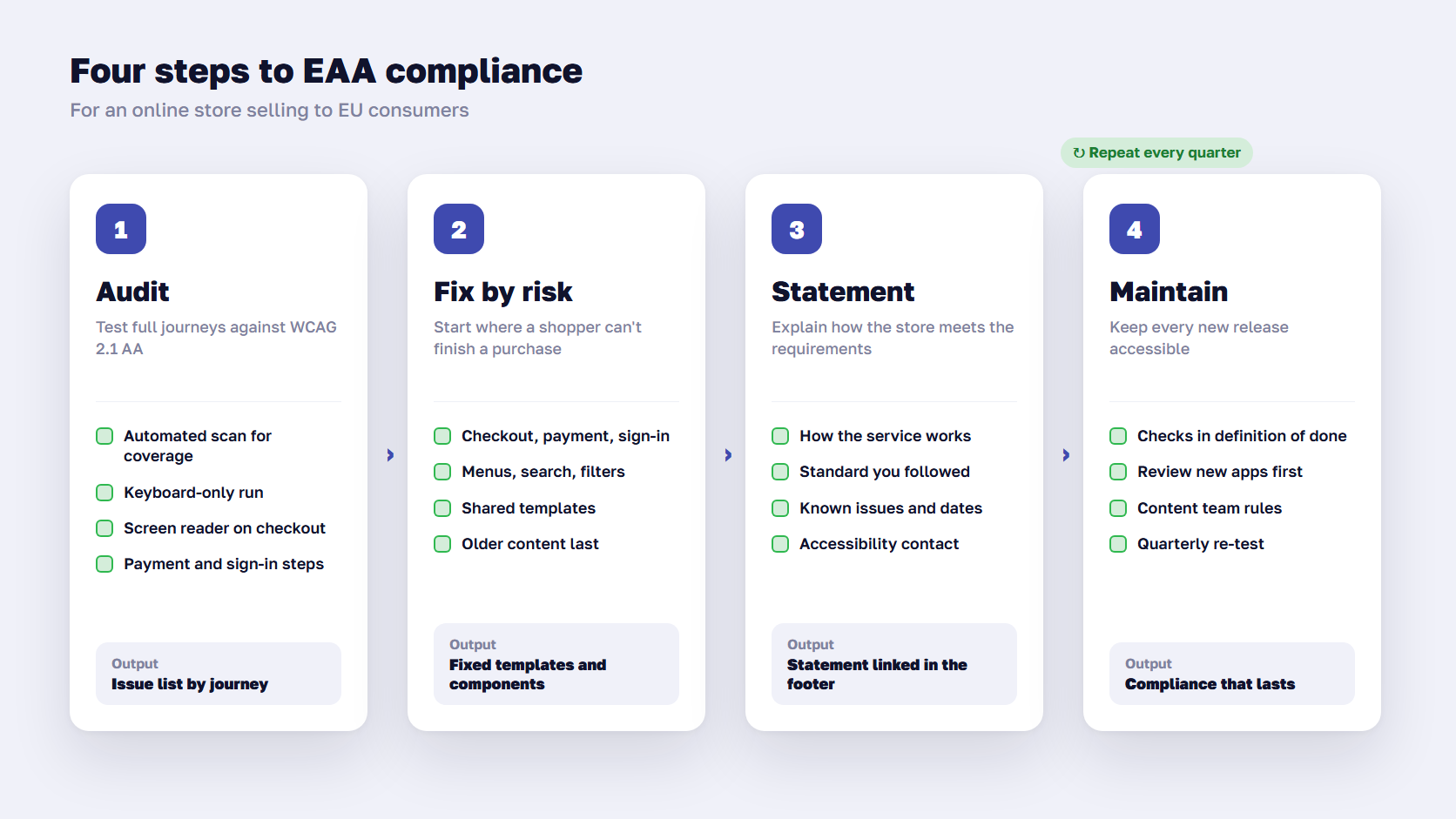
Most stores reach EAA compliance in four steps:
- Audit the store against WCAG 2.1 AA, with automated scans and manual testing of key journeys
- Fix issues in order of risk, starting with checkout, sign-in and payment
- Publish an accessibility statement that explains how the store meets the requirements
- Build accessibility checks into design, content and release work so new pages stay compliant
Run an accessibility audit
A European Accessibility Act audit should follow full shopping journeys. Cover the home page, search and filters, a category page, a product page, cart, checkout, payment, account sign-in, and the pop-ups that appear along the way. Use automated tools for coverage, then test each journey with a keyboard only and with at least one screen reader, such as NVDA on Windows and VoiceOver on iOS. Usability testing with people who use assistive technology shows where shoppers actually get stuck.
If you’d rather have it done for you, our accessibility audit checks the store against WCAG 2.1 AA and the EAA’s eCommerce requirements.
Fix in order of risk
Rank issues by how badly they block a purchase. How often a scanner flags them matters much less. A missing label on the card number field stops a blind shopper from buying. A decorative image without alt text doesn’t. A sensible order:
- Anything that blocks checkout, payment or sign-in
- Navigation, search and filters that keyboard users can’t operate
- Product information that screen readers can’t read, such as prices, variants and stock status
- Template-wide issues, such as contrast, headings and link text
- Individual pages and older content
Fixes in shared templates and components pay off fastest, because one change corrects every page that uses them. Contrast, focus styles and form patterns belong in the design system, which is where our UI/UX design team usually starts.
🚀 Quick takeaway
Fix the checkout first. A store with perfect product pages and an inaccessible payment step still fails the shopper at the only point that earns revenue.
Publish your accessibility statement
Annex V of the directive sets out what you must publish: a general description of the service in accessible formats, an explanation of how it works, and a description of how it meets the accessibility requirements. It goes in your terms and conditions or an equivalent document, and most stores link an accessibility statement from the footer. A useful statement covers:
- What the store offers and how it’s structured
- How the main features work, including search, checkout and payment
- Which standard you followed, for example WCAG 2.1 AA through EN 301 549
- Known issues and the dates you plan to fix them
- A contact point for accessibility problems and another way to place an order
- The national authority that handles complaints in your main markets
The first three items come from Annex V. The last three are good practice taken from public-sector accessibility statements, and they show a regulator that you take problems seriously.
Keep it compliant after launch
The directive expects the store to stay compliant as it changes. That means accessibility checks in the definition of done for every feature, a check of every new app or extension before install, contrast and alt text rules for the content team, and a re-test of the main journeys every quarter. If your store runs on a support plan, the simplest place for these checks is release QA in your eCommerce support process.
Frequently asked questions about the European Accessibility Act
Does the European Accessibility Act apply to B2B online stores?
Not if the store sells only to businesses. The act covers e-commerce services that conclude consumer contracts, so a store with verified business accounts and no consumer sales is outside it. If private buyers can register and pay without a business check, the store concludes consumer contracts and the act applies.
What is the European equivalent of the ADA?
For private businesses, the EAA is the closest equivalent. Unlike the ADA, it lists specific products and services, points to a technical standard, EN 301 549, and requires a public explanation of how a service meets the rules. Public-sector websites fall under a separate law, the Web Accessibility Directive.
Is WCAG 2.1 AA enough for the European Accessibility Act?
For the website itself, WCAG 2.1 AA through EN 301 549 is the accepted benchmark today. The act also requires product accessibility information, accessible payment and identification, an accessibility statement, and procedures to stay compliant. A version of EN 301 549 based on WCAG 2.2 has been published, so plan for WCAG 2.2 as well.
Do accessibility overlays make a store compliant?
No. Overlays add a toolbar and change how a page looks after it loads, but they leave the underlying code unchanged, so most barriers for screen reader and keyboard users remain. Compliance comes from fixing the store’s templates, components and content.
Who checks compliance with the EAA?
Each EU country names its own authorities to check that services comply and to follow up complaints, often its consumer protection or market surveillance body. Consumers and disability organizations can also take cases to court, as the Carrefour ruling in France showed.
Does the EAA apply to UK online stores?
Yes, for their sales to consumers in the EU. A UK company selling to shoppers in Ireland, Germany or France must meet the national version of the act in each of those countries. Sales to UK customers fall under the Equality Act 2010 instead.
Make accessibility part of the next release
The European Accessibility Act makes accessibility a condition for selling to EU consumers, and the first ruling shows courts expect the whole store to work, checkout included. Confirm whether you’re in scope, audit the journeys that earn revenue, fix the checkout first and publish a statement that matches what you’ve done. We’ve done this on Magento before, from bringing Lamborghini’s store to WCAG 2.0 AA with a custom keyboard flow to building WCAG compliance into a new Hyvä storefront.
Not sure whether your store is in scope, or how long the fix list is? Send us your store URL and we'll tell you where to start.




































