Vibe coding started as a post on X, and it is now a question for Magento (Adobe Commerce) store owners too. In February 2025 Andrej Karpathy, an AI researcher, used the term for a way of coding where you describe what you want in plain language, let an AI write the code, and “forget that the code even exists.” By November, Collins Dictionary had named it Word of the Year.
That is easy to picture for a new app built from nothing. Your store is a different case. It already takes orders, it runs custom code someone wrote years ago, and it cannot go down while you try things. So the question for a Magento store owner is whether vibe coding can work on a store like that, and what you would type.
What vibe coding means on a Magento store
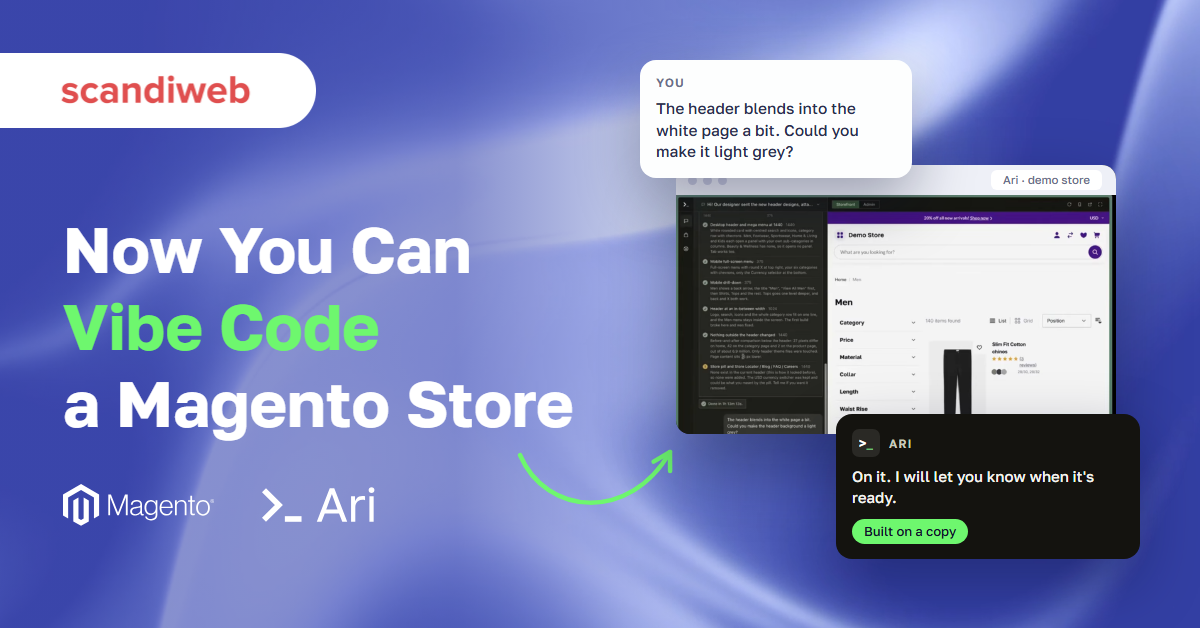
On a Magento store, vibe coding means you describe a change in a chat and an AI agent builds it. With Ari, the AI agent for Magento built by scandiweb, the change is built on a copy of your store, you look at the result on a preview store, and a person releases it. You judge what you see, the way you would judge a designer’s draft. You don’t have to read the code.
Alfreds Genkins, CTO at scandiweb, created Ari. In the October 28 webinar he compared the Ari control panel to Lovable, the app builder: “You might have seen Lovable before, and that’s exactly that. That’s Lovable for your Magento. We tried to make it as easy as building features in Lovable, but in the complexity of Magento.”
The copy is what makes this safe to try. Ari works in its own repository with its own instance of your store, so the live store keeps selling while you try things on the preview.
Four requests from the live demo
In the webinar, Alfreds walked through requests in Ari, some typed live and some from earlier conversations. Four of them show what a request looks like as typed, what came back, and where you, the store owner, come in. None of them needed a line of code from the person asking.
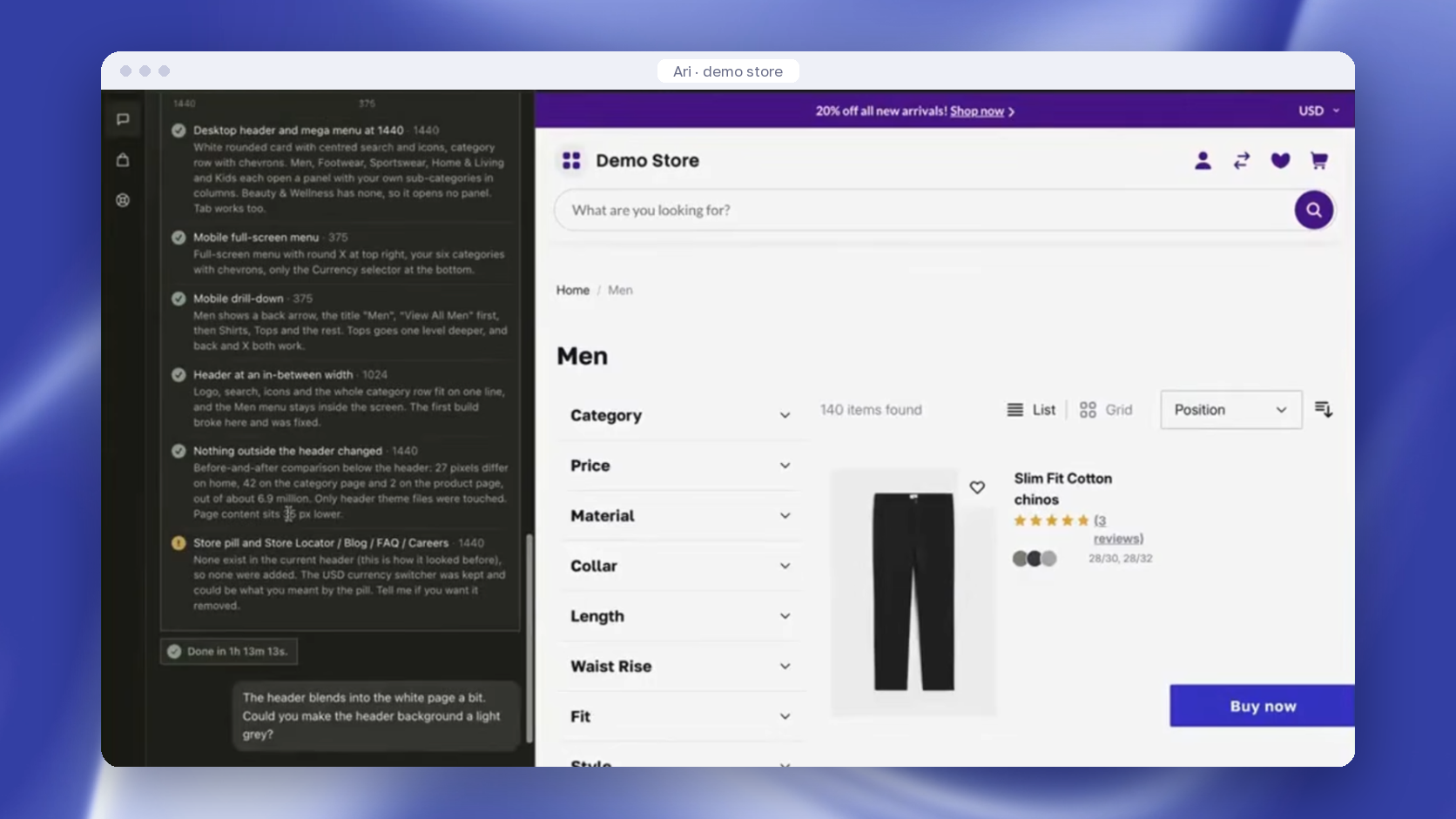
“The header blends into the white page a bit”
The conversation started with “Hi! Our designer sent the new header designs”, with the designer’s mockups attached. Before calling the job done, Ari listed what it had checked: the desktop header and mega menu at 1440 pixels wide, the mobile menu at 375, and the header at an in-between width of 1024, where “the first build broke here and was fixed.” A before-and-after comparison below the header showed that nothing else on the page had changed.
Ari also flagged what it had left out. The mockups showed Store Locator, Blog, FAQ, and Careers links that don’t exist on the store, so none were added, and Ari asked whether the currency switcher was the “pill” the design meant.
One detail bothered Alfreds, so he typed: “The header blends into the white page a bit. Could you make the header background a light grey?” A follow-up works the same way as the first request: look at the preview and say in plain words what is off.
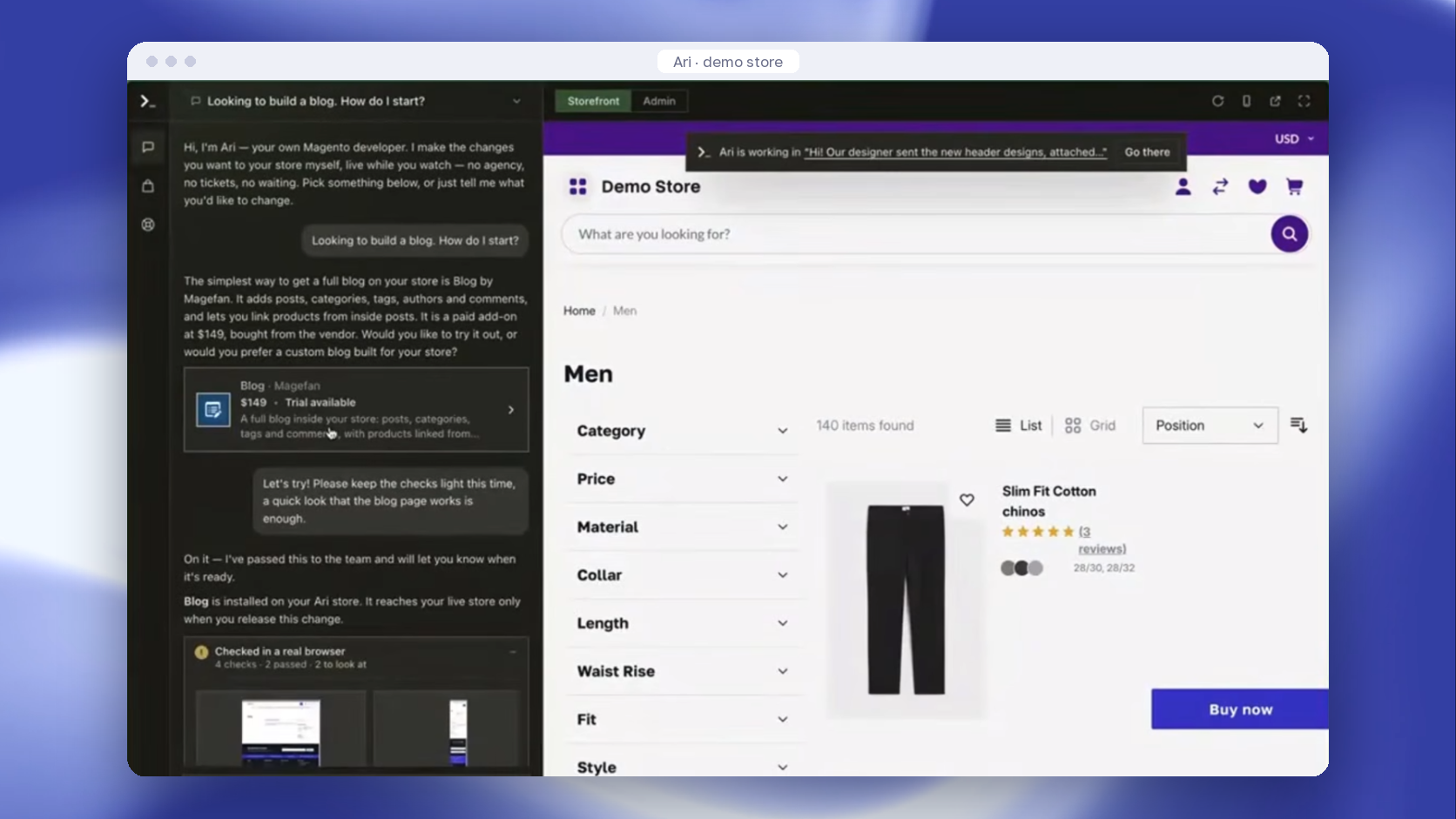
“Looking to build a blog. How do I start?”
That was the whole request. Ari answered with the simplest route, Blog by Magefan: a paid extension at $149 that adds posts, categories, tags, authors, and comments, with a trial available. Then it asked: “Would you like to try it out, or would you prefer a custom blog built for your store?”
“I never said I want an extension. And it offered me options,” Alfreds said.
He chose the trial and asked Ari to keep the checks light. Ari installed the extension on the copy and replied: “Blog is installed on your Ari store. It reaches your live store only when you release this change.” Then it suggested next steps, such as writing the first post or seeing how comments work. The same route is open from Ari’s extension marketplace, where you pick an extension, press “Try it out,” and Ari installs it on the copy and guides you through the setup.
“What’s going on in Ari?”
Ari has connected apps, so you can use it from ChatGPT or Claude, the AI assistants. In ChatGPT, Alfreds asked what was going on in Ari and got a live update: the header color change was in progress. You can also give Ari tasks from there, without opening the control panel.
“@support, please make sure it’s all perfect”
Type “@support” in the chat and the support team is notified. Requests collect in a separate support tab, and you can send images.
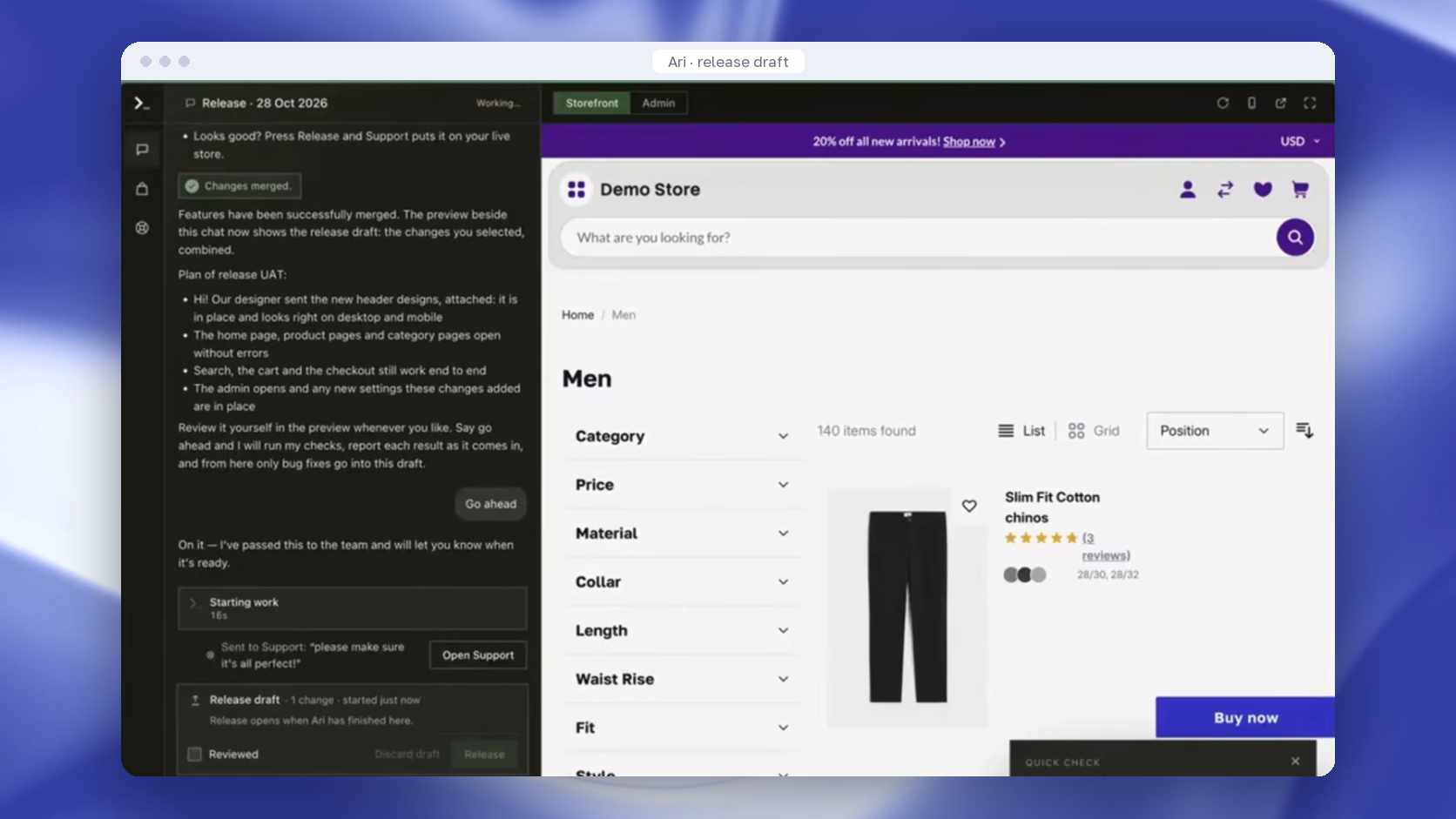
When the header was ready, Ari merged the finished changes into a release draft, showed it on the preview, and set out a test plan:
- the new header is in place and looks right on desktop and mobile
- the home page, product pages, and category pages open without errors
- search, the cart, and the checkout still work end to end
- the admin opens, with any new settings in place
Alfreds typed “Go ahead,” and his note went to support: “please make sure it’s all perfect!” After you sign off, a person or an automation takes it from there. A pull request is opened to your production repository, or your deployment pipeline is triggered, as set up at onboarding.
🚀 Quick takeaway
A follow-up is just another message in the same chat. Say what looks wrong on the preview, and Ari revises the change before anything reaches shoppers.
What one store owner handed over in his first month
Martin Thompson owns a health products store in New Zealand and has run it on Magento since 2009. Before Ari, he had planned to move to a .NET platform because basic work cost too much. In his first month, within his plan’s credits, Ari upgraded an extension, built a Klaviyo integration, fixed a product snippet issue, installed a security patch, fixed a speed issue, and fixed a duplicated menu left by a previous developer.
He tested everything Ari did on his end, and it was right almost every time. “It kept things simple and to the point. It didn’t overengineer things,” he said.
His routine is short: “It will tell me that it’s on my preview site, and then I go and test that. I used to just talk to the developer. Now I just say it’s ready for release and I tag the developer in the portal, and they’ll release it.”
The first night, he stayed up until about 2 a.m. After that, he told the developer to deploy whenever they were confident, went to sleep, and the change went live the next day. He says he got more done in that month than in the previous three.
Requests worth starting with
Start with a change you would otherwise put in a ticket: something small, visible to shoppers, and easy to check on the preview. These come from Ari’s own examples and from Martin’s first month, written the way a merchant would type them.
- A product page block: “Show a delivery date under the Add to cart button on every product page.”
- A promo bar, a banner, or a change to the menu.
- An extension, such as Mageplaza’s SEO Suite. An install uses 50 to 150 credits, about €2.50 to €7.50 on the €99 plan. The manual route is in our guide to installing a Magento 2 extension.
- An upgrade: “Upgrade us from 2.4.6 to 2.4.9 and tell me what breaks.” Our guide on how to upgrade Magento covers what such an upgrade involves.
- A fix, such as a product snippet issue or a duplicated menu left by a previous developer.
- An integration, such as connecting the store to Klaviyo.
- A custom feature, such as finding product information online and adding it to the product.
Anything technically possible inside Magento is open, including integrations with outside APIs.
🚀 Quick takeaway
Pick one request from your ticket backlog that a shopper would notice, such as a delivery date under the Add to cart button, and use it as the first test.
How to phrase a request
Say what the shopper or your team should see and where, the way you would brief a developer. “Show a delivery date under the Add to cart button on every product page” is a complete request. You do not need to know which part of Magento it touches, and you can write it in any language.
A few habits from the demo and the Q&A make the rest easier:
- If details are missing, Ari asks clarifying questions and offers options for how to build it before it starts.
- You can queue as many requests as you want. They run one after another on your store’s copy, and Ari tells you when each one is done.
- Check the result on the preview link. You can browse it any time, and it has nothing to do with production.
- When something looks off, reply in the same chat, the way Alfreds did with the header.
- Release when you are happy. Until then, nothing changes for shoppers.
What Ari won’t do from the chat
Ari never changes your live store from the chat. Everything it builds happens on a sanitized copy of your store, in a separate environment, like a staging environment, and a person releases each change. The limits below come from the webinar Q&A.
- The copy has your products but no customer personal data. The database is sanitized, or you provide a sanitized copy.
- Ari never changes the database directly. It writes migration patches instead, including for content changes, the way a good agency or a good developer would.
- Ari does not work inside systems outside Magento, such as an ERP or a CRM. It can build the integration with them, and if a feature belongs in a PIM, it can say where it should live.
- Keys and passwords stay out of the chat. You paste them into the admin yourself.
- The release is always a person’s call: your developer or agency on the Ari plan, or Ari engineers on Ari Agency.
🚀 Quick takeaway
Ari doesn’t write to your live database. Content and code changes reach the store as migration patches and a release that a person approves.
Frequently asked questions about vibe coding Magento
Can you vibe code a Magento store?
Yes, with an AI agent that works on a copy of the store. With Ari, you describe the change in a chat, Ari builds it on a sanitized copy of your Magento store, and you check the result on a preview store. A person then releases it, through a pull request to your repository or your deployment pipeline. Ari is a store-change agent, one of the four types of Magento AI agents.
Do I need to read the code Ari writes?
No. You judge the result on the preview store, the way Martin Thompson tests every change on his preview site before tagging his developer for release. The code comes back to your own repository, so your developer or agency can review it before release if they want to.
Can Ari work on several requests at once?
You can queue as many requests as you want. Ari switches between them, builds each one, and tells you when one is done. They run one after another, because there is one Magento instance behind the copy, so two builds cannot run side by side.
Does it work on a Hyvä store?
Yes. In the webinar Q&A, Alfreds said Hyvä CMS is covered by Ari’s knowledge base, and Ari also installs Hyvä Theme, Hyvä Checkout, and Hyvä extensions. As with any other change, Ari writes migration patches rather than editing the database directly, so the change can be reviewed and deployed through your usual process.
Who is responsible if a released change breaks something?
That depends on the plan. On the self-managed Ari plan, your own team or agency releases the changes and is responsible for them. On Ari Agency, the Ari team takes that responsibility end to end. Ari also monitors the store’s uptime: one night it restarted Varnish, the caching server in front of Magento, on Martin Thompson’s store when it went down.
What does vibe coding a Magento store cost with Ari?
Ari is €99 a month with 2,000 credits included, and you or your developers release the changes. Ari Agency is €299 a month with 2,000 credits, managed by Ari engineers who carry the responsibility end to end. An extension install uses 50 to 150 credits, about €2.50 to €7.50 on the €99 plan.
Start vibe coding your Magento store with one request
Vibe coding a Magento store works when the request is plain, the change lands on a copy, and a person releases it. That is the pattern the webinar demo showed, from a header redesign and a blog to a release with a test plan and a note to support. It is also how Martin Thompson went from planning to leave Magento to working through his backlog.
Glebs Vrevsky, co-founder of Ari, gave one piece of advice in the webinar: take one task from your backlog and deliver it the new way. Then compare the time, the cost, and the effort with how that task would have gone through a ticket.
The header, the blog, the ChatGPT check-in, and the release step are all in the recording, where you can watch the full webinar.
Want to try vibe coding on your own Magento store? Book an Ari demo and bring the first request from your backlog.