
Adobe Commerce as a Cloud Service (ACCS) is Adobe’s software-as-a-service edition of Adobe Commerce, generally available since June 2025. Adobe owns the application, hosts it, and updates it continuously, which means nobody on your team plans an upgrade again. In exchange, PHP is not supported inside the application, custom logic is rebuilt outside it, and the storefront is rebuilt on Edge Delivery Services.
Two questions usually follow. Are you being forced onto it, and what does it cost to go? No, and more than most merchants expect. Adobe has published no end-of-life date for the platform you are on, and for a heavily customized store, getting to ACCS is closer to a rebuild than a migration.
In this article, we’ll cover what ACCS is, where it fits among Adobe’s commerce editions, what Adobe’s contract actually entitles you to, what does not carry across from your current build, and the conditions that make it a good or bad fit. As an Adobe Gold Solutions Partner with 894+ Adobe certifications and hands-on time in an ACCS sandbox, every number below comes from a trusted partner and Adobe’s own published documentation.
What is Adobe Commerce as a Cloud Service?
Adobe Commerce as a Cloud Service is multi-tenant, and that is the detail deciding how it behaves once you are on it. Your store shares one application with every other ACCS customer, so Adobe sets the release schedule. You get 30 days to evaluate each update in a sandbox before it reaches production, and Adobe guarantees backward compatibility for customizations that follow its API-first extensibility model. What you no longer do is choose when to upgrade.
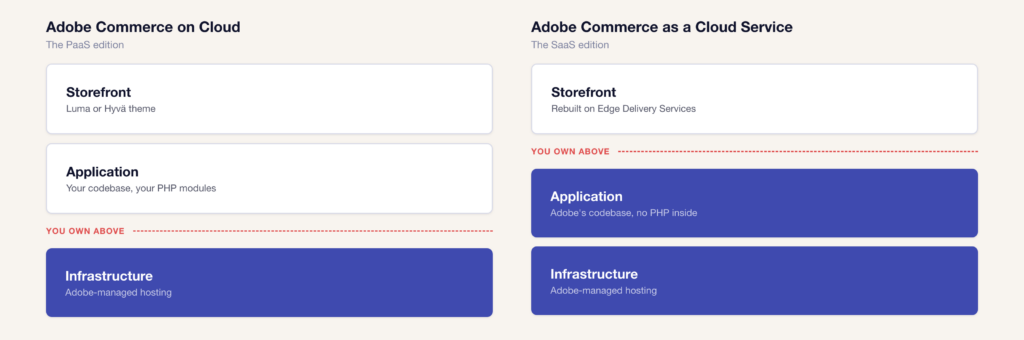
Here’s an important clarification, because the naming may cause confusion – “Adobe Commerce on Cloud” and “Adobe Commerce as a Cloud Service” are different products. The first is the platform-as-a-service edition that most Adobe Commerce merchants run today, where Adobe manages the infrastructure and your team owns the codebase. The second is the new SaaS edition, where Adobe owns both.
If your developers can deploy PHP into your store, you are on the PaaS edition. On ACCS they cannot, because the application is shared across every tenant and Adobe updates it on its own schedule. Teams who still call the platform Magento will also see this product discussed as Magento SaaS, which refers to the same thing under the older name.
Where it fits among Adobe’s four commerce editions
The difference is ownership of the application. On Adobe Commerce on Cloud, the PaaS edition, the codebase belongs to the merchant, who schedules upgrades, applies patches, and sizes infrastructure. On Adobe Commerce as a Cloud Service, the application belongs to Adobe, which patches and upgrades it continuously across all tenants. That removes the upgrade cycle and removes in-application PHP customization at the same time, which is why most migrations become a rebuild.
Adobe now sells four ways to run commerce, and merchants are frequently shown one of them without being told the other three exist.
| Edition | What it is | Who it suits |
|---|---|---|
| Adobe Commerce as a Cloud Service | Multi-tenant SaaS. Adobe owns, hosts, and continuously updates the application. Storefront on Edge Delivery Services. | Merchants with standardized catalogs whose customization is integration work already handled over APIs. |
| Adobe Commerce on Cloud (PaaS) | Adobe-managed infrastructure, your codebase, your upgrade schedule, in-application PHP available. | Merchants whose pricing, checkout, or promotion logic lives inside the application. |
| Adobe Commerce on-premise | You own and operate both infrastructure and application. | Merchants with data residency or infrastructure requirements that rule out shared hosting. |
| Adobe Commerce Optimizer | Adds a SaaS catalog, search, and merchandising layer in front of an existing commerce backend. | Merchants who want faster storefront and catalog performance without replacing the commerce engine. |
For more information on Adobe’s platforms, see our Adobe Commerce vs Magento Open Source comparison.
How the platform is built
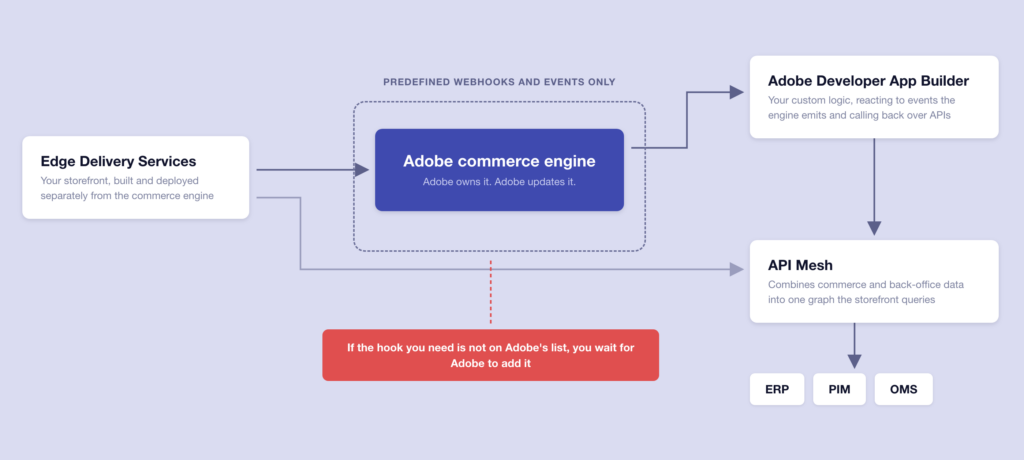
Adobe Commerce as a Cloud Service is headless by default. The commerce engine is Adobe’s, reached over APIs, and the storefront is a separate build on Edge Delivery Services, no longer a theme inside the application. Customization happens out of process, through Adobe Developer App Builder for custom logic and API Mesh for combining data sources. Nothing a merchant writes deploys into the commerce application itself.
Inside that engine are four services, and they are a large part of what you are buying. Live Search handles AI-powered search, Product Recommendations generates suggestions from shopper behavior, Catalog Service serves product data to the storefront at speed, and Payment Services covers payment methods including interest-free installments. On the PaaS edition several of these are separate add-ons. Here, they are part of the platform.
Around them are three architectural pieces that decide what you can build, and they are the source of nearly every practical consequence in the rest of this guide:
Edge Delivery Services is where your storefront is. It is Adobe’s delivery platform, built for page speed and for letting content teams publish changes without a developer in the loop.
Adobe Developer App Builder is where custom logic is. Instead of writing a PHP module that changes how the application behaves, you build a separate application that reacts to events the commerce engine emits and calls back into it over APIs. We wrote about App Builder in production before it became the only extensibility route on SaaS, and the summary is that it does out-of-process work well and is not an integration platform in disguise.
API Mesh connects your storefront to your data sources, combining calls to the commerce engine, your ERP, your PIM, and anything else into a single graph the frontend can query.
On Adobe Commerce B2B, we connected Macron’s storefront to SAP ERP and a Pimcore PIM, and the integration work produced a 132.5% improvement in conversion rate on direct traffic alongside 40% faster order creation. Integration built that way is part of a build that survives a migration to ACCS, because it already communicates over APIs and never depended on PHP inside the application.
The constraint that matters early is that out-of-process extensibility only reaches the points Adobe has chosen to expose. On the PaaS edition, a developer can hook almost any method in the application. On ACCS, webhooks and events come from a predefined list, and Adobe adds to that list release by release.
What Adobe’s contract entitles you to
Adobe’s product description for Adobe Commerce as a Cloud Service sets binding contractual ceilings. A subscription covers up to 250,000 SKUs, up to 100 catalog variations, and a catalog ingestion rate of 1,000 updates per minute and 100,000 per day. Storage is capped at 1 terabyte for the Edge Delivery Services storefront. Exceeding SKU count, catalog variations, or ingestion rate obliges the merchant to license additional capacity.
🚀 Quick takeaway
ACCS entitles you to 250,000 SKUs, 100 catalog variations, and 1,000 catalog updates per minute.
These numbers are published in Adobe’s legal product description, and they are the part of ACCS least discussed in public. They belong in the conversation before a migration is scoped.
| Entitlement | What the contract allows |
|---|---|
| SKU count | Up to 250,000 |
| Catalog variations | Up to 100 |
| Catalog ingestion rate | 1,000 updates per minute, 100,000 per day |
| Storefront storage | Up to 1 TB for Commerce Storefront on Edge Delivery Services |
| Product Visuals (AEM Assets) | 2 power users, 2 collaborator users, up to 1 TB storage |
| Sandbox environments | 2 per instance as the base allocation, expandable |
| Catalog retrieval | Metered, licensed against your sales order |
| Overages | SKU count, catalog variations, and ingestion rate all require licensing additional capacity |
The catalog ingestion ceiling of 1,000 updates per minute is generous for a stable catalog and tight for a retailer repricing thousands of lines at the start of a sale. And two power users on Product Visuals is a real constraint for a content team that expected asset management to come as standard and finds it rationed.
What these numbers do not tell you is how they behave against your specific catalog and release cadence, which is the difference between a limit and a problem. Run that comparison before the commercial conversation starts.
What does not carry over
Configuration does not migrate to Adobe Commerce as a Cloud Service. Adobe states that store settings, payment methods, shipping rules, and tax configuration are recreated by hand in the ACCS Admin, and the Bulk Data Migration Tool covers first-party data only. PHP extensions do not carry over, because the application does not accept them. Luma and Hyvä storefronts have no upgrade path, so every migration includes a storefront rebuild.
🚀 Quick takeaway
Adobe’s Bulk Data Migration Tool covers first-party data only. Store configuration, payment and tax settings, PHP extensions, the storefront and your URL structure are all rebuilt or retyped by hand.
This section is the one most likely to change a timeline, so here is the detail behind each item:
Your configuration is retyped. Store settings, payment method configuration, shipping rules, and tax setup are recreated manually in the new admin. For a single-store merchant, this is tedious. For a merchant with dozens of store views across multiple countries, it is a workstream with its own testing plan.
Your extensions need individual verdicts. Because no PHP loads into the application, every extension in your current stack falls into one of four outcomes: it is now native functionality, a vendor has rebuilt it as an App Builder application, it needs a custom rebuild, or it has no path and the capability is dropped. The available catalog of App Builder extensions remains small, which means more of your stack lands in the third and fourth categories than most merchants expect.
Your storefront is rebuilt. Luma has no path onto ACCS, and neither does Hyvä. Merchants who invested recently in Hyvä storefronts are being asked to write that investment off, which for many is the single fact that settles the decision.
Your URL structure needs deliberate protection. ACCS has no URL rewrite tooling, and a full storefront rebuild means new URL structures, new hreflang handling, and new structured data. Organic traffic does not have to be lost in a replatform, but preserving it depends on redirect mapping that starts at the beginning of the project.
Where ACCS saves you money
The subscription genuinely does consolidate spending. Platform licensing, hosting, infrastructure sizing, and upgrade labor collapse into a single line, and for a team that has been absorbing upgrade projects every year, removing that cycle has real value.
Where the business case needs care is the one-time investment to get there. Reaching ACCS from a customized store means rebuilding the storefront on Edge Delivery Services, re-architecting customization out of process into App Builder, re-making every integration, and recreating configuration by hand. For a complex build, that cost commonly exceeds several years of upgrade spending, so the strongest cases are built on what changes after go-live. Our breakdown of what an ACCS migration costs splits the effort across five workstreams and gives ranges by store profile.
That is also the more durable reason to move. ACCS suits merchants who want to stop spending engineering time on the platform itself so they can spend it on merchandising, content, and integrations instead. It is an argument about how your team operates.
🚀 Quick takeaway
The subscription ends upgrade projects, and that saving repeats every year. Reaching ACCS from a customized build is a one-time cost across five workstreams that commonly exceeds several years of that upgrade spend.
What this means for Adobe Commerce on Cloud
Adobe has published no end-of-life date for Adobe Commerce on Cloud. Version 2.4.9 reached general availability in May 2026 with standard support running to 31 May 2029, so the PaaS edition continues to receive new releases. Individual versions do reach end of support on Adobe’s published lifecycle schedule, and from 1 June 2027 Adobe will stop maintaining Cloud environments on unsupported versions. The deadline attaches to versions, and the platform itself carries no end date.
The version schedule runs in three tiers. Standard support runs three years from general availability and includes quality fixes, security patches and on-call support. Extended support adds a further year of quality and security patches at no cost for 2.4.6 and 2.4.7. Security-only support, offered as a one-time exception for 2.4.4 through 2.4.6, provides isolated security fixes with no quality fixes at all.
| Version | Standard support ends | Extended support ends | Security-only ends | Cloud enforcement |
|---|---|---|---|---|
| 2.4.4 | 12 Apr 2025 | 14 Apr 2026 | 31 May 2027 | 1 Jun 2027 |
| 2.4.5 | 12 Aug 2025 | 11 Aug 2026 | 31 May 2027 | 1 Jun 2027 |
| 2.4.6 | 11 Aug 2026 | 31 Aug 2027 | 31 May 2028 | 1 Jun 2028 |
| 2.4.7 | 31 May 2027 | 31 May 2028 | – | 1 Jun 2028 |
| 2.4.8 | 31 May 2028 | TBD | – | TBD |
| 2.4.9 | 31 May 2029 | TBD | – | TBD |
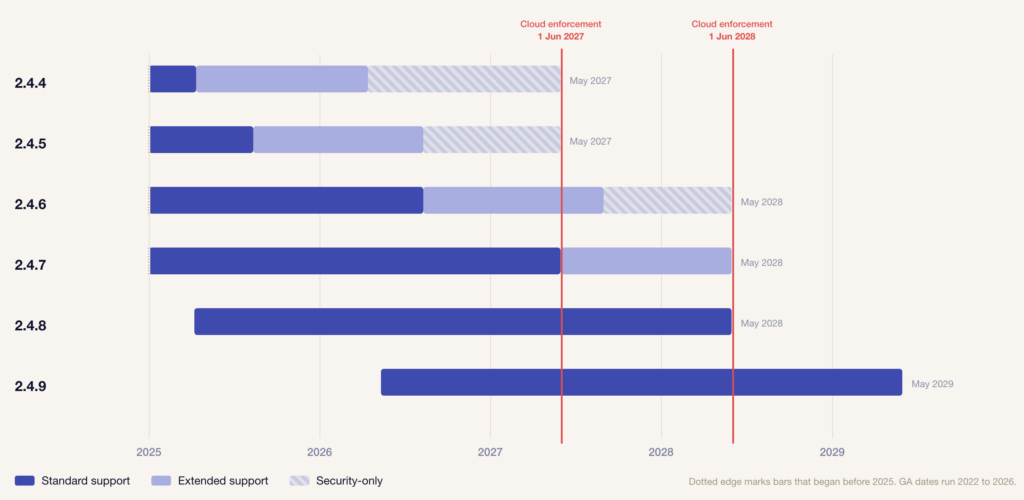
Adobe states that from 1 June 2027 it “will no longer maintain Cloud environments running unsupported Commerce versions,” and that the action it may take includes “suspending traffic to the affected infrastructure. As a result, your eCommerce storefront will go offline.”
Merchants on 2.4.6 and 2.4.7 have until mid-2028 before enforcement reaches them, which is enough time to decide properly. Merchants still on 2.4.4 or 2.4.5 have until June 2027, and for them the pressing question is an upgrade, and a replatform can wait.
How to choose between Adobe Commerce as a Cloud Service and Adobe Commerce on Cloud
The honest answer today is that Adobe Commerce as a Cloud Service fits standardized catalogs and integration-led customization, while Adobe Commerce on Cloud remains the right home for stores whose commercial logic lives inside the application. The decision is related to your customization. If it is written as PHP inside Adobe Commerce, moving it out of process is a rebuild, and a rebuild needs a reason beyond ending upgrades.
Choose Adobe Commerce as a Cloud Service if
- Your catalog stays under 250,000 SKUs and updates at a predictable rate
- Your customization is integration work that already communicates over APIs
- You are on a stock or lightly themed storefront you are ready to rebuild
- Ending the upgrade cycle matters more to you than keeping in-application PHP
- Your content team wants to publish page changes without a developer.
Choose Adobe Commerce on Cloud if
- Your checkout, pricing, or promotion logic is written as in-application PHP modules
- Your catalog exceeds 250,000 SKUs or changes faster than 1,000 updates per minute
- You need a customization that the out-of-the-box extension points do not cover
- Cost reduction is the main reason you are considering the change.
Frequently asked questions about Adobe Commerce as a Cloud Service
What is Adobe Commerce as a Cloud Service?
Adobe Commerce as a Cloud Service is Adobe’s multi-tenant SaaS edition of Adobe Commerce, generally available since June 2025. Adobe owns and hosts the application and upgrades it continuously, so merchants no longer plan version upgrades or apply patches. In exchange, PHP is not supported inside the application, customization happens out of process through App Builder, and the storefront is rebuilt on Edge Delivery Services.
What is the difference between Adobe Commerce SaaS and PaaS?
The difference is who owns the application. On Adobe Commerce on Cloud, the PaaS edition, the codebase is yours, and your team schedules upgrades, applies patches, and sizes infrastructure. On Adobe Commerce as a Cloud Service, the application is Adobe’s, and Adobe upgrades it for every tenant continuously. The trade-off is that in-application PHP customization is no longer available to you.
What are the SKU limits on Adobe Commerce as a Cloud Service?
Adobe’s product description entitles a subscription to up to 250,000 SKUs. It also caps catalog variations at 100 and catalog ingestion at 1,000 updates per minute and 100,000 per day. These are contractual ceilings, not soft guidance. Exceeding SKU count, catalog variations, or ingestion rate obliges you to license additional capacity.
Will my Magento extensions work on Adobe Commerce as a Cloud Service?
Not directly. Adobe Commerce as a Cloud Service does not support PHP inside the application, so extensions written as in-application PHP modules have no home there. Vendors are rebuilding selected extensions as App Builder applications, but the available catalog remains small. Every extension in your current stack needs an individual verdict of native, rebuildable, or dropped.
Is Adobe discontinuing Adobe Commerce on Cloud?
No. Adobe has published no end-of-life date for Adobe Commerce on Cloud. Version 2.4.9 reached general availability in May 2026 with standard support running to 31 May 2029. Individual versions do reach end of support on Adobe’s lifecycle schedule, and from 1 June 2027 Adobe will stop maintaining Cloud environments running unsupported versions, but that deadline attaches to versions, and the platform itself carries no end date.
What is Edge Delivery Services and why does Adobe Commerce as a Cloud Service require it?
Edge Delivery Services is Adobe’s storefront delivery platform, built for speed and for content editing without developer involvement. ACCS is headless, so the commerce engine serves data over APIs and the storefront is a separate build. Luma themes do not carry across, which makes the storefront rebuild a project in its own right inside any migration.
Can I keep my Hyvä storefront on Adobe Commerce as a Cloud Service?
No. Hyvä is a frontend for Adobe Commerce PaaS and has no upgrade path onto Adobe Commerce as a Cloud Service, whose storefront is built on Edge Delivery Services. Merchants who invested in Hyvä recently face writing that investment off. For many, that single fact makes staying on PaaS through the current support window the better commercial decision.
Does Adobe Commerce as a Cloud Service cost less than PaaS?
Not reliably, and cost reduction is the weakest reason to consider it. The subscription consolidates platform, hosting, and upgrade costs, but reaching Adobe Commerce as a Cloud Service from a customized Adobe Commerce build means rebuilding the storefront, re-architecting customization out of process, and re-plumbing integrations. For complex stores that one-time cost commonly exceeds several years of upgrade spend.
When does my Adobe Commerce version lose support?
Adobe publishes three tiers. For 2.4.6, standard support ended 11 August 2026, extended support ends 31 August 2027, and security-only support ends 31 May 2028. For 2.4.7, standard support ends 31 May 2027 and extended support ends 31 May 2028. From 1 June 2027 Adobe stops maintaining Cloud environments on unsupported versions and may suspend traffic to them.
Deciding whether Adobe Commerce as a Cloud Service fits
Adobe Commerce as a Cloud Service is a real product with a clear buyer, and that buyer is more specific than the marketing around it suggests. It suits merchants whose catalog stays inside Adobe’s published ceilings, whose customization is already in integrations outside the application, and who are ready to treat the storefront as something to rebuild rather than carry across.
For merchants whose pricing rules, checkout behavior or promotion logic are written as PHP modules, the honest position is that ACCS asks for a rebuild and does not yet offer enough in return to justify one on cost alone. The version schedule gives most of those merchants until 2028 to decide, which is time enough to answer the question properly.
The three numbers to check before anything else are your SKU count, your peak catalog update rate, and what your current storefront cost to build. Those decide the answer more often than any feature comparison does.
Working out whether Adobe Commerce as a Cloud Service fits your catalog, your customization, and your storefront is a conversation worth having with an experienced Adobe partner. Book a free consultation with an Adobe-certified architect, and we will get back to you within 48h.




































