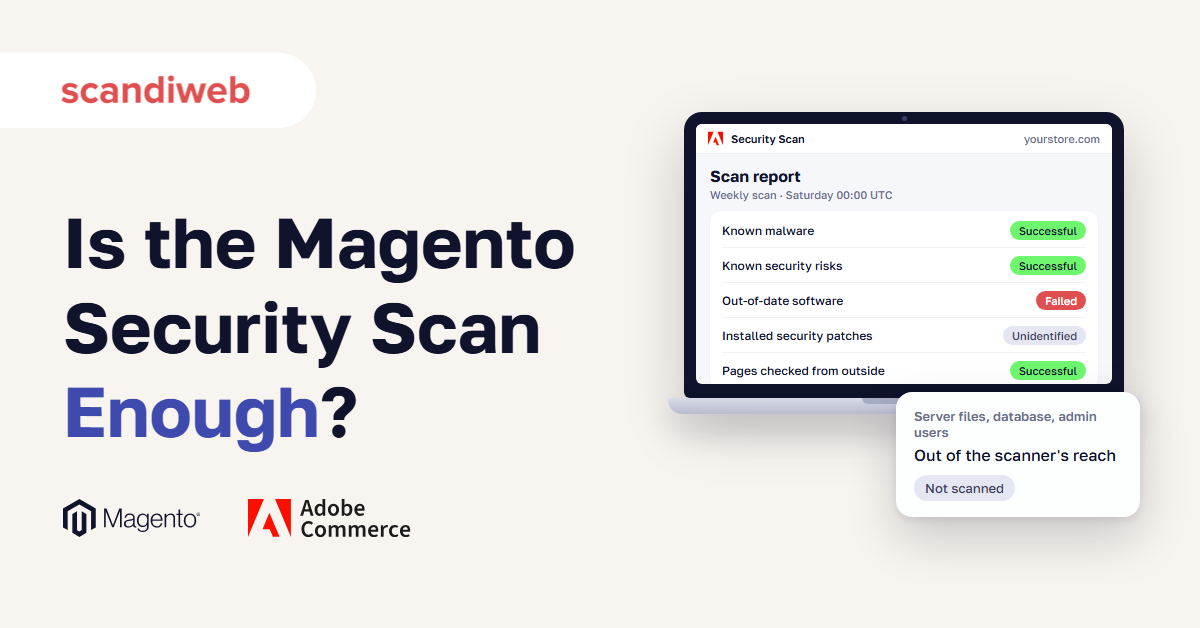

Sometime over the weekend, an email from Adobe tells you that this week’s Magento Security Scan Tool run on your store has finished. The tool is Adobe’s free security checkup for Magento (Adobe Commerce) stores, which runs on a schedule and emails you the result.
You open the report. It lists the checks your store passed and the ones it failed, with a recommended action for each failure. This week the passed checks fill the page, and the failed section is empty.
You archive the email. If anyone asks whether the store is secure, that empty section is what you will point to. So what does a week with nothing failed tell you about your store, and is this one scan enough?
What is the Magento Security Scan Tool, and who can use it?
The Magento Security Scan Tool, also called the Adobe Commerce Security Scan Tool, is Adobe’s free service that monitors Adobe Commerce and Magento Open Source stores for malware and known security risks and emails you the results. It runs more than 21,000 security tests weekly, daily, or on demand. The tool looks at your store the way a visitor’s browser does, which makes it a sound weekly baseline for one part of store security.
You use it from the dashboard of your Commerce account, a free Adobe account that anyone can open at account.magento.com with an Adobe ID, separate from your store’s Admin login.
Adobe tells merchants to set up a scan for each domain. Its security action plan starts with “Diagnose: Run a scan” and makes cleanup a separate step, which includes hiring a qualified consultant or online service and removing unknown Admin users.
Our Magento 2 security guide covers the rest of Magento security, and our post on which security features Magento includes explains the add-ons that fill the gaps.
Which parts of a Magento store does the Security Scan Tool check?
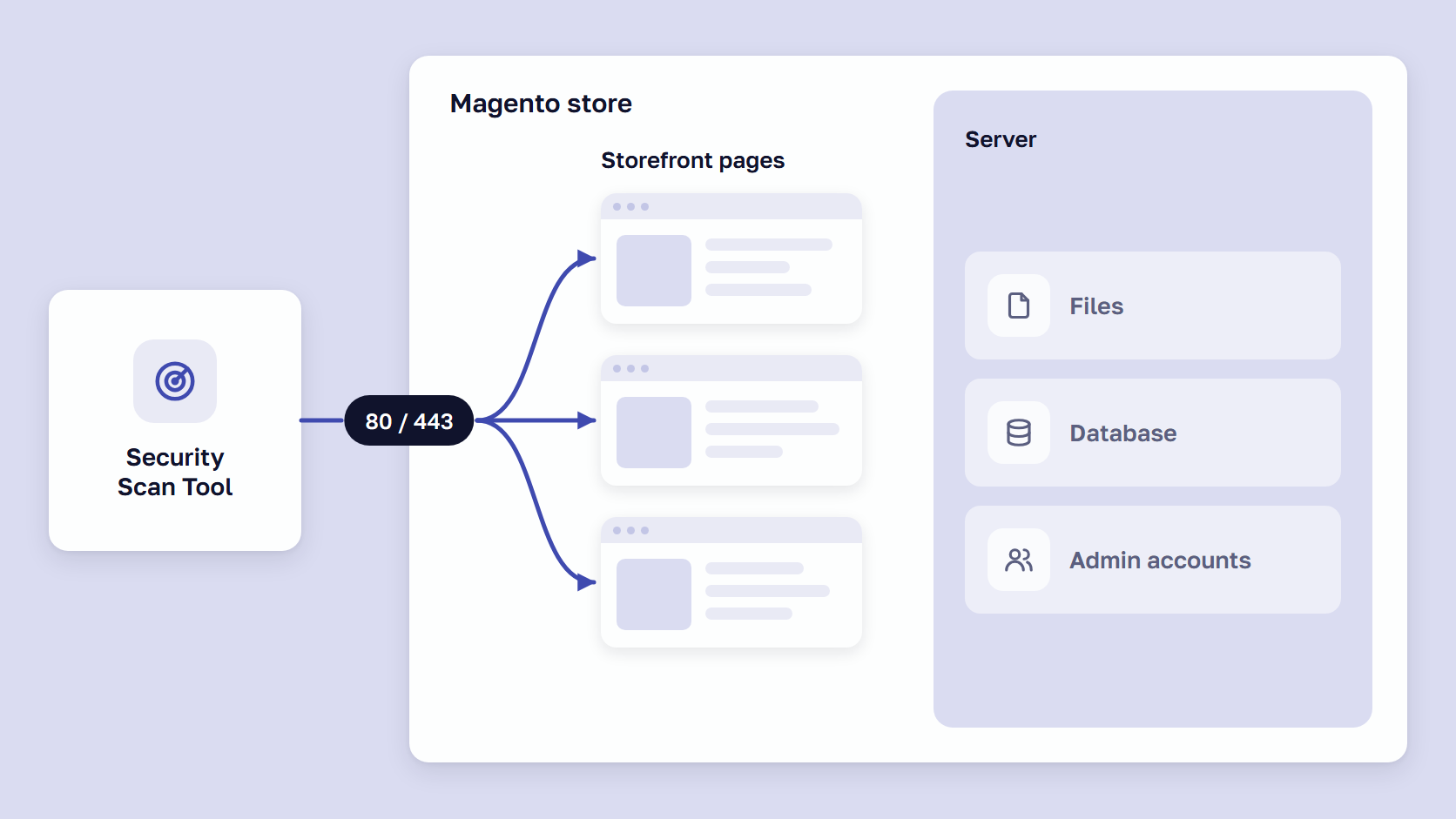
The Security Scan Tool checks the pages it can load for known malware, known security risks, and out-of-date software. Anything that exists only on the server or in custom code needs another check, such as a server-side scanner: software that runs on the store’s own server and reads its files and database.
| Area of the store | Does the Security Scan Tool check it? | What covers it |
|---|---|---|
| Known malware on the pages the scanner can load | Yes, with more than 21,000 security tests | Security Scan Tool, weekly |
| Known security risks and out-of-date software visible from outside | Yes, reported as Failed, Unidentified, or Successful | Security Scan Tool, weekly |
| Which monthly security patches are installed | Only from outside, and Adobe lists an undetected patch as a false-positive case | Commerce Version Tool on the server, after every patch |
| Files, database, processes, and cron jobs on the server | No, it sends requests to ports 80 and 443 only | Server-side malware scanner |
| Malware that shows scanners a clean page | Can be missed, as in a 2026 campaign that served scanners nothing | Server-side malware scanner and a check of CMS blocks |
| Admin user accounts | No, they are stored in the database | Server-side malware scanner or a Magento security audit |
| Custom code and third-party extensions | Adobe does not say, and Sansec says the free scan covers core Magento only | Magento security audit |
| Flaws Adobe has not fixed yet | No missing patch to report until a fix exists | Firewall rules and server-side scanning |
| Whether the store can be broken into | No | Penetration test |
| PCI DSS external scans (requirement 11.3.2) | Adobe makes no PCI claim for the tool | A PCI Approved Scanning Vendor |
A check from outside can find files left open to the public. In our 2019 scan of 13,000 Magento stores, all on Magento 1, a free audit run from outside found open PayPal log files on 5.76% of shops and an open customer export file on 1.65%.
🚀 Quick takeaway
Open your last report and count the Unidentified results. Adobe says each needs “a deeper review” by your team or hosting provider, so name a person for each.
How to set up a Magento 2 security scan, step by step
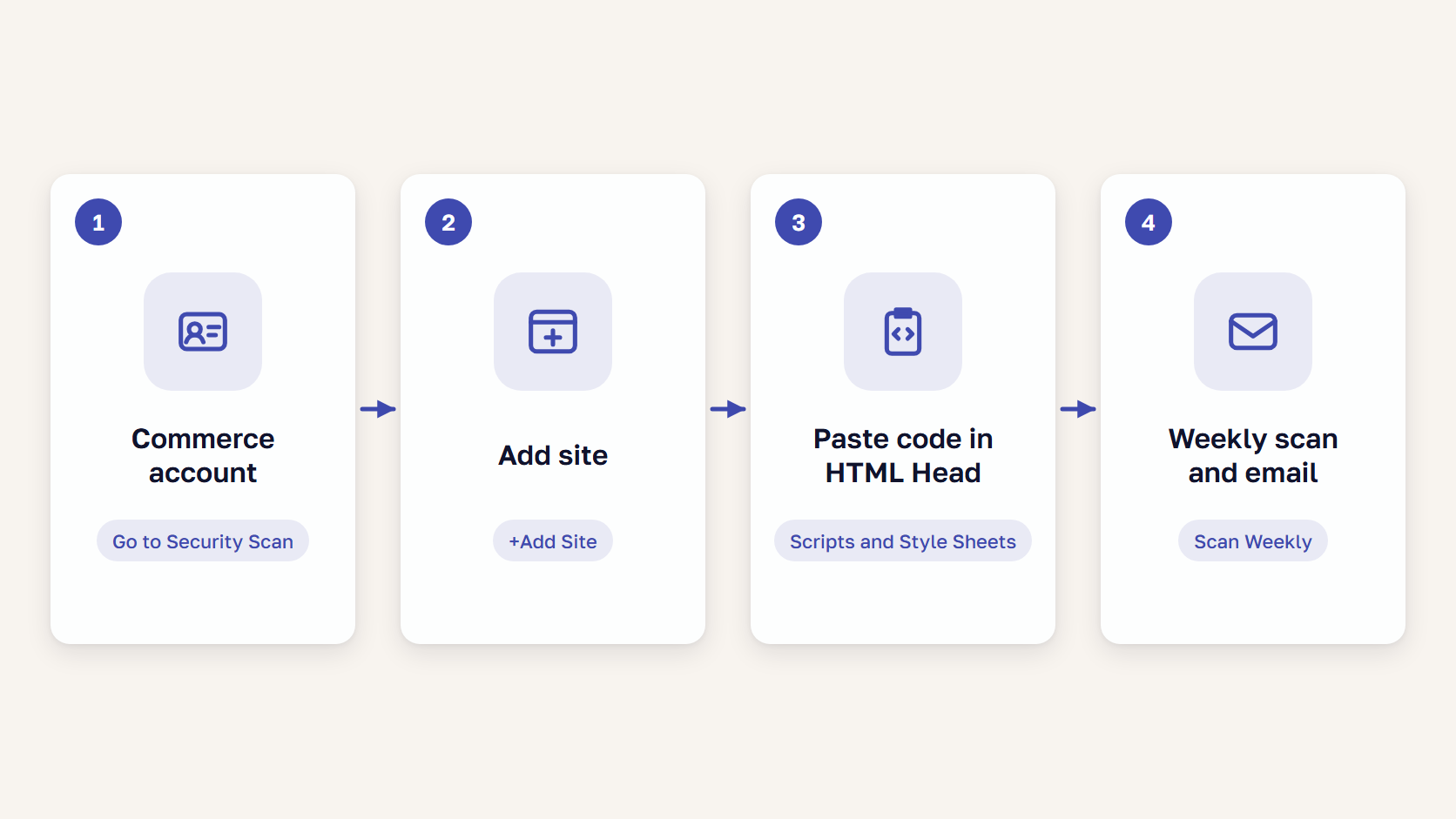
To set up the Security Scan Tool, you need a Commerce account, admin access to the store, and a schedule. Each domain, staging and test sites included, gets its own confirmation code, a short code that proves you own the domain.
- Sign in to your Commerce account at account.magento.com with an Adobe ID.
- Choose Security Scan in the left panel, click Go to Security Scan, read the Terms and Conditions, and click Agree.
- On the Monitored Websites page, click +Add Site and enter the Site URL and Site Name.
- Click Generate Confirmation Code, then click Copy.
- As a user with full administrator privileges in the Magento Admin, go to Content > Design > Configuration, click Edit on your site, expand HTML Head, paste the code at the end of Scripts and Style Sheets, and click Save Configuration.
- Back on the Security Scan page in your Commerce account, click Verify Confirmation Code.
- Under Set Automatic Security Scan, choose Scan Weekly (recommended) or Scan Daily, set the day (weekly only), time, and time zone, enter the notification email address, and click Submit.
On a PWA Studio storefront, the code is a META tag added to template.html and deployed through a build, and on an AEM storefront it goes into head.html. To scan right away, choose Run Scan in the Actions column.
Behind a firewall, allowlist the tool’s three IP addresses: 52.87.98.44, 34.196.167.176, and 3.218.25.102. Adobe’s cloud launch guide says the tool sends requests to ports 80 and 443 only, and its traffic can show up in logs under user agents such as Visbot/2.0.
🚀 Quick takeaway
If your agency registered the store, ask whose inbox the report reaches. Adobe emails only the people named at registration, so add a shared team address.
How to read the Security Scan Tool report
The report lists Failed Scans, Unidentified Results, and Successful Scans, newest first. Failed means the site has a serious security flaw, Unidentified means your team or hosting provider needs to look deeper, and Successful means the check passed.
Each failed test comes with remediation steps. Some mean installing a patch, Adobe’s fix for a security hole, and Adobe says to add patches to a development branch before production. Only the registered user can view the results.
A false positive is a failed check that is not a real problem. Choose Ignore, then Apply Changes, to move it to Ignored Results and out of the risk score. Adobe gives these examples:
- You have “already applied a security patch that the scan tool has not detected”
- The issue does not apply to your store’s configuration
- Another security measure already addresses the concern
- You set the configuration on purpose for business reasons
What can a Magento security scan miss?
A scan from outside, including the Security Scan Tool, can miss files, the database, and admin accounts on the server, malware built to show scanners a clean page, flaws Adobe has not fixed yet, and custom code and extensions. Each needs its own check: server-side scanning, firewall rules, or a code review.
Files, database, and admin accounts on the server
The Security Scan Tool sends requests to ports 80 and 443, so like any Magento 2 vulnerability scanner that works from outside, it reads what the store serves to a browser. Sucuri says its own free scanner cannot detect anything on the server side, and MageReport says nobody can see from outside which files exist on the server.
Admin accounts are in the database too, and Sansec tells merchants to check the admin_user table for accounts they don’t know.
Sansec’s FAQ, from a company that sells a server-side scanner, says free scans “can only scan publicly available assets (Javascript)” and that 65% of malware is hidden on the server. Sansec adds that the free Magento Security Scan “only scans for issues in the core Magento application,” while most stores are hacked through third-party components. Adobe does not say whether the Security Scan Tool checks extensions.
Malware that hides from scanners
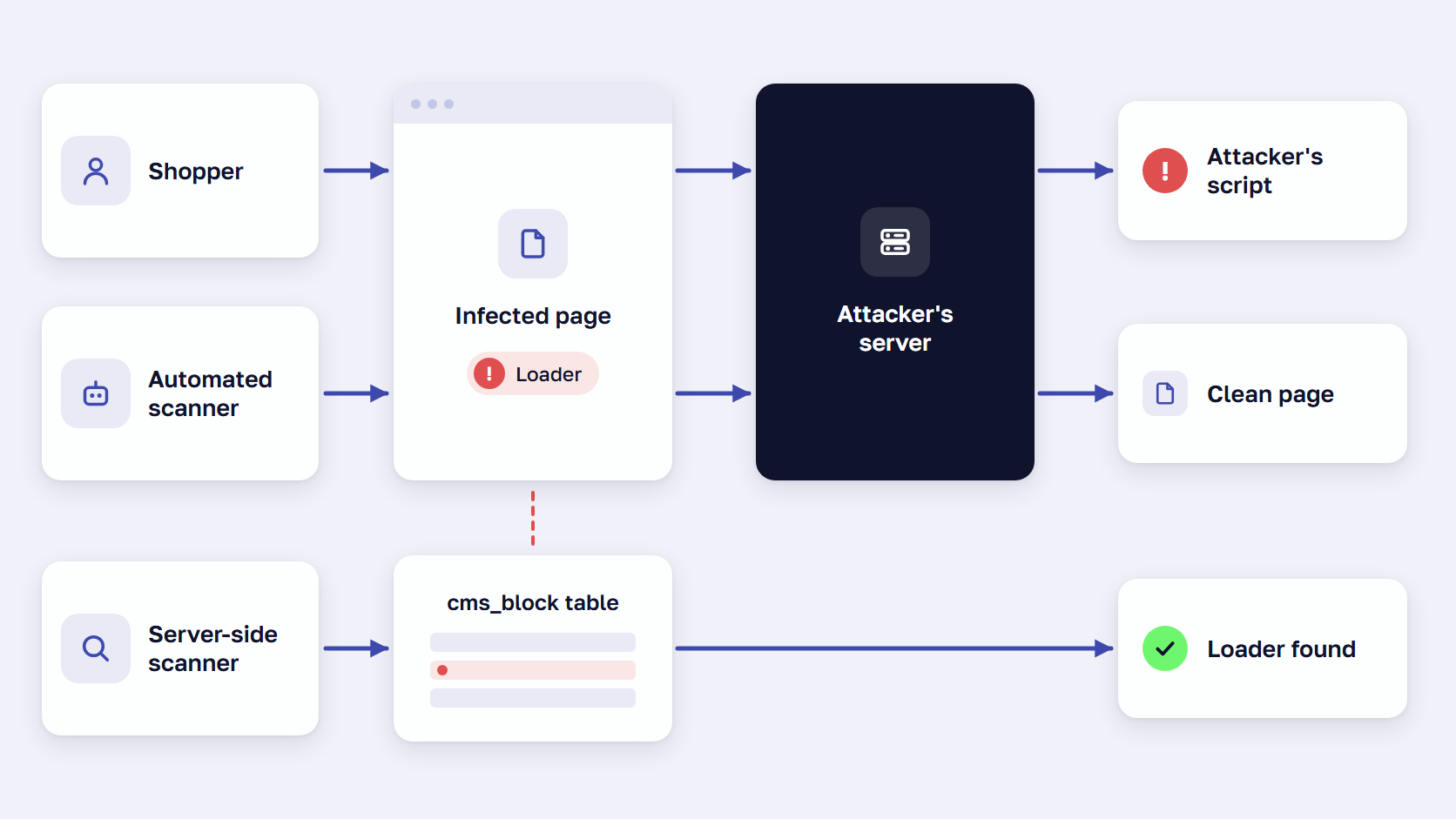
On October 24, 2026, Sansec reported a loader script that a criminal group adds to Magento stores. The attackers’ server first checks whether the visitor is a real shopper or a security scanner, and scanners get nothing. When urlscan.io loaded an infected store, Sansec found no added content in the page.
Sansec’s eComscan found the loader on 148 server installs, in the cms_block table. A CMS block is a piece of page content stored in the Magento database.
One store in the campaign ran Magento 2.4.7-p10 with no core patches missing, and eComscan had found a rogue admin account there on September 16 and a backdoor on September 24. In Sansec’s words, “Deleting the script does not remove that access.”
Flaws with no fix yet
StyleSmuggler attacks started on September 4, 2026, three days before Adobe’s emergency hotfix on September 7, which made the flaw a zero-day: one attacked before a fix exists. Sansec’s StyleSmuggler report says the first victim ran Magento 2.4.6-p15 with the July and August 2026 patches and a clean patch status, so no scanner had a missing patch to report.
Sansec’s advice is to “scan before you assume you are in the clear.” Firewall rules help in that window, and they are one of our Magento security best practices.
PCI DSS external scans
PCI DSS requirement 11.3.2 calls for external scans by an Approved Scanning Vendor, a company whose scan solution the PCI Security Standards Council has tested and approved. Adobe’s Security Scan page makes no PCI claim, and we do not know whether the tool could count, so ask your payment provider or assessor which scan they accept.
🚀 Quick takeaway
Ask your developer to search the cms_block table for script tags nobody on your team added. Sansec found the 2026 loader there, and never in theme files.
Other Magento security scanners compared: Sansec eComscan, Sucuri SiteCheck, and MageReport
Besides Adobe’s Security Scan Tool, Sucuri SiteCheck and MageReport are free and check a store from outside when you enter a URL. Sansec eComscan runs on your server, and so does Adobe’s Commerce Version Tool, which reports installed and missing patches.
| Scanner | Made by | Where it runs | What it looks at | Cost |
|---|---|---|---|---|
| Security Scan Tool | Adobe | Outside the store, from three Adobe IP addresses | Pages it can load, with more than 21,000 tests for malware, known risks, and out-of-date software | Free with a Commerce account |
| Sucuri SiteCheck | Sucuri | Outside the store, when you enter a URL | What a browser can see: known malware, blocklist status, website errors, and out-of-date software | Free |
| MageReport | Hypernode, a Dutch Magento host | Outside the store, when you enter a URL | Known Magento vulnerabilities and some third-party extensions, judged from how the store responds to its requests | Free |
| Sansec eComscan | Sansec | On your server | Files, database, processes, scheduled tasks, and unauthorized accounts, including third-party components | Free to run, paid plans for the full report |
| Commerce Version Tool | Adobe | On your server | Which monthly security patches are installed or missing, and the status of each CVE | Included with Adobe’s security patch files |
Sucuri SiteCheck is a free Magento malware scanner, and Sucuri’s own disclaimer says: “Remote scanners have limited access and results are not guaranteed.”
MageReport is a free Magento vulnerability scanner from Hypernode that judges patches with behavior-based patterns, and its FAQ calls the results “a guide.” The newest MageReport entry in Hypernode’s public changelog is dated March 15, 2023, so we do not know whether it checks for the flaws of 2024 to 2026.
Sansec eComscan, from a company we work with, is free to run. Without a license key, the report says whether malware was found and masks the locations, and paid plans include detailed reporting.
🚀 Quick takeaway
If you use MageReport between weekly scans, confirm its patch result with the Commerce Version Tool, which reads the installed patches on the server.
Is the Magento Security Scan Tool enough?
The Security Scan Tool is enough for what a scan from outside can see. Keep it running weekly on every production domain and add checks from inside the store: a patch check on the server, server-side malware scanning, and a person who reviews custom code and access. Our Magento security checklist says how often to run each.
Check patches from inside the server
Adobe’s Commerce Version Tool runs on the server as php vendor/bin/patch-status and reports which monthly security patches are installed or missing, and which CVEs, the public ID numbers of security flaws, the store is protected against. It is informational and changes nothing.
The tool came with the July 2026 isolated security patch, and on Magento Open Source it reaches stores on 2.4.7 or later. Our patch guide explains how to apply a Magento security patch the tool lists as missing.
Scan the server for malware
A server-side scanner reads the store’s files, database, processes, and scheduled tasks, where the 2026 loader and backdoor were found. Our ReadyMage hosting runs continuous malware monitoring through integrated Sansec scanning, so we have a stake in this advice.
During StyleSmuggler, on September 5 and 6, 2026, we worked with Sansec to roll out Sansec Shield, a Magento-aware firewall, across client stores. We also checked each store’s server and application logs for signs of an earlier attack, as described in how we responded to StyleSmuggler.
Have a person review custom code and access
In a Magento security audit, part of our technical audit, certified engineers read custom code by hand “so you catch the risks an automated scan marks as safe” and check patch level and access controls. Access is read-only, and an audit usually takes one to two weeks.
Sansec, which sells a scanner, recommends a Magento agency’s code audit for custom code. If your payment provider requires a penetration test, a hired attempt to break into the store, Sansec’s FAQ points you to pen test companies.
🚀 Quick takeaway
After every patch, run php vendor/bin/patch-status and save the JSON or CSV output as a dated record from inside the server.
Frequently asked questions
What is the Magento Security Scan Tool?
The Magento Security Scan Tool is a free Adobe service for Adobe Commerce and Magento Open Source stores. From your Commerce account, it runs more than 21,000 security tests for malware and known risks, weekly, daily, or on demand, and emails you the report.
What does the Security Scan Tool check?
The Security Scan Tool checks the pages it can load from outside the store, over ports 80 and 443, for known malware, known security risks, and out-of-date software. Adobe does not publish its list of tests or say whether third-party extensions are covered.
What does the Security Scan Tool miss?
The Security Scan Tool cannot read the server’s files, database, or admin accounts, because it sends requests to ports 80 and 443 only. It can also miss malware that shows scanners a clean page and flaws Adobe has not fixed yet. Sansec says it covers core Magento only.
How do I set up a Magento security scan?
Sign in to your Commerce account at account.magento.com, open Security Scan, and add your site. Paste the confirmation code into HTML Head in the Magento Admin and verify it. Then choose Scan Weekly or Scan Daily and enter the email address for reports.
Which other Magento scanners exist?
Sucuri SiteCheck and MageReport are free scanners that check a store from outside when you enter its URL. Sansec eComscan runs on the server and reads its files, database, and processes. Adobe’s Commerce Version Tool, also on the server, reports installed and missing security patches.
Main takeaway
The Magento Security Scan Tool is free and checks what anyone outside your store can see, so it belongs on every production domain, every week. A week with nothing failed means the pages it loaded passed its tests for known malware, known risks, and out-of-date software.
The rest of the store needs the checks in the third column of the checks table: the Commerce Version Tool after every patch, server-side malware scanning, a person reviewing custom code and access, and a penetration test or Approved Scanning Vendor scan if your payment provider asks for one.
Go through that column with your team or agency, and agree who runs each check and how often. Settle any check without an owner before the next weekly email arrives.
If your last Security Scan Tool report has Unidentified results nobody has looked at, or your store has never been scanned from inside the server, send us the report and your extension list.































Share on: