
On September 4, 2026, at 22:20 UTC, attackers began breaking into Magento (Adobe Commerce) stores that had every available security patch installed. A patch is a fix Adobe publishes for a security hole, and installing each one is the best-known part of Magento 2 security.
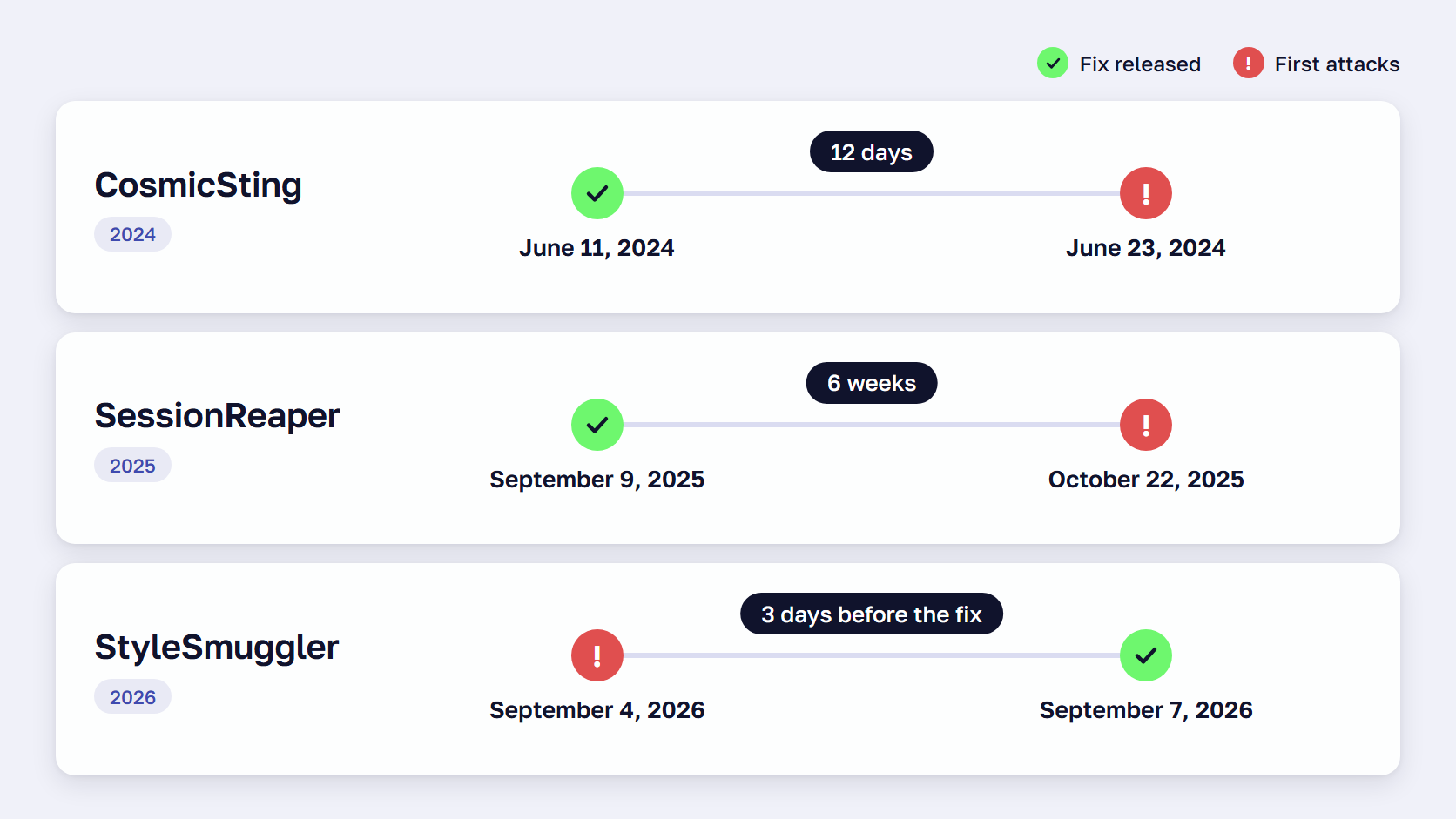
The flaw was later named StyleSmuggler. Adobe’s emergency fix came three days later, and until then there was no fix for a store owner to install.
If you run a store on Magento, you may have heard about it from a board member asking whether you were affected. Whatever you told them, the bigger questions are still open. Is Magento still safe to run a store on, and which parts of keeping it safe are your job?
Is Magento 2 secure?
Yes, Magento 2 is secure when it is maintained. Adobe tests the core code and releases security fixes every month, and its own security best practices say that most compromised sites had known, unpatched flaws or weak passwords and permissions.
In two recent campaigns, the fix existed before the first attack, so stores that patched in the first week were protected.
- CosmicSting, in 2024, began 12 days after Adobe’s fix was out. A week after the fix, Sansec found 75% of stores still unpatched, and by October 1, 2024, it counted 4,275 hacked stores
- SessionReaper attacks, in 2025, were first detected six weeks after Adobe’s emergency patch of September 9, and Sansec reported 62% of stores still vulnerable at that point
StyleSmuggler was a zero-day, a flaw attacked before a fix exists. Sansec dates the first confirmed StyleSmuggler attack to September 4, 2026, on a store with every available patch installed. Adobe’s emergency fix for the flaw, which has a severity score of 10.0 out of 10, followed on September 7.
For those three days, the defenses available were malware scanning and rules on a web application firewall, a filter in front of the store that blocks known attack patterns. No source gives a count of stores compromised through StyleSmuggler.
On Saturday, September 5, the day the flaw became public, our team at scandiweb had firewall rules running across our ReadyMage hosting and had contacted every Magento and Adobe Commerce client. Within a day of Adobe’s fix, we had rebuilt it for 41 older versions, 2.2.0 to 2.4.3-p3, that Adobe no longer covers.
CISA, the US cybersecurity agency, lists six Magento flaws in its catalog of vulnerabilities known to be exploited in real attacks, and three of them were added in 2026.
🚀 Quick takeaway
Find out who would add firewall rules to your store on a Saturday, because that is the day StyleSmuggler became public.
Magento security features in Open Source and Adobe Commerce
Magento Open Source and Adobe Commerce share the core protections, including two-factor authentication (a second sign-in step), reCAPTCHA, and payment-page script controls. Adobe Commerce adds Action Logs and sign-in through Adobe IMS, and the Security Center and managed firewall are cloud only.
| Magento security feature | What it does | Magento Open Source | Adobe Commerce |
|---|---|---|---|
| Two-factor authentication | Second sign-in step for every admin user, on by default since 2.4.0 | Yes | Yes |
| Google reCAPTCHA and CAPTCHA | Blocks bots on admin sign-in and storefront forms, including checkout | Yes | Yes |
| Admin security settings | Account lockout, session lifetime, password lifetime, and a custom admin URL | Yes | Yes |
| Roles and permissions | Limits each admin user to the resources they need | Yes | Yes |
| Encryption key | Protects stored payment and API credentials, rotated from the command line only since 2.4.8 | Yes | Yes |
| Content Security Policy | Restricts which scripts may run, enforced on payment pages since 2.4.7 | Yes | Yes |
| Subresource Integrity | Checks that scripts on payment pages have not been altered | Yes | Yes |
| Security Scan Tool | Free scan with more than 21,000 tests, run weekly or daily | Yes | Yes |
| Action Logs | Records admin actions with the user and IP address | No | Yes |
| Adobe IMS sign-in | Admin login through an Adobe ID, with two-factor authentication set by your Adobe organization | No | Yes |
| Security Center | Dashboard widget with version support status and Adobe security bulletins | No | Cloud only |
| Web application firewall | Fastly firewall managed by Adobe and Fastly on production environments | No | Cloud only |
A custom admin URL cuts traffic from automated scripts, and Adobe notes it will not stop a determined attacker.
On Adobe Commerce on cloud infrastructure, the firewall has no bot protection, and Adobe lists bot protection and Layer 7 DDoS detection as merchant responsibilities unless you buy its Advanced Security add-on.
The Magento Security Center is a widget in Adobe’s Site-Wide Analysis Tool, which Adobe withdrew from on-premises stores in April 2024. On Magento Open Source or self-hosted Adobe Commerce, you build the same view from the Security Scan Tool and Adobe’s bulletins.
Read more: Adobe Commerce vs Magento Open Source: Features Comparison
🚀 Quick takeaway
Two-factor authentication and the payment-page script controls are on by default. Check that nobody has switched them off and that no admin account is shared.
The main Magento store security risks and who owns each one
The main risks to a Magento store are unpatched flaws, vulnerable extensions, stolen logins and keys, payment skimmers, bot traffic, end-of-life versions, and AI agents with broad access. Adobe publishes the fix for core flaws, and every other task belongs to you and the companies you hire.
| Risk | What to do | Who owns it |
|---|---|---|
| Unpatched core flaw | Apply each monthly security patch on a fixed schedule | Adobe publishes the fix, and you or your agency apply it |
| Zero-day attack before a fix exists | Firewall rules and server-side malware scanning | You and your agency, with your host |
| Vulnerable or backdoored extension | Fewer extensions from vetted vendors, updated on the same schedule as core | You and your agency |
| Stolen or guessed admin login | Two-factor authentication for everyone and least-privilege roles | You |
| Payment skimmer in checkout or CMS blocks | Content Security Policy and hosted payment fields | You, with your payment provider |
| Stolen encryption key or API token | Rotate keys and credentials after any exposure | You and your agency |
| Exposed backups and leftover files | Check the web root for database dumps and .git folders | Your agency and your host |
| Carding and bot traffic | reCAPTCHA on checkout and bot management at the edge | You, with your host or CDN |
| End-of-life Magento or PHP version | Upgrade before support ends | You |
| AI agent with broad access | A dedicated integration with minimal permissions and human approval for changes | You |
Extensions run with the same rights as Magento core. In May 2025, Sansec found 21 backdoored extensions from three vendors, with malicious code that had been in the packages for about six years. In July 2026, a single vendor patched dozens of its extensions at once, six of them for critical flaws.
Stolen keys and tokens stay valid after patching. CosmicSting attackers who had copied a store’s encryption key kept their access until the key was rotated, and Adobe’s StyleSmuggler guidance tells merchants to rotate admin passwords, integration tokens, payment gateway credentials, and SSH keys as well.
Sansec has tracked a campaign since July 2025 that has infected 953 stores, most of them Magento. One fully patched store was reinfected an hour after a clean scan, and Sansec’s explanation is that removing the injected script does not remove the attacker’s access.
🚀 Quick takeaway
Write a name next to every row for your own store. Rows that get “I assume the agency” are the ones to raise this week.
Magento store security and AI agent hacks
AI shortens the time you have to patch, because attackers can use it to turn a published fix into a working attack faster. The AI assistants your team connects to the store are a second risk, since each one is a user with permissions and needs limits.
AI is speeding up attackers
Mandiant, part of Google, reports that the mean time to exploit a vulnerability has dropped to an estimated minus seven days, so exploitation routinely starts before a patch is released. VulnCheck found that in the first half of 2026, 23% of newly listed known exploited vulnerabilities showed attacks on or before the day they were published.
Vendors and researchers have reported these cases since late 2025.
- In November 2025, Anthropic disclosed an espionage campaign in which an AI agent did an estimated 80% to 90% of the work against about 30 targets, and made mistakes such as inventing credentials that did not exist
- In April 2026, Anthropic said it does not plan to make its Mythos Preview model generally available, limiting it to selected partners because of how well it finds and exploits software flaws
- In May 2026, Google reported the first zero-day exploit it believes was developed with AI, built by a criminal group planning mass exploitation
- In October 2026, Sansec reproduced four attack routes for a new Magento flaw within 24 hours and wrote that anyone with an AI agent could turn Adobe’s patch into working exploits
We found no documented case of AI agents attacking Magento stores. Sansec describes the Magento campaigns of 2026 as automated and does not mention AI, and Mandiant says 2025 was not the year breaches became the direct result of AI.
For a merchant, the effect is a shorter patch window. Adobe rates most Magento bulletins priority 2, which it defines as acting within 30 days, and Sansec reports that mass exploitation of StyleSmuggler began three days after the fix, on top of the attacks that preceded it. We advise clients to plan patch deployment in days.
Your own AI agents are an entry point
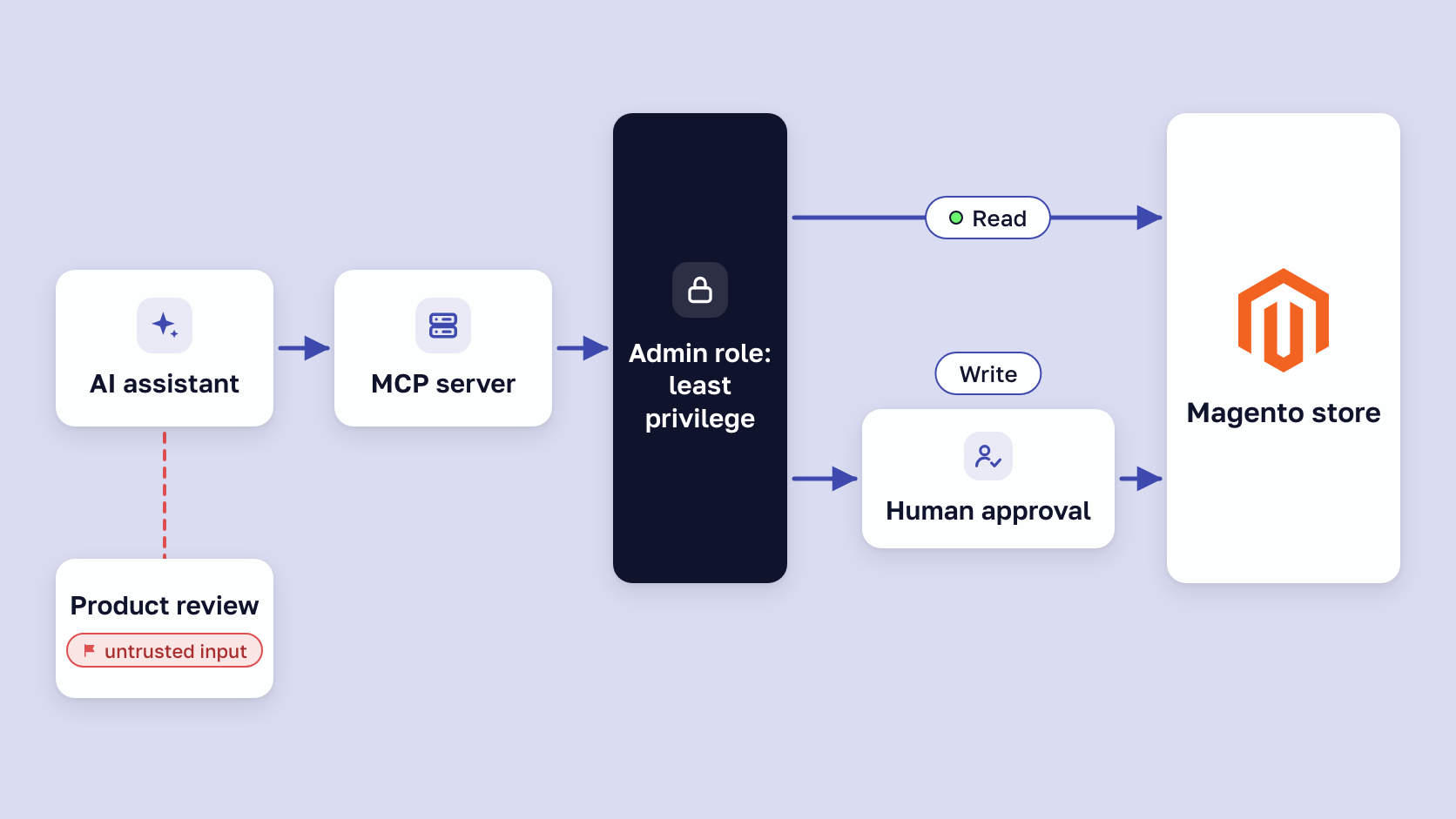
AI assistants now connect to stores through coding tools and MCP servers. MCP, the Model Context Protocol, is the standard they use to reach outside systems. Each assistant is a user with permissions that acts on the text it reads.
That text can carry a prompt injection, an instruction hidden in text the AI reads. The UK’s National Cyber Security Centre says it is very possible that prompt injection attacks “may never be totally mitigated.” In a store, an instruction hidden in a product review or a supplier feed can reach an agent that has the right to change prices or export orders.
A Magento integration token lasts until somebody revokes it, so a forgotten agent integration stays open indefinitely. GitGuardian found 24,008 unique secrets in MCP configuration files on public GitHub.
Our open-source MCP server for Magento uses Magento’s admin roles to set what an assistant may do, and cascading deletes need explicit confirmation. Apply these rules to any agent you connect.
- Give it its own integration with the minimum permissions it needs
- Require human approval for anything that changes prices, refunds, CMS blocks, or admin users
- Treat everything the agent reads as untrusted, and enforce its limits in code and permissions
- Log every tool call
- Keep keys out of agent configuration files and rotate integration tokens on a schedule
In Veracode’s 2026 tests, about 44% of AI coding tasks introduced a security flaw, so AI-written code needs review before deployment.
🚀 Quick takeaway
List every integration in your Magento admin and revoke any that nobody on your team can name, because its token still works.
Magento security patches and how often to update
Update every month. Since 2026, Adobe has released isolated security patches on Patch Tuesday, the second Tuesday of each month, for Adobe Commerce and Magento Open Source. Emergency fixes for flaws under active attack arrive outside that schedule, on any day of the month.
Adobe now publishes its fixes in these release types.
- Monthly isolated patches contain security fixes only and are not cumulative, so every month is applied in order
- Security patch releases, Adobe’s security-only versions ending in -p such as 2.4.8-p5, combine those monthly fixes into one update at least once a year, and the monthly files apply only on top of the latest -p release
- The full patch release arrives once a year, in May
- Emergency fixes are installed separately, as with the StyleSmuggler fix published a day before the September 2026 patch
The Commerce Version Tool, released with the July 2026 patch file, reports which monthly patches are installed and which known flaws the store is still exposed to.
Adobe’s cloud documentation requires patches within 30 days of release. Our own advice to clients is stricter: apply a fix for an actively exploited flaw the same day and deploy critical-rated fixes within a week, with 30 days as the limit for everything else.
Support dates come from Adobe’s lifecycle policy for Adobe Commerce.
| Version | Security fixes until |
|---|---|
| 2.4.9 | May 31, 2029 |
| 2.4.8 | May 31, 2028 |
| 2.4.7 | May 31, 2028, with standard support ending May 31, 2027 |
| 2.4.6 | May 31, 2028, security fixes only after August 31, 2027 |
| 2.4.5 and 2.4.4 | May 31, 2027, security fixes only |
| 2.4.3 and older | Not covered |
Magento Open Source gets a shorter list: for the October 2026 patch, Adobe published Open Source files for 2.4.7 and later only.
🚀 Quick takeaway
Book a recurring slot with your agency for the second Tuesday of every month, so the patch no longer depends on someone remembering it.
Applying a Magento security patch
Our guide shows how to apply a Magento security patch in release order.
Magento end of life dates
Our Magento end of life guide lists the dates for every version, and Magento upgrade services are the next step if your date is close.
Who is responsible for Magento security: Adobe, the host, or the merchant?
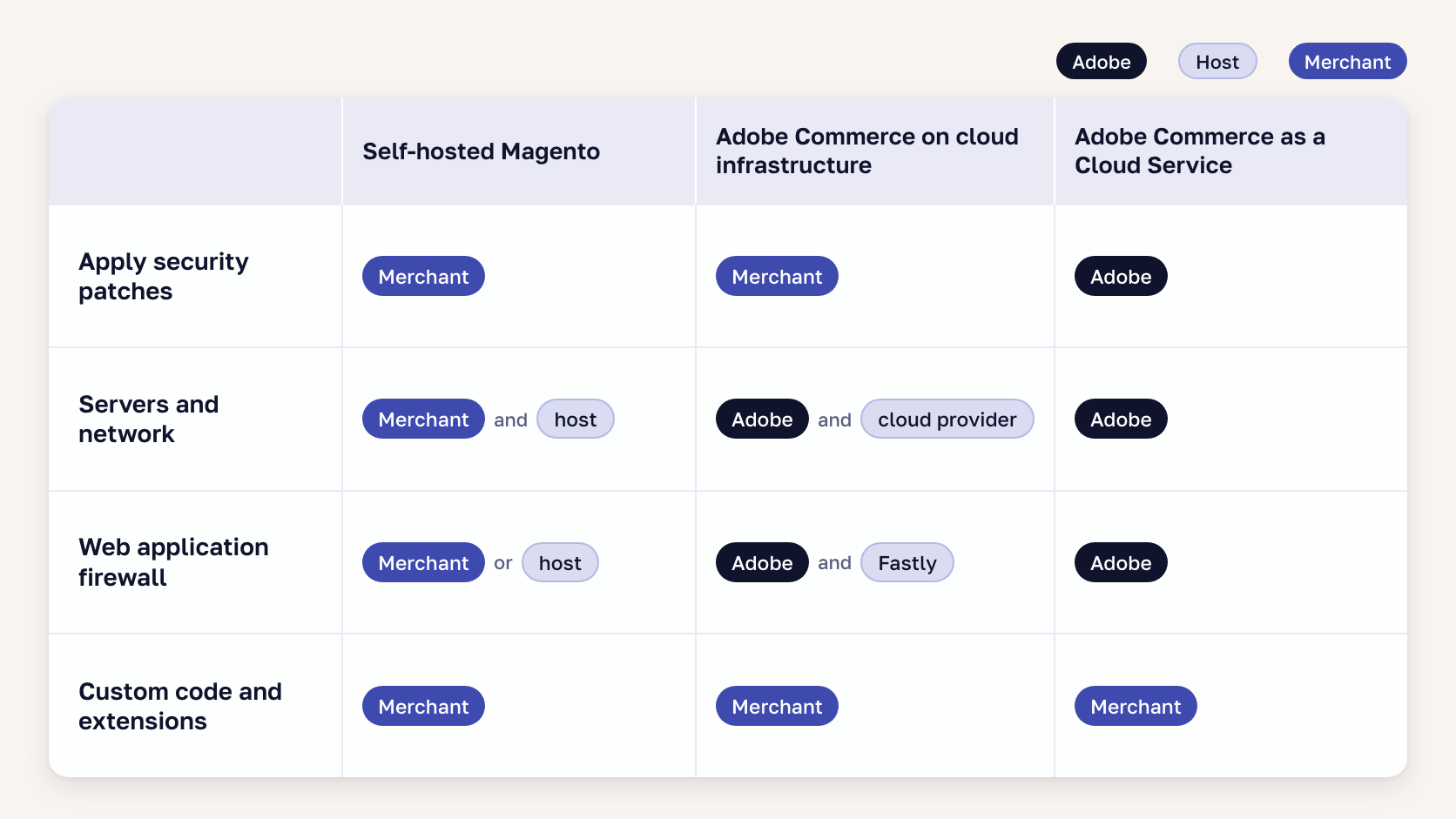
Adobe is responsible for the core code and for publishing fixes. You are responsible for applying those fixes and for everything added to the store, including custom code, extensions, integrations, and admin access. Adobe applies core patches itself only on Adobe Commerce as a Cloud Service.
| Task | Magento Open Source or self-hosted Adobe Commerce | Adobe Commerce on cloud infrastructure | Adobe Commerce as a Cloud Service |
|---|---|---|---|
| Publish core security patches | Adobe | Adobe | Adobe |
| Apply core security patches | Merchant | Merchant | Adobe |
| Servers, operating system, network | Merchant and host | Adobe and the cloud provider | Adobe |
| Web application firewall | Merchant or host | Included, managed by Adobe and Fastly | Included, managed by Adobe |
| Custom code, extensions, integrations | Merchant | Merchant | Merchant, for App Builder apps and integrations |
| PCI compliance | Merchant, for the whole stack | Adobe for the platform, merchant for custom code and processes | Adobe for the platform, merchant for custom code and extensions |
The two cloud columns come from Adobe’s shared responsibility pages for Adobe Commerce on cloud infrastructure and Adobe Commerce as a Cloud Service. Adobe publishes no equivalent table for self-hosted stores, so the first column is our reading of how those projects run.
On Adobe Commerce on cloud infrastructure, applying patches is the merchant’s job, and Adobe’s documentation says so directly. Adobe has also set enforcement deadlines: under its security enforcement policy, cloud environments on unsupported versions or unsupported dependencies may have Admin access or storefront traffic suspended.
A managed hosting contract typically covers the server and the network. Check whether yours names who applies the monthly Magento patch and who updates extensions. Our Magento vs. Shopify comparison shows how the split differs on a fully hosted platform.
🚀 Quick takeaway
If every mention of “patch” in your hosting contract is about the server, assign the monthly Magento patch in writing before the next Patch Tuesday.
Magento security audits and scans
A scan, an audit, and a penetration test each check a different part of Magento site security. A scan looks for known malware and security issues automatically. An audit is a person reviewing your patch level, access controls, extensions, and custom code. A penetration test is an attempt to break into your customized store.
| Check | What it covers | How often |
|---|---|---|
| Adobe Security Scan Tool | Known malware and security issues visible from outside | Weekly |
| Commerce Version Tool | Which monthly patches are installed | After every patch |
| Server-side malware scanning | Backdoors and injected code in files and the database | Continuously |
| Magento security audit | Patch level, access controls, extensions, and custom code | Yearly, and before an upgrade or re-platforming |
| Penetration test | Whether your customized store can be broken into | Yearly, or as your PCI assessment requires |
Adobe’s Security Scan Tool is free for both editions, and Adobe recommends a weekly schedule. It tests what is visible from outside the store, so custom modules and admin roles are beyond its reach.
Our Magento technical audit includes a Magento security audit of patch status, access controls, third-party modules, and anything that exposes customer data. It uses read-only access, and most take one to two weeks. Our Magento code audit guide describes what the code review itself includes.
When we checked 13,000 Magento 1 stores for a 2019 security study, 22% had their admin panel path open. The data is old and from a retired platform, but it shows how common a basic gap is when nobody audits for it.
PCI DSS requirements for payment page scripts
Since March 31, 2025, PCI DSS requirements 6.4.3 and 11.6.1 require payment page scripts to be authorized, checked for integrity, and monitored for tampering. Magento’s Subresource Integrity feature was added for PCI DSS 4.0, and its payment-page Content Security Policy serves the same purpose.
Which requirements apply depends on how your checkout takes card data. Our PCI DSS SAQ guide explains the SAQ, the PCI self-assessment questionnaire, and the 2025 updates for eCommerce merchants.
Magento 2 security best practices, in priority order
These Magento 2 security best practices are in our own priority order, with monthly patching first. If you can fund only part of the list this quarter, start at number one and work down as far as the budget allows.
- Apply security patches every month and stay on the latest -p release
- Enforce two-factor authentication for every admin user
- Put a web application firewall in front of the store
- Limit each admin account to what the person needs and remove accounts of people who have left
- Remove unused extensions and update the rest on the same schedule as core
- Run the Security Scan Tool weekly and server-side malware scanning continuously
- Rotate the encryption key and integration tokens after any incident
- Stay on supported Magento and PHP versions
Adobe’s own security best practices list two-factor authentication and regular upgrades among its five top-priority recommendations. If your team cannot carry monthly patching, our Magento support team can.
What to do first if your Magento store is hacked
Contain the attack first, then rotate every credential. A patch applied after a break-in leaves the attacker’s access in place. Treat any store that was online and unpatched during an attack window as compromised until a scan says otherwise, and work through these steps in order.
- Preserve the logs and work out when the intrusion began
- Apply the missing patch or emergency fix and add firewall rules
- Remove unknown admin users and check CMS blocks for code you did not add
- Compare production code against version control and redeploy from a clean source
- Rotate the encryption key, admin passwords, integration tokens, and payment gateway credentials
- Keep scanning, because Adobe’s incident guidance warns that many sites are compromised again within hours
For a recent example, read how we responded to StyleSmuggler and which Magento versions Adobe’s patch covers.
🚀 Quick takeaway
Confirm today that your production code is in version control, because step 4 needs a clean source to compare against.
Carding attacks
In a carding attack, bots use your checkout to test stolen card numbers, and the cost arrives later as chargebacks. Our guide explains how to stop a carding attack.
Frequently asked questions
Is Magento secure?
Yes, when it is maintained. Adobe tests the core code and releases security fixes every month, and its own guidance says most compromised sites had known, unpatched flaws or weak passwords and permissions. StyleSmuggler was the exception: attacks began three days before Adobe’s fix.
What security features does Magento offer?
Both editions include two-factor authentication, reCAPTCHA, roles and permissions, an encryption key, Content Security Policy, Subresource Integrity, and the free Security Scan Tool. Adobe Commerce adds Action Logs and sign-in through Adobe IMS. The Security Center and the managed firewall are cloud only.
What are the main security risks for a Magento store?
The main risks are unpatched core flaws, zero-day attacks, vulnerable or backdoored extensions, stolen admin logins, payment skimmers, stolen keys and tokens, exposed backups, carding and bot traffic, end-of-life versions, and AI agents with broad access. The risk table above names an owner for each.
How often does Magento need security updates?
Every month. Since 2026, Adobe has released isolated security patches on the second Tuesday of each month, and they are applied in order. Emergency fixes for flaws under active attack arrive outside that schedule, and we advise applying those the same day.
Who is responsible for security: Adobe, the host, or the merchant?
Adobe is responsible for the core code and for publishing fixes, and the merchant for applying them and for custom code, extensions, integrations, and admin access. A managed host typically covers the server and network. Adobe applies core patches itself only on Adobe Commerce as a Cloud Service.
Is Magento PCI compliant?
It depends on the deployment. Adobe keeps the Adobe Commerce cloud platform PCI certified, and the merchant stays responsible for its own custom code, extensions, and processes. On Magento Open Source or self-hosted Adobe Commerce, the merchant is responsible for the whole stack.
Main takeaway: give every Magento security task an owner
Magento 2 security is a list of recurring tasks, and the platform is safe to run a store on when every one of them has an owner. Go back to the risk table and check the owner column against your own store, then find your deployment model in the responsibility table. Rows with a clear owner need a schedule, such as a monthly patch slot or a weekly scan. Rows where you assumed someone else had the task are where to begin, because those are the tasks that turn out to be nobody’s.
If a row in the risk table still has no owner for your store, talk to our Magento team about it, and bring your version number and extension list.





























Share on: