
A license check is the last place anyone comparing Magento security plugins would look for a way into a store. Paid extensions, add-ons for Adobe Commerce and Magento Open Source, run a license check to confirm they were bought.
Around 2019, a fake license check went into 21 Magento extensions, and from at least April 20, 2025, attackers used it to run their own code on store servers. Sansec, a security company that tracks attacks on online stores, reported the fake license check on May 1, 2025, and estimated that 500 to 1,000 stores ran the extensions, a $40 billion multinational among them.
The extensions added a faster add-to-cart, a store locator, a cookie notice, and a blog. None of them was a security extension.
Before you add another, you need to know what Magento already protects and how to tell whether an extension is safe.
Which Magento security plugins does a store need?
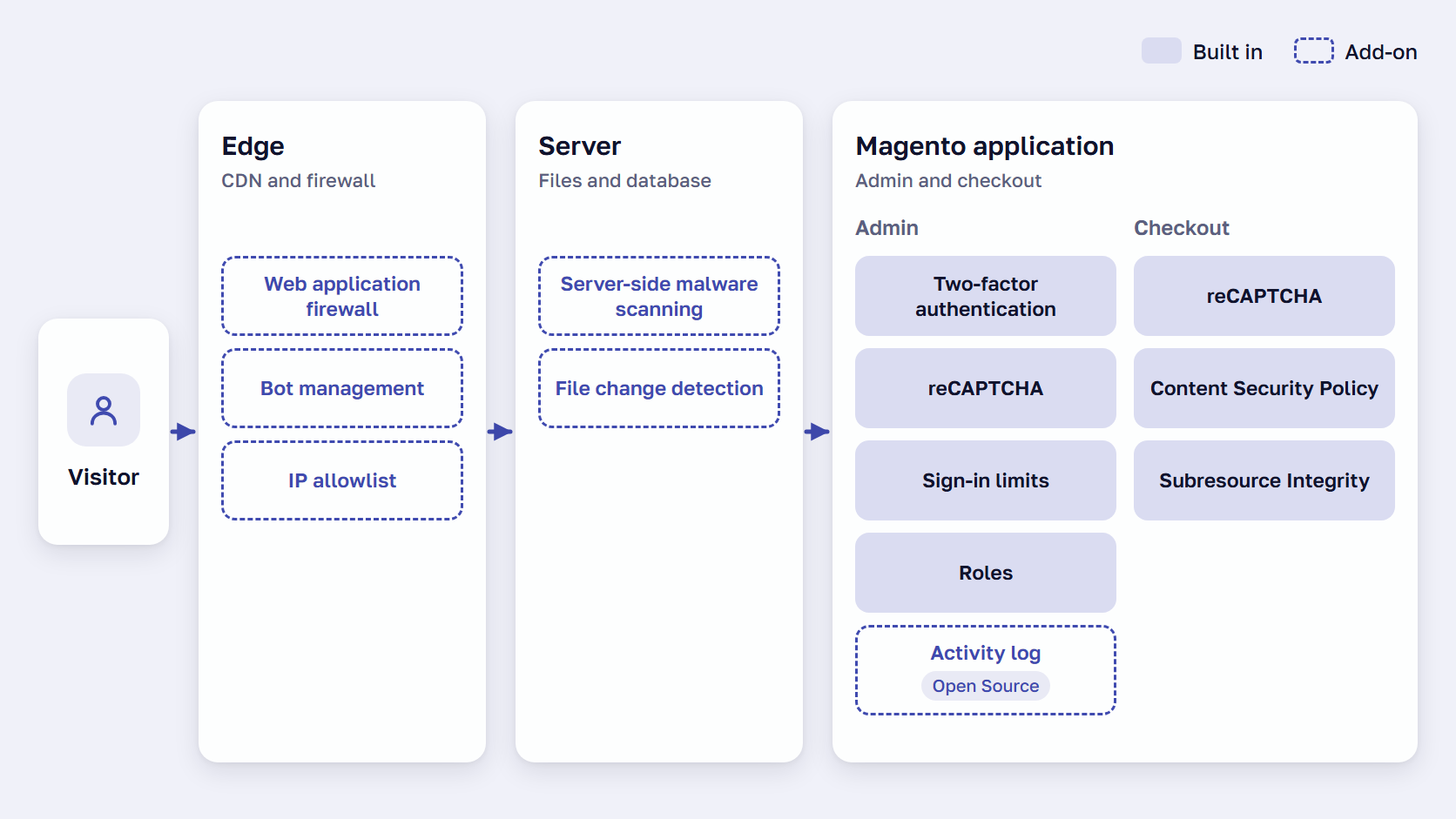
A Magento (Adobe Commerce) store needs security plugins only for the gaps Magento leaves open. Adobe Commerce and Magento Open Source already protect admin sign-in with two-factor authentication (2FA) and lockout rules, stop form bots with reCAPTCHA, control payment-page scripts, and include the free Security Scan Tool. Most of the gaps are outside the Admin.
- A web application firewall (WAF), a filter in front of the store that blocks known attack patterns, with bot management for automated traffic
- Server-side malware scanning, which checks the store’s files and database on the server
- An admin activity log, a record of what each Admin user changed, needed on Magento Open Source only
- An IP allowlist, the only addresses allowed to open the Admin, which no Admin setting provides
Merchants and vendors say “plugin” for an extension, and in Magento code a plugin is an interceptor, a class that intercepts a function call to modify what it does.
Which security features are built into Magento Open Source and Adobe Commerce?
Magento Open Source and Adobe Commerce share the core security features: two-factor authentication, reCAPTCHA, admin sign-in limits, roles, payment-page script controls, an encryption key, and the Security Scan Tool. Adobe Commerce adds Action Logs and sign-in through Adobe IMS, and the Security Center and a Fastly firewall are, in practice, cloud only.
Built in vs add-on: what each edition covers
Magento two-factor authentication covers Admin users and has been on by default since 2.4.0, and Adobe strongly recommends against switching it off. Magento reCAPTCHA protects admin sign-in and storefront forms.
The lockout, session, and password rules are in Adobe’s admin security settings. By default, six failed sign-ins lock an account, and passwords need at least seven characters. The Security Scan Tool is free for both editions and runs weekly, daily, or on demand.
| Security need | Magento Open Source | Adobe Commerce | What to add for the gap |
|---|---|---|---|
| Second sign-in step for admin users | Two-factor authentication with Google Authenticator, Duo Security, Authy or U2F keys, on by default since 2.4.0 | Same, or sign-in through Adobe IMS | Nothing for the Admin. Built-in 2FA does not cover customer accounts |
| Bot checks on forms | Google reCAPTCHA (v3 Invisible, v2 Invisible, v2 checkbox) on admin sign-in and storefront forms, including checkout | Same | Bot management at the edge, for traffic that never touches a form |
| Admin sign-in limits | Lockout after failed sign-ins (default 6), session lifetime, password rules, custom Admin URL | Same | Nothing, if the settings are on |
| Admin access by IP address | No Admin setting | No Admin setting. On cloud infrastructure, a Fastly Edge ACL | IP allowlist at the web server, the CDN, or in an extension |
| Admin activity log | Not included | Action Logs, with the user, action, IP address and date | Admin activity log extension |
| Payment page scripts | Content Security Policy (restrict mode on payment pages since 2.4.7) and Subresource Integrity | Same | Nothing, if both stay switched on |
| Stored keys and credentials | Encryption key, rotated from the command line since 2.4.8 | Same | Nothing. Rotate it after any exposure |
| Web application firewall | Not included | On cloud infrastructure only: Fastly WAF on production, with no bot mitigation or rate limiting | A WAF at the CDN or inside Magento. On cloud, Adobe’s paid Advanced Security add-on |
| Malware scanning | Security Scan Tool, free, more than 21,000 tests, run from outside the store | Same | Server-side scanning of files and the database |
| Security overview | Not included | Security Center in the Site-Wide Analysis Tool, cloud only since April 23, 2024 | Security Scan Tool reports and Adobe’s security bulletins |
What Adobe Commerce adds, and what only the cloud gets
Action Logs record every change an Admin user makes, and Adobe Commerce stores can also sign in to the Admin through Adobe IMS.
The Security Center is a widget with version support status and Adobe’s security bulletins. It is part of the Site-Wide Analysis Tool, which Adobe withdrew from on-premises stores on April 23, 2024. The Fastly WAF covers production environments on Adobe’s cloud, with no malware protection, bot mitigation, or rate limiting.
Adobe Commerce 2.4.7 added payment rate limiting, a cap on how often payment details can be sent through the store’s APIs, which helps against carding, bots testing stolen card numbers in bulk. It is off by default, and Adobe’s page does not say whether Magento Open Source has it. We cover card testing on a Magento checkout in our fraud prevention guide.
Our Magento 2 security guide compares every feature by edition.
🚀 Quick takeaway
Before you buy a suite, open Stores > Settings > Configuration > Advanced > Admin > Security and check the lockout, session, and password values your store uses today.
Magento 2 security extensions: which gap each type fills
Four kinds of Magento 2 security extension or service fill the gaps that Adobe Commerce and Magento Open Source leave. A web application firewall and server-side malware scanning protect the whole store, while IP allowlisting and an admin activity log protect the Admin. Security suites bundle some of these with features Magento already has, such as 2FA and reCAPTCHA.
Web application firewall and bot protection
On Adobe Commerce on cloud infrastructure, Adobe sells an Advanced Security add-on that “delivers bot management, advanced rate limiting, and Layer 7 DDoS protection,” the last being protection against floods of fake page requests. Without it, “Layer 7 DDoS detection, bot protection, and proactive IP blocking are merchant responsibilities,” Adobe’s page says. On Magento Open Source and self-hosted Adobe Commerce, the firewall comes from the host, the CDN, or a Magento module.
StyleSmuggler, the Magento flaw listed publicly as CVE-2026-75650, was attacked from September 4, 2026, before Adobe had a fix. Adobe released a hotfix on September 7, and on September 10 Cloudflare added a blocking rule for StyleSmuggler to its managed ruleset.
Sansec Shield is a paid module that runs inside Magento on either edition, Adobe’s cloud included, and fetches new rules every five minutes. It installs with Composer, the tool that installs PHP packages and records their exact versions.
During StyleSmuggler, our team put firewall rules on ReadyMage, our Magento hosting, on September 5. Over September 5 and 6, we rolled Sansec Shield out across client stores and checked each one by running the attack against it before and after. Read how we protected client stores during StyleSmuggler.
Server-side malware scanning
Sansec, which sells a competing scanner, writes that Adobe’s Security Scan Tool “only checks core Magento and runs from the outside” and “cannot see private extension code or writable directories, which is where most malware lives.” Sansec’s eComscan scans “files, databases, and 3rd party components” on the server, usually in monitoring mode, and alerts on third-party components with known flaws. We cover what the Security Scan Tool checks and misses in a separate guide.
Admin login protection and IP allowlisting
Magento already protects admin sign-in with 2FA, reCAPTCHA, lockout rules, and a custom Admin URL, and no Admin setting limits the Admin to an IP allowlist. Adobe describes doing that on its cloud with a Fastly Edge ACL, an access list at the CDN. On other hosting, in our reading, it is done at the web server, the CDN, or in an extension.
Amasty’s suite lists IP addresses that skip two-step verification, which exempts those addresses and leaves the sign-in page open to all others. Mageplaza’s Professional edition and miniOrange’s suite list IP allowlists. Check which kind a suite offers before you count it as an allowlist.
Magento 2 admin action log for Open Source stores
Action Logs are part of Adobe Commerce only, so a Magento Open Source store adds an admin activity log with an extension. All four suites in the table below list one: Amasty’s logs admin actions with active sessions and page visit history, Magefan’s comes with a login attempts checker, Mageplaza’s is part of the Professional edition, and miniOrange’s adds alerts.
Magento security suites: what each one bundles
The four Magento security suites below appear in alphabetical order, with features and prices as listed on November 12, 2026, on each vendor’s page.
| Suite (vendor) | What the vendor’s page lists | Already built into Magento | Magento versions listed | Listed price |
|---|---|---|---|---|
| Security Suite for Magento 2 (Amasty) | Invisible reCAPTCHA, admin actions log with active sessions, alerts on suspicious sign-ins, two-step authentication, an IP list that skips two-step verification, finer user permissions | reCAPTCHA and 2FA in both editions, admin action logging in Adobe Commerce | The latest -p release of each line from 2.4.5 to 2.4.9 | $449 with 12 months of updates |
| Magento 2 Security Extension (Magefan) | Security and vulnerability scan, file change tracking, malware detection, admin activity log, bot, country and spam blocking | reCAPTCHA in both editions | 2.3.0 to 2.4.9 | Free Basic edition, paid editions $169 and $249 |
| Security Extension for Magento 2 (Mageplaza) | Security checklist, login logs, 2FA, reCAPTCHA, failed sign-in limit. Professional adds action logs, file change detection, IP allow and block lists | reCAPTCHA, 2FA and sign-in lockout in both editions, action logging in Adobe Commerce | 2.4.4 to 2.4.9 | $99 or $149 for the first year |
| Magento 2 Security Suite (miniOrange) | 2FA, brute force protection, IP allow and block lists, admin activity logs, malware scanner, reCAPTCHA. Premium also lists a firewall and site backup | 2FA, reCAPTCHA and sign-in lockout in both editions, action logging in Adobe Commerce | Not stated on the page | $449 a year per instance |
Each suite repeats at least one feature Magento already includes, 2FA or reCAPTCHA. The suites mainly add an admin activity log for Open Source stores, IP allowlisting, sign-in alerts, and file change detection. Other products are listed under Adobe Commerce Marketplace security extensions.
🚀 Quick takeaway
Ask your host or CDN provider whether its firewall blocks bots or only known attack patterns, and on what date it added a rule for StyleSmuggler.
Why are third-party extensions a security risk?
Third-party extensions are a security risk because each one adds code that runs on your Magento Open Source or Adobe Commerce server, and attackers look for flaws in that code as they do in Magento core. Sansec’s Magento security guide says, “Most stores run dozens of extensions, and that code is rarely audited.”
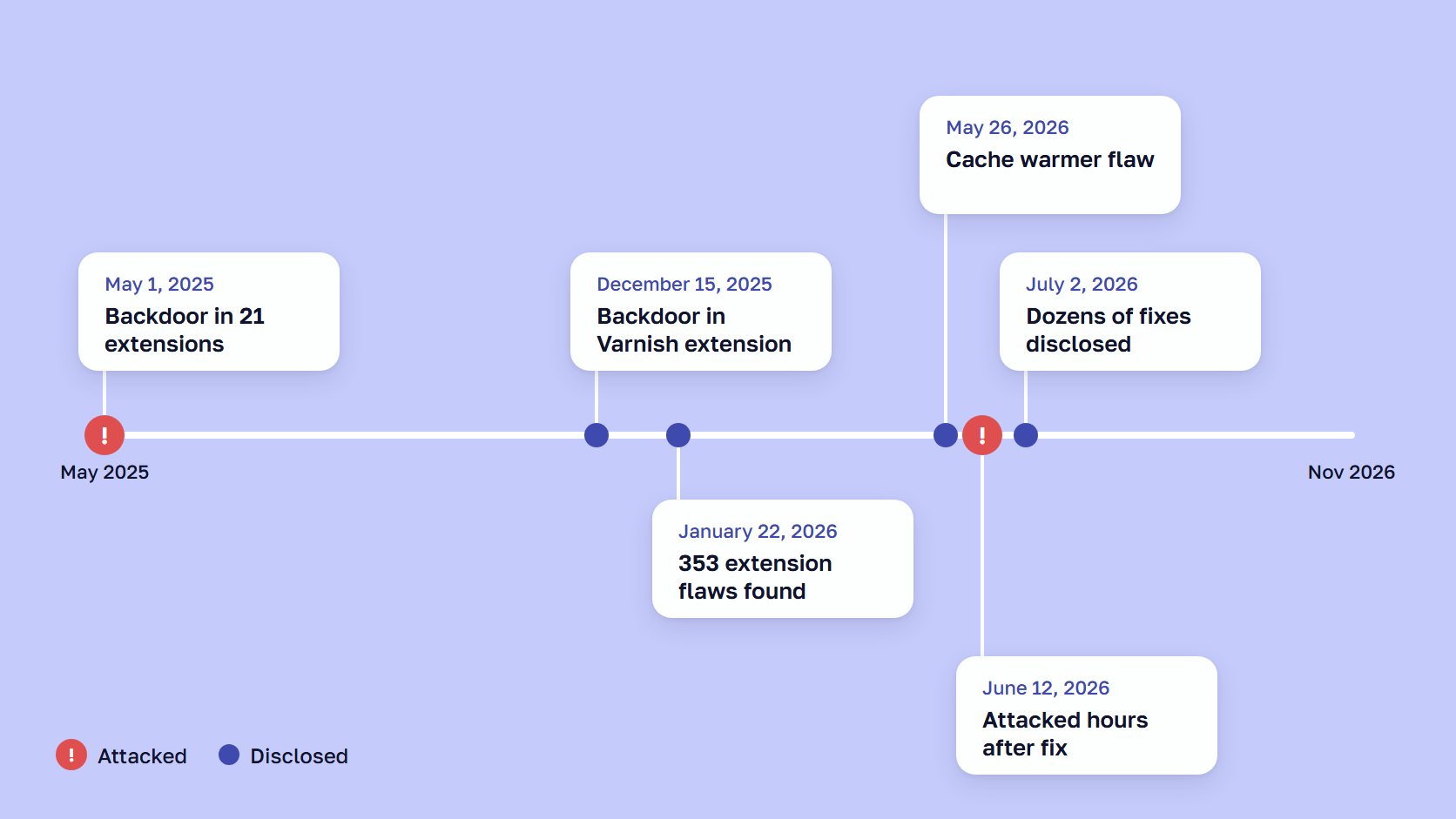
Sansec has reported these extension cases since the fake license check.
- December 15, 2025: a backdoor in a Varnish cache extension (Varnish is a caching server) that let anyone run PHP code on the server. The vendor confirmed it within a day and released a fix within two days.
- January 22, 2026: 353 confirmed vulnerabilities that need no admin access, 15 of them letting an attacker run code on the server, found in the latest versions of the top 5,000 Magento extensions on Packagist, the public catalog Composer installs from. Sansec does not say how many extensions they came from.
- May 26, 2026: CVE-2026-45247 in a cache warmer extension, rated 9.8 out of 10 for severity, where a crafted cookie on any storefront page could let an attacker run code without signing in. The vendor fixed it four days after being told, and Sansec reports no attacks.
- June 12, 2026: CVE-2026-53787 in an order attributes extension, rated 9.3, a file upload that needed no sign-in. The vendor fixed it the same day, and Sansec blocked the first attack attempt within hours of the fix and more than 12,000 attempts from 45 IP addresses by June 15.
- July 2, 2026: security fixes for dozens of extensions, six of them critical, in one vendor’s disclosure, which Sansec says “affects almost every Magento & Adobe Commerce store” and which grew in updates through November 1, 2026.
Sansec does not say whether any of these extensions were sold on the Adobe Commerce Marketplace. A vendor that publishes an advisory and a fix within days is doing its job, and the stores at risk are the ones that never install the update.
🚀 Quick takeaway
Ask your developer for every installed extension with its version number, and check each one against Sansec’s advisories from 2025 and 2026.
What to check before you install a third-party extension
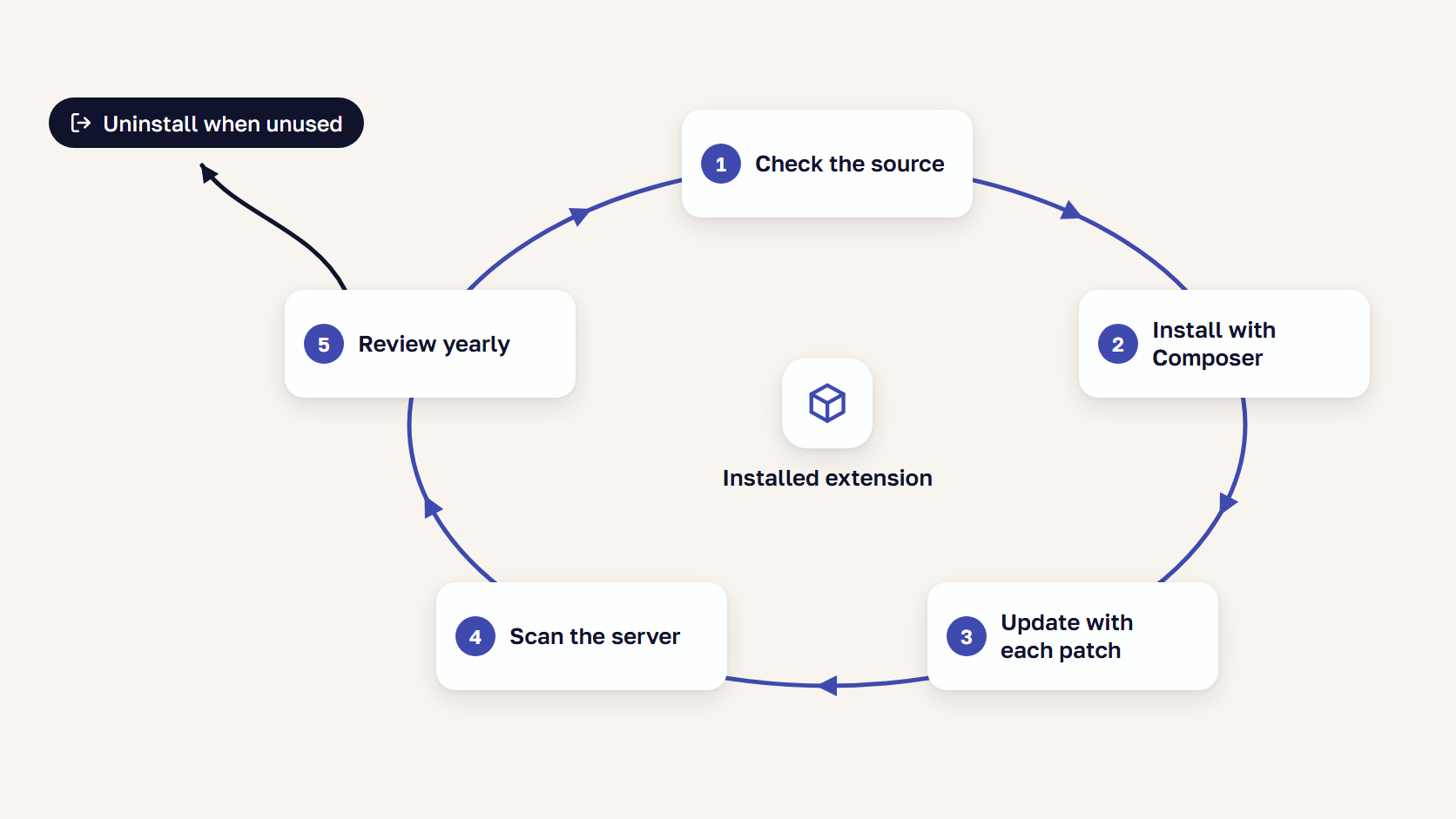
Before a third-party extension reaches your Magento Open Source or Adobe Commerce store, check where it comes from, how it installs, which versions it supports, and how its vendor handled the last flaw. Adobe’s security best practices also advise limiting the number of extensions and vendors.
- Where it comes from. The Adobe Commerce Marketplace, where every listing passed Adobe’s review, or a vendor your agency vouches for. Adobe’s Marketplace review checks code for malware and plagiarism, and extensions bought elsewhere skip it. For updates with only patch-level changes, Adobe’s technical review guidelines allow manual testing to be skipped.
- How it installs. Composer, so the exact version is pinned and
composer auditcan flag known security advisories and abandoned packages. The Composer documentation says the command also detects packages flagged as malware, and our guide shows how to install a Magento 2 extension with Composer. - Which versions it supports. Your Magento version down to the -p release and your PHP version, with a recent release date. A -p release is Adobe’s security-only release, such as 2.4.8-p5.
- How the vendor handled its last security fix. A dated advisory, a fixed version number, and days rather than months between report and fix. In the cases above, one vendor released its fix within two days of confirming the flaw, and another four days after being told.
- Whether your developers can read the code. Adobe advises reviewing extension code for security before you install it.
- What it touches. Checkout, payments, file uploads, admin sign-in, and API endpoints raise the stakes, and any API keys it stores go on your rotation list. Sansec notes that every module supporting GraphQL, one of Magento’s APIs, “adds code that runs on those requests,” and after StyleSmuggler our own rotation list included third-party extension API keys.
- Whether Magento already does it. 2FA and reCAPTCHA are built into both editions, so pay for what a suite adds beyond them. All four suites in the table above list at least one of the two.
- How you get out. Composer can remove it cleanly, and a license bought through an agency can be transferred to you. Adobe advises making sure that a license an integrator buys is transferable, in case you change integrators.
For extensions beyond security, see the Magento 2 extensions most stores need, by category.
🚀 Quick takeaway
Before the next install, ask your developer for the output of composer audit on your live code and an answer for every package it lists.
How do I keep installed Magento extensions safe?
On Magento Open Source and Adobe Commerce alike, keep installed extensions safe by updating them on the same schedule as Magento’s monthly security patches, removing the ones you no longer use, and having someone review the full list once a year. After the July 2026 disclosure, Sansec advised installing the critical fixes the same day and scheduling the rest within about four weeks.
Sansec’s guide also warns that “disabling a module in Magento leaves its code on disk” and that “some vulnerable modules can still be exploited while disabled.”
Our Magento technical audit inventories every extension and flags conflicts and abandoned modules, so you know what is safe to keep and what to remove. It uses read-only access, and most audits take one to two weeks.
For the steps, see Magento security best practices, in priority order. To confirm the work is done, use the Magento security checklist.
🚀 Quick takeaway
Ask your developer which installed extensions are disabled, and uninstall each one with Composer so its files are deleted from the server.
Frequently asked questions
Does Magento need a security extension?
A Magento security extension is not needed for two-factor authentication or reCAPTCHA, because Adobe Commerce and Magento Open Source include both. Most stores still need a web application firewall with bot management and malware scanning on the server. On Magento Open Source, the usual extension to add is an admin activity log.
Which security features are built into Magento?
Magento Open Source and Adobe Commerce both include two-factor authentication for the Admin, reCAPTCHA and CAPTCHA, admin lockout and session rules, roles, an encryption key, Content Security Policy, Subresource Integrity, and the Security Scan Tool. Adobe Commerce adds Action Logs and sign-in through Adobe IMS. The Security Center and the Fastly WAF are cloud only.
What should I check before installing a third-party extension?
Start with the source, and prefer an extension that passed Adobe’s review on the Adobe Commerce Marketplace. Check that it installs with Composer, supports your Magento and PHP versions, and comes from a vendor that fixed its last flaw within days. Make sure your developers can read the code and know what it touches.
Does Magento Open Source have an admin action log?
No. Action Logs, which record every change an Admin user makes, are part of Adobe Commerce only. A Magento Open Source store adds an admin activity log with an extension, and all four security suites in this article list one, so compare what each records, such as active sessions or sign-in attempts.
Main takeaway
Magento security plugins are worth paying for when they close a gap your store has, so map the gaps before you compare products. Go down the last column of the built-in vs add-on table with your developer or host, and mark each row as covered or open. For most stores, the open rows are the web application firewall and server-side malware scanning, plus the admin activity log on Magento Open Source.
Then run every candidate through the criteria list before it reaches the store, and run the extensions you already have through it as well. The 21 extensions with the fake license check added everyday features, so the criteria apply to a store locator as much as to a security suite.
If nobody on your team can say which installed extensions are still maintained, bring the list with versions and talk to our Magento team about what to keep, update, or remove.





























Share on: