
If your support invoice came in higher this month and nothing new went live, or if you’re about to sign a retainer and can’t tell whether 40 hours is too many, the answer to your website maintenance cost question is in the hours. You scroll down the invoice: an emergency security patch, a payment extension that broke after an update, a Saturday call about checkout errors, and six lines called “minor changes.” Each line looks reasonable. The total doesn’t.
Most price guides won’t help much, because they’re written for brochure sites and add up domains, hosting, and SSL certificates. For an online store, those are rounding errors. This guide follows the hours instead: where they go, which ones belong in a retainer, what 24/7 cover adds, and how to check them on an invoice.
How much does website maintenance cost for an online store?
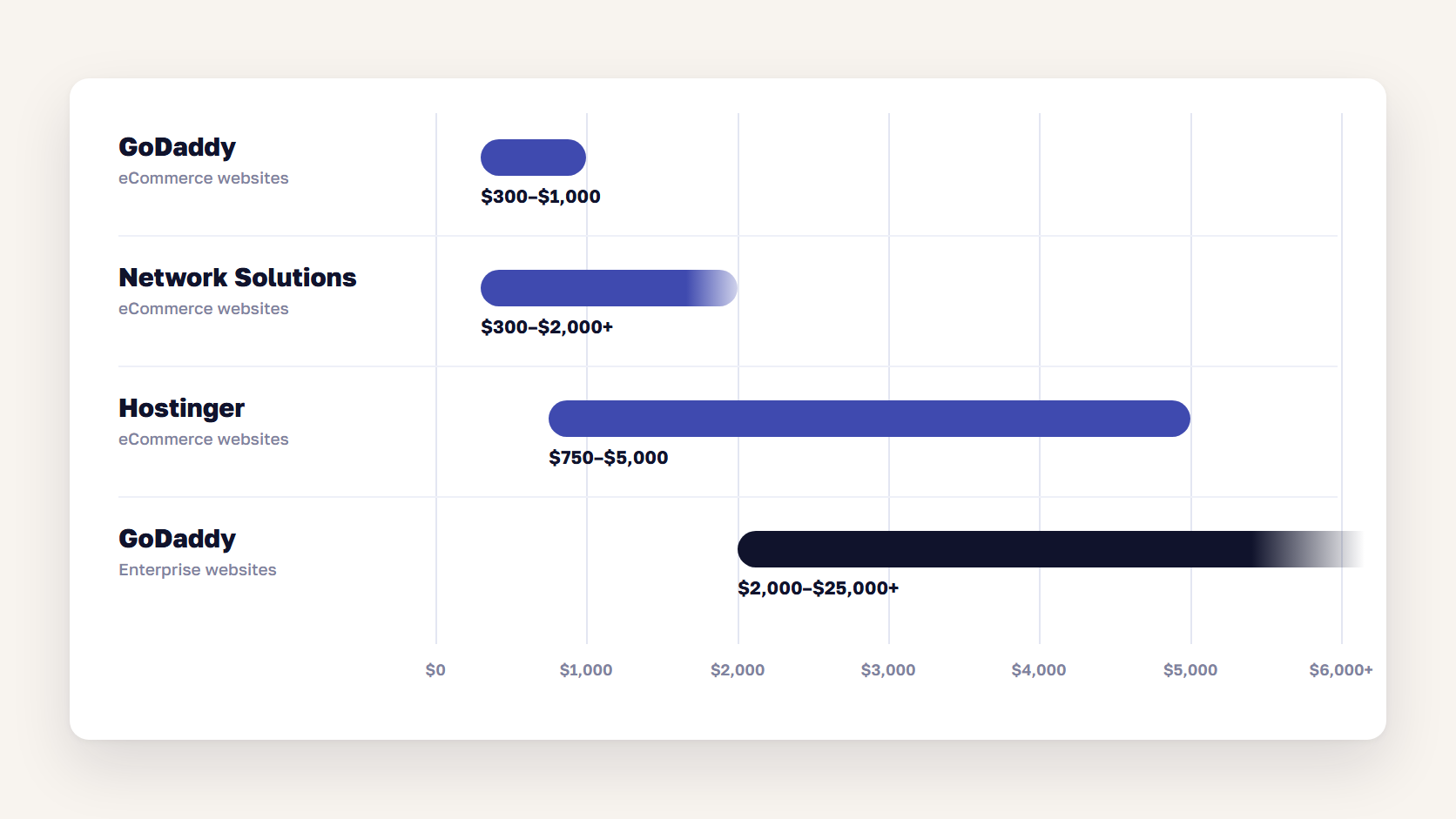
Website maintenance cost for an online store runs from a few hundred dollars a month for a small store on a hosted platform to several thousand dollars a month for a custom or self-hosted store, and more for enterprise stores with 24/7 cover. Published guides from GoDaddy, Network Solutions, and Hostinger put eCommerce sites between $300 and $5,000 a month. Most of that bill is developer time.
| Source | Monthly range | What the estimate covers |
|---|---|---|
| GoDaddy | $300–$1,000 | eCommerce websites |
| Network Solutions | $300–$2,000+ | eCommerce websites |
| Hostinger | $750–$5,000 | eCommerce websites |
| scandiweb Magento pricing guide | About $330–$4,200+ | Magento (Adobe Commerce) maintenance and support, $4,000–$50,000+ a year |
| GoDaddy | $2,000–$25,000+ | Enterprise websites |
Treat these as signposts. None of the vendor guides explains its method, and each one mixes hosting, content writing, and development into the same total. A better way to estimate your own number is to count hours.
A support retainer is mostly developer, DevOps, and QA time. Network Solutions puts technical support at $50 to $200 an hour. The examples below use a round $100 an hour, and the hours are there to show the arithmetic, not as benchmarks:
| Example store | Monthly hours | What the hours cover | Monthly cost at $100/hour |
|---|---|---|---|
| Small store on a hosted platform | 10 | Patches, monitoring, and a few fixes | $1,000 |
| Mid-size store with a custom theme | 40 | The above, plus regular small improvements | $4,000 |
| Self-hosted store with ERP and PIM integrations | 120 | Active development and on-call cover | $12,000 |
| Enterprise or multi-store setup | 200+ | A dedicated team across several stores | $20,000+ |
Swap in your agency’s rate and your real hours, and you have a number you can defend in a budget meeting. Our Magento pricing guide shows how maintenance fits into total cost of ownership over five years.
🚀 Quick takeaway
A low monthly fee with five included hours turns expensive the first month you need fifteen, because the extra ten are billed at the overage rate. Compare the hours behind two quotes before you compare the totals.
What drives the monthly number
Five things set the monthly number for eCommerce website maintenance: security patching and platform upgrades, monitoring and hosting operations, incident response, small features and fixes, and the extensions and integrations that break when anything else changes. Hosting, domain, and SSL are a small share for most online stores. The platform matters most, because a self-hosted Magento store carries its own patching, while Shopify runs hosting and core updates.
Security patching and platform upgrades
On a self-hosted platform, patching is the line that never goes away. Adobe releases security patches for every supported Magento (Adobe Commerce) release line at least once a year, plus isolated security fixes in between, and you can only apply those if you’re already on the latest security-only patch. Each one has to be applied, regression-tested, and deployed. Stores that fall behind pay twice: first to catch up, then to patch.
Every release line also has an end date. Regular support for 2.4.6 ended on August 11, 2026, and 2.4.7 follows on May 31, 2027, according to Adobe’s released versions page. For many stores, an upgrade belongs in next year’s maintenance budget. Our Magento 2 upgrade process breakdown shows what that work involves.
If your store is in scope for PCI DSS, requirement 6.3.3 also expects critical security patches to be installed within one month of release. That deadline turns patching from “when we get to it” into a monthly commitment.
Monitoring and hosting operations
This line covers uptime checks, error logs, server load, cron and queue health, backups, and certificate renewals. Most of it is automated, so the cost is in setting up alerts that matter and acting on them. On Shopify the line is small, because Shopify runs hosting and core updates and completes its own annual PCI DSS assessment. On self-hosted Magento or a headless build, someone has to own the servers, the CDN, and the deployment pipeline, and that someone bills hours.
Incident response
Incidents are the least predictable line. A payment provider changes an API, a cache fills up during a sale, or a critical vulnerability gets exploited before most stores have patched. In September 2026, Adobe released an emergency hotfix for StyleSmuggler, a Magento flaw with a CVSS score of 10.0 that attackers were already using. Stores had to apply the hotfix, check for signs of compromise, and rotate their credentials. Our StyleSmuggler patch guide covers what that took. Weeks like that one are why a retainer needs a stated rate for unplanned work.
Small features and fixes
This is where hours drift. Marketing wants a new banner slot before the weekend, and operations needs a shipping rule changed for one region. Each request is small, so it rarely gets a formal estimate, and twenty of them add up to a week of developer time. Small improvements are a good use of a retainer, as long as someone approves them against a monthly budget.
Extensions and integrations
Every extension, app, and integration is another thing to update and another way for an update to break checkout. ERP, PIM, payment, search, and shipping connections can fail without an error on the storefront: stock stops syncing, and nobody notices until orders oversell. On any platform, a store with 60 extensions and four integrations costs more to maintain than a store with 15 and one. A Magento code audit is a practical way to find the extensions you can remove.
🚀 Quick takeaway
Price guides itemize hosting, domains, and SSL, which are the smallest part of an online store’s maintenance bill. The expensive lines grow with the amount of custom code and the number of integrations you carry.
What a support retainer should include
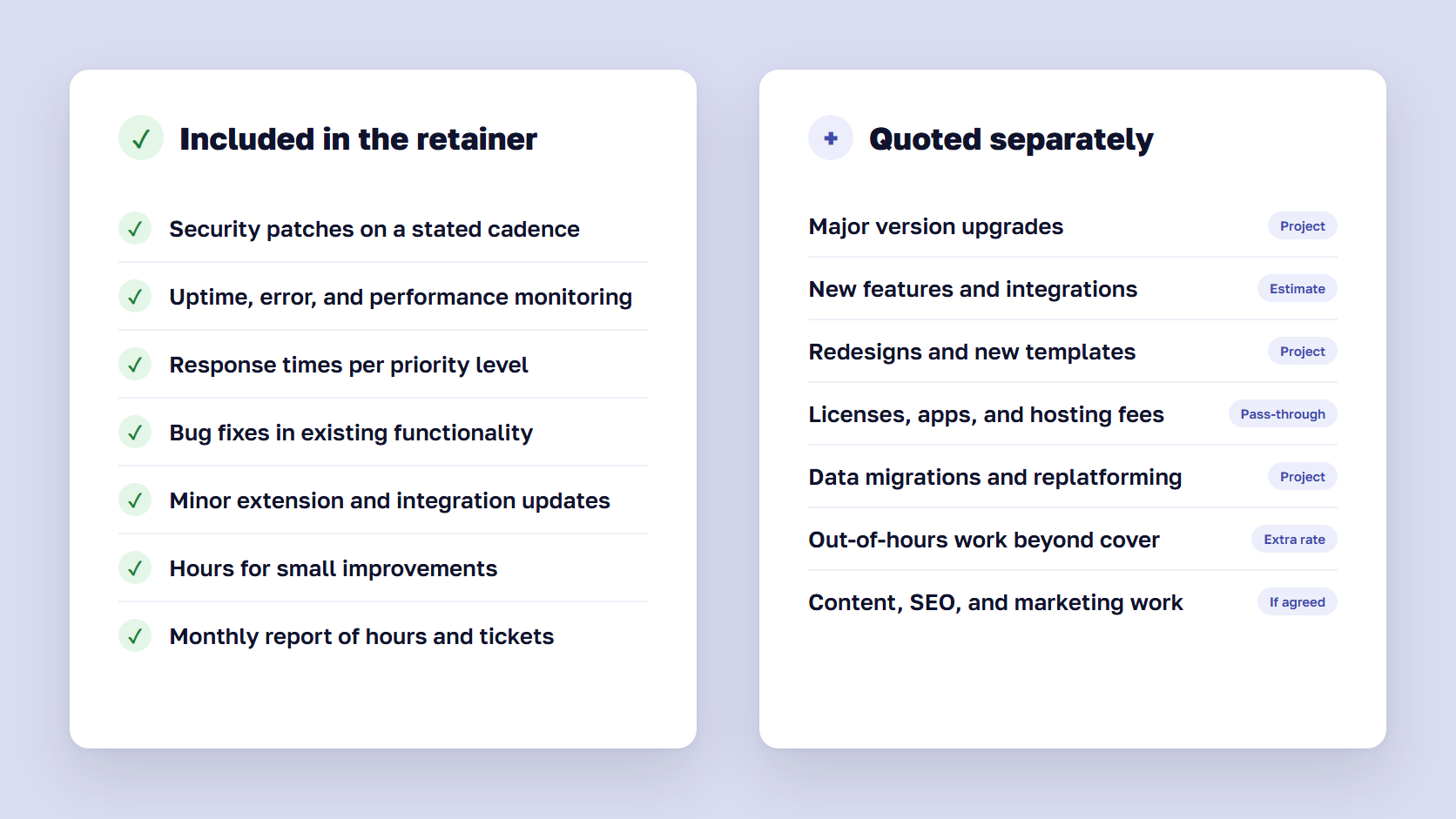
A support retainer, or website maintenance plan, should include security patching on a stated cadence, uptime and error monitoring, a defined response time for each priority level, bug fixes, minor updates to extensions and integrations, and a set number of hours for small improvements. New features, redesigns, major version upgrades, and third-party license fees usually sit outside it and are quoted separately.
| Usually included | Usually quoted separately |
|---|---|
| Security patches on a stated cadence | Major version upgrades |
| Uptime, error, and performance monitoring | New features and integrations |
| Response times per priority level | Redesigns and new templates |
| Bug fixes in existing functionality | Third-party licenses, apps, and hosting fees |
| Minor extension and integration updates | Data migrations and replatforming |
| A set number of hours for small improvements | Out-of-hours work beyond the agreed cover |
| A monthly report of hours and tickets | Content, SEO, and marketing work, unless agreed |
The line between a bug and a change request is behind a lot of billing disputes. Agree in writing that a bug is existing functionality that stopped working as specified, and that everything else is a change. Then ask how the agency handles a fix that turns out to need new code.
Hosting is the other gray area. If the agency runs your infrastructure, the retainer should say who answers when the server goes down at night: the agency or the host.
Our Magento support is built this way: monitoring, patching, bug fixes, performance work, version upgrades, and new features, with scope and cost approved before any work starts.
🚀 Quick takeaway
When incidents and maintenance draw from the same pool of hours, the invoice hides whether your store is getting more stable. Ask for the two to be reported separately from the first month.
Support SLA tiers and when 24/7 cover is worth it
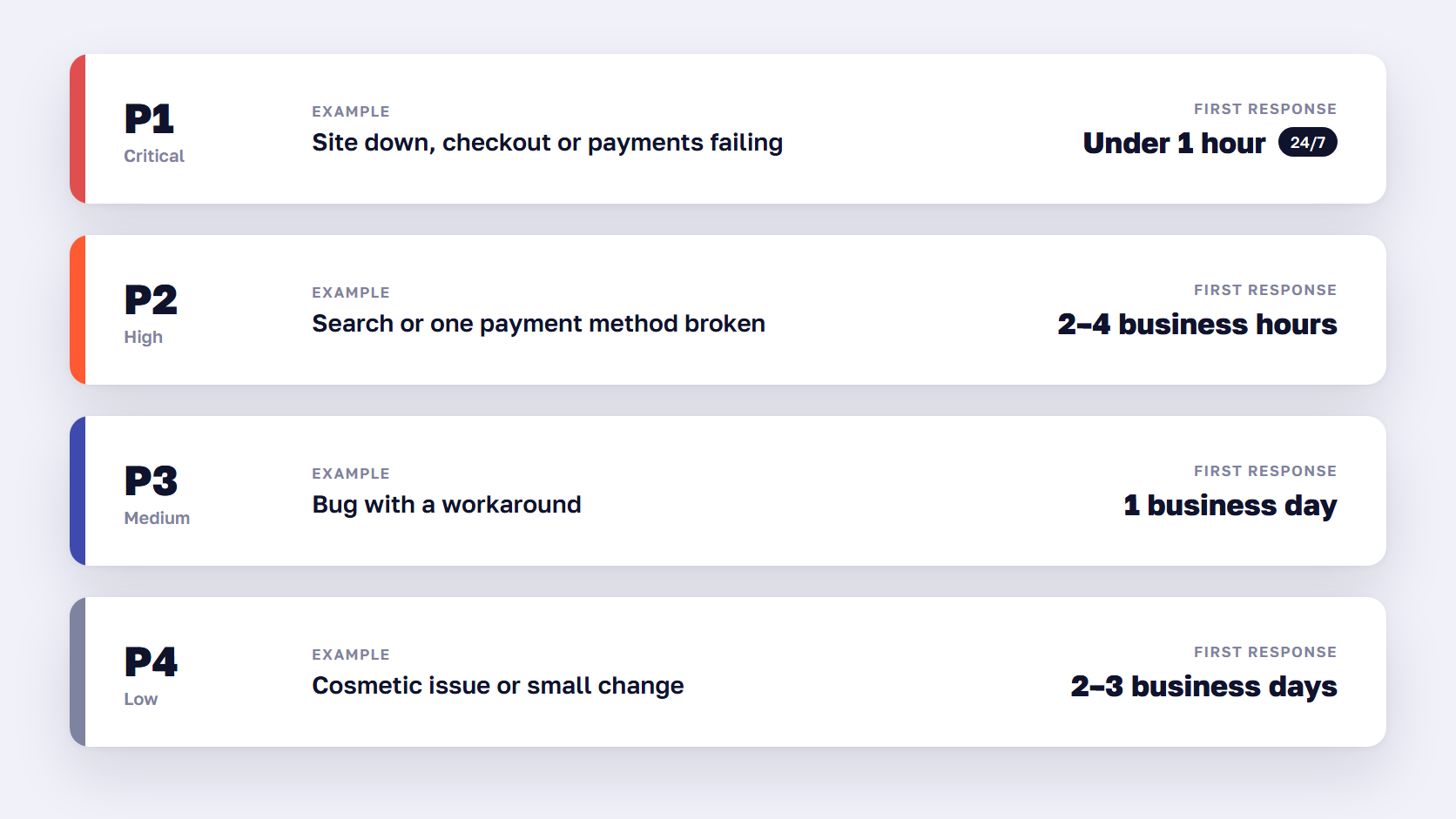
A support SLA sets how fast the agency responds to each priority level, usually from under an hour for a site-down P1 incident to one or more business days for a minor request. 24/7 cover is worth paying for when an hour of downtime costs more than the monthly premium, when traffic peaks outside office hours, or when you sell across several time zones.
Agencies call these priority or incident severity levels, and there is no industry standard for their response times. The example below shows one common structure that you can use as a starting point when you negotiate.
| Priority | Example | Typical first response | What “resolved” usually means |
|---|---|---|---|
| P1 critical | Site down, checkout or payments failing | Under 1 hour, around the clock with 24/7 cover | Workaround or fix live |
| P2 high | Search or one payment method broken | 2–4 business hours | Fix or workaround within a day |
| P3 medium | Bug with a workaround | 1 business day | Fix in the next release |
| P4 low | Cosmetic issue or small change | 2–3 business days | Scheduled with other work |
Response time vs resolution time
Most SLAs promise a response time, meaning how fast a person acknowledges the ticket. Fewer promise resolution, because a fix can depend on a payment provider or a hosting company. Ask for a third number: time to workaround for P1 incidents, such as switching off a broken extension or rolling back a release. That’s the number that stops the revenue loss.
When 24/7 website support pays for itself
Start with uptime. In a 30-day month, 99.5% uptime allows 3.6 hours of downtime, 99.9% allows 43 minutes, and 99.99% allows just over 4 minutes. An uptime promise means little if the people who fix problems only work office hours.
Then work out what an hour offline costs. A store that sells $20 million a year online averages about $2,300 an hour, and far more during a sale. With office-hours support only, an outage that starts at 7 p.m. on a Friday can wait more than 60 hours for a developer.
24/7 cover is usually worth it when:
- An hour of downtime at peak costs more than the monthly premium for on-call cover
- A large share of your orders come in during evenings and weekends
- You sell across time zones, so your busy hours fall outside one office’s working day
- You run your own infrastructure, so no hosting provider watches the servers for you
- You run launches, drops, or sales events outside office hours
It’s harder to justify for a small Shopify store with steady daytime traffic, where Shopify already watches the platform. A middle option is 24/7 cover for P1 incidents only, with everything else handled in office hours.
🚀 Quick takeaway
24/7 support is insurance, so price it against the loss it covers. If one weekend outage would cost more than a year of the 24/7 premium, the decision is made.
How support hours are tracked and billed
Most eCommerce support is billed as hours. Pay-as-you-go bills each approved task, a retainer prepays a block of hours each month, and a dedicated team bills fixed capacity. Ask for a time log per ticket with the date, person, category, and minutes, so you can see whether the hours went to incidents, maintenance, or new work.
| Model | How it bills | Fits | Watch for |
|---|---|---|---|
| Pay-as-you-go | Each approved task, by the hour | Low or uneven demand | No reserved capacity in a busy month |
| Monthly retainer | A prepaid block of hours | Steady demand | Expiring hours, the overage rate |
| Retainer bands | Tiers of hours, each with its own rate | Seasonal demand | Band changes mid-contract |
| Dedicated team | Fixed capacity with named people | An active roadmap plus support | Paying for idle time |
| Fixed-fee website maintenance packages | A flat fee for a defined scope | Small, simple stores | Narrow scope, everything else extra |
The billing increment matters more than it looks. Thirty five-minute fixes come to 7.5 hours when an agency bills in 15-minute increments, and 30 hours when it rounds every ticket up to a full hour.
How to read a support invoice
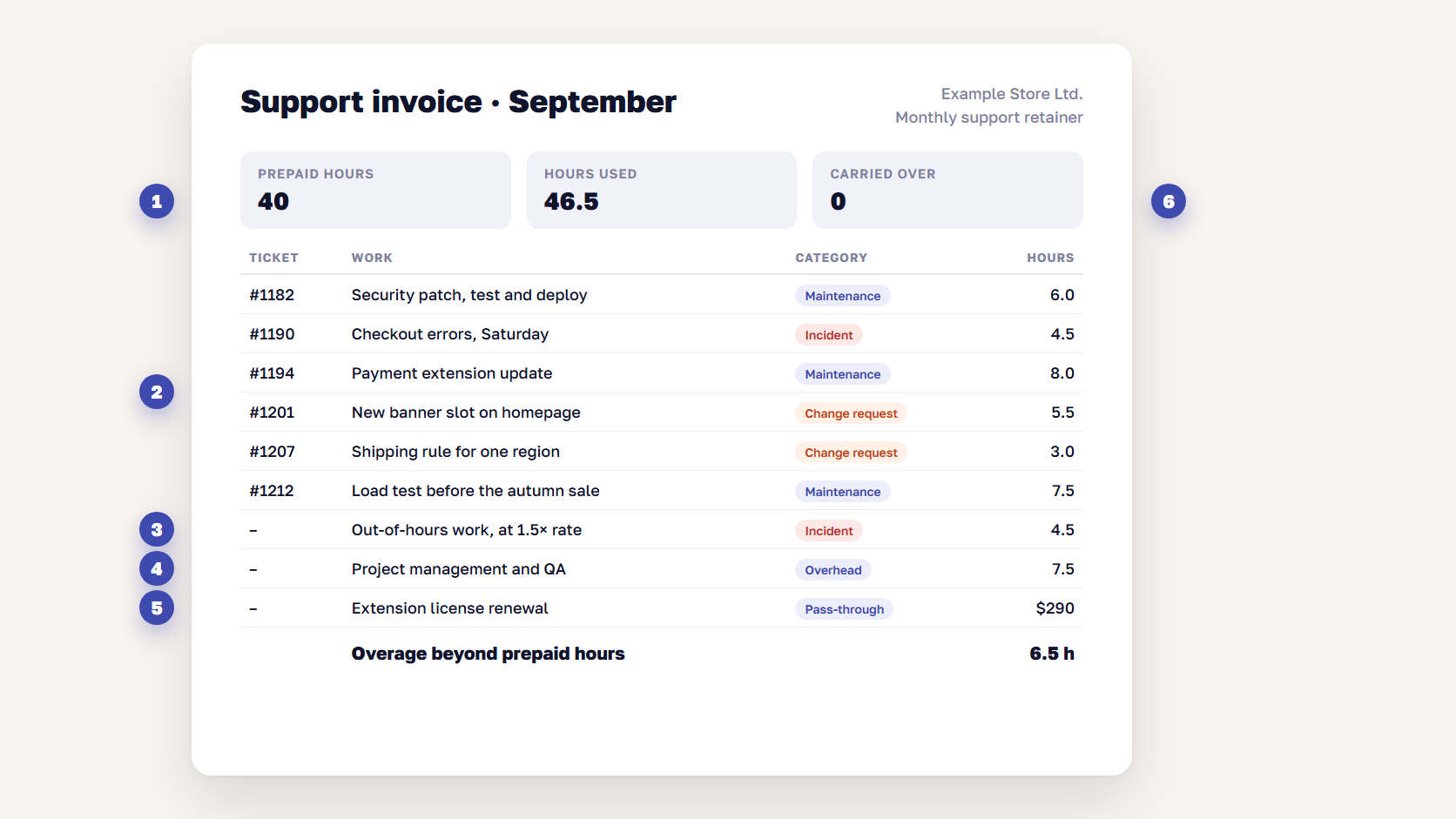
A good invoice can be read without calling the account manager. Look for these lines:
- Base fee or prepaid hours, and how many of them were used
- Hours per ticket, with the ticket number, date, person, and category (incident, maintenance, or change request)
- Out-of-hours work, shown separately with its rate
- Project management and QA time, inside each ticket or as its own line with a stated share
- Pass-through costs, such as extension licenses, hosting, or third-party services
- Hours carried over or expired at the end of the month
If a line says “general maintenance, 12 hours” with no tickets behind it, ask for the log.
Why this month’s bill is higher
When a support bill jumps, the cause is usually one of these:
- An emergency security patch outside the normal cadence
- An out-of-hours incident billed at a higher rate
- A run of small change requests before a marketing campaign
- An extension or platform update that broke something and needed regression testing
- Pre-peak work, such as load testing, code freezes, and extra monitoring before Black Friday
- Fixes on a version close to end of support, where every change also needs a compatibility check
Ask your agency to tag every hour with a category. After three months, you’ll know your baseline, and a higher bill becomes a conversation about one category instead of the whole invoice.
🚀 Quick takeaway
The category split on an invoice tells you more than the total. If incident hours grow every month, the store has a stability problem, and an audit of the part that keeps failing usually costs less than putting out the same fire again and again.
Red flags in a support contract
Read the contract with these questions in hand. Each “no” is worth a conversation before you sign. If you’re still comparing providers, our overview of Magento support and maintenance companies covers the selection side.
- Does the SLA define priority levels, and can you set the priority? If only the agency decides what counts as P1, the response time promise means little.
- Is there a workaround or resolution target for P1? A 15-minute acknowledgment followed by a six-hour fix still costs six hours of sales.
- Does “24/7” mean a person on call? Some contracts mean round-the-clock ticket intake, with someone reading the queue the next morning. Ask who answers at 3 a.m. and how.
- Is the patching cadence written down? “Patches applied as needed” leaves the decision to whoever has spare time.
- What happens to unused hours? Expiring hours are normal in some retainers, but you should know the rule before the first month ends.
- What are the billing increment and the overage rate? Rounding each ticket up to an hour, or an overage rate far above the base rate, can move the monthly cost more than the headline price.
- Do you get a time log per ticket? Without one, you can’t check an invoice.
- Do you own your code, repositories, and hosting accounts? If the agency holds the only access, switching providers turns into a negotiation. The contract should cover handover.
- How long is the notice period? A 12-month term with automatic renewal and 90 days’ notice can keep you paying long after the relationship stops working.
Frequently asked questions about website maintenance cost
How much does website maintenance cost per month?
For an online store, published guides put website maintenance cost between about $300 and $5,000 a month, and enterprise stores go well past that. The real number depends on developer hours. At $100 an hour, a store that needs 10 hours a month pays about $1,000, and one that needs 40 hours pays about $4,000, plus any 24/7 premium.
Do websites need monthly maintenance?
Online stores do. Security patches, extension updates, monitoring alerts, and broken integrations come up every month, and every hour a checkout or payment issue stays open costs orders. A brochure site can get by with occasional updates, but a store that takes payments needs continuous monitoring and patching on a schedule.
Is Shopify cheaper to maintain than Magento?
Usually, for the platform itself. Shopify runs hosting, core updates, and its own PCI DSS assessment, so maintenance is mostly apps, theme, and integrations. Self-hosted Magento (Adobe Commerce) adds patching, upgrades, and infrastructure. The gap narrows for complex stores, where custom apps, integrations, and Shopify Plus fees carry their own costs.
How many support hours does an online store need?
There’s no standard number, so measure it. Count the hours from the last three to six months of tickets, split them into incidents, maintenance, and changes, and size the retainer on the maintenance baseline plus a buffer for incidents. Keep feature work in a separate budget, so it doesn’t eat the hours you need for patches.
What is a good SLA response time for eCommerce?
For a site-down or checkout failure, look for a first response within an hour, around the clock if your store sells at night or on weekends. Lower priorities usually get a response within a few business hours to a business day. Ask for a workaround target for critical incidents too, because a quick acknowledgment doesn’t restore sales.
Do unused retainer hours roll over?
It depends on the contract. Some retainers let unused hours roll into the next month, often with a cap or an expiry date, and others reset every month. Pay-as-you-go billing avoids the question, because you only pay for the hours used. Whatever the model, get the rule in writing before you sign.
What to check before you sign or renew
Website maintenance cost for an online store comes down to hours: how many your store needs for patching, monitoring, incidents, and small changes, and what each one costs. Pull the last three months of invoices, tag the hours by category, and check them against the scope and SLA you need. If the numbers still don’t add up, have that conversation with your agency before the renewal date.
At scandiweb, 450+ active clients use our support, and we’ve handled 9,000+ tickets on a pay-as-you-go model where you approve the scope and cost of each task before work starts.
Want a second opinion on your support contract? Tell us what you're paying for, and we'll show you which hours your store needs.




































