
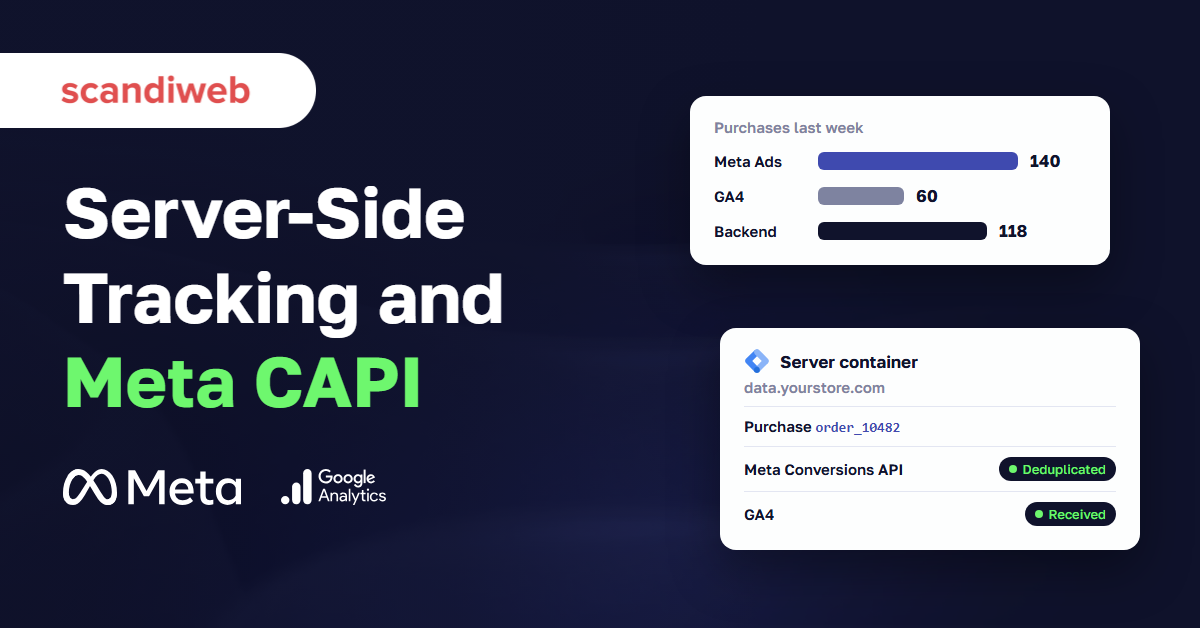
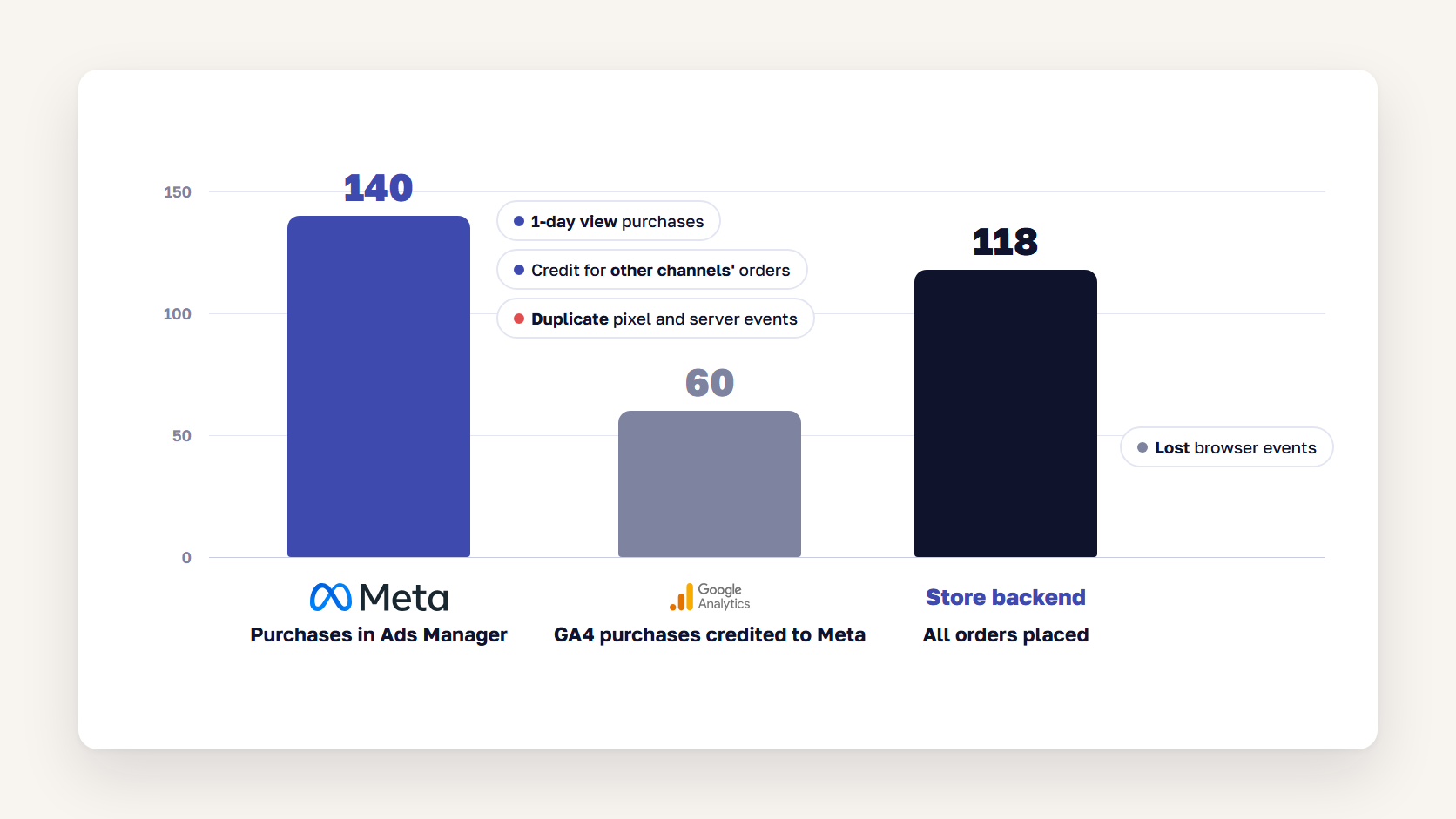
If Meta says your ads drove 140 purchases last week, GA4 credits Meta with 60, and your store backend shows 118 orders in total, your tracking isn’t necessarily broken. Each tool counts on its own date and by its own rules about who gets the credit.
The gap still costs you. Part of it is purchases the browser never reports, and part of it can be the same order counted twice. Server side tracking fixes some of that, which is why so many vendors are pitching it right now. This guide explains why the numbers disagree, what server-side tracking and the Meta Conversions API change, how event deduplication works, what a server container costs to run, and when a mid-size store can skip it.
Why Meta, Google Ads, and GA4 never match
Meta, Google Ads, and GA4 never match because each one answers a different question. Meta counts purchases by people who clicked or saw a Meta ad. Google Ads counts purchases after a Google ad click. GA4 assigns credit across every channel a shopper used. They also date conversions differently, and each loses its own share of browser data to ad blockers and consent choices.
| Why the numbers differ | Meta Ads | Google Ads | GA4 |
|---|---|---|---|
| Who gets credit | Any Meta ad clicked or viewed in the window | Google ad clicks | Channels in the path, set by the attribution model |
| Default window | 7-day click, 1-day view | Set per conversion action, up to 90 days | 90-day lookback for purchases |
| Date of the conversion | Date of the ad impression or click | Date of the ad click | Date of the purchase |
| Counts views without a click | Yes | No | No |
Each platform gives itself the credit
A shopper clicks a Meta ad on Monday, comes back through a Google ad on Wednesday, and buys. Meta counts the purchase because it happened within seven days of a Meta click. Google Ads counts it too. GA4 gives the credit to Google, or splits it, depending on the attribution model. Both ad platforms claim the same order, and both are following their own rules.
Meta also counts purchases by people who only saw an ad and bought within a day. GA4 can’t see an ad view at all, so on a store that spends most of its budget on Meta, view-through purchases are often a large part of the difference. Our guide to offline and online attribution covers how to compare channels without taking any single platform’s word for it.
The same purchase lands on different days
Google Ads reports a conversion on the day of the ad click, and GA4 reports it on the day of the purchase. In Google’s own example, a click on May 5 and a purchase on May 10 show up on May 5 in Google Ads and on May 10 in GA4. Meta’s Ads Manager also dates conversions back to the ad impression or click. Weekly comparisons drift for that reason alone, and the most recent days keep filling in as late purchases arrive.
Google says more than 95% of conversions are attributed within 14 days, so compare platforms on date ranges that ended at least two weeks ago.
Browsers and consent hide some purchases
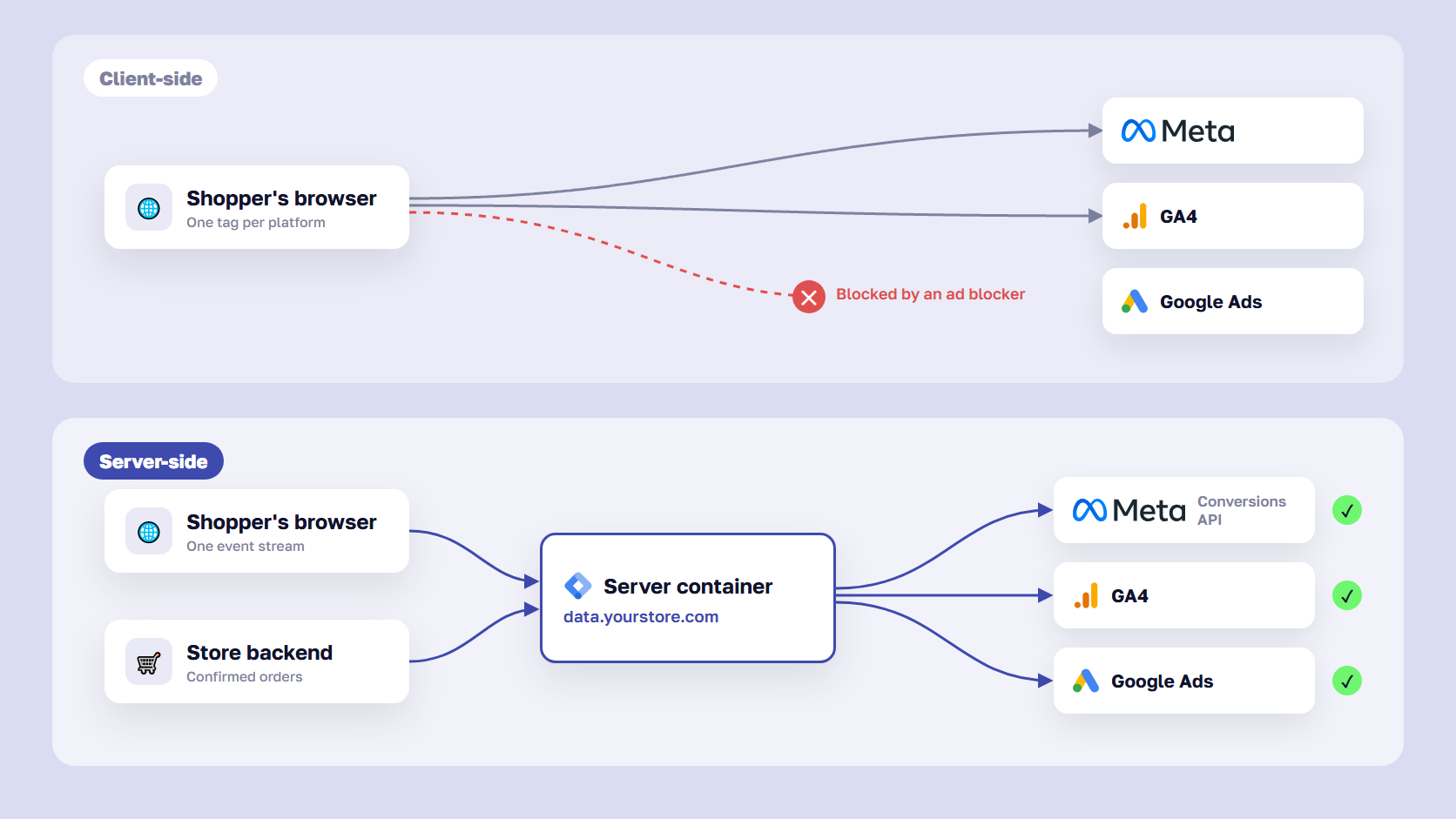
Every platform misses purchases that its browser tag never reports. Ad blockers stop tags from loading, and Safari limits cookies set by JavaScript to seven days, so a shopper who returns after two weeks looks like a new visitor. Visitors who decline cookies are only partly counted, and how much Google models back depends on your Google Consent Mode v2 setup.
Duplicate events inflate Meta
If your store sends a purchase to Meta from the browser pixel and again from the server, and the two events don’t share an ID, Meta counts the order twice. Of all the causes here, this is the only plain error. When Meta’s purchase count comes close to your total order count, check deduplication first.
🚀 Quick takeaway
Most of the gap between Meta and GA4 comes from counting rules that tracking can’t change. The part you can fix is the purchases that get lost or duplicated on the way, so measure that part before you pay for anything.
What is server side tracking?
Server side tracking sends conversion data from a server you control to platforms such as Meta, Google Ads, and GA4, instead of relying only on tags in the shopper’s browser. The browser sends one request to your own subdomain, or your store backend reports the order directly. The server then forwards each event to each platform, under rules you set.
On a typical store, it works like this. A shopper places an order, and the browser sends the purchase event to a server container on a subdomain such as data.yourstore.com. The container, often server-side Google Tag Manager, formats the event for each destination and sends it to GA4, the Meta Conversions API, and Google Ads. Because the request goes to your own domain, fewer ad blockers stop it. The server can also set cookies through HTTP headers, which Safari doesn’t cap the way it caps cookies written by JavaScript in most setups.
Client-side vs server-side tagging
Client-side tagging runs every vendor’s script in the shopper’s browser. Server side tagging moves most of that work to a server: the browser sends one stream of events, and the server decides what goes to each platform.
| Client-side tagging | Server-side tagging | |
|---|---|---|
| Where tags run | In the shopper’s browser | On your server container |
| Requests go to | Each vendor’s domain | Your own subdomain |
| Ad blockers | Often block the tags | Block fewer requests |
| Data control | Each vendor collects what its script reads | You choose what each platform receives |
| Page weight | One script per vendor | Fewer scripts in the browser |
| Running cost | Free | Hosting plus upkeep |
| Who maintains it | Marketing team in GTM | Someone who can debug a server |
What server-side tracking can’t change
A server container doesn’t change attribution. Meta will still count view-through purchases and GA4 will still split credit across channels, so the platforms will keep disagreeing. It doesn’t override consent either. If a visitor declines marketing cookies, the server has to respect that, so consent signals need to travel with each event into the container.
What it can change is the share of real purchases each platform receives and the quality of the customer data attached to them. That improves the signal Meta and Google use to optimize bids. Your dashboards will look closer, but rarely identical.
🚀 Quick takeaway
If a business case promises that Meta and GA4 will finally report the same numbers after a server-side setup, read the rest of that pitch with caution.
How the Meta Conversions API works
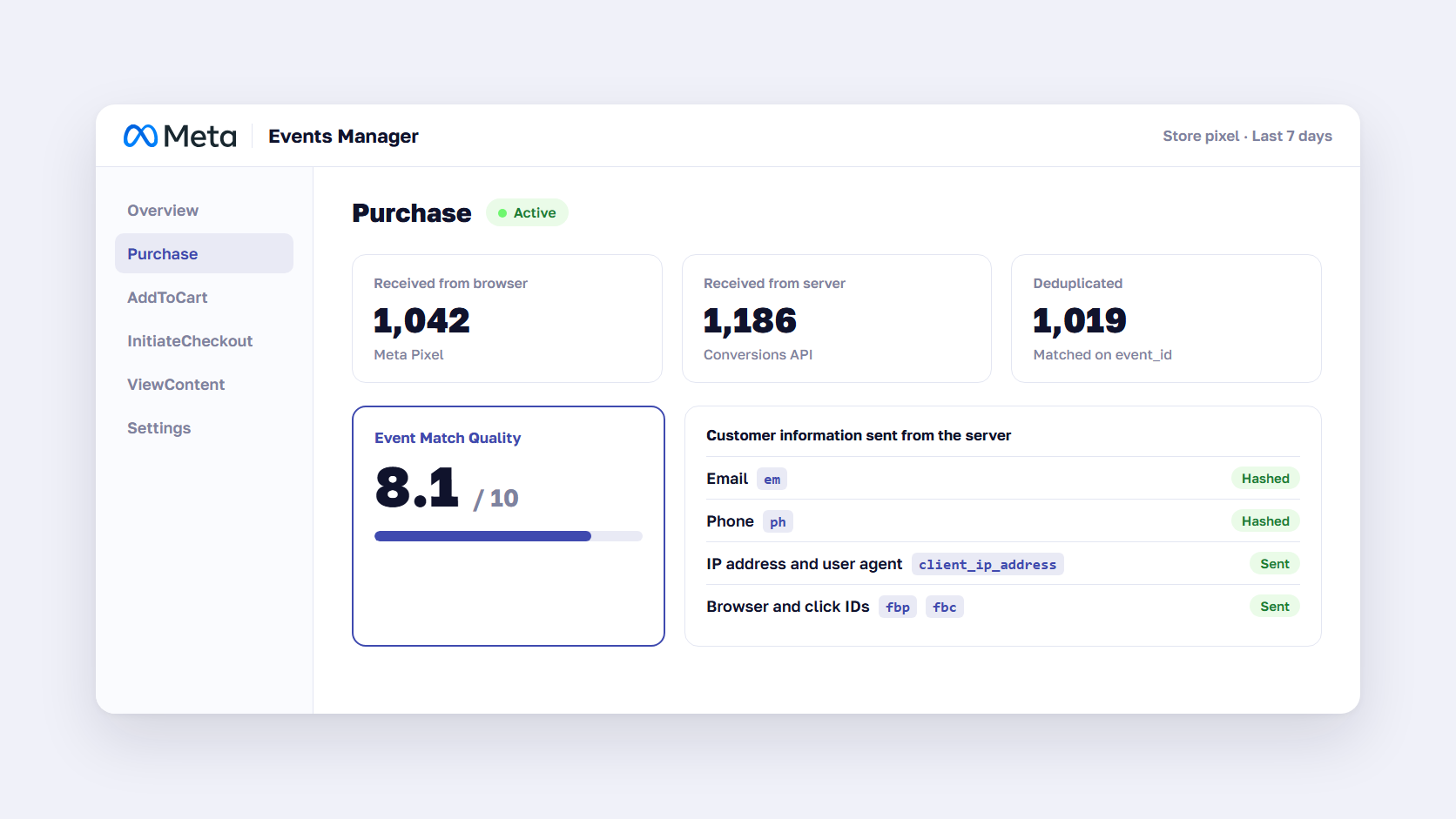
The Meta Conversions API, often called Meta CAPI, lets your server send events such as purchases and add-to-carts directly to Meta, next to or instead of the browser pixel. Each server event carries an event name, a timestamp, an event ID, and customer details such as a hashed email or phone number, which Meta uses to match the purchase to a Facebook or Instagram account.
Meta scores that matching with Event Match Quality, a rating out of 10 for each event type in Events Manager. Email, phone number, name, and IP address are among the parameters Meta lists as high quality, and the browser user agent is required for website events. Unless you use Meta’s Business SDK, your server has to hash the customer details before sending them.
Meta recommends what it calls a redundant setup: send the same events through both the pixel and the Conversions API. The browser pixel adds context the server doesn’t have, while the server covers purchases the browser missed, and deduplication removes the overlap. Meta accepts server events up to seven days after they happened, which helps when an order is confirmed later, for example after a bank transfer.
A store has four common ways to send server events to Meta:
- Shopify’s Facebook & Instagram app sends purchases through the Conversions API when data sharing is set to Enhanced or Maximum, with no server of your own
- Magento (Adobe Commerce) stores usually add a Meta Pixel and Conversions API extension from the Adobe Commerce Marketplace, which sends events from the store backend
- A server-side Google Tag Manager container forwards the same events to Meta, GA4, and Google Ads from one place
- Meta’s Conversions API Gateway is free software that runs in your own cloud account and sends events to Meta only
For step-by-step setup in Google Tag Manager, our earlier guide to setting up the Facebook Conversions API walks through the pixel and the server tags.
How Meta event deduplication works with event_id
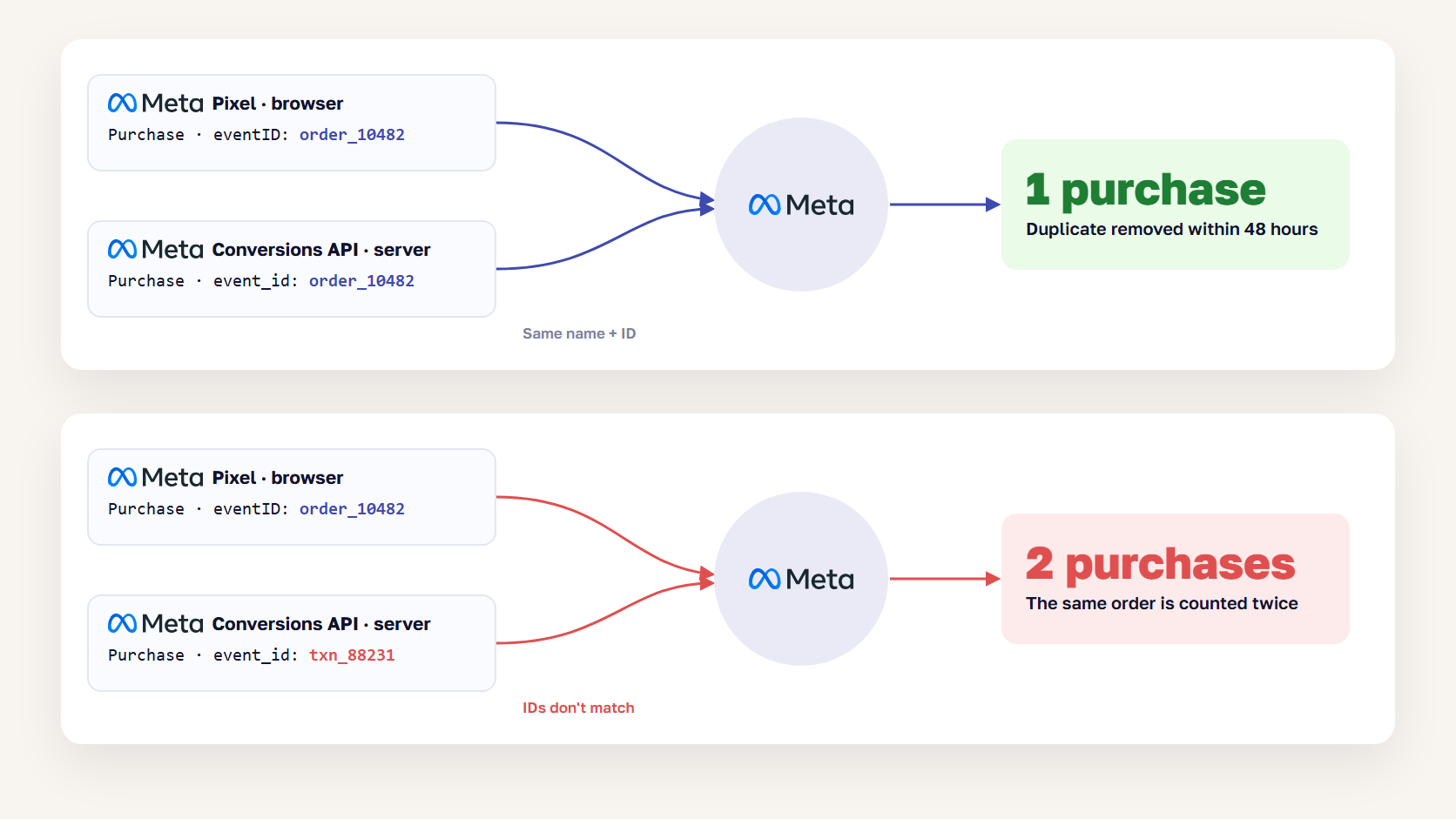
Meta deduplicates a browser event and a server event when both have the same event name and the same event ID, and the second one arrives within 48 hours of the first. The pixel passes the ID as eventID, and the Conversions API as event_id. When they match, Meta keeps one purchase. When the IDs are missing or different, Meta counts the order twice.
Picture two cashiers ringing up the same order. If both write the order number on the receipt, the accountant spots the copy and files one. If neither does, the books show two sales. For purchases, the order number is the obvious ID because the store already creates one for every order.
In the browser, the pixel call carries the ID as its fourth argument:
fbq('track', 'Purchase', {value: 129.00, currency: 'USD'}, {eventID: 'order_10482'});On the server, the Conversions API event carries the same ID:
{
  "event_name": "Purchase",
  "event_time": 1792233177,
  "event_id": "order_10482",
  "action_source": "website",
  "event_source_url": "https://www.yourstore.com/checkout/success",
  "user_data": {
    "em": ["<sha256 of the lowercase email>"],
    "client_ip_address": "203.0.113.24",
    "client_user_agent": "Mozilla/5.0 ...",
    "fbp": "fb.1.1792230000.123456789"
  },
  "custom_data": {"value": 129.00, "currency": "USD"}
}
The result depends on which events arrive and what they carry:
- Both events arrive with the same name and ID: Meta keeps one, generally the first it received
- Only the server event arrives because an ad blocker stopped the pixel: Meta records the purchase from the server
- Only the pixel event arrives because the server call failed: Meta records the purchase from the browser
- The IDs differ, for example the pixel sends the order number and the server sends an internal transaction ID: Meta counts two purchases
- The event names differ, such as “Purchase” and “purchase”: Meta treats them as two separate events
Meta also supports a fallback that matches on the fbp browser cookie or external_id instead of the event ID. It only works when the browser event arrives first, which means it misses the very purchases a server setup is meant to rescue, so use the event ID.
To check your setup, open the Purchase event in Meta Events Manager and compare the deduplicated event count with your backend orders for the same days. If Meta’s purchases are close to or above your total orders while GA4 shows far fewer, place one test order and compare the IDs both sources sent.
🚀 Quick takeaway
Deduplication fails quietly. Meta doesn’t flag a double count, it just reports a better ROAS, and budget moves toward it. Test it again after every checkout or theme update.
What server side tagging costs to run
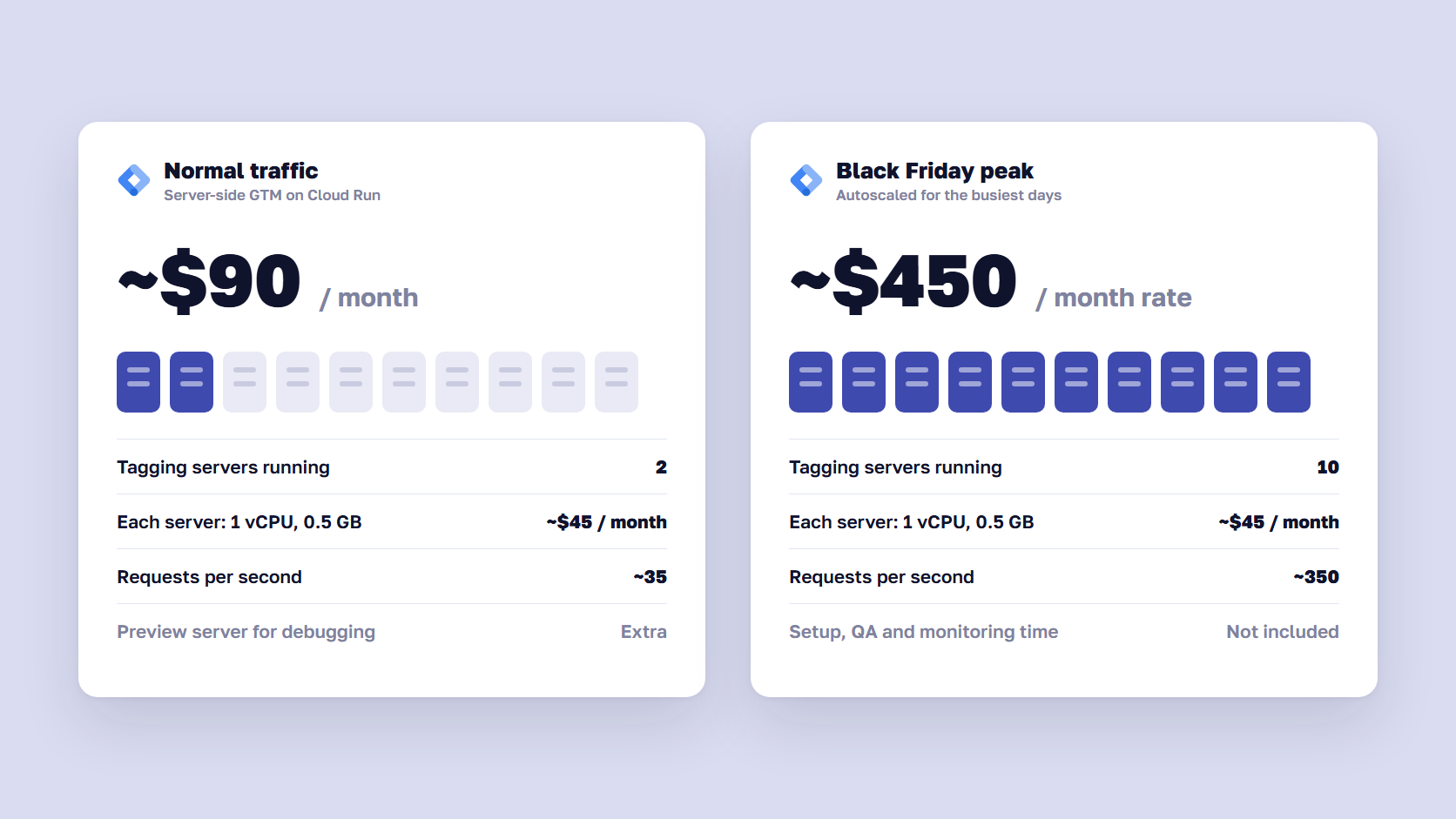
A server-side Google Tag Manager container on Google Cloud Run costs roughly $90 a month at minimum, based on Google’s estimate of about $45 per server per month and its advice to run at least two servers. Traffic peaks scale that up. The bigger cost is the work to build the setup and keep it running.
Google’s Cloud Run setup guide, last updated in May 2026, gives these numbers:
- Each server is a Cloud Run instance with 1 vCPU and 0.5 GB of memory, at about $45 a month
- Google recommends at least two instances, so one server outage doesn’t lose data
- Two to ten servers handle roughly 35–350 requests per second, depending on how many tags you run
- A separate preview server is provisioned for debugging in Tag Manager
At ten servers during a Black Friday peak, the same estimate works out to about $450 a month for those days. Cloud Run is Google’s recommended host, but the container can run in other environments too. Managed providers such as Stape sell server-side GTM hosting on monthly plans priced by request volume, starting with a free tier for low traffic. That removes the cloud setup and adds a vendor.
If Meta is the only platform you need server events for, Meta’s Conversions API Gateway is a lighter option. The software is free, you pay for the cloud resources, and Meta’s own setup flow estimates AWS costs upwards of $30 a month.
Google also offers Google tag gateway for advertisers, which serves the Google tag from your own domain through your CDN or load balancer. It isn’t a full server container, and Google recommends running both for the most durable setup.
Someone also has to rebuild each tag in the server container, pass consent signals through, test purchases against real orders, and watch for drops after every release. If nobody owns that work, a broken container can go unnoticed for weeks.
🚀 Quick takeaway
Plan the budget around the person who maintains the container. A $90-a-month container that breaks after a checkout update costs more than the client-side tags it replaced.
Is server-side tracking worth it for a mid-size store?
Server-side tracking is worth it when paid media drives a large share of revenue across several platforms and someone can own the setup after launch. If your store runs one ad platform on Shopify or Magento, a native Conversions API connection with working deduplication usually closes most of the fixable gap for a fraction of the effort.
Server-side tracking is worth it if:
- Paid media is one of your largest costs, so a few percent of missing conversions changes bidding decisions
- You send purchases to several platforms, such as Meta, Google Ads, TikTok, and GA4, and want one place to manage them
- A high share of your traffic uses Safari and iOS, where cookie limits hit returning shoppers hardest
- You want to control exactly which customer data each platform receives
- You have an analytics team, or a partner, to maintain and monitor the container
It isn’t worth it yet if:
- Meta is your only paid channel and your platform has a native Conversions API connection you haven’t switched on
- Your purchase events aren’t deduplicated, since moving broken events to a server keeps them broken
- Your consent banner and Consent Mode setup aren’t working, because a server container passes the same consent problems on
- Nobody can debug the container when a release breaks it
- You expect it to make Meta and GA4 report the same numbers
If the first list describes your store, our server-side tracking team starts every setup by measuring the gap against backend orders, so the result is a number you can check.
Measure the gap before you build anything
Before choosing a setup, measure how many backend orders each platform receives. Compare orders in your store backend with purchases in GA4 and with the purchase events Meta received for the same days. That shows how much data you lose today, which is the only part a server setup can recover.
- Export backend orders by day for a period that ended at least two weeks ago, so late conversions are included
- Pull GA4 purchases by day for the same dates across all channels, and compare the totals with the backend
- Pull the received Purchase events in Meta Events Manager for the same dates, instead of the attributed purchases in Ads Manager
- Check with one test order that the pixel and server events share an event ID
- Check your consent rate and Consent Mode setup, so you know how much of the gap is visitors who declined
If GA4 receives 90% of backend orders and Meta’s event count is in line with GA4, the browser setup is doing most of the job. If GA4 sees 70% and Meta’s events exceed your orders, you have both lost and duplicated events, which is a strong case for fixing tracking first. Our analytics team runs this comparison as the first step of a tracking audit.
🚀 Quick takeaway
Use Events Manager for this check. Ads Manager’s purchase column applies Meta’s attribution rules, while Events Manager shows the events that arrived, and only that number tells you whether tracking loses data.
Frequently asked questions about server side tracking
Is server-side tracking legal?
Yes, server-side tracking is legal, but it doesn’t change what you need consent for. Under GDPR and similar laws, sending a visitor’s data to Meta or Google for advertising still requires their consent, whether the request comes from the browser or your server. A compliant setup passes consent signals into the server container, and the container forwards data only where the visitor agreed.
Why does Meta report more purchases than GA4?
Meta reports more purchases than GA4 because it counts purchases within seven days of a Meta ad click and one day of an ad view, even when another channel got the last click. GA4 assigns that credit elsewhere and can’t see ad views at all. Duplicate pixel and server events without a shared event ID can also inflate Meta’s count.
Does server-side tracking bypass ad blockers?
Server-side tracking gets past many ad blockers because the browser sends data to your own subdomain instead of Meta’s or Google’s domains. Events your store backend sends directly don’t depend on the browser at all. It must never be used to get around a visitor’s consent choice, because data protection law applies to server requests exactly as it does to browser tags.
Do I still need the Meta Pixel with the Conversions API?
In most cases, yes. Meta recommends running the pixel and the Conversions API together and sending the same events through both, with a shared event ID for deduplication. The pixel adds browser details that help Meta match visitors, and the Conversions API covers purchases the browser misses. The Conversions API works on its own, usually with lower match quality.
How much does server-side tracking cost?
Hosting a server-side Google Tag Manager container on Cloud Run costs about $45 per server per month, according to Google, which recommends at least two servers, so roughly $90 a month before traffic peaks. Managed hosting providers charge monthly plans by request volume. Setup and maintenance usually cost more than hosting and depend on how many platforms and markets you track.
What is the difference between client-side and server-side tracking?
Client-side tracking runs each platform’s tag in the shopper’s browser, and each tag sends data straight to its vendor. Server-side tracking sends one stream of events to a server you control, usually on your own subdomain, and the server forwards data to each platform. It gives you more control over the data and loses fewer events to blockers, at the cost of hosting and maintenance.
Fix the gap you can measure, then decide on the server
Server side tracking helps a store send more of its real purchases to Meta, Google Ads, and GA4, with better customer data attached. It won’t make the platforms agree, because they assign credit and dates by different rules on purpose. Start by measuring how many backend orders each platform receives, then fix deduplication and consent, and switch on the Conversions API your platform already offers. Build a server container when your paid media budget and the number of platforms justify someone owning it.
Not sure whether your gap is lost data or counting rules? Talk to our analytics team, and we'll compare your backend orders with what Meta and GA4 receive.




































