
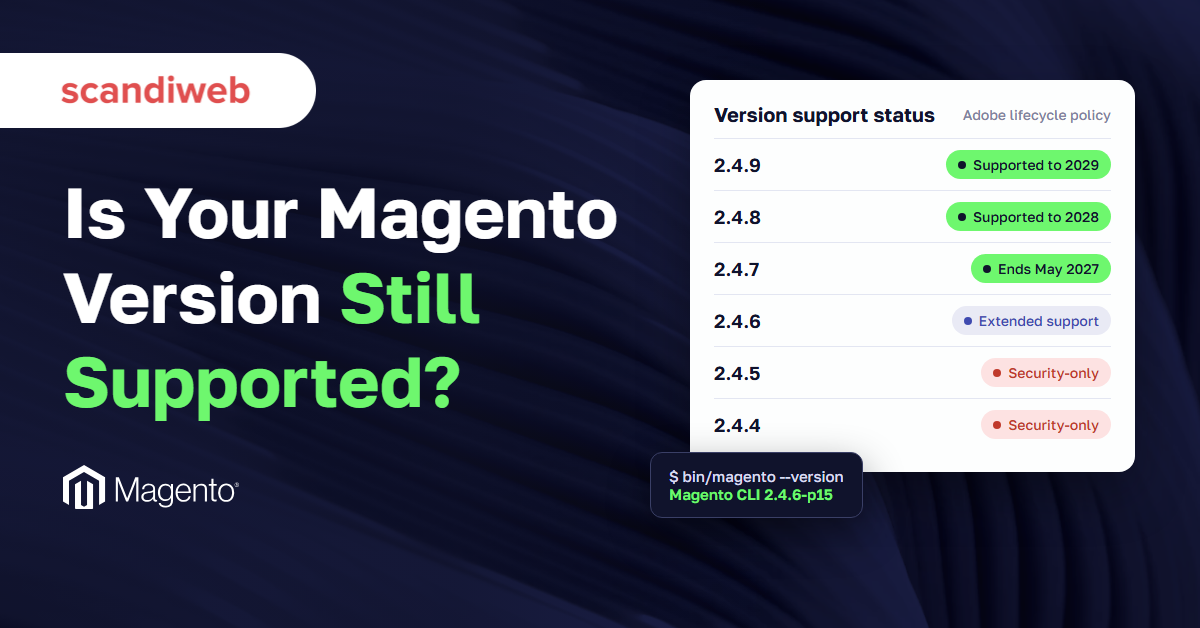
If an upgrade quote just landed on your desk and someone asked whether this is the moment to leave Magento, you need the dates before you need an opinion. Magento end of life comes release by release. Adobe gives each 2.4 line three years of standard support, and five of them reach a deadline by mid-2028.
This guide puts the facts in one place: the latest version, the end-of-support date for every 2.4 release, how Adobe’s monthly security patches have worked since January 2026, the PHP and database versions each release needs, and what an unsupported store risks. It closes with upgrade cost and time ranges, so you can hold the quote up against the cost of waiting.
What is the latest Magento version?
The latest Magento version is 2.4.9, released on May 12, 2026, for both Adobe Commerce and Magento Open Source. Adobe supports it until May 31, 2029. The newest security patches for older lines are 2.4.8-p5, 2.4.7-p10, 2.4.6-p15, 2.4.5-p17, and 2.4.4-p18, all from the same day, with monthly isolated security fixes on top. 2.4.10 has been in alpha since October 13, 2026.
To check the current Magento version of your own store, run bin/magento --version from the root directory, or look at the footer of the admin panel.
🚀 Quick takeaway
“Latest version” and “latest patch” are different questions. A store on 2.4.7-p10 with every monthly isolated fix applied is fully patched, but it still has to leave 2.4.7 before May 31, 2027.
Magento end of life dates for every 2.4 version
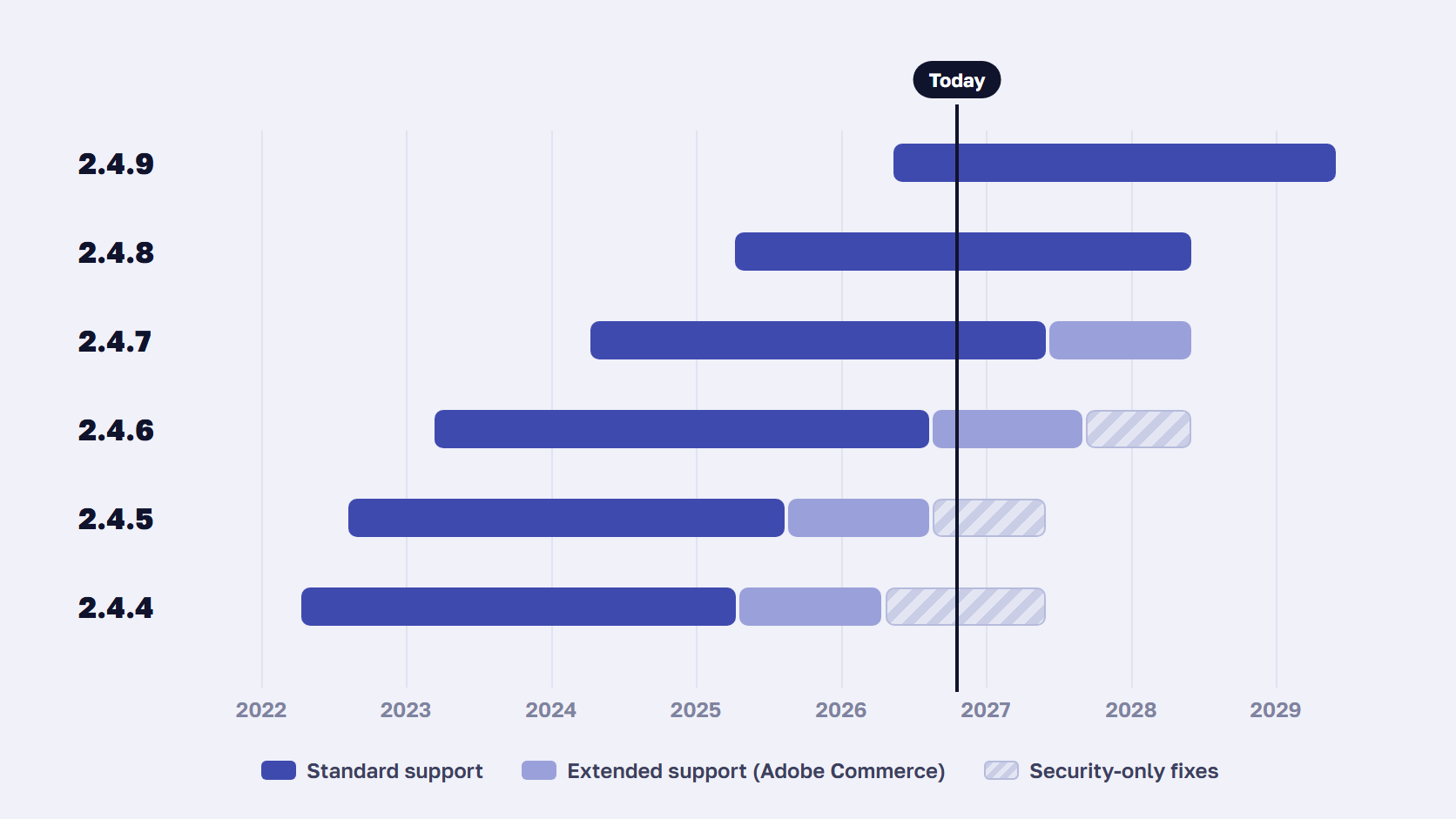
Every Magento 2.4 release gets three years of standard support from its release date, with security patches, quality fixes, and Adobe support included. Adobe Commerce 2.4.6 and 2.4.7 get one extra year of extended support at no cost. 2.4.4, 2.4.5, and 2.4.6 then get a one-time security-only period that ends in 2027 or 2028, according to Adobe’s lifecycle policy.
| Version | Released | Standard support ends | Extended support ends | Security-only fixes until |
|---|---|---|---|---|
| 2.4.9 | May 12, 2026 | May 31, 2029 | Not announced | None |
| 2.4.8 | April 8, 2025 | May 31, 2028 | Not announced | None |
| 2.4.7 | April 9, 2024 | May 31, 2027 | May 31, 2028 | None |
| 2.4.6 | March 14, 2023 | Ended August 11, 2026 | August 31, 2027 | May 31, 2028 |
| 2.4.5 | August 9, 2022 | Ended August 12, 2025 | Ended August 11, 2026 | May 31, 2027 |
| 2.4.4 | April 12, 2022 | Ended April 12, 2025 | Ended April 14, 2026 | May 31, 2027 |
Releases before 2.4.4 are fully out of support. 2.4.0 to 2.4.3 lost regular support on November 28, 2022, and 2.3 on September 8, 2022.
What extended support and the security-only period cover
Extended support covers almost as much as standard support: quality and security patches for the core application, for one more year. The security-only period is thinner. It includes isolated security fixes and nothing else, so a bug in checkout or an indexer stays unfixed. Adobe calls it a one-time transition for moving to a supported release and says it will not be extended.
Magento Open Source vs Adobe Commerce end of life
The lifecycle policy is written for Adobe Commerce, and Open Source stores get less. Adobe’s October 2026 security bulletin, APSB26-153, offered Magento Open Source patch files only for 2.4.7 and later. If you run Open Source 2.4.6 or older, plan as if standard support was your last support. Our guide to Adobe Commerce vs Magento Open Source covers the other differences between the two editions.
Is Magento itself end of life?
No, Magento 2 is still developed and released every year, with 2.4.9 out and 2.4.10 in alpha. Magento 1 is the version that is fully end of life. Its support ended on June 30, 2020, and stores still on it get no patches at all. So the useful answer to “is Magento end of life?” is the date for the release line you run.
🚀 Quick takeaway
If you run 2.4.4 or 2.4.5 today, you are already in the security-only period. Functional bugs found from now on stay unfixed on your version until you upgrade. Only security fixes still arrive.
How Magento security patches work now
A Magento security patch closes known vulnerabilities without adding features. Since January 2026, Adobe has worked to a monthly schedule for isolated security fixes across all supported lines, plus a full patch release for each line every May. Install the latest -p release for your version first, then each monthly isolated patch in release order, and apply emergency hotfixes within days.
| Release type | Example | What it contains | How to install |
|---|---|---|---|
| Full release | 2.4.9 | New features, new system requirements, fixes | Full upgrade project |
| Security patch release | 2.4.8-p5 | Security and high-priority fixes on top of the previous patch | Composer update, regression test |
| Monthly isolated patch | 2-4-8-p5-oct-2026.zip | Security fixes only, for one month | Patch files, in release order |
| Hotfix | APSB26-146 (StyleSmuggler) | One fix for an actively exploited flaw | Quality Patches Tool or patch file, within days |
Security patch vs full release: what to install and when
A full release such as 2.4.9 can change PHP versions, remove old dependencies, and break extensions, so it needs a project with a budget. A security patch release such as 2.4.8-p5 is built to avoid breaking extensions and is the baseline Adobe tests the next fixes against. Isolated patch files are smaller again. Adobe only supports applying them on the latest -p release for your line.
The order matters. Each monthly isolated patch builds on the previous month’s, so skipping September means October may not apply. Within a month, Adobe’s instructions are to apply the Open Source (CE) file first, then the Adobe Commerce (EE) file, then B2B if you use it. The October 2026 fixes were released as patch files only, with no Composer packages.
PCI DSS v4.0.1 requirement 6.3.3 expects critical security patches to be installed within one month of release. With a monthly cadence, that means a standing monthly patch slot in the development calendar.
How to check which Magento security patches you have
Run php vendor/bin/patch-status from the project root. Adobe’s Commerce Version Tool lists applied and missing patches, and marks each CVE as protected, vulnerable, or unknown. It comes with the July 2026 isolated patch, so apply that one first if the command is missing. On Adobe Commerce Cloud, vendor/bin/magento-patches -n status shows the same through the Quality Patches Tool.
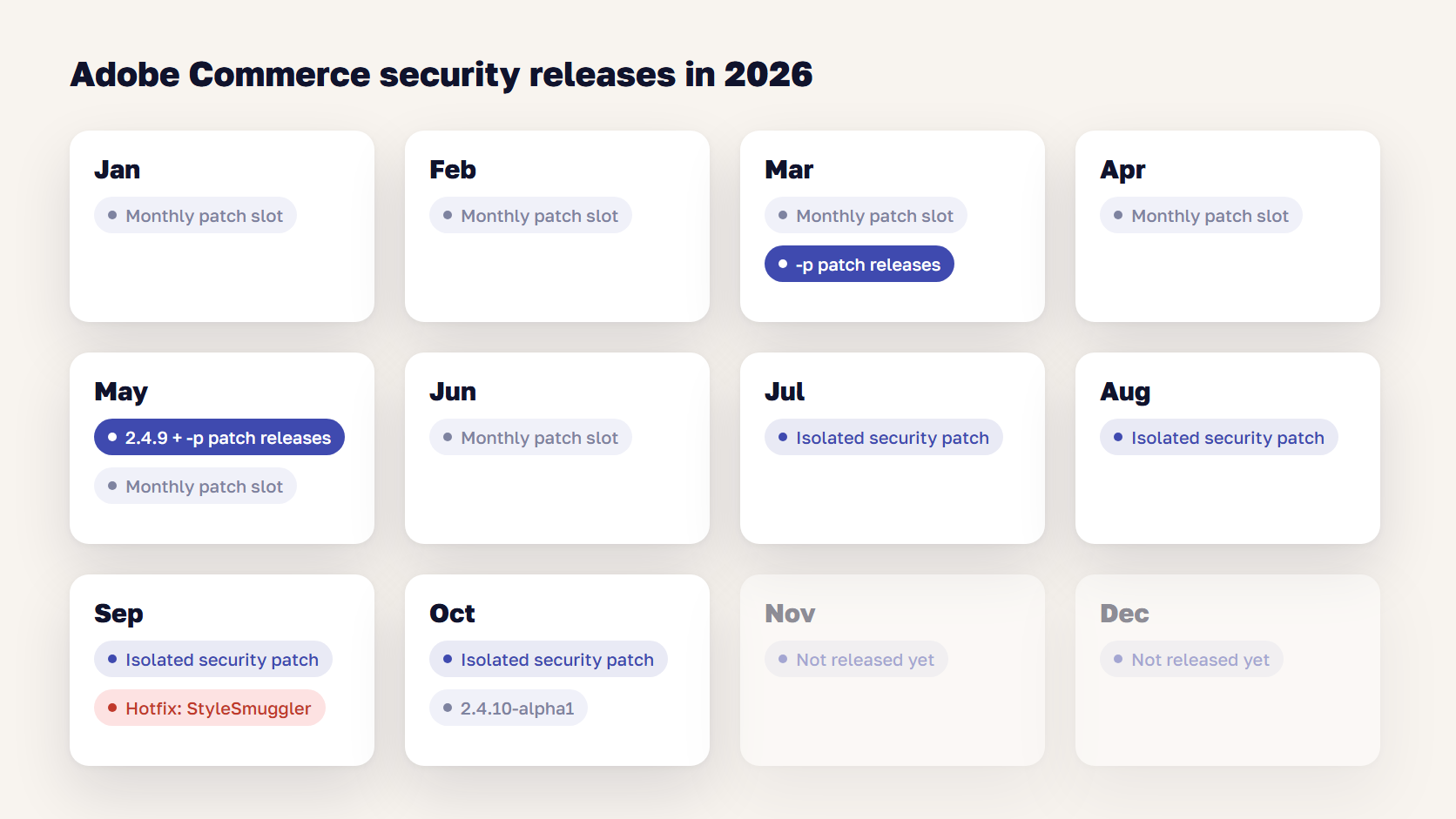
StyleSmuggler showed how fast this can move. The flaw, CVE-2026-75650, scored CVSS 10.0, was exploited from September 4, 2026, and Adobe’s hotfix arrived on September 7. It covered supported versions only. Stores on Magento 2.2.0 to 2.4.3-p3 had no official fix, so we rebuilt Adobe’s fix for 41 of those versions.
Read more: StyleSmuggler Patch: Which Magento Versions Adobe Covers and How to Apply It
🚀 Quick takeaway
Support dates decide who gets a fix during an attack. Adobe wrote the StyleSmuggler hotfix for supported versions, and every store outside that list had to find its own.
Magento system requirements by version
Each Magento release supports a fixed range of PHP, database, search, and cache versions, and the range moves with every patch. The table shows Adobe’s on-premises Magento system requirements for the latest patch of each line. Check Adobe’s system requirements page for your exact patch before planning hosting changes.
| Version (latest patch) | PHP | Database | Search | Cache | RabbitMQ |
|---|---|---|---|---|---|
| 2.4.9 | 8.5 | MySQL 8.4, MariaDB 12.3 | OpenSearch 3 | Valkey 9 | 4.3 |
| 2.4.8-p5 | 8.3, 8.4 | MySQL 8.4, MariaDB 11.4 or 11.8 | OpenSearch 3 | Valkey 8.1 | 4.3 |
| 2.4.7-p10 | 8.2, 8.3 | MariaDB 10.11 or 11.8 | OpenSearch 2.19 or 3 | Valkey 8.1 | 4.3 |
| 2.4.6-p15 | 8.1, 8.2 | MariaDB 10.11 | OpenSearch 2.19 or 3 | Valkey 8.1 | 4.3 |
| 2.4.5-p17 | 8.1 | MariaDB 10.11 | OpenSearch 2.19 | Valkey 8.1 | 4.3 |
| 2.4.4-p18 | 8.1 | MariaDB 10.6 | OpenSearch 2.19 | Redis 7.2 | 3.9 |
Two changes catch teams out on older patches. MySQL 8.0 reached end of support on April 30, 2026, and Elasticsearch 7.17 on January 15, 2026. Adobe now points 2.4.4 to 2.4.7 stores to MariaDB, and 2.4.4 to 2.4.6 stores to OpenSearch.
The stack reaches end of life before Magento does
Adobe patches Magento, but it does not patch PHP, MySQL, or MariaDB once they reach end of life. Keeping those on supported versions is the merchant’s job, and on older lines it’s often impossible.
| PHP version | Security support until | Magento lines that need it |
|---|---|---|
| 8.1 | Ended December 31, 2025 | 2.4.4, 2.4.5, 2.4.6 |
| 8.2 | December 31, 2026 | 2.4.6, 2.4.7 |
| 8.3 | December 31, 2027 | 2.4.7, 2.4.8 |
| 8.4 | December 31, 2028 | 2.4.8 |
| 8.5 | December 31, 2029 | 2.4.9 |
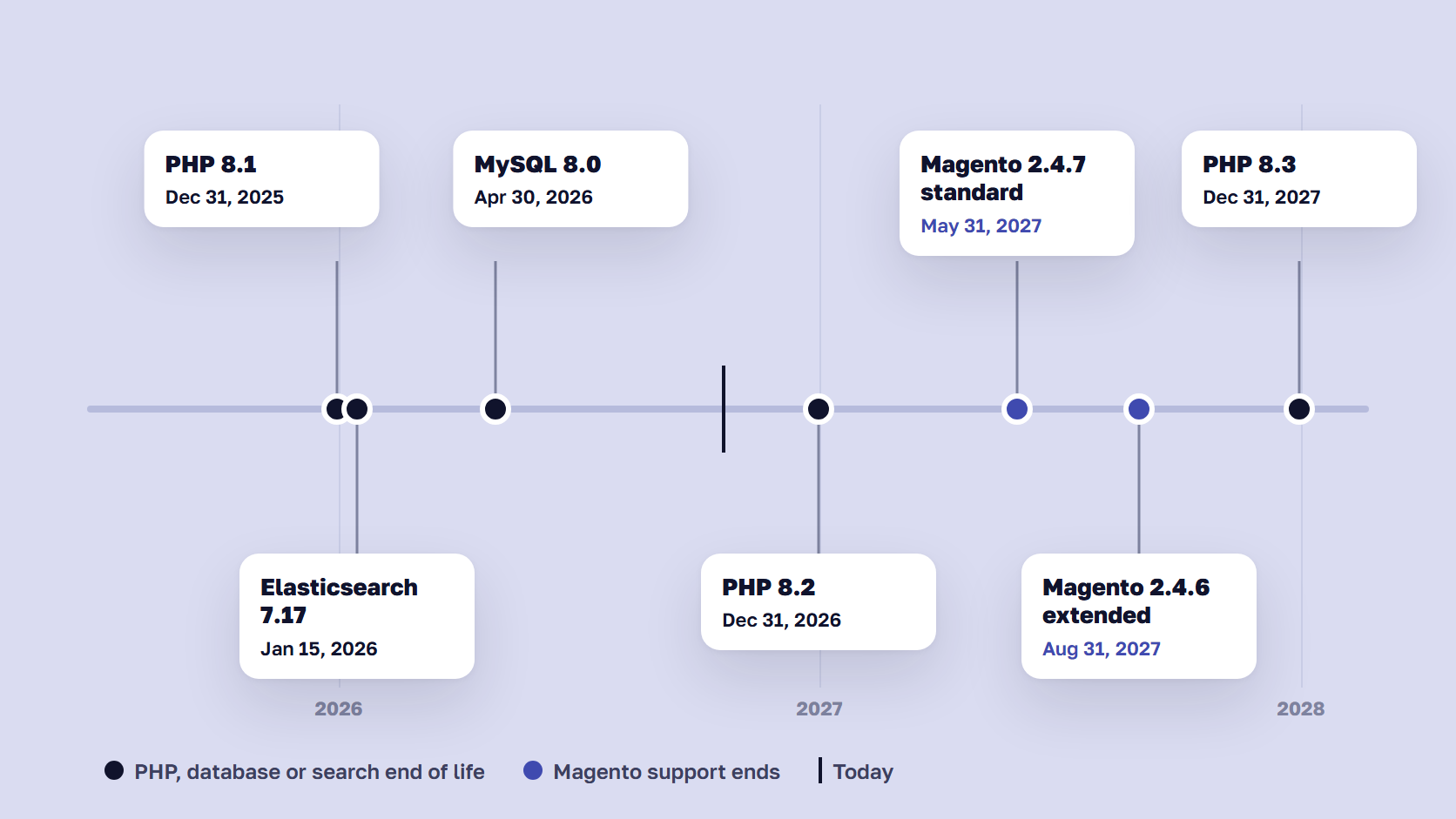
A 2.4.6 store shows the problem. Adobe Commerce extended support runs to August 31, 2027, but the newest PHP that 2.4.6 runs on, 8.2, stops getting security fixes on December 31, 2026. For eight months, the core is patched and the language under it isn’t.
🚀 Quick takeaway
Plan the upgrade around the PHP date, because it arrives first. For 2.4.6 stores, and 2.4.7 stores still on PHP 8.2, that date is December 31, 2026.
The risks of running an unsupported Magento version
An unsupported Magento version stops getting security fixes, so every new vulnerability stays open on your store. The day-to-day costs come from the people who check your store: PCI scans and assessors, extension vendors, your hosting provider, and your cyber insurer. Each of them asks about the version sooner or later.
PCI scans and compliance
Card payments bring PCI DSS obligations, and Adobe’s lifecycle policy states that PCI compliance is the merchant’s responsibility. Requirement 6.3.3 asks for critical security patches within a month, which a store without patches can’t meet. External vulnerability scans commonly flag outdated software versions, and PHP 8.1 has been end of life since the start of 2026. We covered what this did to Magento 1 stores in our guide to Magento 1 PCI compliance, and the same logic applies to any unsupported 2.4 line.
Extension breakage and vendor support
Extension vendors follow Adobe’s support window. When a line loses support, new extension releases stop targeting it, so a payment or shipping module that needs an update for an API change may only come out for 2.4.8 and later. You end up keeping an old version of a module that talks to a live payment provider, or upgrading Magento in a hurry to get the new one.
Hosting and Adobe Commerce Cloud
On Adobe Commerce Cloud, the deadline is enforced. From June 1, 2027 for 2.4.4 and 2.4.5, and June 1, 2028 for 2.4.6 and 2.4.7, Adobe will stop maintaining environments on unsupported versions, and the policy says this can include suspending traffic. Unsupported PHP or database versions can lead to the same result. On your own hosting, the pressure comes from the operating system and PHP packages your provider stops offering.
Cyber insurance questions
Cyber insurance applications now ask whether you run unsupported software, and policies increasingly limit cover for losses through known, unpatched vulnerabilities, as law firm Allens noted in its review of cyber policy wording. Coalition’s claims data, reported in 2023, found that businesses running end-of-life software were three times more likely to file a cyber claim. If your answer on the application is “no” and the store runs 2.4.4, that answer can become a problem after an incident.
🚀 Quick takeaway
Write down which of these four checks applies to you and when the next one is due. A PCI scan date or insurance renewal is often a firmer deadline than Adobe’s own.
How long a Magento upgrade takes and what it costs
A Magento version upgrade usually takes two to eight weeks and costs $3,000 to $40,000, depending on how far you jump and how much custom code and how many extensions have to be checked. Our Magento upgrade guide breaks the ranges down as follows.
| Upgrade type | Typical cost | Typical duration |
|---|---|---|
| Clean jump between 2.4 releases | $3,000–$8,000 | 2–4 weeks |
| Bigger jump with an extension audit | $15,000–$40,000 | 4–8 weeks |
| Magento 1 to Magento 2 or Adobe Commerce | $50,000–$150,000+ | Migration project |
Most of that time goes into extension and theme compatibility and staging tests. The core update is the quick part. A custom theme nobody has touched in 18 months or more typically needs 20 to 40 hours of compatibility work on its own. Our Magento 2 upgrade process breakdown walks through each step and what to test.
Downtime is much shorter than the project. The live store keeps trading while the work happens on staging, and goes into maintenance mode only for the production deployment, which you schedule in a low-traffic window with a tested rollback.
Upgrades are also getting faster. On scandiweb’s public demo store in August 2026, our Ari agent applied and checked a security patch in 9 minutes, upgraded 2.4.6 to 2.4.7 in 38 minutes, and moved a heavily customized 2.4.4 store to 2.4.9 in 2 hours 10 minutes. A real store with abandoned extensions takes longer, since extensions are where the hours go.
The cost of waiting
Waiting doesn’t make the upgrade cheaper. Every release you skip adds deprecated code to fix and requirements to meet in one go, so a 2.4.4 store moving to 2.4.9 also has to change PHP, the database, search, and cache in the same project. Meanwhile you pay for emergency work that a supported store doesn’t need. During StyleSmuggler, stores on supported versions applied Adobe’s hotfix, and stores outside the list needed custom fixes.
When the upgrade quote makes you consider leaving Magento
The upgrade quote is the moment most merchants ask whether to move to Shopify instead. That is a fair question if the platform itself is the problem: the cost of every change, a small catalog that doesn’t need Magento’s flexibility, or no in-house team. If the problem is the upgrade bill alone, a migration replaces it with a bigger one. Our guide to Magento to Shopify migration compares the two paths over three years.
Adobe’s own recommended route for Adobe Commerce customers is Adobe Commerce as a Cloud Service, where Adobe handles patching and version upgrades. It moves the upgrade work to Adobe, with its own migration project to get there.
🚀 Quick takeaway
Compare the upgrade quote with what each path costs over the next three years. Staying on an unsupported version has a price as well, paid later as an incident or a failed scan.
Which Magento version should you upgrade to?
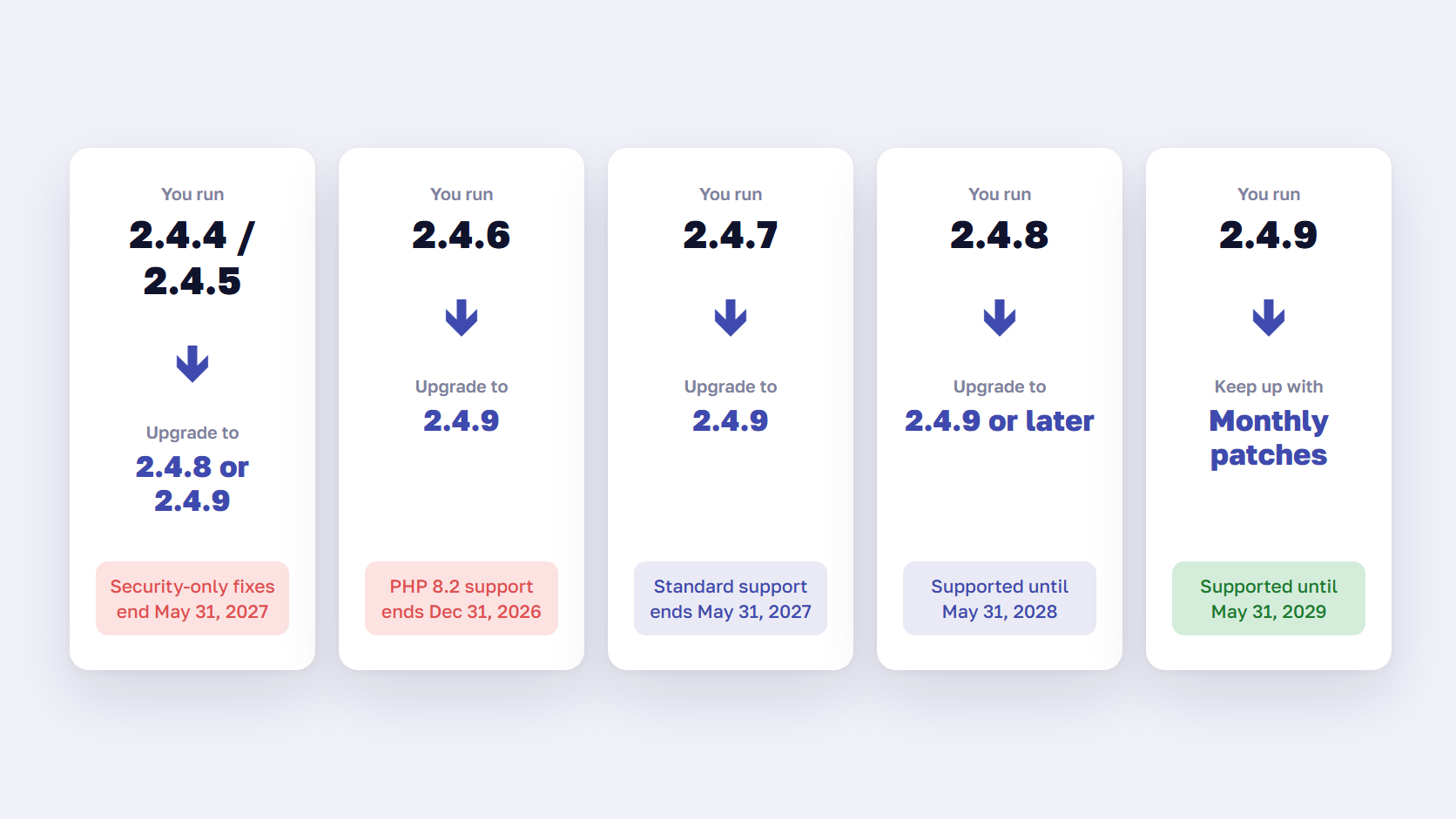
Upgrade to the newest release your extensions and hosting can support, ideally 2.4.9, which Adobe supports until May 31, 2029. If one of your extensions isn’t ready for 2.4.9 and PHP 8.5, 2.4.8 on PHP 8.4 is supported until May 31, 2028. Your current version decides how much time you have.
- On 2.4.4 or 2.4.5, you get security-only fixes until May 31, 2027 and already run on an end-of-life PHP, so start the upgrade now and go straight to 2.4.8 or 2.4.9
- On Adobe Commerce 2.4.6, extended support runs to August 31, 2027, but PHP 8.2 support ends on December 31, 2026, so plan the upgrade for the first half of 2027 at the latest
- On Magento Open Source 2.4.6, treat the store as unsupported and upgrade first
- On 2.4.7, standard support ends on May 31, 2027, and moving to 2.4.9 within the next six months adds two years
- On 2.4.8, you are covered until May 31, 2028, so move PHP to 8.4 and plan the next upgrade for 2027
- On 2.4.9, apply each monthly isolated patch and budget for the next release in 2028 or earlier
If you use Hyvä, the theme license is no longer part of the cost. The Hyvä Theme has been free and open source since November 10, 2025, though its modules still need checking against the target version. Our guide on how to work with Hyvä covers the setup.
Frequently asked questions about Magento end of life
Is Magento end of life?
No. Magento 2, sold as Adobe Commerce and Magento Open Source, is still developed, with 2.4.9 released in May 2026 and 2.4.10 in alpha. What reaches end of life is each release line, three years after its launch. Magento 1 is the version that is fully end of life, because its support ended on June 30, 2020.
When does Magento 2.4.6 reach end of life?
Standard support for Adobe Commerce 2.4.6 ended on August 11, 2026. Adobe Commerce customers get extended support until August 31, 2027, then security-only fixes until May 31, 2028. Magento Open Source 2.4.6 is in a weaker position, because Adobe’s October 2026 security bulletin offered Open Source patch files only for 2.4.7 and later.
Is Hyvä still a paid license?
No, the Hyvä Theme has been free and open source since November 10, 2025, under the OSL 3.0 and AFL 3.0 licenses. Hyvä Checkout, Hyvä Commerce, Hyvä Enterprise, and Hyvä UI are still paid products. For an upgrade budget, that removes the theme license. The theme’s modules still need checking against your target Magento version.
Will my extensions work after upgrading to Magento 2.4.9?
Only the extensions whose vendors have released a version for 2.4.9 and its requirements, including PHP 8.5 and OpenSearch 3. Check each vendor’s compatibility notes, run the Composer update with the target version on staging, and test. Extensions without a release in the past year are the usual blockers, and abandoned ones need a replacement or an in-house fork first.
How do I know if a Magento extension is safe to keep?
Keep an extension if its vendor still releases updates, supports your target Magento and PHP versions, and has a way to report security issues. Check the last release date and the changelog, and whether it overrides core classes. If nobody maintains it, replace it, take over its code, or remove it. An unmaintained module stays a risk even on a fully patched core.
Do I need to install every Magento security patch?
Yes, on a supported line. Since 2026, Adobe’s isolated security patches build on each other and have to be applied in release order, on top of the latest -p release for your version. Skip a month and the next patch may not apply. Hotfixes for actively exploited flaws, such as StyleSmuggler in September 2026, should go in within days.
What PHP version does Magento 2.4.8 need?
Magento 2.4.8 supports PHP 8.3 and 8.4, according to Adobe’s system requirements. PHP 8.3 gets security fixes until December 31, 2027, and PHP 8.4 until December 31, 2028, so 8.4 is the better choice for a 2.4.8 server. Older lines need older PHP: 2.4.7 runs on 8.2 or 8.3, and 2.4.6 on 8.1 or 8.2.
Can I stay on an unsupported Magento version if I patch it myself?
You can for a while, but you take over Adobe’s job. Someone has to track every new vulnerability, backport the fixes, and keep PHP and the database on supported versions that old Magento lines may not run on. During StyleSmuggler, we rebuilt Adobe’s fix for 41 unsupported versions. That bought those stores time, and they still need an upgrade.
Plan your Magento upgrade before the end of life date
Magento end of life arrives per release, and the PHP and database dates under your store usually come first. Find your version in the tables above, note the earliest deadline that applies, and work back from it: two to eight weeks of project time, a staging round for extensions, and a monthly slot for security patches once you’re on a supported line. Then compare that cost with the upgrade quote, and with the cost of a migration if you’re weighing one.
Not sure how much time your version has left, or what the upgrade should cost? Send us your version and extension list, and we'll tell you where you stand.




































