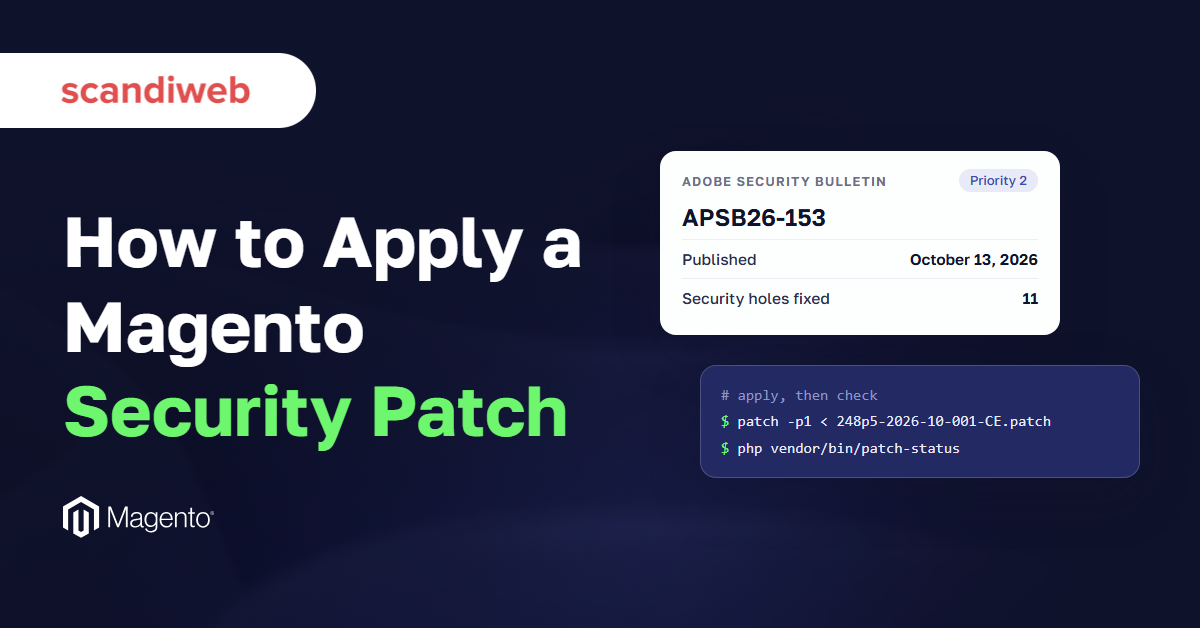
On October 13, 2026, Adobe published security bulletin APSB26-153 for Magento (Adobe Commerce), with fixes for 11 security holes, and the worst of them scored 10.0 out of 10 for severity. A security bulletin is Adobe’s public notice of what it fixed and which versions get the fix, and each fix reaches your store as a patch: a small file of code changes that closes the hole without a full version upgrade. Adobe’s notes for the October patch also warn that it leaves out September’s emergency fix for a flaw attackers were already using. So which Magento security patch does your store need, and is it already installed?
Every command below comes from Adobe’s own documentation, checked on November 2, 2026, and the Adobe Commerce Cloud differences are marked where they apply.
What is a Magento security patch?
A Magento security patch is a code change from Adobe that closes known security holes in Magento Open Source or Adobe Commerce without adding features. Most arrive in two forms: a security patch release such as 2.4.8-p5, and smaller monthly isolated patch files in between. A flaw that attackers already use gets an emergency hotfix.
Adobe uses the word patch for four different things, and the table shows how each one arrives and how you apply it.
| Patch type | What it contains | How Adobe delivers it | How you apply it | Can you skip it? |
|---|---|---|---|---|
| Security patch release (for example 2.4.8-p5) | Security fixes plus the fixes of the patch release before it | Composer package, named 2.4.x-pN | composer require-commerce, then composer update and setup:upgrade | No. Monthly files only apply on the latest one |
| Monthly isolated patch file | Security fixes only, for one month, not cumulative | ZIP of .patch files linked from the bulletin’s knowledge base article | patch -p1 from the Magento root, in release order (Cloud: Cloud Patches for Commerce) | No. Each month builds on the last |
| Hotfix | An urgent fix, for example for a flaw already being exploited | Patch file with its own bulletin, or through the Quality Patches Tool | Same patch -p1 command, or m2-hotfixes on Cloud | No. Apply it as soon as it passes testing |
| Quality patch (Adobe calls it an individual patch) | A low-impact fix for one specific bug | Quality Patches Tool | ./vendor/bin/magento-patches apply <ID> | Yes, unless you have that bug |
The security patch release is the base, and it installs through Composer, the tool that manages Magento’s code packages. Adobe’s release policy requires the latest -p release for your line before any monthly isolated file goes on.
Every monthly file is then folded into the next security patch release, so a store that moves to the next -p release picks up the months it missed. Each fix carries a CVE, the public ID number a security hole gets, and each bulletin lists the CVEs it closes along with the fixed versions, whether it announces a Magento patch release or a hotfix.
🚀 Quick takeaway
Isolated patch files only apply on top of the latest -p release for your version line. A store on 2.4.8-p3 has to move to 2.4.8-p5 before it can apply October’s 2.4.8 file.
Which Magento security patches does your store need?
Your store needs the latest security patch release for its version line, then every monthly isolated patch Adobe has published since, in release order, plus any hotfix announced on top. Which files exist depends on your version and edition: in October 2026, Adobe’s isolated patch files for Magento Open Source started at 2.4.7.
Adobe’s most recent files, from bulletin APSB26-153 in October 2026, show the pattern for each line.
| Your version | Install first (latest -p) | Then every monthly file, for example October’s | Who gets it |
|---|---|---|---|
| 2.4.9 | 2.4.9 (no -p release yet) | 2-4-9-oct-2026.zip | Adobe Commerce and Magento Open Source |
| 2.4.8 | 2.4.8-p5 | 2-4-8-p5-oct-2026.zip (revised October 16) | Adobe Commerce and Magento Open Source |
| 2.4.7 | 2.4.7-p10 | 2-4-7-p10-oct-2026.zip | Adobe Commerce and Magento Open Source |
| 2.4.6 | 2.4.6-p15 | 2-4-6-p15-oct-2026.zip | Adobe Commerce only. Open Source 2.4.6 is listed as affected, with no fix |
| 2.4.5 | 2.4.5-p17 | 2-4-5-p17-oct-2026.zip | Adobe Commerce only, security-only fixes until May 31, 2027 |
| 2.4.4 | 2.4.4-p18 | 2-4-4-p18-oct-2026.zip | Adobe Commerce only, security-only fixes until May 31, 2027 |
| 2.4.3 or older | None | None in Adobe’s 2026 bulletins | Plan an upgrade (see the section on versions that no longer get patches) |
Whatever your line, check for a hotfix announced since your last patch: it is not part of the monthly file.
Find your Magento version and edition
The version shows in the bottom-right corner of any Admin page. If it is hidden, run bin/magento --version.
Note the edition as well, because Magento Open Source and Adobe Commerce get different files. If you run 2.4.8 or older and the version has no -p suffix, you are behind the latest Magento 2 security patch release, since every line from 2.4.4 to 2.4.8 has one.
Read the bulletin’s affected and fixed versions
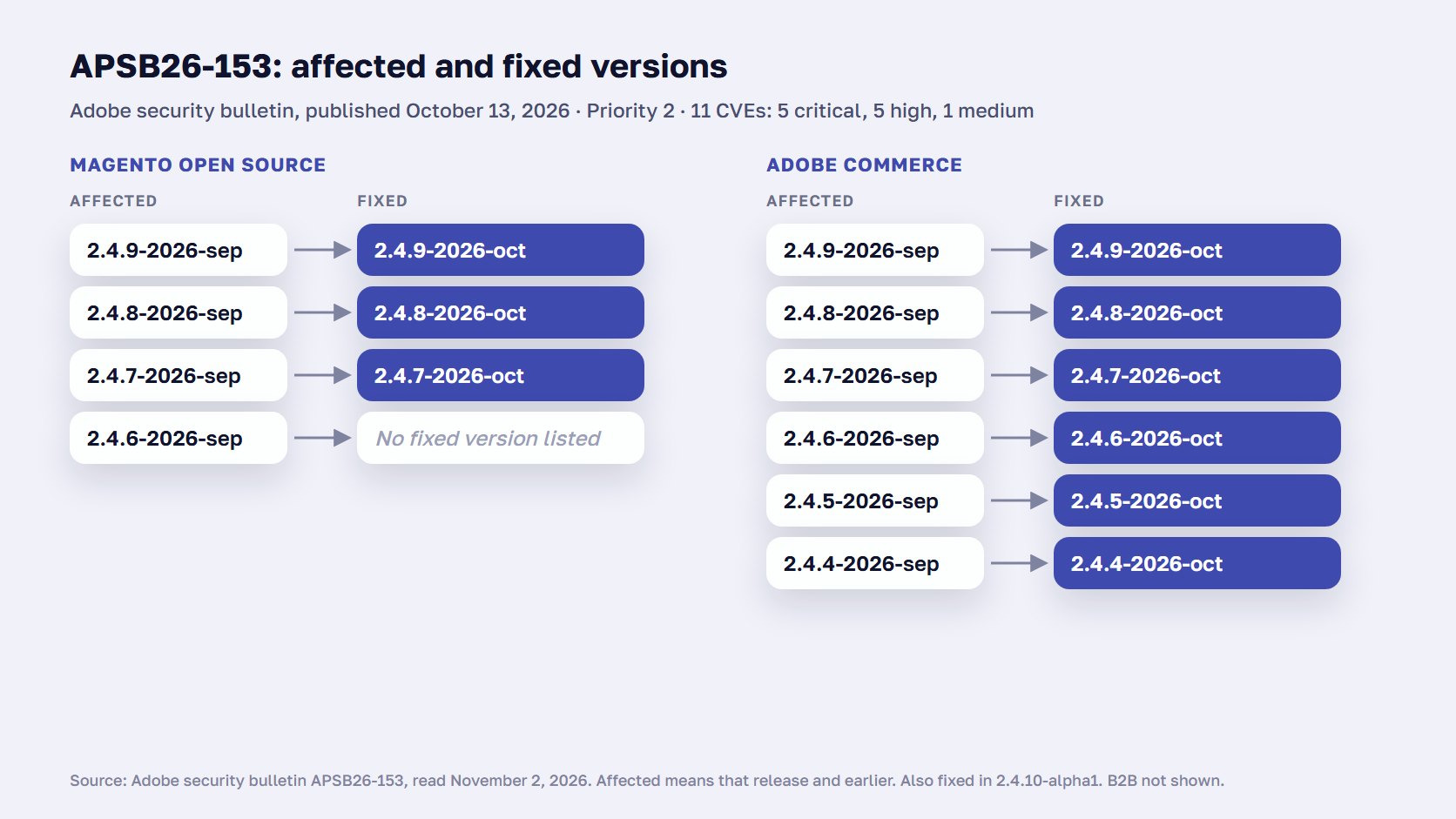
Each Adobe Commerce security bulletin has two tables. The first lists the affected versions, the second lists the fixed ones. A label such as 2.4.8-2026-sep means a 2.4.8 store patched through September, and 2.4.8-2026-oct means the same store with October’s file applied.
The October bulletin lists Magento Open Source 2.4.6 as affected, and its fixed versions for Open Source start at 2.4.7, which is why the edition matters. New bulletins are published in the Adobe Trust Center, so bookmark that page rather than Adobe’s older HelpX page.
🚀 Quick takeaway
Adobe’s October 2026 bulletin lists Magento Open Source 2.4.6 as affected, but its fixed versions for Open Source start at 2.4.7. On Open Source 2.4.6, the fix is an upgrade.
How to check which Magento security patches are installed
To check which Magento security patches are installed, run Adobe’s Commerce Version Tool from the project root with php vendor/bin/patch-status. It lists applied and missing patches and marks each CVE as PROTECTED, VULNERABLE or UNKNOWN. The tool came with the July 2026 isolated patch, so if the command is missing, apply that file first.
Missing one patch is a common gap: in a scandiweb check of 13,000 Magento 1 stores, published in 2019, 14.82% were open to major breaches, mostly because a single patch was missing.
php vendor/bin/patch-status --version
php vendor/bin/patch-status
Read two lists in the output. applied_patches should hold every monthly file since your -p release, and missing_patches should be empty, with each CVE marked PROTECTED. The output is machine-readable, so you can run it automatically as part of continuous integration (CI) and report on it.
On Adobe Commerce Cloud, check both the patch files and the Cloud Patches package, Adobe’s bundle of required fixes that Cloud applies at deployment.
vendor/bin/magento-patches -n status | grep "248p5-2026-10-001-CE\|Status"
php ./vendor/bin/ece-patches status
The first command shows whether one monthly file is applied, and the second is Adobe’s status check for Cloud Patches for Commerce.
How to apply a Magento security patch, step by step
To apply a Magento security patch, back up the store and work on a staging copy first. Move to the latest -p release for your version, then apply each isolated patch file from the Magento root with patch -p1, oldest month first and CE before EE. Refresh the cache, confirm the result with patch-status, test the store, and release.
- Back up the store and copy it to staging. Adobe strongly recommends applying and testing every patch on a staging or integration environment first, and keeping a recent backup.
- Move to the latest -p release for your line. The commands below are for Magento Open Source. On Adobe Commerce, replace
magento/product-community-editionwithmagento/product-enterprise-edition. The full routine, with maintenance mode and compilation, is in our guide on how to upgrade Magento.
composer require-commerce magento/product-community-edition 2.4.8-p5 --no-update
composer update
bin/magento setup:upgrade- Download the month’s patch files. Open the bulletin’s knowledge base article, which for October is Adobe’s October 2026 patch article, download the ZIP for your line, and unzip it. Adobe Commerce 2.4.6 or earlier asks for your Composer keys before the download.
- Apply each file from the Magento root. Apply any missed month first, then CE before EE, then B2B if you run it. CE is the Open Source code and EE the Adobe Commerce code, and Adobe’s order within a month is the CE file, then the EE file. Adobe’s isolated patch guide describes this as how to install a Magento patch file on-premises and on Magento Open Source.
patch -p1 < 248p5-2026-10-001-CE.patchIf that fails, try -p2 instead.
patch -p2 < 248p5-2026-10-001-CE.patch- Refresh the cache. In the Admin, open System > Cache Management and refresh it there.
- Check the result. Run
php vendor/bin/patch-statusagain. The month’s patches should appear underapplied_patches, with nothing inmissing_patches.
- Test on staging, then release. Run your usual checkout and admin checks. Then apply the same files in production through your normal deployment. Adobe’s guide says you can apply a patch locally with the same command, then commit and push it as usual.
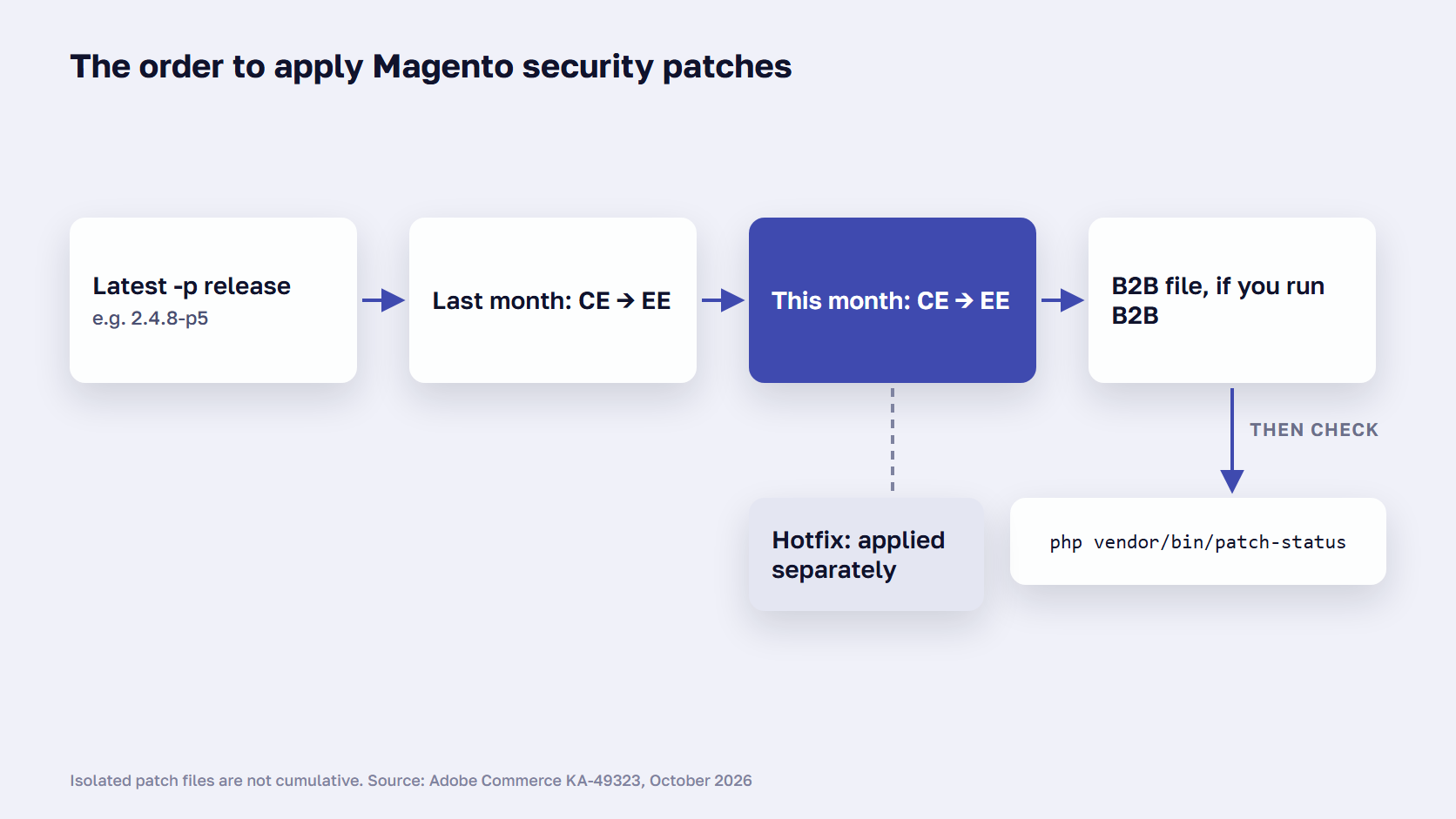
On a store that skipped several months, repeat step 4 for each month, oldest first: each file assumes the earlier ones are in place, and patch-status lists a skipped month as missing.
How to apply an emergency hotfix
A hotfix arrives on its own, with its own bulletin, as a Composer patch file. Adobe’s October article says September’s hotfix for CVE-2026-75650 is not included in the October isolated file and must be applied separately. Upload it to the Magento root and run the same patch command, then refresh the cache.
patch -p1 < %patch_name%.composer.patchOn Cloud, copy the file to the m2-hotfixes folder in your project, commit, and push. Apply a hotfix as soon as it passes staging. September’s hotfix also meant rotating every exposed credential, which our StyleSmuggler patch guide covers step by step.
How to undo a patch
Quality patches have a revert command. Run ./vendor/bin/magento-patches revert <PATCH-ID> for one patch or ./vendor/bin/magento-patches revert --all for all of them, then ./bin/magento cache:clean. On Cloud, delete a custom patch file from m2-hotfixes and push.
Isolated monthly files have no documented revert command. When Adobe revised October’s 2.4.8-p5 file, it told merchants to reverse the original by using their established patch-management process. So commit each patch file on its own, and roll back that commit if testing fails.
🚀 Quick takeaway
Applied October’s 2.4.8-p5 file before October 16? Adobe revised it under the same filename. Download it again, reverse the old file, apply the new one, and check that patch-status lists 248p5-2026-10-002-CE as applied.
Magento patch tools: Quality Patches Tool or Composer patches?
Use the Quality Patches Tool for Adobe’s official patches and Composer patches for your own fixes. Adobe’s documentation says it does not support applying official, Adobe-provided patches with the cweagans/composer-patches plugin. Monthly isolated security patches are a separate case: they come as patch files, applied with the patch command or, on Cloud, through Cloud Patches for Commerce.
| Method | Use it for | Install | Status, apply and revert |
|---|---|---|---|
| Quality Patches Tool | Adobe’s official quality patches and hotfixes | composer require magento/quality-patches | magento-patches status, apply <ID>, revert <ID> |
| Composer patches (cweagans/composer-patches) | Your own fixes. Adobe does not support it for official patches | composer require cweagans/composer-patches | Listed in composer.json, applied on composer install |
| Patch command | Monthly isolated security files and Composer-format hotfixes | Nothing extra beyond the patch utility | patch -p1 < file.patch. No documented revert for isolated files |
The Quality Patches Tool needs Git or the patch utility installed and writes a log to var/log/patch.log. Adobe’s documentation for the tool warns that applying many patches makes the next upgrade harder, so apply a quality patch only for a bug your store has.
The command-line method in Adobe’s patch guide is the one for the monthly files. For what a Composer patch looks like and how to write your own, see how Composer patches work.
🚀 Quick takeaway
Adobe does not support applying its official patches with cweagans/composer-patches. Keep that plugin for fixes your own team writes, and use the Quality Patches Tool for Adobe’s.
How patching works on Adobe Commerce Cloud
On Adobe Commerce Cloud, the Cloud Patches for Commerce package applies required security fixes during your next deployment, through ECE-Tools. Check your installed Cloud Patches version before adding a monthly isolated file, because applying a fix that is already in place can make the install fail. Your own patch files go in the m2-hotfixes folder.
During a deployment, ECE-Tools, the deployment toolset for Adobe Commerce Cloud, applies patches in a fixed order, with the required patches from Cloud Patches for Commerce first, then the optional quality patches you selected, then your own files in m2-hotfixes in alphabetical order. You select quality patches in .magento.env.yaml, the Cloud project’s configuration file, using the IDs that magento-patches status shows for your store, in place of Adobe’s example IDs below.
stage:
  build:
    QUALITY_PATCHES:
      - MCTEST-1002
      - MCTEST-1003
Your own patch files, and any Adobe Commerce security patch you apply by hand, go into m2-hotfixes. Copy the .patch file into the folder, then commit and push, and check the result with ece-patches status.
mkdir m2-hotfixes
git add m2-hotfixes/
git commit -m "Apply 248p5-2026-10-001-CE.patch patch"
git push origin <branch-name>
php ./vendor/bin/ece-patches status
Adobe’s Cloud patching guide covers the packages and the order.
What to do when your Magento version no longer gets patches
When Adobe stops publishing patches for your version, plan the upgrade to a supported line. Adobe Commerce 2.4.4 and 2.4.5 get isolated security fixes only until May 31, 2027, and Adobe’s October 2026 files for Magento Open Source covered 2.4.7 and later. Until the upgrade is live, backported fixes and close monitoring lower the risk.
Under Adobe’s lifecycle policy, the security-only period for 2.4.4 and 2.4.5 brings isolated security fixes and no quality fixes, and 2.4.7 has standard support until the same May 31, 2027 date. Adobe Commerce 2.4.6 has extended support until August 31, 2027, and security-only fixes until May 31, 2028. Every line’s dates are in our list of Magento end of life dates.
If the upgrade is the real fix, scandiweb’s Magento upgrade services can plan it from your current version. For one critical flaw on an old release, a backport can buy time: our StyleSmuggler fix for older Magento versions covers 41 releases from 2.2.0 to 2.4.3-p3. Keep the Security Scan Tool running in the meantime.
🚀 Quick takeaway
On Adobe Commerce Cloud, stores on 2.4.4 or 2.4.5 must upgrade or migrate by June 1, 2027. Adobe’s enforcement policy says non-compliant environments can have Admin access or storefront traffic suspended.
How to keep up with Adobe’s monthly patches
Adobe publishes isolated security patches every month on Patch Tuesday, the second Tuesday of the month, and may release extra patches between them. Subscribe to Adobe’s free security notifications and keep a fixed monthly slot for testing and applying the new files. Agree in advance who applies an emergency hotfix, because those can’t wait for the slot.
Two Adobe pages carry the schedule. Adobe’s monthly patching policy sets out the Patch Tuesday cadence and the order rules, and Adobe’s security notification service emails you each new bulletin for free. Since bulletins moved to the Trust Center in September 2026, the email is the easiest way to hear about a hotfix, because a hotfix comes with its own bulletin on its own day.
Magento patches close the holes in the core. Magento 2 security also depends on the extensions and custom code around it, and Adobe’s enforcement policy puts auditing third-party extensions and securing custom code on the merchant, alongside applying the patches.
Put Patch Tuesday in the calendar
Patch Tuesday is the second Tuesday of the month, and the next one is November 10, 2026. Book a staging slot for the days after it, with the person who applies the files and the person who tests checkout.
Read your extension vendors’ changelogs in the same slot. In November it comes right before the Black Friday code freeze, so book it early.
Decide who applies the patches
A developer on your team can do it with server access and a staging copy. The job is the seven steps above once a month, plus a hotfix now and then.
A support partner applies them on a schedule and runs the same staging test, which suits a store with no developer of its own.
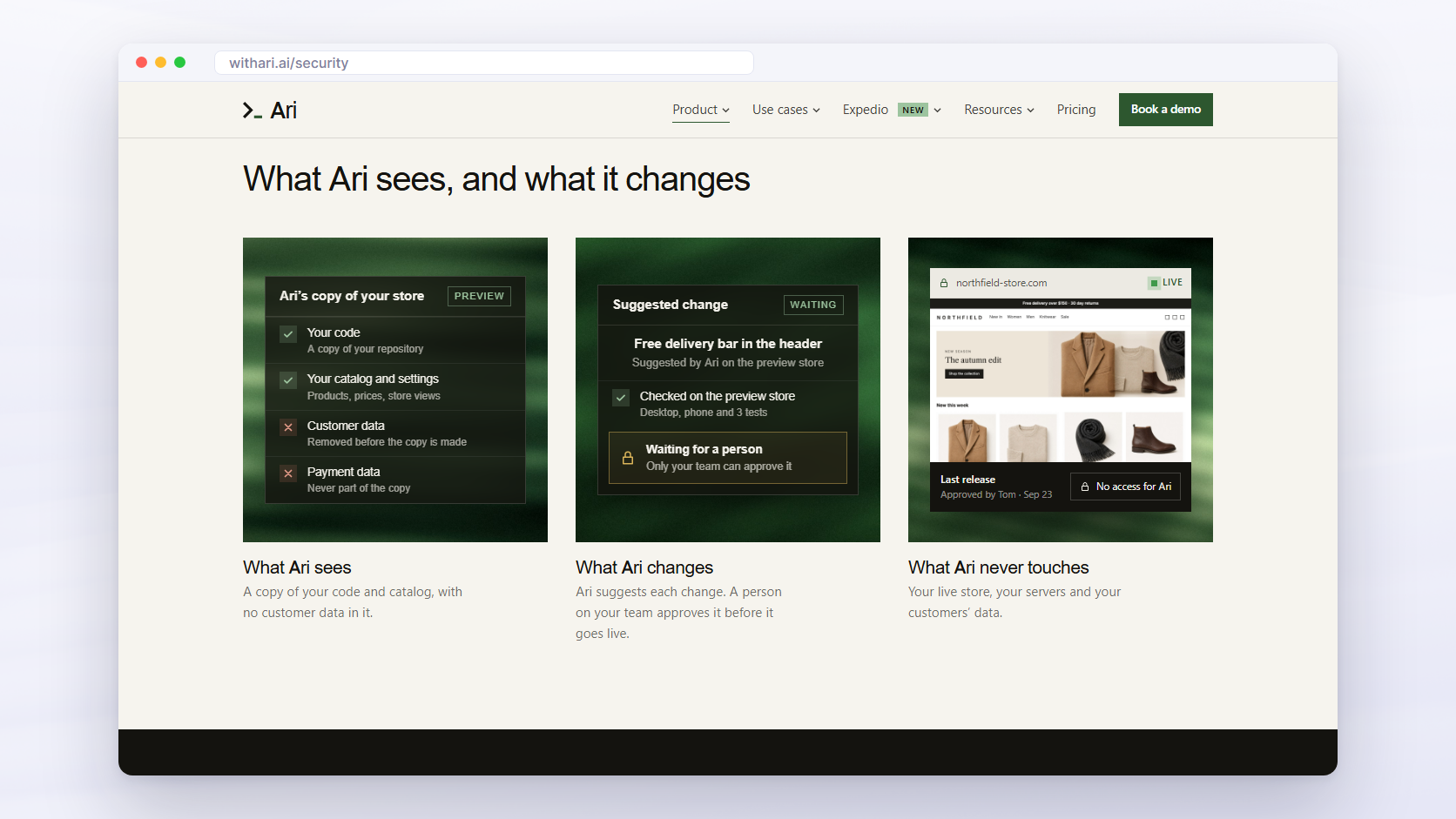
A third option is Ari, the AI agent for Magento built by scandiweb. Your team asks for the month’s patch in chat. Ari applies and checks it on a copy of the store with customer data removed, the team reviews the result on a preview store, and a person approves it and releases it as a pull request. Ari has no access to the live store, its servers, or the live database. See how Ari can apply Magento security patches for your store.
Frequently asked questions about Magento security patches
Are Magento security patches cumulative?
Security patch releases are cumulative: each -p release includes the security and quality fixes of the patch release before it. Monthly isolated patch files are not. Adobe calls them non-cumulative, standalone files, so you apply every month’s file in release order on top of the latest -p release for your version line.
Can I skip a month of Magento security patches?
No. Adobe builds each monthly isolated patch on top of the previous month’s, so a store that missed September has to apply September’s files before October’s. Within a month, apply the CE file first, then EE, then the matching B2B file if you run B2B. Run php vendor/bin/patch-status afterward to check that nothing is missing.
Do I still need a hotfix if I install the monthly patch?
Yes. Adobe’s October 2026 knowledge base article says the hotfix for CVE-2026-75650 from bulletin APSB26-146 is not included in the October isolated patch file and must be applied separately. Adobe also reported that this flaw was exploited in the wild, and its notice asks merchants to rotate the encryption key and every exposed credential.
Can I apply Magento security patches with Composer?
Partly. Security patch releases such as 2.4.8-p5 install with Composer, using composer require-commerce and composer update. Monthly isolated patch files are not Composer packages, so you apply them with the patch command. Adobe also says it does not support applying its official patches through the cweagans/composer-patches plugin, which is meant for your own fixes.
Does Magento Open Source get security patches?
Yes, for supported versions. Adobe’s monthly isolated patches cover Magento Open Source as well as Adobe Commerce, but the October 2026 files for Open Source were available only for 2.4.7 and later. Bulletin APSB26-153 lists Open Source 2.4.6 as affected without a fixed version, so 2.4.6 stores need an upgrade plan.
Is the Magento Security Scan Tool free?
Yes. Adobe’s Security Scan Tool is free from the dashboard of your Commerce or Magento account, for both Adobe Commerce and Magento Open Source. It runs more than 21,000 security tests, watches for security risks and malware, and can run weekly, daily or on demand. A Magento security scan checks the live site from the outside, so pair it with patch-status, which reads the code. See Adobe’s Security Scan Tool guide.
Keep every Magento security patch on schedule
A Magento security patch is only done when the files for every month since your last -p release are applied in order and patch-status shows no missing patches. Check your version and edition today, read the latest bulletin, test the files on a staging copy, and book the next Patch Tuesday in the team calendar.
Whoever applies them, the staging test before release is the step that protects checkout. If nobody on your team owns the monthly patch slot, scandiweb’s Magento support and maintenance plans apply Adobe security patches on schedule, tested before release.
If you want a second pair of eyes on your patch status, talk to our Magento support team.