
A new theme is the usual fix when a Magento (Adobe Commerce) store starts to look dated or feel slow, which is why teams go looking for the best Magento themes before a redesign. For the look, a theme delivers: it is the layer that decides how every page appears and how much code the shopper’s browser has to load, so one project can change the whole storefront.
Speed and running costs are where the choice gets harder. A theme only changes what happens in the browser, after the server has built the page, and it decides which of your extensions keep working without extra development. Prices and versions below were read on each vendor’s own page on November 3, 2026.
What a Magento theme controls, and what it doesn’t
A Magento theme is the set of layouts, templates, styles and scripts that decide how every storefront page looks and what the shopper’s browser loads. Magento comes with two themes, Blank and Luma, and a custom theme inherits from one of them and overrides only the files it changes. Before the theme does anything, though, the server has to build the page, and a theme does not change that step.
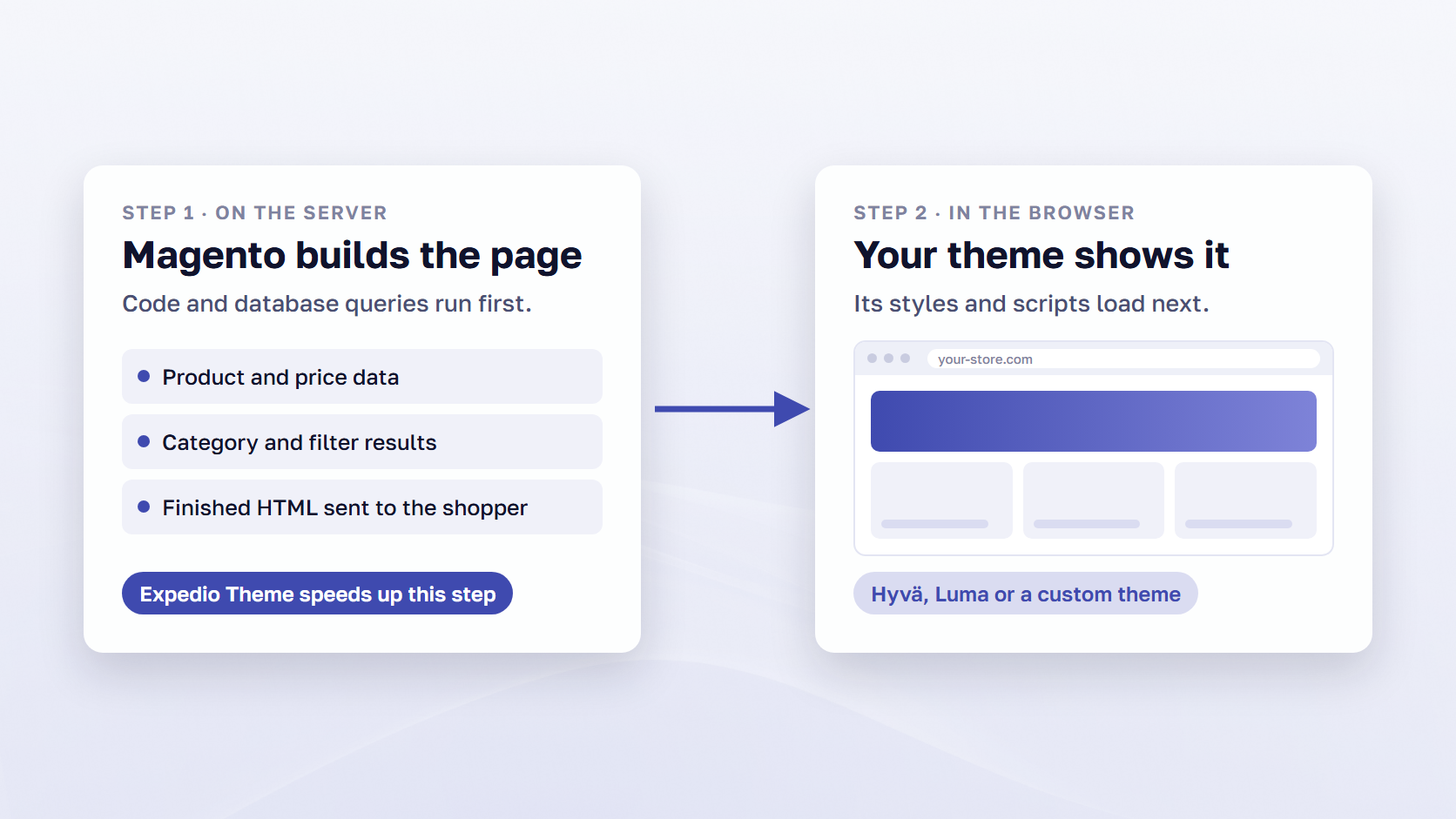
Every page load has two steps. First, Magento’s server builds the whole page by running code and database queries. The time this takes is called time to first byte: how long the server takes to start sending the page. Second, the browser downloads the HTML and the theme’s CSS and JavaScript, and draws the page the shopper can scroll and tap.
A theme changes the second step: a lighter theme means less code to download and run, so the page appears and responds sooner once it arrives. The first step stays as it was, which is why a store can move to a fast theme and still wait at the start of every page view. Our post on why Magento is slow covers both steps.
🚀 Quick takeaway
Keep the Blank and Luma files untouched and put every change in a child theme. Adobe warns that upgrades can overwrite edits made directly in the default theme files.
The best Magento themes at a glance
For most stores in 2026, Hyvä is the theme to build on, and Expedio Theme speeds up page building under whichever theme you run. Luma and Magento Blank come with Magento, Breeze Evolution and Satoshi for Hyvä are free options on different stacks, and Porto and Argento are paid ready-made designs. The table compares all 10 by what each changes, price and fit.
| # | Theme | What it changes | Price (read Nov 3, 2026) | Works with | Best for |
|---|---|---|---|---|---|
| 1 | Hyvä Theme | Replaces the frontend with a lighter one on Tailwind CSS and Alpine.js | Free core. Hyvä UI €250, Checkout €1,000, Commerce €3,000/yr, Enterprise €7,500 first year | Magento Open Source 2.4.4-p9 and up. Adobe Commerce via Hyvä Enterprise | New builds and redesigns where browser speed matters most |
| 2 | Expedio Theme | Speeds up how Magento builds each page on the server | Open-source core | Luma, Hyvä and custom themes. Open Source, Adobe Commerce, Commerce Cloud | Faster pages on the theme you already have |
| 3 | Satoshi for Hyvä | Finished, app-like design on top of Hyvä | Open source (OSL-3.0) | Hyvä Theme 1.3 and up, with the free license key | Hyvä stores that want a finished design |
| 4 | Luma | Magento’s default demonstration frontend | Included with Magento | Open Source and Adobe Commerce 2.4.x (PaaS and on-premises) | Existing stores with no rebuild planned |
| 5 | Breeze Evolution | Standalone, lighter Luma-style frontend | Free (MIT). Breeze Enterprise via a $207/quarter or $588/yr subscription | Open Source 2.4.4–2.4.9, Adobe Commerce 2.4.5–2.4.9 | A faster frontend on a zero license budget |
| 6 | Porto | Ready-made design with many layouts on the Luma stack | $129 regular license | Magento 2.3.x and 2.4.x | The best-selling ready-made paid design |
| 7 | Argento | Modular ready-made design plus 24 Swissup extensions | $90 one-time plus $25/month, or a Swissup subscription | Luma, Breeze and Hyvä packages, 2.4.4–2.4.9 | A design and extension bundle from one vendor |
| 8 | Magento Blank | Bare base for a custom theme | Included with Magento | Open Source and Adobe Commerce 2.4.x | A fully custom design |
| 9 | Adobe Commerce Storefront | Adobe’s Edge Delivery storefront with drop-in components | Not published | Adobe Commerce as a Cloud Service, Adobe Commerce Optimizer, PaaS with an Optimizer license | New storefronts on Adobe’s cloud service |
| 10 | PWA Studio and Venia | React PWA storefront with a reference store | Open source (OSL-3.0) | Open Source and Adobe Commerce backends, 14.5.2 pairs with 2.4.10 | Teams already running PWA Studio |
Prices for these Magento 2 themes were read from each vendor’s page on November 3, 2026, in the currency the vendor shows.
How we compared the themes
We judged each pick on four things. The speed shoppers feel: whether it cuts the code the browser loads or the time the server takes to build the page. The cost to run: license, paid add-ons and upkeep. Extension compatibility: whether a store’s existing extensions keep working, or each one with frontend code needs a compatible version. Updates and support: whether the vendor is releasing, which Magento versions it lists, and what support comes with the price.
Vendors change prices without notice, so confirm the figure on the linked page before you sign.
The 10 best Magento themes in 2026
The ranking puts first the picks that change the most for shoppers, then weighs cost and fit. Hyvä leads because it changes what the browser loads on every page, and Expedio Theme follows because it changes how fast the server builds those pages, on any theme. Then come Magento’s defaults, the free options, the paid designs and Adobe’s newer storefronts.
1. Hyvä Theme
Hyvä Theme replaces Magento’s default frontend with a lighter one built on Tailwind CSS and Alpine.js, so the browser downloads and runs less code on every page. Since version 1.4.0 on November 10, 2025, the core theme has been open source under OSL-3.0 and AFL-3.0. The license page gives you up to five free license keys per account, with community support on Slack.
In scandiweb’s September 2026 study of Chrome UX Report data, Magento stores on Hyvä passed all three Core Web Vitals on mobile 66.4% of the time, against 44.6% for Magento overall. Core Web Vitals are Google’s three page-experience measures.
The paid products are optional: Hyvä UI (€250 one-time), Hyvä Checkout (€1,000 one-time) and Hyvä Commerce (€3,000 per year) for Magento Open Source, and Hyvä Enterprise for Adobe Commerce (€7,500 the first year, then €5,000 per year). Hyvä requires Magento 2.4.4-p9, 2.4.5-p8, 2.4.6-p7 or 2.4.7-p1 or higher, and every extension with frontend code needs a Hyvä-compatible version. scandiweb is a Hyvä Platinum Partner, and our Hyvä theme development team wrote a guide on how to work with Hyvä. We also covered what changed when Hyvä went open source.
Best for: new builds and redesigns where speed in the browser matters most.
🚀 Quick takeaway
A theme changes the browser step and leaves the server step alone. In the same September 2026 data, Hyvä stores had a good time-to-first-byte share of 23.2%, almost identical to Magento overall at 23.0%, while their Core Web Vitals pass rate was 66.4% against 44.6%.
2. Expedio Theme
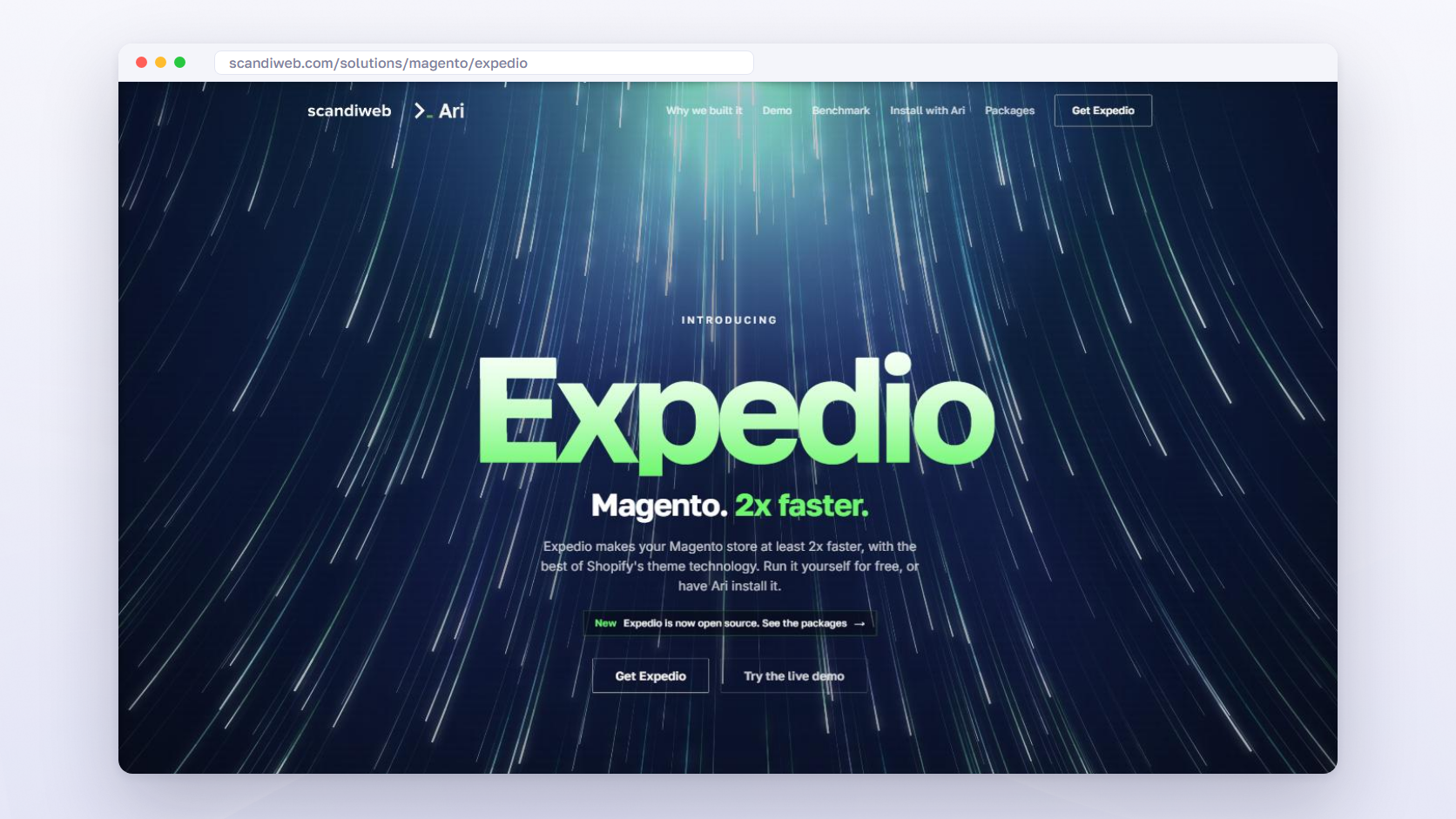
Expedio Theme speeds up how Magento builds every page, so pages arrive in the shopper’s browser sooner. The server step described above, where Magento runs code and database queries before anything is sent, is what Expedio Theme makes faster. It works under your theme, in the server-side work that builds each page. Your Hyvä, Luma or custom storefront, your design, admin, catalog, prices, checkout and orders all stay as they are.
It is built on Liquid, the open-source template language created by Shopify’s co-founder and used in Shopify themes, applied to how Magento builds a page. It runs on Magento Open Source, Adobe Commerce and Adobe Commerce Cloud, on any Magento hosting. Custom themes and the extensions that touch their templates get adapted and tested as part of the setup.
Expedio Theme makes Magento at least 2x faster and lets the same server handle 3x more traffic before response times start to rise. In scandiweb’s benchmark, the median of eight page types was 6.4x faster at peak traffic. Read that figure with its scope: one real merchant’s store on Hyvä was tested, the measure was server response time (time to first byte), not full page load in a browser, and cart and checkout were not part of the comparison.
As the Expedio page puts it, “Hyvä on the frontend with Expedio on the backend is the fastest Magento setup you can run.” Expedio Theme’s core is open source and built by scandiweb.
Best for: any Magento store, on any theme, where pages are slow before the browser starts: slow server responses, slow category and search pages, or traffic peaks.
3. Satoshi for Hyvä
Satoshi for Hyvä is scandiweb’s own design layer for Hyvä stores and the first open-source theme built on top of the Hyvä frontend. It was built by scandiweb’s CTO and licensed under OSL-3.0, which grants a royalty-free license, so there is no theme fee. The current release is v2.0.0 from July 2025, and the product page links to the GitHub repository and a demo store.
It gives you page transitions and animations, product preview peeks with instant add to cart on the product page, and endless pagination with filtering and sorting. It requires the Hyvä Theme (1.3 or newer) with its free license key and no paid Hyvä product. We explain the thinking in our post introducing Satoshi for Hyvä.
Best for: Hyvä stores that want a finished, app-like design instead of styling the default Hyvä theme from scratch.
4. Luma
Luma is the default demonstration theme included with every Magento Open Source and Adobe Commerce 2.4.x install, at no separate price, under OSL-3.0 and AFL-3.0. Adobe’s theme guide states there are no restrictions on using it for a live store, and Adobe continues to support it, so stores on Luma can move to a newer storefront at their own pace.
Luma inherits from Magento Blank, so a child theme overrides only the files it changes. Its stack is LESS with RequireJS, jQuery and Knockout, the stack with the widest extension compatibility here. Scope: Adobe Commerce as a Cloud Service does not support Luma storefronts. On Adobe Commerce running on cloud infrastructure or on-premises (PaaS), Luma Bridge lets Luma pages share cart and sign-in state with an Edge Delivery storefront during a page-by-page migration.
Best for: existing stores on Open Source or Adobe Commerce PaaS and on-premises that need maximum extension compatibility and have no rebuild planned.
5. Breeze Evolution
Breeze Evolution is Swissup Labs’ free, standalone theme on the Breeze frontend, a lighter frontend for Magento 2 that keeps only Knockout and Underscore from the default JavaScript stack. The theme is MIT-licensed, written from scratch in LESS, and splits its CSS into a critical part and a deferred part. The Packagist metapackage is at 3.1.1 from October 8, 2026, and Swissup lists Magento Open Source 2.4.4 through 2.4.9 and Adobe Commerce 2.4.5 through 2.4.9.
Extensions that use JavaScript need an integration, and the Breeze site documents a Better Compatibility mode that reduces the work by loading Luma-based mixins. The paid tier, Breeze Enterprise, comes with a Swissup Labs subscription at $207 per quarter or $588 per year.
Best for: stores that want a faster Luma-style frontend with no license fee and can budget developer time for JavaScript-heavy extensions.
🚀 Quick takeaway
Free covers the license, and the support model differs by pick. Hyvä’s free theme includes community support on Slack, and direct support from the Hyvä team comes only with its paid products, while Luma and Blank come with Magento itself.
6. Porto
Porto is the best-selling Magento theme on ThemeForest, with 27,877 sales on its item page as of November 3, 2026. A regular license costs $129 one-off and includes future updates and six months of support from p-themes, with an extension to 12 months offered at $42.75 at the time of reading.
Version 5.2.0 was released on August 24, 2026, with fixes for Magento 2.4.8 and 2.4.9 in the changelog. The listing covers Magento 2.3.x and 2.4.x and tags Magento Enterprise as compatible. Porto runs on the standard Luma stack, with no Hyvä edition on the listing or the vendor’s site. Headline features are a mega menu, 300+ admin features and a fluid product grid of 2 to 8 columns.
Best for: stores that want the most-sold ready-made design with many prebuilt layouts on the standard Luma stack, at a one-off $129.
7. Argento
Argento is Swissup Labs’ modular theme, sold as separate packages for the Luma, Breeze and Hyvä frontends, with one license covering all three. On argentotheme.com, the offer is a $90 one-time lifetime license plus $25 per month for support and updates, first month included, valid for up to five Magento installations.
It bundles 24 Swissup extensions, including Ajax Pro, Ajax Search, NavigationPro and Pagespeed. Current versions are Argento Breeze 3.2.1 (October 8, 2026) and Argento for Hyvä 1.3.9 (August 28, 2026), listed for Magento Open Source and Adobe Commerce 2.4.4 through 2.4.9 and Hyvä 1.4 and newer. Swissup’s own store sells Argento within its quarterly ($207) or yearly ($588) subscription instead, covering all Swissup modules on 10 installations.
Best for: budget-conscious stores that want a ready design plus a bundle of extensions from one vendor, with the option to move from Luma to Breeze or Hyvä later.
8. Magento Blank
Magento Blank comes with every Magento Open Source and Adobe Commerce 2.4.x install, at no separate price, and Adobe describes it as a basis for custom theme creation. Luma inherits from it. Blank is the right starting point when the design will be fully custom: a child theme inherits everything from Blank and overrides only the files it changes, so the team decides what goes into every template and style the shopper receives.
Adobe recommends never editing the Blank or Luma files directly, since upgrades can overwrite those changes, so everything custom goes in the child theme. That makes Blank a project for an in-house frontend team or an agency with a custom Magento design practice.
Best for: stores that want a fully custom design built in-house or by an agency, on Magento’s standard frontend stack.
9. Adobe Commerce Storefront
Adobe Commerce Storefront powered by Edge Delivery Services is Adobe’s newer storefront: starter code, drop-in components for product details, cart, checkout, account and B2B flows installed from npm, and document-based authoring in Microsoft Word or Google Docs plus visual editing with Storefront Builder. Adobe recommends it as the starting point on Adobe Commerce as a Cloud Service, and its storefront overview says Adobe continues to support Luma for stores that stay on it.
Scope by edition: the drop-in components are licensed with Adobe Commerce as a Cloud Service and Adobe Commerce Optimizer. Adobe Commerce on cloud infrastructure or on-premises (PaaS) gets them by adding an Adobe Commerce Optimizer license and the Storefront Compatibility Package. Magento Open Source is not supported. Pricing is not published, so ask your Adobe account representative.
Best for: Adobe Commerce as a Cloud Service merchants, or Adobe Commerce PaaS merchants licensing Adobe Commerce Optimizer, who want Adobe’s recommended storefront.
10. PWA Studio and Venia
PWA Studio is Adobe’s open-source toolkit for building a React progressive web app storefront on an Adobe Commerce or Magento Open Source backend, with Venia as the reference storefront to start from. It is licensed under OSL-3.0 on GitHub and still receives releases: v14.5.2 was published on November 3, 2026, and the repo’s compatibility map pairs it with Magento 2.4.10.
It includes React hooks and components (Peregrine and Venia UI), an extensibility framework in the buildpack, the UPWARD connector for serving the PWA from Magento and a Page Builder extension. Adobe’s release notes for 14.5.2 report Lighthouse performance scores of 98 on desktop for all four Venia pages and 67 to 75 on mobile. For the wider set of options, see our Magento PWA solution comparison.
Best for: teams that already run or maintain a PWA Studio storefront and need a supported upgrade path. For new builds, it is a niche choice.
Free vs paid Magento 2 themes
Free Magento 2 themes (Hyvä core, Luma, Magento Blank, Breeze Evolution and Satoshi for Hyvä) cost nothing to license. The spend moves to add-ons, support and the build: Hyvä’s checkout and UI packs, Breeze Enterprise, developer time for extension compatibility, and the design work. Premium Magento themes such as Porto and Argento charge up front and include a design and a support period.
| Theme | License | What is paid | Support and updates |
|---|---|---|---|
| Hyvä Theme | Free core (OSL-3.0 and AFL-3.0) | Hyvä UI €250, Checkout €1,000, Commerce €3,000/yr, Enterprise €7,500 first year | Community support on Slack with the free theme, direct support with paid products |
| Luma and Magento Blank | Included with Magento | Nothing | Updated with each Magento release |
| Breeze Evolution | Free (MIT) | Breeze Enterprise via a Swissup subscription, $207/quarter or $588/yr | Support and updates come with the subscription |
| Satoshi for Hyvä | Open source (OSL-3.0) | Nothing listed. Needs the free Hyvä license key | Releases on GitHub, latest v2.0.0 |
| Porto | $129 regular license | $2,950 extended license, $42.75 to extend support to 12 months | Future updates and 6 months of support included |
| Argento | $90 one-time | $25/month after the first month, or a $207/quarter or $588/yr Swissup subscription | First month included, license stays valid if you cancel |
🚀 Quick takeaway
Check how many installations a license covers before you compare prices. Hyvä’s paid products are valid for one Magento installation with unlimited domains and store views, Argento’s $90 license covers up to five installations, and the Swissup subscription covers 10.
How to choose the best Magento theme for your store
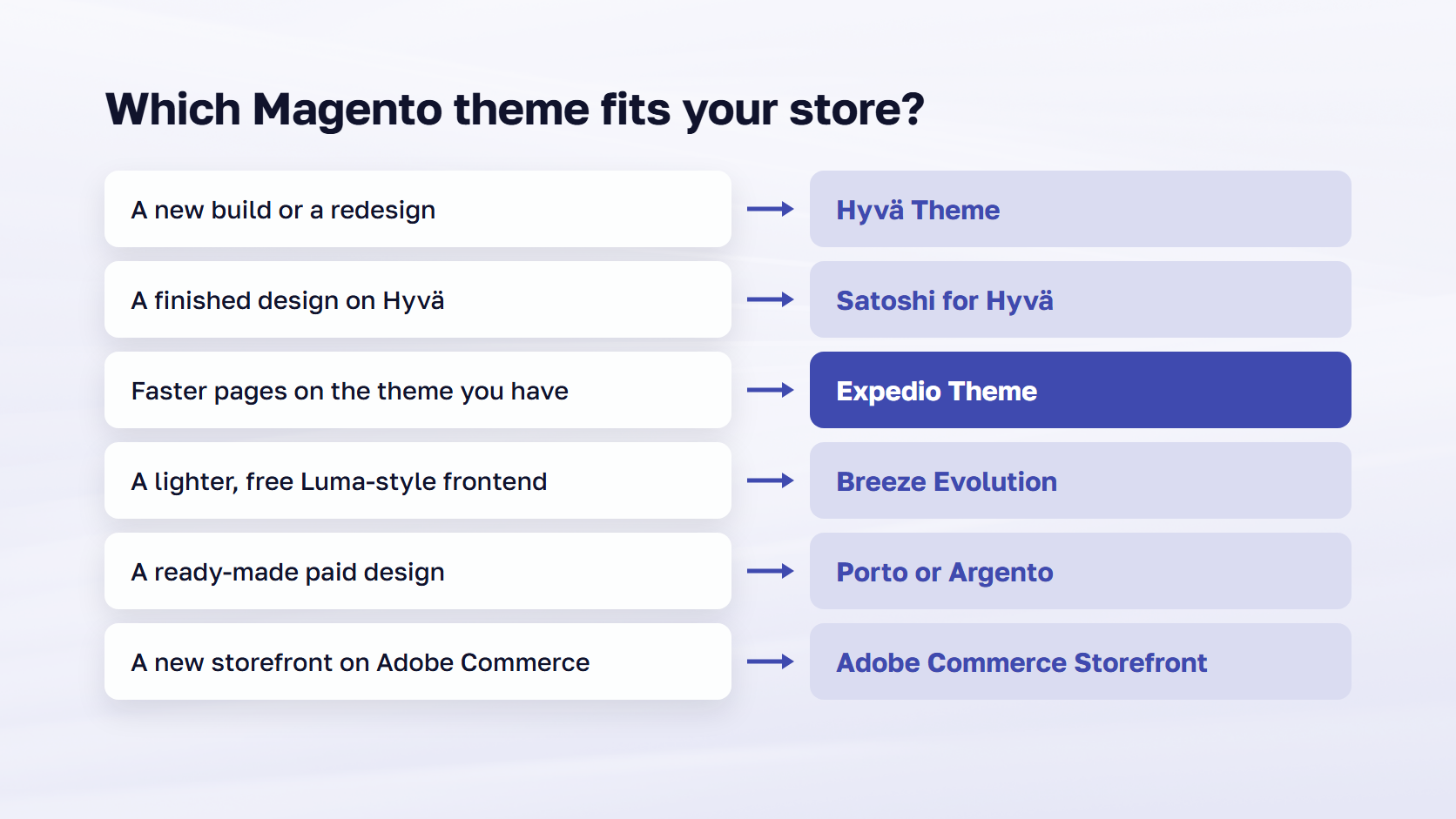
Match the theme to the one thing your store needs most. Build on Hyvä when you’re starting new or redesigning, stay on Luma when the store works and no redesign is planned, and add Expedio Theme when the server step is the slow one. The other picks cover narrower cases, listed below, and the chart sums them up.
- Choose Hyvä Theme if you’re building new or redesigning and speed in the browser matters most. Add Satoshi for Hyvä if you want a finished design to start from.
- Add Expedio Theme if pages are slow before the browser starts: slow server response, slow category and search pages, traffic peaks. It works on any theme, including Luma and custom themes. For the browser side, see our Magento speed optimization extensions.
- Choose Breeze Evolution if you want a lighter, free Luma-style frontend and can budget developer time for JavaScript-heavy extensions.
- Choose Porto if you want the best-selling ready-made paid design with many layouts.
- Choose Magento Blank as the base when you want a fully custom design.
- Choose Argento if you want a modular paid theme with vendor support and the option to change frontend branch later.
- Choose Adobe Commerce Storefront if you’re on Adobe Commerce as a Cloud Service, or on PaaS with an Adobe Commerce Optimizer license, and starting a new storefront.
- Choose PWA Studio only if you already run it.
- Stay on Luma for now if the store works and a redesign isn’t planned. Expedio Theme can still make it faster.
B2B stores pick on the same criteria, plus whether company accounts, purchase orders and quotes are covered. Adobe Commerce Storefront has B2B drop-ins for purchase orders, company management and quote management. For the other picks, that coverage comes from extensions, so run the same compatibility check.
Frequently asked questions about Magento themes
The best Magento theme for most stores is Hyvä, which is free at the core and strongest on browser speed, with Expedio Theme on the server for the fastest setup. A template is one file inside a theme, you can switch themes on a live store after testing on staging, and Expedio Theme works under the theme you have. The details follow.
What is the best Magento theme in 2026?
For most new builds and redesigns, Hyvä Theme, with Satoshi for Hyvä on top when you want a finished design. Stay on Luma if the store works and no redesign is planned, start from Magento Blank for a fully custom design, and use Adobe Commerce Storefront on Adobe Commerce as a Cloud Service. Under any of them, Expedio Theme makes the server build pages at least 2x faster.
Is Hyvä free to use?
Yes. The Hyvä Theme core has been free and open source under OSL-3.0 and AFL-3.0 since version 1.4.0 on November 10, 2025, with up to five free license keys per account and community support on Slack. The paid products are Hyvä UI (€250), Hyvä Checkout (€1,000), Hyvä Commerce (€3,000 per year) and, for Adobe Commerce, Hyvä Enterprise (€7,500 the first year, then €5,000 per year).
What is the fastest Magento 2 theme?
On the browser side, Hyvä has the strongest field data. In September 2026 Chrome UX Report data, Hyvä stores passed Core Web Vitals on mobile 66.4% of the time, against 44.6% for Magento overall. A theme leaves the server step alone, and that is where Expedio Theme works, making page building at least 2x faster on any theme. Together they cover both steps of the page load.
What is the difference between a Magento theme and a template?
A theme is the whole package Magento applies to every page: layouts, templates, styles and scripts. A template is one file inside it, the PHTML file that renders one block, such as the product gallery or the mini cart. In search, Magento templates and Magento website templates usually mean full themes, so judge any listing by the criteria above: speed, cost to run, extension compatibility, and updates and support.
Can you change the theme on a live Magento store?
Yes. A theme is assigned in the Magento admin, so the switch itself is quick. Do it on a staging copy first: every extension with frontend parts needs a version compatible with the new theme (a Hyvä compatibility module, a Breeze integration or a Luma child theme), and the checkout and your top-selling pages need a test run before the live switch.
Does Expedio Theme replace Hyvä or Luma?
No. Expedio Theme works under your theme, in the server-side work that builds each page, and your Hyvä, Luma or custom storefront, design and data stay as they are. It runs on Magento Open Source, Adobe Commerce and Adobe Commerce Cloud, on any Magento hosting, and the admin, catalog, prices, checkout and orders are untouched. You keep the theme you have, and the server builds its pages faster.
Choosing from the best Magento themes
The best Magento themes in 2026 come down to a short list once you know which step of the page load you need to fix. Hyvä is the theme to build on for a new store or a redesign, Satoshi for Hyvä gives you a finished design on top of it, and Luma and Magento Blank remain sound choices for a store that works or a design built from scratch. Breeze Evolution, Porto and Argento cover the free and paid ready-made ground, and Adobe’s Edge Delivery storefront is the path on Adobe Commerce as a Cloud Service.
Under any of them, Expedio Theme speeds up the server step. Read the prices again on the vendor pages before you sign, since they were current on November 3, 2026, and may have moved. scandiweb is a Hyvä Platinum Partner with 894+ Adobe certifications and 23+ years in eCommerce.
If you're planning a Hyvä build or want to know how much faster your current theme could run, talk to our Magento team.