
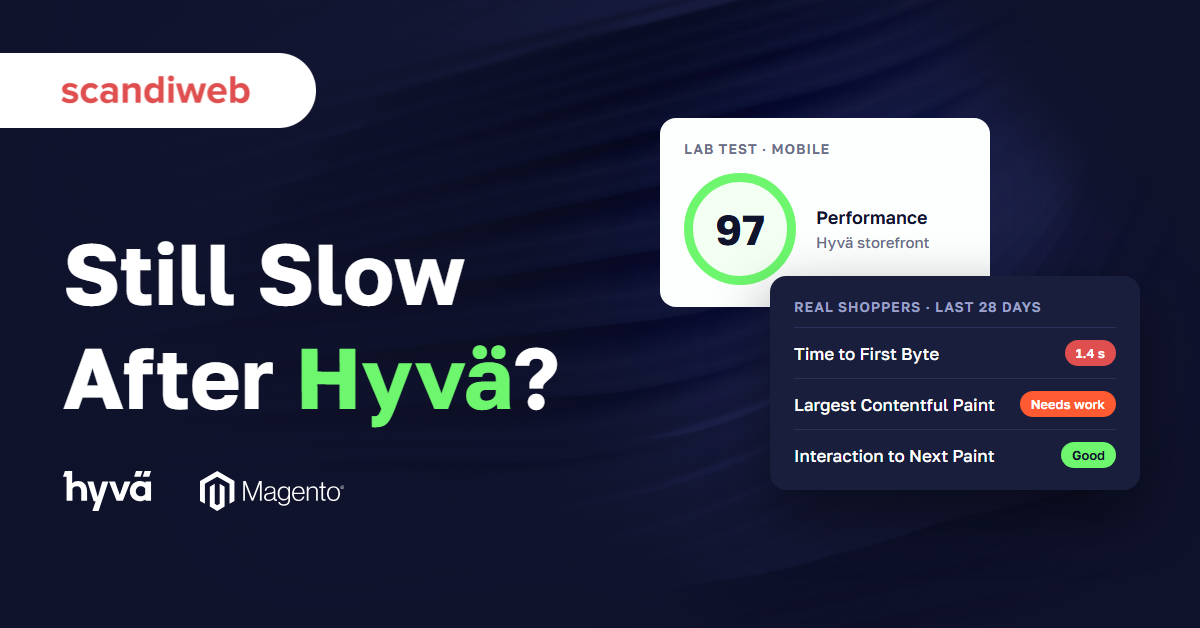
Your Magento (Adobe Commerce) store moved to Hyvä, a lighter storefront theme, and Google’s free PageSpeed Insights test turned green on the first run. Then the complaints kept coming: the store still feels slow after Hyvä, and the real-visitor data in that same report has barely moved. So which part of the store didn’t get faster?
When a Magento store is still slow after Hyvä, whoever signed off the migration budget has an awkward question to answer: was the money well spent, and what should the next project be? Before anyone books another frontend sprint, it pays to find out where the wait happens.
Why is a Magento store still slow after Hyvä?
A Magento store stays slow after Hyvä when the time is lost before the browser gets the page, or on pages Hyvä doesn’t render. Every page load has two steps: the server builds the page, then the browser draws it. Hyvä makes the second step lighter and leaves the first, server response time, where it was.
What Hyvä changes in the page load
Hyvä changes what the browser loads after the page arrives. Its pages load Tailwind CSS and Alpine.js, while pages on Luma, Magento’s default theme, load RequireJS, Knockout, and jQuery, the older JavaScript libraries Luma is built on. Our study of 12 eCommerce platforms analyzed September 2026 data from the Chrome UX Report, Google’s record of real Chrome visits. In it, the median Magento store on Hyvä loaded 767 KB of JavaScript on mobile, against 1,270 KB for Magento overall.
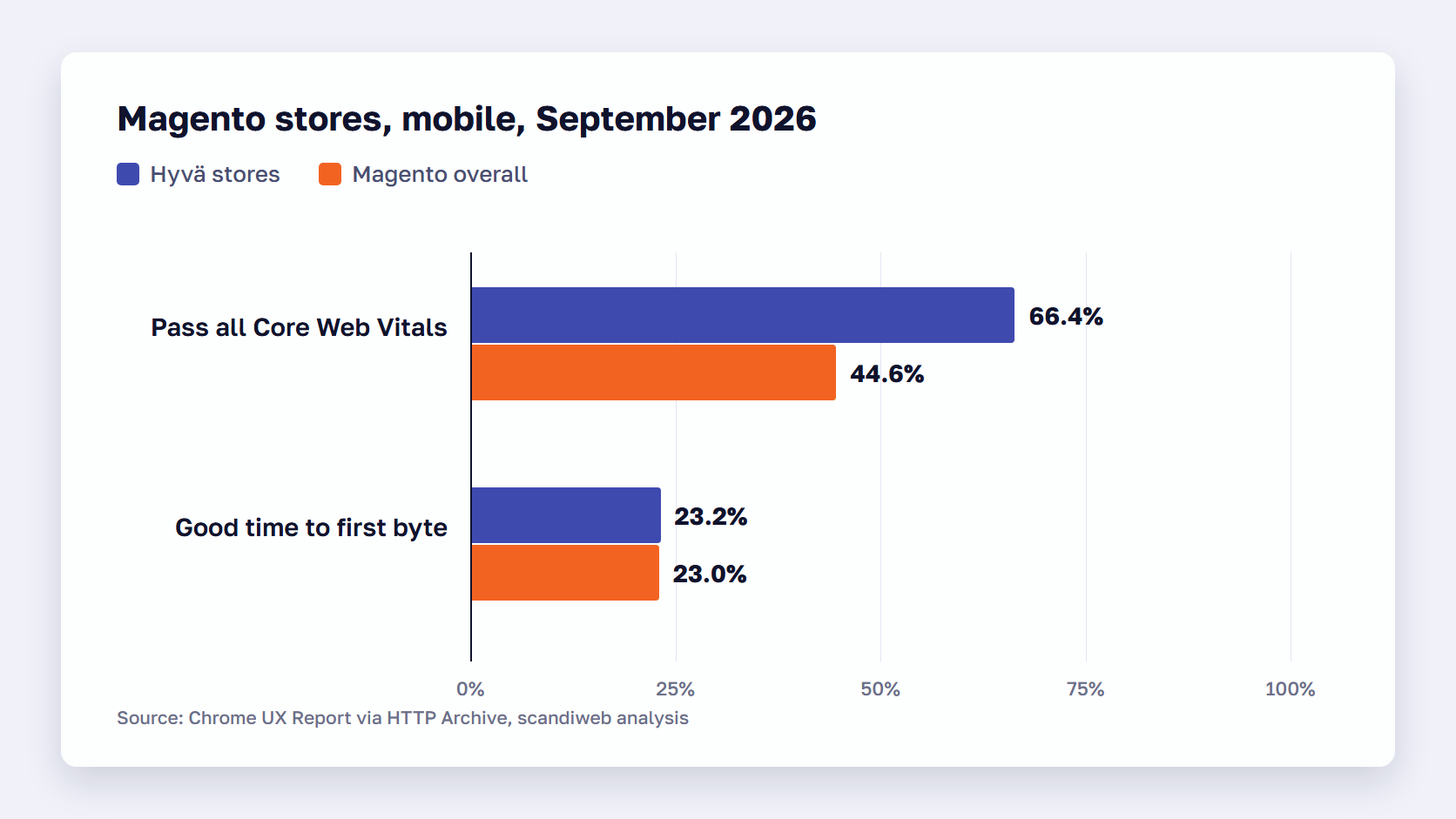
That shows in Core Web Vitals, Google’s three page-experience measures: how soon the main content appears (LCP, within 2.5 seconds), how fast the page reacts to a tap (INP, 200 milliseconds or less), and how much the layout jumps (CLS, 0.1 or less), each judged at the 75th percentile of visits. A page passes when all three are good. In that data, 66.4% of Magento stores on Hyvä passed all three on mobile, against 44.6% for Magento overall. Good LCP was 77.2% against 58.1%, good INP 90.2% against 84.4%, and good CLS 89.5% against 70.9%. That is the Hyvä performance gain.
What Hyvä leaves as it was
Before the browser receives anything, Magento’s server builds the page: it runs the layout XML, renders each block through its PHP template, and queries the database for products, prices, and stock. Hyvä is still a Magento theme made of layout XML and PHP templates, so that work happens the same way under Hyvä.
The wait this produces is time to first byte (TTFB), how long the server takes to start sending the page. Google’s TTFB guidance calls 0.8 seconds or less good and more than 1.8 seconds poor. It is measured before any script runs, so the amount of JavaScript a theme carries has no effect on it.
The September 2026 data shows this. 23.2% of Magento stores on Hyvä had a good mobile time to first byte, against 23.0% for Magento overall. At the 75th percentile, the median Hyvä store took 1,100–1,199 ms to send the first byte, against 1,200–1,299 ms for Magento overall, and both are above the 0.8-second line. A lighter theme can’t make the first byte arrive sooner.
🚀 Quick takeaway
Hyvä moved the Core Web Vitals pass rate for Magento stores from 44.6% to 66.4% on mobile in September 2026 data, while the share with good server response stayed at 23.2%, against 23.0% for Magento overall. Budget server work as its own project.
Why a green PageSpeed score can sit next to a slow store
A green PageSpeed Insights score comes from one simulated visit to one page, so it can look perfect while real shoppers wait. Google’s documentation says good lab data “does not necessarily mean real-user experiences will also be good.” The field data in the same report, from real Chrome visits over 28 days, shows what shoppers actually get.
Lab data vs field data on a Hyvä store
We get this question after many Hyvä launches, and the answer starts with what the score measures. The PageSpeed Insights score is lab data: Lighthouse, the tool behind it, loads one page once on a simulated Moto G4 phone. That page is often the homepage, which the full page cache (Magento’s store of finished pages) usually already holds, so the server step looks quick. The PageSpeed Insights documentation says lab data is collected in a controlled environment and may not capture real-world bottlenecks.
Field data comes from real Chrome users over the previous 28 days, reported at the 75th percentile, on their own devices and networks. Google’s note on why lab and field data can disagree puts it plainly: lab data can say a site performs great while field data says it needs work.
The lab gain from Hyvä is real: the median Hyvä store scores 48 in Lighthouse against 35 for Magento overall. Shoppers, though, feel the field numbers, on every page they open. Magento Core Web Vitals are judged on that field data, so test a filtered category page, a search result, and the checkout as well as the homepage. Our guide on how to read PageSpeed Insights goes further.
What “Server responded slowly” means after a Hyvä launch
“Server responded slowly” is a line in the Document request latency insight in PageSpeed Insights, and it appears when the main HTML document takes more than 600 ms to arrive from the server. The insight measures the server step alone, so a Hyvä launch can’t clear it. Lighthouse 13 folded the older initial-server-response-time audit into this insight, so the warning may carry a different label than in your last report.
The fix is on the server: serve more pages from the full page cache, and make the pages it misses faster to build. The section on fixing slow server response below covers both, and our guide on how to reduce initial server response time walks through the measurements step by step.
🚀 Quick takeaway
PageSpeed Insights flags “Server responded slowly” when the main page takes more than 600 ms to start arriving. A lighter theme can’t clear that line, because the time passes before any CSS or JavaScript loads.
How to tell whether the server or the browser is slow
Split the wait into its two steps first. Read the field data for time to first byte and Core Web Vitals, time the server on a cached page and on one the cache misses, and check which pages still load Luma. Poor server time points to the server. Good server time with a slow page points to the browser.
- Read the field data in PageSpeed Insights for one key URL and for the origin. In the field section, note time to first byte, LCP, INP, and CLS at the 75th percentile, both for the page you tested and for the origin, meaning every page Chrome users opened on your domain, since one URL can look fine while the store as a whole doesn’t.
- Compare TTFB with LCP. LCP’s budget is 2.5 seconds, so if the first byte uses most of it, the server is the step to fix first, and browser-side work alone won’t bring LCP under the line.
- Time the server on a cached page, then on one the cache misses. Run curl or open the Network panel in DevTools on a category page and note the time to first byte, then add a throwaway query parameter to the URL so the full page cache can’t answer and the server has to build the page, as our guide to audit Magento performance shows. The gap between the two is the build time the cache hides.
- Check which pages still load Luma. Open the page source of the checkout, the customer account pages, and any page an extension adds, and search for RequireJS, or read the list of routes under HYVA THEMES > Fallback theme > General Settings in the admin, where Hyvä’s Luma theme fallback hands chosen routes to a Luma-based theme. Anything on that list runs on Luma’s code, whatever the rest of the store uses.
- List the third-party tags on the slowest page and when each was added. Compare the list with the launch date: a tag added after launch loads on top of Hyvä’s lighter baseline and is a browser-side suspect on every page it runs on.
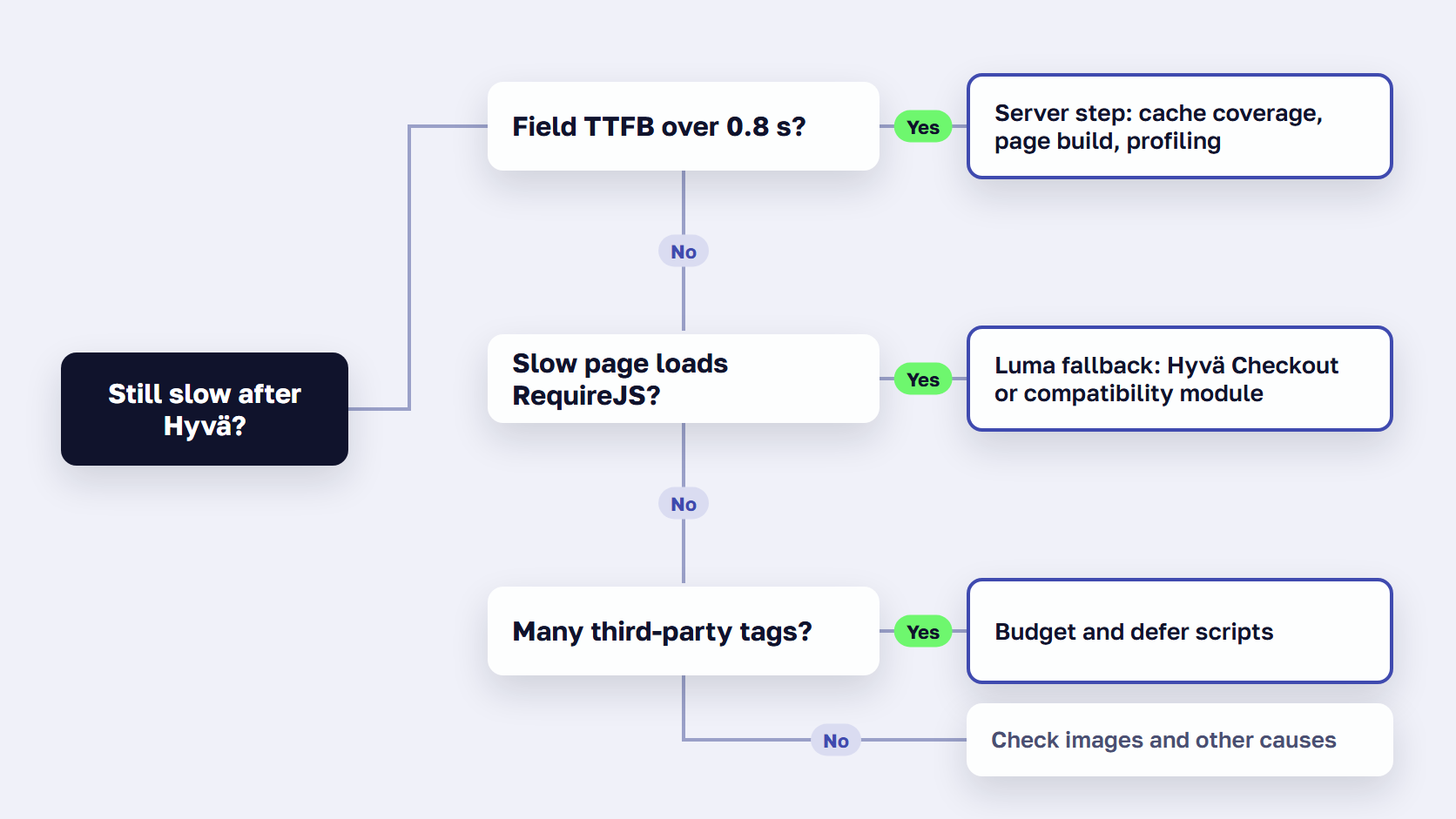
If none of the five explains why your Magento store is still slow after Hyvä, the cause is somewhere else in the stack, and our guide on why a Magento site is slow covers the rest.
🚀 Quick takeaway
Open the page source of your checkout and search for RequireJS. If it’s there, that page runs on Luma’s frontend stack through Hyvä’s fallback, whatever the rest of the store uses.
How to fix slow server response on a Hyvä store
Fix the server step in two ways: serve more pages from the full page cache, and make the pages the cache misses faster to build. A theme can’t help with either, because both happen before the browser receives anything. Then profile the pages that are still slow, since one extension or integration call can add time to every uncached page.
Serve more pages from the full page cache
The full page cache returns a finished page on the next request without rebuilding it, and Hyvä pages are cached like any other Magento page. Coverage is the issue. Catalog pages for logged-in customers are cached separately for each customer group, and search results for each search term, so those requests miss more often, and one block marked cacheable="false" in the layout makes the whole page uncacheable.
Most Magento 2 Hyvä performance tuning on the server starts with the hit rate, so check it before anything else. Our guides on the Magento full page cache, Varnish configuration (Varnish is the caching server that holds those pages in front of Magento), and running a cache warmer cover how to raise it.
Make the page build faster with Expedio Theme
Caching only skips the build for pages it has already stored. For every other request, the build itself has to get faster, and that is server-side work a storefront theme can’t do.
Expedio Theme is #2 in our ranking of the best Magento themes, the one pick that works under Hyvä instead of replacing it. Expedio Theme speeds up how Magento builds each page on the server. It works under Hyvä, Luma, or a custom theme, and it doesn’t change your theme, design, or data. As the Expedio page puts it, “Hyvä is the frontend, Expedio is the backend, and a store can run both.”
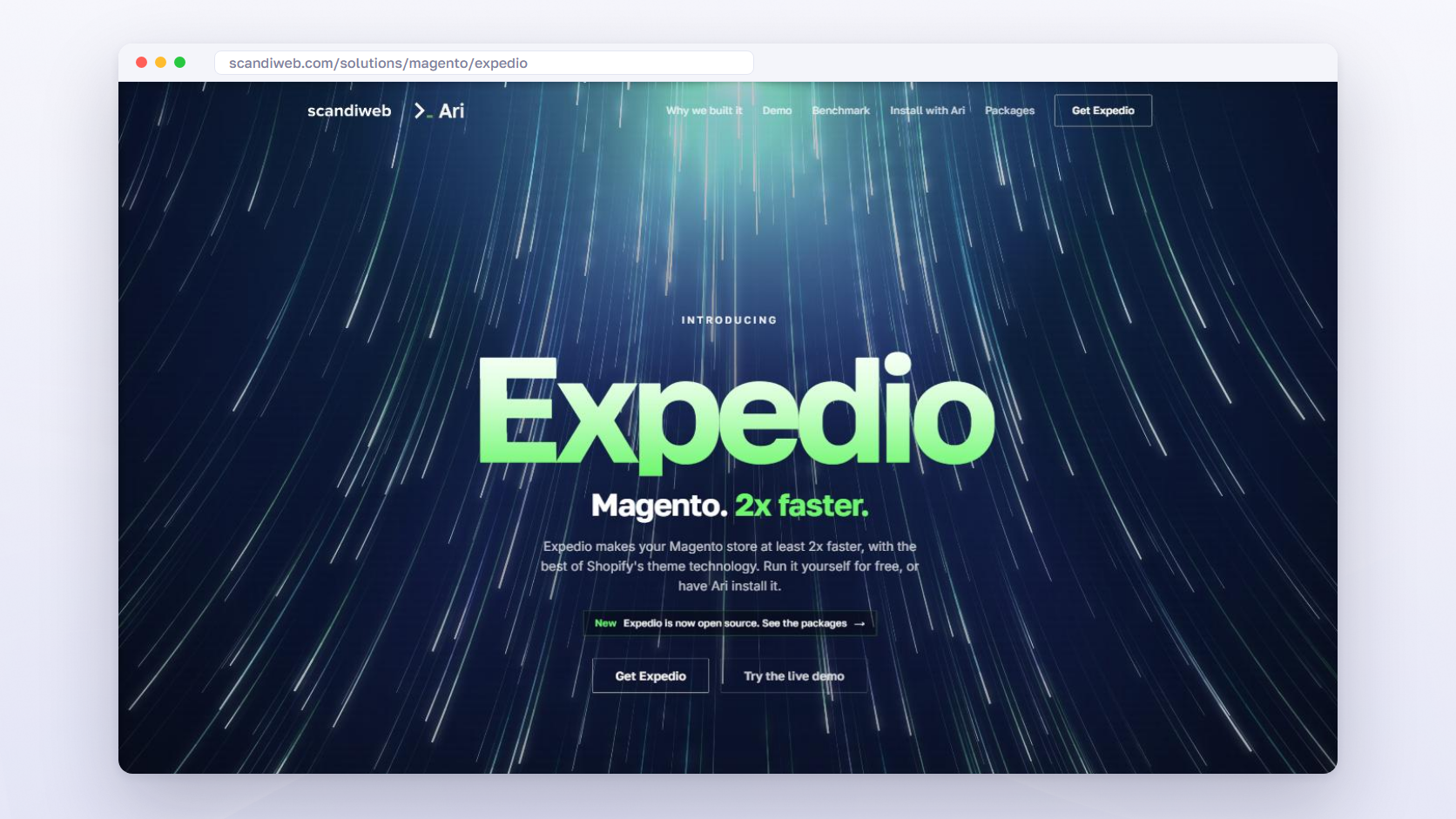
Expedio Theme makes Magento at least 2x faster, and the same server handles 3x more traffic before response times start to rise. Those results come from scandiweb’s benchmark on one merchant’s Hyvä store, with about 1,000 categories and 20,000 products, measured as server response time rather than full page load. With all caches empty, a category page took a median of 57 ms to build instead of 181 ms. Cart and checkout aren’t part of the comparison. It doesn’t change the browser side, which stays Hyvä’s job.
Profile the pages that are still slow
A profiler is a tool that records where the time goes while Magento builds a page: layout, blocks, templates, and database queries. Run it on the pages that stay slow after the cache and build work, because one extension or integration that calls another system while the page builds adds that wait to every uncached request. Bigger hosting helps only when CPU or memory is at its limit, so profile before you buy more of either. Our guide shows how to profile an uncached page step by step.
🚀 Quick takeaway
In a benchmark on one merchant’s Hyvä store, stock Magento ran 604 database queries to build the homepage, and Expedio Theme ran 11. Fewer queries per page is what lets the same server take more traffic.
Which Hyvä pages still load Luma, and how to fix them
Pages on Hyvä’s Luma theme fallback load Luma’s RequireJS, Knockout and jQuery instead of Hyvä’s Tailwind CSS and Alpine.js, so they keep Luma’s weight on a Hyvä store. The usual ones are a Luma-based checkout and pages from extensions without a Hyvä compatibility module. Third-party scripts added after launch slow the browser step on every page.
The checkout on the Luma fallback
A Luma-based checkout, Magento’s default one included, runs on a Hyvä store through Hyvä’s Luma fallback module. On those pages the browser loads Luma’s CSS and JavaScript, RequireJS, Knockout, and jQuery, instead of Hyvä’s Tailwind CSS and Alpine.js, so a shopper who browsed a light storefront lands on a heavier page at the moment they pay.
Hyvä’s own documentation on running a Luma checkout recommends its paid Hyvä Checkout as the option with the best performance, built for Hyvä stores and free of the Luma frontend stack, and it notes that a Luma-based checkout needs extra styling work to match the Hyvä storefront. If step 4 above found RequireJS in your checkout, moving the checkout onto Hyvä Checkout is the fix for that page.
Extensions without a Hyvä compatibility module
Hyvä’s documentation on compatibility modules says modules built for Magento’s Luma or Blank themes need a compatibility module, a small add-on that re-implements the parts of the extension that don’t work out of the box on a Hyvä storefront. Without one, the extension’s storefront features may not work on a Hyvä page.
Check which Hyvä-compatible modules already exist in the Compatibility Module Tracker or ask the extension’s vendor. The other options are a custom module, or sending that extension’s pages to the Luma fallback as a stopgap. Treat the fallback as temporary, because every page on it keeps Luma’s weight, a point our guide on how to work with Hyvä makes as well. The Hyvä Theme core has been free and open source since version 1.4.0 on November 10, 2025, and compatibility modules come with the free license key.
As a Hyvä Platinum Partner, scandiweb’s Hyvä theme development team checks extension compatibility before launch, so you know in advance which pages, if any, need the fallback.
Third-party scripts added after launch
Hyvä starts from a lighter JavaScript baseline, 767 KB on the median mobile page against 1,270 KB for Magento overall, and every tag added afterward loads on top of it: the chat widget, the review widget, the heatmap, the A/B test script, the second analytics tag. A theme change removes none of them. Google’s guidance on third-party JavaScript notes that it is “usually outside your control” and recommends a performance budget and a regular audit.
Set that budget, load tags after the main content, and remove the ones nobody has looked at in a quarter. If images are the other weight on the page, our list of speed optimization extensions covers compression and lazy loading.
🚀 Quick takeaway
The median Magento store on Hyvä loads 767 KB of JavaScript on mobile, against 1,270 KB for Magento overall. Every tag added after launch eats into that gap, so give third-party scripts a budget.
Frequently asked questions about Magento speed after Hyvä
Hyvä speeds up the browser step and leaves server response time where it was, a lab score can be green while field data isn’t, and pages on the Luma fallback keep Luma’s code. The answers below cover the questions merchants ask most after a Hyvä launch.
Does Hyvä improve server response time (TTFB)?
Not in the field data. In scandiweb’s analysis of Chrome UX Report data for September 2026, 23.2% of Magento stores on Hyvä had a good mobile time to first byte (800 ms or less), almost the same as 23.0% for Magento overall. Hyvä changes what the browser loads after the first byte arrives. The time the server takes to build the page needs server-side work.
Why does my PageSpeed score look high when my Hyvä store still feels slow?
The score is lab data: Lighthouse loads one page once, on a simulated mid-range phone, often a page the cache already holds. Shoppers load many pages on their own devices and networks, including pages the cache misses. Google’s PageSpeed Insights documentation says good lab data doesn’t necessarily mean real users get a good experience, so read the field data in the same report.
Does Hyvä make the Magento checkout faster?
Only if the checkout runs on Hyvä. A Luma-based checkout, including Magento’s default one, works on a Hyvä store through Hyvä’s theme fallback, and on those pages the browser loads Luma’s CSS and JavaScript (RequireJS, Knockout and jQuery) instead of Hyvä’s. Hyvä’s own documentation says its paid Hyvä Checkout “delivers the best performance, compatibility, and user experience.”
What happens to an extension without a Hyvä compatibility module?
Hyvä’s documentation says modules built for the Luma or Blank theme “require a Compatibility Module to work with Hyvä”, which re-implements the parts that don’t work out of the box. Until one exists, the options are a ready module from Hyvä’s Compatibility Module Tracker or the vendor, a custom one, or sending that extension’s pages to the Luma fallback, where they load Luma’s heavier code.
How long does field data take to show the effect of a Hyvä launch?
Up to four weeks. PageSpeed Insights reports real Chrome users’ experiences “over the previous 28-day collection period”, so in the first weeks after launch the field data still mixes visits to the old storefront with visits to the new one. Compare field numbers from before the launch with numbers from at least 28 days after it, and use lab tests in the meantime.
Can a Magento store run Hyvä and Expedio Theme together?
Yes. Hyvä speeds up what the browser does, and Expedio Theme speeds up how Magento builds each page on the server, under Hyvä, Luma or a custom theme, without changing the design or data. The two work on different steps of the same page load, so one doesn’t replace the other. The benchmark behind its claims ran on a Hyvä store.
Fixing a Magento store that is still slow after Hyvä
A Magento store that is still slow after Hyvä usually has a server step that never got faster, a few pages still on Luma, or scripts added since launch. Measure with field data first, then fix the step that is losing the time.
If field time to first byte is poor, start with the server: cache coverage, the page build, and profiling. If the server responds quickly and a page is still slow, look for the Luma fallback and the tag list. If only the lab score has moved, wait for 28 days of field data before judging the launch. The Hyvä performance gain was real and stayed in the browser step, and the server step needs a project of its own. For the full list of fixes from the server to the browser, see our guide on how to speed up Magento.
scandiweb is a Hyvä Platinum Partner with 894+ Adobe certifications and 23+ years in eCommerce, and we measure both steps before we recommend either project.
If your Hyvä store scores well in the lab and still feels slow to shoppers, ask our Hyvä and Magento team to look at which step is losing the time.