
If you’re adding a new country and someone on the team has asked whether that means a new Shopify store, or if you already run three country stores and wonder whether Shopify Markets could fold them back into one, this guide gives you the rules to decide. Markets lets one store sell to many countries with local currencies, prices, languages, domains, and duties. Expansion stores are separate Shopify Plus stores under one organization, each with its own admin, catalog, and checkout.
Most brands should start with Markets. The ones that shouldn’t usually find out from their ERP or their catalog, months before the storefront shows a problem. Shopify updates Markets several times a year, so the plan limits below are the ones in Shopify’s help center in October 2026.
Shopify Markets or expansion stores: the short answer
Use Shopify Markets when every country sells mostly the same products, run by one team, and the differences are currency, price, language, domain, and duties. Markets handles all of those inside one store. Use expansion stores when a country needs its own catalog structure, its own apps or checkout, its own ERP company, or a team that works apart from the others. Expansion stores need Shopify Plus, which includes nine of them.
In the client conversations we track, two questions come up again and again: “Markets or a separate store per country?” and “How do we handle currencies, VAT, and languages?” The answer to the second one usually settles the first. Once you know what Markets can localize inside one store, whatever is left over is the case for a second store.
What Shopify Markets handles inside one store
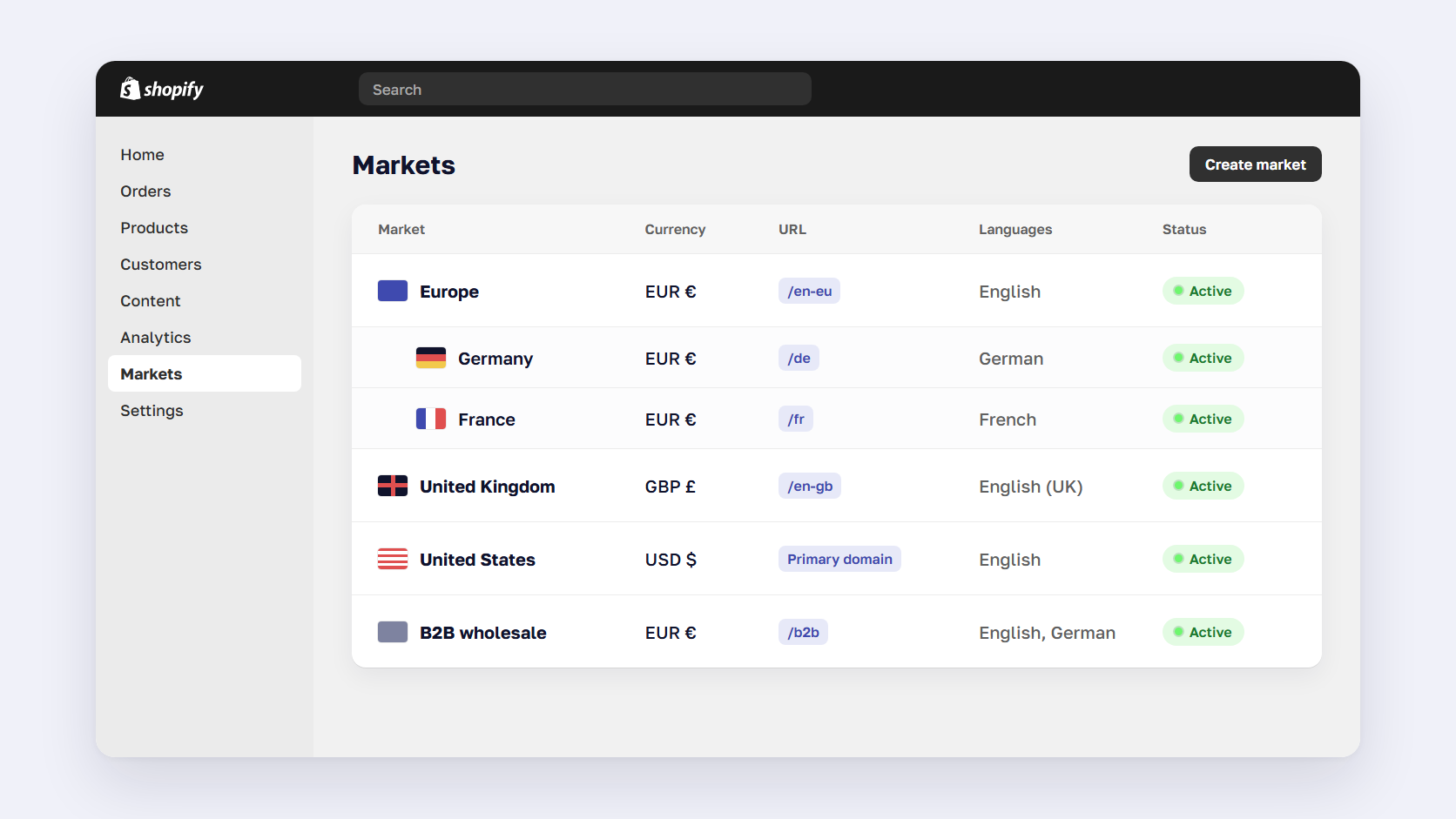
Shopify Markets groups customers by country or region, B2B company, retail location, or sales channel, and changes what each group sees. Inside one store you can set local currencies, catalogs with adjusted or fixed prices, languages, a domain or subfolder, and how duties and taxes appear at checkout. Creating regional markets is free on every Shopify plan. A few settings, such as a different theme per market, need the Advanced or Plus plan.
Each market has conditions (who it applies to) and customizations (what they see). A submarket, such as Germany inside a Europe market, inherits its parent’s settings and can override them. Shoppers who match no market get your backup region, which is your store’s home country by default, according to Shopify’s Markets overview.
| Markets setting | What it changes | Plan notes |
|---|---|---|
| Currency | Local prices with automatic or manual exchange rates and optional rounding | Needs Shopify Payments or Adyen to charge in local currency |
| Catalogs | Which products a market can buy, percentage price changes, fixed prices per product | All plans. B2B: 3 active catalogs on Basic, Grow, and Advanced |
| Languages | Translated storefront and checkout | Up to 20 languages, 30 on Plus |
| Domains | Subfolder, subdomain, or separate domain per market | All plans |
| Duties and taxes | Tax-inclusive prices, duties at checkout or included in the price | Transaction fee when duties are calculated |
| Theme and checkout | Theme content and checkout pages per market | Advanced and Plus. Checkout blocks per market on Plus only |
| Business entities | Which legal entity takes payment in a market | Plus only, with several Shopify Payments accounts |
Currencies and prices across markets
To charge shoppers in their own currency, your store has to use Shopify Payments or Adyen. With any other payment provider, customers pay in your store currency. Automatic exchange rates follow the market rate and build Shopify’s conversion fee, 1.5% or 2% depending on where your store is based, into the price the shopper sees. Manual rates hold a price in place and take the fee from your payouts instead. Rounding turns a converted €9.73 into €10.00, per Shopify’s currency guide.
Exchange rates don’t set your price positioning. Catalogs do. A catalog decides which products a market can buy and lets you raise or lower every price in it by a percentage. You can then set a fixed price on individual products, which is how a €49 price in Germany and a £45 price in the UK stay put when the exchange rate moves.
Duties, taxes, and VAT
Each market has its own tax display. Shopify can show tax-inclusive prices where shoppers expect them, such as the EU and Australia, and add tax at checkout in the US and Canada. Before Shopify collects VAT or sales tax for a market, you need to add your tax registration for the regions in it. Markets calculates and displays the tax, and the registration and filing stay with you.
Duties are also set per market. You can add them at checkout as a line item, or include them in your prices and absorb them. Accurate estimates need an HS code and a country of origin on every product. Calculating duties at checkout carries a transaction fee: temporarily 0.5% since February 2, 2025, against a standard 0.85% when Shopify Payments is your main gateway and 1.5% with other providers, according to Shopify’s duties guide.
Domains, subfolders, and languages
Every market can run on a subfolder (yourstore.com/de/), a subdomain (de.yourstore.com), or its own domain (yourstore.de). You can sell in up to 20 languages on Basic, Grow, and Advanced, and up to 30 on Plus. Shopify’s Translate & Adapt app machine-translates up to two languages for free and lets you change copy per market, for example British and American spelling.
Shopify’s language requirements list two limits that catch teams out. Product, article, and blog tags can’t be translated. URL slugs can be translated per language but can’t be customized per market, so Germany and Austria on German share the same product URLs.
B2B markets
B2B markets group company locations, so a wholesale buyer in France can see a different catalog from a retail shopper in France. On Basic, Grow, and Advanced you can assign up to 3 active catalogs across all your B2B markets, and Plus removes that cap. If your wholesale pricing runs on dozens of customer-specific price lists, that cap decides your plan before it decides your store setup.
What Shopify Managed Markets adds
Managed Markets, the product formerly called Markets Pro, makes Global-e the merchant of record in the countries you turn on. As the legal seller, Global-e collects and pays duties and taxes, so you don’t need a tax registration in each country, and it adds local payment methods. It’s open to merchants based in the continental US and to certain stores in Canada and the UK.
Since August 24, 2026, Managed Markets no longer supports delivered duty unpaid (DDU) in countries where it supports delivered duty paid (DDP), according to Shopify’s changelog. Shoppers in those countries now pay duties at checkout instead of to the carrier. Shopify’s own pages quote different Managed Markets fees, so confirm the current rate with Shopify before you model margins.
🚀 Quick takeaway
Most of what teams picture as a reason for a second store, such as euro prices, German copy, a .de domain, or VAT-inclusive pricing, is a market setting. Test your plan against Markets before anyone budgets a second theme build.
Where one store with Markets stops working
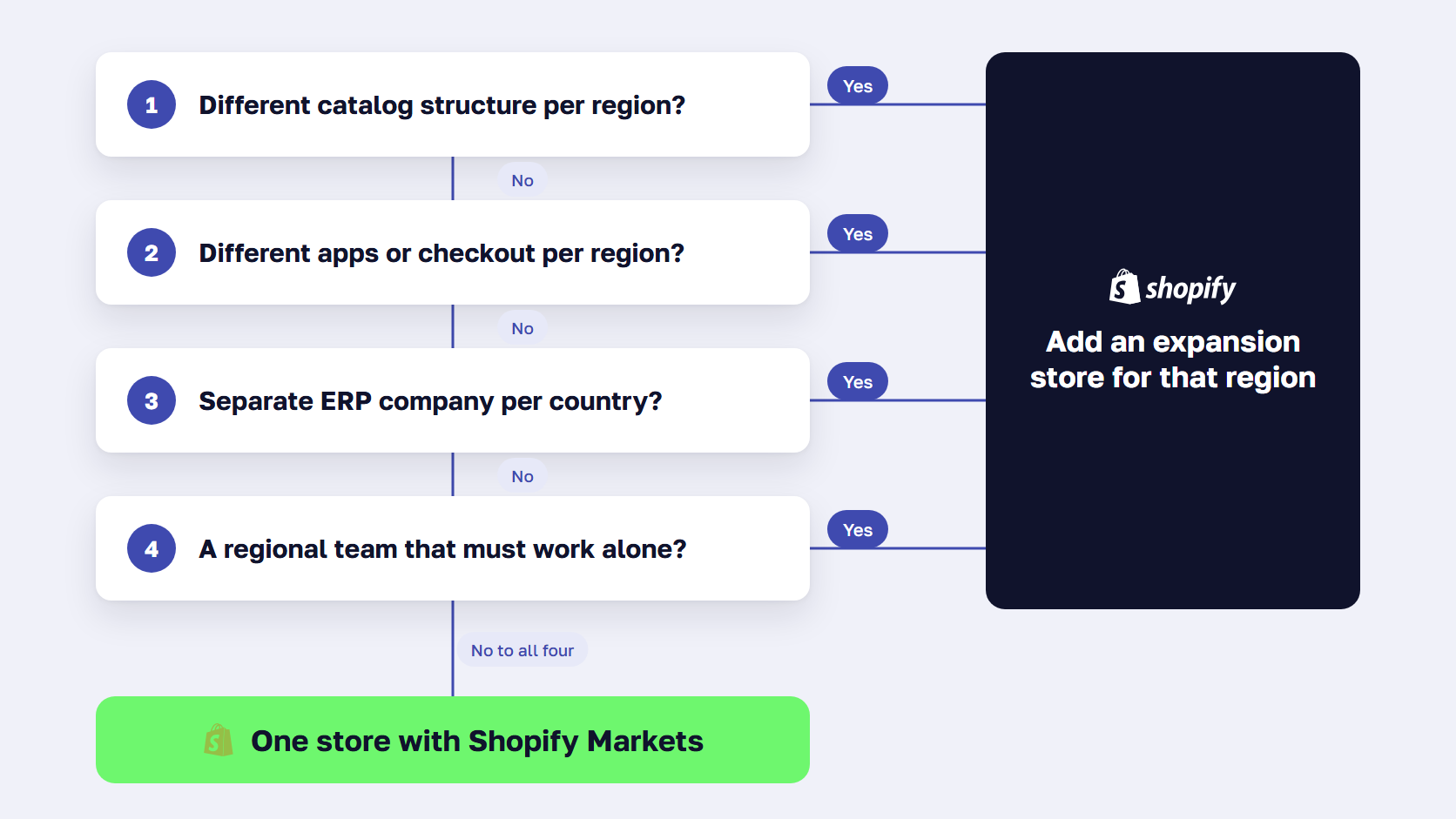
One store with Markets stops working when countries need different things behind the storefront. The usual breaking points are regional catalogs with a different structure, apps or checkout logic that must differ by country, an ERP that runs each country as a separate company, and regional teams that need their own admin. Differences in price, language, and currency alone rarely justify a second store.
Start with the catalog. Markets can hide products and change prices, but every market shares the same products, variants, options, and metafields. If your EU range uses different variant structures, product data, or compliance fields than your US range, one store forces a single catalog model on both ranges.
Apps and checkout come next. Apps are installed once per store, so if the US needs a subscription app and Europe needs a different invoicing app, one store means running both for everyone and configuring around them. A theme customized per market needs Advanced or Plus, and checkout blocks per market need Plus.
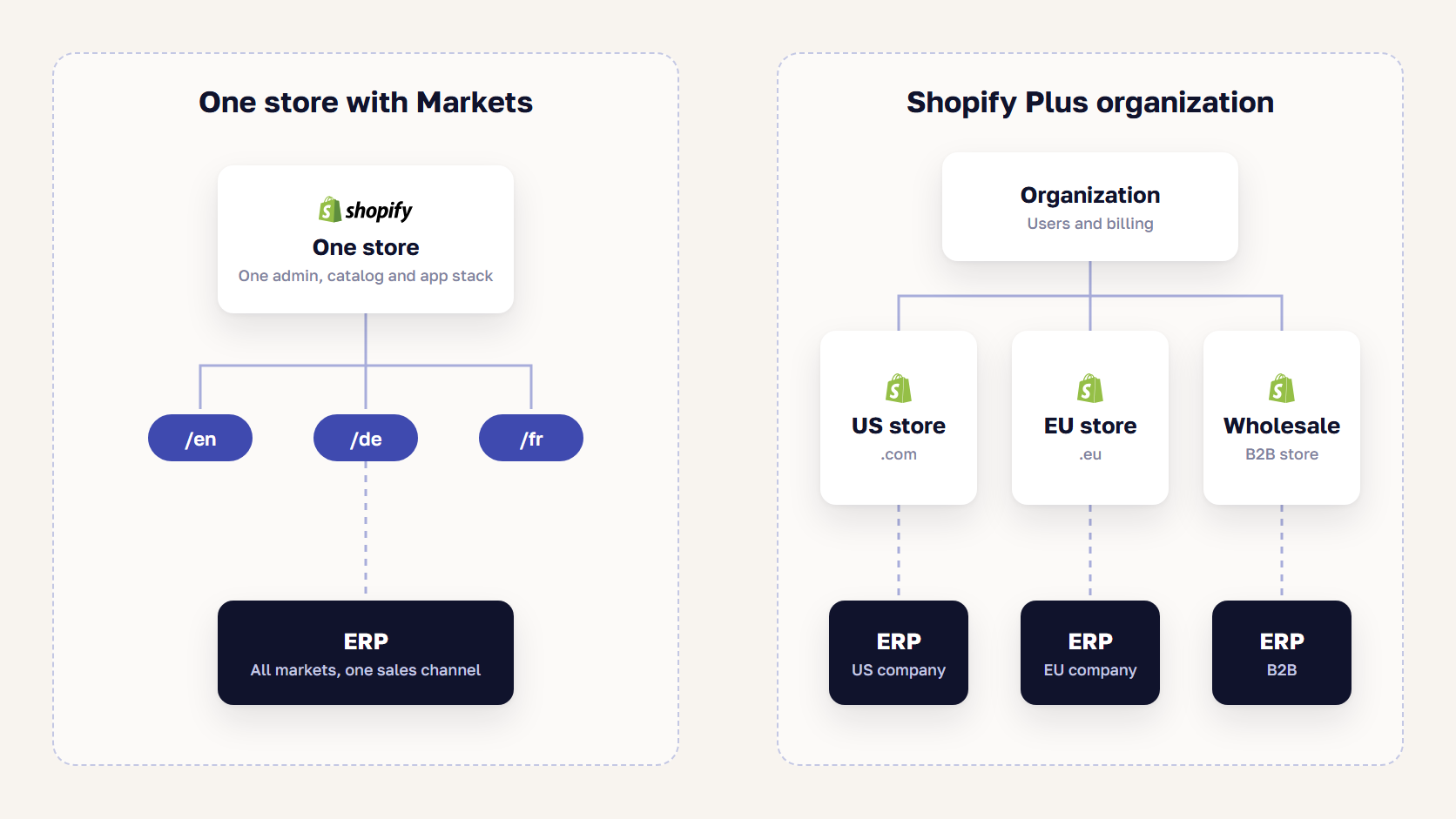
The back office is where most decisions are made. Many ERP setups run one company per country, and each company expects its own sales channel. On Plus, business entities let a different legal entity take payment in each market from one store, which solves payouts. Orders, stock, and invoices still have to land in the right ERP company, and that mapping is integration work in either setup. Our ERP integration guide covers how to scope it.
Teams are the last test. Shopify has no per-market staff permissions, so anyone who can edit markets can edit all of them. A regional team that should only touch its own prices and content has no clean boundary in a single store.
🚀 Quick takeaway
Look at the back office before the storefront. If every country’s orders can go into one ERP company and one team runs merchandising, one store with Markets will cost less to run for years.
When Shopify expansion stores make sense
Shopify expansion stores make sense when a country or channel needs its own catalog, apps, checkout, or team, and running another store costs less than bending one store around that need. On Shopify Plus, an organization can run one main store and nine expansion stores with no extra platform fee. Shopify pre-approves international stores, B2B wholesale stores, and physical retail stores as expansion store types.
Each expansion store has its own settings, configuration, and storefront, while users and billing stay at the organization level. When you create one, you can import data such as products from another store in your organization. According to Shopify’s expansion store guide, that import is only possible at creation. After that you manage each store’s data yourself, which in practice means a PIM, an ERP, or a sync app.
Shopify Plus costs $2,300 per month on a three-year term or $2,500 on a one-year term, and every store beyond the ten included adds $300 per month, per Shopify’s Plus pricing. Our Shopify vs Shopify Plus guide covers what else changes when you upgrade.
What running multiple Shopify stores costs
The platform fee is the small part. Every store adds its own app subscriptions, theme releases, product and price updates, tracking setup, and checks before each campaign. A change that takes one release on a store with Markets takes one per store, unless your theme is built once and deployed to all of them.
Search adds a cost too. Each store on its own domain builds its own authority, and you add the hreflang between stores yourself, as the SEO section below explains.
Can you have multiple Shopify stores without Plus?
Yes, but each store needs its own subscription. Outside Plus, store owners can group stores into an organization for shared management. Plus stores use expansion stores under one contract instead, according to Shopify’s store grouping guide.
| Area | One store with Markets | Expansion stores |
|---|---|---|
| Plan | Any plan, some settings on Advanced or Plus | Shopify Plus, 9 included |
| Catalog | One product set, availability and price per market | A separate catalog per store |
| Apps and checkout | One set for every market | Different per store |
| Content | Translations and market-specific copy | Separate themes and content |
| ERP and legal entity | One sales channel, business entities on Plus | One store per ERP company if needed |
| Hreflang | Generated by Shopify | Added by you across stores |
| Running cost | One store to maintain | Every change repeated per store |
🚀 Quick takeaway
Nine included stores make expansion stores look free. In practice, each one adds its own app bills, plus another round of releases and catalog sync every time something changes.
International SEO with Shopify Markets: hreflang, domains, and redirects
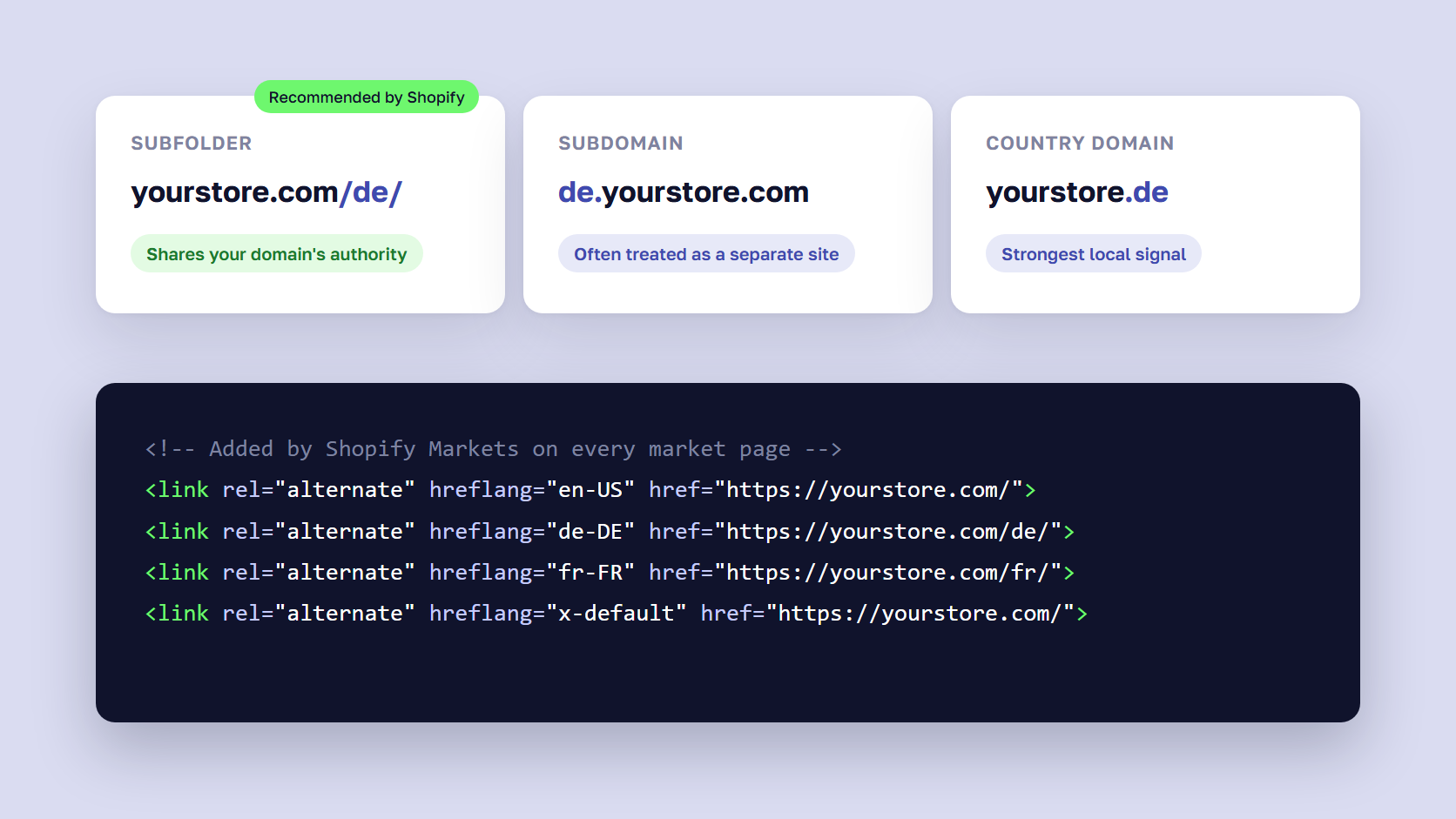
Shopify Markets generates hreflang tags automatically for every market that has its own subfolder, subdomain, or domain, plus an x-default tag that points to your primary domain. It also sets self-referencing canonical URLs and adds every market URL to your sitemap. Separate expansion stores don’t get this across stores, so hreflang between them has to be added in each theme or with an app.
Shopify’s international SEO guide recommends subfolders for most stores, because they share your primary domain’s authority and need no extra domains. Country domains send the strongest local signal, but each one has to earn its rankings separately. Some search engines treat subdomains as separate sites.
After launch, check these settings in the theme and in Search Console.
- Hreflang only appears for markets with a distinct URL, so a market that shares your main URL gets none
- Turning off automatic hreflang to use your own can hurt SEO, and running both creates duplicate tags
- Shoppers are redirected by IP address and browser language, while known search engine crawlers get the URL they asked for
Redirects that trap shoppers in the wrong country cause the problems we cover in why forced GEO IP redirects are bad for SEO, so keep the country and language switcher visible. Our guide to hreflang and canonical tags for international stores goes deeper into the tag rules.
🚀 Quick takeaway
If you fold country stores into one store with Markets, treat it as a domain migration. Every old country URL needs a 301 redirect to its new subfolder before the switch, or you lose the rankings each store earned. Our SEO migration checklist covers the redirect map.
How to choose between Shopify Markets and expansion stores
Start with one store and Markets, and add an expansion store only for the country or channel that fails a specific test: a different catalog structure, a different app or checkout setup, a separate ERP company that can’t share a sales channel, or a team that must work on its own. Most brands selling the same range in several countries stay on one store. Brands with regional ranges or a wholesale operation often run one store per region.
Choose Shopify Markets if
- You sell mostly the same products in every country
- Your differences are currency, price, language, domain, and duties
- One team runs merchandising and content for all markets
- Your ERP can take orders from every country through one sales channel
- You want Shopify to handle hreflang and market sitemaps
Choose Shopify expansion stores if
- Your regional ranges differ in variants, product data, or compliance fields
- A region needs apps or checkout logic the others shouldn’t run
- Each country is a separate ERP company that needs its own sales channel
- Regional teams need their own admin and release schedule
- You run a wholesale store that shares products but not the buying experience
If your answers split down the middle, our Shopify consulting team can run an architecture review that maps your catalog and ERP against each market before you commit.
Frequently asked questions about Shopify Markets
What is Shopify Markets?
Shopify Markets is the part of the Shopify admin where you group customers by country, B2B company, retail location, or sales channel, and change what each group sees. Each market can have its own currency, catalog and prices, languages, domain or subfolder, and duty and tax settings, all inside one store. Creating regional markets is free on every Shopify plan.
Is Shopify Markets free?
Creating regional markets is free on all Shopify plans, but selling through them has costs. Shopify Payments adds a 1.5% or 2% fee when it converts currency, and calculating duties at checkout carries a transaction fee. Translate & Adapt machine-translates two languages for free, Managed Markets charges its own per-order fee, and some market settings need the Advanced or Plus plan.
Is Shopify Managed Markets worth it?
Managed Markets is worth it when you want to sell into many countries without registering for tax in each one. Global-e becomes the merchant of record and handles duties, taxes, and local payment methods for you. It costs more per order than running Markets yourself, and it’s only open to merchants based in the continental US and certain stores in Canada and the UK.
How many expansion stores do you get with Shopify Plus?
A Shopify Plus organization can have ten stores on its contract with no extra platform fee: one main store and nine expansion stores. Staging stores don’t count toward the limit. Each store beyond ten costs $300 per month or a revenue share. Shopify pre-approves international, B2B wholesale, and physical retail stores as expansion store types.
Does Shopify Markets handle hreflang automatically?
Yes. Shopify generates hreflang tags for every market that has its own subfolder, subdomain, or domain, adds an x-default tag for your primary domain, and includes market URLs in your sitemap. Markets that share your main URL get no hreflang. Separate expansion stores don’t link to each other automatically, so cross-store hreflang has to be added in the theme or with an app.
Can I move from separate Shopify stores to one store with Markets?
Yes, but plan it as a migration. Pick the store that stays, bring the other stores’ products, customers, and translations into it, and set each former country store up as a market with its own subfolder or domain. Then map a 301 redirect from every old URL to its new address before you switch, so the rankings each store earned carry over.
Choosing your Shopify Markets setup
For most brands, the right Shopify Markets setup is one store with a market per country or region. Expansion stores earn their running cost when the catalog, apps, ERP company, or team behind a country has to be different. Write down what each country needs before deciding, and plan the URL structure and hreflang with the first market.
If you’re moving off Magento with several store views, our Magento to Shopify migration guide covers what you rebuild on the way. For the business questions that come before any platform setup, read our article on factors to consider before international expansion.
Planning a new country, or wondering whether your country stores should be one? Tell us what each market needs, and we'll tell you which setup fits.




































