

One morning, a merchant wrote to our support team that the Magento (Adobe Commerce) admin had been slow for a couple of days, and asked whether an index needed clearing. It was a reasonable guess. The cause was a large bulk job running in the background, and the admin was back to normal once the job finished. Magento performance issues often work like that. You notice the slowness in one place, and the cause is somewhere else.
Slow server response is also widespread on the platform. In HTTP Archive’s September 2026 data, 23% of Magento sites had a good time to first byte on mobile, against 46% of websites overall. That figure counts origins, so it says nothing about your store in particular. It is a reason to measure before you assume the platform is at fault.
What causes Magento performance issues?
Magento performance issues come from a short list of causes: pages that miss the cache, a cache that isn’t working, stalled cron jobs, bots, heavy extensions, setup mistakes, small servers, a bloated database, a heavy theme, and work running in the admin. The symptom points to the cause, so start from what you see.
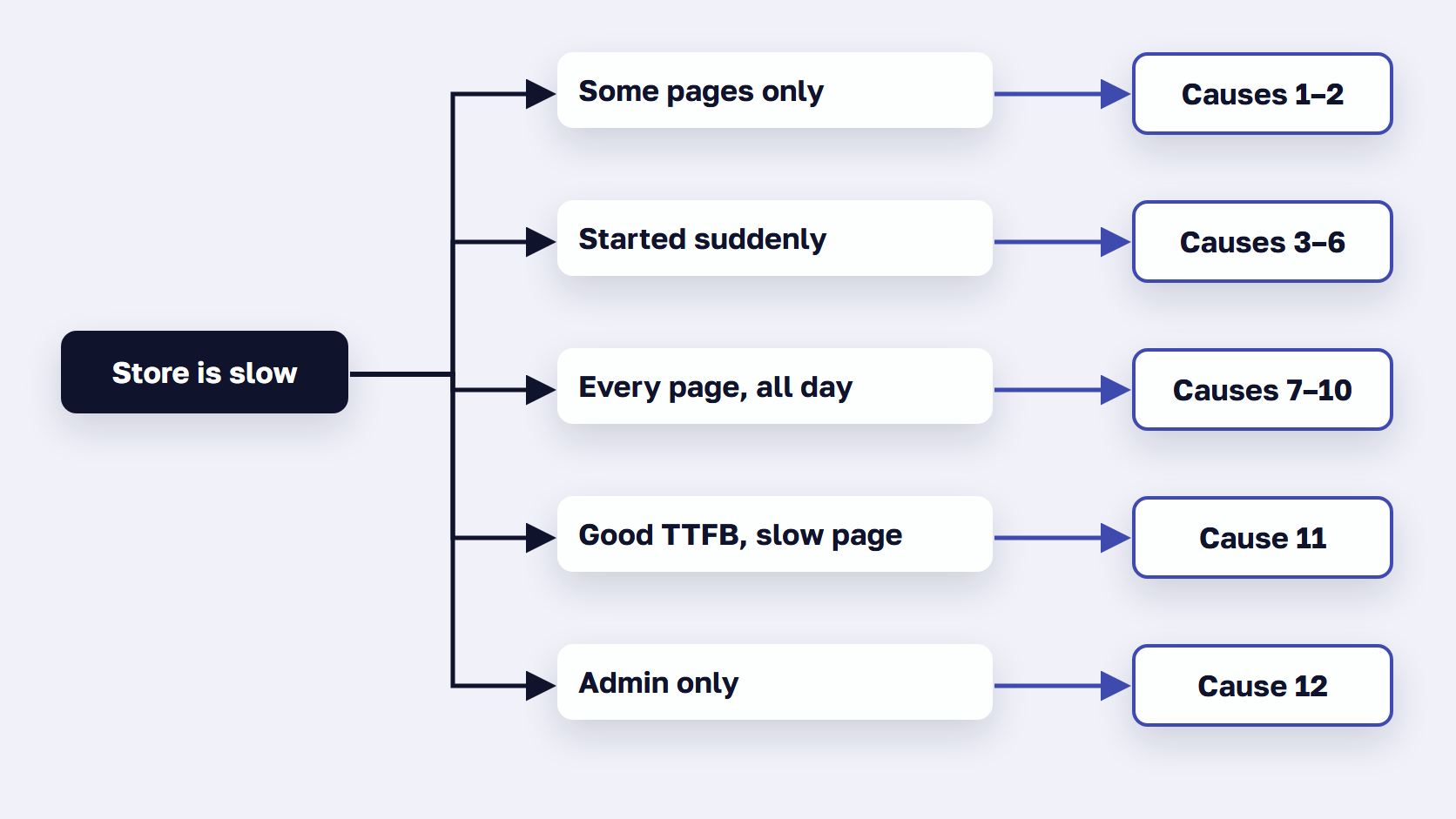
Find the row that matches what you see, then read that cause below. These are the twelve causes we meet most in Magento support work, and the last column names who on your side usually owns the fix.
| # | What you see | Likely cause | Fix | Who fixes it |
|---|---|---|---|---|
| 1 | Fast homepage, slow logged-in, filtered, search or page 2+ | Frequent cache misses expose a slow page build | Faster page build, fewer cache variants | Magento developer |
| 2 | The same anonymous page is slow every time | A cacheable="false" block or no Varnish | Varnish in front, remove cacheable="false" blocks | Magento developer |
| 3 | Slow for everyone after a deploy or flush | Cold or undersized cache | Flush by tag, deploy off-peak, size the cache | DevOps or host |
| 4 | Prices, stock or new products update late | Cron stopped, indexers behind | Restart cron, Update by Schedule | DevOps and developer |
| 5 | Slow at odd hours with no sales spike | Bots and crawlers using server capacity | Rate-limit or block at the CDN and in robots.txt | Host or DevOps |
| 6 | Slow since a new module, integration or upgrade | Extra work on every request | Profile on staging, remove or replace | Magento developer |
| 7 | Every page slow, cached ones too, even at night | Developer mode or old PHP in production | Production mode, supported PHP, OPcache | Magento developer |
| 8 | Fine at low traffic, slow at peaks | Undersized or shared server | Dedicated resources, separate tiers, autoscaling | Host |
| 9 | Category and search slow, database CPU high | Bloated tables and slow queries | Prune tables, tune MySQL, OpenSearch | Developer or DBA |
| 10 | A cache flush logs customers out, add to cart slows at busy times | Cache and sessions in one instance | Separate Valkey instances | DevOps or host |
| 11 | Good TTFB, but the page appears late or lags | Heavy theme, images and third-party scripts | Hyvä, or trim JS, images and tags | Frontend developer |
| 12 | Storefront fine, admin slow | Reindex on save, large grids, bulk jobs | Update by Schedule, smaller grids, off-hours jobs | Developer and store admin |
Two checks come before you pick a row. First, time the server response on a page that is almost always cached, such as the homepage while logged out, and on one that misses more often, such as a filtered category while logged in or a search term nobody has used. The gap between the two tells you whether the server or the browser is losing the time. Our guide on how to audit Magento performance turns that check into a routine for every page type. Second, list what changed in the last few weeks: deploys, modules, upgrades, traffic. Use field data where you have it, and our guide on how to read PageSpeed Insights explains why one lab score can mislead.
🚀 Quick takeaway
Before anyone opens the code, write down four answers: which pages are slow, whether logged in or out, since when, and at what traffic. Those answers narrow the 12 causes to two or three.
Is your Magento 2 site slow on only some pages?
If the homepage loads quickly but logged-in, filtered, search, or deeper category pages are slow, those pages are missing the cache, and each miss exposes a slow page build. A cache hit comes back from memory. A miss makes Magento build the page in PHP, and that build is where the time goes.
Two causes produce this pattern. The first is a page build that is too slow to survive without the cache. The second is a cache that fails to serve pages it should.
1. Pages that miss the cache take too long to build
Logged-in, filtered and search pages are cacheable. Magento keeps one copy of a logged-in catalog page per customer group and context, and one copy of a search results page per search term. These pages simply miss far more often than the homepage, and every miss sends the request to PHP.
Adobe’s public content documentation lists what goes into the cache key: customer group, selected language, selected store, selected currency, and whether the customer is logged in. Each combination is a separate copy of the page. Filter combinations from layered navigation multiply the copies again, a new search term has no copy yet, and page 2 and onward of a category are visited far less than page 1. Right after a deploy or a flush, everything misses.
In our support work, slow pagination and a slow catalog for logged-in customers are the two most common forms of this. Each miss makes Magento run the layout, render every block through its template, and query a database that spreads one product across many tables.
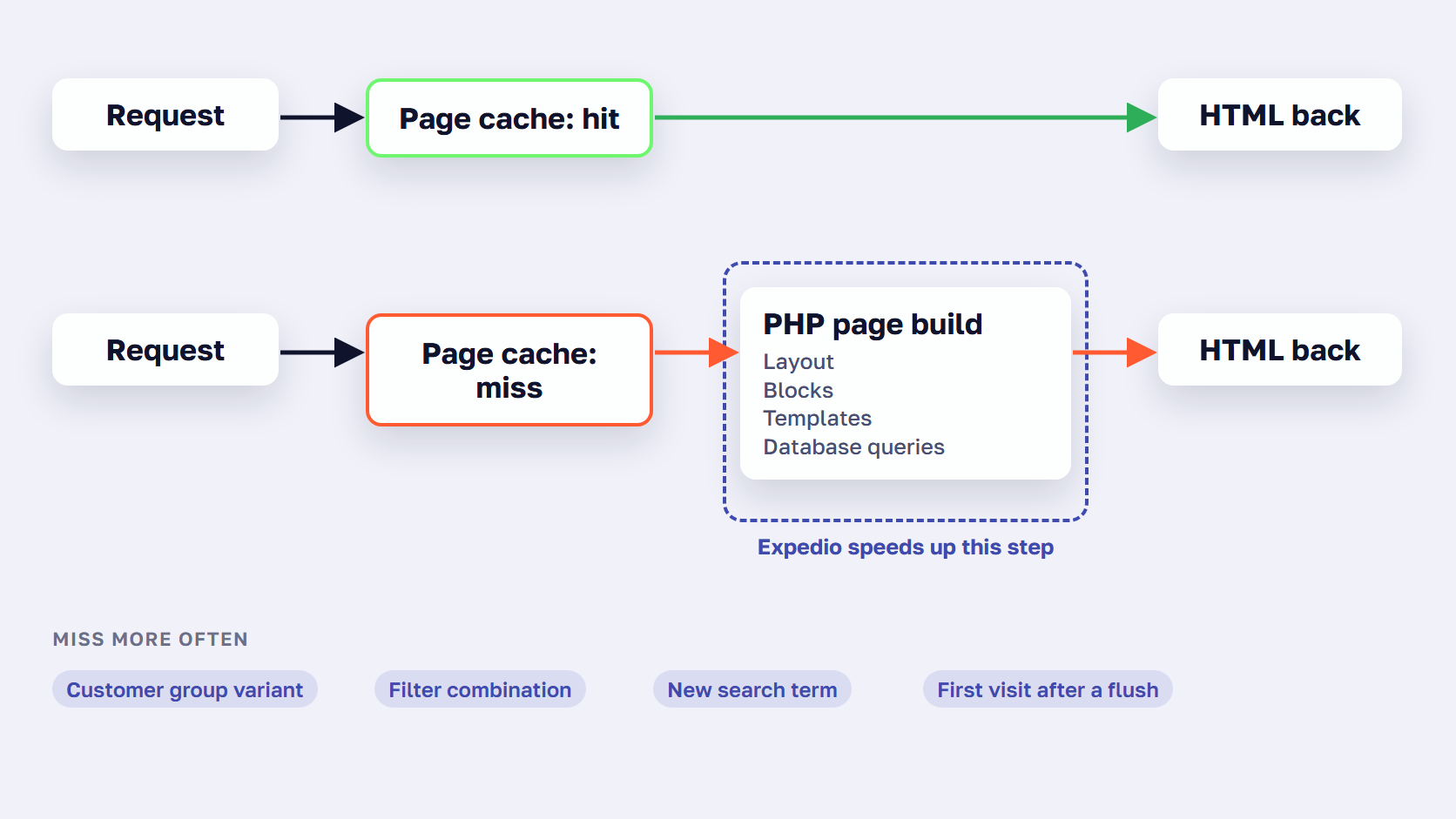
There are two fixes. Cut the number of variants, for example by merging customer groups that share the same prices and keeping filter combinations out of crawl paths. Or make the build itself faster.
Expedio is scandiweb’s open-source module that does this for Magento 2: it speeds up how Magento builds each page on the server, at least 2x, under Luma, Hyvä or a custom theme. It applies Liquid, the open-source template language created at Shopify, and runs on Magento Open Source, Adobe Commerce and Commerce Cloud, on any hosting, with ReadyMage shipping it built in. In a benchmark on one merchant’s Hyvä store, measured as server response time, category pages built with all caches empty took a median of 57 ms with Expedio instead of 181 ms, and a full category page ran 30 database queries instead of 655. The full method and numbers are in the Expedio benchmark.

Who fixes it: a Magento developer.
2. The full page cache isn’t serving pages it should
Load the same category URL twice while logged out. If the second load is as slow as the first, that page isn’t coming from the cache at all. The most common cause we find is a block marked cacheable="false" in a custom or third-party layout file. Adobe’s knowledge base article on non-cacheable pages spells out the effect: one uncacheable block makes the entire page uncacheable, so every visitor waits for the build every time. Compare, cart and checkout are uncacheable on purpose. A catalog page should never be, and this is worth checking on any slow store.
The other cause is the built-in file or database cache in place of Varnish, which Adobe describes as much slower. Only /customer and /checkout pages and POST requests are meant to bypass the Magento full page cache.
Fix: run Varnish (Fastly on Commerce Cloud), search the layout XML for cacheable="false" outside cart, checkout and compare, and move that block to private content. Our guide to the Magento full page cache shows how to check which pages miss it. Who fixes it: a Magento developer.
🚀 Quick takeaway
Adobe’s page cache keys each URL by customer group, store, currency, language, and whether the shopper is logged in. A B2B store with many customer groups keeps many copies of every page, so more requests miss the cache and wait for the page build.
Why did my Magento site suddenly get slow?
A Magento site that was fine last month and is slow now has usually changed somewhere. The common triggers are an empty cache after a deploy or flush, a stopped cron job, a wave of bots, and a new extension, integration, or upgrade. List what changed in the last few weeks before anyone touches the server.
When a Magento site is very slow all of a sudden, the cause is usually one of the four below. Each leaves a trace somewhere: a deploy log, a cron log, a server log, or a module that wasn’t installed last month.
3. A deploy or cache flush left the cache empty
Magento has two flush buttons, and they do different things. Adobe’s cache management guide explains that Flush Magento Cache removes items according to their tags, while Flush Cache Storage removes everything regardless of tag. After a full flush or a deploy, every page has to be rebuilt by PHP until the cache fills again, and shoppers feel that for as long as it takes.
A cache instance with too little memory causes the same thing all day. Valkey evicts keys once memory use passes the maxmemory limit, so a store whose pages don’t fit never gets fully warm.
Fix: prefer Flush Magento Cache, deploy outside peak hours, give the cache enough memory, and warm the top pages after each deploy. Sometimes flushing the whole cache storage is the only option, and then the timing is what you control. Who fixes it: DevOps or the hosting team.
4. Cron stopped, so indexes fell behind
Adobe’s cron guide lists what depends on cron: reindexing, all Commerce emails, currency rate updates, sitemaps, catalog price rules and newsletters. Adobe states that Commerce will not work as expected if cron is set up badly.
With indexers on Update by Schedule, a stopped cron shows up first as stale prices, stale stock and missing new products. When cron comes back, the backlog of indexing and queued jobs hits the server at once. In our support work that is often the moment a store that was only out of date becomes slow as well.
Check it with bin/magento indexer:status and bin/magento indexer:show-mode, and look at when cron last ran. Our guide to Magento indexer issues and their fixes covers the failure modes. Fix: restart cron, keep the indexers on Update by Schedule, and repair the job that failed instead of reindexing by hand. Who fixes it: DevOps and a developer.
5. Bots and crawlers are using up server capacity
Imperva’s 2025 Bad Bot Report found that automated traffic made up 51% of all web traffic in 2024 and malicious bots 37%. That is one security vendor’s data, and it doesn’t measure server load. What we see in support work is that crawlers go after deep and filtered URLs the cache rarely holds, so each request takes a PHP worker that a shopper could have used.
The symptom is a store that is slow at odd hours with no matching spike in sales. Fix: read the server logs for the top user agents and regions, rate-limit or block the heavy ones at the CDN or WAF, and block regions you don’t sell to. The Crawl-delay line in robots.txt only helps with crawlers that follow it. Google’s robots.txt documentation says Google doesn’t support it, while Anthropic’s ClaudeBot does. Leave Googlebot and Bingbot alone, then retest TTFB once the bot load is off. Who fixes it: the hosting team or DevOps.
6. A new extension or integration adds work to every request
Every extension adds something: observers, plugins, layout blocks, JavaScript. An integration that calls an ERP or a pricing service while the page builds makes every cache miss wait for that call as well. An upgrade can bring both at once, so a store that got slow after a migration or upgrade belongs in this row as much as in row 7.
Fix: profile one slow page on staging with New Relic or Magento’s profiler, disable the suspects one at a time, and remove whatever nobody uses. If you are replacing modules rather than removing them, our list of the best Magento extensions is a starting point. Who fixes it: a Magento developer.
🚀 Quick takeaway
Google ignores the Crawl-delay line in robots.txt, but some AI crawlers follow it, Anthropic’s ClaudeBot among them. Use it for those, and rate-limit everything else at the CDN.
Why is my Magento site running slow on every page?
When every page is slow, cached pages included, and it stays slow at night with little traffic, the problem is in the layers under the store: developer mode or an old PHP version in production, a server that is too small or shared, a database that keeps growing, or cache and sessions crowded into one instance.
Rule out the four causes below before anyone changes a line of code.
7. Production runs in developer mode or on an old PHP version
bin/magento deploy:mode:show answers this in seconds. Adobe’s application modes guide says production mode serves static view files from the cache only, and that default mode is not optimized for production because of the performance cost of static files. A store left in default or developer mode pays that cost on every request.
PHP matters too. Adobe lists PHP 8.5 for 2.4.9 and PHP 8.4 or 8.3 for 2.4.8. Run the version Adobe lists for your release and size OPcache for the whole codebase. Of all the Magento 2 performance issues in this list, this one is the cheapest to check. Who fixes it: a Magento developer.
8. The server is undersized or shared
The symptom is a store that is fine at low traffic and slow at peaks, with CPU or memory at its limit. Shared hosting adds other sites’ load to yours. Adobe’s guidance separates the tiers, with Varnish on its own server in front of the web tier.
Fix: dedicated resources, separate tiers for a larger catalog, and autoscaling for peaks, which we describe in server autoscaling in Magento 2. Our managed Magento hosting, ReadyMage, runs on AWS with that tuning done and Expedio built in. More hardware helps only when hardware is the limit, which is why this row comes after the ones above it. Who fixes it: the hosting team.
9. The database has grown and slow queries pile up
Magento’s EAV model spreads one product across many tables, so catalog pages are query-heavy by design. Log and quote tables grow without limit unless someone prunes them. The symptom is slow category and search pages with high database CPU.
Fix: prune the log and quote tables, size the InnoDB buffer pool to the server’s memory, watch the slow query log, and match MySQL max_connections to the number of PHP threads, as Adobe recommends. Keep catalog search and layered navigation on OpenSearch or Elasticsearch, which Adobe has required since 2.4.4. Who fixes it: a developer or a DBA.
10. Cache and sessions share one instance
The symptom is easy to recognize. A cache flush logs every customer out, and login, add to cart and checkout slow down together at busy times. Slow add to cart at peak hours is the complaint that usually brings this one to light.
Adobe’s Valkey and Redis best practices say that separating the cache from the sessions reduces contention between cache and session traffic, and Adobe’s setup guide calls for a dedicated instance each for sessions, the Commerce cache and the full page cache. On 2.4.9, and on 2.4.8 patches after p4, use Valkey, since Redis cache isn’t supported there. Who fixes it: DevOps or the hosting team.
🚀 Quick takeaway
Run bin/magento deploy:mode:show on the production server. If it answers developer, switch to production before anyone spends money on hardware.
Why does a Magento page feel slow when the server is fast?
If the server answers quickly but the page appears late or reacts slowly to taps, the time is going in the shopper’s browser. On Magento that usually means the Luma theme’s JavaScript, large images, and third-party tags. A lighter theme such as Hyvä fixes this half of the load, and server-side work leaves it as it is.
This kind of Magento slow performance is measured in the browser, and the fix is in the theme.
11. The theme makes the browser do too much
Google’s Web Vitals thresholds are the measure here: LCP within 2.5 seconds, INP of 200 ms or less, and CLS of 0.1 or less, at the 75th percentile of visits. On Luma, the main costs are dozens of RequireJS modules, large images, and third-party tags.
Hyvä rebuilds the frontend with far less JavaScript, and our guide on how to work with Hyvä covers what the move involves. If a rebuild isn’t on the table, trim Luma instead: bundle JS by page type and never merge it, serve WebP with width and height set, lazy-load images below the fold only, and audit every third-party tag.
One check before you start. If the store already moved to Hyvä and is still slow, the remaining time is on the server, which points back to cause 1. Who fixes it: a frontend developer.
Why is the Magento admin slow?
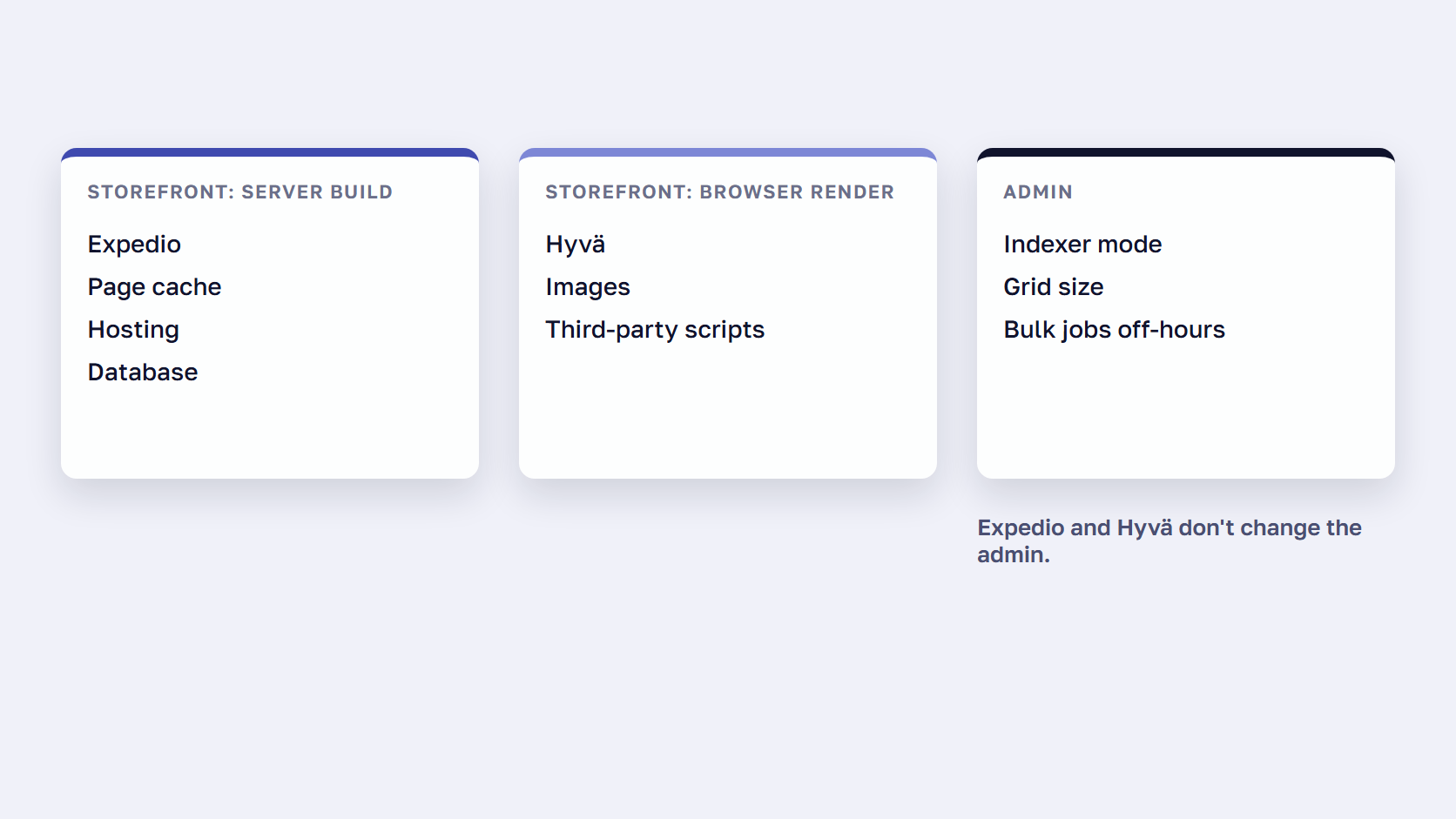
A slow Magento admin usually comes from work the admin starts or waits on: indexers that rebuild on every save, product grids that load a large catalog, bulk imports and mass updates during office hours, and extensions that load on every admin page. Storefront fixes, Expedio included, don’t change the admin.
12. Indexing, grids and bulk jobs slow down the admin
Magento 2 admin loading slow usually traces back to work the admin itself starts. With indexers on Update on Save, every change in the admin triggers a reindex, so saving a product can stall while the indexer runs. Adobe’s configuration best practices recommend Update on Schedule instead.
Large catalogs make the product grid heavy, and Adobe recommends limiting the number of products in the grid. Two more settings on that page move work to the background: asynchronous email notifications and asynchronous order grid indexing. Bulk imports, mass updates and content jobs belong outside office hours, which is what the merchant in our intro found out the slow way. Extensions that load on every admin page add up as well.
The admin panel and the storefront are different workloads, so a fast storefront tells you nothing about a slow backend. Expedio doesn’t change the admin, and neither do Hyvä or the page cache. Who fixes it: a developer, plus the store admin who schedules the bulk jobs.
🚀 Quick takeaway
If the admin is slow and the storefront isn’t, storefront fixes won’t help. Check which indexers run on save and which bulk jobs ran that day before you change the server.
Frequently asked questions about Magento performance issues
Why is Magento so slow?
Magento does a lot of work to build each page. It runs the layout, renders every block through its template, and queries a database that spreads each product across many tables. A full page cache hides that work whenever it already holds the page. When it misses, or an extension adds to the build, shoppers wait. On well-tuned hosting stock Magento answers quickly, so most slowness comes from setup, extensions, and hosting.
Why is my Magento store still slow after moving to Hyvä?
Hyvä speeds up the browser side of a page load and leaves server response time where it was. In HTTP Archive’s September 2026 data, 66% of Hyvä sites passed all three Core Web Vitals on mobile, against 45% of all Magento sites, yet both had the same 23% share of good time to first byte. If the store is still slow after Hyvä, measure server response on pages that miss the cache.
Can bots and AI crawlers slow down a Magento store?
Yes. Crawlers often request pages the cache doesn’t hold, so each request makes Magento build a page in PHP and ties up a worker that a shopper could have used. Imperva’s 2025 Bad Bot Report found that automated traffic made up 51% of all web traffic in 2024. Check server logs for the busiest user agents, rate-limit or block heavy crawlers at the CDN, and use robots.txt for the ones that follow it.
How can I tell if the server is making my Magento site slow?
Measure time to first byte (TTFB), the wait before the first byte of the page arrives. Google’s guidance calls 0.8 seconds or less good and more than 1.8 seconds poor. Test pages that miss the cache more often, such as a filtered category page while logged in, or a new search term. If TTFB is high there and low on the cached homepage, the server’s page build is the bottleneck. Our guide to reducing server response time covers each fix.
Will a bigger server fix a slow Magento site?
Only when the server is the constraint, for example when the store slows down at peaks while CPU or memory runs at its limit. More hardware lets more pages build at the same time. It doesn’t make each page build faster, so a cache miss that is slow at night stays slow. Making the build faster helps with both. Expedio, for example, lets the same server handle 3x the traffic before response times start to rise.
What should I check first when my Magento site is slow?
Start with the checks that take minutes. Run bin/magento deploy:mode:show to confirm the store is in production mode, run bin/magento indexer:status and check that cron is running, and compare TTFB on a cached page with a filtered or logged-in page. Then list the deploys, new modules and upgrades from the last few weeks, and check the server logs for crawler traffic.
Fixing Magento performance issues starts with the symptom
Magento performance issues are quicker to fix once you know which kind you have. Start from the symptom, check what changed, and separate server time from browser time before anyone buys hardware or rebuilds a theme.
Slow on some pages only points to causes 1 and 2. A sudden change points to causes 3 to 6. Slow everywhere, all day, points to causes 7 to 10. A fast server with a page that appears late is cause 11, and a slow admin with a fine storefront is cause 12. Most stores match one or two rows, and a fix aimed at the wrong row costs money without moving the numbers.
Once you know the cause, our guide on how to speed up Magento lists all 15 fixes in the order we apply them, from the server to the browser.
If your store matches more than one row, tell us what you're seeing and we'll help you work out which cause to fix first.




































