
You are the person who gets asked whether your online store is secure, and a Magento security checklist is what you reach for when “I think so” stops being an answer.
Sometimes the question follows the news. On September 7, 2026, SecurityWeek reported that attackers were using a zero-day, a flaw attacked before a fix exists, to backdoor Adobe Commerce and Magento Open Source stores. A board member who reads that asks about yours.
Other times it comes on a form. The self-assessment questionnaire (SAQ) a merchant fills in for PCI DSS, the card industry’s security standard, can ask who approved each script your checkout page loads.
Which parts of your store can you show are secure today, and when did anyone last check?
What do you check to know your Magento store is secure?
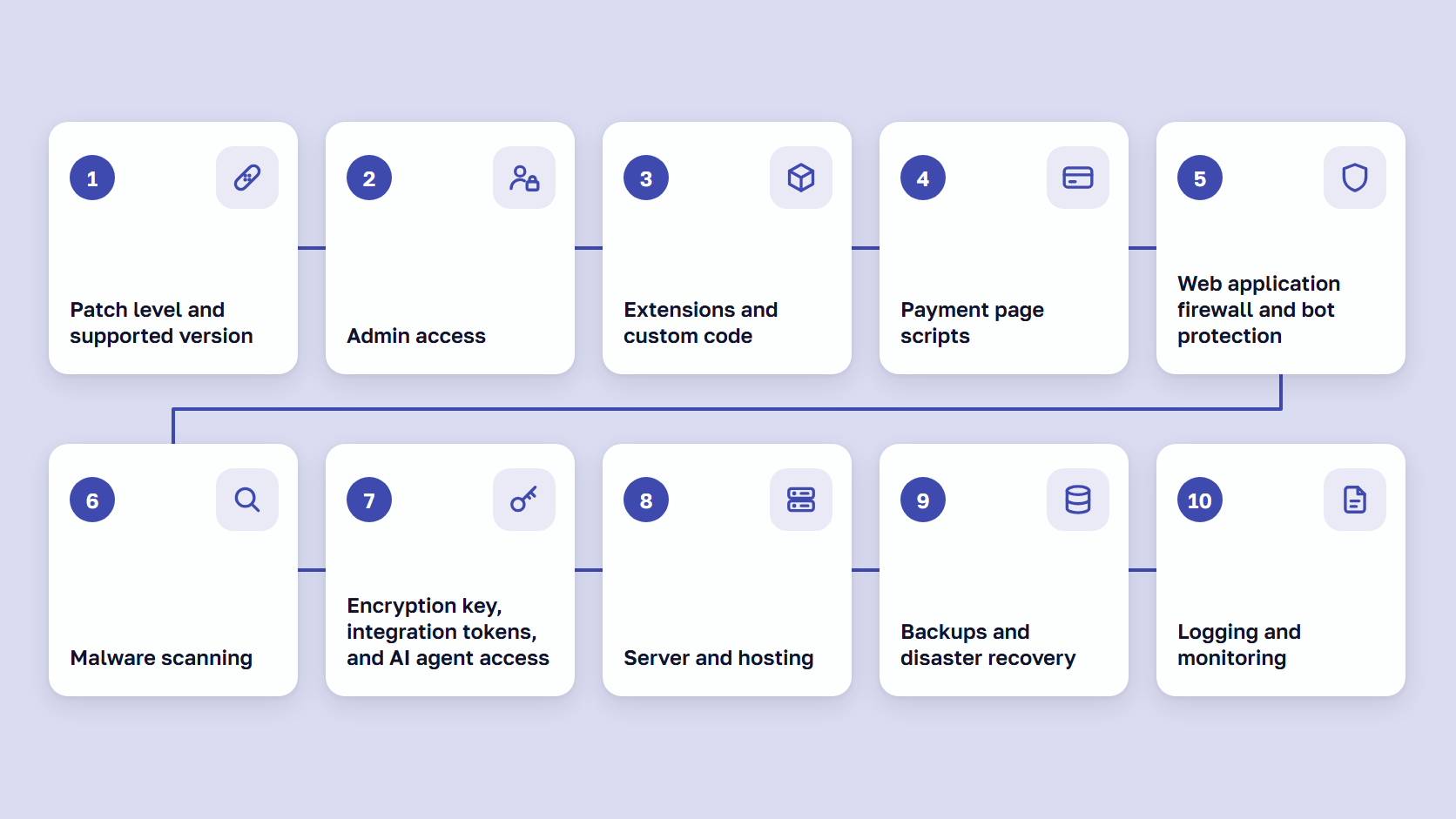
To know a Magento (Adobe Commerce) store is secure, check ten areas, with a way to verify each check and an interval. They follow the order of our Magento security best practices post, which explains how to set each one up.
- Patch level and supported version
- Admin access
- Extensions and custom code
- Payment page scripts
- Web application firewall and bot protection
- Malware scanning
- Encryption key, integration tokens, and AI agent access
- Server and hosting
- Backups and disaster recovery
- Logging and monitoring
Verifying, in our view, means dated evidence: a command’s output, an Admin screen, or a report. A setting someone remembers switching on does not count. Settings drift, and Adobe’s Security Scan Tool flags a disabled two-factor authentication module, the code that adds a second sign-in step.
Adobe’s security best practices trace most compromised sites to known flaws nobody patched, weak passwords, and loose file permissions. In our 2019 security study of about 13,000 stores on the now-retired Magento 1, 2.18% had their configuration file open to anyone and 1.65% had a customer export file reachable from the web.
Our Magento 2 security guide explains the risks and who owns each task.
🚀 Quick takeaway
Pick one row you believe is done, such as two-factor authentication, and ask for its evidence today. If nobody can show it, the row is open.
The Magento security checklist, area by area
The Magento security checklist has 31 checks in ten tables, each with how to verify it and how often. In the last column, “(Adobe)” and “(PCI DSS)” mean that source sets the interval, and “(our advice)” marks scandiweb’s recommendation where neither gives one.
Downloads
Take the same 31 checks into your next review: print the PDF, or track owners, dates and results in the spreadsheet.
1. Patch level and supported version
Adobe’s monthly security patch policy calls for the latest -p (security-only) release plus every monthly patch since, and the Commerce Version Tool reports each CVE, a security hole’s public ID. Our guide covers Magento end of life dates.
| Check | How to verify | How often |
|---|---|---|
| Your Magento version still gets security fixes | Read the version in the bottom-right corner of any Admin page, or run bin/magento --version. Compare it with the end dates in Adobe’s lifecycle policy. | Every quarter, and six months before your version’s end date (our advice) |
| The latest -p release and every monthly patch since are installed | Run php vendor/bin/patch-status. The missing_patches list is empty and every CVE shows PROTECTED. On Adobe Commerce on cloud infrastructure, also check the Cloud Patches version. | Monthly, after Patch Tuesday, the second Tuesday of the month (Adobe) |
| Emergency hotfixes are applied, and a named person hears about them | A team inbox is subscribed to the Adobe Security Notification Service. Every hotfix bulletin since your last -p release matches a deployed patch. | The day a hotfix bulletin arrives (our advice) |
2. Admin access
Two-factor authentication (2FA) has been on by default in the Magento Admin since 2.4.0. With Adobe IMS sign-in on Adobe Commerce, the Adobe organization enforces 2FA instead.
| Check | How to verify | How often |
|---|---|---|
| Two-factor authentication is on for every admin user | Run bin/magento module:status Magento_TwoFactorAuth and confirm the module is enabled. Check the required providers at Stores > Settings > Configuration > Security > 2FA. With Adobe IMS sign-in, check 2FA in your Adobe organization instead. | Monthly (our advice) |
| Every admin account belongs to one current person, with only the role they need | System > Permissions > All Users: no shared or generic logins, no accounts of people who have left, and an expiration date on temporary users. Open each user’s User Role tab. | Quarterly, and the day someone leaves (our advice) |
| Admin security settings have not drifted | Stores > Settings > Configuration > Advanced > Admin > Security: Admin Account Sharing is No, a lockout after failed logins is set, and Password Lifetime is set. Run bin/magento info:adminuri to confirm the Admin path is not the default. | Quarterly (our advice). Adobe recommends changing passwords at least every 90 days. |
3. Extensions and custom code
Our post on choosing Magento security extensions covers vetting. Composer’s audit command checks packages against the Packagist.org advisory database, and we do not know how many Marketplace extensions have advisories there, so treat a clean result as a minimum.
| Check | How to verify | How often |
|---|---|---|
| Every installed module is known and still needed | Run bin/magento module:status --enabled and composer show. Match the output to a list your team approved, and remove what nobody can name. | Monthly, with the patch slot (our advice) |
| No installed package has a known flaw or a pending security update | Run composer audit and composer outdated. For extensions that are not on Packagist, check the vendor’s release notes. | Monthly, and when a vendor announces a fix (our advice) |
| Production code matches version control | A developer compares the code on the production server with the repository. Every file that differs is explained or removed. | Monthly (our advice), and at once after a suspected break-in (Adobe) |
4. Payment page scripts
The PCI Security Standards Council’s guidance explains requirements 6.4.3 and 11.6.1, and our PCI DSS SAQ guide shows which questionnaire applies to how your checkout takes card data. Adobe’s Content Security Policy developer guide covers CSP, the list of sources a browser may run scripts from. Subresource Integrity (SRI) is a fingerprint the browser checks before running a script.
| Check | How to verify | How often |
|---|---|---|
| Content Security Policy is enforced and Magento’s scripts carry SRI hashes on checkout | Open the checkout with the browser’s developer tools. The page response has a Content-Security-Policy header, not only Content-Security-Policy-Report-Only, and Magento’s script tags show an integrity attribute. Restrict mode on payment pages is the default since 2.4.7. | After every deployment (our advice) |
| CSP violation reports reach someone | A Report URI is set at Stores > Settings > Configuration > Security > Content Security Policy, and a named person reads what arrives there. | Weekly (our advice) |
| Every checkout script is listed, approved, and has a written reason (PCI DSS 6.4.3) | Compare the scripts the checkout loads (developer tools, Network tab, JS filter) with your script inventory. Each script has an owner and a business or technical reason. | Whenever a script is added or changed (PCI DSS) |
| A tamper alert covers the checkout’s headers and scripts (PCI DSS 11.6.1) | A change- and tamper-detection tool checks the headers and scripts the browser receives on the payment page and alerts a named person. Make one test change and confirm the alert arrives. | At least weekly, or at the interval in your targeted risk analysis (PCI DSS). Test the alert quarterly (our advice). |
5. Web application firewall and bot protection
A web application firewall (WAF) blocks known attack patterns. Adobe’s Fastly WAF page says the cloud WAF has no rate limiting (a cap on requests per visitor), and our Magento fraud prevention guide covers reCAPTCHA against card testing.
| Check | How to verify | How often |
|---|---|---|
| A web application firewall filters traffic to the store | Adobe Commerce on cloud infrastructure: the Fastly WAF is active on production. Self-hosted: your host or CDN shows the active WAF policy and last week’s blocked requests. | Monthly, and the day an exploited Magento flaw is announced (our advice) |
| Bots are rate-limited on login, checkout, and coupon codes | Your CDN or WAF shows rate-limit rules for those pages. On cloud, the Fastly WAF has no bot mitigation or rate limiting, so confirm Adobe’s Advanced Security add-on or your own rules. | Quarterly (our advice) |
| reCAPTCHA protects admin sign-in and the forms bots target | Stores > Settings > Configuration > Security > Google reCAPTCHA Admin Panel (Admin Sign In, Forgot Password) and Google reCAPTCHA Storefront (Customer Login, Create New Customer Account, Checkout/Placing Order, Coupon Codes). | Quarterly, and after any admin lockout is fixed (our advice) |
6. Malware scanning
Adobe’s Security Scan Tool is free for both editions and tests the store from outside, and our post explains what the scan checks and misses. A CMS block is content the store reuses across pages.
| Check | How to verify | How often |
|---|---|---|
| The Security Scan Tool runs on every domain, and someone reads the report | In your Commerce or Magento account, under Security Scan: every storefront domain is verified, a weekly scan is scheduled, and every Failed item in the latest report has an owner. Review anything marked Ignore. | Weekly (Adobe) |
| A server-side scanner checks files and the database | The scanner’s latest report covers code, media folders, and database content such as CMS blocks, and its alerts reach a named person. | Daily (our advice) |
| No unknown code where skimmers hide | Content > Elements > Blocks, and Content > Design > Configuration for every store view (HTML Head > Scripts and Style Sheets, Footer > Miscellaneous HTML), hold only scripts your team added. pub/media holds no PHP files. | Weekly (our advice) |
7. Encryption key, integration tokens, and AI agent access
An integration is a connection another system or an AI agent uses to reach store data, and Adobe’s token documentation says its token works until revoked. The encryption key protects stored credentials such as payment and API keys.
| Check | How to verify | How often |
|---|---|---|
| Every integration, including each AI agent, has an owner and only the access it needs | System > Extensions > Integrations: every Active integration has a named owner and Resource Access set to Custom. Delete the ones nobody uses, because an integration token lasts until it is revoked. | Monthly, and when a supplier or agent changes (our advice) |
| Token settings are still at their safe defaults | Stores > Settings > Configuration > Services > OAuth: “Allow OAuth Access Tokens to be used as standalone Bearer tokens” is No, and the admin token lifetime under Access Token Expiration has not been raised above the 4-hour default. | Quarterly (our advice) |
| The encryption key and credentials are rotated after any exposure, and keys stay out of code | Your change log shows when bin/magento encryption:key:change last ran (command line only since 2.4.8) and which credentials were rotated with it. A secret scan of the repository and of AI agent configuration files finds no keys. | After any incident or suspected exposure (Adobe), and the secret scan monthly (our advice) |
8. Server and hosting
By our reading of Adobe’s system requirements and PHP’s supported versions, a store on Magento 2.4.4, 2.4.5, or 2.4.6 running PHP 8.1 gets no PHP security fixes. Magento’s three modes are default, developer, and production.
| Check | How to verify | How often |
|---|---|---|
| The store runs a PHP version that both Adobe and PHP still support | A developer confirms the PHP version the store runs and compares it with Adobe’s system requirements for your Magento version and PHP’s own end dates. PHP 8.1 lost security fixes on December 31, 2025, and PHP 8.2 loses them on December 31, 2026. | Quarterly, and before each PHP end date (our advice) |
| Production runs in production mode | bin/magento deploy:mode:show returns production. | After every deployment (our advice) |
| Code folders are read-only and env.php is closed | Self-hosted: vendor, app/code, app/etc, pub/static, generated/code, generated/metadata and var/view_preprocessed have no write access in production, and app/etc/env.php has no permissions for other users. On cloud infrastructure, environments are read-only by design. | After every deployment (our advice) |
| No development leftovers are reachable | From outside your network, request /.git/HEAD, any phpinfo file, database dumps, and log files. Each returns 403 or 404. | Monthly (our advice) |
9. Backups and disaster recovery
Magento’s built-in backup is deprecated, and Adobe warns that rolling back to a backup “can silently fail, resulting in incomplete data being written.”
| Check | How to verify | How often |
|---|---|---|
| Backups run and are stored away from the store’s server | Self-hosted: your backup tool’s log shows a recent successful database and media backup (Magento’s built-in backup is deprecated). Cloud: Pro staging and production get automatic backups, and on Starter and integration environments magento-cloud snapshot:list shows your own. | Weekly look at the latest successful backup (our advice) |
| A restore works, and a written recovery plan names who does what | Restore the latest backup to a staging copy and place a test order. The disaster recovery plan names who restores and which credentials get rotated, and it notes how long the last restore took. | Restore test quarterly and before every upgrade, plan review yearly (our advice) |
10. Logging and monitoring
Adobe’s Action Logs report records each admin action with the time, IP address, username, and result. Only Adobe Commerce has Action Logs.
| Check | How to verify | How often |
|---|---|---|
| Admin actions are logged and reviewed | Adobe Commerce: System > Action Logs > Report, with Admin Actions Logging on. Magento Open Source has no Action Logs, so review the web server’s access logs for Admin URLs instead. | Weekly (our advice) |
| No unknown or locked admin users | Compare System > Permissions > All Users with last week’s list, and check System > Permissions > Locked Users for lockouts that may point to password guessing. | Weekly (our advice) |
| Alerts reach a named person, and logs go back far enough to trace an intrusion | Send a test alert from the scanner, the CSP reports and the tamper tool, and confirm a person received each one. Check the date of your oldest available log. | Quarterly (our advice) |
🚀 Quick takeaway
Write a name in the Owner column of the download before the first run. Rows without a name are the ones that get skipped.
How to check if your Magento store is secure, step by step
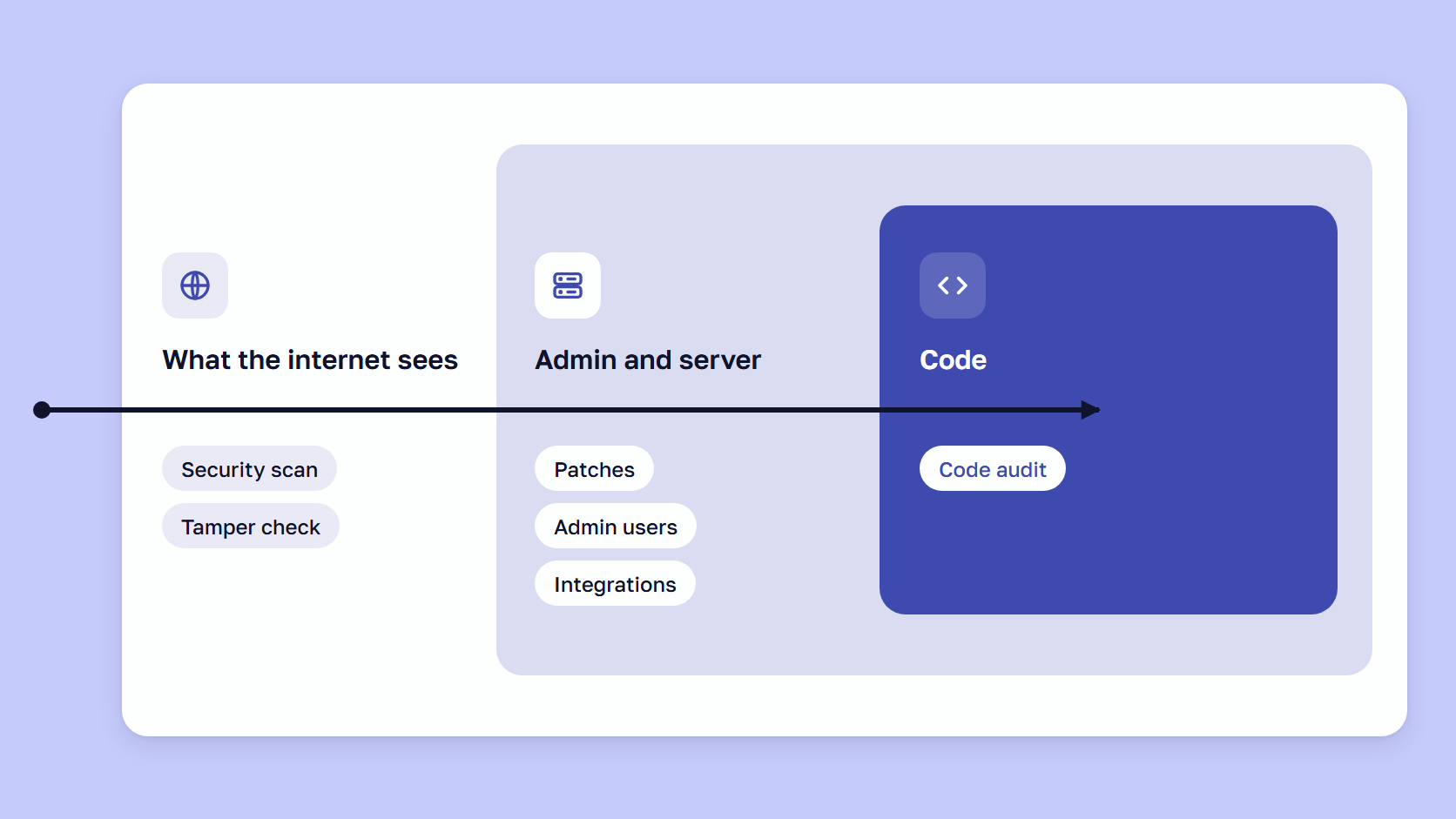
To check if your Magento store is secure, work from the outside in: the Security Scan Tool report first, then patches, admin access, integrations, the checkout, the server, backups, and logs. Admin rows need no developer, and command-line rows need one with server access.
- Read the latest Security Scan Tool report, which tests what the internet sees.
- To check Magento security patches, have a developer run
php vendor/bin/patch-status. If the command is missing, the July 2026 patch is not installed, so apply a Magento security patch. - Review admin accounts and confirm two-factor authentication is still on.
- Confirm every Active integration, AI agents included, has an owner.
- Compare the checkout’s headers and scripts with your script inventory.
- Give the server rows to a developer, and the firewall and backup rows to your host.
- Test that every alert reaches a named person.
For every Magento security check, we advise saving the output or screen with the date and the name of whoever ran it.
During StyleSmuggler in September 2026, our team backed up each store before any change, then ran the live exploit on every store twice, once to see it work and once after deploying a protective shield, to see it fail. The team’s post on how we responded to StyleSmuggler says: “The verification step is the one that’s easiest to skip under pressure and the one that matters most.” It adds that a missing warning sign is not proof a store is clean.
🚀 Quick takeaway
Put the date in each evidence file’s name, so next quarter’s run starts with a comparison.
How often to check Magento security
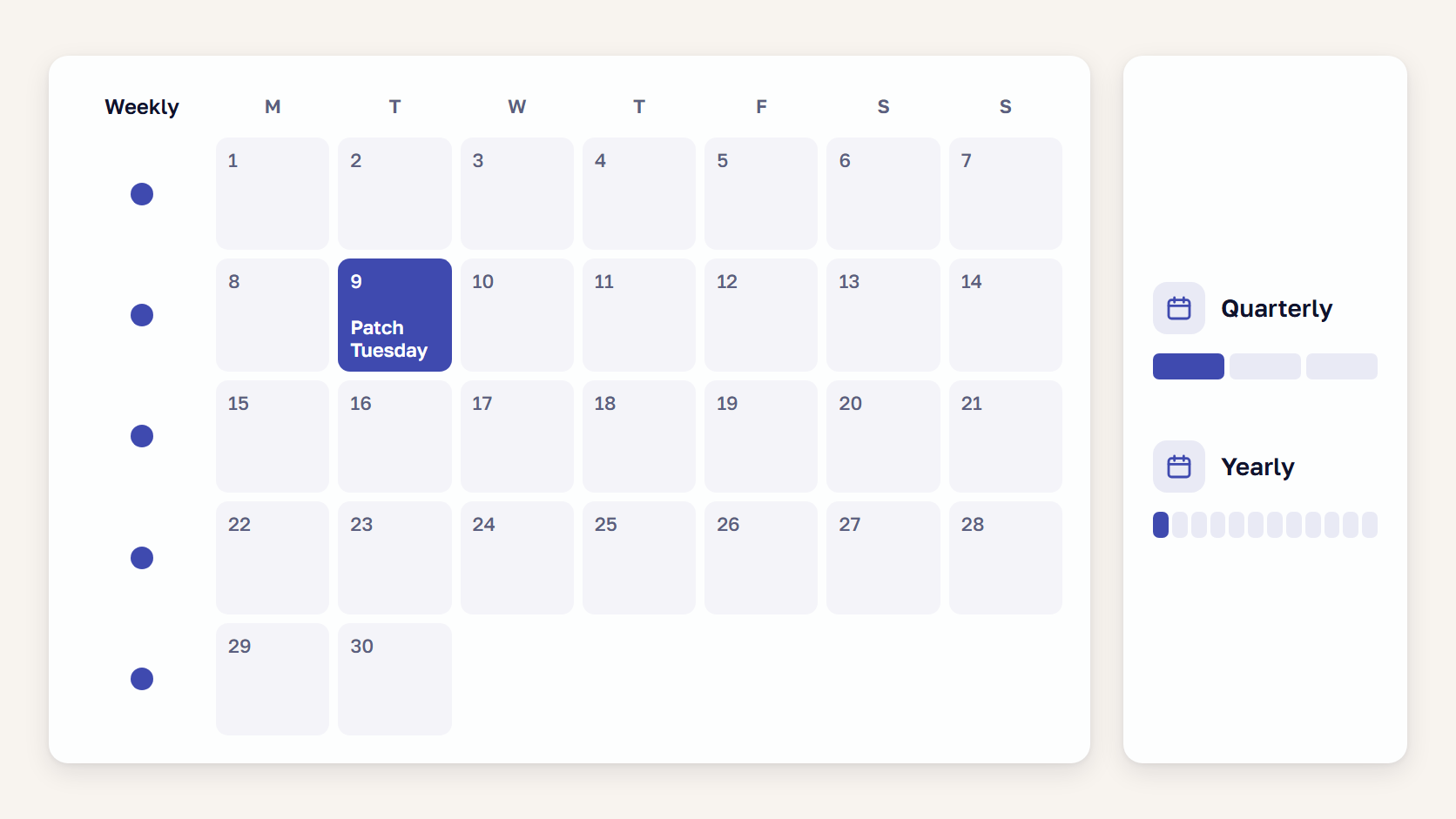
Check Magento security weekly for the Scan Tool report, the payment page tamper check, and admin users, and monthly after Patch Tuesday for patches, extensions, and integrations. Review access and test a restore quarterly, book a full audit yearly, and check at once after these events.
- An Adobe hotfix bulletin arrives
- Someone with Admin access leaves
- A new extension or checkout script goes live
- You suspect a break-in, in which case Adobe says to compare the code with version control (your code’s repository), reset all credentials, and keep monitoring
- An upgrade or re-platforming is coming up
- You take over a store from another team
For the tamper check, PCI DSS lets a targeted risk analysis, a documented risk assessment, replace the weekly default.
A clean result shows Magento store security on the day it was produced. Sansec’s CMS block loader research of October 24, 2026, describes a Magento 2.4.7-p10 store with no missing core patches, reinfected one hour after a clean scan by a skimmer loader in its CMS block table. Adobe’s incident guidance warns that many sites are compromised again within hours.
🚀 Quick takeaway
Put the Scan Tool report and the payment page tamper alert in the same weekly slot, read by the same person.
When is a Magento security checklist not enough?
A Magento security checklist is not enough when the question is about custom code, a backdoor planted before a patch went on, or whether your customized store can be broken into. It can only confirm settings, versions, and whether controls are present.
Our Magento code audit guide recommends a full audit at least once a year, before any migration or upgrade, and when you inherit a store, plus a lighter security check after every major Adobe security bulletin.
Our Magento security audit reviews patch status and access controls and flags anything that exposes customer data. It takes one to two weeks on read-only access and ends in one written report ranking each finding by priority, with the cost to fix it.
🚀 Quick takeaway
Book the yearly audit before your next upgrade or re-platforming decision, so its report can shape that budget.
Frequently asked questions
What should a Magento security checklist include?
A Magento security checklist should cover patch level, admin access, extensions, payment page scripts, the firewall, malware scanning, keys and tokens, the server, backups, and logs. Every check needs a way to verify it and an interval, and this page holds 31 checks.
How do I check if my Magento store is secure?
Start with the latest Security Scan Tool report, which shows what the internet sees of your Magento store. A developer then runs php vendor/bin/patch-status, and you review admin users, two-factor authentication, integrations, and checkout scripts. A store without a developer can still do every Admin row.
How often should I run a security check?
On a Magento store, read the scan report and the payment page tamper alert weekly, and verify patches monthly after the second Tuesday. Access reviews and a restore test are quarterly, a full audit yearly. A hotfix bulletin or a departing admin user means checking that day.
Does the checklist differ for Magento Open Source and Adobe Commerce?
Most rows are identical on Magento Open Source and Adobe Commerce. Action Logs and Adobe IMS sign-in are Adobe Commerce only, and the Fastly WAF comes only with Adobe Commerce on cloud infrastructure. Adobe’s October 2026 Open Source patch files cover 2.4.7 and later only.
Main takeaway
A Magento security checklist answers “is our store secure?” only for the day someone last ran it, so give it a schedule. Book the weekly, monthly, quarterly, and yearly rows as recurring slots, and agree who reacts when an event trigger happens.
Start from the ten tables above, or from the PDF and the spreadsheet if you want owner and date columns. Go through the 31 rows once and write down who owns each one and where its evidence is saved.
Some rows will have no owner yet. Close those first, because nobody has been verifying them. Once every row has a name and dated evidence, the next person who asks whether the store is secure gets an answer you can show.
If some rows have no owner or no evidence, send us your checklist with those rows marked, and we will tell you which ones to close first.





























Share on: