
Ask ChatGPT for the best rattan chair under €300 and it answers with a row of product cards: photos, prices, ratings and a link to buy. Most of the stores in that row never applied for anything, and some stores that would sell the perfect chair are missing because their IT team blocked a bot two years ago. Both facts point to the same thing: ChatGPT shopping works from the data it can reach, and you decide most of that data.
This guide covers how ChatGPT chooses products, the routes into it for Shopify, Magento and other platforms, what Google AI Mode needs, and which AI crawlers to allow or block.
What is ChatGPT shopping?
ChatGPT shopping is the set of features that show product results inside ChatGPT when someone asks for buying advice: product cards with images, prices, reviews and links to buy, plus a guided shopping research mode for bigger purchases. OpenAI says the results are chosen independently and are not ads. Since March 2026, most purchases finish on the merchant’s own website.
The features arrived in stages. Product results appeared in ChatGPT search in 2025, and shopping research, which asks follow-up questions and builds a buyer’s guide, launched in November 2025. In September 2025, OpenAI added Instant Checkout, so shoppers could pay without leaving the chat. That part was scaled back in March 2026. Shoppers researched in ChatGPT and then preferred to buy on the retailer’s site, so checkout moved back to merchant websites and merchant apps inside ChatGPT. Our earlier guide to agentic commerce explains how Instant Checkout worked.
For a store, this changes the job. ChatGPT is now mainly a discovery and referral channel, much like a search engine with a product carousel, and the work is getting your products into that carousel with accurate data.
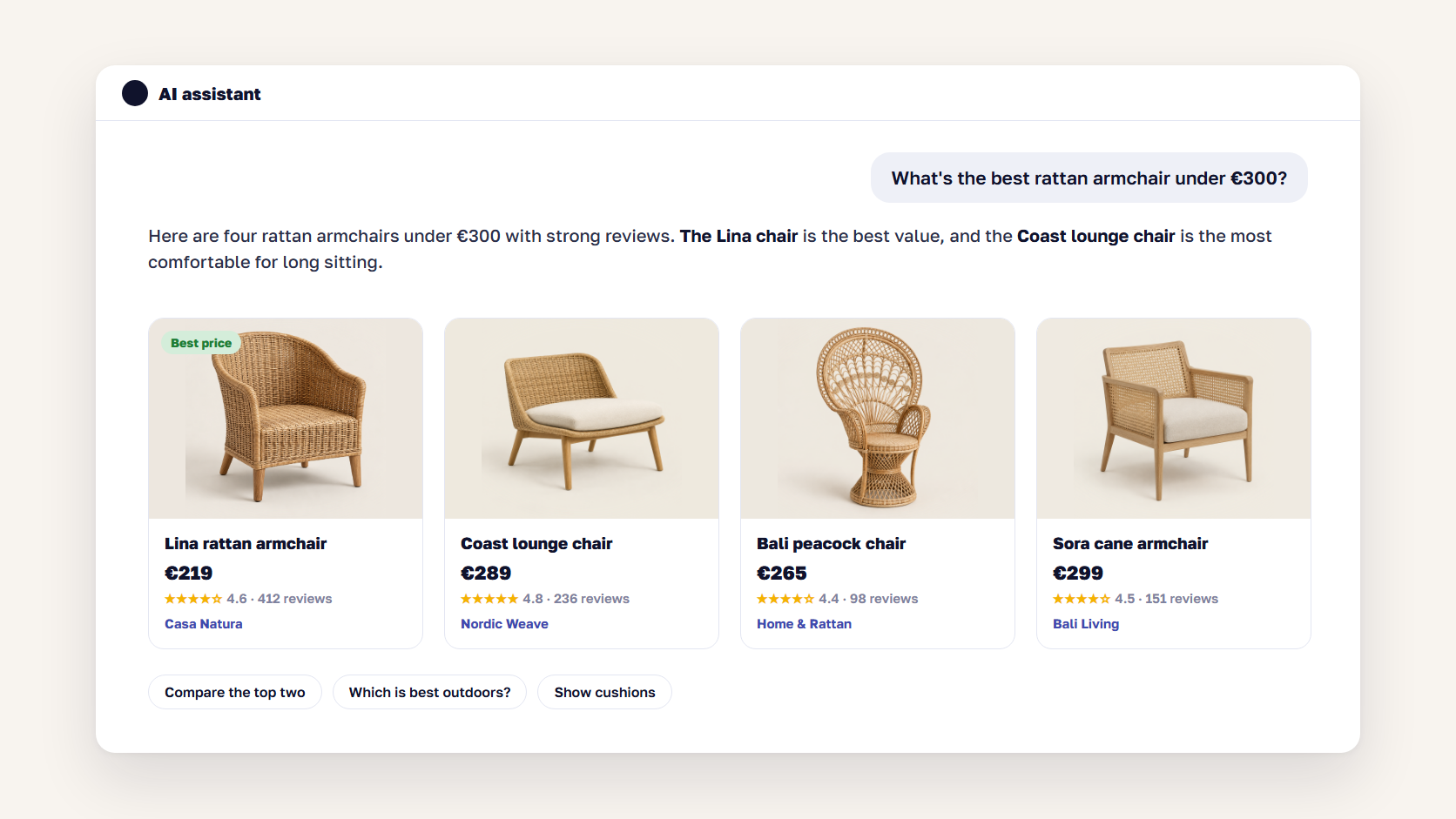
How ChatGPT chooses which products and stores to show
ChatGPT picks products by how well they match the question and what it knows about the shopper, then ranks the stores that sell each product. OpenAI’s help pages name availability, price, quality and whether the store makes or mainly sells the item as factors. The data comes from crawled web pages, third-party data providers and product feeds that merchants send directly.
Four details in OpenAI’s documentation matter for merchants:
- Product choice and store choice are separate steps. A product can appear while your store is missing from its list of sellers, so check both.
- Price and availability carry weight. When several stores sell the same item, the cheapest in-stock offer can get a “Best price” label.
- Data can lag. OpenAI warns that prices and shipping details shown in ChatGPT may be out of date, which is why a frequently refreshed feed beats a page that gets crawled now and then.
- Brands get credit for making the product. Whether you make or primarily sell the item is a ranking factor, which helps D2C brands against resellers.
🚀 Quick takeaway
ChatGPT ranks the stores that sell a product as well as the product itself. If a reseller has a fresher price and stock status than you, it can take the click for your own product.
How to get listed in ChatGPT shopping
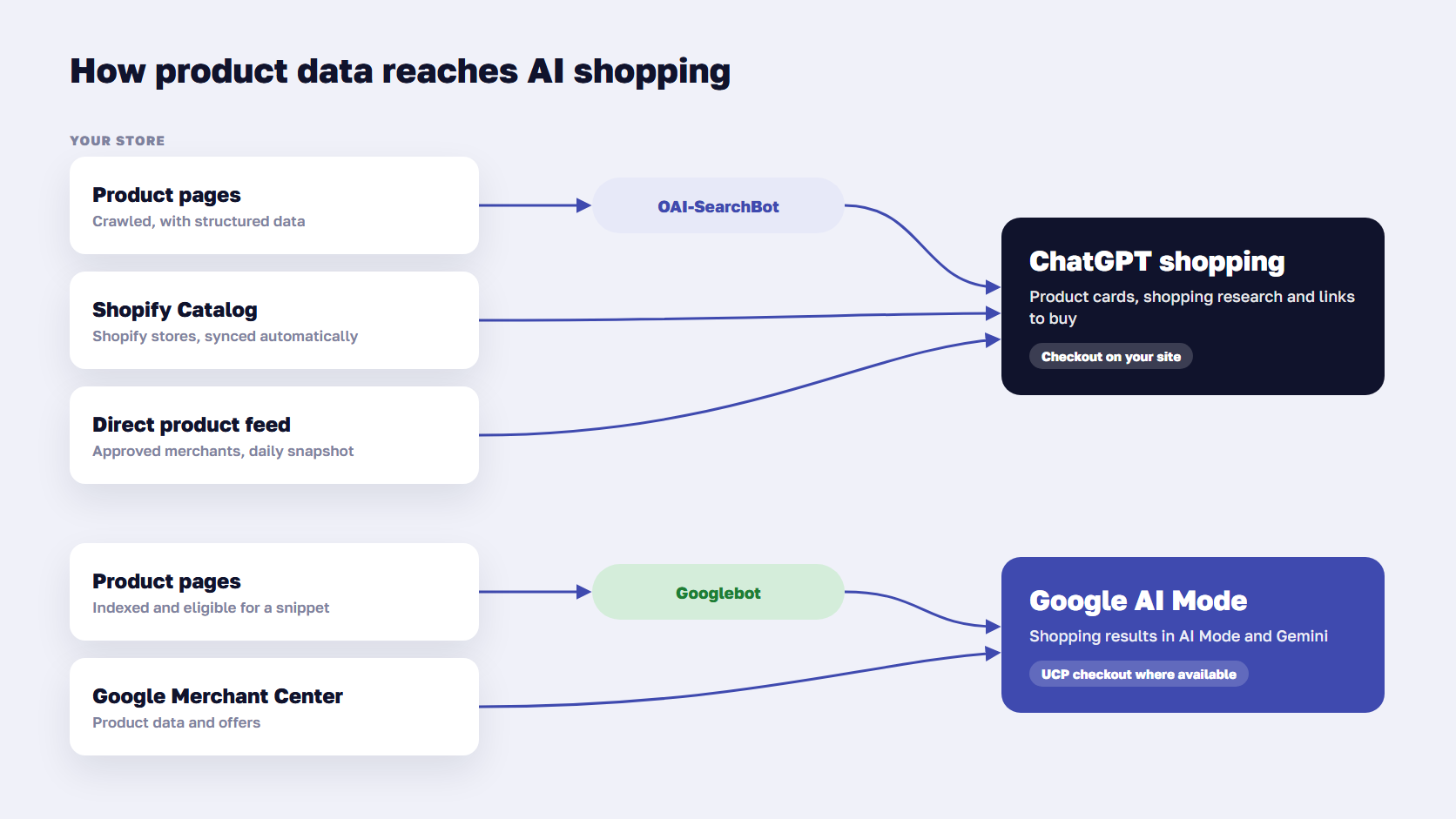
There are three ways to get listed in ChatGPT shopping. Let OpenAI’s search crawler, OAI-SearchBot, read your product pages. Sell on Shopify, which sends your catalog to ChatGPT through Shopify Catalog. Or apply at chatgpt.com/merchants to send a product feed directly, which OpenAI currently opens to approved partners. Paid product ads from a feed are a fourth, separate option.
| Route | Who it fits | What you do | Freshness |
|---|---|---|---|
| Crawling by OAI-SearchBot | Every store | Allow OAI-SearchBot, keep product pages and structured data accurate | Depends on how often pages are recrawled |
| Shopify Catalog | Shopify stores | Keep the ChatGPT channel switched on in Shopify admin | Synced by Shopify |
| Direct product feed | Approved merchants and partners | Apply at chatgpt.com/merchants, then send a daily feed | Daily snapshot plus API updates |
| Product feed ads | Advertisers | Upload a feed in OpenAI’s Ads Manager, open beta | Paid placement, labeled as an ad |
Shopify stores
Shopify sends merchants’ products to ChatGPT through Shopify Catalog, and OpenAI’s help pages say individual merchants don’t need to do anything extra. Since March 2026, this runs as Shopify’s Agentic Storefronts channel, which is switched on by default and managed in the Shopify admin. Shoppers who tap a product finish the purchase on your own storefront, and the orders appear in Shopify like any other sales channel.
Being in the catalog is only the starting point. Your product titles, descriptions, variants and images are what ChatGPT reads, so the Shopify SEO checklist applies here too.
Magento, Adobe Commerce and other platforms
Magento and Adobe Commerce have no built-in ChatGPT channel. Stores on these platforms get in through crawling, and the larger ones through a direct feed once OpenAI approves them. A feed usually comes from a feed management tool or a custom export that maps your catalog to OpenAI’s schema, the same way you’d build a Google Shopping feed. If you’d rather not build that mapping yourself, it’s part of our product feed management work.
What goes in a ChatGPT product feed
OpenAI’s commerce documentation sets out how a direct feed works:
- Delivery: a full catalog snapshot pushed by SFTP at least once a day, with API updates during the day for price and stock changes
- Formats: Parquet preferred, with compressed JSONL, CSV and TSV also accepted, up to about 500,000 items per file
- Content: product ID, title, factual description, product URL, price, availability, images, barcodes such as GTINs, categories and seller details
- Variants: one row per size or color, with variant options filled in, so each purchasable item has its own price and stock
- Removal: a product that drops out of the feed stays visible for up to 14 days, so set it as ineligible for search if it must disappear sooner
- Tracking: add a parameter such as utm_medium=feed to product URLs so feed clicks show up separately in analytics
OpenAI also says required fields make prices and availability display correctly, while extras such as rich media and reviews improve ranking. Start with a sample of about 100 products, fix the validation errors, then send the full catalog.
🚀 Quick takeaway
If you already run a clean Google Shopping feed, most of the ChatGPT feed work is already done. The new part is mapping fields to OpenAI’s schema and delivering it daily.
How products get into Google AI Mode shopping
Google AI Mode shows products from the same sources as Google Shopping: pages Google can crawl and index, and product data in Google Merchant Center. Google says there are no extra requirements and no special markup for AI Mode. Keep Merchant Center accurate, make your structured data match the page, and keep Googlebot unblocked.
Google’s own guidance on AI features is blunt about it: a page has to be indexed and eligible for a snippet, and you don’t need new files, AI text files or special schema. Good product structured data still helps, as long as it matches what the page shows.
Checkout is where Google is moving faster than OpenAI. In January 2026, Google introduced the Universal Commerce Protocol (UCP), built with Shopify, Etsy, Wayfair, Target and Walmart, so shoppers can buy in AI Mode and Gemini while the retailer stays the merchant of record. In May 2026, Google announced a Universal Cart with Google Pay checkout, plans to bring UCP checkout to Canada and Australia and later the UK, and an AI performance report in Merchant Center that shows how your brand appears on AI surfaces.
| ChatGPT shopping | Google AI Mode shopping | |
|---|---|---|
| Main data sources | Crawled pages, Shopify Catalog, direct feeds, third-party data | Indexed pages, Google Merchant Center |
| Crawler to allow | OAI-SearchBot | Googlebot, plus Storebot-Google for Shopping |
| How to join | Automatic via crawl or Shopify, feed by application | Merchant Center account and indexed pages |
| Where checkout happens | Merchant website or merchant app in ChatGPT | Merchant website, or Google checkout through UCP where available |
| Paid option | Product feed ads, open beta | Shopping ads and Performance Max |
Should you block AI crawlers?
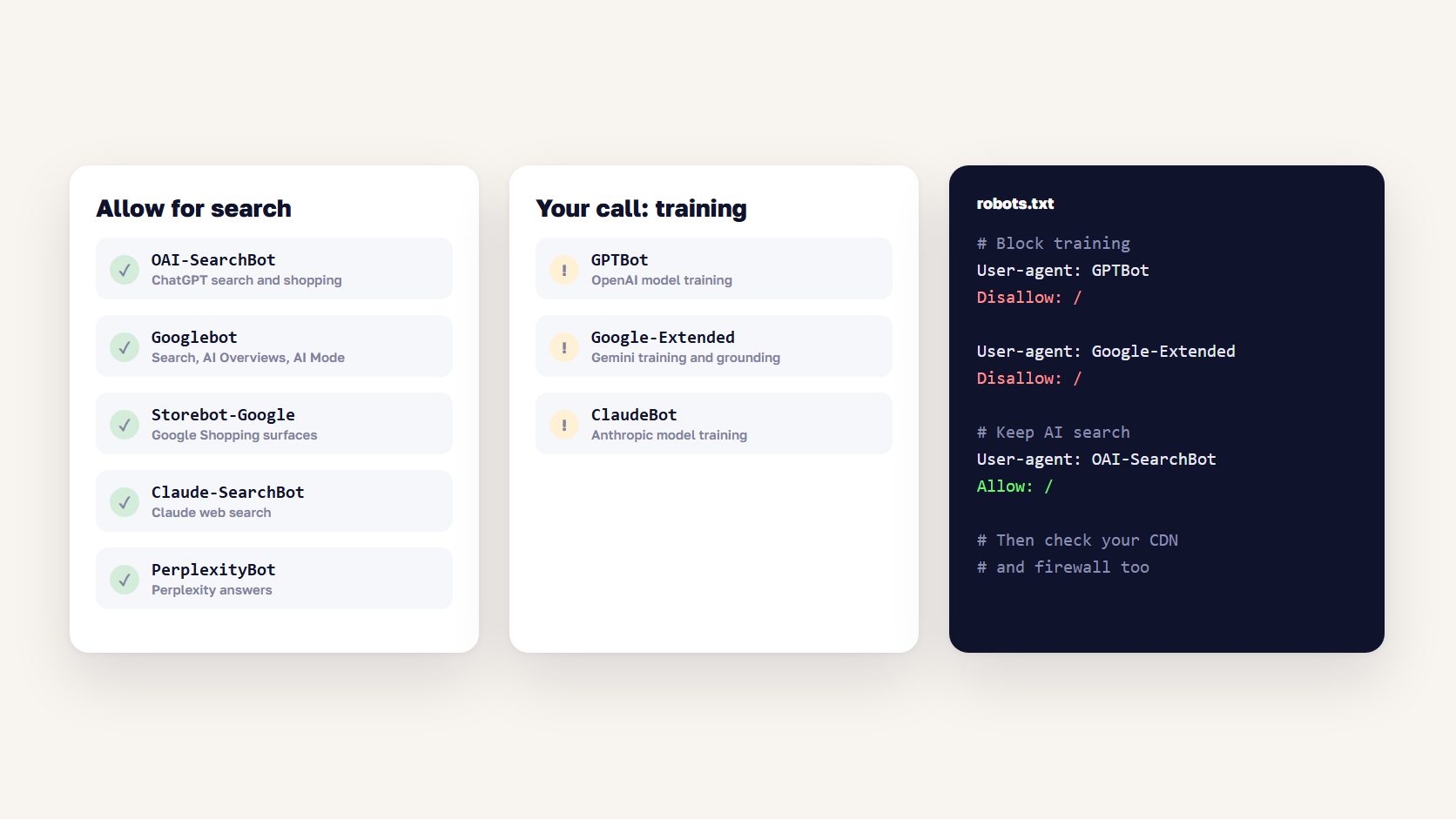
Block AI crawlers for training if you want to, and keep every search crawler allowed. Blocking GPTBot stops OpenAI from training on your pages without affecting ChatGPT shopping. Blocking OAI-SearchBot removes your pages from ChatGPT search answers, and blocking Googlebot removes you from Google Search, AI Overviews and AI Mode. Google-Extended only controls Gemini training and grounding, and Search ignores it.
| Crawler | Company | What it does | If you block it |
|---|---|---|---|
| GPTBot | OpenAI | Collects pages to train AI models | Pages not used for training, no effect on ChatGPT search |
| OAI-SearchBot | OpenAI | Builds ChatGPT’s search index | Pages not shown in ChatGPT search answers |
| ChatGPT-User | OpenAI | Visits a page when a user asks ChatGPT to | Robots.txt may not apply, not used for search inclusion |
| Googlebot | Crawls for Search, AI Overviews and AI Mode | Gone from Google Search and its AI features | |
| Google-Extended | Controls use in Gemini training and grounding | No effect on Search inclusion or ranking | |
| Storebot-Google | Crawls for Google Shopping surfaces | Products affected across Shopping | |
| ClaudeBot / Claude-SearchBot | Anthropic | Training / Claude search | Same split as OpenAI |
| PerplexityBot | Perplexity | Perplexity search index | Pages not shown in Perplexity answers |
For most stores, the right robots.txt allows the search crawlers and blocks training if you want to. A minimal version looks like this:
User-agent: GPTBot
Disallow: /

User-agent: OAI-SearchBot
Allow: /

User-agent: Google-Extended
Disallow: /
OpenAI says changes take about 24 hours to apply to search results. Our Magento robots.txt guide shows where to edit the file in the Magento admin and how to test it.
Check your CDN before your robots.txt
Plenty of stores that never touched robots.txt still block AI crawlers at the CDN. Since 15 September 2026, Cloudflare blocks training and agent bots by default on new domains with ads, while search bots stay allowed. It also now treats Googlebot, Bingbot and Applebot as mixed search-and-training crawlers, so a blunt “block AI training” setting can block them too. Cloudflare’s newer “Disallow AI Training” option keeps search crawling while blocking training. Check the bot settings in your CDN and firewall, then confirm in your server logs that OAI-SearchBot gets a 200 response on product pages.
🚀 Quick takeaway
Allowing OAI-SearchBot in robots.txt achieves nothing if your firewall returns 403 to it. The server logs tell you whether the crawler actually got in.
How to optimize for ChatGPT shopping
Once the data can reach ChatGPT, the same things that make a product page convert also make it easier to recommend:
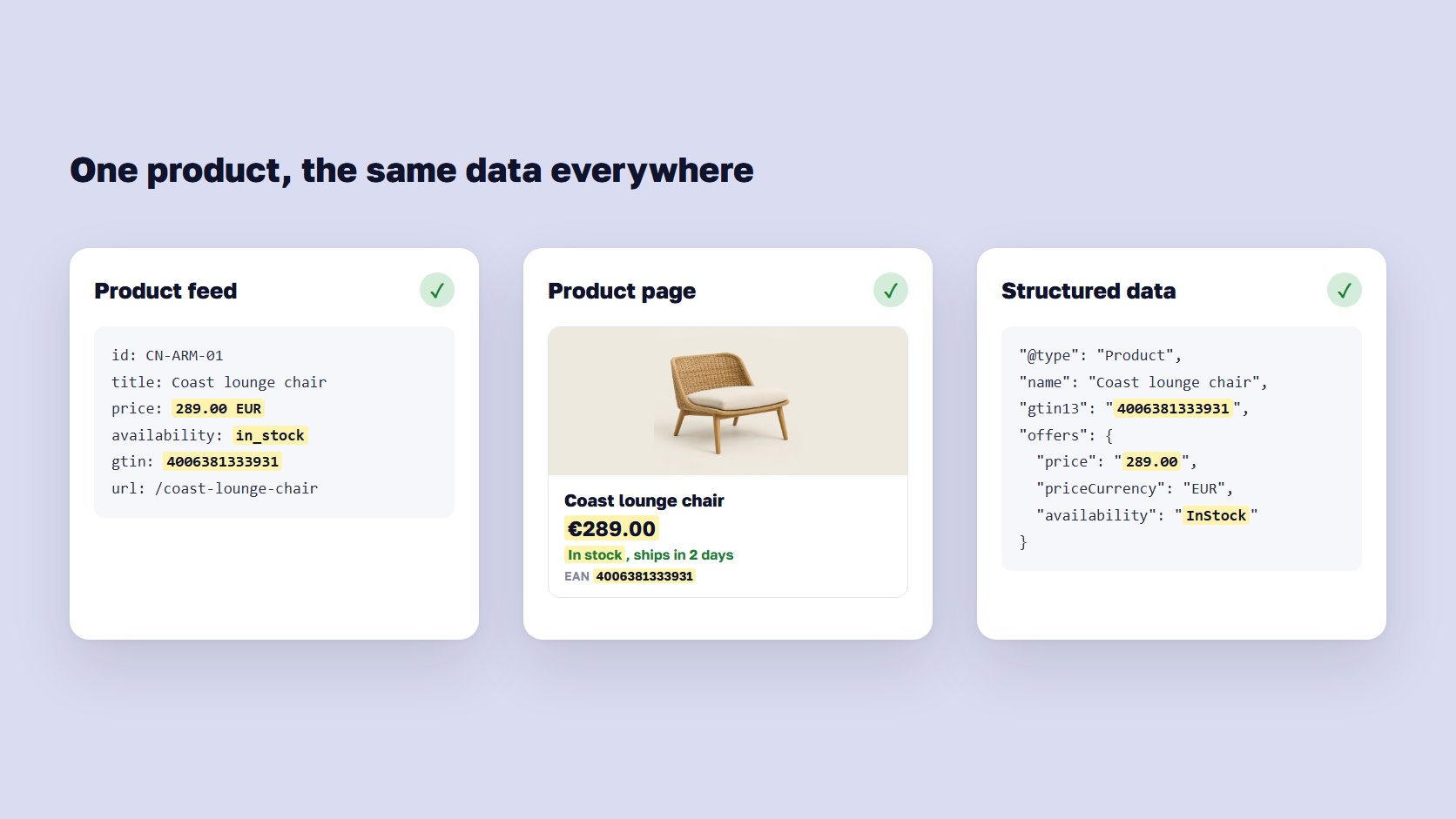
- Keep price and stock identical everywhere. The feed, the product page and the structured data should show the same price and availability.
- Write descriptions that answer buying questions. Materials, dimensions, compatibility, who it suits and how it differs from similar products. The same answers power an AI shopping assistant on your own store.
- Use real identifiers. GTINs and brand names let ChatGPT match your offer to the right product.
- Show reviews on the page. Ratings and review counts appear on product cards, and OpenAI lists reviews among the signals that improve ranking.
- Publish clear shipping and returns pages. Shoppers ask about delivery and returns, and ChatGPT can only answer from what it can read.
- Earn mentions on other sites. Reviews, comparisons and press mentions shape which brands ChatGPT trusts for a category.
This works for smaller brands too. For Kouboo, a boutique home decor brand, we optimized product and category pages and secured outside citations. The brand reached 53% visibility in ChatGPT and Perplexity for high-intent prompts and appeared in the top three recommendations next to Amazon and Wayfair.
🚀 Quick takeaway
When a store is invisible in ChatGPT, the cause is usually data: blocked crawlers, stale prices or missing identifiers. Fix access and consistency before you write a single new page.
How to measure AI shopping traffic
ChatGPT referrals show up in GA4 as visits from chatgpt.com, and ChatGPT adds utm_source=chatgpt.com to most outbound links. Build a GA4 exploration or channel group for AI referrals, so ChatGPT, Perplexity, Gemini and Copilot traffic doesn’t disappear into “Referral”, and add utm_medium=feed to feed URLs to separate feed clicks from organic mentions. Before you trust conversion numbers from this traffic, check that your consent setup records purchases correctly.
On the Google side, Merchant Center’s new AI performance report shows how your brand appears on AI surfaces, rolling out in the US and four other markets. For brand mentions across assistants, a monitoring tool such as our AnswerRank leaderboard tracks how often AI answers recommend you.
Frequently asked questions about ChatGPT shopping
Is ChatGPT shopping free for merchants?
Yes. Appearing in ChatGPT’s product results costs nothing, whether ChatGPT finds your products by crawling, through Shopify Catalog or through a direct feed. OpenAI says these results are not ads. Paid placement is separate: product feed ads in OpenAI’s Ads Manager, currently in open beta.
Can shoppers still buy directly in ChatGPT?
Mostly not inside the chat itself. OpenAI scaled back Instant Checkout in March 2026, and purchases now finish on the merchant’s website or in a merchant’s own app inside ChatGPT. Shopify stores send shoppers to their own checkout through an in-app browser.
Are ChatGPT product results ads?
No. OpenAI says product results are chosen independently and are not ads or influenced by its partnerships. Separate, labeled ads can appear for advertisers who run campaigns in OpenAI’s Ads Manager.
Does blocking GPTBot remove my products from ChatGPT?
No. GPTBot only collects content for model training. ChatGPT search and shopping use OAI-SearchBot, so you can block GPTBot and still appear, as long as OAI-SearchBot is allowed in robots.txt and in your CDN.
Do I need an llms.txt file?
No. OpenAI’s merchant documentation doesn’t ask for one, and Google says you don’t need AI text files to appear in AI Overviews or AI Mode. Spend the time on crawler access, product data and feed quality instead.
How long does it take for products to appear in ChatGPT?
It depends on the route. Robots.txt changes reach ChatGPT search in about 24 hours, but pages still need to be crawled. Shopify catalog products sync automatically. A direct feed needs OpenAI’s approval first, then updates with every daily snapshot.
Get your products in front of AI shoppers
ChatGPT shopping rewards stores whose product data is reachable, consistent and current, and the same work gets you into Google AI Mode. Allow the search crawlers, check the CDN, keep the feed and the product pages in sync, and measure the traffic separately. As an OpenAI Select Partner, we help stores do all of this as part of AI search optimization.
Asked ChatGPT about your category and found your competitors instead? Tell us what it recommended, and we'll show you what's keeping your products out.




































