
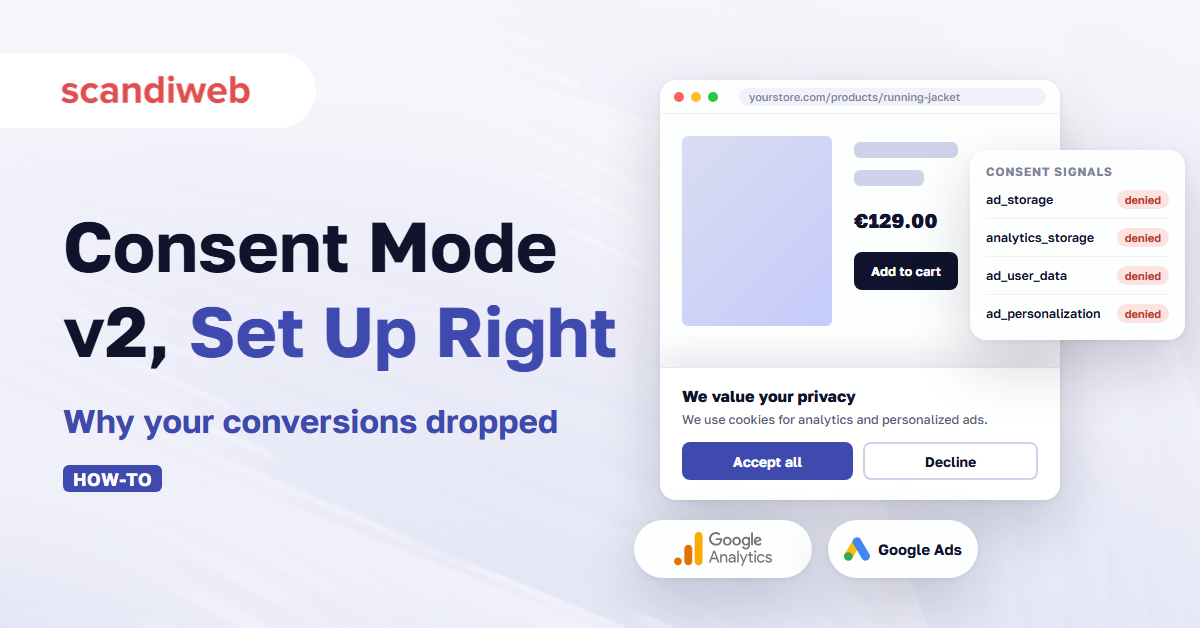
The new cookie banner went live on Monday. By Friday, Google Ads reports fewer conversions, GA4 shows fewer purchases, and the order count in your backend is exactly where it was. Google Consent Mode v2 explains the gap: it tells Google’s tags which visitors declined tracking, and Google stops counting those visitors unless your setup lets it model them back.
Whether that gap is a reporting problem or a real loss depends on how consent mode is set up and how much traffic your store has. This guide covers what Consent Mode v2 is, when it’s mandatory, basic vs advanced mode, what changed in 2026, setup on Magento and Shopify, the mistakes that break it, and a 20-minute test.
What is Google Consent Mode v2?
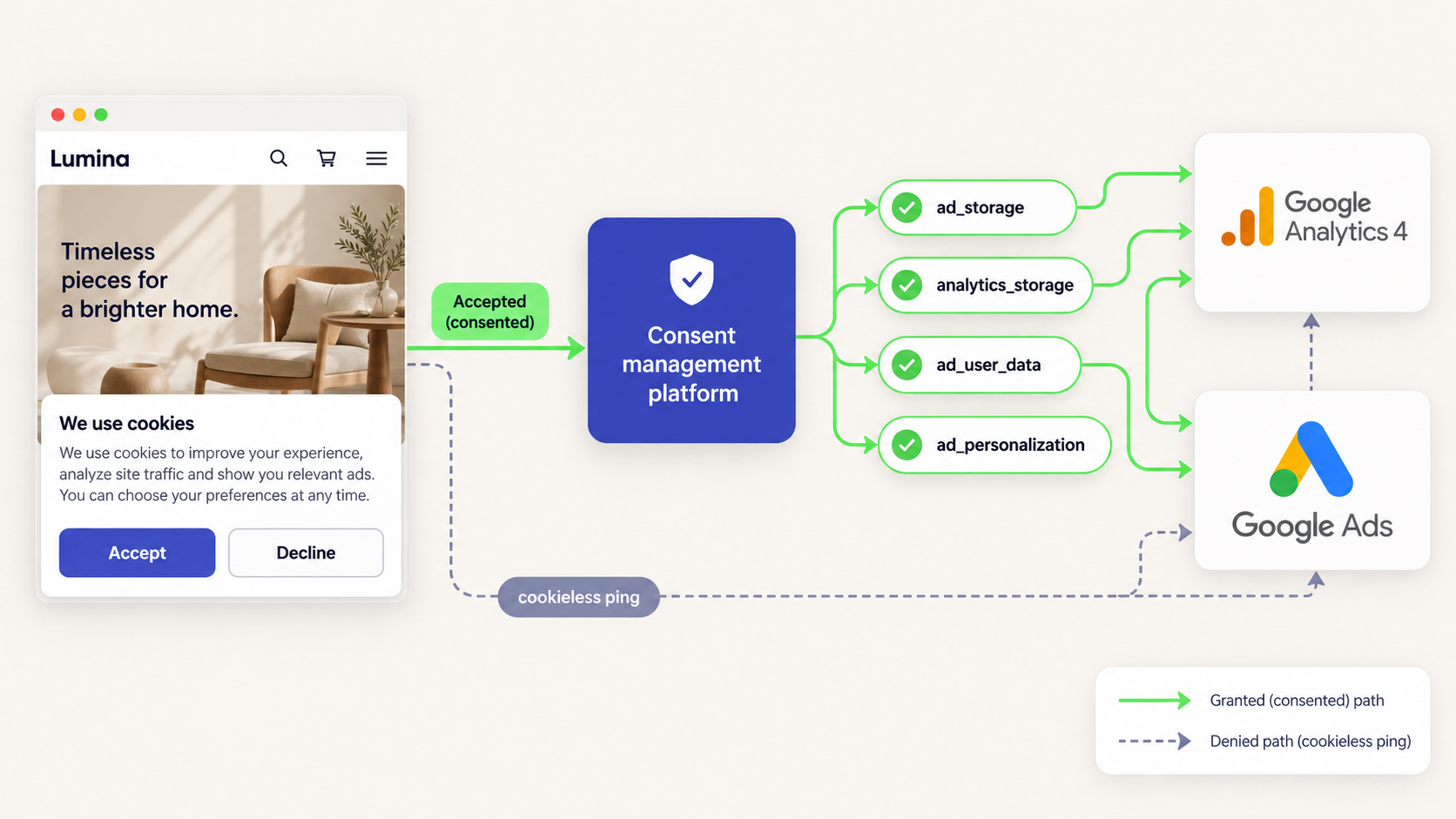
Google Consent Mode v2 is the way your website tells Google’s tags what each visitor agreed to on your cookie banner. It passes four signals, ad_storage, analytics_storage, ad_user_data, and ad_personalization, and Google Ads and GA4 adjust what they collect and use for each visitor. Version 2 added the last two signals, which control whether user data can be sent to Google for advertising and whether it can be used for personalized ads and remarketing.
| Signal | What it controls | Added in |
|---|---|---|
| ad_storage | Cookies and identifiers used for advertising | v1 |
| analytics_storage | Cookies used for analytics, such as visit duration | v1 |
| ad_user_data | Sending user data to Google for online advertising | v2 |
| ad_personalization | Using data for personalized ads and remarketing | v2 |
Two tools split the work. Your cookie banner, run by a consent management platform (CMP), asks the visitor and stores the answer. Consent mode passes that answer to every Google tag on the page, which is why a banner can look compliant while Google still receives the wrong signal.
Is Google Consent Mode v2 mandatory?
Google Consent Mode v2 is mandatory if you use Google Ads or GA4 measurement and have visitors in the EEA, the UK, or Switzerland. Google’s EU User Consent Policy requires consent for those users, and since March 2024 Google expects the consent to reach its tags through consent mode. Without the v2 signals, Google can’t build remarketing audiences or use personalized ads for those visitors, and conversion measurement for them gets much weaker.
For a store selling into Europe, a missing or broken setup shows up in Google Ads first:
- Remarketing lists stop adding European visitors
- Smart bidding gets fewer conversion signals and bids on thinner data
- User-provided data, such as hashed emails for enhanced conversions, isn’t used for visitors without ad_user_data granted
- The account falls out of line with Google’s EU User Consent Policy
If you only sell in the US, Google doesn’t require consent mode today. Stores that sell into Europe already juggle several EU rules at checkout, including the new EU withdrawal button, and consent mode belongs on the same compliance checklist.
🚀 Quick takeaway
Consent mode is Google’s requirement on top of privacy law. A legally compliant banner that doesn’t send the four signals still costs you remarketing and bidding data in Europe.
Basic vs advanced consent mode: which one fits your store?
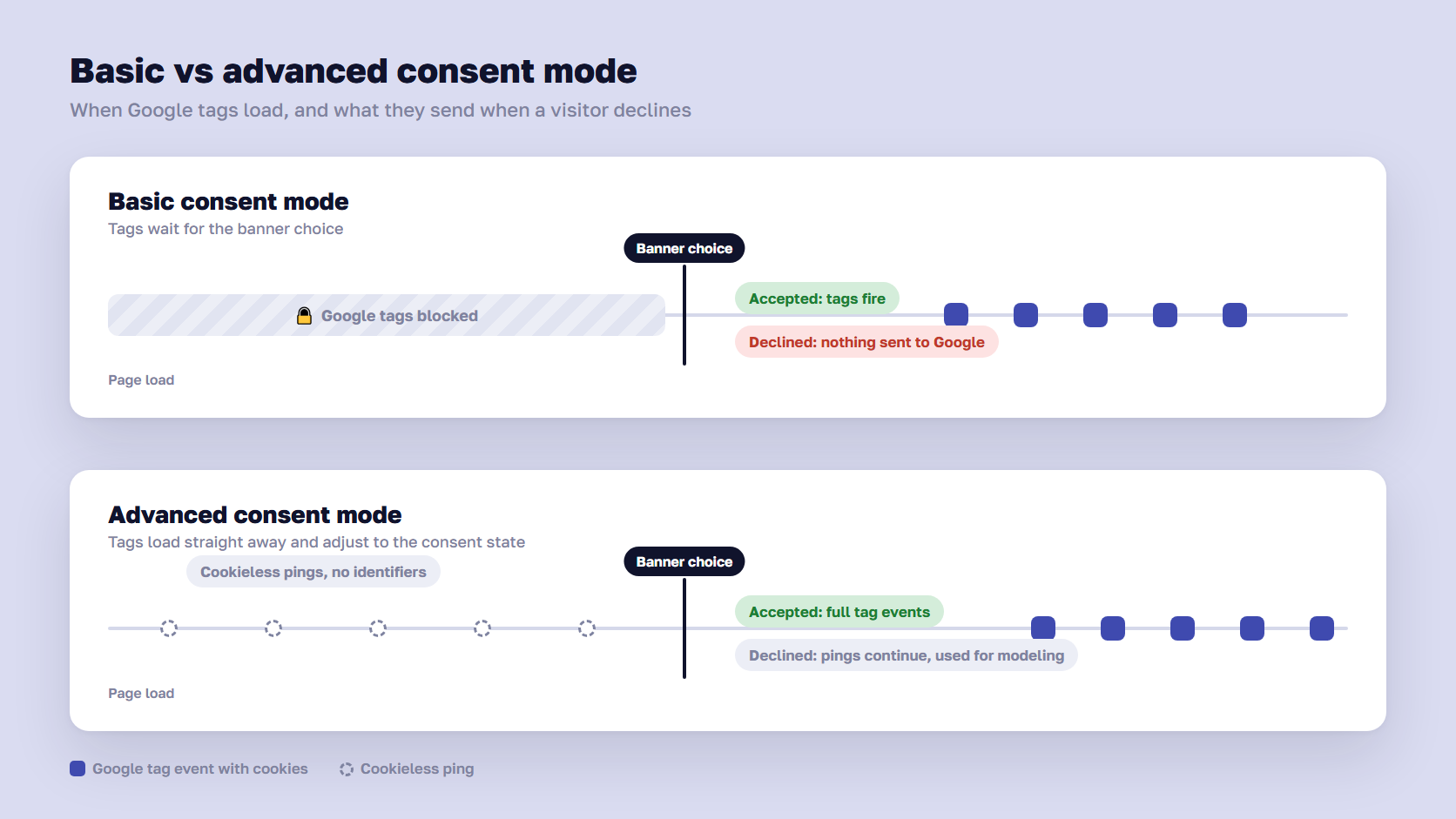
Basic consent mode blocks Google tags until a visitor answers the banner, so a visitor who declines sends nothing to Google. Advanced consent mode loads the tags straight away and sends cookieless pings while consent is denied, which lets Google model the missing conversions with a model built on your own data. Most stores with steady Google Ads traffic in Europe get more out of advanced mode.
| Basic consent mode | Advanced consent mode | |
|---|---|---|
| When Google tags load | After the visitor answers the banner | On page load |
| Data sent if the visitor declines | Nothing, not even the consent status | Cookieless pings without identifiers |
| Conversion modeling in Google Ads | General model | Model specific to your account |
| GA4 behavioral modeling | Not available | Available above Google’s thresholds |
| Legal review | Easiest to approve | Some legal teams object to any request before consent |
Choose basic consent mode if:
- Your legal team won’t approve any request to Google before consent
- Google Ads is a small share of your European revenue
- Your store gets well under 700 Google Ads clicks a week in each country
- You report on backend revenue and use GA4 mainly for on-site behavior
Choose advanced consent mode if:
- Google Ads drives a meaningful share of your European orders
- Your campaigns use smart bidding, which needs as many conversion signals as possible
- You get more than 700 ad clicks a week in your main countries
- Your GA4 property has thousands of daily users, enough to qualify for behavioral modeling
Why conversions dropped after your cookie banner went live
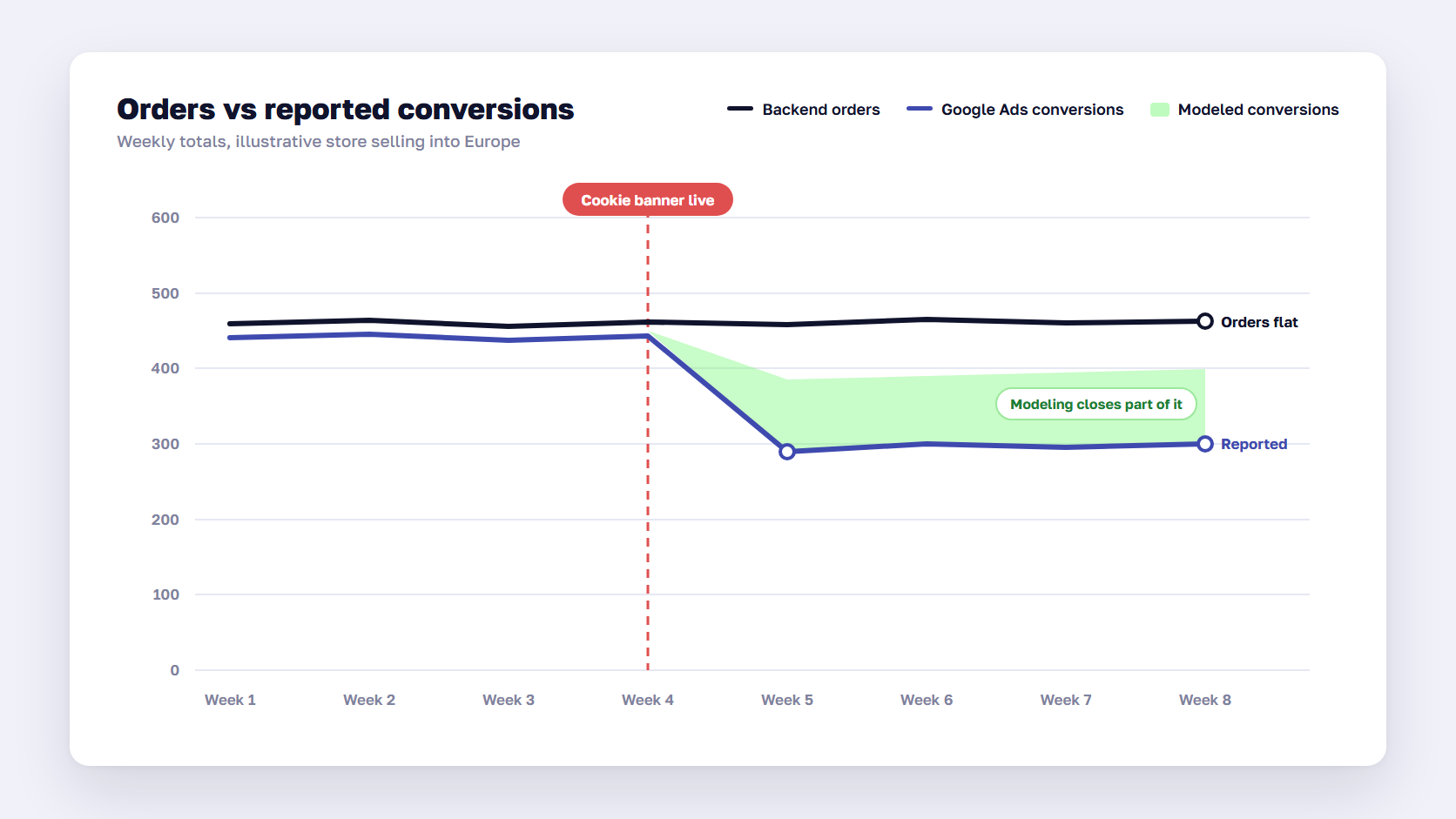
Conversions drop after a cookie banner goes live because Google stops seeing the visitors who decline. Orders still happen, but Google Ads and GA4 only record purchases from visitors who consented, so the reported numbers fall while your backend stays flat. Conversion modeling can fill part of the gap, but only if consent mode is set up correctly and your store meets Google’s data thresholds.
The size of the gap follows your consent rate, with one twist. If 60% of European visitors accept, 40% of that traffic disappears from the reports. The missing share of purchases is usually smaller, because Google’s own documentation says consented users are typically 2–5 times more likely to convert than visitors who decline. Shoppers who are ready to buy tend to click “accept” and move on.
GA4 consent mode modeling thresholds
GA4 only models the behavior of visitors who decline when the property meets Google’s eligibility rules:
- At least 1,000 events per day with analytics_storage denied, for at least 7 days
- At least 1,000 daily users with analytics_storage granted, for at least 7 of the previous 28 days
- Consent mode enabled on every page of the site
- Google tags loaded before the consent banner appears
Modeling fills in users and sessions. It doesn’t change event counts, so a GA4 report built on the purchase event still shows only consented purchases.
Does conversion modeling recover the lost data?
Partly. Google Ads conversion modeling needs 700 ad clicks over 7 days per country and domain grouping, according to Google Ads Help. Below that, you get no modeled conversions. Above it, Google’s own example shows an 18% uplift in conversion rate from modeling, which narrows the gap but rarely closes it.
🚀 Quick takeaway
A mid-size store can configure everything correctly and still see a permanent gap in Google Ads, because it never reaches 700 clicks a week in smaller markets. For revenue, trust your backend. Use Google’s numbers for trends and bidding.
What changed in Google Consent Mode in 2026
Since June 15, 2026, Google Consent Mode is the only control over whether advertising data from GA4 reaches a linked Google Ads account. The Google Signals switch no longer blocks it. If your ad_storage default is set to granted, Google Ads now uses advertising cookies even when Signals is turned off, so stores that relied on Signals as a privacy safeguard need to check their consent defaults.
Google’s announcement also lists two changes coming later in 2026:
- ad_personalization will become the only control over whether GA4 data is used for ads personalization in Google Ads
- IP addresses collected by the Google tag will be encrypted before they reach linked Google Ads accounts
Neither has a published date yet. Both make the consent mode setup the single source of truth for what Google does with your visitors’ data, so a default that’s wrong today will matter more by the end of the year.
How to set up Google Consent Mode v2 on Magento and Shopify
At a high level, the setup is the same on every platform:
- Pick a Google-certified CMP that supports consent mode v2
- Set default states for all four signals before any Google tag fires, denied for visitors in the EEA, the UK, and Switzerland
- Update the four signals when the visitor makes a choice on the banner
- Choose basic or advanced mode
- Check that GA4 and Google Ads tags read the same consent state
- Test in each region you sell to, before and after consent
Magento (Adobe Commerce)
Magento’s built-in Cookie Restriction Mode blocks cookies until a visitor accepts, which works like basic consent mode. For advanced mode, run an external CMP through Google Tag Manager and switch Cookie Restriction Mode off. Running both gives Google two consent sources that can disagree, and the tags follow whichever one updates last.
Check the theme as well. Older Magento builds often include a gtag.js snippet hard-coded in the layout from a previous GA setup, which fires outside GTM and ignores the CMP. We find these leftovers in most Magento data tracking audits.
Shopify
Shopify records visitor choices in its Customer Privacy API, which uses its own categories, such as analytics and marketing. Those categories don’t map one-to-one to the four consent mode signals, so the mapping happens in your CMP app or in the pixel code. Before you install a CMP from the Shopify App Store, check that it lists consent mode v2 support. After install, confirm that the Google & YouTube app and every custom pixel read the same choice, including on checkout and the thank-you page.
Google Tag Manager
In GTM, fire the consent default command on the Consent Initialization trigger, ahead of every other tag. Turn on the consent overview in the container settings to see which tags check which consent types. Google tags have built-in consent checks for the four signals, while third-party tags such as Meta or Microsoft Ads need their own consent settings. Run a dataLayer QA at the same time, because a purchase event that fires twice or too early skews every report that consent mode feeds.
If your consent setup was added during an older GA4 migration, review both together as part of a GA4 setup review.
Common consent mode v2 mistakes on eCommerce stores
The setups we audit rarely lack consent mode entirely. The usual faults come from tag timing and from leftovers of earlier tracking work:
| Mistake | What happens | Fix |
|---|---|---|
| Global “granted” default | Google treats European visitors as consented until the banner loads. Since June 15, 2026, Google Signals no longer limits what this sends to Google Ads. | Default all four signals to denied for visitors in the EEA, the UK, and Switzerland |
| GA4 tag fires before the consent default | The first page view goes out without any consent state | Fire the default on the Consent Initialization trigger |
| Hard-coded gtag.js in a Magento layout or a Shopify theme | The snippet fires regardless of the CMP | Remove it and load Google tags only through GTM or a consent-aware app |
| “Denied” default set worldwide | A store that shows the banner only in Europe loses US data it was allowed to collect | Use the region parameter on the consent default |
| Payment redirects and hosted checkouts | The consent state drops, so the purchase event fires with no signal or the wrong one | Place a test order and check the purchase request on the thank-you page |
| Server-side container ignores consent | Non-Google tags receive data from visitors who declined | Pass the consent state on to every tag the container fires |
🚀 Quick takeaway
Check the order before the settings. Most broken setups we see send a perfectly configured consent state, only after the GA4 tag has already fired.
How to check if consent mode is enabled
A full check takes about 20 minutes per region, and you can do most of it in the browser:
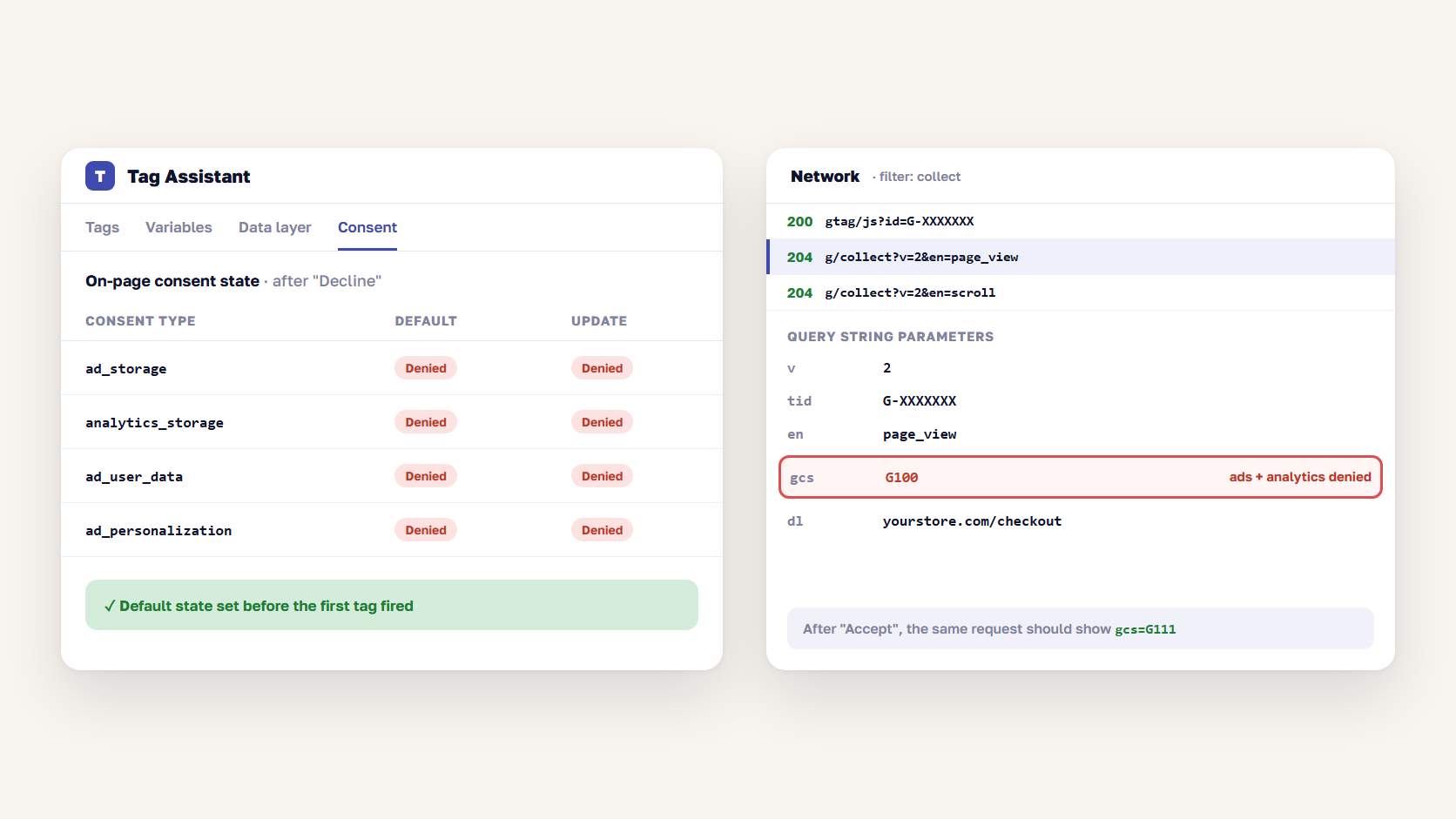
- Open the store in Google Tag Assistant and confirm the Consent tab shows a default state before the first tag fires
- Decline on the banner and inspect network requests to Google: the gcs parameter should read G100, meaning ad and analytics storage are denied
- Accept and confirm gcs changes to G111, meaning both are granted
- Place a test order and check that the purchase request carries the same consent state as the rest of the session
- In Google Ads, check the consent mode status in the conversion diagnostics
- In GA4 admin, check that consent settings show measurement and personalization signals as active
The gcs value is the quickest read. Its second digit is ad_storage and its third is analytics_storage, where 1 means granted and 0 means denied:
| gcs value | ad_storage | analytics_storage | When you should see it |
|---|---|---|---|
| G100 | Denied | Denied | After “Decline” in the EEA, the UK, or Switzerland |
| G110 | Granted | Denied | Visitor accepted marketing cookies only |
| G101 | Denied | Granted | Visitor accepted analytics cookies only |
| G111 | Granted | Granted | After “Accept all” |
If you’d rather not repeat these checks every quarter, our GA4 team monitors consent signals as part of ongoing tracking support.
Frequently asked questions about Google Consent Mode v2
Is Google consent mode v2 mandatory?
Yes, if you advertise with Google Ads or measure with GA4 and have visitors from the EEA, the UK, or Switzerland. Google requires their consent under its EU User Consent Policy and expects it to arrive through the four consent mode v2 signals. Without them, remarketing and personalized ads stop working for those visitors, and conversion measurement gets weaker.
What does consent mode do in Google Tag Manager?
In Google Tag Manager, consent mode reads the visitor’s consent state and holds or adjusts each tag based on it. Google tags have built-in checks for the four consent signals. For third-party tags, you add consent requirements in the tag settings so they only fire after the visitor agrees.
How do I check if consent mode v2 is working?
Use Google Tag Assistant’s Consent tab to confirm a default state loads before any tag fires. Then decline and accept on your banner and check the gcs parameter in requests to Google: G100 means ad and analytics storage are denied, G111 means both are granted. Google Ads conversion diagnostics also show consent mode status.
Does Google Consent Mode v2 replace a cookie banner?
Consent mode needs a cookie banner to work. The banner, run by a consent management platform, asks visitors for consent and records the answer. Consent mode then passes that answer to Google’s tags. Without a banner, there’s no choice to pass, and Google receives only your default settings.
Do I need advanced consent mode for conversion modeling?
For a model trained on your own account’s data, yes. Advanced mode sends cookieless pings when visitors decline, and Google uses them to model conversions specific to your store. Basic mode only gets a general model in Google Ads, and GA4 behavioral modeling isn’t available.
What happens if I don’t implement consent mode v2?
For visitors in the EEA, the UK, and Switzerland, Google Ads stops building remarketing audiences and can’t use their data for personalized ads. Conversion tracking for them gets weaker, which feeds smart bidding less data. Your account also falls out of line with Google’s EU User Consent Policy.
Get consent mode right before you trust the numbers
Google Consent Mode v2 decides what Google Ads and GA4 are allowed to see, so a wrong setup changes every number your marketing team reports without anyone touching the campaigns. Start with the default state and the gcs check, then decide whether advanced mode pays off for your ad spend. Getting tracking right changes what you can see: when we rebuilt tracking for BUFF, the store captured 75% more user data. Our analytics team runs the same audit on consent setups for Magento and Shopify stores.
Still not sure whether your conversion drop is real or just consent? Tell us what changed on your store, and we'll check the setup with you.




































