
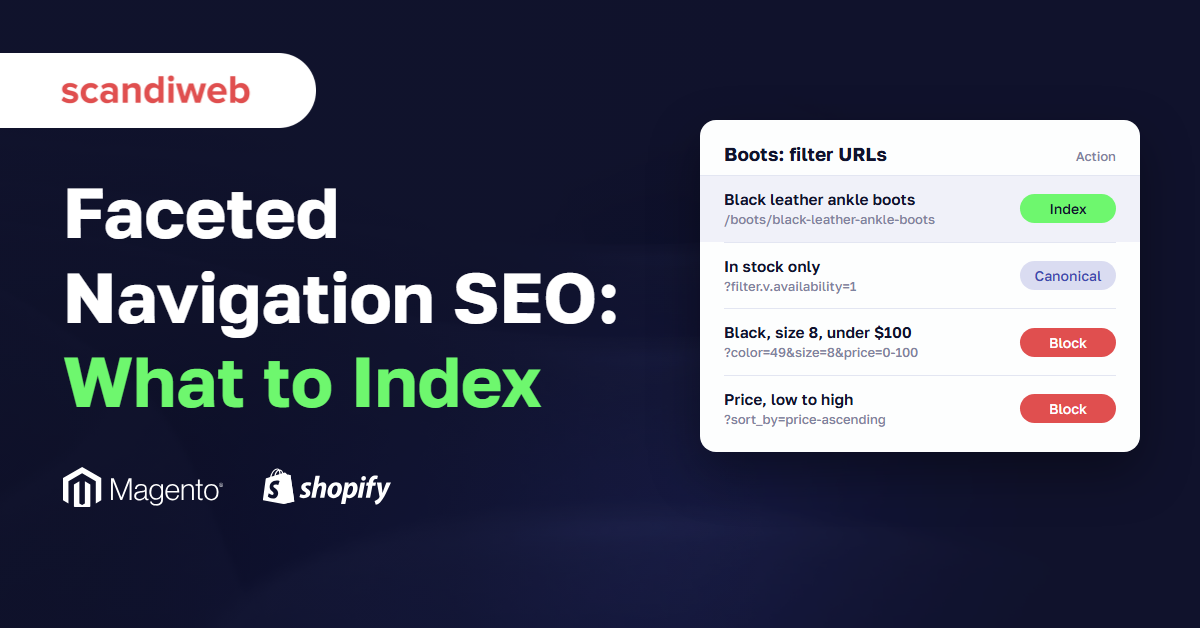
If your developer says the filter pages are wasting crawl budget and someone in marketing wants every filtered URL indexed for long-tail traffic, you’re probably waiting to find out which of them is right. Faceted navigation SEO usually gets argued as a choice between those two camps: block every filter URL, or let Google have them all.
Neither works on a real catalog. One category with six filters can produce over half a million URL combinations, and almost none of them match anything a shopper types. A few do, and “black leather ankle boots” alone gets about 1,200 searches a month in the US. The job is to find those few, give them proper pages, and keep Google away from everything else, on Magento, Shopify, or any other platform.
What faceted navigation SEO decides
Faceted navigation SEO, sometimes called faceted search SEO, is the set of rules that decides which filter combinations on your category pages search engines may crawl and which they may index. Filters for color, size, brand, or price each add a parameter or path to the URL, and filters combine. The SEO work is choosing the small set of filtered pages that deserve to rank and keeping crawlers out of the rest.
Those are two separate decisions. Crawling is whether Googlebot fetches the URL at all. Indexing is whether the page can appear in search results. robots.txt controls the first, while canonical tags and noindex act on the second, and mixing them up causes many of the problems we find in store audits.
The scale is what makes it urgent. Take one category with six filters: 12 colors, 10 sizes, 20 brands, 5 price bands, 6 materials, and 4 sort orders. If a shopper can pick one value per filter, that category alone has about 630,000 possible URLs. Allow two colors at once, or let the parameters appear in any order, and the number keeps growing. Google’s own guidance on faceted navigation says filters can generate “infinite URL spaces”, and that crawlers often fetch many of these URLs before they recognize them as low value.
Crawl waste vs long-tail opportunity
Both arguments in your team are about real effects. Filter URLs do use up crawling that could go to new products, and some filter combinations do match searches your main categories can’t win. The answer is to measure each side on your own store before choosing.
Are filter pages wasting crawl budget?
They can be, once enough filter URLs are open to crawlers. Google’s crawl budget guide is written for sites with more than a million pages that change weekly, sites with 10,000+ pages that change daily, and sites with many URLs in “Discovered – currently not indexed”. A store with layered navigation can land in that last group with only a few thousand products, because the filters multiply the URL count far past the catalog size.
Three checks tell you whether it’s happening on your store:
- In Search Console, open Settings and then the Crawl stats report. Compare the number of daily requests with the number of products and categories you sell, and look for filter parameters in the example URLs under each response type
- In the Page indexing report, a large and growing “Discovered – currently not indexed” count full of filter URLs means Google keeps putting off crawling them. Our guide to Search Console statuses like duplicate without user-selected canonical explains how to read each status
- In your server logs, group Googlebot requests by URL pattern. If filter and sort URLs take a bigger share of requests than product pages, crawling is going to the wrong place
The cost shows up as slower discovery. New products and price changes take longer to reach search, because Googlebot is busy with URLs like ?color=black&size=9&sort=price_asc.
Where the long-tail demand is
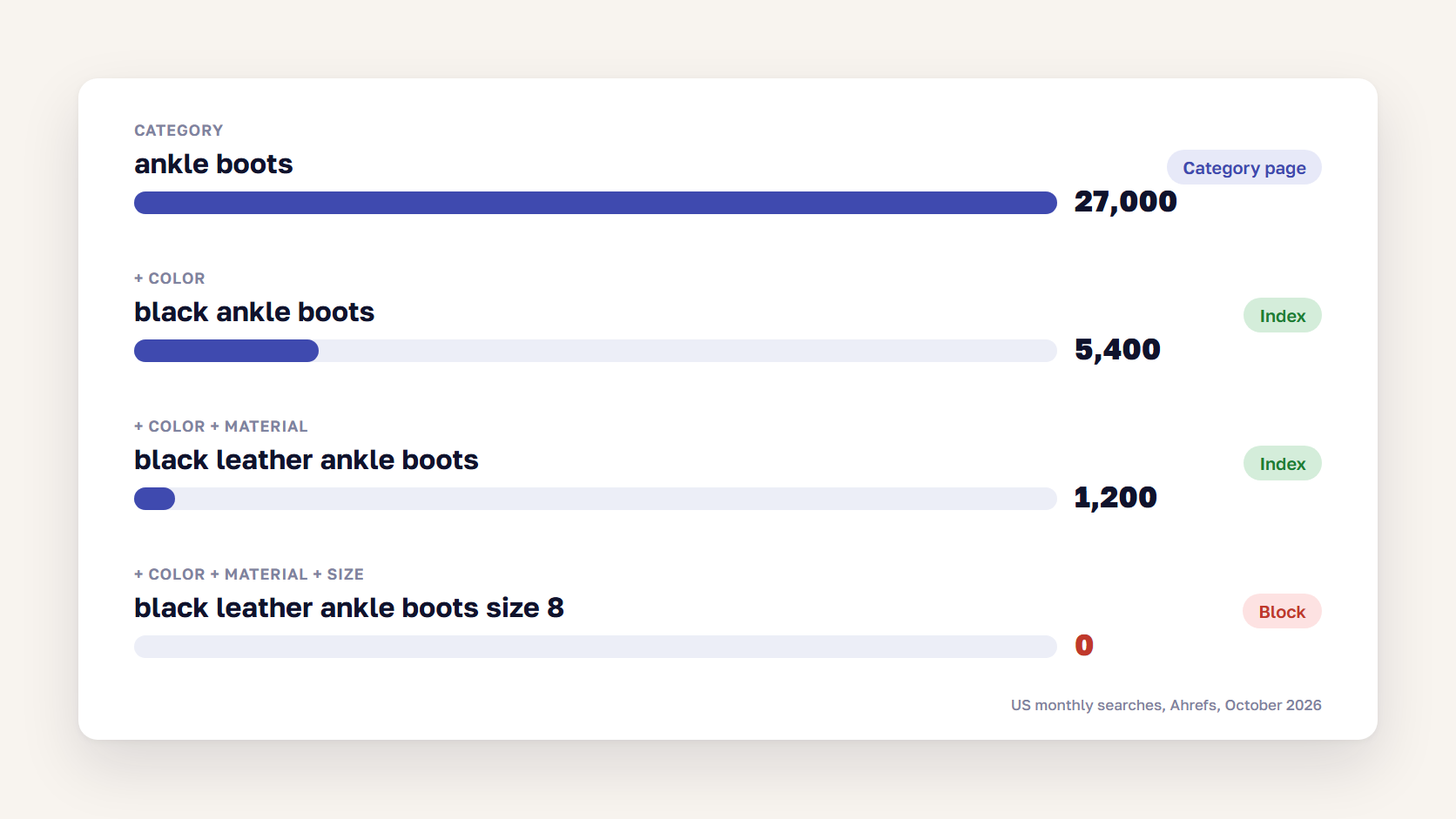
The opportunity is also real, but it shrinks fast as filters stack up. Here is the US search volume ladder for one footwear category, from Ahrefs in October 2026:
- ankle boots: 27,000 searches a month
- black ankle boots: 5,400
- black leather ankle boots: 1,200
- black leather ankle boots size 8: 0
The same pattern repeats in other categories. “Mens linen shirts” gets 8,200 searches and “blue linen shirt men” gets 300. “Green velvet sofa” gets 3,300. One attribute on top of a category often carries real demand, a second one sometimes does, and size, price, or availability on top of that almost never does.
🚀 Quick takeaway
The two camps are usually arguing about different URLs. Crawl waste comes from deep combinations nobody searches for, and the long-tail value comes from shallow ones, so one rule can satisfy both.
The decision rule: which filter combinations deserve an indexable URL
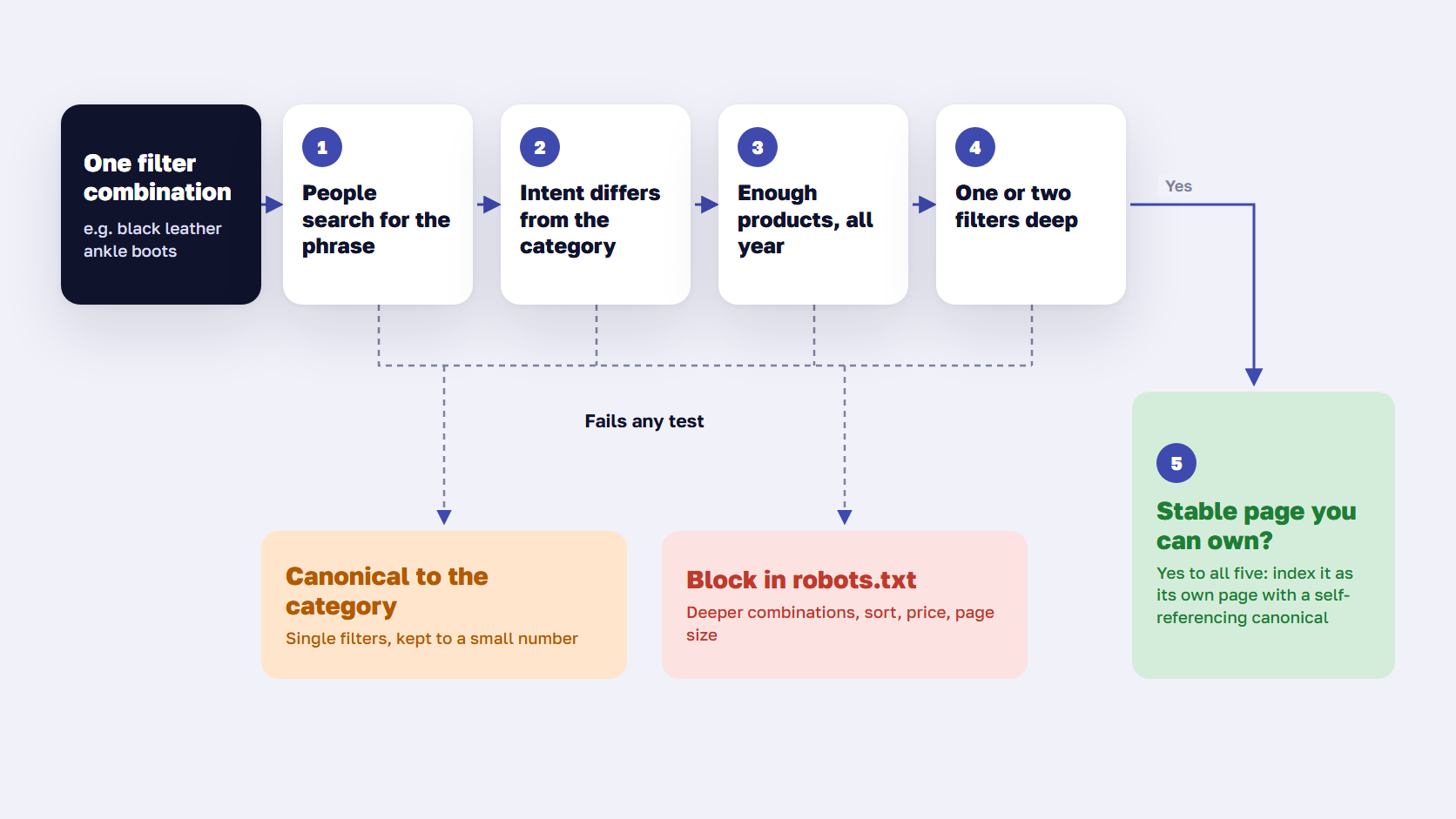
A filter combination deserves an indexable URL when people search for it as a phrase, the parent category doesn’t already answer that search, enough products stay on the page, it adds no more than one or two filters to the category, and you can give it a stable page of its own. Every combination that fails any of these tests stays out of the index, and most should stay out of the crawl.
Run each candidate through the five tests in order. The first two decide most cases.
- Search demand: check the phrase a shopper would type, such as “black leather ankle boots”, in a keyword tool for your main market. Pick one threshold for the whole catalog, for example 50 searches a month, and apply it the same way to every candidate
- Different intent from the parent: someone searching “green velvet sofa” wants green velvet sofas and would be let down by the full sofa category. Someone searching “sofas under $1,000” is usually happy on the sofa category with a price filter. Color, material, style, brand, and use case tend to pass. Size, price, and availability tend to fail
- Enough products, consistently: the page needs enough products to fill at least the first screen, in a range that doesn’t empty out every few weeks. A filter page that drops to zero products turns into a soft 404
- One or two filters deep: a category plus one attribute, or plus two at most, like brand and type. Three or more filters almost never pass test 1
- A stable page you can own: one clean URL, its own title, H1, and short intro copy, and links from the parent category. If your platform can only produce the combination as a parameter URL whose order changes, build a dedicated page for it instead
Everything that fails goes into one of two groups. Single filters with no demand can stay crawlable with a canonical tag pointing to the category, as long as their number stays small. Deeper combinations, sort orders, page-size options, and price ranges should be blocked from crawling.
| Filter type | Example | What to do |
|---|---|---|
| Category plus one high-demand attribute | black leather ankle boots | Give it its own indexable page |
| Category plus two attributes with demand | Nike running shoes for women | Own page, only if it passes all five tests |
| Single filter with no search demand | in stock only, 4 stars and up | Canonical to the category, or block |
| Two or more filters with no demand | black, size 8, under $100 | Block in robots.txt |
| Sort order, page size, grid or list view | price low to high, 48 per page | Block in robots.txt |
| Combination with no products | red boots in size 15 | Return a 404 |
| Internal search results | /search?q=boots | Block in robots.txt |
Should filtered URLs be indexed?
Only the few that pass all five tests, and usually as dedicated pages. Next to the number of possible filter URLs, that list is short. Leaving the rest out of the index doesn’t cost traffic, because nobody searches for them, and it keeps the category pages as the clear target for their head terms. Our duplicate content guide covers what happens when thousands of near-identical filter pages compete with the category instead.
🚀 Quick takeaway
Write the list of indexable combinations down and give it an owner. Without a list, every new filter the merchandising team adds becomes a crawl and index decision that nobody made.
Index, noindex, canonical or robots.txt: what each does to filter URLs
Use robots.txt to stop crawling of filter URLs you never want in search, a canonical tag for small sets of single-filter pages that should pass their signals to the category, and a self-referencing canonical on the pages you chose to index. Noindex is rarely the right tool for faceted navigation, because Google still has to crawl a page to see the tag.
| Method | Stops crawling | Stops indexing | Passes signals to the category | Best use |
|---|---|---|---|---|
| robots.txt disallow | Yes | Generally no | No | Deep combinations, sort and view parameters |
| Canonical tag to the category | Only over time | Likely yes | Yes | A small set of single-filter URLs |
| Meta robots noindex | No | Yes | No | Rarely, for pages that must stay crawlable |
| Nofollow on filter links | Only if every link has it | No | No | A support measure, never the main control |
| 404 for empty combinations | Over time | Yes | No | Filters that return no products |
| Filters without a URL change | Yes | Yes | No | Facets you never want as pages |
A few details from Google’s documentation matter here. A URL blocked in robots.txt can still be indexed without its content if other pages link to it. Google says a canonical tag on filter URLs may reduce crawling of them over time, but it calls robots.txt the more effective long-term control. Its crawl budget guide is direct about noindex: Google “will still request, but then drop the page”, so noindex saves no crawling at all.
Combinations that send mixed signals
A broken faceted navigation setup often has the right tools in the wrong combination.
- A robots.txt block plus noindex: Google can’t crawl the page, so it never sees the noindex
- Noindex plus a canonical to the category: one tag says drop the page, the other says merge it into the category. Google advises against noindex for canonicalization, so use the canonical alone
- A canonical to the category on a filter URL that’s in your sitemap or main menu: your internal signals point at the filter URL while the tag points away from it, and Google may ignore the tag
- Blocking filter URLs that are already indexed: they can stay in the index without content. If you need them gone first, allow crawling with noindex until they drop out, then add the robots.txt rule
🚀 Quick takeaway
Once a filter URL is blocked in robots.txt, its canonical and noindex tags have no effect, because Google never reads the page. Decide crawling first, then indexing.
How to build a filter page worth indexing
A filter combination that passed the five tests needs to work like a real category page. Otherwise Google may treat it as a near-duplicate of the parent and index the parent instead.
- A clean, stable URL. A path such as /boots/black-leather-ankle-boots is easiest to keep stable. If you use parameters, keep one fixed order and the standard “&” separator, as Google recommends
- A self-referencing canonical tag, never one pointing to the parent category
- Its own title, H1, and meta description built on the phrase people search, such as “Black Leather Ankle Boots”
- A short intro that helps shoppers choose between the products shown, with a few sentences on materials, fit, or care
- Internal links from the parent category, for example a row of popular styles above or below the product grid, plus breadcrumbs back to the category
- A place in the XML sitemap next to your regular categories
- A plan for when stock runs out. Keep the page live with related products while the range is seasonal, and return a 404 or redirect to the parent if it’s gone for good
Filter UX still matters for shoppers on every other combination. Our guide to product listing page best practices covers filter order, labels, and mobile layouts.
🚀 Quick takeaway
Links from the parent category matter as much as the copy. Google counts a sitemap entry as a weak signal, so a filter page that only the sitemap points to gives Google little reason to rank it over its parent.
Magento and Adobe Commerce implementation notes
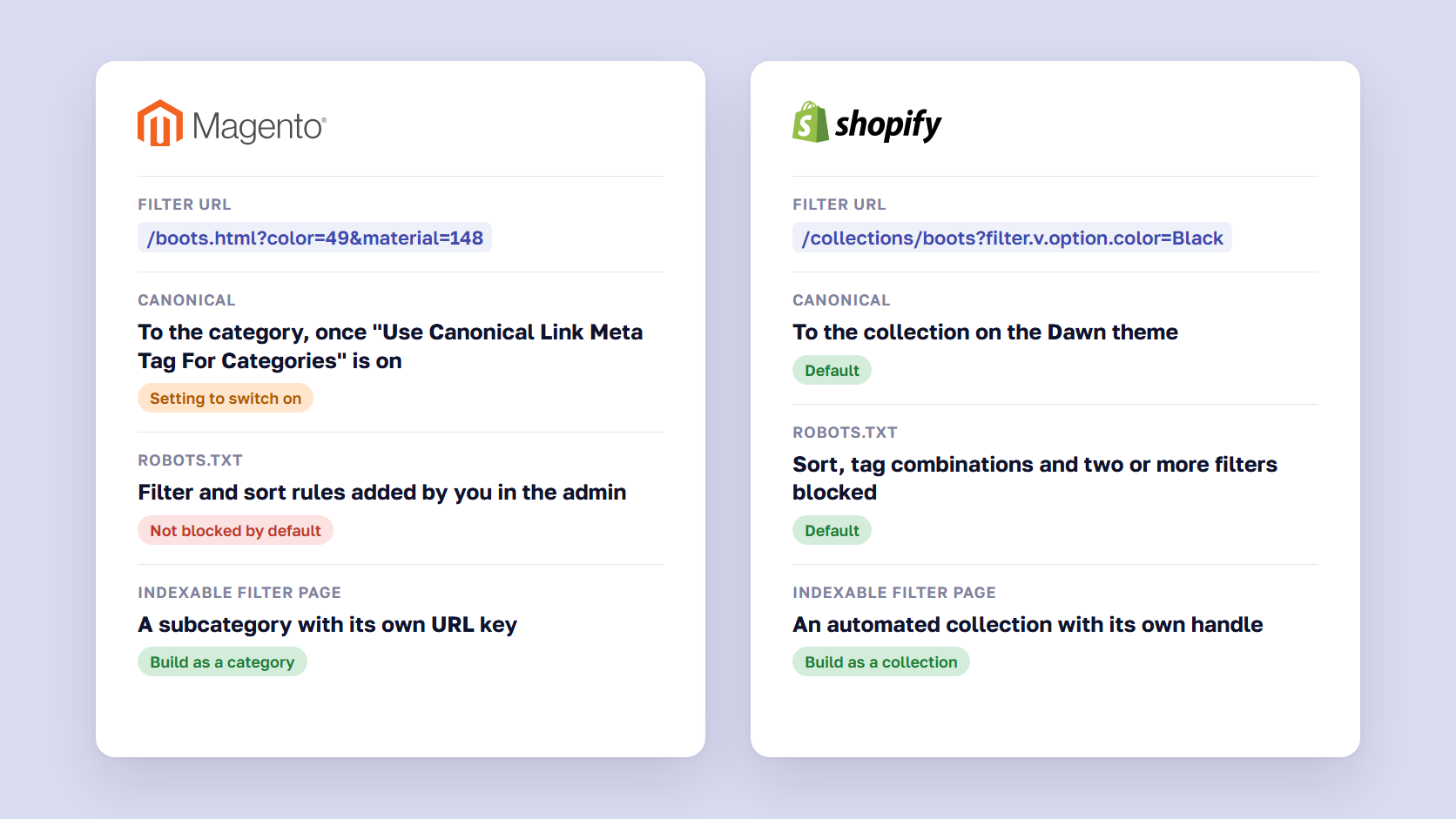
By default, Magento adds each filter to the category URL as a query parameter with a numeric option ID, so a filtered page looks like /women/boots.html?color=49&material=148. That makes the parameters easy to block with robots.txt and hard to turn into pages worth indexing. The usual setup has three parts.
Canonical tags for filtered category URLs
Go to Stores > Settings > Configuration > Catalog > Catalog > Search Engine Optimization and set “Use Canonical Link Meta Tag For Categories” to Yes. Filtered URLs then point their canonical to the clean category URL. Adobe recommends enabling the canonical tag for both categories and products.
robots.txt rules for filter parameters
Add your rules under Content > Design > Configuration, in the Search Engine Robots section for the right scope. A typical starting set blocks filter, sort, and toolbar parameters:
User-agent: *
Disallow: /*?*color=
Disallow: /*?*material=
Disallow: /*?*price=
Disallow: /*?*product_list_order=
Disallow: /*?*product_list_dir=
Disallow: /*?*product_list_limit=
Disallow: /*?*product_list_mode=
Replace the attribute codes with the filterable attributes your store uses, and check the live URLs first. Headless frontends, AJAX filters, and search services such as Adobe’s Live Search can produce different parameters. Our guide to the Magento 2 robots.txt setup lists the system paths that belong in the same file.
Indexable filter pages as categories
Build each combination that passed the five tests as a category. Create a subcategory such as “Black Leather Ankle Boots” under Boots, with its own URL key, meta title, meta description, and description, and assign the products. On Adobe Commerce, the Visual Merchandiser can fill the category automatically with “Match products by rule”, using attribute conditions such as color and material. Adobe notes the rule is applied when the category is saved, and products that no longer match are removed. Link the new category from Boots, so shoppers and Google reach it from the parent.
How to choose filterable attributes, set up anchor categories, and speed up filtering with AJAX or Hyvä is covered in our guide to Magento layered navigation setup.
🚀 Quick takeaway
On Magento, the indexable version of a filter is a category with its own URL key. The filtered URL keeps its canonical to the parent, so the two pages don’t compete for the same search.
Shopify implementation notes
Shopify’s defaults already handle two of the three outcomes from the decision rule: canonical and block. We checked them on Shopify’s own Dawn demo store in October 2026. Storefront filters, which you set up in the admin or the Search & Discovery app, add parameters such as ?filter.v.option.color=Black or ?filter.p.vendor=Nike to the collection URL, and a store can have up to 25 filters.
What Shopify’s default robots.txt blocks
The standard file disallows sorted collection URLs, combined tag URLs, and any collection URL with two or more filter parameters:
Disallow: /collections/*sort_by*
Disallow: /collections/*+*
Disallow: /collections/*filter*&*filter*
Disallow: /*/collections/*sort_by*
Disallow: /*/collections/*+*
Disallow: /*/collections/*filter*&*filter*
A URL with a single filter stays crawlable. On the Dawn theme, that single-filter URL and even a two-filter one carry a canonical tag pointing to the unfiltered collection. So out of the box, single filters are canonicalized to the collection and combinations are blocked. Custom themes can change the canonical, so check yours with the URL Inspection tool.
The second set of lines covers language and market subfolders. If you sell in several countries through Shopify Markets subfolders, each subfolder repeats the whole filter space, so any rule you add needs the same pair.
Indexable filter pages as collections
Shopify has no admin setting that turns a filter URL into an indexable page, and the theme’s canonical points it at the collection anyway. Build each combination that passed the five tests as its own automated collection, with conditions such as product type equals Boots and a tag or metafield for black leather. It gets its own handle, title, description, and place in the sitemap, and you link to it from the parent collection.
Adding your own rules in robots.txt.liquid
To block single filters with no search value, such as availability or price, edit the robots.txt.liquid template and add rules for those parameters. Keep Shopify’s default rules in the file. Our Shopify SEO checklist covers the rest of the theme-level setup.
🚀 Quick takeaway
Shopify’s defaults already block most filter combinations. The usual gap on a Shopify store is the missing collections for the filter phrases people search.
How to check faceted navigation after a release or migration
New filters, a theme update, or a replatforming project can undo a working setup in one deploy. Check four things after each one:
- Fetch the live robots.txt and test a few filter URLs against it. A staging file that blocks everything, or a filter rule lost in the deploy, are both common release mistakes
- Inspect one filter URL and one indexable filter page with the URL Inspection tool, and compare the user-declared and Google-selected canonical
- Watch “Indexed, though blocked by robots.txt” and “Discovered – currently not indexed” in the Page indexing report for new filter patterns over the following weeks
- Check the Crawl stats report. A jump in daily requests right after the release usually means a new parameter became crawlable
Migrations need extra care because filter URLs change format between platforms. A Magento ?color=49 URL has no equivalent on Shopify, so every indexable filter page needs a matching page on the new platform and a 301 redirect in the redirect map, and the new robots.txt rules need to be live on launch day. Our SEO migration checklist covers the full redirect and launch process.
🚀 Quick takeaway
Before a migration, export the filter URLs that got organic clicks in the last year from Search Console. That list is the set of filter pages the new store has to rebuild and redirect.
A technical SEO audit checks crawl rules, canonicals, and status codes across every template in one pass. It’s also where our eCommerce SEO team starts when filter URLs outnumber the products on a store.
Frequently asked questions about faceted navigation SEO
Are filter pages wasting crawl budget?
They can be, if search engines can crawl every filter combination. Check the Crawl Stats report in Search Console and your server logs for the share of Googlebot requests that go to filter and sort URLs. A growing “Discovered – currently not indexed” count full of filter URLs is another sign. Blocking combinations with no search value in robots.txt is the fix Google recommends.
Should filtered URLs be indexed?
Only the ones people search for. A filter combination deserves an indexable URL when the phrase has search demand, the intent differs from the parent category, enough products stay on the page, it adds no more than one or two filters, and it has a stable page with its own title and copy. Everything else should stay out of the index.
Should I use noindex or a canonical tag on filter pages?
Use a canonical tag pointing to the category for a small set of single-filter pages, and robots.txt for everything deeper. Noindex keeps a page out of search but saves no crawling, because Google still has to fetch the page to read the tag. Never combine noindex with a canonical to another URL, since the two send opposite signals.
Is robots.txt or rel=canonical better for faceted navigation?
For filter combinations you never want in search, robots.txt is better, and Google calls it the more effective long-term control. A canonical tag still lets Google crawl the URLs and only reduces crawling over time. Use canonicals for the few single-filter pages that should pass their signals to the category, and robots.txt for the rest.
Should sort and page-size URLs be indexed?
No. Sorting by price or showing 48 products per page changes the order and number of products, but the page targets the same search as the category. Block these parameters in robots.txt. Shopify’s default robots.txt already blocks sort_by URLs on collections, and on Magento you add rules for the product_list parameters yourself.
How many filters can a page combine and still be worth indexing?
Usually one, sometimes two. Search demand drops fast as filters stack up. In the US, “black ankle boots” gets about 5,400 searches a month, “black leather ankle boots” about 1,200, and adding a size brings it to zero. Pages with three or more filters almost never have enough demand to justify their own URL.
Do AJAX filters solve faceted navigation SEO?
They solve the crawl side, but they don’t help the long tail. If filters update the product grid without changing the URL, there are no filter URLs to crawl or index. That also means no filter page can rank, so you still need dedicated category or collection pages for the combinations people search for.
What happens to filter pages when you migrate platforms?
Their URLs change, because every platform formats filters differently. List the filter pages that get organic traffic before the migration, build matching category or collection pages on the new platform, and 301 redirect the old URLs to them. Set the new robots.txt filter rules before launch, so the new store doesn’t open its full filter space to crawlers on day one.
Faceted navigation SEO comes down to a short list
Faceted navigation SEO is mostly a list: the filter combinations that earn their own page, and a rule that blocks the rest. Build the list from search demand, give each entry a proper category or collection page, block deep combinations, sort orders, and price ranges in robots.txt, and recheck the setup after every release. Review the list each season too, because new filters and new ranges change which phrases have demand.
Not sure which of your filter pages belong in Google? Send us a category URL, and we'll show you which combinations to index and which to block.




































