
If your eCommerce platform is holding back growth or struggling with customer demands, it may be time for an upgrade. Migration to Magento 2 can bring concrete benefits to your eCommerce business: better performance, security, and scalability. Adobe’s mid-2025 transition to a cloud-native model has reshaped the migration landscape too, which is why getting the path right matters more than ever in 2026.
Switching platforms is a strategic decision that needs careful handling and executive oversight. You want to be sure this decision aligns with your business goals and is carried out properly. Whether you need to migrate Magento 1, or you are moving from Shopify, BigCommerce, or another platform, this guide will help you lead your team confidently through this upgrade.
Key takeaways
- Migrating to Magento 2 is a solid choice to make your eCommerce site perform better under high traffic, besides bringing other benefits like improved speed, security, and customer experience.
- For a successful migration, executives should focus on setting clear goals and collaborating closely with experienced migration experts who specialize in Magento, SEO, data migration, and analytics.
- Continuous post-migration optimization, including testing, security updates, and personalization, is equally important as careful migration to make the most out of Magento 2.
🚀 Quick takeaway
A 2026 Magento 1 to Magento 2 migration typically runs $120,000 to $400,000 for a mid-market store (per Elogic 2026 benchmarks). The single biggest cost driver is theme work, especially if you move to Hyvä.
Is it time to migrate?

If you are planning a migration, your current platform is likely not keeping up. Older platforms expose you to security risks and missed opportunities in a mobile-first world. Even some newer platforms limit your ability to customize your online store or scale your eCommerce business.
Migration to Magento 2 is essential if your current platform is experiencing any or several of these challenges:
- Security vulnerabilities due to infrequent updates
- Rigid architecture that limits integration with new tech
- Difficulty adding features or fixing bugs
- Slow load times and poor high-traffic handling
- Limited scalability, hindering growth and custom business needs
- Inefficiency in managing B2B/B2C models, multiple brands, or global operations
- High maintenance costs from unsupported or outdated systems
Magento 2 provides an efficient, reliable solution, saving time and money on maintenance and troubleshooting in the long run. Before you can reap those cost-saving benefits, factor in the migration cost from Magento 1 to Magento 2 or from any other platform. With careful planning, the transition can be smooth and financially manageable.
What is Magento 2?

Magento 2 is a flexible eCommerce platform, especially suited for businesses needing customization and scalability. Now part of Adobe, it integrates with Adobe’s marketing and analytics tools, enhancing its capabilities for complex eCommerce needs.
Magento 2 is ideal for:
- Medium to large businesses requiring advanced features and high transaction support
- Global operations with multiple languages, currencies, and site management
- B2B and B2C stores needing flexible payment options and customer segmentation
- Companies seeking scalable, customizable eCommerce solutions
Magento 2 may not fit smaller businesses or those needing a quick, budget-friendly setup. In that case, considering other eCommerce platforms may be better.
Benefits of migrating to Magento 2
Affordability and flexibility
Magento 2 offers a powerful platform for various budgets. Opt for the free Open Source version for flexibility without upfront costs, or choose Adobe Commerce for advanced features and support. It is an enterprise-level solution without the matching price tag.
Performance and scalability
Built for speed, Magento 2 handles high-traffic peaks with ease, offering load times 3 to 4 times faster than Magento 1. This improves customer experience, boosts conversion rates, and positively impacts SEO.
Versatility for B2B, B2C, and global expansion
Magento 2 supports B2B and B2C transactions, even for large product catalogs. It simplifies managing multiple brands and regions, making it easy to scale internationally with built-in support for languages, currencies, and taxes.
Mobile optimization
Magento 2 is mobile-first, ensuring a smooth shopping experience on any device. As mobile shopping grows, this feature helps increase engagement and conversion rates.
Future-readiness with PWA and headless commerce
Magento 2 supports Progressive Web Apps, offering app-like experiences in the browser. It also supports headless architecture, allowing flexibility across multiple channels and a highly customizable, agile experience.
Ecosystem and integrations
Magento 2 is backed by Adobe, so it integrates smoothly with Adobe’s suite of marketing, analytics, and content tools. With over 8,000 extensions and a strong partner ecosystem, you can customize your store to meet specific needs.
Streamlined admin experience
Magento 2’s admin interface is user-friendly, making it simple to add products, manage content, and update store data. Your team can focus more on growth strategies rather than day-to-day maintenance.
Security
Magento 2 prioritizes security, providing regular security patches to safeguard customer data. Its modern tech stack ensures your store remains compliant with the latest standards, keeping your eCommerce platform secure and up-to-date.
🚀 Quick takeaway
The 3-to-4x performance gap between Magento 1 and Magento 2 is the single most defensible business case for the migration. Everything else is supporting evidence.
Case studies: How businesses have benefited from Magento 2 migration
JewelStreet enhanced global reach and customer experience via Magento 2 migration

JewelStreet, a luxury jewelry marketplace with 500+ boutiques across 17 country-specific websites, aimed to expand its global reach and improve the customer experience by migrating to Magento 2. scandiweb led the migration, addressing JewelStreet’s need for improved site performance, scalability, and reliable functionality across multiple languages and currencies.
Key improvements post-migration:
- 30 to 40% faster load times through code and database optimization
- Global reach with support for 6 currencies and tailored country-specific sites
- An editorial blog driving over 10% of conversions
- Custom boutique listings, exit-intent pop-ups, and “Deliver By Date” filtering for special-occasion buyers
Norwood Magento 2 migration and ScandiPWA boosts performance and user experience
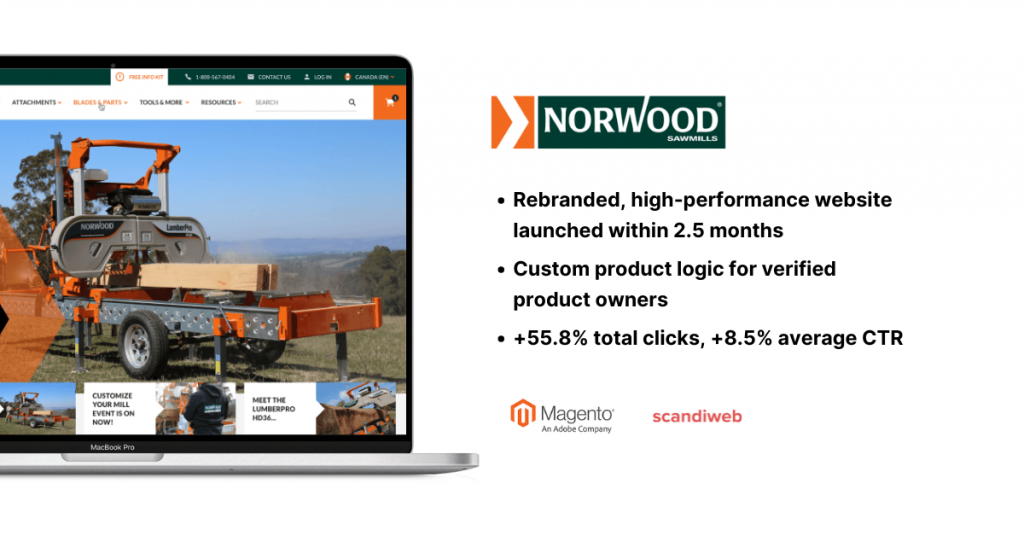
Norwood, a global leader in portable sawmill innovation with over 30 years in the industry, modernized its website by migrating to Magento 2 with ScandiPWA. Their goals: a full rebranding, improved user experience, and clean SEO transition.
Results post-migration:
- Launch of a fully rebranded, high-performance website within 2.5 months
- Custom product logic, allowing only verified Norwood product owners to browse and purchase replacement parts
- +55.8% increase in total clicks and +8.5% rise in average CTR
Dobell maintained revenue flow during the pandemic with Magento 2 migration and ScandiPWA
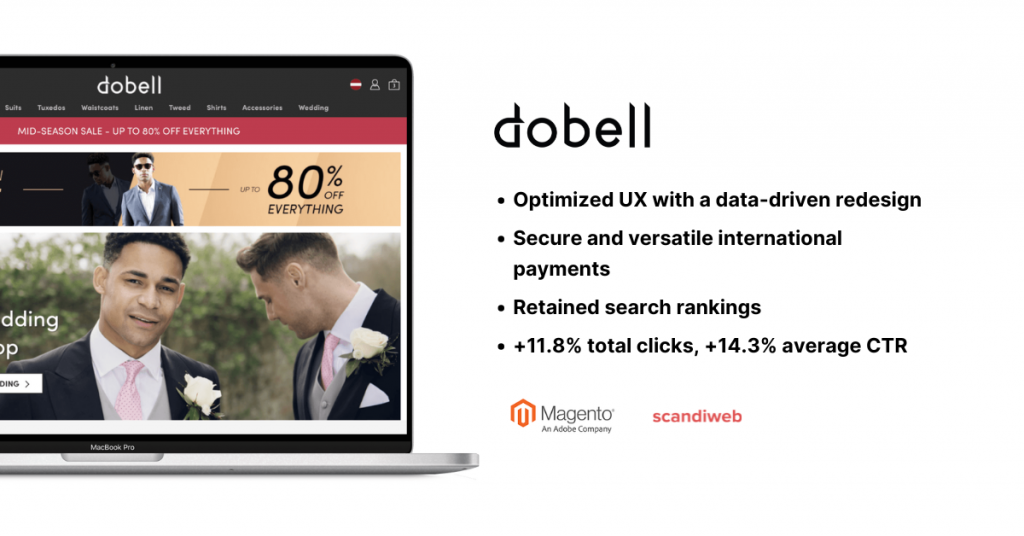
Dobell, a UK-based menswear retailer, sustained revenue during the pandemic by upgrading to Magento 2 with ScandiPWA. scandiweb managed the migration, focusing on UX improvements, SEO retention, and international functionality.
Improvements post-migration:
- Optimized UX with sub-second page loads and an extended ScandiPWA storefront
- Secure international payments through Adyen integration
- SEO strategy retained Dobell’s search rankings post-migration
- Eight optimized stores including the UK, Germany, and the USA
- 11.8% increase in total clicks and a 14.3% rise in average CTR
🚀 Quick takeaway
Two patterns repeat across these three case studies: SEO is preserved when 301 redirects and URL structures are mapped in advance, and post-migration CTR climbs when the new build ships with measurable UX improvements.
Common migration challenges
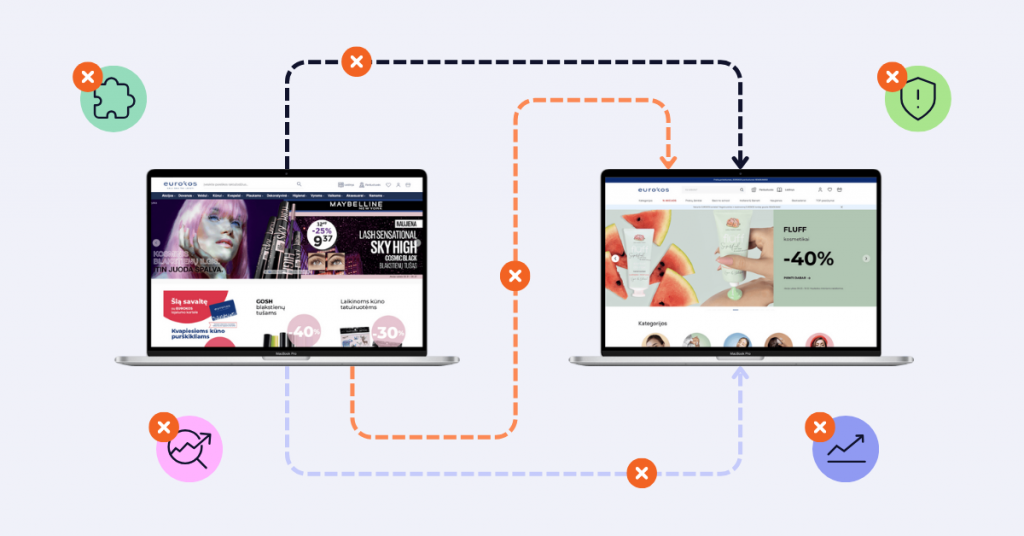
Migrating to Magento 2 can lift your eCommerce site, but the process comes with hurdles to watch out for:
- Moving critical data (customer details, order histories, product info) carries a risk of data loss or errors without careful handling
- Existing themes and custom code often are not compatible with Magento 2, which may require redesign or redevelopment if not planned for
- Switching platforms can hurt SEO rankings if 301 redirects, URL structures, and other best practices are not followed
- Some extensions from your current setup may not work on Magento 2, requiring replacements or custom solutions and extra cost
- Third-party integrations (payment processors, shipping systems) need reconfiguring. Without testing, you risk disruptions in operations and user experience
By addressing migration and post-migration challenges early, you can smooth the transition.
How much does a Magento 2 migration cost in 2026?
The honest 2026 range, per Elogic’s 2026 migration cost benchmarks and Emerline’s 2026 cost guide:
- Mid-market store: $120,000 to $400,000 all-in for a typical migration
- Smaller catalogs: $5,000 to $150,000 depending on customization depth
- Theme work is the single biggest cost driver: $40,000 to $80,000 for a standard Luma rebuild, $50,000 to $100,000 for a Hyvä theme rebuild
- Adobe’s June 2025 transition to a cloud-native model adds planning complexity that older quotes do not account for
scandiweb’s global delivery model and automation typically keep rates 30 to 50% below top-tier estimates while covering all migration aspects.
Resources and support for a successful Magento migration

A smooth Magento 2 migration depends on having the right team and support in place.
Team requirements
You need a few key roles, either in-house or external:
- A project manager to oversee timeline, budget, and coordination
- An experienced Magento developer for the technical side: adapting custom code and ensuring Magento 2 compatibility
- An SEO specialist to preserve URL structures, manage redirects, and follow SEO best practices
- A data analyst to validate data quality and ensure customer, order, and product info stays intact
Partnering with the right migration specialist
A migration partner with the right experience makes the process smoother. Look for a specialized Magento development company with:
- Proven experience in Magento migrations with case studies to back it up
- Magento certifications, current with the latest practices and technologies
- Technical depth in both Magento 1 and Magento 2, plus current eCommerce trends
- Clear communication: updates, answers, and responsive issue management
- Agile methodologies for iterative delivery
- Comprehensive support including post-launch help and ongoing optimization
If you would rather start from a vetted shortlist, see our guide to the best Magento migration companies.
Step-by-step Magento migration strategy for executives
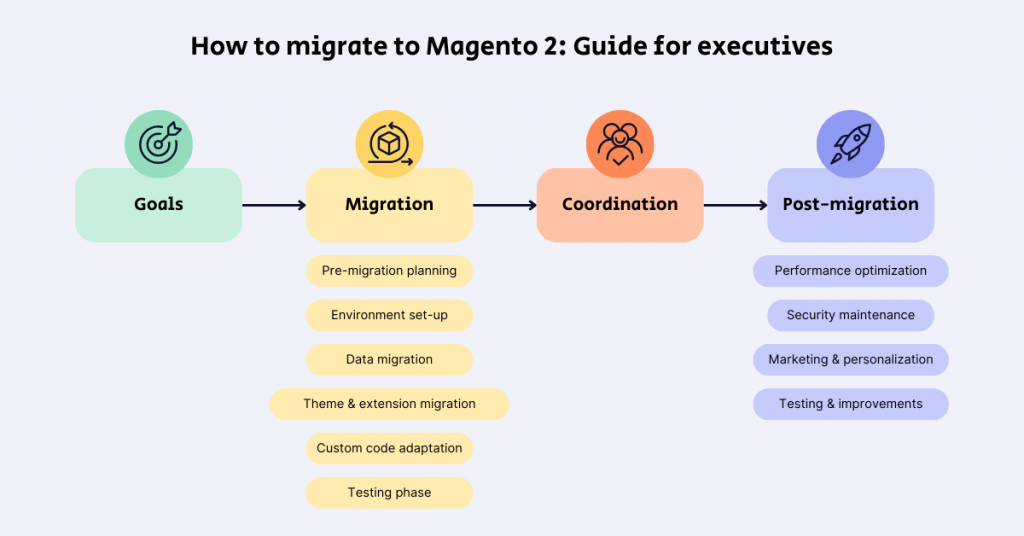
Understanding the Magento 2 migration strategy is key for executives, ensuring technical changes support business goals like improved customer experience, increased revenue, and security.
Step 1: Set goals and key outcomes
Define what you want from the migration:
- Improved site performance and faster load times
- Stronger security and up-to-date compliance
- Better customer experience (smooth navigation, mobile optimization)
- Expanded features and scalability
Set clear KPIs: target load times, conversion rates, and SEO benchmarks to track migration success.
Step 2: Monitor critical milestones
Stay focused on major milestones, ensuring each phase aligns with your business goals.
Pre-migration planning
The team will assess your site structure, data quality, active extensions, and SEO performance. Make sure these assessments complete and align with your long-term goals.
Environment set-up
Your team will configure the server and create the new Magento 2 environment. Confirm setups meet Magento 2’s technical requirements for stability, performance, and security from day one.
Data migration phase
The team uses Magento’s Data Migration Tool or a third-party service (e.g., LitExtension) to transfer customer, product, and order data. Check that they validate data accuracy before and after migration.
Theme and extension migration
The team adapts or rebuilds your theme and extensions for Magento 2. Confirm essential extensions are compatible or have alternatives, and the theme reflects your brand.
Custom code adaptation
For custom features, the team reviews and adjusts code for compatibility, preserving core functionalities and minimizing site performance impact.
Testing phase
Rigorous testing ensures a smooth user experience: checkout flows, load times, cross-device compatibility. All critical paths meet usability standards before going live.
Go-live readiness
Before launching, the team confirms SEO settings, redirect mapping, and final security checks. A go-live checklist ensures nothing critical is overlooked.
🚀 Quick takeaway
The two milestones most often skipped under deadline pressure: full data validation post-migration and SEO redirect verification. Both are non-negotiable if you want to keep your search rankings.
Step 3: Coordinate with vendors and teams
For a smooth migration, clear communication between internal team, project manager, and external migration vendors is essential. Align on:
- Timelines and expectations for each phase
- Reporting protocols for issues or risks that arise
- Scheduled updates on progress, timelines, and key outcomes
Step 4: Post-migration optimization and performance strategy
Post-launch monitoring and optimization protect the migration investment.
Performance optimization
Faster load times improve user experience and conversions. Key improvements: image compression, lazy loading, and caching with tools like Varnish and Redis. Magento’s Profiler tool identifies performance bottlenecks.
Security maintenance
Post-migration security is essential. Regular audits, timely updates, and monitoring (Magento Security Scan) keep your site and customer data secure.
Ongoing marketing and personalization
Magento 2 offers tools for targeted marketing: customer segmentation, personalized content, and automated email campaigns.
Continuous testing and improvements
Regular A/B testing and Conversion Rate Optimization refine key areas like checkout and navigation. Continuous SEO updates keep your site competitive in search.
Final checklist: Ensuring a smooth migration to Magento 2
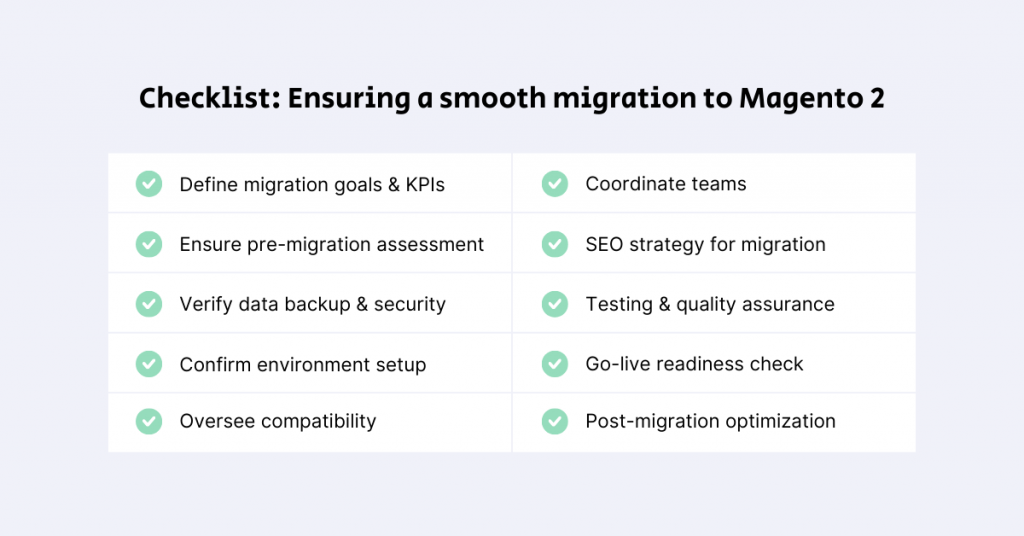
A migration checklist ensures all necessary tasks complete, minimizing issues and downtime:
- Set clear goals (better performance, stronger security) and define KPIs like load times and conversion rates
- Confirm a full site audit is completed (architecture, data quality, extensions, SEO)
- Make sure your team has backed up all critical data to prevent loss
- Confirm your Magento 2 environment meets technical requirements and is securely configured
- Check compatibility of essential extensions; decide on theme updates or custom feature adjustments
- Align roles and timelines with your team and external partners
- Approve an SEO strategy (301 redirects, URL mapping, metadata transfer)
- Confirm rigorous testing will validate checkout flow, site speed, mobile compatibility, and overall UX
- Before launch, confirm redirects, security updates, and SEO configurations
- Monitor KPIs post-launch and address issues promptly
🚀 Quick takeaway
Print the checklist above and treat it as a gate, not a guideline. Every item should be ticked before go-live, with named owners next to each one.
Conclusion: Future-proof your eCommerce with Magento 2

Moving to Magento 2 is more than a tech upgrade. It is a strategic move to boost speed, security, and flexibility for long-term growth. By planning the migration carefully, you are setting up a foundation that meets today’s customer needs and adapts to future trends.
With Magento 2’s features, you can create a shopping experience that keeps customers coming back. For decision-makers, this means a platform ready to handle more traffic, more customers, and higher digital demands. Whether your team or a specialized agency manages the migration, this process opens the door to a more responsive, growth-ready platform aligned with your business goals.
Frequently Asked Questions
How long does a Magento 2 migration typically take?
A typical Magento 1 to Magento 2 migration takes 4 to 8 months from discovery to stable production, depending on catalog size, custom integrations, and B2B complexity. A baseline mid-market migration runs 2 to 3 months.
How much does a Magento 2 migration cost?
Mid-market migrations typically run $120,000 to $400,000 all-in. Smaller catalogs land in the $5,000 to $150,000 range. Theme work is usually the single biggest cost driver, especially when moving to Hyvä. scandiweb’s global approach and automation keep rates 30 to 50% below top-tier estimates while covering all necessary aspects.
How do I migrate to Magento 2?
Start with a pre-migration assessment, back up data, set up a Magento 2 environment, migrate data with the Data Migration Tool, adapt themes and extensions, then test thoroughly before going live.
What data can be migrated to Magento 2?
Magento 2 can handle customer data, order history, product information, and other essential data, preserving continuity for your business.
How do I upgrade to Magento 2?
Set up a Magento 2 environment, use the Data Migration Tool to transfer data, then adapt themes, extensions, and customizations for compatibility.
How to migrate Magento 2 to another server?
Back up your current Magento 2 site, configure the new server, transfer files and data, then test for functionality before finalizing the setup.
What are the benefits of upgrading to Magento 2?
Magento 2 offers faster performance, mobile optimization, improved scalability, stronger security, and a streamlined admin experience, making it well-suited for growing businesses.
Why use Magento 2?
Magento 2 provides a flexible, scalable platform designed for both B2B and B2C, with extensive customization options and strong support for high-traffic, high-volume operations.
Will my site’s SEO be affected by migrating to Magento 2?
If managed carefully, SEO impact can be minimized. Key steps: set up 301 redirects, preserve URL structures, and transfer metadata to protect rankings and organic traffic.
About this guide
Maintained by the scandiweb Magento team. Reviewed by Aleksandrs Mokans, Magento BE & Integration Lead. scandiweb is an Adobe Solution Partner with 20+ years of eCommerce delivery and 2,100+ Magento and Adobe Commerce projects shipped.
Ready to migrate to Magento 2 but unsure about the next steps? With years of experience managing complex migrations, scandiweb can make your transition smooth. From planning to SEO supervision and ongoing support, we have got you covered every step of the way. Reach out to us, share your migration goals, and we will provide a free estimate and tailored roadmap to get you started.




































