


BigCommerce to Amazon integration for accurate listings and inventory control
Connect BigCommerce with Amazon to sync products, inventory, pricing, and orders, reducing oversells and listing errors while keeping your marketplace data clean and trackable.








BigCommerce and Amazon integration in short
BigCommerce connects to Amazon through a channel listing app that you pick in Channels > Channel Manager. Feedonomics Surface is the free option BigCommerce's help center points to: it syncs price, inventory, and orders for existing Amazon US listings with matching SKUs, but does not create listings. Apps such as Salestio create listings across Amazon marketplaces, Feedonomics' managed service covers larger catalogs, and a custom build on Amazon's Selling Partner API suits ERP-led flows.
Are your Amazon listings drifting out of sync with what’s actually available in BigCommerce? That’s when you get overselling, canceled orders, pricing mismatches, and a support team stuck explaining errors that started as simple data gaps.
The BigCommerce Amazon integration connects your store and Amazon Marketplace so catalog data, inventory, prices, and orders move through one controlled flow. Amazon becomes a trackable sales channel inside your eCommerce stack, with clear ownership of records and fewer “which system is right?” moments across teams.
This setup fits if Amazon volume is high enough that manual updates, spreadsheets, or ad-hoc apps keep breaking your ops cadence.


• Product identifiers (SKU, UPC/EAN), titles, descriptions, attributes, images, and category mappings are translated from BigCommerce to Amazon listing requirements, including variation structures when applicable.
• Inventory quantities are synced from the source of truth (BigCommerce or upstream ERP) to Amazon on schedule or near real time, with reserved stock and fulfillment-specific rules handled per channel.
• Pricing fields in BigCommerce are mapped to Amazon price feeds, with support for channel-specific price lists and guarded updates to prevent unintended overrides.
• Amazon order events are imported into BigCommerce as sales orders, including buyer, shipping, tax, and line details, then routed to ERP/WMS where present.
• Order status, shipment confirmations, tracking numbers, cancellations, and refunds are synchronized back to Amazon to keep marketplace notifications consistent.
• Sync jobs validate payloads, capture API responses, log failures, and retry transient errors, with delta updates sending only changed records where supported.
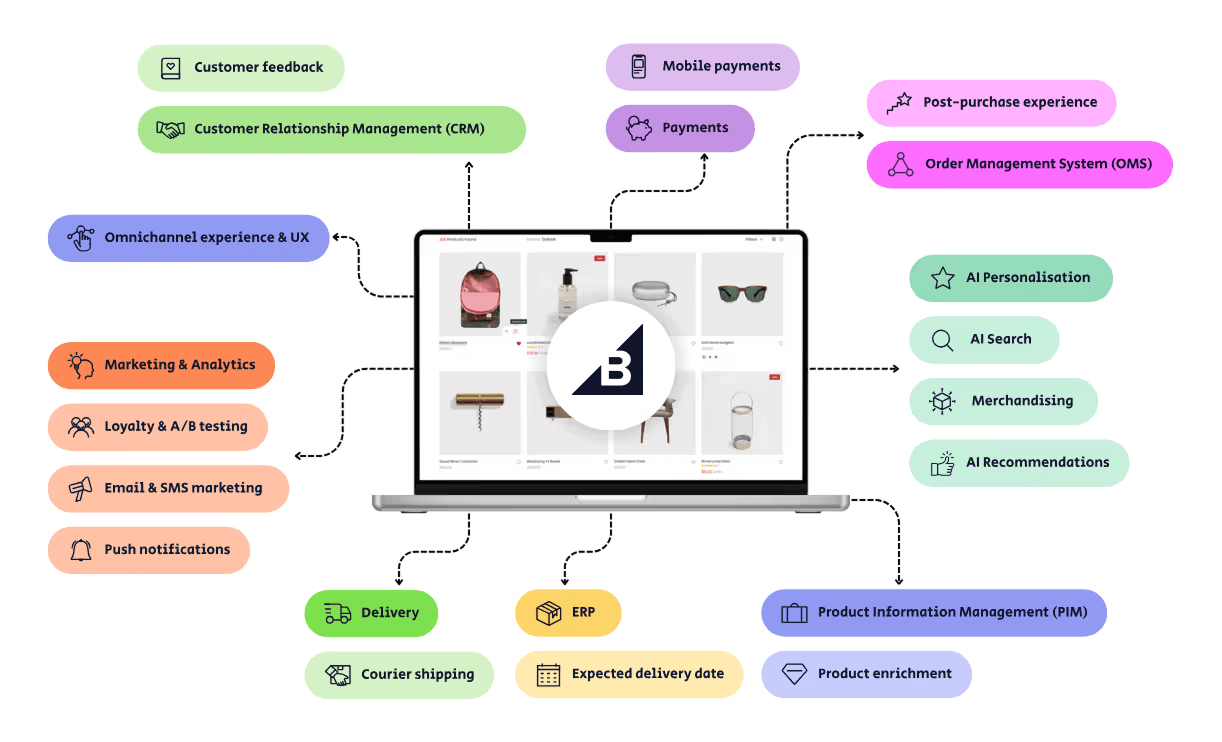
Ways to connect BigCommerce and Amazon
| Option | Type | Best for | Notes |
|---|---|---|---|
| Feedonomics Surface for Amazon | Connector | US stores that already have Amazon listings and want free price, stock, and order sync | Syncs prices and inventory as often as every 30 minutes and imports Amazon orders as often as every 15 minutes, acknowledging them automatically and sending tracking back. Requires an Amazon US Seller Central account, a US-based store, existing listings, and identical SKUs; listing creation, returns, and refunds are not synced. Surface Basic is free for up to 100,000 SKUs and two channels. |
| Salestio Amazon, eBay & Etsy Integration | Connector | Stores that need to create Amazon listings from BigCommerce, including outside the US | Covers 14 Amazon marketplaces, 22 eBay marketplaces, and Etsy. Exports products at custom prices and quantities, links existing Amazon catalog items, and imports orders with tracking sent back. $37 a month after a 30-day free trial. |
| Feedonomics Managed Service | Integration platform | Large catalogs that want a managed feed service rather than a self-serve app | Offered from the Feedonomics Surface setup flow as a managed service with unlimited SKUs and channels. |
| Custom integration on Amazon Selling Partner API (SP-API) | Custom API | ERP-led order flows or listing rules that apps do not support | Listings go through the Listings Items API or JSON_LISTINGS_FEED, because legacy XML and flat-file listing feeds are no longer accepted. Orders API v0 is deprecated, and integrations must move to Orders API v2026-01-01 by March 27, 2027. |
What syncs between BigCommerce and Amazon
| Data | Direction | System of record | Timing |
|---|---|---|---|
| Prices | BigCommerce to Amazon | BigCommerce, with optional fixed or percentage markups and custom field mapping | As often as every 30 minutes (Feedonomics Surface) |
| Inventory | BigCommerce to Amazon | BigCommerce, with an optional maximum quantity for Amazon | As often as every 30 minutes; longer for large catalogs |
| Orders | Amazon to BigCommerce | Amazon until imported, then BigCommerce for fulfillment | As often as every 15 minutes, acknowledged to Amazon automatically |
| Shipments and tracking | BigCommerce to Amazon | BigCommerce | Next sync interval after the order is fulfilled in BigCommerce |
| Cancellations | BigCommerce to Amazon | Amazon Seller Central for buyer requests, then BigCommerce | Next sync interval after canceling in BigCommerce |
| Returns and refunds | Not synced | Amazon Seller Central | Processed by hand in Seller Central and recorded in BigCommerce |
| Listings | Created on Amazon or by another listing app | Amazon | Not created by Feedonomics Surface; listing sync is planned |
How a BigCommerce Amazon integration project runs
- Open an Amazon Seller Central account for each BigCommerce store, complete identity, tax, and bank details, and request brand registration or category approval where needed.
- Decide whether you need listing creation from BigCommerce or only sync for listings that already exist, then pick the provider in Channels > Channel Manager.
- Make SKUs identical across BigCommerce products, variants, and Amazon listings, since a SKU that isn't found is a common reason Amazon orders fail to import.
- Turn off price, inventory, and order sync in any other app before enabling the same sync in the new one, to avoid conflicting updates and duplicate orders.
- Connect Seller Central, enable auto-sync, and set rules for Amazon prices, quantity caps, and stock held back for other channels.
- Fulfill Amazon orders in BigCommerce rather than in Seller Central, and check that carrier names match carriers Amazon recognizes.
- Set up order sync email alerts, and agree who processes returns and refunds in Seller Central and records them in BigCommerce.
Common problems and how to avoid them
Orders fail when BigCommerce stock hits zero
BigCommerce rejects an imported Amazon order for a product with zero stock, which happens when stock ran out in BigCommerce before the next inventory sync reached Amazon. Products must be in stock and purchasable for orders to import; adding stock lets the order import on the next sync, or you cancel it in Seller Central.
SKU and option mismatches block imports
An Amazon order line whose SKU is not in the BigCommerce catalog fails as a SKU lookup, and variant options that don't match the BigCommerce product return 'The options of one or more products are invalid.' Both need manual handling until the listing data is corrected.
Shipping from Seller Central leaves BigCommerce behind
Order sync assumes fulfillment happens in BigCommerce. Orders shipped from Seller Central, or through a shipping integration connected directly to Amazon, are not updated in BigCommerce, so tracking has to be entered by hand.
Tracking rejected over carrier names
Amazon rejects tracking when the carrier name on the BigCommerce shipment doesn't match a carrier Amazon recognizes for the marketplace. Map carrier names in shipping apps such as ShipStation before go-live.
Returns and refunds stay manual
Feedonomics Surface does not sync returns or refunds. Process them in Seller Central, then log the refund on the BigCommerce order with the third-party provider option so BigCommerce records stay correct.
Amazon revenue counts toward your BigCommerce plan
Orders generated through Amazon count toward the store's sales volume, which can trigger an automatic plan upgrade, and they are subject to BigCommerce's Open Payment Provider fees. Include both in the channel's margin model.
Why choose scandiweb to handle BigCommerce integration for you?
How do you sync BigCommerce products to Amazon Marketplace without duplicate SKUs and listing errors?
We map SKUs, variants, attributes, and Amazon category requirements, then set a single source of truth for product data. Sync rules prevent duplicate listings and keep updates consistent across channels.
Can a BigCommerce to Amazon integration keep inventory accurate in real time to prevent overselling?
Yes – inventory can sync near real time with safeguards for latency, buffers, and channel priorities. This reduces oversells, cancellations, and “phantom stock” across marketplaces.
How does BigCommerce Amazon integration handle pricing sync, promotions, and channel-specific price rules?
We support price lists, sale prices, and marketplace-specific rules so Amazon gets the right price at the right time. You can also lock pricing fields to avoid Amazon overwriting BigCommerce.
Can you sync Amazon orders into BigCommerce and push fulfillment, tracking, and cancellations back to Amazon?
Yes – orders flow into BigCommerce with taxes, discounts, and shipping details, then fulfillment and tracking are pushed back to Amazon. This keeps customer comms and seller metrics clean.
How do you connect BigCommerce, Amazon, and an ERP or PIM so stock and product data stay consistent?
We integrate ERP and PIM feeds through a controlled data layer and validation rules, then publish to BigCommerce and Amazon. scandiweb has delivered 2,100+ eCommerce projects since 2003, including large-scale ERP, PIM, and marketplace integrations.
Does BigCommerce have a built-in Amazon integration?
BigCommerce connects to Amazon through provider apps listed under Channels > Channel Manager, and which providers you see depends on the store's location and currencies. Its help center highlights Feedonomics Surface as a free app for existing Amazon US listings.
Can Feedonomics Surface create Amazon listings from BigCommerce?
No. It syncs price, inventory, and orders for listings that already exist on Amazon, and listing creation is planned for a future release. Create listings in Amazon or with another listing app first.
How often do Amazon orders sync into BigCommerce?
With Feedonomics Surface, new Amazon orders import as often as every 15 minutes and are acknowledged to Amazon automatically. Price and inventory updates run as often as every 30 minutes, and the interval can grow for large catalogs.
Can two BigCommerce stores share one Amazon seller account?
No. BigCommerce requires a separate Amazon Seller Central account for each of your stores.
Does Feedonomics Surface work with Amazon outside the US?
Not currently. Its Amazon connection is for US-based stores with an Amazon US Seller Central account. For other Amazon marketplaces, use a provider that supports them, such as Salestio.
Sources
- BigCommerce Help Center: Selling on Amazon
- BigCommerce Help Center: Feedonomics for Amazon
- BigCommerce: Amazon omnichannel solution
- BigCommerce App Marketplace: Salestio Amazon, eBay & Etsy Integration
- Amazon SP-API: Introducing the Orders API v2026-01-01
- Amazon SP-API: Listings feed type values
Last updated by the scandiweb integration team.






Amazon integration on other platforms
More BigCommerce integrations
1. Submit your integration request
2. Join a free strategy & discovery call
We’ll review your business systems, identify key challenges, and uncover actionable opportunities.
3. Get a tailored proposal
Trusted by 700+ leading brands worldwide





