


Bigcommerce eBay integration for synced listings, stock, pricing, and orders
Connect BigCommerce with eBay to sync listings, inventory, pricing, and orders in near real time, so you avoid overselling, stale offers, and manual updates across channels.








BigCommerce and eBay integration in short
BigCommerce connects to eBay through a channel listing app installed from Channels > Create channel, using an eBay business account. Feedonomics Surface is the free option for existing eBay US listings: it syncs price, inventory, and orders by matching SKU but does not create listings. Apps such as Salestio create listings across 22 eBay marketplaces, and custom builds use eBay's Sell APIs.


• BigCommerce products, variants, SKUs, images, and key attributes are mapped to eBay listings, with category and required item specifics mapped per marketplace rules.
• Inventory and price updates are synchronized using delta-based feeds so only changed SKUs are sent, with configurable ownership for which system is the source of truth.
• Listing lifecycle events (create, revise, end, relist) are routed through the integration layer, with validation against eBay constraints before submission.
• eBay orders are imported into BigCommerce as orders with customer, shipping, tax, and payment metadata mapped into native BigCommerce fields.
• Order status and shipment updates (including tracking numbers and carrier codes) are pushed back to eBay to keep buyer-facing order progress consistent.
• Error handling captures API responses, logs failed records with root-cause details, and supports retry logic for transient eBay or network failures.
• ID linking between BigCommerce SKUs and eBay item IDs is persisted to support accurate revisions, cancellations, and reconciliation across systems.
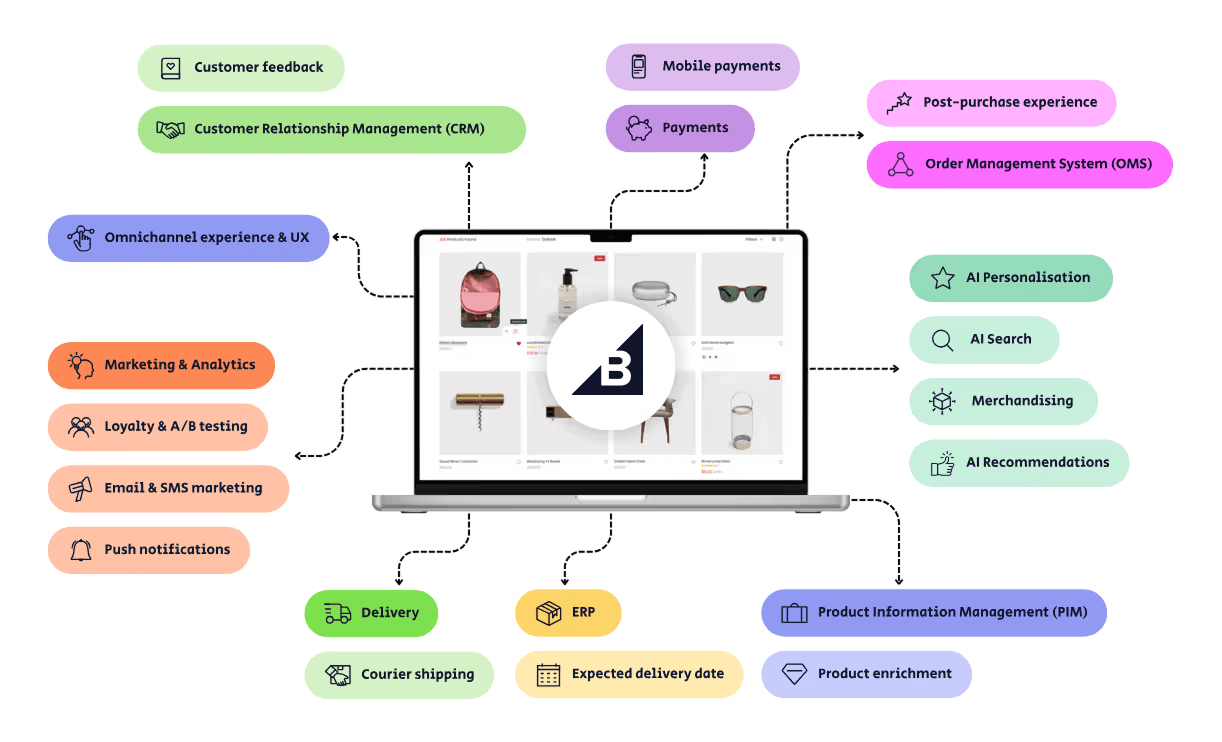
Ways to connect BigCommerce and eBay
| Option | Type | Best for | Notes |
|---|---|---|---|
| Feedonomics Surface for eBay | Connector | eBay US sellers whose listings already exist and who want free price, stock, and order sync | Syncs price and inventory as often as every 30 minutes and imports orders as often as every 15 minutes, once eBay's one-hour buyer cancellation window has closed. Requires an eBay US store, existing listings, and matching SKUs, and reports a quantity of 1 by default until quantity rules are set. Surface Basic is free for up to 100,000 SKUs and two channels. |
| Salestio Amazon, eBay & Etsy Integration | Connector | Stores that need to create eBay listings from BigCommerce, including on non-US eBay sites | Covers 22 eBay marketplaces, 14 Amazon marketplaces, and Etsy. Exports products at custom prices and quantities, syncs stock and price, and imports orders with tracking codes sent back. $37 a month after a 30-day free trial. |
| Feedonomics Managed Service | Integration platform | Large catalogs that want a managed feed service rather than a self-serve app | Offered from the Feedonomics Surface setup flow as a managed service with unlimited SKUs and channels. |
| Custom integration on eBay Sell APIs | Custom API | ERP-led stock and pricing, or listing logic that apps do not support | The Inventory API keys inventory items by SKU and publishes offers that need payment, return, and fulfillment policies plus a merchant location key. Listings created through the Inventory API cannot be edited in Seller Hub or other listing tools. |
What syncs between BigCommerce and eBay
| Data | Direction | System of record | Timing |
|---|---|---|---|
| Prices | BigCommerce to eBay | BigCommerce, with optional eBay price rules | As often as every 30 minutes (Feedonomics Surface) |
| Inventory | BigCommerce to eBay | BigCommerce; Feedonomics Surface sends a quantity of 1 by default | As often as every 30 minutes |
| Orders | eBay to BigCommerce | eBay until imported, then BigCommerce for fulfillment | As often as every 15 minutes, after eBay's one-hour buyer cancellation window |
| Shipments and tracking | BigCommerce to eBay | BigCommerce | After the order is fulfilled in BigCommerce |
| Cancellations | BigCommerce to eBay | BigCommerce for merchant cancellations; eBay Seller Hub for buyer requests | Next sync interval |
| Refunds | Issued in eBay | eBay Seller Hub | Manual, full or partial, in Seller Hub |
| Listings | Created in eBay or by another listing tool | eBay | Not created by Feedonomics Surface; listing sync is planned |
How a BigCommerce eBay integration project runs
- Use an eBay business account (a personal account can be converted) and check your eBay selling limits before listing.
- Enable eBay's Out of Stock control in your eBay account settings, which Feedonomics Surface needs to keep inventory in sync when items sell out.
- Give every product and variant a SKU that matches the eBay listing exactly, including the base product of listings with variant options.
- In the BigCommerce control panel, go to Channels, click Create channel, connect eBay, and install the app you chose.
- Set quantity rules (actual stock, a cap, or a one-unit buffer) and price rules for eBay before enabling auto-sync.
- Turn off the same sync in any previous eBay app, then test an order end to end, including tracking and a cancellation.
- Handle refunds and buyer cancellation requests in eBay Seller Hub, and record them on the BigCommerce order.
Common problems and how to avoid them
eBay shows a quantity of 1
Feedonomics Surface reports an in-stock quantity of 1 to eBay by default, to help sellers stay within eBay selling limits. To show real stock you need a quantity rule, which requires a plan that supports rules, and raising quantities beyond your eBay limits can block listing updates.
eBay orders arrive about an hour after the sale
Feedonomics Surface imports eBay orders only after eBay's one-hour buyer cancellation window closes, then on its 15-minute sync. Warehouse and customer service teams should expect that delay rather than treat it as a failed sync.
Variant listings need SKUs at both levels
For eBay listings with variant options, the base product and each variant need a SKU. Price lists, product modifiers, and option rules created in the v2 product experience are not supported by default.
Out of Stock control left off
Feedonomics Surface requires eBay's Out of Stock control to be enabled in the eBay account before syncing, so inventory stays in sync when items sell out. It is an eBay account setting, so it is easy to miss during a BigCommerce-side setup.
eBay revenue counts toward your BigCommerce plan
Orders generated through eBay count toward the store's sales volume, which can trigger an automatic plan upgrade, and they are subject to Open Payment Provider fees. Include both in the channel's margin model.
Listing the whole catalog on day one
eBay assesses an insertion fee on every product listed, and BigCommerce advises against listing the entire catalog at once, especially for stores new to eBay. Start with the products most likely to sell.
Why choose scandiweb to handle BigCommerce integration for you?
How does BigCommerce integrate with eBay to sync listings, inventory, and pricing?
We connect BigCommerce catalog data to eBay listing fields, then run rule-based sync for stock and price updates. Updates can be triggered by product changes, inventory movements, or scheduled checks.
Can a BigCommerce eBay integration prevent overselling when eBay listings move fast?
Yes – inventory is synced back to BigCommerce from eBay orders and reservations, with safeguards for low stock and race conditions. This keeps available-to-sell consistent across channels.
Does the BigCommerce eBay integration import eBay orders into BigCommerce for fulfillment?
Yes, eBay orders can be created in BigCommerce with customer, shipping, tax, and item details mapped to your fulfillment workflow. Status updates and tracking can be pushed back to eBay when supported.
How are pricing rules handled for eBay listings from BigCommerce?
We can apply channel pricing logic such as markups, minimum margins, promotions, and rounding before sending prices to eBay. This avoids manual repricing while keeping offers competitive.
Can scandiweb build a scalable BigCommerce eBay integration with ERP, PIM, and analytics support?
Yes – we’ve delivered 2,100+ eCommerce projects and build marketplace syncs that fit ERP, PIM, and BI reporting requirements. Our analytics team has delivered 575+ eCommerce dashboards, so marketplace performance stays measurable.
Why does eBay show only one item in stock for my BigCommerce products?
Feedonomics Surface sends a quantity of 1 to eBay by default to help you stay within eBay selling limits. A quantity rule can send actual stock, a capped quantity, or zero when one unit is left.
How long do eBay orders take to reach BigCommerce?
With Feedonomics Surface, orders import after eBay's one-hour buyer cancellation window closes, then on the next 15-minute sync. With other apps, BigCommerce says orders generally appear within a few minutes, depending on eBay API traffic.
Can I create eBay listings from BigCommerce for free?
Feedonomics Surface, the free option, only syncs listings that already exist on eBay; listing creation is planned for a future release. To create listings from BigCommerce, use a listing app such as Salestio, or create them in eBay first.
Where do I refund or cancel an eBay order from my BigCommerce store?
Issue full and partial refunds in eBay Seller Hub, and cancel orders there too. With Feedonomics Surface, a cancellation you make in BigCommerce is also reported back to eBay.
Can I sell on eBay Australia or other eBay sites from BigCommerce?
It depends on the app. BigCommerce says marketplace availability depends on your channel listing app; Feedonomics Surface supports eBay US only, while Salestio lists 22 eBay marketplaces.
Sources
- BigCommerce Help Center: Selling on eBay
- BigCommerce Help Center: Feedonomics for eBay
- BigCommerce App Marketplace: Salestio Amazon, eBay & Etsy Integration
- eBay Developers: Inventory API overview
Last updated by the scandiweb integration team.






eBay integration on other platforms
More BigCommerce integrations
1. Submit your integration request
2. Join a free strategy & discovery call
We’ll review your business systems, identify key challenges, and uncover actionable opportunities.
3. Get a tailored proposal
Trusted by 700+ leading brands worldwide





